Category: Wordpress Tooltip Plugin Document

WordPress Tooltip Glossary Plugin 10.8.6 Released

Dear WordPress Tooltip Glossary Users,

Hope this message find you are doing well and have happy days with your family 🙂

Yesterday we just released a new version WordPress Tooltip Glossary Plugin 10.8.4, we added a new WooCommerce tooltip addon: tooltips for “Custom Product Tabs for WooCommerce” Plugin, today our developer audit codes of our wordpress tooltip glossary plugin, and he found the newest wordpress core code deprecated a few wordpress core functions, and in codes of our wordpress tooltip glossary plugin,  there are still have two deprecated wordpress functions, we just replaced deprecated wordpress function with newest wordpress function to get a better result of performance and security, please remember to upgrade wordpress tooltip glossary plugin to the newest version: 10.8.6 🙂


Thanks for use our wordpress tooltip plugin, any feature request or wordpress tooltip glossary plugin questions, please contact us, we are happy to build a better and better wordpress tooltip plugin for you 🙂

Thanks, have a blessed day with your family 🙂
Best Regards,
WordPress Tooltips Glossary Support Team

WordPress Tooltip Glossary Plugin 10.8.4, New WooCommerce Tooltip Addon: Tooltips for Custom Product Tabs for WooCommerce Plugin

Hi Dear WordPress Tooltip Glossary Plugin Users,

Hope this message find you are doing well and have happy days with your family 🙂 We are happy to report you that we just released a new wordpress tooltip glossary plugin, changes in WordPress tooltip glossary plugin 10.8.4:

New WooCommerce Tooltip Addon: Tooltips for Custom Product Tabs for WooCommerce

As you know, our wordpress woocommerce tooltip plugin support add woocommerce tooltip effects on woocommerce products page, and a few woocommerce component which generated by  3rd woocommerce plugins, a few days before, an user told us her woocommerce tabs which generated by the plugin “Custom Product Tabs for WooCommerce” not works well with our wordpress woocommerce tooltip plugin, our developer analyzed the code of the wordpress “Custom Product Tabs for WooCommerce” plugin and find the reason and developed a new version to hook filters of the plugin “Custom Product Tabs for WooCommerce”.

How to Enable WooCommerce Tooltip Addon: Tooltips for Custom Product Tabs for WooCommerce

You can enable WooCommerce Tooltip Addon: “Tooltips for Custom Product Tabs for WooCommerce” by this way:

1 Login wordpress admin area

2 Click “Tooltips” menu item

3 Click “Addons” sub menu item,  you will open “Tooltips Addon Settings” panel

4: In “Tooltips Addon Settings” panel, you will find the addon “Tooltips for Custom Product Tabs for WooCommerce” in addons panel, it looks like this:

Tooltips for Custom Product Tabs for WooCommerce

Tooltips for Custom Product Tabs for WooCommerce

Please select “Enable Tooltips Effects for Custom Product Tabs for WooCommerce” option in “Tooltips for Custom Product Tabs for WooCommerce” option box, and click “Update Now” button,  Once enabled “Tooltips for Custom Product Tabs for WooCommerce” addon, in woocommerce shop front end, you will find you can add woocommerce tooltip effects on tabs which created by the “Custom Product Tabs for WooCommerce” plugin.

How to Enable “Tooltips for WooCommerce Products” WooCommerce Tooltip Addon

If you want to use full features of woocommerce tooltip, for example, add woocommerce tooltip effect on woocommerce product description, product short description, woocommerce standard / additional / review tabs… and so on,  please remember to enable “Tooltips for WooCommerce Products” addon.

You can enable “Tooltips for WooCommerce Products” woocommerce tooltip addon by this way:

1 Login wordpress admin area

2 Click “Tooltips” menu item

3 Click “Addons” sub menu item,  you will open “Tooltips Addon Settings” panel

4: In “Tooltips Addon Settings” panel, you will find the addon “Tooltips for WooCommerce Products” in addons panel, it looks like this:

tooltip addon settings panel

tooltip addon settings panel

Please select “Enable Tooltips for WooCommerce” option in Tooltips for WooCommerce Products option box, and click “Update Now” button, you will own the full functions of woocommerce tooltips 🙂

Thanks for the feature request of woocommerce tooltip, if you have any feature request or question of wordpress tooltip glossary plugin, please don’t hesitate to contact us, we are happy to build a better and better wordpress tooltip plugin for you 🙂

Thanks, have a blessed day with your family 🙂
Best Regards,
WordPress Tooltips Glossary Plugin Support Team
Tagged with: , , , , ,

How to Enable “More Details” Glossary Term Link in Tooltip Popup Window and Change “More Details” to Your Own Language

Hi Dear WordPress Tooltip Glossary Plugin Users,

We received a ticket about how to add a related glossary link in wordpress tooltip popup box and change the language of the link to your own language, the user asked:

In the Tooltip PopUp is the Link to Glossar in englisch “More Details”.Where can I change this in German language?

I think might more users have the same question, I’d like reply in here publicly:

How to Enable Related Glossary Term Link(“More Details”) in Tooltip Popup Box and Change the Word “More Details” to Your Own Language

Since wordpress tooltip glossary plugin 8.7.6, our wordpress tooltip plugin support add link of  related wordpress glossary of terms in tooltip popup box, when users mouse hover a tooltip term in wordpress post, at the bottom of the tooltip popup window, you will find “More Details” link after content of the tooltip, if you click “More Details” links, you will open tooltip glossary term page, it is user-friendly and SEO-friendly.

How to Enable Related Glossary Term Link(“More Details”) in Back end of WordPress Tooltip Plugin ?

You can enable it by this way:

1 Login wordpress admin area

2 Click “Tooltips” menu item

3 Click “Optional Settings” sub menu item, “Tooltips Optional Settings” panel

4: In “Tooltips Optional Settings” panel, you will find “add links for tooltip terms in tooltip popup box” option, if you enabled this option, wordpress tooltip plugin will add tooltip glossary term  links in tooltip popup box, and enable “Enable Glossary Index Page” option in Glossary Settings Panel automatically.

It looks like this:

open glossary term link in new window

open glossary term link in new window

Also since WordPress tooltip glossary plugin 10.5.8, WordPress glossary plugin support Opt to Open Glossary Term Page Links in Tooltip Popup Box Window

How to Change the Word “More Details” of Glossary Term Link in Tooltip Popup Window to Your Own Language?

Since WordPress Tooltip Glossary Plugin 10.5.4, Support Custom “More Details” Glossary Term Link in Tooltip Popup Window to Your Own Language, you can do it by this way:

1 Login wordpress admin area
2 Click “Tooltips” menu item
3 Click “Addons” sub menu item
4 You will open “Tooltips Addon Settings” panel, please enable “Tooltips Language Customization” addon and the click “Update Now” button
5 Please refresh this page and then under “Tooltips” menu item, you will find “Languages” sub menu item
6 Click “Languages” sub menu item, then you will open “Custom Language of Tooltip and Glossary” panel, you will find “Custom More details in Tooltip Popup Window” option at the bottom of the setting panel, just change it with your word and click “Submit” button
It looks like this:

custom tooltip glossary more details with your own words

custom tooltip glossary more details with your own words

You can see our wordpress tooltip language addon have more powerful function, for example, you can customize all wordpress glossary a-z in wordpress glossary language addon 🙂

A new version of wordpress tooltip plugin is testing and will be released tomorrow, if you have any feature request or question of wordpress tooltip, please don’t hesitate to contact us 🙂

Thanks, have a blessed day with your family 🙂
Best Regards,
WordPress Tooltip Glossary Plugin Support Team
Tagged with: , , , , , , ,

WordPress Tooltip Glossary Plugin 10.8.0 Released

Dear WordPress Tooltip Glossary Users

Hope this message find you are doing well and have happy days with your family 🙂

We just released WordPress Tooltip Glossary Plugin 10.8.0, in this version we fixed a typo on tooltip language addon, please update to the newest wordpress tooltip plugin 🙂

Thanks, have a blessed day with your family 🙂

Best Regards,
Tooltips Support Team

Tagged with: , ,

WordPress Tooltip Glossary Plugin 10.7.8 Released

Hi Dear WordPress Tooltip Glossary Users,

Hope this message find you have a happy weekend with your family 🙂

We just released WordPress Tooltip Glossary Plugin 10.7.8 Released, based on user’s feedback, we fixed a typo in admin area, thanks for the feedback, if you have any suggestion or question of wordpress tooltip plugin, please don’t hesitate to tell us 🙂

Thanks, have a blessed day with your family 🙂

Best Regards,
Tooltips Support Team

Tagged with: , ,

WordPress Tooltip Glossary Plugin 10.7.6, Support Ninja Forms, Try to Support Tooltip Effects in Dynamically Generated Content

WordPress Tooltip Glossary Plugin Users,

WordPress Tooltip Plugin 10.7.6 released, changes in this version:

Support Ninja Forms Tooltips, Try to Support Tooltip Effects in Dynamically Generated Content

We got a feature request, in which the user told us he want to add wordpress tooltip effect in ninja forms, ninja forms is a popular wordpress form plugins, the author said:

Ninja Forms is a simple, eloquent form builder that is a delight to use. Its minimalist yet beautiful interface is simple enough for anyone to learn quickly and easily, while still being more than powerful enough for any professional

We did a check on ninja forms, we found the amazing user is using a template to generate forms dynamically, in this case,those dynamically generated  forms will have a delay to load their content, in general, most of wordpress plugins designed based on wordpress standard API  to hook the_content API, and load css / javascript codes via wordpress filter “the_content”, so the traditional way cannot suppport these dynamically generated content, because javascript / jQuery codes can only works based on existed content in wordpress posts.

Our developer used a lot of time to read and research codes to find a solution, just sleep at 05:35am in the morning, finally he found a method to solve this kind of problem, it solved in this wordpress tooltip plugin 10.7.6, full of tears and seat 🙂

With wordpress tooltip 10.7.6, you will find “Delay the execution of tooltip function” metabox at right hand of wordpress editor,it looks like this:

delay the executon of wordpress tooltip function

delay the executon of wordpress tooltip function

Just enter the number of millisecond to delay in here, the execution of tooltip will delay specific milliseconds to wait javascript frameworks(ajax, vue…) generate and load dynamically generated content first, and then load our jQuery codes to add tooltip effects in those dynamically generated content, we entered 2000 in the “Delay the execution of tooltip function” meta box, Ninja forms tooltip works well on our side.  🙂

Please note, this is not a promise to support any kinds of dynamiclly generated content.

We also fixed a bug of tooltip customize style for single specific tooltip.

If you have any feature request or question of wordpress tooltip plugin, please don’t hesitate to tell us, we are very happy to build a better and better wordpress tooltip glossary plugin for you, also please check all features of wordpress tooltip  🙂

Thanks, have a blessed day with your family 🙂
WordPress Tooltip Glossary Plugin Support Team

Tagged with: , , , , ,

WordPress Tooltip Glossary Plugin 10.6.6, Support One Click to Bulk Disable Tooltips in Post by Post ids

Dear WordPress Tooltip Glossary Plugin Users,

Thanks for use our wordpress tooltip plugin and give us more and more feedback and suggestions, we are happy to report you, we just released WordPress Tooltip plugin 10.6.6, based on users feature request, changes in this version:

WordPress Tooltip Plugin Support One Click to Bulk Disable Tooltips in Post by Post ids

How to bulk disable tooltips in wordpress posts by posts ids?

#1 Please login wordpress admin area

#2 Click “Tooltips” menu item

#3 Click “Tooltips Optional Settings” sub menu item, it looks like this:

Wordpress Tooltips Menu Item

WordPress Tooltips Menu Item

#4 You will open “Tooltips Optional Settings” panel, you can find “Bulk disable tooltips in post by post id” option box,it looks like this:

Bulk disable tooltips in post by post id

Bulk disable tooltips in post by post id

Please just input post ids in this input box, split with comma “,”, for example, 3,22,58,126,583

In front end, wordpress tooltip plugin will not add tooltip effects in those wordpress posts.

Please note, this option invalid for tooltips which generated by [tooltips] shortcode

Thanks for the amazing wordpress tooltip feature request,  we are developing a new tooltip version, you will see it soon 🙂

Thanks, have a blessed day with your family 🙂
WordPress Tooltip Glossary Plugin Support Team

Tagged with: , ,

Updated! How to Use WordPress Tooltip ShortCode

Hi Dear WordPress Tooltip Users,

We received a user’s ticket, in which she told us she hope get more help of how to use wordpress tooltip shortcode, we have re-write our guide at How to use wordpress tooltip shortcode [tooltips] to add tooltips manually?

In the new version of guide, we added how to add videos in an image via [tooltips] shortcode, how to make a icon tooltip via [tooltips] enclose shortcode format, how to add an audio tooltip via [tooltips] shortcode… and so on, Please check our updated version. 🙂

Thanks, have a blessed day with your family 🙂

WordPress Tooltip Glossary Plugin Support Team

Tagged with: ,

WordPress Tooltip Glossary Plugin 10.6.2 Released, Support Enclosing Shortcodes

Hi Dear WordPress Tooltip Glossary Plugin Users,

Hope this message find you are doing well and have happy weekend with your family 🙂

We are happy to report you that we released wordpress tooltip glossary plugin 10.6.2, changes in this version:

WordPress Tooltip Glossary Plugin Support Self-Closing Shortcode and Enclosing Shortcode

Just like we reported before, in general, tooltips pro will add tooltips effects automatically in post’s content/title/tag/excerpt/gallery/menu… and so on, based on wordpress standard APIs, this will save your time to manage tooltips, for example, when you want to change tooltips content, you will not need to search all posts to find out which page have a specified tooltips and change it one by one manually,  you can just edit your tooltips in wordpress standard tooltips WYSWYG editor, then tooltips content will be updated automatically.

However, you can still add tooltips manually, you can add wordpress tooltip sitewide via shortcode “tooltips”, you can find a demo at here . WordPress Tooltip plugin have many shortcodes to help you implement a variety of tooltip functions, for example, you can use “tooltips” shortcode to use image as a tooltip for another image, for example, “tooltips” shortcode support self-closing,  and since wordpress tooltip 10.6.2, it support enclosing shortcodes too, so you can add tooltips for icons and so on, our shortcodes have poweful functions, please check “lists of how to use wordpress tooltip shortcode“, you will find it is very east to create video tooltip, audio tooltip, image tooltip…manually.

How to build a Icon Tooltip?

Very easy! Please mouse hover this icon tooltip -> 🙂

Please check codes:

[tooltips keyword='good' content = 'you are very welcome!']:)[/tooltips]

Just use your icon replace the “:)”

We are adding new module for help you select pretty icons more easier 🙂

Thanks, have a blessed day with your family 🙂

WordPress Tooltip Glossary Plugin Support Team

Tagged with: , ,

How Can I Click Links, Play Audios, Play Videos in WordPress Tooltip Box?

Hi Dear WordPress Tooltip Plugin Users,

I get a user’s question, in which he asked us:

I just bought the Tooltips PRO plugin. I’m trying to show an audio tooltip when the mouse hover an image , The problem is that the tooltip disappears when I move the mouse towards the audio, so it doesn’t allow you to hear it. Any way to solve this problem?

I guess maybe a few users have the same question, I will reply in here publicly, it is very easy to solve the problem, would  you please:

#1 Go to wordpress admin area

#2 Click tooltips menu

#3 Click tooltips style sub menu item

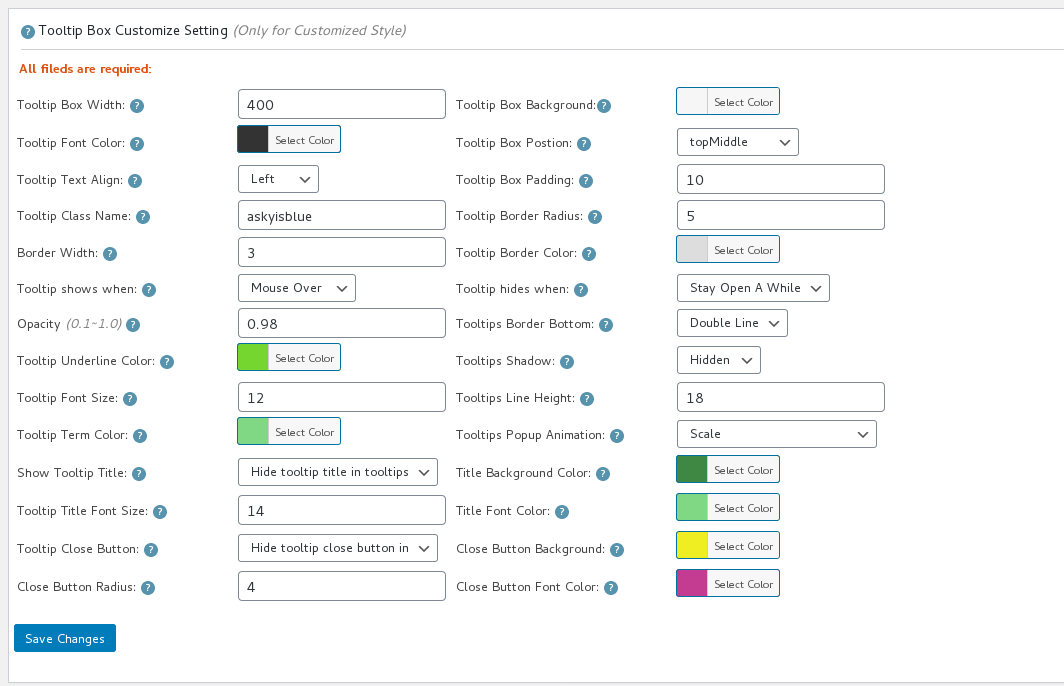
#4 You will open “Tooltips Style Settings” Panel, in “tooltip box cuustomize setting” option panel, you will find “tooltips hides when” option box, please select “stay open a while”

#5 Click “save changes” button.

It looks like this:

tooltip box customize setting

tooltip box customize setting

By this way, when the mouse leaves the tooltip terms, you can click links in the tooltip, or click button to play audio or video in tooltip box 🙂

Hope this have a little help 🙂

Any more question or feature request is welcome 🙂

Thanks, have a blessed day with your family 🙂
WordPress Tooltip Glossary Plugin Support Team
Tagged with: , ,
Top