How can I ensure that “normal” main glossary page displays correctly?

Hi Dear Users of WordPress Tooltip Glossary Plugin, hope this message find you are doing well and have happy day with your family! 🙂  We got an amazing wordpress tooltip user’s ticket, in which he asked our a question “How can I ensure that “normal” main glossary page displays correctly?”:

Hello,
I face an issue with glossary page. If I call glossary through a shortcode in a page it works well, but when reaching “normal” glossary page (through breadcrumb for instance), it does not display correctly.

How can I ensure that “normal” main glossary page displays correctly?
Many thanks in advance for your help.

We did a check for the user,  I think the user miss-understanding the glossary page and glossary index page, the URL which user told us is a glossary index page — which created automatically when the user activate the wordpress tooltips plugin,we developed the function of glossary index page is based on another wordpress tooltip user’s suggestion — he said each glossary item should have their own link, and all these links should listed in wordpress glossary index page automatically, so google can index these glossary terms easier and improve SEO rank of tooltip sites 🙂

We make a screenshot of glossary settings panel, in the screenshot, you can see what we said in the glossary settings panel is “Glossary Index Page” — it will list all glossary terms in here for improve SEO of your glossary site:

glossary settings panel

By default, wordpress tooltip plugin will create a “glossary” page automatically, when you activate wordpress tooltips plugin, some users hope use “glossary” page to display glossary list, they do not want to use “glossary” page as a glossary category archive page, okay,  as the admin of wordpress tooltip site, you can change the glossary index page in glossary global settings panel by this way:

1: login wordpress as admin

2: in wordpress pages panel, you can created a new page in wordpress page editor, for example “glossary terms”

3:click tooltips menu item in wordpress dashboard

4: click glossary settings sub menu item

5: then you will open glossary settings panel:

glosasry global settings panel in wordpress glossary plugin 15.0.0

glosasry global settings panel in wordpress glossary plugin 15.0.0

6: In glossary settings panel, check the option “glossary index page”, and change it as your new page “glossary terms”

7: click save changes button

Then you will use  the new glossary terms page as glossary index page, and you can use your old “glossary” page to build the glossary by this way:

1: in the wordpress dashboard, please click pages menu

2: in pages panel, click to edit the glossary page

3: in the glossary page, please insert glossary shortcode [glossary]

4:save the page and click publish

5: in the front end, you will find the glossary page looks like this:

wordpress glossary demo page

wordpress glossary demo page

Please check our wordpress glossary demo

Then it will works well 🙂

Hope this have a little help, Any more feature request is welcome 🙂


Thanks, have a blessed day with your family 🙂

Best Regards,

WordPress Tooltips Support Team

Tagged with: , , , ,

How to Add WordPress Tooltips on Fast Secure Contact Form?

We get a ticket from an amazing wordpress tooltip users which using Fast Secure Contact Form plugin, he said he read our document How to Create WordPress Tooltip for Contact Form 7?  He want to add wordpress tooltips effect for each input text field in the Fast Secure Contact Form, so users will know which kind of message with which kind of format will be accepted by his support. He do not know how to add tooltips popup box in his contact form input text field, he hope us write a document of How to Add WordPress tooltip plugin on Fast Secure Contact Form for him.  🙂

We are happy to help more wordpress tooltips uers who using other amazing wordpress form plugins, our wordpress tooltips support nearly all wordpress form plugins, for example: Contact Form 7, WPForm, GF form, Fast Secure Contact Form… and so on 🙂

How to Add WordPress Tooltips on Fast Secure Contact Form?

With wordpress tooltip plugin, it is very easy to add tooltips effect for each input box field in fast secure contact form:

1: Because this function just be included in wordpress tooltips pro and wordpress tooltips pro plus plugin, so if you do not have wordpress tooltips pro plugin yet, please login your account in wordpress tooltip plugin site.

2: After logged in your account, please click “download”  menu item to download wordpress tooltip plugin zip file.

3: After downloaded wordpress tooltips pro zip file, please login your wordpress site admin area as wordpress admin

4: Then in wordpress dashboard, please “Plugins” menu, you will open wordpress official plugin management panel.

5: If you installed wordpress tooltips free plugin or old version of wordpress tooltip pro plugin, please delete the old version of wordpress tooltip plugin

Then in “Plugins” management panel, please click “add new” link at the top of the plugins panel, in here you can upload the wordpress tooltips plugin zip file

6: After installed wordpress tooltip plugin, please remember to activate the new wordpress tooltip plugin

7: Now in fast secure contact form, please create a contact form, it is simple and fast:

7.1 In wordpress dashboard, click settings menu item

7.2 Then click FS Contact Form sub menu item

7.3 You will open “Fast Secure Contact Form Settings” panel

7.4 In here you can create a new contact form, we make a screenshot for you:

…., and then create fields in fields tab in fast secure contact form, after entered all fields, just click publish to save your contact form 🙂

7.5 After publish the contact form, in front end, it looks like this:

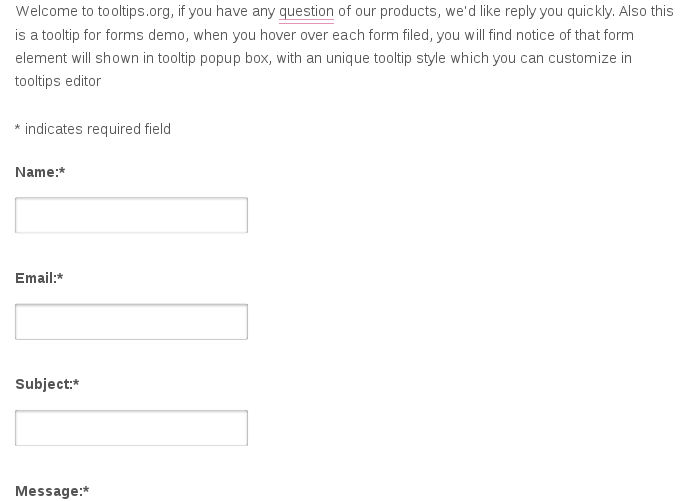
Okay, now what you need to do is — when user mouse hover the input text field in contact form, a wordpress tooltips window will pop-up, and display tooltips content in the tooltip window, how can we do this? 🙂

It is very simple.

7.6: In your browser, for example firefox, just click F12, and then check the css class or css id  for the input text box, for example, in my site, the input text box which under the label “name”, have a id “#fscf_name1”, just remember this, we will use it to add tooltips effect on this input text field at next steps soon.

8: In wordpress dashboard, click tooltips menu item

9: Then click “Add new” sub menu item

10: Add wordpress tooltip content in wordpress tooltips editor, it looks like this:

add new wordpress tooltips for input field in contact form

add new wordpress tooltips for input field in contact form

11: Then in the right hand of the tooltip editor, you will find  metabox “Tooltip For Forms “,  in here just enter the css id of the input text filed “#fscf_name1”, it looks like this:

That’s all, very simple? Yes!

In the front end, when mouse hover the input text box “Name”, you will find tooltip popup window. You can find demo for this document at: Tooltip for anything.

Conclusion:

With wordpress tooltip plugin, wordpress admin can add tooltip effect in any contact form, just a few clicks and input the css class or css id of any component in the contact form, you can show awesome tooltips effect for any component in any wordpress contact form 🙂


Tagged with: , ,

WordPress Tooltip 15.6.2 Released, Support Case Sensitive Tooltips

Hi, Good evening, dear WordPress Tooltip Plugin users,  hope this message find you are doing well and having happy days with your family 🙂  We are happy to report you, we released wordpress tooltips pro plugin 15.6.2, based on an amazing tooltip user’s ticket, to support case sensitive for wordpress tooltips, that means, for example, in wordpress tooltips editor,  you can add tooltip effect for tooltip term “wordpress”, and you can add another tooltip effect for the tooltip term “WordPress” 🙂

The ticket from the amazing tooltip user:

How to switch off case sensitivity?

Our wordpress tooltip support replied:

Hi,

Thanks for the message 🙂

We will develop a new version to support this 🙂

Once finished this version we will reply you again 🙂

Thanks, have a blessed weekend with your family 🙂

Best Regards,
WordPress Tooltips Support Team
That’s why our wordpress tooltip developer developed a new version: wordpress tooltips pro plugin 15.6.2, once you upgrade to the wordpress tooltip 15.6.2 🙂

How to switch off case sensitivity?

1: login wordpress tooltips  plugin site.

2: click my account menu in the top menu bar, please download newset wordrpess tooltips pro and tooltips pro plus version 15.6.2, it is a wordpress zip file

3: after downloaded wordpress tooltips zip file, login your wordpress as admin

4: in wordpress dashboard, please click plugins menu item

5: then deactivate old version of wordpress tooltips pro plugin, then please ensure click the “delete” link to remove the old version of wordpress tooltips pro plus plugin

6: upload the latest version of  wordpress tooltips pro plugin zip file, it is tooltips-pro-15.6.2.zip, then please remember to activate new tooltips pro plugin in your wordpress plugin panel

7: after installed new tooltips pro plugin, please click “tooltips” menu in wordpress dashboard,  then please click “Optional Settings” sub menu item

8: then you will open tooltips “Optional Settings” Panel,  you will find “Enable Tooltips Case Sensitive” option, in which you can Enable or Disable Tooltips Case Sensitive, we make a screenshot for you at below:

Wordpress Tooltips Case Sensitive

WordPress Tooltips Case Sensitive

9: if you need turn off case sensitive for tooltip terms, please select “disable tooltips case sensitive”

10: in front end of wordpress page , you will find your tooltip terms, for example wordpress and WordPress, will have the same content in tooltip popup box

11: if you need turn on case sensitive for tooltip terms, please select “enable tooltips case sensitive”, then in front end, you will find wordpress and WordPress will have different tooltip terms 🙂

By the way, it is recommend to enable tooltips case sensitive 🙂

Thanks for the great suggestion for wordpress tooltip plugin, if you have any feature request or question, please don’t hesitate to contact us 🙂


Thanks, have a happy day with your family 🙂

Best Regards,

WordPress tooltip support term

Tagged with: , ,

WordPress Tooltips Plugin 15.6.0 Released, Display Tooltips Title in Tooltip Shortcode

Hi, Good morning, dear users of WordPress Tooltip Plugin ,  hope this message find you are doing well and having happy weekend with your family 🙂  We are happy to report you, we released wordpress tooltips pro plugin 15.6.0. In wordpress tooltips pro plugin 15.6.0, based on an amazing user’s suggestion, wordpress tooltips plugin support display tooltip title in tooltips which generated by wordpress tooltip shortcode. 🙂

The amazing user told us:

Hello,

I think there is a small bug. I activated “Show Tooltip Title”. This works, except if I use a shortcode like this: “tooltip_by_id
tooltip_id=’5219′” . Here only the body text appears – not the title itself.

Thanks and kind regards

Our wordpress tooltip developer checked the feature request, and we replied:

Hi,

Hope you are doing well and having happy weekend with your family 🙂

Thanks for the detailed description 🙂

In tooltip shortcode, we have no this feature yet, but we are developing a new version to allow users decide display title in tooltips which created via shortcode, once finished it we will reply you again 🙂

Thanks, have a blessed weekend with your family 🙂

Best Regards,
WordPress Tooltip Plugin Support Team

Then we re-developed wordpress tooltip plugin, and realized the user’s feature request, if you upgraded to wordpress tooltip plugin 15.6.0, you can enable tooltips title in tooltip shortcode by this way:

1: login wordpress as admin

2: in wordpress dashboard, click tooltips menu

3: in tooltip menu, please click tooltips style sub menu item, then you will open the “Tooltips Style Settings” panel, it looks like this:


tooltip style panel -- change color of links for tooltip content in the tooltip box option

tooltip style panel — change color of links for tooltip content in the tooltip box option

In tooltips style settings panel, you can find many options, just search “Show Tooltip Title” option, you will find you can opt to display tooltips title or hide tooltips title in here 🙂

In front end, if you enabled tooltips title for wordpress tooltips, then when user hover the tooltip terms in wordpress posts, in tooltip pop-up window, they will find there are tooltip title at the top of the tooltip window, it looks like this:

wordpress tooltips by is support tooltip title

wordpress tooltips by is support tooltip title

Thanks for the great suggestion for wordpress tooltips plugin, if you have more feature request or question, it is very welcome to contact us, we are always happy to improve wordpress tooltip functions for users 🙂


Thanks, have a blessed day with your family 🙂

Best Regards,

WordPress Tooltips Support Team

Tagged with: , ,

WordPress Tooltips Free Plugin 7.7.3 Released

Hi, Good evening, dear WordPress Tooltip Plugin users, hope this message find you are doing well and having happy days with your family 🙂

A wordpress tooltip user reported that he found “uncaught typerrror: jquery() is not a function” error and “points to note when using the swell theme, go to swell settings > jquery tab > unchedk don’t load jquery-migrate” then the problem be fixed 🙂

We did a research and we found in a few themes they will disable load jquery-migrate in wordpress site, so we decide add a new option to allow tooltips admin load jquery-migrate from wordpress tooltip plugin settings 🙂

If you have errors of “uncaught typerrror: jquery() is not a function”, please:

1: login wordpress as wordpress admin

2: click plugins menu item in wordpress dashboard

3: click tooltips menu item and then click global settings sub menu item, you will open wordpress tooltips global settings panel

4: please move to the bottom of the wordpress tooltips global settings panel, you will find the new option: “enable / disable jquery-migrate”, please just select “enable jquery-migrate” option and click blue “update now” button

5: in front end of wordpress page source, you will find we have loaded jquery-migrate package for your wordpress automatically, and this kind of problem will be solved, wordpress tooltips pro will works well in your wordpress pages

Then the problem will be solved and wordpress tooltips will works well on your wordpress site 🙂

That’s why we have released wordpress tooltips free plugin 7.7.3 🙂

Thanks, have a blessed weekend with your family 🙂

Best Regards,

WordPress Tooltips Plugin Support

Tagged with: , ,

WordPress Tooltips Pro 15.5.6 Released

Hi, Good evening, dear WordPress Tooltip Plugin users, hope this message find you are doing well and having happy days with your family 🙂  Our wordpress tooltip plugin developer just released wordpress tooltips pro plugin 15.5.6, to solve the conflicts in wordpress tooltip plugin addons. We get a ticket from an wordpress tooltip user, the users said:

 I uninstalled the tooltips-pro plugin, and tried to reactivate it, but  unfortunately when I click on the ACTIVATED button, this message appears.
We want it fixed because we are in love with this plugin.

Our wordpress tooltip plugin developer checked the error carefully, we found when users activate wordpress menu tooltips addon and tooltips for oceanwp addon at the same time, there are conflicts between wordpress menu tooltips  and oceanwp tooltips, our developer have fixed the problem and it works well now 🙂

Thanks for the great bug report, if you have any more question or feature request, please don’t hesitate to tell us, we are very happy to help you always 🙂


Thanks, have a blessed day with your family 🙂
WordPress Tooltips Support Team


Tagged with: , , ,

WordPress Tooltips Pro Plugin 15.5.4 Released

Hi, Good afternoon, dear  users of WordPress Tooltip Plugin , hope this message find you are doing well and having happy days with your family 🙂 We get a wordpress tooltips plugin user’s ticket, in which he said that when he using FAQ in wordpress ACF plugin, there are an error be reported in wordpress tooltips plugin side. 🙂

Our developer checked codes of ACF plugin and wordpress tooltip plugin, we found the conflicts and we fixed this problem in wordpress tooltips plugin 🙂

Also we found in the user’s site, his ACF FAQ addon broken the css style of wordpress tooltip plugin, although this is out of scope of wordpress tooltip support term because the problem is generated by ACF FAQ addon, but our wordpress tooltip plugin developer still traced into the problem and offer the solution to solve this problem:

1: Login wordpress as wordpress admin

2: In wordpress dashboard, click tooltips menu item

3: Click “Tooltips Coder” sub menu item

4: You will open tooltips coder panel, it looks like this:

tooltip glossary custom coder

tooltip glossary custom coder

5: Just copy our customized codes for ACF FAQ addon in tooltips custom code panel:
.accordion .accordion-trigger {
font-size: 2rem;
width: auto !important;
}
.tooltipsall {
border-bottom: 2px dotted #888;
margin-left: 6px;
}

Then ACF tooltips will works well 🙂

Thanks for the great report, if you have any more question or feature request, please don’t hesitate to contact us 🙂


Thanks, have a blessed day with your family 🙂
WordPress Tooltips Support Team
Tagged with: , ,

How to add tooltips effect for fields in easy pricing tables plugin

Hi,

We get a wordpress tooltip user’s ticket, in which he said that on our wordpress tooltip plugin demo page, he found the demo of tooltips for easy pricing tables plugin page not works well, he found the tooltip shortcode is not works good in fields of easy pricing tables, he request us to check does wordpress tooltips pro support easy pricing tables plugin or not.

Our developer did a check of easy pricing tables plugin, we found it is because the easy pricing tables plugin has upgraded their plugin codes, and their pricing tables do not support add shortcode effect in fields of pricing table, they just support insert shortcode in button text, if wordpress users insert shortcode in other kinds of fields in easy pricing tables, in front end they just displayed messed javascript codes.  But wordpress tooltips pro new version support add tooltips effects on fields of easy pricing tables automatically, so we do not need use wordpress tooltip shortcode in easy pricing tables any more 🙂

This is the screenshot of our wordpress tooltips for easy pricing table:

You can check our demo of wordpress tooltips for easy pricing table directly, just mouse hover each fields, you will find wordpress tooltips can add text, images… and so on for each fields in easy pricing table, so admins can save the space and add more description for each fields in pricing table 🙂


This is the screenshot of our easy pricing table, you can see we are using two methods of wordpress tooltips for easy pricing tables

You can find we are using two methods of wordpress tooltip plugin for easy pricing tables, the first method is just enter tooltip terms in any field in the easy pricing tables, another method is use wordpress tooltip shortcode in button text filed 🙂

Thanks for the note, if you have any more question or feature request for wordpress tooltips plugin, please don’t hesitate to contact us 🙂

Thanks, have a blessed day with your family 🙂

WordPress tooltips support team


Tagged with: , , , ,

Recent Works of WordPress Tooltips Until 2022-02-15, We developed 10 New Tooltip Versions and Wrote 9 Tooltip Document

Hi,  Dear users of  WordPress Tooltip Plugin , hope this message find you are doing well and having happy day with your family 🙂 In recent days, we released 10 new wordpress tooltip plugin versions, and we wrote 9 wordpress tooltip document for wordpress tooltip users:

New WordPress tooltip plugin version:

WordPress Tooltips Free Plugin 7.6.9 Released, Support Move WordPress Tooltips Jacascript Code to the WordPress Footer

WordPress Tooltips Pro 15.3.6 Released, Support Jquery-Migrate

WordPress Tooltips Pro 15.3.8 Released, Support Elementor Editor Better

WordPress Tooltips Pro Plugin 15.4.0 Released, Javascript Codes of Tooltips and Glossary Support Defer

WordPress Tooltips Pro 15.4.2 Released

WordPress Tooltips Pro 15.4.4 Released, Support Icon Tooltips Better

WordPress Tooltips Pro Plugin 15.4.6 Released, Support Synonyms Tooltip Better

WordPress Tooltips Plugin 15.4.8 Released, Support Elementor Tooltip Better

WordPress Tooltips Pro Plugin 15.5.0, Support Elementor Tooltip Keyword Matching Mode for Elementor Better

WordPress Tooltips Plugin Free 7.7.1 Released, Increase the Page Loading Speed of the WordPress Pages

WordPress tooltip document:

How I Will be Able to Stop the Tooltips Showing Up on the Additional Page? (WordPress Tooltip Plugin Have A Few Methods to Do it)

How to Link WordPress Tooltip to WordPress Glossary Page?

Question:could you share the values of the dark theme (or the css code)

How to let WordPress Tooltips Plugin Works Well With a Few Cache plugin?

How to Let WordPress Tooltips Plugin Works Well With WP-Optimize?

Question:Can You Tell Me What the Settings For the Green Style are?

Question:How do I turn off the tooltip within a wordpress post for text, sentence paragraph?

How to Add Custom WooCommerce Tooltip Effects to WooCommerce Variations in WooCommerce Variable Products?

WordPress Tooltips Pro Plugin 15.5.2 Released, Increase Loading Speed of WordPress Pages

Also we have updated our wordpress tooltip plugin features page, to added a few new features which released in recent days 🙂

We are working hard to develop a new version of wordpress tooltip, if you have any feature request, please don’t hesitate to contact us 🙂

Thanks, have a blessed day with your family 🙂

Best Regards,

WordPress Tooltips Plugin Support Team


Tagged with: ,

WordPress Tooltips Pro Plugin 15.5.2 Released, Increase Loading Speed of WordPress Pages

Hi, Good evening, dear  WordPress Tooltip Plugin users, hope this message find you are doing well and having happy day with your family 🙂 We just released a new wordpress tooltips pro plugin to increase loading speed of pages of wordpress tooltip site. 🙂

May be you remember about 3 years before, we released wordpress tooltips pro to speed up the wordpress pages, we have a detailed document at:

WordPress Tooltips Plugin 9.7.2, Optimized Code to Speed up Your Page Load Time, in wordpress tooltips plugin 9.7.2, we added an option to allow wordpress tooltip admin to decide “load tooltips js codes / directory js codes / in wordpress footer| or “load tooltips js codes / directory js codes / in wordpress head”, if tooltip administrator decide load tooltip javascript codes in the wordpress footer, this will speed up the loading speed of wordpress pages, because browser do not need wait all tooltip javascript loaded and browser can display the content of the wordpress pages directly.

And about one month ago, our wordpress tooltip developer released wordpress tooltips pro 15.4.2, in which wordpress tooltip allow admin “enable or disable defer attribute for wordpress tooltips javascript files” , by use defer for all our wordpress tooltip javascript files and wordpress glossary javascript files, we can speed up wordpress page loading speed by use the great performance of morden browser, defer will tell browser load all content and other things first, do not waiting for wordpress tooltip javascript files and wordpress glossary  js files, browser will display content of wordpress posts directly, so users will get content faster. 🙂

We developed wordpress tooltips plugin more than 11 years, since 11 years before, in last years, we are continue to optimize our wordpress tooltip plugin to speed up wordpress pages, today, we are happy to report you, in the current time, if you upgrade to the newest WordPress Tooltips Pro Plugin 15.5.2, all wordpress  tooltips inline javascript codes and wordpress tooltips codes of main javascript function can be put into the wordpress footer now:

wordpress tooltips pro plugin 15.0.2 global settings panel

global settings panel of wordpress tooltips pro plugin

As you can see, there are an option “Load Tooltip Javascript In WordPress Footer”, now if you select the option “Load Tooltip Javascript In WordPress Footer”, not only wordpress tooltips inline js codes be put into the wordpress footer, but also wordpress tooltips main js function will be put into the wordpress footer too, wordpress tooltips main js function is developed to loading wordpress tooltips effects on all wordpress tooltip term in wordpress posts, and wordpress tooltips main js function will decide the action of wordpress tooltip component, for example  wordpress tooltips window fade-in or fade-out,  or display wordpress tooltips popup at bottom center on the tooltip term underline or top left on the wordpress tooltips term… and so on, and there are a few more wordpress tooltip js codes, now all wordpress tooltip javascript codes can be move to wordpress footer in all wordpress posts, or let’s say in the header of wordpress posts, in the content section of wordpress pages, there are no any more wordpress tooltip javascript codes, this will increase page loading speed of all wordpress posts 🙂

Please upgrade to wordpress tooltips pro 15.5.2 asap you can 🙂

Thanks, have a blessed day with your family 🙂

Best Regards,

WordPress Tooltips Plugin Support Team

Top


