Category: Wordpress Tooltip Plugin Document

QR Code Tooltip Demo And Tooltip For Search Form Demo

Hi Dear WordPress Tooltip Plugin Users,

Based on users’ requests, we created QR Code Tooltip Demo And Tooltip For Search Form Demo, you can open our “Try Demo” menu item at head menu, you will find new QR Code tooltip demo, when users hover over the “QR Code” tooltip term, they will find a QR Code in tooltip popup box, it is helpful tool for help mobile users scan and redirect to your links, for example payment, socal links… and so on 🙂

Also if you open our wordpress tooltip plugin document page, when you hover over the search form, you will find our tooltip for search form demo, our tooltip for form element feature support show any content like video, audio, text, image, qr-code, google map… in tooltips for fields in forms 🙂

We received Tons of feature requests of wordpress tooltip plugin, we are working hard to finish them asap we can, you will see the new version soon 🙂

Thanks, have a blessed day with your family 🙂

Best Regards,

WordPress Tooltips Support Team

Tagged with: , , , ,

WordPress tooltip plugin 9.3.0, tooltip users can import tooltip categories from csv file too

Hi Dear WordPress Tooltip Plugin users,

Based on an amazing users feature requests, we just released a new wordpress tooltip plugin 9.3.0, in there version:

When you import tooltips, you can import categories from csv file too

You can find “Import Tooltips” sub menu item in wordpress tooltip admin area, it looks like this:

Wordpress Tooltips Menu Item

WordPress Tooltips Menu Item

If you click “Import Tooltips” sub menu, you will open import tooltips setting panel, it looks like this:

import tooltips setting panel

Import tooltips setting panel

How WordPress Tooltips Importer works?

#1 You can find sample.csv in the folder “tooltips-pro”, we have make sample in this csv file, you can just follow our format to build your csv file
#2 In sample.csv, there are two fields, “tooltips term” and “tooltips content”, tooltips term will be imported as title of tooltips, and “tooltips content” will be imported as content of tooltips.
#3 In sample.csv, we use comma “,” to split fields, if you have comma (,) in your content field, it maybe caused the import failed, the solution is use double quotes (“) to warp your content field, it looks like this: “the world, need goods”
#4 In general, #3 will works well, but in your tooltip content, maybe you have double quotes (“) already, in this case, because there are a lot of double quotes (“), so import will failed again, in this case, the solution will looks like this: “the world, \”need goods\””, just add \ before your own “, it will works well
#5 If you want to add mages in your tooltips, that is easy, just do it like this: hi this is image import sample < img class=”alignnone size-medium wp-image-259″ src=”http://yourdomain.com/wp-content/uploads/2018/07/yourimagenam.png” /> , just change class, image path, image name as your values.
#6 You can find all these samples in sample.csv in the folder “tooltips-pro”

#7 You can import tooltips categories from csv file too, please check our samples in sample-category.csv in the folder “tooltips-pro”

In sample-category.csv, there are 3 fields, “tooltips term” and “tooltips content” and “tooltips category”, tooltips term will be imported as title of tooltips, and “tooltips content” will be imported as content of tooltips, “tooltips category” is tooltip category name

If you added a tooltip category name for a tooltip importing record, aftered the tooltip item be imported, we will assign the this tooltip item to the tooltip category. If the category did not existed, we will create this category for you automatically.

In tooltip importing records, you can ignore “tooltips category” row, then the imported tooltip record will not be assign to any tooltip category

#8 We understand you need add more and more new tooltips in csv files and import these tooltips csv files, when you import the tooltips from csv files, our import module will detect duplicated tooltips terms and ingore these duplicated tooltip terms, so you can import tooltips safely

What’s the next feature of wordpress tooltip plugin we are doing?

Based on wordpress tooltip users’ requests, we are developing a wordpress tooltip export module, you will see it soon 🙂

If you have any more question or feature request of wordpress tooltip plugin, please don’t hesitate to tell us 🙂

Thanks, have a blessed day with your family 🙂

BR,

WordPress Tooltip Support Team


WordPress Tooltip Plugin 9.2.6 Released, Support WordPress OceanWP Theme

Hi Dear WordPress Tooltip Plugin Users,

Hope this message find you are doing well and have happy week with your family 🙂

We just released a new wordpress tooltip plugin, in this version:

WordPress Tooltip Plugin Support WordPress OceanWP Theme

OceanWP is an amazing theme, the amazing author said:

OceanWP is the perfect theme for your project. Lightweight and highly extendable, it will enable you to create almost any type of website such a blog, portfolio, business website and WooCommerce storefront with a beautiful & professional design. Very fast, responsive, RTL & translation ready, best SEO practices, unique WooCommerce features to increase conversion and much more. You can even edit the settings on tablet & mobile so your site looks good on every device. Work with the most popular page builders as Elementor, Beaver Builder, Brizy, Visual Composer, Divi, SiteOrigin, etc…

You can see by default, with the theme, users can use elements and woocommerce, it is easy to start a business quickly, that;s why it have more than 400,000 installation:

wordpress tooltips for oceanwp theme

wordpress tooltips for oceanwp theme

One of our awesome user told us, on one page of his site, tooltip did not work, we trace into the code of OceanWP theme, we found they use their own private functions to build a few pages, but what our wordpress tooltip plugin can do is just follow wordpress standard API to hook content of posts, so we developed an wordpress tooltip addon “Tooltips for OceanWP Theme” to support OceanWP Theme.

It is very easy to use “Tooltips for OceanWP Theme” addon,  Tooltips Addon Settings panel, you will find a new addon: “Enable/Disable Tooltips for inOceanWP Theme”, once you enabled this addon, tooltips will start support OceanWP theme, no more settings needed 🙂

We get a lot of feature requests of our wordpress tooltips plugin, we are realize these amazing features asap we can , you will see it soon, if you have any question or feature requests, it is welcome to contact us 🙂

Thanks, have a blessed weekend with your family 🙂

Best Regards,

WordPress Tooltips Plugin Support Team

Tagged with: ,

WordPress Tooltip Plugin 9.2.4 Released

Hi Dear WordPress Tooltips Plugin Users,

Hope this message find you are doing well and have happy weekend with your family 🙂

We just released wordpress tooltip plugin 9.2.4, in this version:
We fixed the the link error in the tip of glossary “language” option in “Glossary Settings” panel
We fixed the hover css of glossary “language” option in “Glossary Settings” panel

Also we have updated wordpress tooltip plugin features page to add new changes in feature lists, for example form tooltips, also we have updated description of wordpress tooltip plugin single site license product and wordpress tooltip plugin multi-license product, we got a lot of feature request, we are working hard to realize these amazing suggestion, you will see the new version soon, if you have any feature requests, or any question about wordpress tooltips plugin, please don’t hesitate to contact us 🙂

Thanks, have a blessed weekend with your family 🙂

Best Regards,
Wordpress Tooltips Plugin Support Team

Tagged with: , ,

Developed A Knowledge Base Search Form For WordPress Tooltip Plugin Document

Hi Dear WordPress Tooltip Plugin Users,

Yesterday we got a user’s ticket, in which the user said in wordpress tooltip plugin document, he can not get all woocommerce tooltip documents from knowledge base quickly, he wasted time to read many wordpress tooltip guide article, he want a search form for the wordpress tooltip plugin knowledge base 🙂

Knowledge Base Search Form For WordPress Tooltip Plugin Document

Today, we are happy to report you, our developer have developed a Knowledge Base search plugin, when you check wordpress tooltip plugin document, at the top of the wordpress tooltip plugin document pages, you will find a search form, if you enter woocommerce tooltip in the search form, you will get all posts related with woocommerce tooltip, it will help users to get correct wordpress tooltip document easier 🙂

It looks like this:


We get a lot of users feature requests, we are working hard to add these amazing feature to wordpress tooltip plugin, you will see it soon, if you have any question or feature request, please don’t hesitate to tell us 🙂

Thanks, have a blessed day with your family 🙂

Best Regards,

WordPress Tooltips Plugin Support Team


Tagged with: , , ,

WordPress Tooltip Plugin 9.2.0, Support Tooltips For Forms, You Can Add Tooltip For Each Form Elements

Hey, Dear WordPress Tooltips Plugin Users,

Hope this message find you are doing well and have happy weekend with your family! 🙂

I am happy to report you, based on users feature request, we just released wordpress tooltips plugin 9.0.2, in this version:

Support Tooltips For Forms, You Can Add Tooltip For Each Form Elements

An amazing user give us an screenshot to ask can we add tooltip for each form elements, he said he want to add tooltip notice for form validation,  another user give us an article to tell us he want tooltip for forms. It seems many users have similar requirement of this kind of tooltip for form fields, we have re-developed our wordpress tooltip plugin to realize this great feature requests, please check tooltip for forms demo at below:

Welcome to tooltips.org, if you have any question of our products, we'd like reply you quickly. Also this is a tooltip for forms demo, when you hover over each form filed, you will find notice of that form element will shown in tooltip popup box, with an unique tooltip style which you can customize in tooltips editor
* indicates required field

You can see when you hover over any form field, we have a tooltip for that form field, you can customize unique style for each tooltip for form element in tooltip editor, it looks like this:


custom style of tooltip for form element

custom style of tooltip for form element

What we are doing more for tooltip for forms functionality

This is only the first step of the work to make a pretty wordpress tooltip for form fields functionality, based on users suggestions, we still need to support more features of tooltips for form element, for example support icon… and so on.

I will write a detailed description of how to use tooltips for forms guide at tomorrow(it is our 01:01am) 🙂

Thanks, have a blessed day with your family 🙂

Best Regards,

WordPress Tooltip Plugin Support Team

Tagged with: , , , ,

How To Download WordPress Tooltips Pro Plugin?

Hi Dears,

Today we received a wordpress tooltip user’s ticket, he said:

on the dashboard of my site I get the message
“Tooltip Pro new version 8.9.6 has been released, please login to download new version, change log can be found at document”
I have version 8.2.0 installed.
Logged in in my account I don’t find a link to download the update.
Please give me a hint where it can be found.

I think maybe a few more users have the same question, I am happy to reply it in here publicly 🙂

It is very easy to download wordpress tooltip pro plugin via a few simple steps:

#1 Step 1 Login wordpress tooltip site via https://tooltip.org/login , it looks like this:

Login wordpress tooltip site tooltips.org

Login wordpress tooltip site tooltips.org

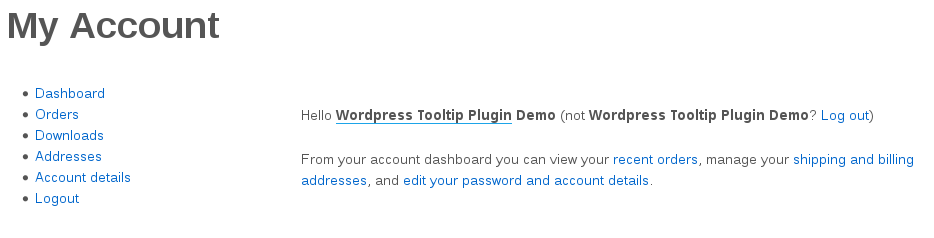
#Step 2, You will be redirected to “My Account” panel (https://tooltips.org/my-account/) automatically, it looks like this:

wordpress tooltip my account panel

wordpress tooltip my account panel

At the left hand of “My Account” panel, you will find “Downloads” link

#Step 3 Click “Downloads” link(https://tooltips.org/my-account/downloads/) in “My Account” panel, then you will open download plugin panel, it looks like this:

Download WordPress Tooltips Pro Plugin

Download WordPress Tooltips Pro Plugin

In here, you will find the red button “Tooltips Pro Pluing”, just click “Tooltips Pro Pluing” button to download newest version of wordpress tooltips pro plugin 🙂

Any more question is welcome 🙂

Thanks, have a blessed weekend with your family 🙂

Best Regards,

WordPress Tooltips Support Team


Tagged with:

WordPress Tooltips Plugin 9.1.0 Released

Hi Dear WordPress Tooltips Users,

An user asked us a question:

how to get wordpress tooltip plugin document more easier

Today we are happy to report you, we have added a few new Knowledge Base articles in wordpress tooltip plugin Knowledge Base menu:

How to Get Support, Document and Demos

How to Enable / Disable Tooltip Glossary Index Page

How to Select My Own Glossary Index Page, How to Delete Default Glossary Index Page

How to Upgrade to the WordPress Tooltips Pro

We are adding more wordpress tooltip knowledge base articles into knowledge base panel, you will see it soon, also you can find all wordpress tooltip plugin knowledge base articles at wordpress tooltip plugin documents, and you can find all wordpress tooltip features at features of wordpress tooltip plugin.

Thanks, any more question, please do not hesitate to contact us, we’re always ready to assist you the best we can. 🙂

Have a blessed day with your family 🙂

Best Regards,

WordPress Tooltips Support Team

Tagged with: , , ,

How to Select My Own Glossary Index Page, How to Delete Default Glossary Index Page

Hi Dear WordPress Tooltip Glossary Users,

Hope this message find you are doing well and have happy days with your family 🙂

Based on users requests, we are adding knowledge base to help users use wordpress tooltips glossary plugin more easier, today we added a new item in wordpress tooltip knowledge base:

“How to Select My Own Glossary Index Page, How to Delete Default Glossary Index Page”.

Based on users feature requests, for increase SEO rank of wordpress tooltip site, we will create glossary page for your site,  each glossary item have their own link, and all these links will listed in wordpress glossary page automatically.

In general, at the first time when you enabled glossary index page in “Enable Glossary Index Page” option, we will generate a new wordpress page “glossary” at ‘ ‘Glossary Index Page for you automatically, however, you can select any wordpress page as glossary index page from select box in “Glossary Index Page” option via “Glossary Settings” plugins menu, the “Glossary Settings” panel looks like this:

glossary settings panel

glossary settings panel

Also if you want to delete glossary index page, you can just find it and delete the page “glossary” manually at wordpress admin area -> all pages, and select another page as your glossary page.

Also we have another method to list all glossary item: use [glossary] shortcode, you can find [glossary] shortcode demo at Glossary Demo. Or click this to check full of wordpress tooltips plugin features.

Any more feature request is welcome 🙂

Thanks, have a blessed day with your family 🙂

Best Regards,

Tooltips Support Team

Tagged with: , , , , , ,

WordPress Tooltips Pro Plugin 9.0.2 Released

Hey Dear WordPress Tooltips Plugin Users,

Hope this message find you are doing well and have happy weekend with your family 🙂

I am happy to report you that we just released a new version of wordpress tooltips pro version, in wordpress tooltip 9.0.2, we support Auto-Upgrade from tooltips free better, when you upgrade from wordpress tooltip free plugin versions, you do not need to deactivate and delete wordpress tooltip free plugin, you can just upload wordpress tooltip pro plugin and activate it directly, our wordpress tooltip pro plugin will detect do you installed wordpress tooltip free plugin or not, if yes, when you try to activate wordpress tooltip pro plugin, wordpress tooltip pro plugin will deactivate wordpress tooltip free plugin automatically and upgrade from wordpress tooltip free plugin automatically, it is safe and nothing need to do 🙂

We are developing a new version based on user’s feature request, you will see it soon 🙂

Thanks, have a blessed weekend with your family 🙂

Best Regards,
Wordpress Tooltip Plugin Support Team

Tagged with: , ,
Top