Category: Wordpress Tooltip Plugin Document

WordPress Tooltips Plugin 12.7.8 Released, Added Glossary Paginate Navigation at the Top of Glossary List Page too

Hi Dear WordPress Tooltip Glossary Plugin Users,
Hope this message find you are doing well and have happy weekend with your family! 🙂
Based on wordpress tooltip user’s feature request, we released wordpress glossary plugin 12.7.8 🙂
A user told us, the glossary paginate navigation looks good, it is helpful, but it is a little hard to find wordpress glossary paginate navigation links, because these glossary paginate navigation links is at the bottom of the glossary lists, so if we can add glossary paginate navigation at top of wordpress glossary list and bottom of wordpress glossary page, it is better 🙂
This is an amazing feature request, we agree it, our developer give up his weekend to developed a new wordpress tooltip version 12.7.8 to realize it, now when wordpress tooltip users enabled “Enable Glossary Paginate Navigation” in glossary settings panel, in front end, wordpress glossary plugin will not only show wordpress glossary  paginate navigation at the bottom of glossary list, but also add glossary paginate navigation at the top of glossary list,this will make life more easier 🙂
Also we tweak tooltip glossary css. 🙂
Thanks for the great idea, thanks for share your amazing suggestion with us 🙂 If you have any question or suggestion of wordpress tooltip plugin, please don’t hesitate to tell us, we are very happy to make a powerful and user friendly wordpress glossary plugin for you 🙂
Thanks, have a blessed day with your family 🙂
Best Regards,
WordPress Glossary Plugin Support
Tagged with: , , , ,

WordPress Tooltips Plugin 12.7.4 Released, Added “Enable Glossary Paginate Navigation” Option in “Glossary Customize Setting” Panel

Hey Dear WordPress Tooltip Glossary Plugin Users,
Hope this message find you are doing well and have happy weekend with your family! 🙂
We get an wordpress tooltip user’s ticket, in which he suggested allow users to enable or disable glossary paginate navigation option in back end, because it is not each users like use glossary paginate navigation under glossary index page, actually, only heavy wordpress glossary users which have huge glossary terms need use glossary paginate navigation, his tooltip site just have 100 glossary terms, he hope show all glossary terms to users in one time 🙂
This is a great suggestion, our developer developed a new wordpress tooltip plugin version asap he can, and after test many times, we released wordpress tooltip plugin 12.7.4 🙂
Now in wordpress glossary settings panel, we added “Enable Glossary Paginate Navigation” option in “Glossary Customize Setting” setting panel, if you enable “Enable Glossary Paginate Navigation” option, in glossary page, we will show paginate navigation under glossary list. If you disable “Enable Glossary Paginate Navigation” option, in glossary page, we will remove paginate navigation under glossary list. By default, if you did not set up “Enable Glossary Paginate Navigation” option, we will not show paginate navigation under glossary list 🙂
The  “Enable Glossary Paginate Navigation” option in “Glossary Customize Setting” setting panel looks like this:
wordpress glossary plugin 12.7.4 settings panel

wordpress glossary plugin 12.7.4 settings panel

If you have any question or suggestion of wordpress tooltip plugin, please don’t hesitate to tell us 🙂
Thanks, have a blessed day with your family 🙂
Best Regards,
WordPress Tooltip Glossary Plugin Support Team

Tagged with: , , ,

How Do I Make WordPress Tooltip Content Text Align Centered?

Hi Dear WordPress Tooltip Plugin Users,

We get a user’s ticket, in which he asked us how to make tooltip content text align centered, we have developed a new version to realize it, and we are happy write a document for use this tooltip style feature easier 🙂

How Do I Make WordPress Tooltip Content Text Align Centered?

1: Login wordpress admin

2: Click “Tooltips” menu item

3: Click “Tooltips Style” sub menu item to open “Tooltips Style Settings” panel

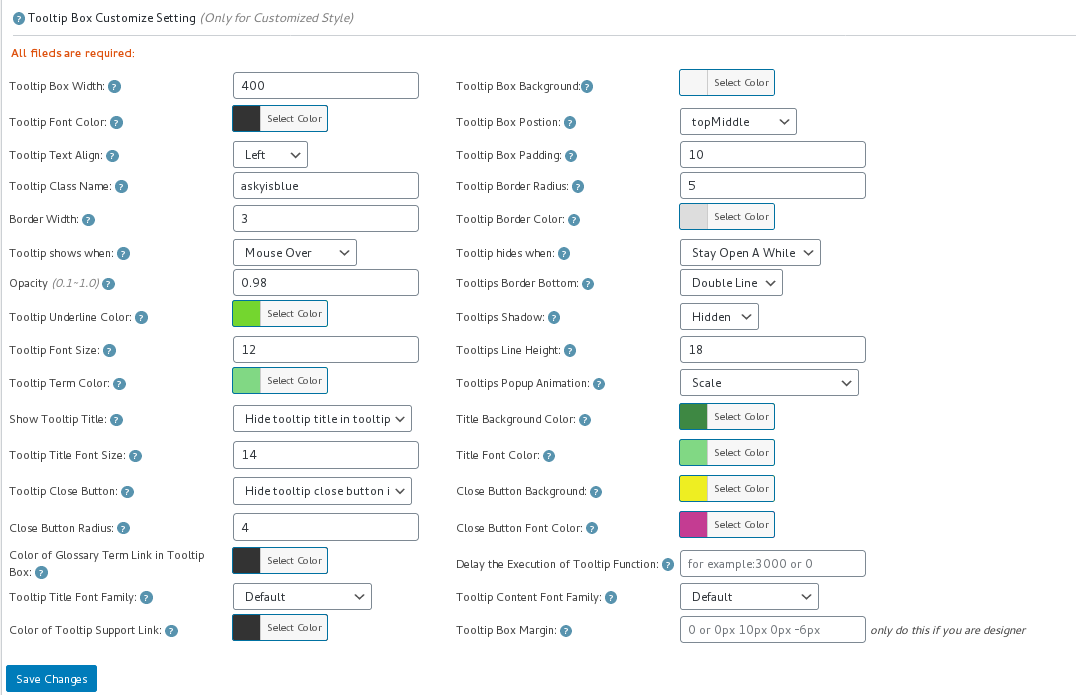
4: In “Tooltips Style Settings” panel, You will find “Tooltip Box Customize Settings” panel, it looks like this:

tooltip style panel version 12.3.6

tooltip style panel version 12.3.6

5: In “Tooltip Text Align” option, you will find 3 options “Left”, “Center”, “Right”, please just select “Center”

6: Also you will need finish other settings in “Tooltip Box Customize Settings” panel

7: Click “Save Changes” blue button

8: Check your wordpress tooltip in front end, when mouse hover a tooltip term, you will find in tooltip popup box, tooltip title and tooltip content is text align centered now 🙂

Via WordPress Tooltip plugin, just a few clicks, you can make a pretty style just in a few minutes, wordpress tooltip plugin is a time saver, so good and so easy, right? 🙂

If you have any features request of wordpress tooltip plugin or any question of wordpress tooltip, please contact us 🙂

Thanks, have a blessed weekend with your family 🙂
Best Regards,
WordPress Tooltip Glossary Plugin Support Team


Tagged with: ,

How to Regenerate All WordPress Tooltip Style?

We get a ticket, a user of wordpress tooltip plugin ask us a question, he created many tooltips, also he created unique tooltip style for a few tooltips , it seems a few of them not works well, because he changed tooltip style too many times, in tooltip editor tooltip style metabox, and added a few customized tooltip style in tooltips.css file, the user think something messed up a little, but he  do not want to use a lot of time to find out wordpress tooltip posts which have customized tooltip style, he want to know:

How to Regenerate All WordPress Tooltip Style?

1: Login your wordpress admin area

2: Click “Tooltips” menu item

3: Click “Reset Tooltips” sub menu item

4: Then You will open “Reset Tooltips” panel, in which you will find “Regenerate All Tooltips Style” option, just click “Regenerate Style” blue button, we will regenerate all wordpress tooltip style for you automatically 🙂

It looks like this:

Regenerate All Tooltips Style

Regenerate All Tooltips Style

5: In front end, you will find all tooltip styles be regenerated with the tooltip style global settings and customized style of each wordpress tooltip posts.

WordPress Tooltip plugin is very easy to use, right? 🙂

We are develop a new version of wordpress tooltip plugin, in which we will improve wordpress tooltip glossary pagination functions, you will see it soon 🙂

Thanks, have a blessed day with your family 🙂
Best Regards,
WordPress Tooltip Glossary Plugin Support Team
Tagged with: ,

How can I Make WordPress Tooltip doesn’t Apply to a Specific Page?

We get a user’s ticket, in which he asked us a question:

How can I Make WordPress Tooltip doesn’t Apply to a Specific Page?

1 Login your wordpress site admin area

2 Click “Posts” menu item in wordpress admin area

3 Click “Add New” sub menu item, you will open wordpress post editor

4 When you edit wordpress post in editor, you can find the “disable all tooltips in this post” metabox in right hand of wordpress editor, please just click   “disable all tooltips for this post” option, and save your wordpress post, it looks like this:

disable all tooltips in this post

disable all tooltips in this post

5 In front end, you will find wordpress tooltip effects has been removed from your wordpress posts 🙂

6 If you do not want to remove all wordpress tooltip effects, if you just want to remove wordpress tooltip effect for a few specific tooltip terms in front end, you can use another option “Disable specific tooltips”, which under “Disable all tooltips in this post” option in “wordpress tooltip settings for this page” metabox, it looks like this:

Disable specific tooltips

Disable specific tooltips

7 In “Disable specific tooltips” option, you can enter multiple tooltips to exclude a few specific tooltips in this post, split by comma “,”  🙂

8 If you think remove wordpress tooltips effects in each post is a hard work, we have a tool to make the life more easier for wordpress toolti editor:

WordPress Tooltip Plugin Support One Click to Bulk Disable Tooltips in Post by Post ids

9 Click “Tooltips” menu item

10 Click “Tooltips Optional Settings” sub menu item, it looks like this:

Wordpress Tooltips Menu Item

WordPress Tooltips Menu Item

11 You will open “Tooltips Optional Settings” panel, you can find “Bulk disable tooltips in post by post id” option box,it looks like this:

Bulk disable tooltips in post by post id

Bulk disable tooltips in post by post id

12 Please just input post ids in this input box, split with comma “,”, for example, 3,22,58,126,583

13 In front end, wordpress tooltip plugin will not add tooltip effects in those wordpress posts.

Easy? Yes 🙂
If you have any question or suggestion of wordpress tooltip plugin, please don’t hesitate to tell us 🙂
Thanks, have a blessed day with your family 🙂
Best Regards,
Tagged with: ,

WordPress Tooltips Plugin 12.7.0 Released, Added Paginate Navigation Links in Glossary Page

Hi, WordPress Tooltip Glossary Plugin Users,

Hope this message find you are doing well and having happy weekend with your family! 🙂

We are happy to report you, we just released wordpress tooltip glossary plugin 12.7.0, changes in wordpress tooltip glossary plugin 12.7.0:

WordPress Tooltips Plugin Support add Paginate Navigation Links in Glossary Page

An amazing user write to us, said he have x,000s glossary terms, so when loading glossary page, it used many munutes, he hope we can add paginate functions for glossary page, this is a great suggestion, we re-developed our wordpress tooltip plugin to realize this feature, since wordpress tooltip 12.7.0, in wordpress glossary page, wordpress tooltip plugin added paginate navigation links, if the number of glossary terms more than 30, wordpress glossary plugin will show paginate navigation links at the bottom of the glossary pages, you will see navigation links previous , 1,2,3…, next.. and so on, and per glossary page will only show 30 glossary terms, it looks like this:

paginate navigation links in glossary page

paginate navigation links in glossary page

Thanks for the amazing feature request for wordpress tooltip ,  Any question or suggestion for wordpress glossary plugin, please don’t hesitate to tell us, we are always happy to offer an amazing wordpress tooltip glossary plugin for you.   🙂

Thanks, have a blessed weekend with your family 🙂

Best Regards,
Wordpress Tooltip Glossary Plugin Support Team

Tagged with: , , ,

WordPress Tooltips Plugin 12.6.2 Released

Hi!  Dear Users of WordPress Tooltip Plugin,
Hope this message find you are doing well and having happy weekend with your family! 🙂
We received an amazing user’s ticket, in which he told us, when he set up Tooltip Text Align option in wordpress tooltip style settings panel, for example, set up “Tooltip Text Align”  option as center, he found the content of wordpress tooltip terms in wordpress tooltip popup window is not text align “center”, the text align is still “left”, we have re-developed our wordpress tooltip plugin, to fixed this tooltip content text align problem,   and released wordpress glossary plugin version 12.6.2, now in wordpress tooltip style settings panel, when users set up “Tooltip Text Align” option, our last versions just only change text align of tooltip title,  but since this wordpress tooltip plugin 12.6.2 version, our wordpress tooltip plugin will change the text align of tooltip content too 🙂
Thanks for the amazing report,  If you have any question or suggestion of wordpress tooltip plugin, please don’t hesitate to tell us 🙂
Thanks, have a blessed day with your family 🙂
Best Regards,
WordPress Tooltip Glossary Plugin Support
Tagged with: , ,

WordPress Tooltip Glossary Plugin 12.6.0 Released

Hi!  Dear Users of WordPress Tooltip Glossary Plugin,
Hope this message find you are doing well and having happy days with your family! 🙂
We are happy to report you, we have re-developed our wordpress glossary plugin, and released wordpress glossary plugin version 12.6.0.

Changes in wordpress tooltip glossary plugin:

As you known, in recent weeks,  we have released many versions of wordpress tooltip glossary plugin, based on wordpress glossary plugin user’s suggestions, we get Tons of feature request on wordpress glossary features, so we were focus on improve wordpress glossary functions in last days, from a simple wordpress glossary plugin, growth as a powerful and complex wordpress glossary plugin, now codes of wordpress glossary modules is a bit large,   in this wordpress tooltip glossary plugin version 12.6.2, we moved glossary shortcodes functions to a dedicated php file, for improve functions of glossary shortcodes,  also we re-structure glossary global settings modules for works better 🙂
If you have any question or suggestion of wordpress tooltip plugin, please don’t hesitate to tell us 🙂
Thanks, have a blessed day with your family 🙂
Best Regards,
WordPress Tooltip Glossary Plugin Support Team
Tagged with: , , ,

How to Enable or Disable WordPress Tooltips in WordPress Glossary Index Page or Glossary Term Pages?

Hi WordPress Tooltip Glossary Users,
We get a user’s ticket, in which he asked us how to enable or disable wordpress tooltips show in glossary index page or glossary terms pages, I think maybe more users have the same question, I am happy to reply in here publicly 🙂

How to Enable or Disable WordPress Tooltips in WordPress Glossary Index Page or Glossary Term Pages?

1: Login your wordpress site admin area

2: Click “Tooltips” menu item

3: Click “Glossary Settings” sub menu item, you will open “Glossary Settings” panel

4: In “Glossary Settings” panel, you will find “Disable Tooltips in Glossary Page” option box, it looks like this:

glossary settings panel

glossary settings panel

5: In “Disable Tooltips in Glossary Page” option box, just select “Enable Tooltips in Glossary Page” or “Disable Tooltips in Glossary Page”, and click “Save Changes” blue button at the bottom of the page

6: Changes will start work in front end instantly 🙂

We are developing a new version to improve wordpress glossary functions, you will see it soon 🙂

If you have any question or suggestion of wordpress tooltip plugin, please don’t hesitate to tell us 🙂
Thanks, have a blessed day with your family 🙂
Best Regards,
WordPress Tooltip Glossary Plugin Support Team
Tagged with: , , ,

WordPress Tooltip Glossary Plugin 12.5.4, Improved Read More of the Tooltip Content in the WordPress Tooltip Popup Box

Happy Holiday,  Dear WordPress Tooltip Glossary Plugin Users,

Hey, hope this message find you are doing well and having happy days with your family! 🙂

We just released wordpress tooltip plugin 12.5.4, in this version, after checked user’s request, we decide to improve  read more of the Tooltip content in the wordpress tooltip window. 🙂

As you know, wordpress tooltip support show excerpt of tooltip content in the tooltip pop up window, before wordpress tooltip 12.5.4, when you edit tooltip in tooltips editor, you will find you can specify specific settings for each tooltip term to show excerpt or full content in tooltip window, in tooltip editor,you will find “show excerpt in tooltip pop up metabox” metabox,  it looks like this:

show excerpt in tooltip pop up metabox

show excerpt in tooltip pop up metabox

You need select “Use Excerpt in Tooltip Pop up box for each tooltip terms. Now with wordpress tooltip version 12.5.4, we added a new option “Follow the Settings of the Optional Settings Panel” in this metabox, by default, you do not need set up this metabox for each tooltip, by default, you can just set up  “show excerpt or full content of tooltips in tooltip pop box” option in wordpress tooltip “Optional Settings” panel in one time, all all tooltip pop up window will show tooltip excerpt with read more link, the “show excerpt or full content of tooltips in tooltip pop box” option looks like this:

show excerpt or full content of tooltips in tooltip pop box

show excerpt or full content of tooltips in tooltip pop box

If  you add new tooltip terms, this option “Use Excerpt in Pop Up Box” will works well for all new tooltip terms automatically.

Please note, Old tooltip terms which entered before 12.5.4, still need set up metabox “show excerpt in tooltip pop up metabox” manually

Hope this have a little help 🙂

If you want to set up tooltip pop up box of a specific tooltip term to show full tooltip content, you can still specify specific settings for each tooltip term to show excerpt or full content in tooltip window, in tooltip editor. 🙂

If you have any question or suggestion of wordpress tooltip plugin, please don’t hesitate to tell us 🙂
Thanks, have a blessed day with your family 🙂
Best Regards,
WordPress Tooltip Plugin Support
Tagged with: , ,
Top