
Why and How to Hide Letters Without Items in Your WordPress Glossary
— New Features in WordPress Tooltips Free 10.2.3
Hi, Dear WordPress Tooltip users, I hope this message find you are doing well and enjoying happy days with your family. 🙂 We received an amazing wordpress tooltips users’ ticket, in which he asked:
Subject:
tooltips with superscripts
Message:
Is it possible (currently, or with an enhancement) for a tooltip to be displayed for a word that has a superscript number at the end of it?
Our wordpress tooltips plugin support replied:
Hi,
Thanks for the question 🙂
I guess what you’re looking for might be:
In glossary page (https://tooltips.org/glossary-demo/) , only display glossary items that has a superscript number at the end of it? 🙂If so in tooltips pro version we have an option: “Hide Nav letters have no item” , just enable it and we will only display glossary items that has a superscript number at the end of it 🙂
Currently we have no this feature in free version, but our developer is developing a new version to add this function from pro version to free version for you, you will see it soon 🙂
Sorry if I misunderstood, please tell me more details or provide a screenshot or page? 🙂
Thanks, have a blessed day with your family 🙂
Best Regards,
WordPress Tooltips Plugin Support
We then released the WordPress Tooltips Free plugin 10.2.3 for tooltip users to resolve the issue! 🙂
A Step-by-Step Guide to Hiding Letters Without Items in WordPress Glossary
1: Please login your wordpess as administrator
2: Click on the “Tooltips” menu item
3: Click on the “Glossary Settings” sub-menu item
4: Now, you will open “Glossary Settings” panel, I make a screenshot of wordpress tooltips 33.6.8 which using on tooltips.org, but there are a few options is the same with wordpress tooltips free, for instance, “Hide Nav letters have no item”
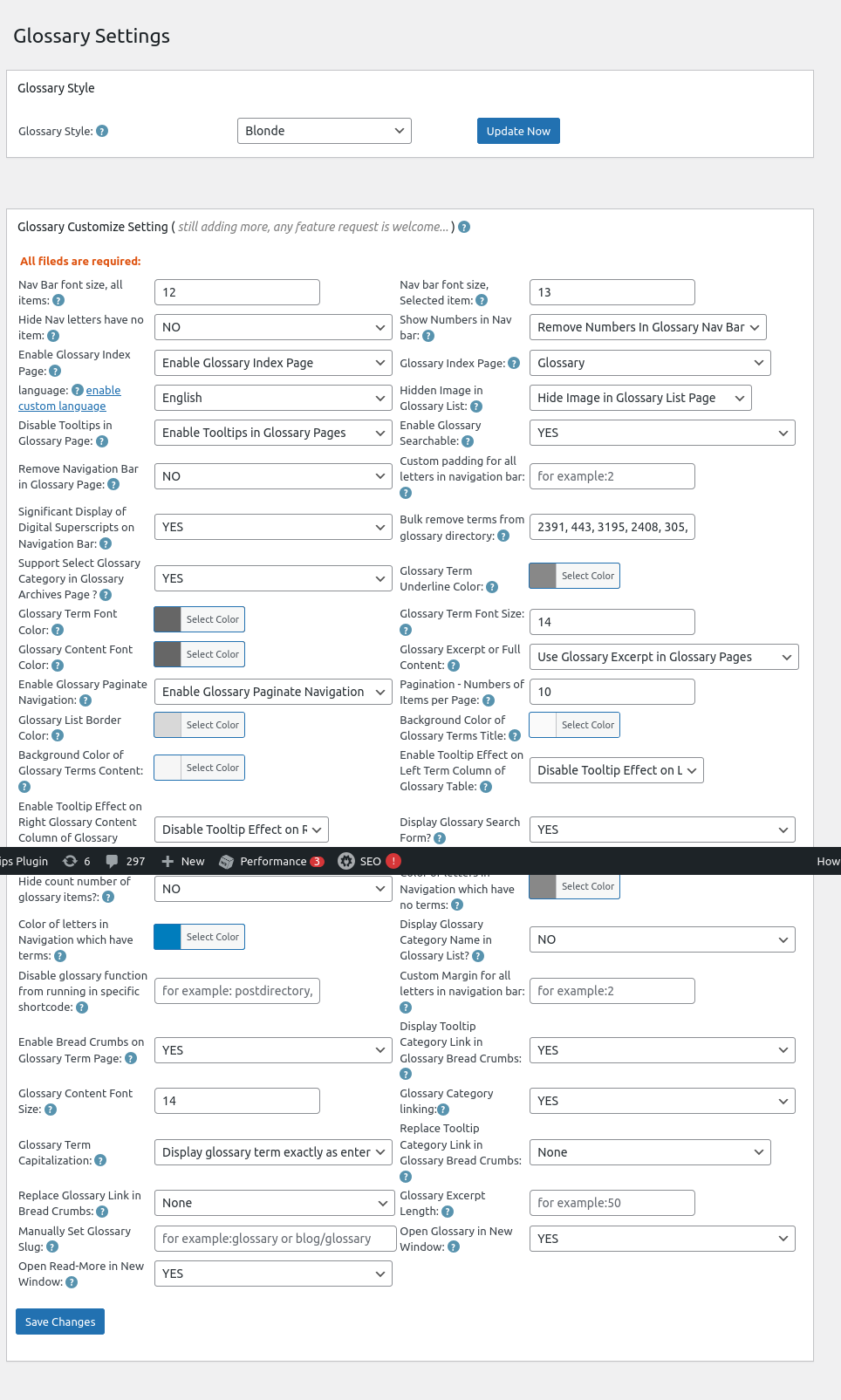
Glossary Settings in wordpress tooltips 33.6.8
5: If you select “Yes” in the option Glossary Settings in wordpress tooltips 33.6.8, then in front-end, we will hide letters without items in wordpress glossary page
If you select “No” in the option Glossary Settings in wordpress tooltips 33.6.8, then in front-end, we will display all letters in wordpress glossary page, include letters which have no items
what is wordpress glossary?
A WordPress glossary is a compilation of terms and definitions related to WordPress, which helps users (especially beginners) understand the various concepts, features, and terminology associated with the platform. It serves as a reference guide to facilitate better comprehension of WordPress functionalities, themes, plugins, and best practices. It looks like this:
Conclusion:
WordPress tooltip glossary plugin allows tooltips users to hide letters (sections of the glossary) that do not contain any glossary items. Glossary users can find this option within the settings of the plugin, labeled “Hide Nav letters have no item”. By utilizing this feature, the glossary can be presented in a more streamlined manner, which may be visually appealing to some users.
Enhanced User Experience: By removing empty sections, the glossary becomes less cluttered, making it easier for readers to find relevant terms without distractions.
Improved Navigation: A cleaner layout can help users navigate the glossary more efficiently, as they won’t encounter irrelevant letters.
Customization: This option gives site administrators more flexibility in designing their glossary according to the needs and preferences of their reader base.
Overall, this feature aims to create a more user-friendly and aesthetically pleasing glossary, which can lead to higher engagement and satisfaction among users.
You can find change log of wordpress tooltips free plugin at:




