Category: Wordpress Tooltip Plugin Document

How to add tooltip effect on feature image of wordpress post?

Hi dear WordPress tooltip users, hope this message find you are doing well and have happy days with your family:) We get a wordpress tooltip ticket from an amazing user, he asked us a qustion:

In addition, for the client’s post listing page, we just show the  featured images with a “read more” button underneath it. The client  would like a way for a description to popup when a user hovers over  the featured image and I was wondering whether Tooltip Pro can go  that. I watched your video, which shows an image being added to the  post, but does the same work for featured images?

May be you known, wordpress tooltip support image tooltips, if you check our  demo of image tooltip, you will find when user mouse hover an image, we can popup tooltip window with text, or video , audio, or another image, also wordpress tooltips pro plus support more amazing image tooltip features, for example in recent version:

How to running tooltip shortcode in the Title attribute of image? Supported by wordpress tooltips plus 21.3.8

But it is the first time, we heard a user want to add tooltip effect on wordpress feature image, we did a check, in the current time, you can do it by this way:

1: login wordpress dashboard and click tooltips menu item, it looks like this:

wordpress tooltip menus 14.3.6

wordpress tooltip menus 14.3.6

2: and then you will find wordpress global settings panel tooltip, click it to open tooltips global settings panel, the “tooltips global settings panel” looks like this:

wordpress tooltips pro plugin 15.0.2 global settings panel

wordpress tooltips pro plugin 15.0.2 global settings panel, in the current time we are using wordpress tooltips pro plus 22.0.8

3: you will find there are option ” Enable Tooltips for Image? “, please enable it.

4: then  in the option ” Tooltips for Image setting”, please select “use alt attribute in image tag as content of tooltips for image”

5: then when you add a featured image in wordpress post, please add text in the ALT field of the featured image


insert tooltip shortcode in alt filed of image

insert tooltip shortcode in alt filed of image

Then in the front end, when mouse hover the featured image in wordpress post, you will find the tooltip text displayed in tooltip popup window

This function supported by wordpress tooltips pro and wordpress tooltips pro plugin, but wordpress tooltips pro plus support more image tooltip functions, support more tooltip functions for wordpress image gallery plugins 🙂

We will try to develop a new wordpress tooltip version to support tooltips for featured image, we are working hard to develop an advanced ACF tooltip addon, once finished it, we will develop the featured image tooltip soon 🙂

Thanks for the great report, we’d like offer a plugin license “WordPress Life Quotes with Tooltip” for the amazing tooltip user as a THANKS 🙂 WordPress Life Quotes Plugin is a lovely plugin to display random life quote on the bottom of wordpress post, life quote can serve as a source of inspiration and motivation for readers, including a random life quote in a wordperss post can help to break up the text and make the content more visually interesting and engaging and creating a connection with readers.


If you have any more feature request or question, please don’t hesitate to tell us, we are happy to realize it for you and we always offer thanks and gifts for amazing idea of feature request 🙂

Thanks, have a blessed day with your family 🙂

Best Regards,

Support

Tagged with: , , ,

How to bulk remove user from member directory in wordpress tooltip plugin? Supported by tooltip pro plus 21.9.8 and tooltips pro 16.8.6

Hi dear WordPress tooltip users, hope this message find you are doing well and have happy weekend with your family

A user has submitted a support ticket for wordpress tooltip plugin. He told us he using our member directory addon to create the directory of members, he added wordpress tooltip effect on each user’s username in the member directory, to show their selfie video,  which greatly helps all members quickly understand each other, enhances member relationships, and strengthens the overall group’s activity and trust, and all users like it the tooltip function for member directory. But a few users told him, they do not like their personal information and emails being displayed on the internal member list. They say they want to maintain their privacy and not be disturbed in their daily lives. 🙂

He checked settings in wordpress tooltip member directory addon, he found he can enable / disable specific user roles in member directory, but he had to change user role for each user manually, as an administrator, constantly trying to change user roles simply because some users do not like their personal information and emails being displayed on the internal member list is a tedious and unenjoyable task. He hopes for a simpler solution. 🙂

Okay, it is the first time we heard this kind of requirement, our wordpress tooltip developer tried to find a easily management method to help wordpress admin to exclude specific users from member directory, finally , we found it:

How to exclude specific user from wordpress member directrory?

1: login wordpress tooltip site download wordpress tooltips pro plus 21.9.8 or tooltips pro 16.8.6.

2: upload ans activate wordpress tooltip plugin in your wordpress site

3: click tooltips menu in wordpress admin area and click directory settings panel, it looks like this:

directory settings panel in wordpress tooltips pro plus 19.2.8

directory settings panel in wordpress tooltips pro plus 19.2.8

This is directory panel in wordpress tooltip pro plus version 19.2.8, some features is not existed in tooltips pro version and more features is not included in wordpress tooltip free plugin, but member directory addon have same functions.

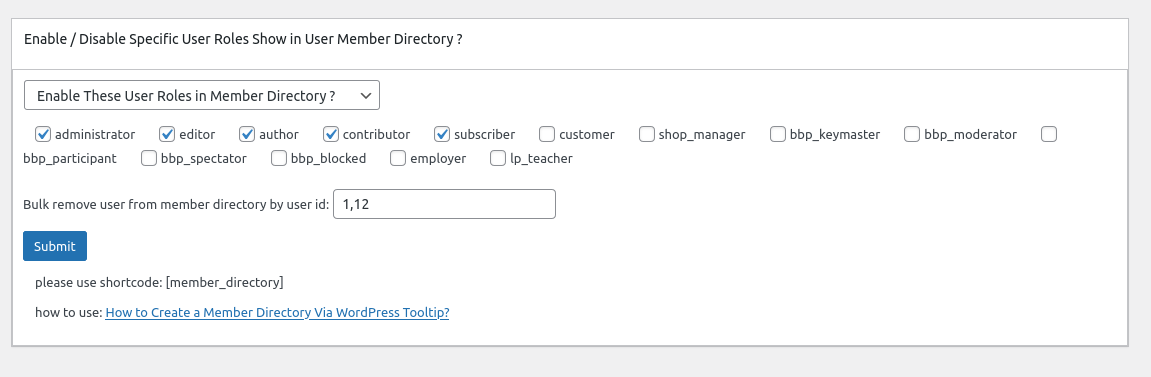
In the new version wordpress tooltips pro 20.9.8. you will find there are a new option “Bulk remove user from member directory by user id in wordpress tooltip”, it looks like this:

In here you can bulk enter user ids to exclude specific users from wordpress member directory in one time.

4: In front end, users which added in the “Bulk remove user from member directory by user id in wordpress tooltip” option, will be removed from wordpress member directory 🙂

Thanks for the great feedback,we give the user a license of “WordPress live link preview plugin with tooltip” plugin as a THANKS, Live link preview is a light and fast and powerful plugin to display live link preview for your wordpress users.

when users mouse hover a link on your wordpress post, WordPress live link preview plugin will display the live preview screenshot of the site in a wordperss tooltip popup window, users will see where you are sending them.

If you have any more feature request or question for wordpress tooltip plugin, please don’t hesitate to contact us, we are happy to improve wordpress tooltip for you always, and we will give you a few license of our amazing wordpress plugins too 🙂


Tagged with: ,

WordPress Tooltips pro plus 21.7.8 and WordPress Tooltips pro 16.8.2 and WordPress Tooltip free 8.6.9 Released

Hi dear WordPress tooltip users, hope this message find you are doing well and have happy weekend with your family 🙂  We have released WordPress Tooltips pro plus 21.7.8 and WordPress Tooltips pro 16.8.2 and WordPress Tooltip free 8.6.9 , based on a wordpress tooltip free user’s feedback 🙂

The wordpress tooltip user told us after import tooltips from csv file, the tooltips in the frontend interface are somewhat confusing, our wordpress tooltip developer checked his site and lost the whole night to developed a new version to fix the problem for the amazing user 🙂

When you have a time, please upgrade to the latest wordpress tooltips plugin version  🙂

What’s next? We are developing a new version of ACF tooltip addon, in which we can support more new complex fields from ACF pro , in last version, we have support display tooltips effect on most ACF fields of ACF free and ACF Pro in front end, we will add some ACF tooltip function  of ACF free version to wordpress tooltips free, and we are enhance our woocommerce product directory function for wordpress tooltips pro plus, we will move some of woocommerce directory functions to wordpress tooltips free version too. 🙂

Thanks, have a blessed day with your family

Best Regards,

WordPress tooltip plugin support

Tagged with: , ,

WordPress Tooltips pro plus 21.6.8 — wordpress tooltips pro 16.7.6 — wordpress ACF group 1.1.0 Released

Hi dear WordPress tooltip users, hope this message find you are doing well and have happy days with your family 🙂 An amazing wordpress acf tooltip user created a ticket and he told us after enable wp_debug, he found php warning, we released wordpress tooltips pro plugin 21.6.8 and wordpress tooltips pro plugin 16.7.6 to fix this php warning error 🙂

Thanks for the great bug report, we give the great wordpress tooltip plugin user a THANKS — we added license of smart content link with tooltip plugin in his account — which allows wordpress editor to easily add contextual content links within the body of your article. These smart links are designed to provide readers with quick access to related resources and information, making it easier for them to learn more about the topic at hand. Try it out today and see how smart links can enhance your content!

Also we have released wordpress advanced custom field (ACF) group plugin 1.1.0, in this version we improved UI of ACF fields in front-end in wordpress post, WordPress ACF GROUP plugin by wordpress tooltips is a ACF (Advanced custom fields) plugin to print the values and labels of all fields from a ACF group 🙂

Thanks for the great feedback, if you have any more question or feature request, please don’t hesitate to contact us 🙂

We are very happy to help you 🙂


Thanks, have a blessed day with your family

Best Regards,

WordPress tooltip plugin support

Tagged with: , , , ,

What is the way to show in the title of every product a woocommerce tooltip with the description of the product

Hi dear WordPress tooltip users, hope this message find you are doing well and have happy days with your family An amazing woocommerce tooltip user created a topic on our woocommerce tooltip support forum, he asked us: “Hi guys, I’m using Tooltip Pro+ and I’m wondering what is the way to show in the title of every product a Tooltip with the description of the product?”  We’d  like write a detailed document for the woocommerce tooltip user 🙂

What’s the benefit to add woocmmerce tooltip on woocommerce product title?

Woocommerce can add woocommerce tooltip on product title in the shop page or product page to enhance the user experience and provide more information about the product, for example, woocommerce shop owner can provide some quick information about the product, such as its main features, benefits, or any other information that a buyer might be interested in knowing before making a purchase, woocommerce  shop owner can insert tooltips videos / audios / images / coupon codes / payment QR code…etc in the tooltip popup box,  this way, the buyer can have access to important information at a glance without having to click on each product individually to view the details  🙂

How to  to add woocmmerce tooltip on woocommerce product title?

Tooltips are small pop-up window that appear when the mouse cursor hovers an element. In this case, the woocommerce admin can add a tooltip to the product title in the shop page, which will show additional information about the product when the user hovers over it with their mouse, it is very easy to add tooltip on woocommerce title quickly:

1: Login  woocommerce tooltip plugin site to download wordpress tooltip pro plus plugin

2: login your wordpress  dashboard, upload woocommerce tooltip plugin via your wordpress plugins panel,then activate woocommerce tooltip plugin

3: Click “Tooltips” menu item, then click “Addons” sub menu item to open “Tooltips Addon settings” panel

4: In “Tooltips Addon settings” panel, you will find 18 wordpress tooltip addons, please enable “Tooltips for WooCommerce Product” addon and click “Update Now”  button,  it looks like this:

5: Click tooltips menu again
6: Click “woo tooltips” sub menu item, it looks like this:

tooltip sub menu items

tooltip sub menu items

7: Then you will open “Advanced WooCommerce Tooltips Addon Settings” panel, it looks like this:

advanced woocommerce tooltips addon settings

advanced woocommerce tooltips addon settings

8: Please enable “Tooltips for WooCommerce Product Title.

Then in the front end, woocommerce tooltip plugin will detect are there tooltip term in woocommerce product title and add  tooltip effect on woocommerce product title automatically 🙂

Hope this have a little help 🙂

Thanks, have a blessed day with your family 🙂

Best Regards,

WordPress tooltip plugin support

Tagged with: , , ,

How to use woocommerce tooltip to add a Tooltip to a WooCommerce product attribute?

Hi dear WordPress tooltip users, hope this message find you are doing well and have happy days with your family 🙂 We get a ticket from a wordpress tooltip user, he asked us a question “How to use woocommerce tooltip to add a Tooltip to a WooCommerce product attribute?”, by wordpress tooltip,  woocommerce shop owner can add tooltip on woocommerce product attribute easily, we believe there are more woocommerce tooltip user have similar question, we are happy to write a detailed document to help the user to understand how woocommerce tooltip can add a tooltip to woocommerce attribute. 🙂

What’s the benefit to add wordpress tooltip on woocommerce product attribute?

adding a tooltip to a woocommerce product attribute can provide additional information to customers about the attribute. For example, if the attribute is “material”, a tooltip could provide more information about the specific type of material used for the product via add video tooltip or audio tooltip on the materail attribute. This can help customers make more informed purchasing decisions and improve their overall shopping experience. Additionaly, tooltips can also help reduce the amount of customer support inquires related to product attributes, as customers can quickly find the information they need on the product page 🙂

How to add wordpress tooltip on woocommerce product attribute?

it is very easy to add tooltip on woocommerce attribute quickly:

1: Login  woocommerce tooltip plugin site to download wordpress tooltip pro plus plugin

2: login your wordpress  dashboard, upload woocommerce tooltip plugin via your wordpress plugins panel,then activate woocommerce tooltip plugin

3: Click “Tooltips” menu item, then click “Addons” sub menu item to open “Tooltips Addon settings” panel

4: In “Tooltips Addon settings” panel, you will find 18 wordpress tooltip addons, please enable “Tooltips for WooCommerce Product” addon and click “Update Now”  button,  it looks like this:


woocommerce tooltip addon

5: Click tooltips menu again
6: Click “woo tooltips” sub menu item, it looks like this:

tooltip sub menu items

tooltip sub menu items

7: Then you will open “Advanced WooCommerce Tooltips Addon Settings” panel, it looks like this:

advanced woocommerce tooltips addon settings

advanced woocommerce tooltips addon settings

8: Please enable “Tooltips for WooCommerce Product Attribute”, also please enable all other 7 woocommerce tooltip options.

Then in the front end, you will find woocommerce tooltips works well on woocommerce product attribute labels, it looks like this:

tooltips for woocommerce product additional information

Please note, you need add some tooltips first, if you are new users of woocommece tooltip, please check our wordpress tooltip video tutorials to learn how to create a tooltip term easily, and you can customize style for each toolip term to make a colorful woocommerce tooltip to cache the user’s attention, for example:

woocommerce attribute tooltip

Also woocommerce tooltip will add tooltip effect on woocommerce desprition and short descriptuion too, and you can use shortcode to add advanced woocomemrce tooltip content in woocommerce product description too

And you can add a woocommerce glossary for your product to help customer understand the benefit / performance of your product too.

By the way, you can display woocommerce product title, image, price with “add to cart” button, “view cart button” in wordpress tooltip in any wordpress post via Woocommerce product cart anywhere , something looks like it in tooltip popup:


 This will increase the visibility and sales of those products in any where in your woocommerce site
If you have any question or suggestion of woocommerce tooltip plugin, please don’t hesitate to conact us
Thanks, have a blessed day with your family
Best Regards,
WordPress Tooltip Plugin Support Team
Tagged with: , , , ,

WordPress Tooltips Pro + 21.4.8 and wordpress tooltips pro 16.6.6 released

Hi, Dear users of WordPress Tooltip , hope this message find you are doing well and having happy days with your family.   We just released new version of WordPress Tooltips Pro + 21.4.8 and wordpress tooltips pro 16.6.6, to follow wordpress security standard to use sanitize_text_filed function to enhance the security in the wordpress tooltip post types setting panel 🙂

In wordpress tooltip post types setting panel, worpress tooltip plugin editor can choose to restrict tooltip from displaying only in the specified custom post type, we developed this function is based on an amazing wordpress tooltip user’s suggestion, he said he like use wordpress tooltips to provide additional information or context about a particular element on wordpress post, such as buttons or images in wordpress posts, however, he do not want tooltip effect displayed in his lessons custom post type, in this case, tooltip can be a distraction to student, by select specified wordpress standard post type and custom post type, you can avoid this kind of annoyance. 🙂

At the same time, wordpress tooltip plus plugin support add tooltips effect on anything in your wordpress pages — if they have a CSS class or CSS ID, we call this tooltips for anything

Also wordpress tooltip pro plus plugin support reuse wordpress standard post type or wordpress custom type post as tooltip content and title, this will help wordpress blogger  make tooltips for reader fast 🙂

Thanks for great suggestions to wordpress tooltips plugin, if you have any question or feature request, please don’t hesitate to contact us 🙂


Thanks, have a blessed day with your family

Best Regards,

WordPress tooltip plugin support

Tagged with: , ,

How to running tooltip shortcode in the Title attribute of image? Supported by wordpress tooltips plus 21.3.8

Hi, Dear WordPress Tooltip users, hope this message find you are doing well and having happy days with your family. 🙂 In last days, based on amazing wordpress tooltip user’s feature request, we are try out best to support display tooltips pip with video or image for images in the photo gallery, via add tooltip shortcode into alt field of images in photo gallery, today our wordpress developer said we can do more things for wordpress photo glossary plugin users, we can do more things for wordpress image tooltip users, we developed a new version wordpress tooltips pro plus 21.3.8 to support insert tooltip shortcode in the title attribute of wordpress images 🙂

We understand these functions will extend functionality of wordpress photo gallery plugins, and displaying tooltip popups with multimedia like video or image for images will enhanced user experience, that means wordpress tooltip popups can provide additional information or media content related to the image, for example, if you displaying a horse image , you can add a horse video for the horse image, by providing additional media content or information, users may be encouraged to spend more time on your wordpres site and engage with the content. 🙂

Also a few wordpress photo gallery plugin display small photos on the photo gallery page, users who may have difficulty viewing small photos on a wordpress site can benefit from wordpress tooltip popups, as they can provide a larger view of the image or additional content for their wordpress photo gallery by insert tooltip shortcode in the ALT field or Title field in images. 🙂

How to running tooltip shortcode in the Title attribute of image?

1: please login wordpress tooltip site to download wordpress tooltips pro plus versions >= 21.3.8

2: upload the wordpress tooltip zip file and activate wordpress tooltips pro plus on your wordpress site

3: in wordpress dashboard, click tooltips menu, then click optional settings sub menu item

4: in wordpress tooltips global settings panel, enable the option ” Enable Tooltips for Image”, it looks like this:

Enable Tooltips for Image


5: in wordpress tooltips global settings panel, in the option “Tooltips for Image setting”, select “”

6: click tooltips menu item and click optional sub menu item, you will open the wordpress tooltip optional settings panel, at the bottom of the wordpress tooltips optional settings panel, you will find the new option ” Running tooltip shortcode in the title attribute”, just enable it

7: then in your wordpress editor, you can insert tooltip shortcodes into image Text attribute of images in your image like this:

use title attribute in image as content of wordpress tooltipuse title attribute in image as content of wordpress tooltip

In this screen, you will find in the title field, we inserted tooltip shortcode [tt_content_by_id tooltip_id='4090'], and then in the front-end, you will see the result like this:

image alt tooltip shortcode effect on wordpress front end

As you can see, when mouse hover the image, we displayed another image with formatted HTML content with links in the wordpress tooltip pop-up window

By running tooltip shortcode in the Title attribute of image or running tooltip shortcode in the ALT attribute of image of wordpress photo gallery, yuo can adding wordpress tooltip popups with video or image to photo gallery can provide server benefits that can improve wordpress site usablity, engagement…etc


Thanks, have a blessed weekend with your family

Best Regards,

WordPress Tooltip plugin Support

Tagged with: , ,

How to insert tooltip shortcodes in the ALT attribute of image in a few photo gallery plugins or in the ALT field of an image? Wordperss Tooltips Plus 21.2.8

Hi, Dear users of WordPress Tooltip plugin, hope this message find you are doing well and having happy weekend with your family. We finished a new wordpress tooltips pro plus 21.2.8, support insert tooltip shortcodes in the ALT attribute of image in a few photo gallery plugins or in the ALT field of an image 🙂

A few days before, we reported: When mouse hover an image, how to display images and multimedia content via image ALT field? Supported by wordpress tooltips pro plus 20.9.8

When mouse hover an image, how to display images and multimedia content via image ALT field?

1: download wordpress tooltips pro plus 20.9.8 via wordpress tooltip plugin download panel

2: install wordpress tooltips pro + on your wordpress site

3: click tooltips menu item and then click global settings sub menu item

4: in wordpress tooltips global settings panel, enable the option ” Enable Tooltips for Image”, it looks like this:

Enable Tooltips for Image

Enable Tooltips for Image

5: in wordpress tooltips global settings panel, in the option “Tooltips for Image setting”, select “setting tooltip for image running as support next-gen gallery”

6:  then in your wordpress editor,  you can insert tooltip shortcodes into image ALT field of images in your image like this:

insert tooltip shortcode in alt filed of image

insert tooltip shortcode in alt filed of image

As you can see, in the ALT field, just insert tooltip shortcode [tt_content_by_id tooltip_id='306'], and then in the front-end, you will see the result like this:


image alt tooltip shortcode effect on wordpress front end

image alt tooltip shortcode effect on wordpress front end

As you can see, when mouse hover the image, we displayed another image with formatted HTML content with links in the wordpress tooltip pop-up window

Now in the new version wordpress tooltips pro plus 21.2.8, we start to support insert tooltip shortcodes in the ALT attribute of image in a few photo gallery plugins, for exaple, nextgen gallery plugin, if you upgrade to the new version, in the option panel, you can enable / disable the new option “Running tooltip shortcode in the ALT attribute of image in a few photo gallery”, then after insert tooltip shortcodes in the ALT attribute of image in a few photo gallery plugins,  when mouse hover the image,  we will display multimedia content for images in photo gallery 🙂

Also an user requested us to modify the function of “click anywhere out of tooltip window” for him again, because he found he can change an option in his slider to let it works better, and he request us customized the code for him based on the user’s third request.

Thanks, have a blessed weekend with your family 🙂

Best Regards,

WordPress Tooltip Support


Tagged with: , ,

WordPress Tooltips Pro Plus 21.1.8 and WordPress Tooltips 16.6.2 Released

Hi, Dear  WordPress Tooltip plugin users, hope this message find you are doing well and having happy weekend with your family.  we just released wordpress tooltips pro plus 21.1.8 and wordpress tooltips plugin 16.6.2, based on a few wordpress tooltips plugin user’s suggestion.

Changed in WordPress Tooltips Pro Plus 21.1.8 and WordPress Tooltips 16.6.2:

1: Improved core javascript function of tooltips

2: Improved glossary shortcode to stop glossary shortcode functions running specific shortcodes

If you have any feature request or requirement of wordpress tooltip plugins, please don’t hesitate to tell us 🙂

Thanks, have a blessed weekend with your family 🙂

Best Regards,

WordPress Tooltips Plugin Support

Tagged with:
Top