Category: Wordpress Tooltip Plugin Document

Support customize width / margin / padding of smart content link bar and margin of each link in smart content link shortcode, WordPress AI smart content link with tooltips 3.3.0 released

Hello, Esteemed users of the WordPress Tooltip plugin! I trust this message finds you in the best of spirits and enjoying a delightful holiday with your loved ones 🙂

In recent days, we have developed a new wordpress smart content link with tooltip shortcode that support display smart content  links bar in anywhere of your wordpress site, based on an amazing wordperss tooltip user’s feature request:

I would love to be able to customize multiple Smart Content Links. Specifically, I would like to showcase sequels to the current story and provide specific product links for each story. For instance, in one of my comics, there is an episode featuring flying shoes. My idea is to include an AFFILIATE link for shoes below that particular comic episode. Alongside this customization, I would greatly appreciate the ability to insert this specific Smart Content Link Bar anywhere on the page.

Then our wordpress tooltip plugin developer developed smart content link 3.2.2 to realize this great feature request .

The user installed  the new version of wordpress smart content link with tooltip plugin, he said this is what he want, and he give us a little more suggestion:

Currently, I am able to insert a customized smart content link bar anywhere on my WordPress page. It’s a wonderful addition, but I’ve noticed that all the link bars share the same background color. I was wondering if it would be possible to customize each link bar with a different background color. This way, it will enhance user attention and make the website more visually appealing.

In addition to the background color customization, if it’s feasible, I would love to have the flexibility to assign a different color to each individual link.

Our wordpress tooltip developer enhance the function of our smart content link shortcode to allow users change the background and link color in the shortcode, then yesterday we got a new feature request from the user:

Dear team,
I would like to express my utmost appreciation for the prompt release of the new version. I am genuinely pleased with the results as I have successfully installed it and witnessed its excellent performance. With this new update, I can now utilize shortcodes to insert multiple smart content link bars into my posts, each having distinct background colors. This feature is instrumental in captivating my users’ attention, encouraging them to explore comic sequels, previous episodes, and comics related to the subject matter. Such convenience fosters an enjoyable experience for my readers, enabling them to delve into a wider selection of comics.
Moreover, the ability to customize different layered colors for each link is truly remarkable. This customization empowers me to add more prominent colors that entice users to purchase my eBook product. I am immensely grateful for your invaluable support.
I do have a humble request. Can you please consider adding parameters to the shortcode that would allow me to personalize the width, margin, and padding of the smart content link bar? This enhancement would ensure a comfortable opening experience for users and better alignment with my WordPress theme.
Additionally, I’m wondering if it is feasible to customize the margin of the links within the smart content link bar itself.
Thank you once again for your remarkable assistance and responsiveness.
Warm regards,

Our wordpress tooltip developer checked this great ticket, and we developed wordpress smart content links with tooltips  3.3.0 to realize the feature for the user, now you can use the shortcode like this way:

[[scl_unique width=”80%” bg_color=”#c6d6f6″ margin=”20px” padding=”10px” link_margin=”10px” link_padding=”10px” links=”<a href=’https://bb.com’ style=’color: #e4f5d2 !important; visited: #d4c502 !important;’>document</a>,<a href=’https://yy.com’>gift card</a>,<a href=’https://cc.com’>coupon code</a>”]]

Please note, by default, the height of smart content link bar will be set as “auto”, if you did not add “width” in the shortcode,  the width of smart content link bar will be set as ‘100%’, if you did not add “bg_color” in the shortcode, by default the background  color will be set as #eeeeee 🙂

Thanks for the great so many suggestion, our wordpress tooltip developer give the amazing user another pro paid wordpress plugin developed by wordpress tooltip: WordPress Catalogs with Tooltip Plugin,  because we heard the author is selling the eBook product in his woocommerce site, wordpress catalogs plugin is a wordpress catalog maker plugin to help you build catalogs for your wordpress posts, woocommerce product… and so on. With wordpress catalogs plugin, you can list your services, goods, documents, important posts, knowledge base.. or other items in the list with image, links, price… and so on very easy with pretty effects.

Also we reported to the comic book author that our wordpress tooltips pro plugin support woocommerce tooltip too, and some users told us that our woocomemrce tooltips plugin can help them increase comic book sales!

Thanks, have a blessed day with your family

Best Regards,

WordPress tooltips plugin support
Tagged with: , , ,

Support customize colors in smart content link shortcode, WordPress AI smart content link with tooltips 3.2.4 released

Hi, Dear users of WordPress Tooltip plugin, hope this message find you are doing well and having wonderful weekend with your family:) Some days ago, we reported that we developed a new version of the Smart Content Link with tooltips plugin to support use a new shortcode [[scl_unique]] to create unlimited smart content link bar and insert different links in each dedicated smart content link bar, it works like this way:

[[scl_unique links=”<a href=’https://tooltips.org’>wordpress tooltips</a>,<a href=’https://tooltips.org/contact-us/’>contact us</a>”]]

Based on an amazing smart content link with tooltip user’s suggestion.

After released the version of wordpress AI smart content link with tooltip plugin 3.2.2, the user created another ticket:

Hi there,
I hope this message finds you well. First of all, I want to express my sincere gratitude for your efforts in developing the new version 3.2.2 of the Smart Content Links plugin. It has been a great addition to my website.
I wanted to share some feedback on the customization feature. With the latest update, I’m now able to customize multiple Smart Content Links, which is fantastic. I have utilized this feature by adding a Shoes partner link at the bottom of the Flying Shoes episode of the comic.
However, I have a further request that I hope you can assist me with. Currently, I am able to insert a customized smart content link bar anywhere on my WordPress page. It’s a wonderful addition, but I’ve noticed that all the link bars share the same background color. I was wondering if it would be possible to customize each link bar with a different background color. This way, it will enhance user attention and make the website more visually appealing.
In addition to the background color customization, if it’s feasible, I would love to have the flexibility to assign a different color to each individual link. This would provide even more versatility in presenting the content and making it more engaging for users.
Thank you again for your hard work and dedication to improving the plugin. I appreciate your consideration of my request and I’m excited to see how the Smart Content Links plugin evolves.
Warm regards,

Okay, our wordpress tooltip plugin developer checked this ticket carefully, and he said it’s great that the veteran user has come up with another very good feature request, then we released his great idea in one day, now you can create dedicated wordpress smart content link bar via shortcode and insert the shortcode in anywhere of your wordpress site, and you can insert many different links, and you can customize background for each smart content link bar by this way:

[scl_unique bg_color=”#c6d6f6″  links=”<a href=’https://bb.com’ style=’color: #e4f5d2 !important; visited: #d4c502 !important;’>document</a>,<a href=’https://yy.com’>gift card</a>,<a href=’https://cc.com’>coupon code</a>”]

As you can see, in the links, you can use CSS to add color for each links in style field.

That’s why we released WordPress AI smart content link with tooltips 3.2.4, please upgrade it asap you can 🙂

Also AI smart content link support use AI NLP(Natural Language Processing) to help you build best internal links — it is important to improve your SEO quickly, you can enter a keyword in back-end, Smart content links will ranking posts based on the best match with keywords using AI calculations. And Smart content link plugin support works well with wordpress tooltip pro plugin to add amazing extra content like videos , preview images, text , description , AD, affiliates , song…etc for each links in smart content link 🙂


Thanks, have a blessed day with your family

Best Regards,

WordPress tooltips plugin support
 

Tagged with: , , , ,

Improved the UI design of all tooltip settings panel of the WordPress tooltip plugin, WordPress tooltip plugin pro plus 27.5.8 released

Hi Merry Christmas!

Dear users of  WordPress Tooltip plugin,  hope this message find you are doing well and having wonderful holiday with your family:) We just released wordpress tooltips pro plus 27.5.8 in which we improved the UI design of all tooltip settings panel of the WordPress tooltip plugin 🙂

Just like we reported in Improved the UI design of the tooltip global settings panel of the WordPress tooltip plugin some days ago, an UI designer told us:

I noticed a minor issue in the Tooltips Global Settings panel of the WordPress Tooltips plugin. The titles and content in each panel are not aligned to the left. There seems to be a 5px difference in the padding-left. Would it be possible to address this issue?

We fixed the problem asap once we get the feedback, then our wordpress developer checked all settings panels in wordpress tooltips pro plus plugin, and we have improved the UI design or all settings panel in the new version wordpress tooltips pro plus 27.5.8 🙂

The settings panel affected by this new version includes:

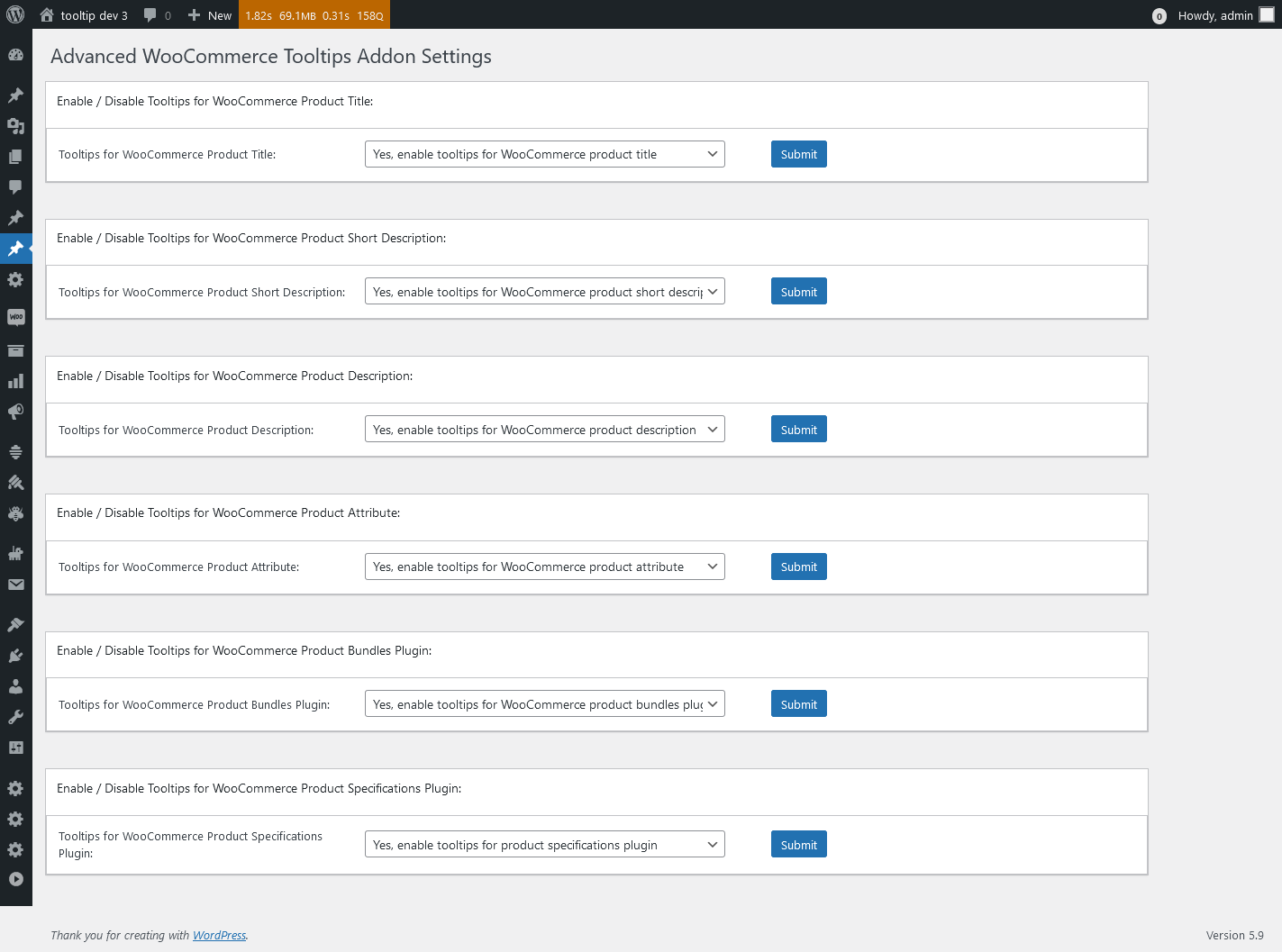
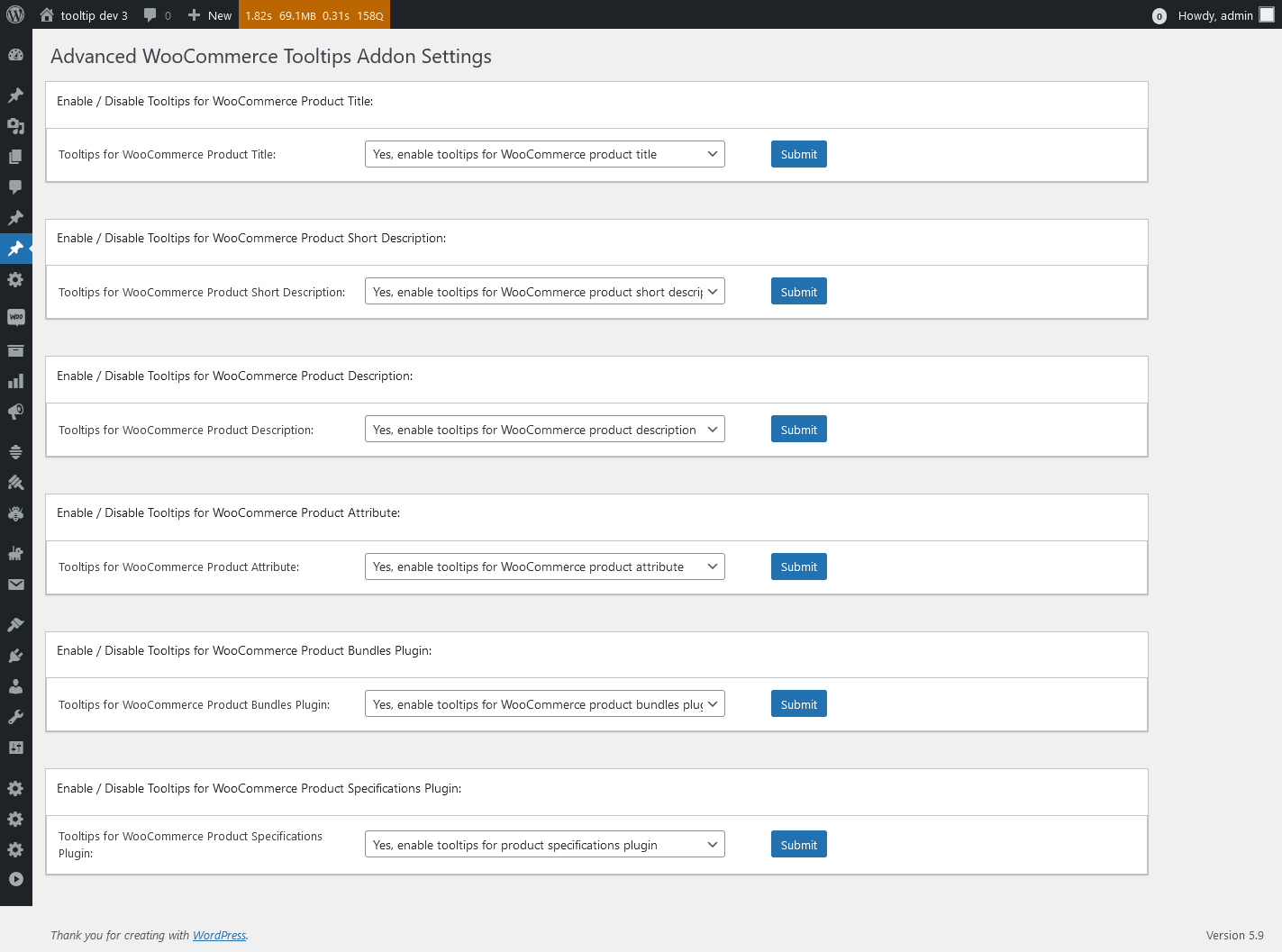
1: Advanced WooCommerce Tooltips Addon Settings, it looks like this:

Advanced WooCommerce Tooltips Addon Settings in wordpress tooltips pro plus 27.5.8

Advanced WooCommerce Tooltips Addon Settings in wordpress tooltips pro plus 27.5.8

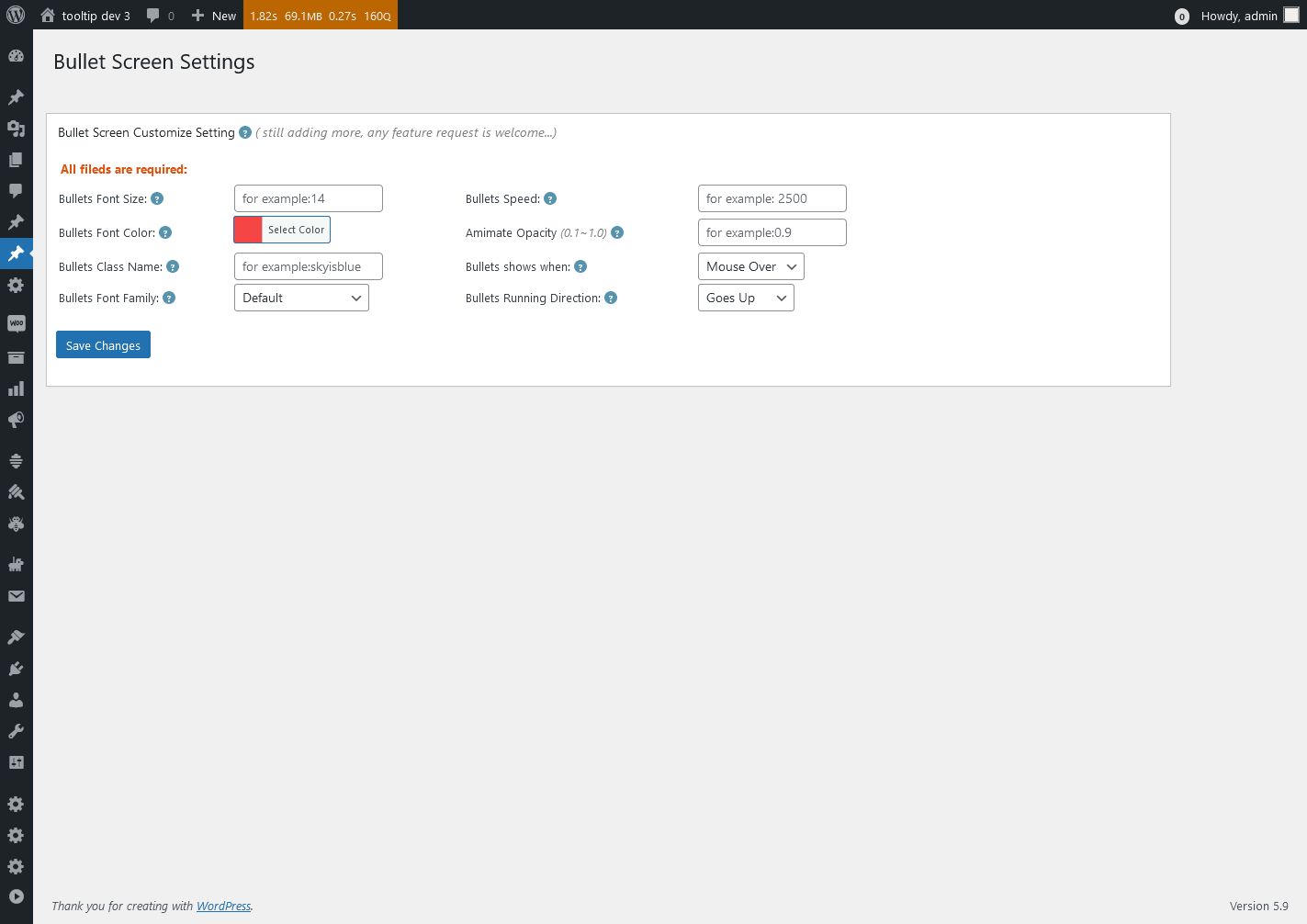
2: WordPress Bullet Screen Settings, it looks like this:

Bullet Screen Settings in wordpress tooltips pro plus 27.5.8

Bullet Screen Settings in wordpress tooltips pro plus 27.5.8

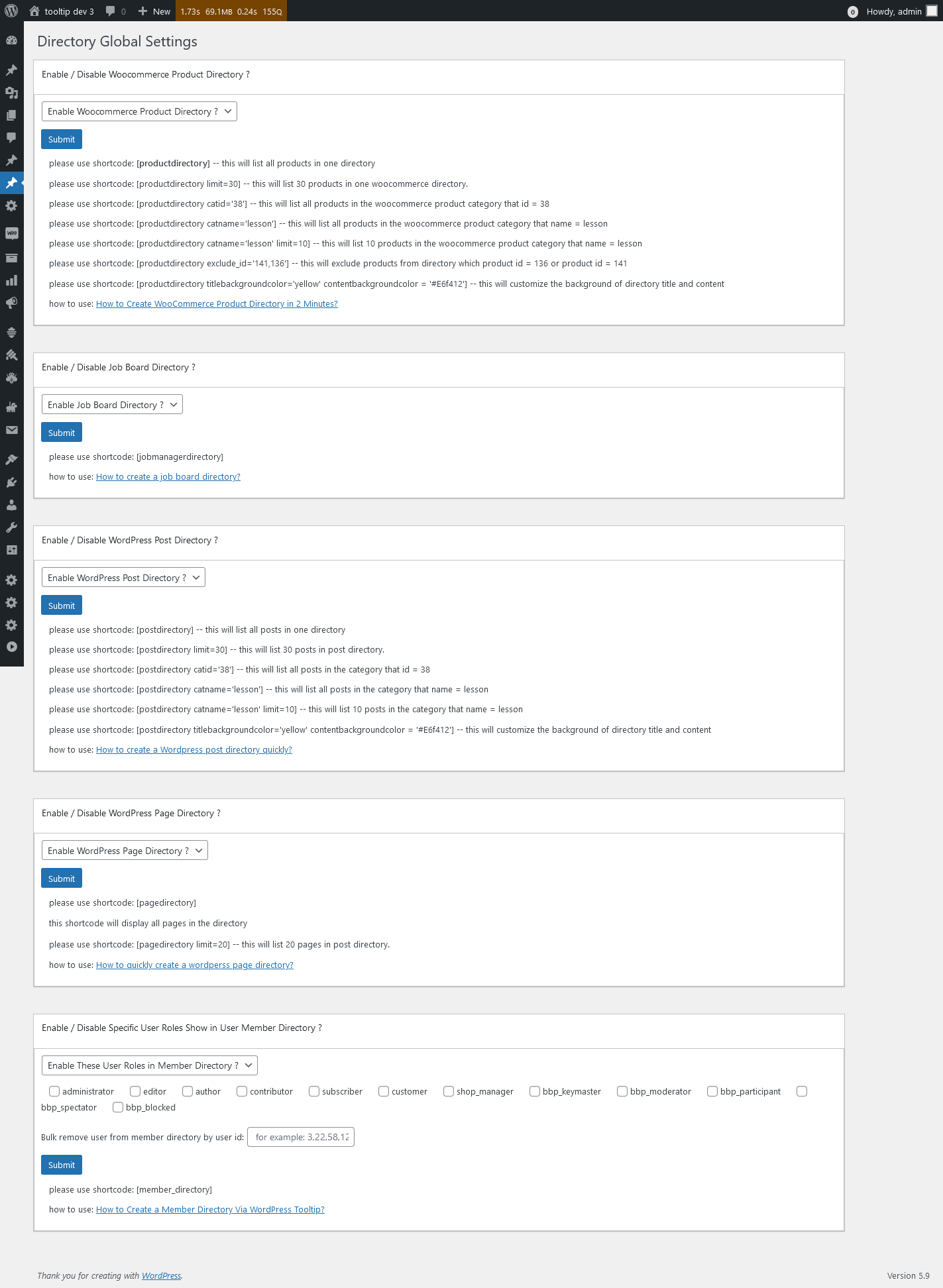
3: WordPress Directory Global Settings, it looks like this:

Directory Global Settings in wordpress tooltips pro plus 27.5.8

Directory Global Settings in wordpress tooltips pro plus 27.5.8

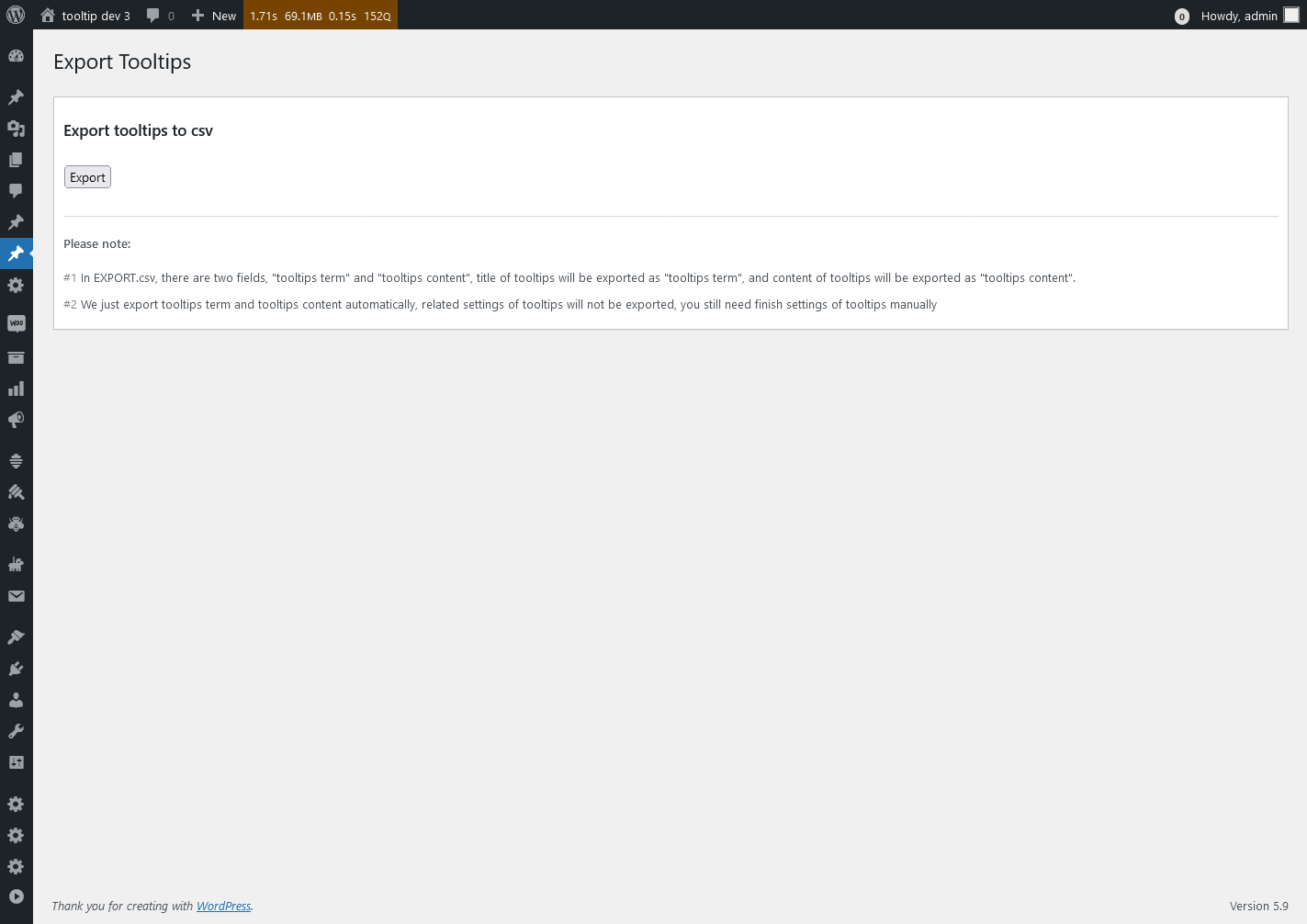
4: Export Tooltips panel, it looks like this:

Export Tooltips in wordpress tooltips pro plus 27.5.8

Export Tooltips in wordpress tooltips pro plus 27.5.8

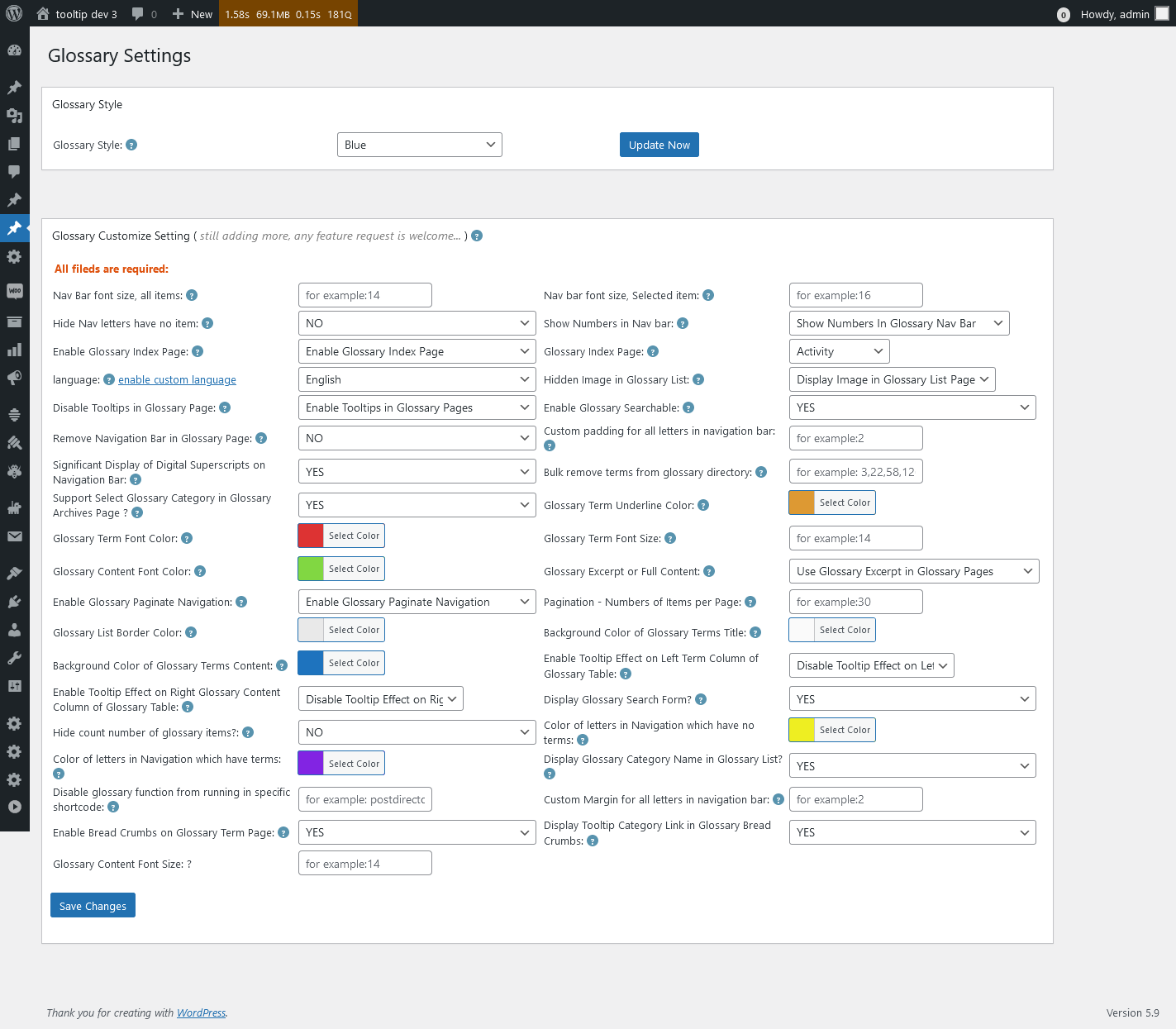
5: WordPress Glossary Settings panel, it looks like this:

Glossary Settings in wordpress tooltips pro plus 27.5.8

Glossary Settings in wordpress tooltips pro plus 27.5.8

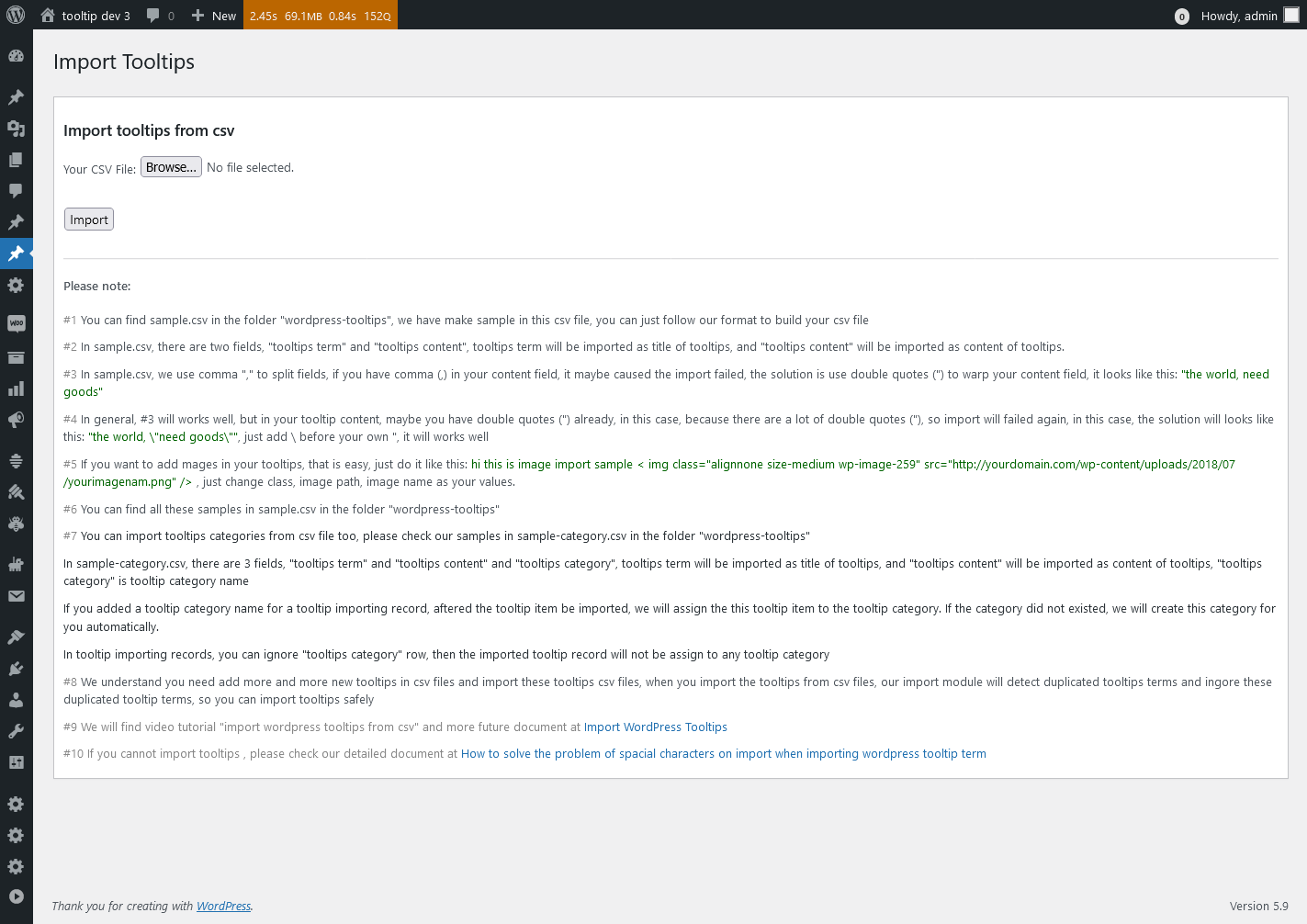
6: Import Tooltips panel , it looks like this:

Import Tooltips panel in wordpress tooltips pro plus 27.5.8

Import Tooltips panel in wordpress tooltips pro plus 27.5.8

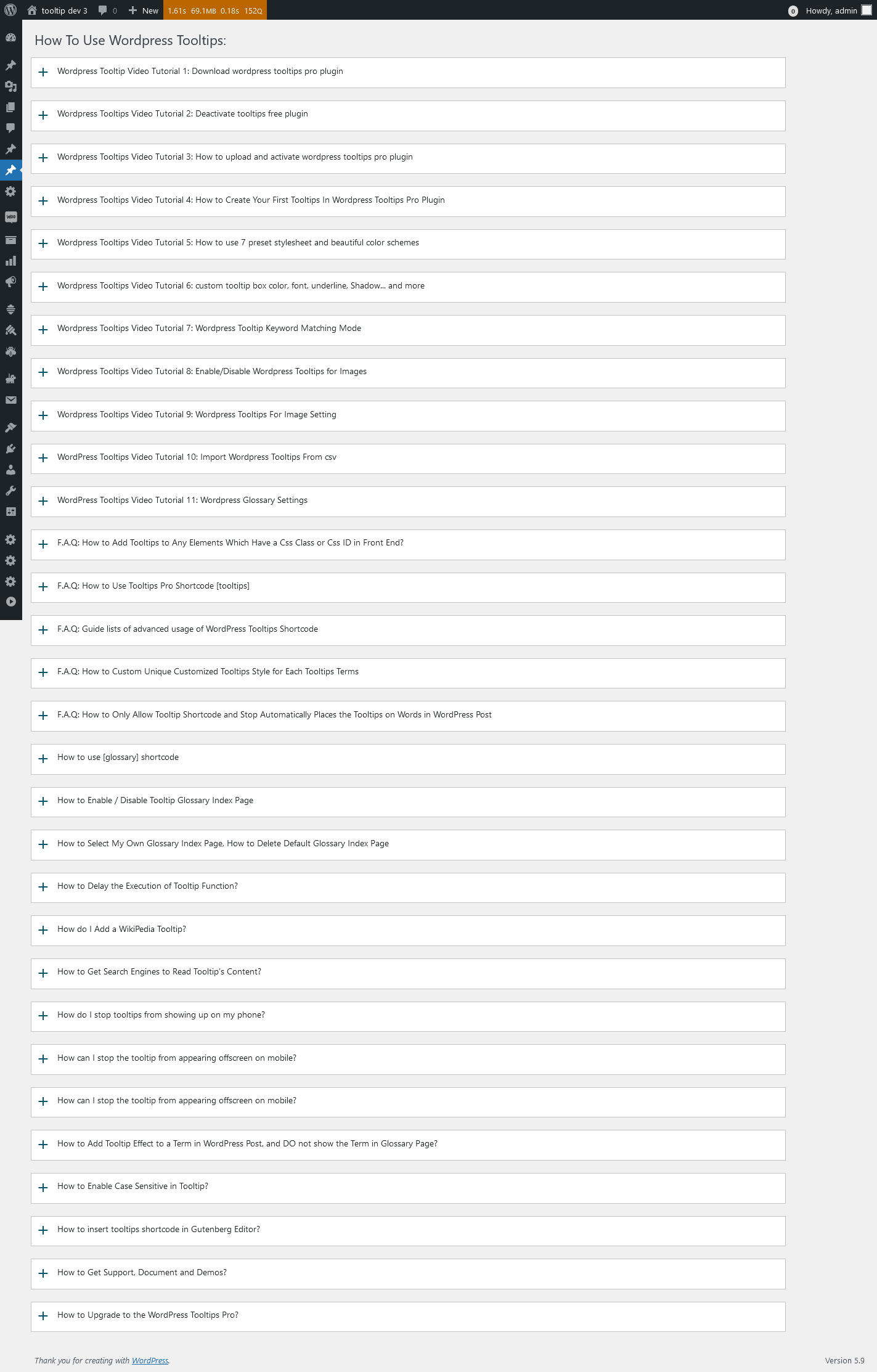
7: wordpress knowledge panel, it looks like this:

knowledge panel in wordpress tooltips pro plus 27.5.8

knowledge panel in wordpress tooltips pro plus 27.5.8

8: Reset WordPress Tooltips panel, it looks like this:

Reset Tooltips in wordpress tooltips pro plus 27.5.8

Reset Tooltips in wordpress tooltips pro plus 27.5.8

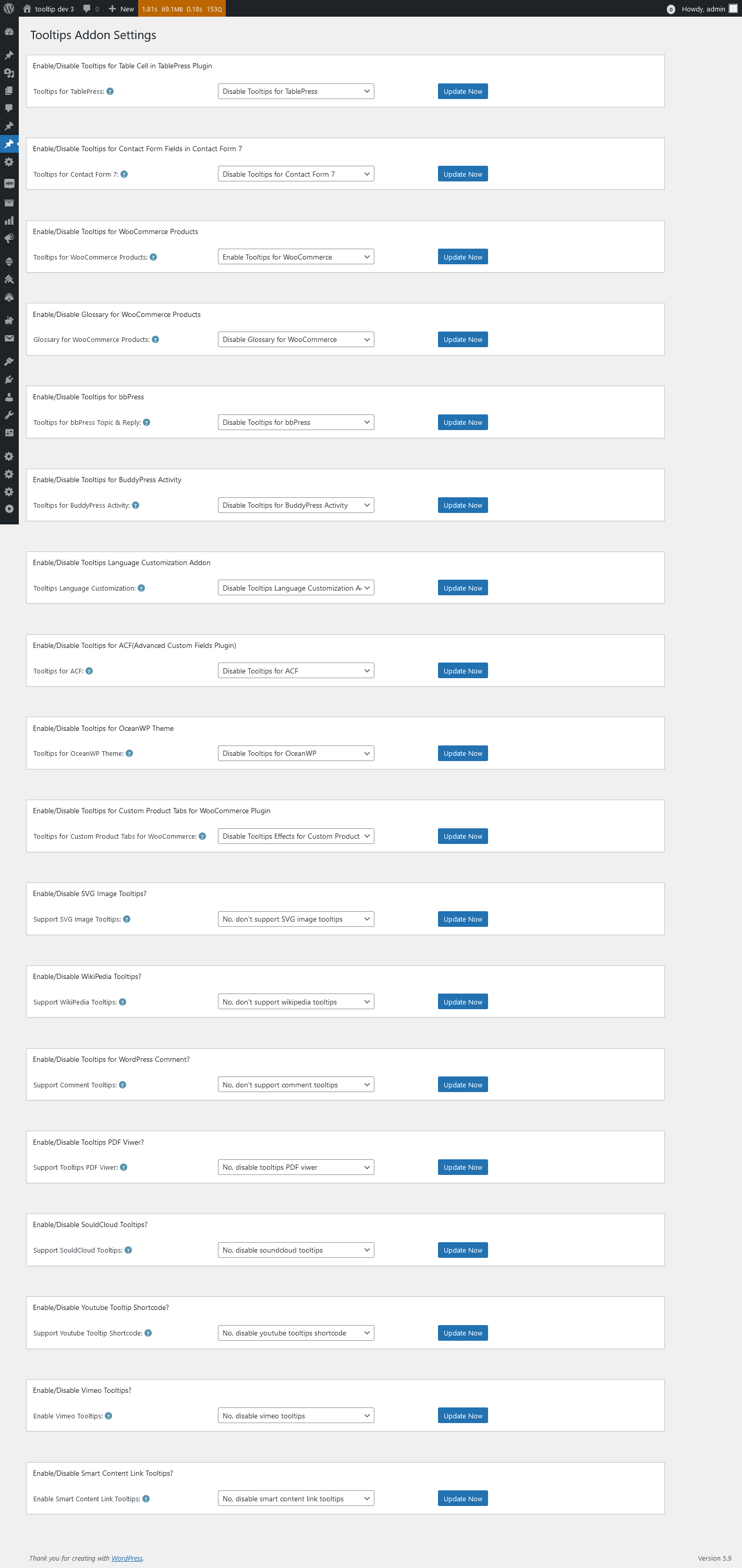
9: WordPress Tooltips Addon Settings panel, it looks like this:

Tooltips Addon Settings in wordpress tooltips pro plus 27.5.8

Tooltips Addon Settings in wordpress tooltips pro plus 27.5.8

10 WordPress Tooltips Global Settings panel, it looks like this:

Tooltips Global Settings in wordpress tooltips pro plus 27.5.8

Tooltips Global Settings in wordpress tooltips pro plus 27.5.8

11: WordPress tooltips plugin menu, it looks like this:

tooltips menu in wordpress tooltips pro plus 27.5.8

tooltips menu in wordpress tooltips pro plus 27.5.8

12 WordPress Tooltips Optional Settings panel, it looks like this:

Tooltips Optional Settings in wordpress tooltips pro plus 27.5.8

Tooltips Optional Settings in wordpress tooltips pro plus 27.5.8

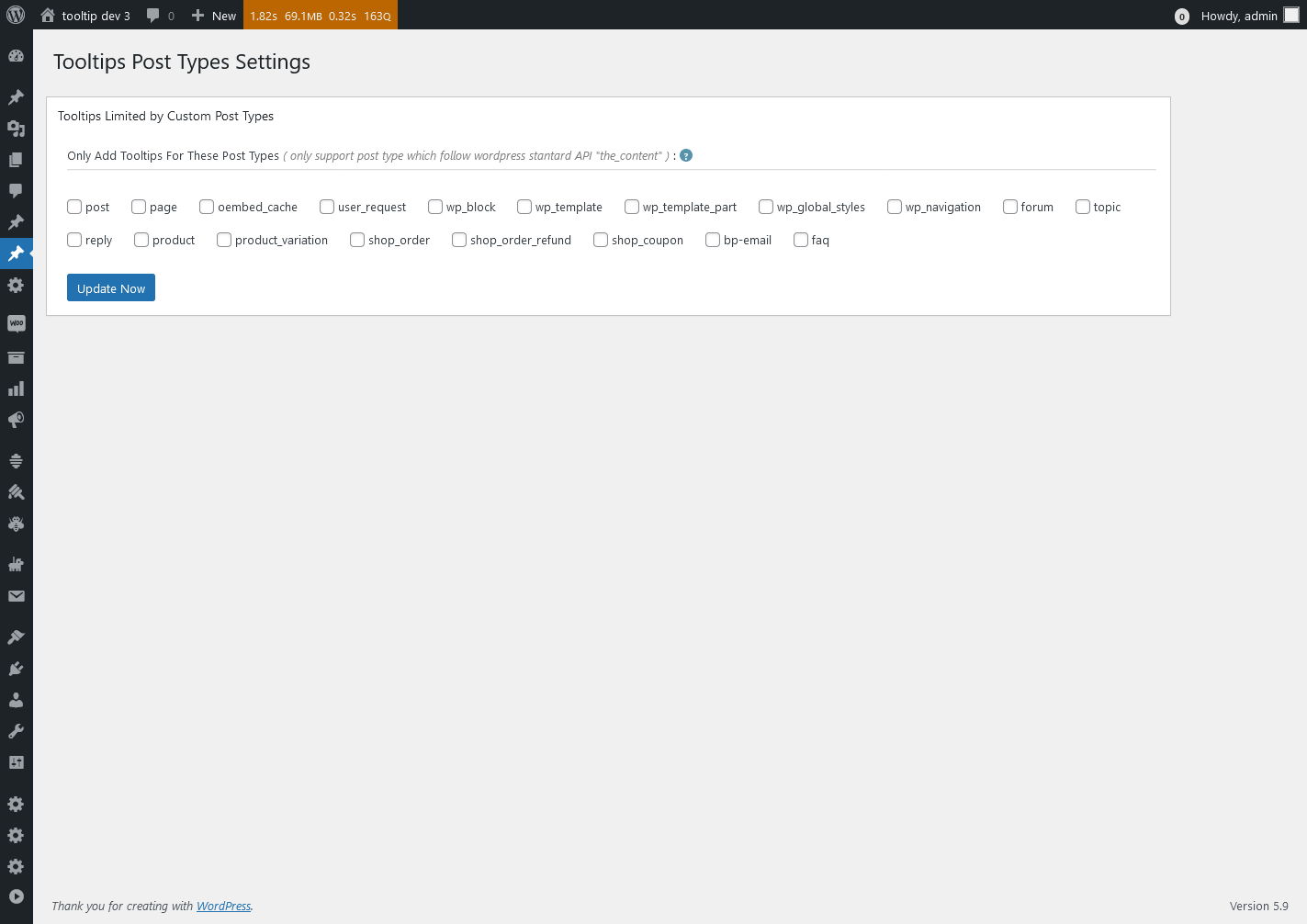
13 WordPress Tooltips Post Types Settings panel, lt looks like this:

Tooltips Post Types Settings in wordpress tooltips pro plus 27.5.8

Tooltips Post Types Settings in wordpress tooltips pro plus 27.5.8

14 WordPress Tooltips Style Settings panel, it looks like this:

Advanced WooCommerce Tooltips Addon Settings in wordpress tooltips pro plus 27.5.8

Advanced WooCommerce Tooltips Addon Settings in wordpress tooltips pro plus 27.5.8

Thanks for the great suggestion, this has helped us not only to improve our UI design, but also to make the interface more comfortable for all wordpress tooltip users. We give the user a license of AI Smart Content Links plugin, which will enhance your website’s content and uplift the user experience with the powerful Smart Content Links plugin. By seamlessly integrating links to relevant content within your WordPress blog posts, you can effortlessly provide valuable context, information, and resources to your readers. These intelligent links are engineered to grant quick access to related resources and information, enabling your audience to delve deeper into the topic at hand while maintaining uninterrupted flow and focus on your core message.
Leveraging the cutting-edge AI-driven Natural Language Processing (NLP), Smart Content Links empowers you to bolster your SEO efforts efficiently. With its intuitive backend interface, simply input a keyword, and the plugin will leverage AI algorithms to rank and match posts, ensuring optimal alignment between content and keywords. 🙂


Thanks, have a blessed day with your family

Best Regards,

WordPress tooltips plugin support
 

Tagged with: , ,

New shortcode to support display related links bar in anywhere, wordpress AI smart content link with tooltips 3.2.2 released

Hi, Dear   WordPress Tooltip plugin users, hope this message find you are doing well and having wonderful weekend with your family:) An amazing users of wordpress AI smart content link with tooltip plugin wrote to us:

Dear developer,
I hope this message finds you well! First and foremost, I want to express my utmost gratitude for developing the amazing AI Smart Content Link plugin. Let me start by saying that I am absolutely thrilled with its functionality and the positive impact it has had on my comic website.
By using the Smart Content Link feature to display related articles about the background stories of my comics, I have witnessed a significant boost in user engagement. The users have been able to browse and visit other related content, which has truly stimulated their interest. The results have been remarkable! According to Google’s web analytics tool, the number of pageviews for tied-breaking stories has increased from 3 to 7. Additionally, the average time users spent on the site has doubled. Not only that, but the AI Smart Content Link has also led to a substantial increase in my ad revenue. It’s truly outstanding!
I genuinely love your plugin and the value it brings to my website. However, I do have a suggestion that I believe could further enhance its versatility. I would love to be able to customize multiple Smart Content Links. Specifically, I would like to showcase sequels to the current story and provide specific product links for each story. For instance, in one of my comics, there is an episode featuring flying shoes. My idea is to include an AFFILIATE link for shoes below that particular comic episode. Alongside this customization, I would greatly appreciate the ability to insert this specific Smart Content Link Bar anywhere on the page. This flexibility would allow me to maximize the plugin’s benefits.
Once again, I want to congratulate you on developing such a successful plugin. The inclusion of relevant links on the page has effectively guided my users to explore more associated stories, resulting in a substantial increase in pageviews. Thank you once more for your outstanding work, and I sincerely hope that you continue to achieve great success!
Warmest regards,

Our wordpress tooltip plugin developer checked this ticket, we have developed a shortcode [[scl]] in smart content link plugin,  it will display all global smart content links in one smart content link bar, however, this amazing user want to to customize many smart content link bar with different links, so we can not re-use [[scl]] shortcode, we had to develop a new shortcode to realize this great feature request 🙂

In the new version wordpress smart content link with tooltip plugin 3.2.2, you can use a new shortcode [[scl_unique]] to make unlimited smart content link bar and insert different links in each smart content link bar, it works like this way:

[[scl_unique  links=”<a href=’https://tooltips.org’>wordpress tooltips</a>,<a href=’https://tooltips.org/contact-us/’>contact us</a>”]]

You can insert unlimited links in the smart content link bar, just separate different links with comma 🙂

Also you can install wordpress tooltips pro plugin to enhance the function of smart content links, when users house mover a links, they can get video, audio , text , images, content of affiliate, product related with the link….more related links…etc 🙂

Thanks, have a blessed day with your family

Best Regards,

WordPress tooltips plugin support


Tagged with: , , ,

WordPress FAQ with tooltips pro 4.7.6 Released

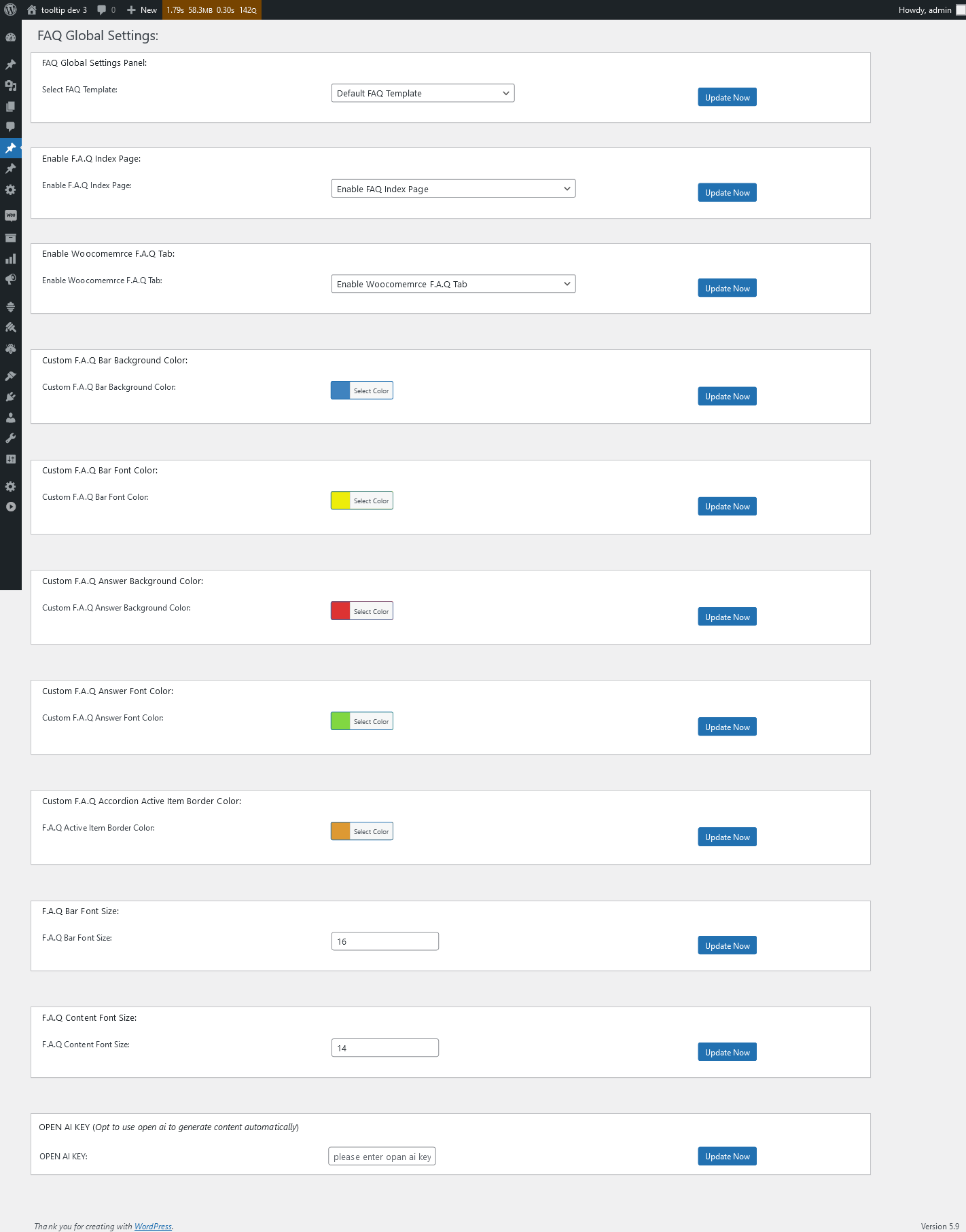
Hi, Dear   WordPress Tooltip plugin users, hope this message find you are doing well and having wonderful weekend with your family:) We just released wordpress faq with tooltips pro 5.7.6,in this version, we re-designed our WordPress FAQ global settings panel, the new WordPress FAQ global settings panel looks like this:

wordpress faq global settings panel in 4.7.6

As you can see, the new wordpress FAQ plugin interface is more colorful and powerful, you can select the pre-designed FAQ template through the FAQ TEMPLATE of wordpress FAQ with tooltip pro, you can also select the color through the wordpress color You can customize the color and background of all components of wordpress FAQ with tooltip pro, including wordpress faq with tooltip pro FAQ answer, FAQ question, FAQ bolder…etc. You can also customize the color and background of all components of wordpress FAQ with tooltip pro. .etc, you can also customize fonts for all wordpress faq with tooltip pro components, you can also allow WOOCOMMERCE FAQ TAB to add FAQ TAB to your WOOCOMMERCE products, or allow the use of FAQ AI WRITER to automatically write FAQ content or automatically write WordPress posts…. .etc

The WordPress FAQ Pro plugin seamlessly integrates with the WordPress Tooltips plugin, offering a comprehensive solution. The FAQ editor allows you to enrich your FAQ questions and answers by incorporating various media elements such as videos, audios, images, texts, links, music, YouTube videos, films, and more into the tooltip terms. We are adding more and more amazing features into wordpress FAQ with tooltips plugin, based on user’s feedback,  If you have any further questions or suggestions for new features, please feel free to reach out to us. We are dedicated to continuously improving the functionality of the WordPress FAQ plugin to better serve your needs.


Thanks, have a blessed day with your family

Best Regards,

WordPress tooltips plugin support
Tagged with: , , ,

Improved the UI design of the tooltip global settings panel of the WordPress tooltip plugin, WordPress tooltip plugin pro plus 27.4.8 released

Hi, Dear   WordPress Tooltip plugin users, hope this message find you are doing well and having wonderful days with your family:) We got a feedback from an UI designer:

Hello,
I hope this message finds you well. First of all, let me express my appreciation for your WordPress Tooltips Pro Plus plugin. I am a loyal user and I truly enjoy its powerful and outstanding features. I use WordPress Tooltips to showcase my design portfolio, including design illustrations, videos, and the final website effects.

Recently, I upgraded to a newer version of the WordPress Tooltips plugin and as a UI designer, it is in my nature to provide feedback. My job involves understanding user requirements, coming up with creative ideas, and creating design solutions, including interface design, color palettes, and layout arrangements. Based on prototypes and design plans, I work on detailed interface designs, including design illustrations, icons, buttons, as well as page layout, color schemes, and visual effects.

I noticed a minor issue in the Tooltips Global Settings panel of the WordPress Tooltips plugin. The titles and content in each panel are not aligned to the left. There seems to be a 5px difference in the padding-left. Would it be possible to address this issue?

Thank you for your attention and I look forward to your response. Your dedication to providing users with an exceptional experience is truly commendable.
Best regards,


Our wordpress tooltip developer checked this ticket and we tried our best to fixed it asap we can ( in one hour ), please upgrade to wordpress tooltips pro plus 27.4.8 to check the new UI of global settings panel, we are checking other panel and we will fix this UI problem asap we can  🙂

We appreciate your suggestion and our developers sent you a license for the WordPress live link preview plugin with tooltip plugin because you mentioned “I use WordPress Tooltips to showcase my design portfolio, including design illustrations, videos, and the final website effects. I use WordPress Tooltips to showcase my design portfolio, including design illustrations, videos, and the final website effects.”, our developers thought it might be a good way to impress your clients if you could show them how your website looks in real time 🙂   Live link preview is a light and fast and powerful plugin to display live link preview for your wordpress users.  when users mouse hover a link on your wordpress post, WordPress live link preview plugin will display the live preview screenshot of the site in a wordperss tooltip popup window, users will see where you are sending them.

If you have any more question or feature request, please don’t hesitate to contact us, we are very happy to improve wordpress tooltips plugin for you, and we always offer gift as THANKS for your suggestion

Thanks, have a blessed day with your family

Best Regards,

WordPress tooltips plugin support
Tagged with: , , ,

Customize FAQ question font size, wordpress faq pro with tooltips 4.6.6 released

Hi Dear users of  WordPress Tooltip plugin, hope this message find you are doing well and having wonderful days with your family:) A user of the wordpress faq pro plugin reported a problem to us:

Hi there!
I hope this message finds you well. I just wanted to take a moment to express my utmost gratitude for developing the incredible . It has become an essential tool for me, and I truly appreciate all the hard work and dedication you’ve put into creating such a fantastic plugin.

One of the aspects that I absolutely adore about your FAQ plugin is the flexibility it offers. I’m thrilled that it allows me to utilize any pre-existing WordPress post, or even a custom type post, as FAQ content. This feature has been a game-changer for me, particularly when I’m creating FAQs for my yoga class. I can easily quote my LMS plugin content directly as FAQ content, saving me a significant amount of time.

Moreover, I wanted to commend you on the integration of AI for writing FAQ questions and answers directly. The quality of the generated content is exceptional, and it has truly expanded my creative horizons while enhancing the overall quality of my posts. I couldn’t be happier with how well it works!

However, I’ve encountered a minor issue regarding the font size of the FAQ questions. Occasionally, when I attempt to set the font size, it doesn’t seem to work as expected. I was wondering if you could kindly assist me in resolving this matter. Your guidance and support would be immensely appreciated.

Once again, thank you from the bottom of my heart for developing such a remarkable plugin. I look forward to your kind assistance and remain forever grateful.
Warmest regards,

We build a development platform to re-play the issue for the amazing user, finally we found the problem and we fixed this problem in wordpress faq with tooltip plugin 4.6.6, please upgrade to the latest version asap you can 🙂

Yes,  based on many wordpress tooltips user’s feedback, we have added many amazing functions to realize user’s feature request, now wordpress faq with tooltip plugin support use OpenAI ChatGPT to write FAQ question and answer and wordpress post automatically, it looks like this:

Generate FAQ via OpenAI

WordPress faq pro plugin also works well with wordpress tooltips plugin, FAQ editor can add video / audio / image / text / links / music / youtube / films …etc on tooltip terms in FAQ question / answer.  If you have any more question of feature request,  please don’t hesitate to contact us, we are very happy to improve functions of wordpress faq plugin for you

Thanks, have a blessed day with your family

Best Regards,

WordPress tooltips plugin support
Tagged with: , , , ,

WordPress smart content link with tooltips plugin 3.2.0 Released

Hi Dear users of  WordPress Tooltip plugin, hope this message find you are doing well and having wonderful days with your family:) We got a ticket from the user of WordPress smart content link with tooltips plugin, he told us:

Hello,
I hope this message finds you well. Firstly, I would like to express my sincere gratitude for developing the exceptional AI Smart Content Link plugin. It has truly been a game-changer for my website, enhancing the user experience and significantly increasing both traffic and revenue. Thank you for creating such a useful tool!
I have been utilizing the AI Smart Content Link plugin to incorporate various important elements into my website, such as WooCommerce store membership purchase links, German tutorial guides, discussions on German learning classes, and affiliate links cleverly positioned at the top of my posts. The flexibility provided by this plugin has been astonishing, and I am amazed at how effectively it has driven traffic to my specified pages, resulting in approximately 15% growth in revenue. It is evident that your dedication and expertise have contributed immensely to this success.
However, as an enthusiastic user, I have observed that you frequently release updates and introduce new features to the AI Smart Content Link plugin. I am eager to take advantage of these enhancements promptly to further elevate the experience for my valued visitors. For instance, the recent update allowing the smart content link to exclusively run on designated custom post types was immensely beneficial. It enabled me to selectively display the smart content link and avoid showing it on the top of WooCommerce’s product purchase pages. Regrettably, I discovered this powerful feature nearly a month following its release. Consequently, I became aware that certain plugin version updates include essential bug fixes, security enhancements, and performance improvements.
Therefore, I kindly request your support in adding a feature that enables users to receive prompt notifications whenever a new version of the AI Smart Content Link plugin is released. This would significantly assist me in maintaining the latest and most secure version, thereby mitigating potential vulnerabilities and ensuring the optimal functioning of my website.
Once again, I would like to extend my heartfelt appreciation for your hard work and the remarkable plugin that you have developed. Your dedication to improving the user experience is truly admirable. I sincerely hope that my request to enable update alerts aligns with your development plans and that you would consider implementing this valuable feature for the benefit of all users.
Thank you for your time and consideration. I eagerly await your response and look forward to continuing my journey with the AI Smart Content Link plugin.
Warm regards,

Our developer of AI smart content link checked this ticket, and we released a new version wordpress smart content link with tooltips 3.2.0 to solve the problem for the user, now once we released a new version, users will get a new version released alert bar at the top of the wordpress dashboard, users can click the link to our site to download the new version, of just dismiss it 🙂

Thanks for the great feedback, we developed Smart content links plugin based on wordpress tooltips plugin user’s feature request, smart content links are a powerful tool for enhancing your website’s content and improving the user experience. By embedding links to related content within your wordpress blog posts, you can provide valuable context, information, and resources to your readers without disrupting their flow or distracting them from your main message. These smart links are designed to provide readers with quick access to related resources and information, making it easier for them to learn more about the topic at hand.

Smart content links using AI NLP(Natural Language Processing) to help you build best internal links — it is important to improve your SEO quickly, you can enter a keyword in back-end, Smart content links will ranking posts based on the best match with keywords using AI calculations.

Also smart content links with tooltips support add tooltips effects on links, you can add video / audio / image / text / links / maps …etc on smart content links to help users get more information and help increase revenue for your site 🙂

Try it out today and see how smart links can enhance your content 🙂


Tagged with: ,

How to solve the problem of spacial characters on import when importing wordpress tooltip term? WordPress tooltips pro plus 27.3.8, tooltips pro 19.4.6, tooltips free 9.3.9 released

Hi Dear users of  WordPress Tooltip plugin, hope this message find you are doing well and having wonderful days with your family:) An amazing wordpress tooltip user created a ticket, he said:

Hey im trying to use your plugin for a language tutors website.One thing I would like to do is import multiple tooltips for use in the site, However I cant do this with certain characters such as é . An
example of this is when I want to add the tooltip , I dont think I have -_ no créo tener. I am using the CSV format that is suggested and I have tried different iterations of using quotations etc to no success, any support would be greatly appreciated

Our wordpress tooltip plugin support replied:

Hi,

Hope you are doing well and having wonderful weekend with your family 🙂

Thanks for the message 🙂

We are very happy to help you 🙂

Sorry this is the first time we heard this kind of problem. Because we have many plugin versions with different functions, Would you please tell us:
1 the plugin version you are using
2 the URL related with the problem
3 a little more details about the content of the file, if you can share the csv file with us, we will try to test in our site to solve it for you 🙂

Thanks, have a blessed day with your family 🙂

Best Regards,
Wordpress tooltip plugin support

The wordpress tooltip user replied:

Of course
version 9.3.1
No Url as I can’t import  and here is the example CSV I am using attached.
Best regards

Our wordpress tooltip developer downloaded the tooltip csv file, and did a test on our tooltip site, yes, we found we can not import records from the csv file into wordpress tooltips.  Then we read codes in our wordpress tooltip import module, carefully, but we can not find any bug in functions, finally, after many tests, we found the user’s csv file is not UTF-8 encoding, it is ANSI encoding, our wordpress tooltip plugin developer said, when working with csv files, it is important to ensure that the file encoding matches the encoding used in the code. Otherwise, you may encounter garbled text or have trouble recognize certain characters. If your code is using UTF-9 encoding, you need to make sure that the uploaded CSV file is also encoded in UTF-8. You can check the encoding of the file before uploading it. 🙂

How to convert your file to a UTF-8 encoded file?

To convert an ANSI-encoded file to a UTF-8 encoded file in Windows, you can use Notepad or any other text editor. For example, for ANSI-encoded file, here are steps :

1 Open notepad.

2 open the ANSI-encoded file in notepad

3 go to the file menu and select save as

4 in the save as type dropdown, choose “all files”

5 give the file a new name and add the “.csv” extension, for example, tt.csv

6 in the “Encoding” dropdown, select “UTF-8”

7 click the “save” button

Notepad will save the file using UTF-8 encoding. Note that if the file contains non-ASCII characters, they will be converted to multi-byte sequences instead of single bytes.

You can also use other tools like notepad++, visual studio code,etc, to convert ANSI-encoded file to a UTF-8. These tools provide more advanced options and better handing of different file type and character sets.

To help more users avoid making this make this mistake, our wordpress tooltip developer added this tip into  “import tooltips” panel in WordPress tooltips pro plus 27.3.8, WordPress tooltips pro 19.4.6, WordPress tooltips free 9.3.9 🙂

We greatly appreciate the fantastic feedback we received from the amazing WordPress tooltip user. As a token of our gratitude, we are delighted to offer the amazing user a license for WordPress FAQ Pro with Tooltip. The WordPress FAQ plugin is a truly effective and efficient solution for WordPress bloggers, enabling them to effortlessly create, manage, and edit FAQs. With this plugin, users can easily choose visually appealing default FAQ templates, customize FAQ styles in a few simple clicks, and create beautiful accordion-style FAQs. It also allows for the categorization of FAQs and offers support for WooCommerce Product FAQ, Responsive FAQ, multiple FAQ templates, and FAQs grouped by category. Additionally, you have the flexibility to specify the number of FAQ items for each category. Support use OpenAI ChatGPT to generate high-quality content for WordPress F.A.Q and wordpress post automatically. By utilizing the WordPress FAQ plugin, the management of FAQs becomes an effortless and seamless experience. And there’s even more to discover! We are so grateful for your report and are thrilled to share this enhanced experience with you. 🙂

If you have any more question of feature request,  please don’t hesitate to contact us, we are very happy to improve functions of wordpress tooltip plugin for you 🙂

Thanks, have a blessed day with your family 🙂

Best Regards,

WordPress tooltips plugin support


Tagged with: , ,

How to add wordpress tooltip effect to woowommerce product title? WordPress tooltips pro plus 27.2.8 released

Hi Dear  WordPress Tooltip plugin users,  hope this message find you are doing well and having wonderful days with your family:) We got a feedback from an amazing wordperss tooltip user, he said:

Tooltip dont show in woocommerce catalog page

Hi,
I set a tool description for the info keyword, but it does not appear on the woocommerce catalog page and on a single product page

Why?

Please solve the problem.

Regards

Thanks for the page URL and screenshots, our developer checked it carefully and checked our codes carefully, we found the problem and solved it in the new version of wordpress tooltips plugin version 27.2.8. 🙂

How to add tooltip effect to woowommerce product title?

1: login wordpress as admin

2: click tooltips menu in wordpress dashboard

3: click addons sub menu item, it looks like this:

wordpress tooltip menus 14.3.6

wordpress tooltip menus 14.3.6

4: in tooltips addon settings panel, enable the option “tooltips for woocommerce products”, and then fresh the page

5: then in tooltips menu, you will find a new sub menu item: woo tooltips, please click it to open advanced woocommerce tooltips addon settings, it looks like this:

advanced woocommerce tooltips addon settings

advanced woocommerce tooltips addon settings

6: in advanced woocommerce tooltips addon settings panel, please enable each options one by one

7: In tooltips menu, locate “optional settings” sub menu item, click it to open “Tooltips Optional Settings” panel, it looks like this:

tip description with links in Optional Settings in wordpress tooltips pro plus 23.9.8 by tooltips.org

tip description with links in Optional Settings in wordpress tooltips pro plus 23.9.8 by tooltips.org

8: in “Tooltips Optional Settings” panel, please enable “Tooltips for Post Title” and click “Update Now” blue button

9: then in your woocommerce shop page and product page, when mouse hover the tooltip keyword in these page, you will find tooltips popup window with tooltip content

We greatly appreciate the fantastic feedback we received from the amazing WordPress tooltip user. As a token of our gratitude, we are delighted to offer the amazing user a license for WordPress FAQ Pro with Tooltip. The WordPress FAQ plugin is a truly effective and efficient solution for WordPress bloggers, enabling them to effortlessly create, manage, and edit FAQs. With this plugin, users can easily choose visually appealing default FAQ templates, customize FAQ styles in a few simple clicks, and create beautiful accordion-style FAQs. It also allows for the categorization of FAQs and offers support for WooCommerce Product FAQ, Responsive FAQ, multiple FAQ templates, and FAQs grouped by category. Additionally, you have the flexibility to specify the number of FAQ items for each category. Support use OpenAI ChatGPT to generate high-quality content for WordPress F.A.Q and wordpress post automatically. By utilizing the WordPress FAQ plugin, the management of FAQs becomes an effortless and seamless experience. And there’s even more to discover! We are so grateful for your report and are thrilled to share this enhanced experience with you. 🙂

Also about the question

Hi,
you have demo with this plugin?
Best Regards

Yes,  please check woocommerce tooltip, you will find demo of woocommerce tooltip

If you have any more question or feature request, please don’t hesitate to contact us, we are very happy to improve wordpress tooltips plugin for you, and we always offer gift as THANKS for your suggestion

Thanks, have a blessed day with your family

Best Regards,

WordPress tooltips plugin support


Tagged with: , ,
Top