Category: Update

Updated wordpress tooltip features page and change log of wordpress tooltips pro page and wordpress tooltips pro plus product page

Hi, Dear users of WordPress Tooltip plugin, we hope this message finds you well and that you’re enjoying wonderful day  with your family.

A wordpress tooltip user told us, he added feed of tooltips.org into his feed reader, he  found from our feed,  we have released many versions of wordpress tooltip plugin , when he go to change log of wordpress tooltip pro plugin,  he did not found the change log, he said he hope can find update change log of wordpress plugin, so he can review changes asap 🙂

Okay, as wordpress tooltip users, you can find our updates via feed of our wordpress tooltips site, you can also find  change logs via:

wordpress tooltips pro plus plugin product page

Features of WordPress Tooltips Plugin

Change Log of WordPress Tooltips Pro Plus

Next time when we update our new versions of wordpress tooltips plugin, we will update these change logs for wordpress tooltip users too 🙂

Dear Mr. D, please come in to review the detailed response and demo regarding the WordPress Tooltip import issue

Hi,  I hope this message finds you are doing well and enjoying wonderful days with your family. 🙂

Thanks for the question in your ticket:

Hi, another question:

How important is this part of a CSV import: “wp-image-<NR> ?
Example:
“SKL-105″,”<img class=\”alignnone size-medium wp-image-680\” src=\”http://255.255.255.255/wp-content/uploads/2023/08/SKL-105.jpg\” alt=\”\” width=\”215\” height=\”300\” />”,

I can import the tooltip like this and everything works fine (so without the wp-image part):
“SKL-105″,”<img class=\”alignnone size-medium\” src=\”http://255.255.255.255/wp-content/uploads/2023/08/SKL-105.jpg\” alt=\”\” width=\”215\” height=\”300\” />”,

Is there a reason why it’s in there and can I do an import without it?
Asking since I have over 6000 tooltips I need to import and scripting this is kinda difficult since the wp-image number keeps changing

Please note, we hide the real IP of your site to protect your privacy. 🙂

After got this ticket, we create a wordpress tooltip csv file like this:

tooltips term,tooltips content
“SKL-105″,”<img class=\”alignnone size-medium wp-image-680\” src=\”https://tooltips.org/wp-content/uploads/2023/05/Life-Quotes.jpg\” alt=\”\” width=\”215\” height=\”300\” />”,
“SKL-106″,”<img class=\”alignnone size-medium\” src=\”https://tooltips.org/wp-content/uploads/2023/05/live-link-preview.jpg\” alt=\”\” width=\”215\” height=\”300\” />”,

Please note, in order to allow you see the full result of the demo, we have replaced your real IP with our site URL — tooltips.org 🙂

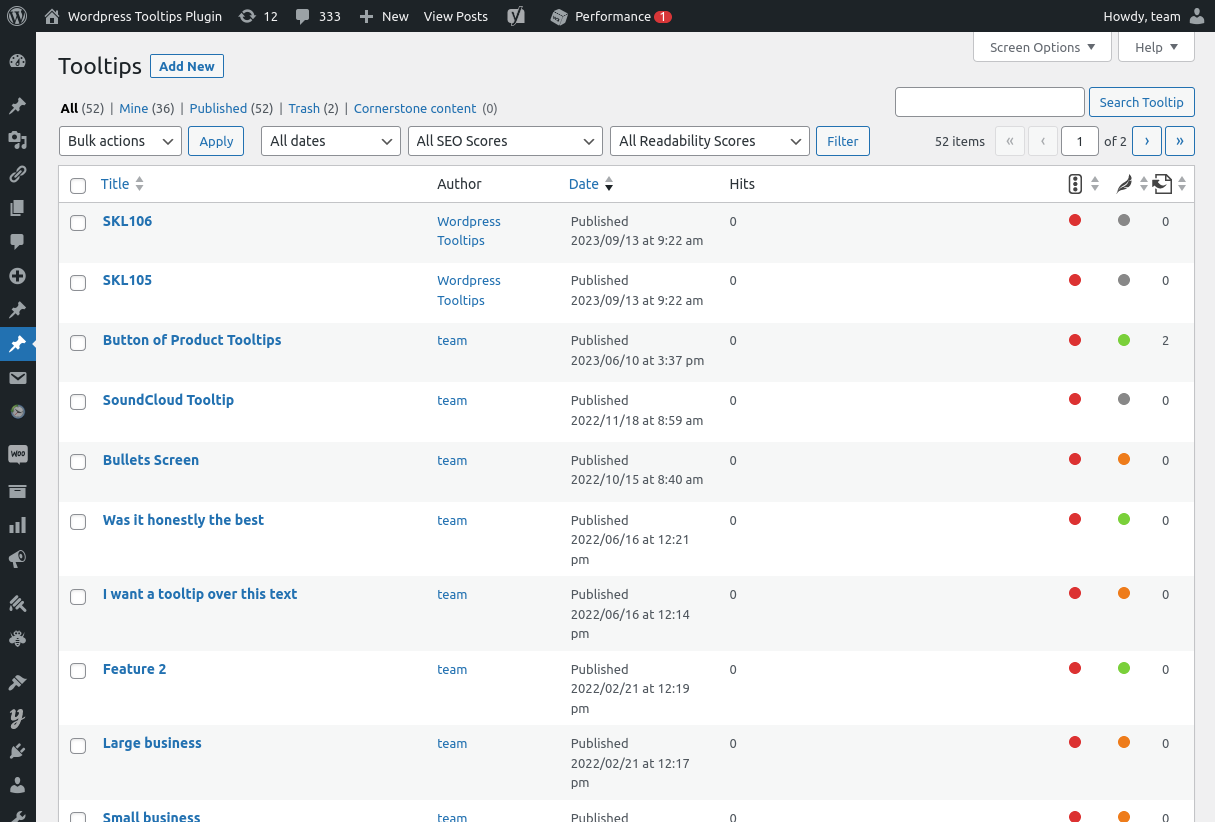
And as you can see after imported the csv file from wordpress tooltips plugin, in our tooltip list it looks like this:

imported the csv file from wordpress tooltip plugin in tooltips.org

Please note that in your ticket, there are two tooltip records with the same tooltip title. Therefore, only one tooltip term can be imported into the WordPress tooltip database. To avoid this kind of problem, we have changed one of the tooltip terms to SKL-106 🙂

And next is the result demo of these imported tootlip terms in the front-end:

Hi, this is SKL105 and it works well, and this is SKL106, it works well too 🙂

Sir, as you can see in this wordpress tooltip demo, all things imported and all things works well, just a report 🙂

If you have any more question, please don’t hesitate to tell us, we are very happy to help you 🙂

Tagged with: , ,

WordPress Tooltips Free 8.6.3 Released

Hi dear WordPress tooltip users, hope this message find you are doing well and have happy days with your family

We just released wordpress tooltips free 8.6.3, in this version, we improved our core javascript function of  tooltips , to keep a clean UI in front-end 🙂

In last version of wordpress tooltips free plugin 8.5.9,  a wordpress tooltip user told us he did not find the changes in the new version, we told him we added a contact form 7 tooltip addon  , for help wordpress tooltip users get the correctly information of new version, we will add change log of last two version of wordpress tooltips free plugin — because our wordpress tooltips plugin developed before at years before, out change log is too long to displayed in wordpress readme.txt, so full change log can be found at here.

We are developing next version of wordpress tooltips free plugin 8.6.9, in which we will add ACF tooltip function for wordpress tooltip free user, full function can be found at here — acf tooltip in tooltips pro and pro +

Thanks, have a happy day with your family 🙂

Best Regards,

WordPress tooltip plugin support

Tagged with: , ,

WordPress Tooltips Free 8.3.9 Released

Hi, Dear users of wordpress tooltip ,  hope this message find you are doing well and having happy weekend with your family 🙂  Sorry for the delay of the update, we were lost all of our sleeps to working hard to develop an AI generate content tooltip function for our tooltip users and just released it at  How to use artificial intelligence to automatically generate tooltip content, supported by wordpress tooltips pro plus 19.4.8 . Then our wordpress tooltip developer developed a new wordpress tooltip free user, based on a feedback from an amazing wordpress tooltip user. The user told us he never say the update news in our RSS feed widget in tooltip back-end, he has to visit our document regularly. Sorry for this, when we released our wordpress tooltip plugin in about 12 years before, we was write all plugin documents on the site tomas.zhu.bz, and then we registered tooltips.org because we have more and more powerful functions and support work for users, in Rss feed section in wordpress tooltip plugin, we forget to change the RSS feed source from tomas.zhu.bz to tooltips.org, actually we released new version of tooltips plugin very quickly — over the years, we  often  released a new version per day, and we always write new document for wordpress tooltip users — we have more than 650 documents for wordpress tooltip users until 2023-03-27. In wordpress tooltip free 8.3.9, we changed RSS feed of wordpress tooltip document from tomas.zhu.bz to tooltips.org, in wordpress tooltip back-end, you can find latest document update information via tooltip RSS feedback widget now 🙂

Thanks for the feedback, if you have any more question, please don’t hesitate to contact us, we are very happy to improve our wordpress tooltip plugin for users 🙂

Thanks, have a happy weekend with your family 🙂

WordPress tooltip support

Tagged with: ,

WordPress tooltips free plugin 8.3.3 Released, support wordpress post directory

Hi, Dear WordPress Tooltip plugin users, hope this message find you are doing well and having happy weekend with your family 🙂 Our wordpress tooltip developer just finished a new version of wordpress tooltips plugin — wordpress tooltip 8.3.3. 🙂

In recent months, we start to realize all feature request about wordpress tooltip directory, in recent days, in wordpress tooltips pro plus version,  we have finished  wordpress job board directory,  , woocommerce product directory, member directory, wordpress page directory, wordpress post directory,   today we move the wordpress post directory function to wordpress tooltips free plugin, based on a free user’s request. 🙂

Also we have changed the UI of wordpress directory settings panel, we added shortcode of each directory and we added detailed how to use link for each directory too, and  because the old UI is a little large, so if we add more wordpress directory functions in the settings panel, the UI might messed up, so we re-developed the UI of wordpress directory settings panel to make it simple and pretty 🙂

In the current time, our wordpress tooltip developer is working hard to add an  artificial intelligence (AI) system for wordpress tooltip plugin, maybe you know, in our wordpress tooltips plus version, we had integrated a few APIs to generate wordpress tooltip via 3rd big sites, for example, users can just enter a wordpress tooltip title in wordpress tooltip editor and select the option to generate content from wikipedia , and just click public, then wordpress tooltips plug version will generate tooltip content from wikipedia automatically, you can check demo at wikipedia tooltip demo, now we are start to support generate wordpress tooltip content from AI automatically, based on a few heavy tooltip  user’s strong suggestion, they said they want to generate more and more tooltip with best content automatically.  This AIGC tooltip content basic module will be added to all wordpress tooltip users, include wordpress tooltip free, wordpress tooltip pro, and wordpress tooltip pro +, because this can help many heavy blogger generate content automatically, and it is good for SEO, then we will add more and more functions for pro and pro + user, we have got many suggestion on this area, we will realize all these functions asap we can 🙂

Thanks, have a happy day with your family 🙂

Best Regards,

WordPress tooltip plugin support

Tagged with: , , , , , , ,

New version of WordPress tooltip pro plus plugin is on the road, support product directory / Woocommerce glossary

Hey, Dear  users of  WordPress Tooltip plus plugin, hope this message find you are doing well and having happy weekend with your family 🙂  In recent days, we released wordpress tooltip plugin per version / per day, and we are follow wordpress tooltip user’s feature request to add wordpress directory functionality in wordpress tooltip plugin.

We got a wordpress glossary user’s suggestion, he said in his site, he selling many kinds of product light on his woocommerce shop, every time  his customer need to user a lot of time to click next page and next product buttons to find the correct light that they needing, the wordpress glossary user said he was use our wordpress glossary to create product glossary via  wordpress tooltip editor manually, but that means he always need enter all products manually in wordpress glossary directory one by one, he hope us create a woocommerce product directory for him and list all product in the product directory automatically, so he will not need to enter  and delete the lights in the glossary editor every week 🙂

This is the first time we heard this kind of requirement, our wordpress tooltip developer lost his whole night to find a solution, and now we nearly finished the woocommerce tooltip functions, the client said he is urgent to look the woocommerce product directory because he have a lot of new product now, and another user said he want this function too, and he added a few suggestion too,  we are try our best to realize these new features and we will testing each functions and then we will released new version of wordpress tooltips pro plus soon 🙂

If you have any more feature request about woocommerce product list / directory / glossary, please don’t hesitate to tell us, we are happy to realize it for you in next version too 🙂

Thanks, have  a blessed weekend with your family 🙂

Best Regards,

WordPress tooltip support

Tagged with: , , , , , ,

WordPress Tooltips Free Plugin 8.2.7 Released

Hey, Dear  users of  WordPress Tooltip plugin, hope this message find you are doing well and having happy days with your family 🙂  Maybe you know, in recent days, we released a few version to help wordpress tooltip users build member-directory, and then we received a few tickets from some wordpress tooltip user, in which they asked us how to use the function of wordpress member directory 🙂

In general, once we released a new wordpress tooltip version, we will write a document for the new version and introduce all changes and how to use the new functions in detail. You can change our change log of wordpress tooltip free version to find all detailed document for each wordpress tooltip free version, and you can check our wordpress tooltip document to get all document too. 🙂

Because there are a  few wordpress tooltip user asked the same question about how to use member-directory, our wordpress tooltip developer decide add a few help tips to help users to use function of member directory easier, new changes in wordpress tooltips free plugin 8.2.7:

1:  Please login wordpress dashboard and click tooltips menu item, and then  click  “How to” sub menu item, you will find we have added a new item “How to create member directory via wordpress tooltip” tab in wordpress tooltip knowledge panel, just click the tab you will find the link of the document How to Create a Member Directory Via WordPress Tooltip?

2: Also if you login wordpress and click tooltips menu item and then click directory settings sub menu item, you will find at the bottom of the wordpress directory settings panel, we added a little tip with the link of the document How to Create a Member Directory Via WordPress Tooltip?

If you have any more question or feature request about directory function, please don’t hesitate to tell us, we are happy to realize it for you 🙂

Thanks, have a happy day with your family 🙂

Please note, in recent days, because we upgraded one version in one day, in order to prevent users from upgrading fatigue, we will upload wordpress tooltips free plugin 8.2.7 at next Monday 🙂

We was planed released wordpress tooltips free plugin 8.2.7 at Monday, but our developer check our code again and then followed wordpress security standard to use nonce functions family to enhance all input $_POST, although all these input $_POST is generated by admin, so non-admin user or guest cannot add any bad data in all input $_POST, but our developer still use nonce function to enhance member directory functions, and we will do this work for all input $_POST in next version 🙂

Best Regards,

WordPress tootlip plugin support

Tagged with: ,

WordPress Tooltips Free 8.2.5 Released

Hey, Dear   WordPress Tooltip users, hope this message find you are doing well and having happy day with your family 🙂

After released wordpress tooltip plugin 8.1.9, we got a few users’ feedback, we re-developed wordpress directory section like this:

1: remove member directory menu item in wordpress dashboard

2: in wordpress tooltips menu item, we added a directory settings sub menu item

In our development plan,  we will not only add member directory functionality for wordpress tooltip user, but also author wall, custom post type directory…etc, and we planed to add new custom post type “directory” for our directory functionality,  based on suggestions from many wordpress tooltip users, in last month, we have got many this kind of feature request 🙂

But in the current time, directory add a member directory menu item in menu, it is really easy to make users misunderstand, yes, the user’s feedback is right, we fixed this problem in this version and we will think about how to find a better method to add new directory function for wordpress tooltip users 🙂

Thanks, have a happy day with your family 🙂

WordPress Tooltip Support

WordPress Tooltips Free 8.2.3 Released

Hey, Dear users of  WordPress Tooltip plugin, hope this message find you are doing well and having happy weekend with your family 🙂

In last weeks, we reported we added a few new functions to wordpress tooltips free plugin, for example:

In Version 8.0.9 Start Support Bullets Screen on WordPress Tooltip Term

and in version 8.1.9 Support Create a Member Directory Via WordPress Tooltip Quickly 

Our developer audit  the code of new versions and enhance the security of codes 🙂

Thanks, have a happy day with your family 🙂

WordPress Tooltip Support


Tagged with:

Recent Works on WordPress Tooltips Until 2023-02-02

Hi, dear wordpress tooltip users,  hope this message find you are doing well and having happy weekend with your family 🙂  We are happy to report, you, in recent days, we have developed 26 wordpress tooltip plugin versions for wordpress tooltip users, and we write 6 detailed step by step document for wordpress tooltip users. 🙂

We developed 23 wordpress tooltip plugin versions:

At first, we released a few wordpress tooltip versions to enhance tooltips for wordpress new blocks and support wordpress gutenberg editor:

1: In WordPress Tooltips Free Plugin 7.9.9, wordpress tooltip start to support WordPress Block Theme

2: In WordPress Tooltips Pro Plus 16.5.8, we added a few new faq items in wordpress tooltip plugin knowledge base, and  support Tooltip in Gutenberg Block Theme, and support Gutenberg Editor Better

3: In WordPress Tooltips Pro 16.0.2, we support WordPress Tooltips Shortcode in Gutenberg Editor

4: In WordPress Tooltips Pro Plugin 16.0.6, we support WordPress Gutenberg Block Theme better

Then we released a few versions to add a few new functions and improve functions of wordpress tooltip plugin, based on a few wordpress tooltip users’ suggestion:

5: In WordPress Tooltips Pro Plus 16.7.4, we added a new option to Disable WordPress Tooltips functionality in front-end and still enable WordPress Glossary functionality  at the same time

6: In WordPress Tooltips Pro Plus 16.8.8, we enhanced wordpress tooltip plugin to fix issues which caused by error format which import from other CMS system or 3rd wordpress plugin

7: In WordPress Tooltips Pro Plus 16.9.4, wordpress tooltip editor can change cursor style of WordPress Tooltip keyword 🙂

8: In WordPress Tooltips Pro Plus 17.0.4, wordpress tooltip user can change Cursor Style for tooltip keyword in wordpress post, and wordpress tooltip user can change cursor style  in WordPress Tooltip Popup Window too 🙂

9: In WordPress Tooltips Plugin 17.0.8,  wordpress tooltip user can set up WordPress Bullets Screen Font Family for WordPress Tooltip keyword

10: In WordPress Tooltip Pro Plus Plugin 17.1.4 , wordpress tooltip admin can  insert images in Bullet Screen to Make a Pretty & Lovely Bullet Screen for wordpress tooltip / buddypress tooltip / bbpress tooltip

11: In WordPress Tooltips Pro Plus Plugin 17.1.8, we fixed the issue of “Tooltip Term Color in Post” option in style settings  of  “unique style for each tooltip”

Then we enhanced wordpress bullets screen function for wordpress tooltip plugin, based on a few users’ feedback

12: In WordPress tooltip pro plus 17.2.4, wordpress tooltip user can  make the bullets screen follow the specified direction

13: And we released WordPress Tooltips Free 8.0.9, we added Bullet Screen for WordPress Tooltip Term function for wordpress toottip free user  too

14: Then we fixed a few problem in WordPress Tooltips Pro Plus Plugin 17.3.4 and WordPress Tooltips Pro Plugin 16.1.2

15: In WordPress Tooltips Pro Plus plugin version 17.3.8 ,we fixed a duplicated option in tooltip style panel

16: In WordPress Tooltips Free 8.1.1,  we added a new option to disable tooltip in entire Site but enable glossary in entire wordpress site

17: In WordPress Tooltips Plus 17.5.8, wordpress tooltip user can insert a  youtube videos in tooltip pop-up via tooltip shortcode easyly

18: In WordPress Tooltips Free Plugin 8.1.3, start display tooltip in content which generated by 3rd wordpress plugin’s shortcode

19: In WordPress Tooltips Pro Plus 17.6.8, wordpress tooltip plugin can custom wordpress tooltip keyword background in WordPress post

20: In WordPress Tooltip Pro Plus 17.7.8,  wordpress tooltip admin can change Padding of WordPress Tooltip keyword  in wordPress post too

21: In WordPress Tooltips Pro Plus 17.8.8, wordpress tooltip user can custom Margin of WordPress Tooltip keyword in WordPress Pages 🙂

22: In WordPress Tooltip Pro Plus 17.9.8, wordpress tooltip editor can insert vimeo videos into wordpress tooltip pop-up window easily

23: In WordPress Tooltips Free Plugin 8.1.5, we improved WordPress Tooltips shortcode to support display tooltip in the content that generated by 3rd plugin for example learnpress

24: In wordpress tooltip pro plugin 16.1.6, we enhanced woocommerce tooltip,  wordpress tooltip plugin tooltip_by_id shortcode in Woocommerce product variant

25: In wordpress tooltips pro plus 18.1.8,  wordpress tooltip user can add different background colors for each wordpress tooltip term in specific wordpress post

26: In wordpress tooltip pro plus plugin 18.2.8, wordpress tooltip editor can customize unique WordPress Tooltip Term padding for each WordPress Tooltip Keyword in specific wordPress post

Also we have wrote 6 detailed wordpress tooltip document with screenshot for wordpress tooltip users:

1: How to remove wordpress tooltip dotted lines from Menu?

2: How to use the wordpress post name “glossary” as glossary index page in wordpress tooltip plugin?

3: How to set the display time before the popup vanishes in wordpress tooltips plugin?

4: How to popup different pictures on one wordpress tooltip term like “Family”?

5: How to Add SoundCloud Player with Pretty Songs in WordPress Post Easily via WordPress Tooltip Plugin?

6: How to Disable WordPress Tooltips In Menus?

We are working hard to develop tiktok tooltip based on an amazing wordpress tooltip users’ feature request, you will see it soon 🙂

Thanks, have a blesed weekend with your family 🙂

WordPress tooltip plugin support

Tagged with: , , ,
Top