Category: Blog

WordPress Footnote with Tooltips Plugin 1.5.8 Released, Support a WordPress Theme Better

Hi, Dear  WordPress tooltip plugin users, hope this message find you are doing well and have happy days with your family 🙂  We just released wordpress footnote with tooltips plugin 1.5.8.

We got a ticket from a user of wordpress footnote with tooltips plugin, in which he told us, in his wordpress site, when users mouse hover a footnote term,  the worpress foonote tooltip pop-up window works well, he can see the footnote content in the tooltip window and when mouse our the footnote term, the footnote tooltip window hided, that’s good.  The only problem is, the background color of wordpress footnote tooltip window is not right 🙂

Our wordpress footnote tooltip developer checked the user’s site, that’s really strange, yes. Finally we tried to installed the same plugins and theme of the user’s site, and we found it is because in his wordpress theme, the theme author added a few !important in background color of their css code, this caused the color of background in wordpress footnote tooltip window be changed as their theme background color… 🙂

Our wordpress footnote tooltip developer re-developed our plugin, and added !important on background color in our css code of wordpress footnote tooltip plugin, all things works well now 🙂

Thanks for the great question, if you have any more question or feature request, please do not hesitate to contact us, we are always happy to improve our wordpress footnoot with tooltip plugin for you 🙂

Thanks, have a blessed day with your family 🙂

Best Regards,

WordPress Tooltips Plugin Support

Tagged with: ,

WordPress Footnote with Tooltip Plugin 1.4.8 Released

Hi, dear wordpress footnote with tooltips user, hope this message find you are doing well and have happy weekend with your family 🙂

A few days before, we released wordpress footnote with tooltips 1.4.2, to support insert link in footnote items, based on the suggestion of an amazing wordpress footnote with tooltips. Then we get the user’s feedback:

Hello thank you,

Nice that you keep developing this plugin.
I tested 1.4.2 and footnotes can have a link inside now.

  1. But as I mentioned also in my mail, what about the Footnotes label
    that is now displayed on all my posts, even on posts without footnotes, how to change that?
    It isn’t logical to show this label if there are no footnotes to
    show.
  2. I send you a screenshot from an example post which
    creates his own footnotes automatically. It has to do with icons in
    that post I think. Can you have a look?

Sleep well (

Greetings,

Our developer checked the screenshot and re-play the issue in our wordpress footnote with tooltip site, and we found the reason, we have fixed the problem and the issue be solved in wordpress footnote with tooltip 1.4.8 now 🙂

Thanks for the great feedback and feature request, if you have any more question of feature request, please don’t hesitate to contact us, we are very happy to improve functions of wordpress footnote with tooltip plugin 🙂

Thanks, have a blessed weekend with your family 🙂

Best Regards,

WordPress Footnote with Tooltip Support Team

Tagged with:

WordPress Footnote Plugin 1.4.2, Support Add Urls in Footnote Items

H, Dear  users of WordPress tooltip plugin , hope this message find you are doing well and have happy days with your family 🙂 We just released wordpress footnote with tooltip plugin 1.4.2, to support wordpress footnote editor to insert links in footnote items 🙂

An amazing user of wordpress footnote with tooltip plugin wrote to us:

Hello Support Team,

I’m trying to create my first footnote here to see how it works.
{{Shore Fire Media – Introducing SHEROES: New Podcast Series From Talkhouse & Carmel Holt, Amplifying Womxn’s Voices In Song & Conversation}}

It works as promised but when I add a link to this footnote this post disappears between Post Title and Footnote label, see attached
screenshot. Carmel Holt</a> {{Shore Fire Media – <a href=”https://mydomain.com” target=”_blank” rel=”noreferrer noopener”>Introducing SHEROES: New Podcast Series From Talkhouse &amp; Carmel Holt, Amplifying Womxn’s Voices In Song &amp; Conversation</a>}}

Carmel Holt already has a link to a Facebookpage, could that be the problem?

I’m using the block editor for this post.


Our wordpress footnote with tooltip plugin did not support insert link in footnote items, this is the first we get this kind of suggestion, our wordpress footnote developer checked the great feedback, and developed a new version wordpress footnote with tooltip plugin 1.4.2 to allow footnote editor to insert links in footnote items. 🙂

Also we have merged footnote menu items too, we are developing a new version of wordpress footnote with tooltip plugin — to allow footnote insert image, links, videos…etc in footnote editor and display these advanced footnote content as tooltip content, that means when users mouse hover items in references lists, they will see more advanced content with text, image, video… in a tooltip popup window, so users do not need to open too many references pages again and again, they can get all references content in one page on your site  🙂

Thanks for the great feature request of wordpress footnote with tooltip plugin, if you have any more question, please don’t hesitate to contact us 🙂

Thanks, have a blessed day with your family 🙂

Best Regards,

wordpress footnote with tooltip plugin support team


Tagged with: , , , , , ,

WordPress Tooltips Free Plugin 7.8.7 Releases

Hi Dear Users of WordPress Tooltip plugin, hope this message find you are doing well and having happy weekend with your family, we are happy to report you, we have released wordpress tooltips free plugin 7.8.7 🙂

As some long-time users of the wordpress tooltip plugin may know, our plugin was designed almost 12 years ago, and over the past 12 years, we have developed more than 400 versions of the wordpress tooltip free plugin and wordpress tooltip pro plugin and wordpress tooltip pro plus plugin have been developed in more than 400 versions in order to meet the new needs of our users. At the same time, wordpress has been upgraded many times, and some of the code we designed more than 10 years ago is quite old, so we regularly check our code against the latest wordpess code and update our code to keep up with wordpress updates.

In WordPress Tooltips free plugin 7.8.7, our wordpress tooltip plugin developer followed wordpress security to enhanced our code to check and  filter the data submitted by the wordpress admin in the wordpress tooltip management panel, to ensure all data is safe 🙂

Changes in wordpress tooltip 7.8.7:

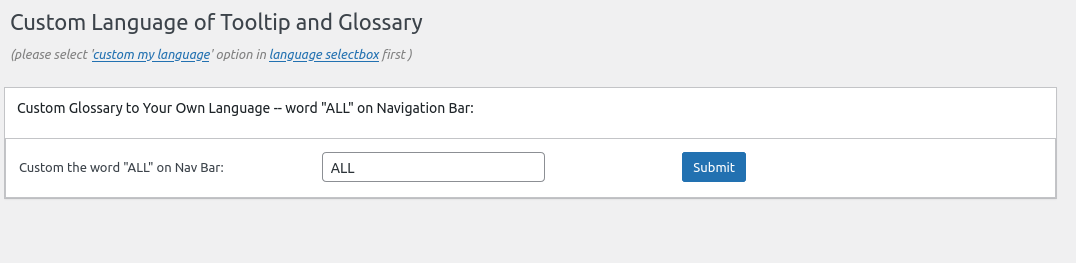
1: Enhanced code to check and filter data submitted by admin in wordpress tooltip language addon, the wordpress tooltip language addon panel looks like this:

custom language for wordpress tooltip glossary panel

If you want to use wordpress tooltips language addon, you need enable the it in wordpress tooltips addon panel, it looks like this:

addon settings panel in wordpress tooltips free.png

With wordpress tooltips pro plus version, we developed many more addons for wordpress tooltip users, this is a screenshot for a old version of wordpress tooltips pro plus plugin, because my screenshot software has some problems, so the screenshot shows my WP bar, in the real panel, there are no this WP bar:

tooltip addons in tooltip multisite license version

tooltip addons in tooltip multisite license version

2: Check and filter data submitted by admin in wordpress tooltip glossary settings panel, the wordpress tooltip glossary settings panel looks like this:

wordpress glossary panel in wordpress tootips free plugin 7.8.7

This is a screenshot of an earlier wordpress tooltips pro version of the glossary settings panel, because my screenshot software has some problems, so the screenshot shows my PC bar

wordpress glossary settings panel in wordpress glossary plugin 15.6.8

wordpress glossary settings panel in wordpress glossary plugin 15.6.8

Conclusion:

In wordpress tooltips plugin 7.8.7, wordpress tooltip developer followed wordpress standard to use wordpress security function sanitize_textarea_field to check and filter data be submitted by admin in wordpress glossary settings panel and wordpress tooltip language addon panel, to enhance wordpress security for wordpress tooltip admins 🙂


Thanks, have a happy weekend with your family 🙂

Best Regards,

WordPress Tooltip Plugin Support

Tagged with: , , ,

WordPress Tooltip Demo for Mr Dave

We get a ticket from an amazing wordpress tooltip user, thanks for wrote to us about the question of wordpress tooltips plugin, it seems it is hard to just use a few words to show the final result of your question, so we build this demo to show how wordpress tooltip works 🙂

please note, the content of tooltip demo is come from the song “The most beautiful moment”

The ticket:

Hi, I have the free ver. at present. I think that the pro version is case sensitive, can you confirm? Also phrases ie. “a matrix”. I think this can be done in pro using shortcode; however, wondered if will also work if entered into the ‘Synonyms of the keyword’ text box?

Thanks.

We replied:

Thanks for the message 🙂

We are very happy to help you 🙂

Yes, in pro version, support case sensitive and Synonyms of the keyword 🙂

Thanks, have a happy weekend with your family 🙂

Best Regards,

WordPress Tooltip Plugin Support Team

The user replied:

Hi Support Team,
Thanks for the reply. Actually, I already knew about the case  sensitive feature. I am more interested in phrases, ie a tooltip associated with two or more consecutive words for example: ‘I want a tooltip over this text’.
1- can that be done in shortcode? (I think it can)
2- can that be done in the synonym text box? (I think it can’t)
Thanks

We replied:

Thanks for the reply 🙂

If you meant you want add tooltip effect on the tooltip term ” I want a tooltip over this text”, then we can do it via shortcode and this  can   be done in synonym tooltip too, you can check our menu item at  tooltips.org/ if you mouse hover “menu tooltip demo”, then  you  can find tooltip pop-up window 🙂

If I miss-understand you, would you please tell me more detail? I hope  this have a little help, but because you have repeat the question twice, I think it is better let our developer to do a check and reply  you again 🙂

Thanks, have a happy day with your family 🙂

Best Regards,
WordPress Tooltip Plugin Support Team

Then the user replied:

You have answered the question perfectly, thanks.
When you say it can be done in the synonym tooltip too, do you mean only in the Pro version? I have tried to enter in the free version
and cannot get it to work.

It is great that this is a feature, but just one more question please.
Say, in the demo you have “menu tooltip demo” working. What happens if you have another single keyword “menu”? For instance, if the word menu is hovered over, will two tooltips appear, one for the word “menu” and  one for the phrase “menu tooltip demo”?

Sorry to ask all these questions.

Thank you.

Okay, I’d like build a demo at here, I build a tooltip demo for the tooltip term “was it Honestly the best”

and then I added a synonyms tooltip “Honestly” in tooltips editor, it looks like this:

synonyms tooltip demo

synonyms tooltip demo

So the result of the tooltip demo is here:

honestly

and

Thanks for the great question, help this demo have a little help 🙂

If you have any more question, please don’t hesitate to contact us, we are very happy to help you 🙂

Best Regards,

WordPress Tooltip Plugin Support Team

Tagged with: , , ,

Sync WordPress with ActiveCampaign Plugin 1.3.1 Released

Hi, Dear  WordPress tooltip plugin users, hope this message find you are doing well and have happy days with your family 🙂  Our wordpress tooltips plugin developer have released a new version of Sync WordPress with ActiveCampaign Plugin, Sync WordPress with ActiveCampaign Plugin will integrates WordPress with ActiveCampaign by adding new users information to contact on ActiveCampaign, when a new user registered.

Sync WordPress with ActiveCampaign Plugin is a simple & easy-to-use solution that help you to sync your new wordpress users with your ActiveCampaign account.
After users registered on your wordpress site, our plugin will add users to ActiveCampaign automatically.
In back end, you can add your ActiveCampaign list id, ActiveCampaign URL, ActiveCampaign API Key.
You can get your ActiveCampaign Email Marketing API at http://www.activecampaign.com/api/

Maybe problem:
In general hosting has installed php curl already, but maybe some self-managed hosting did not installed php curl, in this case there are 500 error when SYNC accounts between wordpress and ActiveCampaign,
it is generated by ActiveCampaign official API codes, in this case you need install and enable php curl, it is very simple, for examle on ubuntu and php5, the command is:
apt-get install php5-curl, and all things will works well.

More amazing features are being developed and any feature request is welcome.

== Installation ==

1:Upload the SYNC AC with WP plugin to your blog
2:Activate it
3: You will find WP TO AC menu item, just enter your ActiveCampaign list ID, ActiveCampaign URL, ActiveCampaign API Key
1, 2, 3: You’re done!

== Frequently Asked Questions ==
FAQs & Feature Request and Plugin Support URI can be found here: https://tomas.zhu.bz/wordpress-plugin-sync-activecampaign-with-wordpress.html/

== Screenshots ==

== Changelog ==
= Version 1.3.1 =
New option to enable / disable Sync WP with AC, by default we will sync new user information from wp with ac, but you can stop it in back end now

= Version 1.2.1 =
follow wordpress standard to use ABSPATH and exit() to protect 24 php files
Changed plugin url and author url to our official site https://tooltips.org for better support and feature request
Support wordpress 5.3.2
Update license and copyright — GPL3

= Version 1.1.1 =
Fixed deprecated functions

= Version 1.0.0 =
* Spell out that the license is GPLv3
* Finished the first version
* General code clean up

== Upgrade Notice ==
= Version 1.0.0 =
* Spell out that the license is GPLv3
* Finished the first version
* General code clean up


Tagged with: , ,

WordPress FAQ Plugin 3.7.3 Released

Hi dear users of wordpress tooltips plugin, hope this message find you are doing well and have happy weekend with your family 🙂  I am happy to report you, we just released WordPress Frequently Asked Questions Plugin 3.7.3 🙂

May be you know, our WordPress Frequently Asked Questions Plugin support display wordpress tooltip effects on the faq title and faq content in faq items, you can check our tooltips for faq at our FAQ demo page,  in the faq item “how to get search engines to read tooltip’s content” , if you check the tooltip term “Encyclopedia” you will find our wiki tooltip popup window,   but an amazing user told us he cannot let another 3rd wordpress plugin to add their customized effects in our faq items, he hope we add some filters in our faq items, so he can add their customized effects in faq items too 🙂

In the WordPress Frequently Asked Questions Plugin 3.7.3, we added two filter for developer to add specific effects on F.A.Q title or F.A.Q content:
You can use filter_faq_item_title to change content of faq title or something more, for example, add tooltip effects on faq title
apply_filters( ‘filter_faq_item_title’, $ffw_faq_for_wp_how_to_bar_title);
You can use filter_faq_item_content to change content of faq item content or something more, for example, add tooltip effects on faq content
apply_filters( ‘filter_faq_item_content’, $ffw_faq_for_wp_how_to_bar_content);

Thanks for the great suggestion for WordPress Frequently Asked Questions Plugin, if you have any more question or feature request, please don’t hesitate to tell us 🙂

Thanks, have a blessed weekend with your family 🙂

Best Regards,

WordPress Tooltips Plugin Support Team

Tagged with: , ,

WordPress Footnote Plugin 1.1.2, Footnote Editor can Add Footnote via Footnote Editor Now

H, Dear  users of WordPress tooltip plugin , hope this message find you are doing well and have happy days with your family 🙂 We get an amazing  wordpress footnote user’s feedback, he give us a lot of great suggestion, for example, display videos in footnote! Yes this is great idea, as we all known, in general, “footnotes are often used to refer to the bibliography”, so we never image users have a requirement to add videos in footnote, in our mind, footnotes will just add some source in the foot of the paper, but the footnote user’s suggestion refreshed our minds in this ares, yes, this is a internet-times, new young authors would like add more and more media in their paper and footnotes, if we can display multimedia content for specific footnotes, for example, when hover a footnote, a youtube video or UN talking will popup in footnote window, that will told readers better knowledge, it is 2022 year, we are not using an internet which only link to each other — that’s the things happened 40 years before, we need add multimedia content in footnote, of course! User need it, that’ great to build new footnote for the new-times 🙂

This is why we developed wordpress footnote plugin 1.1.2, in this version, as the first step for the new plan for the new footnote plugin in this new times, we added a new menu item in backend, in which footnote editor can add new footnote menu in wordpress dashboard, if you click the footnote menu , you can edit or add new footnote in a WYSIWYG footnote editor, actually the footnote editor is a standard wordpress custom post editor, so it is very easy to use for wordpress editors 🙂

In the new wordpress footnote editor, you can add video / image / audio / maps… etc in the post content of the wordpress footnote, and in the new wordpress footnote menu, you can add new footnote, edit footnotes, delete specific footnotes… etc 🙂

This is just the first step, we are working hard to insert more and more functions for the new wordpress footnote plugin, you will see it soon 🙂

Thanks for the great advice for the wordpress footnote plugin, if you have any feature request or question for wordpress footnote plugin, please don’t hesitate to contact us 🙂

Thanks, have a blessed day with your family 🙂

Best Regards,

WordPress Tooltips Plugin Support

Tagged with: , ,

WordPress Tooltips Free Plugin 7.6.9 Released, Support Move WordPress Tooltips Jacascript Code to the WordPress Footer

Hi, dear  WordPress Tooltip Plugin users,  hope this message find you are doing well and having happy day with your family 🙂  An amazing wordpress tooltip users submitted a ticket to us, he said:

Hello, I’m using Elementor and WordPress with the Tooltips plugin. I have several tooltips added to the list and the glossary page is up. The corresponding tooltips throughout the site are underlined with dots. I’m seeing no tooltip on hover. The pointer turns into a text
> curser and no tooltip pops up. Can you kindly advise? Thank you in advance.

and

Hello support team, I’m grateful for your speedy response. I like the plugin and will purchase once I can get the free version running.
1. The plugin version I’m using is: Version 7.6.7 (Tooltips)
1. The issue is shown on each page of the website
2. Issue: you’ll notice on the URL example above; the tooltip doesn’t appear as you hover or click on the term words that are underlined with a dotted line.

Additionally, I have the corresponding glossary set at seekinward.net/glossary which appears to be working fine. Please let me know if you need additional information.

Thank you so very much again for you quick response. I’m hopeful to get this running.

We checked the wordpress front end of his URL, and we replied:

Thanks for the reply 🙂

Our developer have checked your URL, we found in browser console, there are some jquery issue which means the jquery is not loaded correctly, we found you are using a cache plugin, would you please do a check at:
https://tooltips.org/how-to-let-wordpress-tooltips-works-well-with-autoptimize-plugin/
and
https://tooltips.org/how-to-let-wordpress-tooltips-works-well-with-sg-optimizer-plugin/

Thanks, have a happy day with your family 🙂

Best Regards,
Support Team

But the user said he followed our document to set up his plugin but that not work, it is strange, we get a chance to check more, and we replied:

Hi,

Thanks for the reply! :)))

Follow your last message, we found the z-index is set to -1, we corrected on our side, and yes, we found that did not solved the problem, we checked the test site carefully and did many tests, finally we found it is because your site, there are a plugin “themerexaddons”, and there are an option “move javascripts to the footer”, when we unchecked this option, tooltips works well in front end 🙂

Before have a chance to check your test site, our developer was think the problem is caused by jquery migrate, but after checked your test site and codes, our developer find we need some heavy changes in wordpress tooltip plugin, our developer is working hard to develop a new version to solve it, because this change will effect backbone of wordpress tooltip plugin, we are not sure can we finish it in 2 days or not, but we will try our best to finish asap we can, we will reply you soon 🙂

Thanks, have a blessed day with your family 🙂

Best Regards,
Support Team


Then our wordpress tooltip developer lost his night to develop a new version of wordpress tooltip plugin to solve this problem for the users asap we can, now if you upgrade to the WordPress Tooltips Free Plugin 7.6.9, you can solve this problem by this way:

1: login our wordpress as admin

2: in wordpress dashboard, click tooltips menu item

3: click global settings sub menu item

4: you will open the wordpress tooltips global settings panel, at the bottom of the wordpress tooltips global settings panel, you will find the new option: move tooltip javascript codes to wordpress footer

5: in the “move tooltip javascript codes to wordpress footer” option, please just select “yes. move tooltip javascript codes to wordpress footer” and click the blue submit button, then in the front end, we will move all tooltip js codes to wordpress footer, this will solve the conflict with themes or plugin which have option to move js codes to the wordpress footer, and this will increase wordpress pages loading speed

6: if you do not want to move wordpress tooltip js codes to the wordpress footer, just ignore this option, or select “no, let is be”

Thanks for the great feedback for wordpress tooltip plugin, we’d like offer 20% discount for the great user which help to improve wordpress tooltip for all wordpress tooltips users 🙂

Thanks, have a blessed day with your family 🙂

Best Regards,

WordPress Tooltips Support Team

Tagged with: , ,

WordPress Email Blacklist Plugin 2.0.6 Released

Dear  WordPress Tooltip users,   hope you are doing well and have happy weekend with your family 🙂  We have released wordpress email blacklist plugin 2.0.6 in which we added 10 spam domains and spam email address into our wordpress spam blacklist firewall plugin 🙂

Everyday, we received many spam mails, and we found 10 spam domains and spam emails which always push adult link and “hot … pictures” and spam links, it is not safe for our users, so we added these 10 spam domains and spam email address into our csv file — spamemaildomains.csv, you can import these spam domain and spam emails like this way:

1: login wordpress admin area

2: click email blacklist menu item

3: click import sub menu item

4: import spammer files spamemaildomains.csv which in the wordpress email blacklist plugin root folder


If you have any question of feature request about our wordpress email blacklist plugin, please don’t hesitate to contact us, we are very happy to help you 🙂

Best Regards,

WordPress Tooltip Plugin Support


Top