Category: Blog

How to modify content from 3rd plugin via scl_content API in Smart Content Links with Tooltip plugin? Version 2.0 Released

Hi dear WordPress tooltip users, hope this message find you are doing well and have happy days with your family:) We just released Smart Content Links with Tooltip plugin 2.0, in this version, we added an API : “scl_content” filter for Smart Content Links with Tooltip plugin.

what wordpress filter?

A WordPress filter is a function that allows developers to modify the behavior of WordPress core functions, themes, and plugins. Filters are used to modify the output of WordPress functions or to add new functionality to WordPress. Filters are applied to data before it is displayed on the website or stored in the database. They are used to modify the content, title, meta tags, and other elements of a WordPress site. Some examples of WordPress filters include the_content, the_title, wp_title, and wp_head. Developers can create their own custom filters to modify WordPress functionality to suit their needs.

For example, wordpress tooltip plugin and smart content link plugin using the wordpress  `the_content` filter, it is a WordPress filter that allows developers to modify the content of a post or page before it is displayed on the front-end of a website. This filter is applied to the post content when it is retrieved from the database and before it is displayed on the website. Developers can use this filter to add or remove content, modify the formatting of the content, or even add custom functionality to the content. The `the_content` filter is commonly used in WordPress themes and plugins to customize the way content is displayed on a website.

So add scl_content filter in smart content link plugin allows other developers or users to modify the output or behavior of smart content links without having to modify the plugin code directly. This makes smart content link plugin more flexible and customizable, as users can make changes without having to worry about their modifications being overwritten when the plugin is updated.

How to use scl_content filter in smart content link plugin?

easy, for example, in wordpress tooltips pro plus plugin , we developed a tooltips for smart content link addon, in which when users mouse hover a smart content link  in your wordpress post, they will see the video / image / audio / detailed document of that link, this will greatly enrich the functionality of your LINKs 🙂

You can do it by this way:

add_filtler(‘scl_content’, ‘tooltipsforSCL’, 10,1)

Then in the function do something

function tooltipsforSCL()

{

…do something

}

Tagged with: , ,

WordPress Member Directory with Tooltips Plugin Pro

What is Member Directory ?

A member directory is a list of individuals or organizations who are members of a particular group, association, or community. It typically includes contact information such as names, addresses, phone numbers, and email addresses. Member directories are often used by organizations to facilitate communication and networking among members, as well as to promote their membership base. They may be available in print or online formats, and may be accessible only to members or to the public.

What is WordPress Member Directory Plugin?

WordPress Member Directory Plugin is a tool that allows you to create a directory of members on your WordPress website. It enables you to display member profiles, contact information, and other relevant details in an organized and searchable format. With this plugin, you can create a membership site, a business directory, or a community directory. This can be useful for websites that have a large number of users or members, such as community websites, membership sites, or online directories.

Use case of WordPress Member Directory Plugin?

A member directory is a tool that organizations can use to manage and organize information about their members. Here are some use cases for a member directory:

1. Contact information: A member directory can be used to store and manage contact information for all members of an organization. This can include names, addresses, phone numbers, and email addresses.

2. Membership management: A member directory can help organizations keep track of their members’ status, such as whether they are active or inactive, and when their membership expires.

3. Networking: A member directory can facilitate networking among members by allowing them to search for and connect with other members who share similar interests or backgrounds.

4. Communication: A member directory can be used to send targeted communications to specific groups of members, such as newsletters or event invitations.

5. Resource sharing: A member directory can be used to share resources among members, such as job postings, volunteer opportunities, or educational materials.

A wordpress tooltip user told us he using our wordpress tooltip member directory addon to create the directory of members, he added wordpress tooltip effect on each user’s username in the member directory, to show their selfie video, which greatly helps all members quickly understand each other, enhances member relationships, and strengthens the overall group’s activity and trust, and all users like it the tooltip function for member directory.

Overall, a member directory can help organizations better understand and engage with their members, and can facilitate communication and collaboration among members.

How to Use WordPress Member Directory Plugin

Member directory plugin is very easy to use, just inser wordpress Member directory shortcode “member_directory” in any page or post, you will get a member directory with pretty member directory template quickly

How to build a member directory quickly?

1: click download wordpress tooltip to download latest version of wordpress tooltip lugin

2: upload the wordpress tooltip zip file into your wordpress site via wordpress plugins panel

3: activate wordpress tooltip plugin and click Tooltips menu item in wordpress dashboard

4: click member directory sub menu item, it looks like this:

member directory global settings in wordpress tooltip plugin

member directory global settings in wordpress tooltip plugin

5: As you can see, you will open member directory global settings panel, in which you can enable member directory or disable functions of member directory, also you can decide which user roles will be added into the member directory list, for example, you can just add authors into member directory to build a wordpress authro wall for your site, or you can just add teachers directory of your LMS system for your students…etc

6: In front-end, you can just insert the shortcode “member_directory” in any wordpress post, then you will find member directory which looks like this:

member directory orange style via wordpress tooltip

member directory orange style via wordpress tooltip

As you can see, users can click the  letter on the Navigation bar to open the list of users starting with that letter.

In the left column of the directory, we display the user name, in the right column of the member directory, we display user information and details of the user information, the user information is come from the biographical info field in wordpress user profile panel, it looks like this:

user profile of wordpress tooltip user

user profile of wordpress tooltip user

Once user change their information in wordpress user profile, wordpress tooltip will display the new user information in member directory too


How to exclude specific user from wordpress member directrory?

1: login wordpress tooltip site download wordpress tooltips pro plus 21.9.8 or tooltips pro 16.8.6.

2: upload ans activate wordpress tooltip plugin in your wordpress site

3: click tooltips menu in wordpress admin area and click directory settings panel, it looks like this:

directory settings panel in wordpress tooltips pro plus 19.2.8

directory settings panel in wordpress tooltips pro plus 19.2.8

This is directory panel in wordpress tooltip pro plus version 19.2.8, some features is not existed in tooltips pro version and more features is not included in wordpress tooltip free plugin, but member directory addon have same functions.

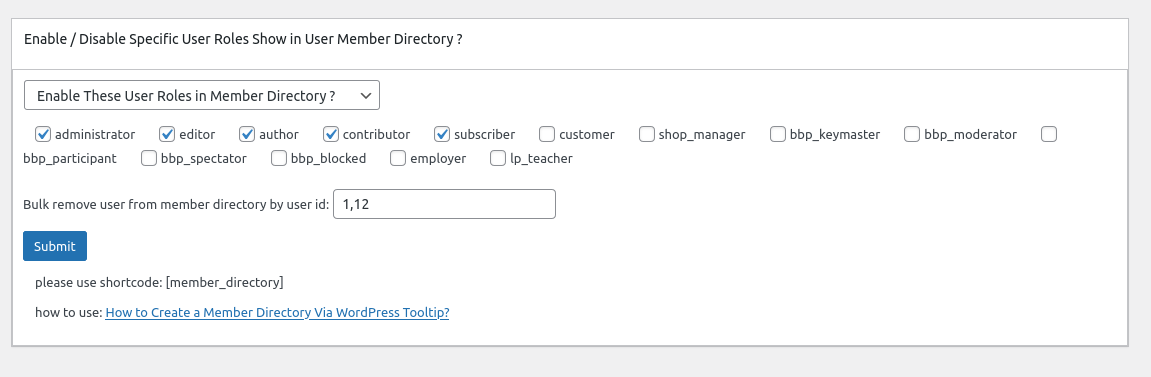
In the new version wordpress tooltips pro 20.9.8. you will find there are a new option “Bulk remove user from member directory by user id in wordpress tooltip”, it looks like this:

In here you can bulk enter user ids to exclude specific users from wordpress member directory in one time.

4: In front end, users which added in the “Bulk remove user from member directory by user id in wordpress tooltip” option, will be removed from wordpress member directory

Change Log of Member Directory Plugin

= Member Directory for WordPress Version 2.1.4 =
new option Bulk remove user from member directory by user id

Price changed to 2.2

= Member Directory for WordPress Version 2.1.2 =
Support wordpress post directory, please use shortcode: “postdirectory”
added wordpress post directory panel in back-end

Price changed to 2.1

= Member Directory for WordPress Version 2.0.2 =
New option to set up user roles of member directory
new menu item Member Directory Settings, you can:
opt to custom Nav Bar font size
opt to custom member directory term font size
opt to hide count number of member directoryitems
opt to significant display of digital superscripts on navigation bar

Price changed to 2.0

= Member Directory for WordPress Version 1.3.1 =
In wordpress member directory list, display user’s “Biographical Info” filed

Price changed to 1.4

= Member Directory Version 1.3.0 =
Added “Member Directory” menu item
If you click “Member Directory” menu item, you will open “Member Directory Global Settings” panel
In “Member Directory Global Settings” panel, you will find “Enable / Disable Specific User Roles Show in User Member Directory” option box
In Enable / Disable Specific User Roles Show in User Member Directory option box,
you can select multiple user roles from user roles lists and select to enable or disable specific user roles listed in member directory

Price changed to 1.3

= Member Directory Version 1.2.0 =
Added navigation bar at the top of the members directory page.
By default, we will list all users in the members directory page, in navigation bar, you can click A to view all users start A, click T to view all users start T
Also in the navigation bar, we will show user counts in the digital superscripts of the ‘A’, ‘B’, ‘C’… and so on

Price changed to 1.2

= Member Directory Version 1.0.0 =
* Spell out that the license is GPLv3
* Finished the first version
* General code clean up

Price 1.0

== Installation ==

1:Upload the Member Directory plugin to your blog
2:Activate it
3:Inser shortcode “member_directory” in any page or post
1, 2, 3: You’re done!

== Frequently Asked Questions ==
FAQs can be found here: https://tooltips.org/

Tagged with: ,

WordPress Member Directory with Tooltip 2.0.7 Released

Hi dear WordPress tooltip users, hope this message find you are doing well and have happy day with your family, We have improved functions for wordpress member directory 🙂

What is member directory?

A member directory is a list of individuals or organizations who are members of a particular group, association, or community. It typically includes contact information such as names, addresses, phone numbers, and email addresses. Member directories are often used by organizations to facilitate communication and networking among their members. They can be in the form of a printed document, an online database, or a mobile app.

What is WordPress Member Directory plugin?

The WordPress Member Directory plugin is a tool that allows you to create a directory of members on your WordPress website. It enables you to display a list of members, their profiles, and contact information. This plugin is useful for websites that have a membership system, such as social networks, online communities, and business directories. With this plugin, you can easily manage and display your members’ information, making it easier for visitors to find and connect with them.:)

What’ new in wordpress member directory 2.0.7?

1: In wordpress member directory 2.0.7, you can build remove / hide specific users in wordpress member directory, based on an amamzing wordpress tooltip user’s feedback. The user has submitted a support ticket for wordpress tooltip plugin to told us he using our wordpress tooltip member directory addon to create the directory of members, he added wordpress tooltip effect on each user’s username in the member directory, to show their selfie video,  which greatly helps all members quickly understand each other, enhances member relationships, and strengthens the overall group’s activity and trust, and all users like it the tooltip function for member directory. But a few users told him, they do not like their personal information and emails being displayed on the internal member list. They say they want to maintain their privacy and not be disturbed in their daily lives.

Then in wordpress tooltip member directory addon, we added new option and function to solve this kind of problem for member directory editor, then we move these new changes to our wordpress member directory plugin too 🙂

How to exclude specific user from wordpress member directrory?

1: download wordpress member directory plugin and upload it to your wordpress via plugins panel

2: click member directory menu , then in member directory settings panel, you will find there are a new option “Bulk remove user from member directory by user id in wordpress tooltip”, it looks like this:

In here you can bulk enter user ids to exclude specific users from wordpress member directory in one time.

3: In front end, users which added in the “Bulk remove user from member directory by user id in wordpress tooltip” option, will be removed from wordpress member directory

If you have any more feature request about member directory, please don’t hesitate to tell us, we are happy to help you realize it  🙂

Thanks, have a blessed day with your family 🙂

Best Regards,

Best Regards,

WordPress tooltip plugin support

Tagged with: ,

How to use scl shortcode to display Smart Content Links in anywhere of your wordpress site? Supported by Smart Content Links with Tooltip version 1.9

Hi dear WordPress tooltip users, hope this message find you are doing well and have happy weekend with your family   We have released WordPress Smart Content Links with Tooltip version 1.9 , based on a wordpress tooltip user’s feedback

New shortcode [[scl]] to display smart content link  bar in specific wordpress posts, ‘scl’ means smart content link 🙂

The Smart Content Links with Tooltip plugin user told us, he love smart content link plugin, but in his wordpress site, he found the smart content link bar displaying throughout the whole wordpress site, although he found he can opt to display smart content link bar in specific wordpress post type,  but he still do not want smart content link bar display in all wordpress posts, he  want an option to enable / disable smart content link bar in back end, and just offer a shortcode of smart content link plugin to allow he display smart content links in specific wordpress posts, in last version our wordpress tooltip developer added a new global settings in wordpress smart content link with tooltip plugin, and we added a new option “Enable Smart Content Link Bar Throughout the Whole Site” in the wordpress smart content link with tooltip  global settings panel to solve the problem for the user. And in this version — smart content link plugin 1.9 you can use shortcode [[scl]] to display smart content link  bar in specific wordpress posts 🙂

Thanks for the great suggestion to wordpress tooltip plugins, we give a license of wordpress footnote with tooltip plugin for him as a THANK 🙂

If you have any more  feature request to wordpress tooltip plugins, please don’t hesitate to contact us 🙂

Thanks, have a blessed day with your family

Best Regards,

WordPress tooltip plugin support

Tagged with: , ,

How to Enable / Disable Smart Content Link Bar Throughout the Whole WordPress Site? Supported by WordPress Smart Content Link with Tooltip 1.8.0

Hi, Dear WordPress Tooltip users, hope this message find you are doing well and having happy days with your family. We just released wordpress smart content link with tooltips plugin 1.8.0, based on an wordpress tooltip user’s feedback. 🙂

The wordpress tooltip user told us, he do not want smart content link bar displayed throughout the whole wordpress site always, he hope have an option to disable smart content link bar in back end, okay, our wordpress tooltip developer added a new global settings in wordpress smart content link with tooltip plugin, and we added a new option “Enable Smart Content Link Bar Throughout the Whole Site” in the wordpress smart content link with tooltip  global settings panel to solve the problem for the user 🙂

How to Enable / Disable Smart Content Link Bar Throughout the Whole WordPress Site?

1: Login wordpress tooltip plugin site to download the smart content links version which >= 1.8.0

2: upload and install the wordpress smart content links with tooltips version 1.8.0

3: in wordpress dashboard, click smart content link menu item and then click global settings  sub menu item, it looks like this:

Enable Smart Content Link Bar Throughout the Whole Site

Enable Smart Content Link Bar Throughout the Whole Site

4: as you can see, in WordPress Smart Content Links with tooltips global Settings panel, there are new option  “Enable Smart Content Link Bar Throughout the Whole Site”,  you can enable / disable Smart Content Link Bar throughout the wordpress site in here 🙂

What’s next?

We are adding a shortocode for WordPress Smart Content Links with tooltips, so you can add WordPress Smart Content Links Bar in anywhere of your wordpress site 🙂

Thanks for the great feedback, if you have any more feature request or question, please don’t hesitate to contact us

Thanks, have a blessed weekend with your family

Best Regards,

WordPress Tooltip plugin Support

Tagged with: , ,

WordPress Tooltips pro plus 21.6.8 — wordpress tooltips pro 16.7.6 — wordpress ACF group 1.1.0 Released

Hi dear WordPress tooltip users, hope this message find you are doing well and have happy days with your family 🙂 An amazing wordpress acf tooltip user created a ticket and he told us after enable wp_debug, he found php warning, we released wordpress tooltips pro plugin 21.6.8 and wordpress tooltips pro plugin 16.7.6 to fix this php warning error 🙂

Thanks for the great bug report, we give the great wordpress tooltip plugin user a THANKS — we added license of smart content link with tooltip plugin in his account — which allows wordpress editor to easily add contextual content links within the body of your article. These smart links are designed to provide readers with quick access to related resources and information, making it easier for them to learn more about the topic at hand. Try it out today and see how smart links can enhance your content!

Also we have released wordpress advanced custom field (ACF) group plugin 1.1.0, in this version we improved UI of ACF fields in front-end in wordpress post, WordPress ACF GROUP plugin by wordpress tooltips is a ACF (Advanced custom fields) plugin to print the values and labels of all fields from a ACF group 🙂

Thanks for the great feedback, if you have any more question or feature request, please don’t hesitate to contact us 🙂

We are very happy to help you 🙂


Thanks, have a blessed day with your family

Best Regards,

WordPress tooltip plugin support

Tagged with: , , , ,

ACF Group Plugin by WordPress Tooltips

WordPress ACF GROUP plugin by wordpress tooltips is a ACF plugin to print the values and labels of all fields from a ACF group/

What is Advanced custom files(ACF) plugin?

ACF(Advanced custom files) is a wordpress plugin that provides a user-friendly interface for creating and managing custom fields.It allows worpdress developers and wordpress admin to easily add custom fields to their wordpress posts and pages withoug the need for complex code.

Then ACF plugin is designed to enhance the functionality of wordpress by adding additional fields that are not includes by default. These custom fields can be sued to collect specific information about a post or page, such as product features, customer reviews, event dates and times, and more.

using the ACF plugni, custom fields can be added to various type of content, including posts, pages, custom post types, and even taxonomy terms. The plugin provides a variety of field types, including text, image, select , date picker and more, making it easy to customize the fields based on the specific needs of the wordpress site.

ACF plugin has become a popular tool among wordpress users due to its ease of use and flexibility. It allows developer and wordpress admin to create rich, customized content without the need of advanced coding skills 🙂

Why develop ACF Group plugin?

We developed an ACF Tooltip addon for our wordpress tooltip pro plugin, when wordpress users insert ACF fields into frontend of wordpress post, wordpress tooltip ACF Tooltip addon will add tooltip effect on ACF fields automatically.

A problem is, what we want to do is, load all ACF fields in a ACF group and display their labels and values in frontend of wordpress post, and add wordpress tooltip effect for ACF fields which have a wordpress tooltip keyword, but after searched a lot of official site and plugins, we cannot find this kind of plugin or code, so we decide to develop this ACF group plugin for ourself and for all ACF users and wordpress tooltip users 🙂

How to use ACF Group Plugin?

1: Login wordpress tooltip plugin site to download acf group plugin

2: login your wordpress dashboard, upload acf group plugin via your wordpress plugins panel,then activate acf group plugin

3: in front-end, in wordpress editor, enter the shortcode
[[acf_group group=’group1′]]
“group1” is the acf group title

Then in the front end, ACF GROUP plugin will print group title and then list the values and labels of all fields from the ACF group group1

What’s wordpress tooltips plugin?

Tooltips are small popup box with more information like video / audio / image / google maps / QR code / wiki / text… and so, tooltips box will pop up when users hover over an element in your pages, the element can be a word in your post, a search form input box, an image in your page, a widget on your sidebar.. and so on, wordpress tooltip plugin supports add tooltip effect on any element on the wordpress posts, or display on wordperss menu, comment, contact form, woocmmerce product, bbpress forum, buddypress activity…etc, with pretty effects and many more little amazing components and addons, for example, Bullets Screen
What it WordPress Tooltip Plugin:

WordPress tooltip pro is a tooltips plugin for wordpress, which be designed to help you create colorful, varied and graceful tooltip styles to present the content to your users, with lively and elegant animation effects, and save your valuable screen space.

When the users hover over an item, the colorful tooltip popup box will display with the animation effect. You can add video, audio, image, and even other content which generated by 3rd wordpress plugins like QR code, Amazon AD, Google Map in tooltip popup box via wordpress standard editor, it is very easy to use.

In wordpres tooltip plugin, we included a ACF tooltip addon to add tooltip effect on ACF fields in front-end automatically 🙂

What’s benefit to use ACF Group plugin?

Displaying all fields in an ACF field group in the frontend of a WordPress post can also provide several other benefits for the WordPress admin:

Enhanced User Engagement: By providing visitors with more detailed information about a post, they may be more likely to engage with it and potentially share it with others. This can help to increase traffic to the website and improve engagement metrics.

Customized User Experience: ACF fields can be used to provide a more customized experience for visitors based on their interests and preferences. For example, if a field group is used to collect data about a visitor’s location or interests, the WordPress admin can use this information to display more relevant content to the visitor.

Streamlined Content Creation: By using ACF fields to collect and display information in a standardized way, the WordPress admin can streamline the content creation process and ensure that each post contains all relevant information in a consistent format.

Improved SEO: Including additional information about a post in the form of ACF fields can help to improve search engine optimization (SEO). By including relevant keywords and detailed information in the fields, the post may rank higher in search engine results pages.

We are adding more and more ACF features in this ACF group plugin 🙂

Tagged with: , , , ,

WordPress smart content link 1.7 released

Hi, Dear  WordPress Tooltip users,  hope this message find you are doing well and having happy days with your family. we just released WordPress smart content link with tooltip plugin 1.7 for wordpress tooltip users

In the new version of WordPress smart content link with tooltip plugin plugin 1.7.0, we followed wordpress security standard to use sanitize_text_filed function to enhance the security in the setting panel of WordPress smart content link with tooltip plugin

We discussed the functions of smart content link with a few users, they told us, displaying colorful related links in a bar at the top of bottom of wordpress posts really help to keep readers on the wordpress by providing users with other relevant content to explore, via their tracker log, they found users click 2 ~ 3 more related posts via wordpress smart content link bar, we believe this can be particularly useful for wordpres site that published a lot of content, as visitors may not necessarily know where else to look for more information 🙂

and the colorful links helped to draw attention to the related content and make it more visually appealing for blog readers. This can potentially increase click-through rates and encourage users to spend more time on our wordpress site 🙂

Also, the related links can help to improve the overall user experience of the wordpress site by providing visitors with more options for finding information. By offer these smart content links, the wordpress site owner can demonstrate their expertise in the topic area and provide readers with valuable resources.

Finally, display smart content related links can help to improve search engine optimization SEO by providing internal links to other pages on your wordpress site, this can help search engines crawl and index the site more effectively, potentially leading to higher search engine rankings and more traffic 🙂

If you have any feature request to wordpress smart content related links plugin, please don’t hesitate to contact us 🙂


Thanks, have a blessed weekend with your family

Best Regards,

WordPress Tooltip plugin Support

Tagged with: , ,

WordPress life quote with tooltip plugin 1.2 released

Hi, Dear  WordPress Tooltip users,  hope this message find you are doing well and having happy days with your family. we just released wordpress life quote with tooltip plugin 1.2 for users 🙂

In the version wordpress life quote with tooltip plugin 1.2.0, we follow wordpress security standard to use sanitize_text_filed function to enhance the security in the setting panel of wordpress life quote with tooltip plugin 🙂

We get a few users’ feedback about how to use wordpress life quote plugin, our suggestion is, wordpress life quote with tooltip plugin can provide motivation to wordpress blog readers, especially if the quotes are related to the topic of the blog, depending on the focus of the blog, life quotes can be used to encourage a certain mindset or convey an important message to readers 🙂

We decide develop a new version which will allow admin of wordpress life quote with tooltip plugin to select specific quote category for their wordpress site, this will help admin to display quotes that related to the topic of the blog 🙂

Thanks for the great feedback, if you have any more feature request or question, please don’t hesitate to contact us

Thanks, have a blessed weekend with your family

Best Regards,

WordPress Tooltip plugin Support

Tagged with: , ,

How to only display quotes in specific wordpress post types? WordPress life quote plugin with tooltips 1.1 released

Hi, Dear users of WordPress Tooltip, hope this message find you are doing well and having happy days with your family. An amazing customer told us, he like our wordpress life quote plugin, it added an element of visual interest and variety to his wordpress blog, and make the content more engaging for his readers, life quote helps to convey the personality of the author. And a few users told him, read quotes provide inspiration, via quotes helped to establish his blog as an authority in his industry by sharing insightful from well-known figures. WordPress life quote plugin help to build trust with vistors and encourage reader return to his blog for more valuable content 🙂

But after installed wordpress life quote with tooltip plugin, he found life quote bar displayed in his wordpress glossary table,  he said he want to streamline the design of the wordpress site and ensure consistency throughout different sections of his wordpress site, he want  smart content link bar only displayed in a few specific post type, he said by limiting the smart content link bar, he can create a more focused and intentional design that highlights the most important content by each post type.

It is a great feedback, we understand the users is a port of his larger effort to optimize the wordpress usability and design, and help ensure that visitors can easily find what they are looking for, our wordpress tooltip developer re-developed a new wordpress random quote plugin  version to realize his feature request

How to only display wordpress quotes in specific wordpress post types?

1: Login wordpress tooltip plugin site to download the smart content links version which >= 1.1.0

2: upload and install the smart content links version 1.1.0

3: in wordpress dashboard, click life quote menu item, it looks like this:

Life Quotes with Custom Post Types Settings

Life Quotes with Custom Post Types Settings

4: as you can see, in Life Quotes with Custom Post Types Settings panel, wordpress quote plugin have listed all your post type in here, include wordperss standard post type and wordpress custom post type, you can select specific wordpress post type in here,  then wordpress life quote will only display in these specific wordpress post type.


Thanks, have a blessed weekend with your family

Best Regards,

WordPress Tooltip plugin Support

Tagged with: , ,
Top