Загрузите файл admin.css для плагина WordPress Tooltips в области wp-admin только тогда, когда текущий экран принадлежит этому плагину, улучшены подсказки WooCommerce, выпущен WordPress Tooltips Pro Plus 35.7.8

Дорогие пользователи плагина wordpress tooltips, Надеюсь, это сообщение находит вас в добром здравии и что вы проводите прекрасные дни с вашей семьей . Мы получили несколько фантастических предложений от одного из наших замечательных пользователей и рады объявить о выпуске WordPress Tooltips Pro 35.7.8 и WordPress Tooltips Free 10.7.3. Эти обновления содержат новые функции на основе ваших запросов.

  1. Замечательный пользователь tooltips сказал нам:

Панель типографики темы Salient: административный интерфейс под Salient: типографика разлагается и отображается неправильно, когда tooltips активированы.

Мы рассмотрели основной код темы и обнаружили, что он содержит класс .tooltip, который конфликтует с классом .tooltip в нашем файле admin.css. Мы переписали наш плагин WordPress tooltips следующим образом:

В новой версии плагин WordPress Tooltips будет загружать файл admin.css только в области wp-admin, когда текущий экран принадлежит плагину. Это изменение поможет избежать конфликтов с другими темами или плагинами.

  1. Улучшенные tooltips WooCommerce в WordPress Tooltips Pro Plus 35.7.8

WooCommerce Tooltips является мощным инструментом для улучшения пользовательского опыта в интернет-магазинах. Они позволяют продавцам представлять подробную информацию о продуктах, такую как видео, аудиоклипы, изображения, текст, QR-коды и вопросы и ответы, таким образом, помогая привлекать клиентов и стимулировать продажи.

WooCommerce Tooltip добавляет красивые эффекты tooltip к описаниям продуктов и кратким описаниям, архивам продуктов WooCommerce, заголовкам продуктов WooCommerce, тегам продуктов WooCommerce и т.д., например, Tooltips на атрибутах продуктов WooCommerce:

tooltips для дополнительной информации о продуктах WooCommerce

Ключевые особенности:

  • Мультимедийная поддержка:
    • Возможность добавления видео tooltips для демонстрации продуктов.
    • Поддержка аудио tooltips для предоставления дополнительной информации о продукте.
    • Изображение tooltips для демонстрации изображений, связанных с продуктами.
  • Улучшенная настраиваемость:
    • 50 настраиваемых вариантов стиля для tooltips, включая:
      • Цвет шрифта
      • Цвет обводки
      • Цвет фона
      • Позиция и выравнивание tooltip
      • Непрозрачность tooltip
      • Размер текста и другие варианты визуального оформления.
  • Интерактивный контент:
    • Поддержка включения QR-кодов и купонов непосредственно в tooltips.
    • Использование эффектов tooltip, таких как вращение, затемнение и прогрессивное появление.
  • Улучшенный опыт пользователей:
    • Tooltips для атрибутов продукта, чтобы предоставить подробную информацию (например, спецификации материалов).
    • Индивидуальные tooltips на заголовках и описаниях продуктов для быстрой передачи важной информации.
    • Снижение запросов клиентов: благодаря предоставлению дополнительной информации о продуктах через tooltips необходимость в запросах поддержки клиентов может быть минимизирована.
    • Привлечение: Tooltips могут улучшить опыт покупок, укрепляя доверие клиентов и поощряя покупки.
  • Легкость использования:
    • Простой процесс установки и активации через панель управления WordPress.
    • Интуитивно понятная панель настроек для легкой настройки.
    • Легкость установки и использования: Настройка tooltips проста через панель управления WooCommerce и требует всего лишь нескольких кликов.
  • Динамичные варианты отображения:
    • Множество tooltips можно интегрировать на страницах продуктов без перегрузки большими видео.
    • Адаптивный дизайн, который хорошо работает на мобильных устройствах.
  • Функциональность справочника:
    • Создайте справочник продуктов WooCommerce для облегчения просмотра и сравнения продуктов. Он выглядит вот так:
      ❤️ Made with Love since 2008, trusted by 20,000 websitesOne Time Payment, Lifetime Upgrades , Unlimited Download , Unlimited Domain , Multiple-Site license, Ticket Support, Video Tutorial, Detailed Document.Add colorful tooltip popup box on AnyThing in your site, transform any ordinary web page into a vibrant multimedia knowledge hub, interactive museum, or powerful marketing center. Join thousands of Happy Users 🙂Easily Create Beautiful Tooltips in Just a Few Clicks:   Image Tooltip, Video Tooltip, Audio Tooltip, QR-Code Tooltips, Multilingual Tooltips, WooCommerce Tooltip, Youtube Tooltip, Contact Form Tooltips, Table Tooltips, ACF tooltips, PDF Tooltips , WikiPedia tooltips , Tooltips on Menu / Title / Tag / Comment / Category, SVG / Gif / Gallery Tooltips, Button Tooltips, Pricing Table Tooltips, SoundCloud Music Tooltips, Vimeo video Tooltip , Polylang Tooltips , Font Awesome Icon Tooltips , TTS (text to speech) Tooltips,  AI Tooltips -- AI generate content for wordpress post / page / tooltip automatically, reuse any post as tooltips...,add Tooltips to Anything on your Site,... and much moreAdditionally, enjoy features like Powerful Glossary, Pretty Directory, Bullets Screen ...and much more! There are countless amazing features packed into this plugin, but we can't list them all here! Explore and experience the full range of functionalities for yourself 🙂Note: You can Buy Tooltips Plugin Via Credit Card or Debit Card Without Paypal Account, if you do not want to use paypal, please contact us to get other payment method
      Smart Content Links with Tooltip ( 3.2.0 )
      Price: $6.10

      Category: Smart Content Links
      Smart content links are a powerful tool for enhancing your website’s content and improving the user experience. By embedding links to related content within your wordpress blog posts, you can provide valuable context, information, and resources to your readers without disrupting their flow or distracting them from your main message. These smart links are designed to provide readers with quick access to related resources and information, making it easier for them to learn more about the topic at hand.Smart content links using AI NLP(Natural Language Processing) to help you build best internal links -- it is important to improve your SEO quickly, you can enter a keyword in back-end, Smart content links will ranking posts based on the best match with keywords using AI calculationsTry it out today and see how smart links can enhance your content!
      WooCommerce Product Tabs Plugin
      Price: $0.00

      Category: WooCommerce Product Tabs Plugin
      You can insert videos, audios, screenshots, reviews, pricing tables... and so on in woocommerce product tabs, to increase sales of your amazing products,  also  you can enter any shortcodes in woocommerce product tabs to expand  functions of woocommerce product tabs via other 3rd wordpress plugins, to build an awesome and funny and user-friendly and powerful woocommerce product page 🙂
      WooCommerce Tooltip Demo
      Price: $0.00

      Category: WordPress Tooltips Plugins WooCommerce Tooltip
      ❤️ Made with Love since 2008, trusted by 20,000 websitesGive Your Products the Power to Explain, Inspire, and Sell ThemselvesWooCommerce Tooltip are your store’s new secret selling superpower. In today’s crowded eCommerce world, customers click away fast—so your product pages need to capture attention instantly.With this plugin, you can add beautiful, interactive tooltip popups anywhere on your WooCommerce products. Inside each tooltip, you can include:- Videos & Audio Clips: Bring your products to life. - Images & Detailed Descriptions: Offer comprehensive insights. - Payment QR Codes & Shipping Info: Streamline the purchase process. … and so much more✅ Solve a pain point: You have a great product, but users never click through to the product page. ✅ Solve a pain point: You're selling products but don't know which ones users prefer. ✅ Solve a pain point: You're selling a product but don't know which features users find most appealing. … and so much more**Want to see it in action? Scroll through this demo and test the interactive examples.This page is a DEMO, to obtain the WooCommerce Tooltip plugin, please visit product page of WooCommerce Tooltip Plugin
      WordPress 404s Plugin(version 3.5.9)
      Price: $0.00

      Category: WordPress 404s Plugin
      WordPress 404s Plugin is a All in One 404 solution, fix 404 pages, automatically log each 404 pages, referrers URL, IP, browser..., opt to mail to admin, redirect 404 to home page or any url using 301..., help you fix broken links and stop 404 Page Not Found happen again.
      WordPress Catalogs with Tooltip Plugin
      Price: $5.00

      Category: wordpress catalogs plugin WordPress Tooltips Plugins
      Add wordpress catalogs for your services, goods, documents, important posts, knowledge base, woocommerce products..... and so on, easy and pretty 🙂Ask a Pre-Sales Question?Note: You can Buy Tooltips Plugin Via Credit Card or Debit Card Without Paypal Account, if you do not want to use paypal, please contact us to get other payment method
      WordPress Email Blacklist Plugin
      Price: $4.00

      Category: WordPress Email Blacklist Plugin
      WordPress Spam Email Blacklist Plugin is a wordpress plugin which allow you build a spam email blacklist to prevent spammers register as your users, also you can import spam email blacklist from our csv file via import blacklist menu item, we will add this spam email domain blacklist once we find new spam email domains
      WordPress FAQ Plugin -- WordPress Frequently Asked Questions
      Price: $0.00

      Category: WordPress FAQ Plugin Wordpress Plugin Download Free
      WordPress FAQ, WooCommerce Product FAQ, Responsive FAQ, Multiple FAQ Templates, FAQs grouped by category, specified number of FAQ items for each FAQ... and moreOpen Source License: GPLv3 or laterTested up to: Wordpress 6.8.3Wordpress FAQ Versions: 3.8.5
      WordPress FAQ Pro Plugin With Wordpress Tooltips (version 4.8.6)
      Price: $5.20

      Category: WordPress FAQ Plugin
      Lifetime Upgrades, Unlimited Download, one domain, Ticket SupportPowerful WordPress FAQ plugin, easy to use, select pretty FAQ templates from pre-designed template, custom FAQ style in back-end via a few clicks, Support use OpenAI ChatGPT to generate high-quality content for WordPress F.A.Q and wordpress post automatically, support WooCommerce Product FAQ, Responsive FAQ, Multiple FAQ Templates, FAQs grouped by category, specified number of FAQ items for each FAQ… and more and more
      Wordpress Footnote with Tooltip Plugin
      Price: $5.00

      Category: WordPress Tooltips Plugins WordPress Footnote Plugin
      Wordpress footnote plugin will add foonote in your wordpress post automatically, Our wordpress footnote plugin will replace your footnote with numbers and link numbers to references lists automatically, references lists will generated by wordpress foonote pugin automatically too, support add tooltips on wordpress footnote items to help users understand footnote items faster and better 🙂
  • Шорткоды:
    • Возможность использовать шорткоды для интеграции tooltips в любом месте описаний или страниц продуктов WooCommerce.
  • Оптимизировано для SEO:
    • Контент tooltipов оптимизирован для поисковых систем, что улучшает общую производительность SEO сайта.
  • Регулярные обновления:
    • Постоянные улучшения и запрашиваемые функции рассматриваются для непрерывного совершенствования плагина.
  • Дополнительные приложения:
    • Совместимость с другими приложениями, такими как BuddyPress, bbPress и Advanced Custom Fields (ACF).

Заключение

Эти функции делают плагин WooCommerce Tooltip универсальным и мощным инструментом для повышения вовлеченности клиентов и, в конечном счете, увеличения продаж в интернет-магазине.

Преимущества:

  • Увеличение продаж: Привлекательные tooltips могут привести к более высоким коэффициентам конверсии.
  • Динамическое представление: Благодаря визуальным эффектам tooltips выделяются, привлекая внимание клиентов.
  • Улучшенный опыт покупок: Клиенты могут быстро находить необходимую информацию, не покидая страницу продукта.

Шаги для установки:

  1. Загрузите и активируйте плагин WooCommerce Tooltip.
  2. Включите необходимые приложения для tooltips продуктов в настройках плагина.
  3. Настройте параметры tooltips в соответствии с брендом вашего магазина.

Заключение:

WooCommerce Tooltips является необходимым приложением для любого интернет-магазина, который стремится выделиться среди конкурентов и повысить вовлеченность клиентов. Предоставляя глубокое понимание продуктов, они эффективно поддерживают процесс продажи и обогащают опыт покупок. Для внедрения посетите страницу плагина WooCommerce Tooltips, чтобы начать.

Tagged with: , , , ,

Завантажте файл admin.css для плагіна WordPress Tooltips в області wp-admin лише тоді, коли поточний екран належить до плагіна, покращено підказки WooCommerce, випущено WordPress Tooltips Pro Plus 35.7.8

Шановні користувачі плагіна wordpress tooltips, Сподіваюся, це повідомлення застане вас у доброму здоров’ї і що ви проводите чудові дні з вашою сім’єю . Ми отримали деякі фантастичні пропозиції від одного з наших чудових користувачів і раді оголосити про випуск WordPress Tooltips Pro 35.7.8 та WordPress Tooltips Free 10.7.3. Ці оновлення містять нові функції на основі ваших запитів.

  1. Чудовий користувач tooltips сказав нам:

Панель типографіки теми Salient: адміністративний інтерфейс під Salient: типографіка розбивається і розміщується неправильно, коли tooltips активовано.

Ми переглянули основний код теми і виявили, що він містить клас .tooltip, що конфліктує з класом .tooltip у нашому файлі admin.css. Ми переписали наш плагін WordPress tooltips ось таким чином:

У новій версії плагін WordPress Tooltips буде завантажувати файл admin.css лише в області wp-admin, коли поточний екран належить плагіну. Ця зміна допоможе уникнути будь-яких конфліктів з іншими темами або плагінами.

  1. Покращені tooltips WooCommerce у WordPress Tooltips Pro Plus 35.7.8

WooCommerce Tooltips слугує потужним інструментом для покращення користувацького досвіду в інтернет-магазинах. Вони дозволяють торговцям представляти детальну інформацію про продукти, таку як відео, аудіокліпи, зображення, текст, QR-коди та запитання та відповіді, таким чином, допомагаючи залучати клієнтів і стимулювати продажі.

WooCommerce Tooltip додає гарні ефекти tooltip до описів продуктів та коротких описів, архівів продуктів WooCommerce, заголовків продуктів WooCommerce, тегів продуктів WooCommerce тощо, наприклад, Tooltips на атрибутах продуктів WooCommerce:

tooltips для додаткової інформації про продукти WooCommerce

Ключові Особливості:

  • Мультимедійна Підтримка:
    • Можливість додавання відео tooltips для демонстрацій продуктів.
    • Підтримка аудіо tooltips для надання додаткової інформації про продукт.
    • Image tooltips для демонстрації зображень, пов’язаних з продуктами.
  • Покращена Налаштовуваність:
    • 50 налаштовуваних варіантів стилю для tooltips, включаючи:
      • Колір шрифту
      • Колір обведення
      • Колір фону
      • Позиція та вирівнювання tooltip
      • Непрозорість tooltip
      • Розмір тексту та інші варіанти візуального оформлення.
  • Інтерактивний Контент:
    • Підтримка включення QR-кодів і кодів купонів безпосередньо в tooltips.
    • Використання ефектів tooltip, таких як обертання, затемнення і прогресивне відображення.
  • Покращений Досвід Користувачів:
    • Tooltips для атрибутів продукту, щоб надати детальну інформацію (наприклад, специфікації матеріалів).
    • Індивідуальні tooltips на заголовках і описах продуктів для швидкого передачі важливої інформації.
    • Зменшення Запитів Клієнтів: Завдяки наданню додаткової інформації про продукти через tooltips, необхідність у запитах підтримки клієнтів може бути мінімізована.
    • Залучення: Tooltips можуть покращити досвід покупок, зміцнюючи довіру клієнтів і заохочуючи покупки.
  • Легкість Використання:
    • Проста установка та процес активації через панель керування WordPress.
    • Інтуїтивно зрозуміла панель налаштувань для легкого налаштування.
    • Легкість Установки та Використання: Налаштування tooltips є простим через панель керування WooCommerce, що вимагає лише кількох кліків.
  • Динамічні Варіанти Відображення:
    • Багато tooltips можна інтегрувати на сторінках продуктів без переповнення великими відео.
    • Адаптивний дизайн, який добре працює на мобільних пристроях.
  • Функціональність Довідника:
    • Створіть довідник продуктів WooCommerce для полегшення перегляду та порівняння продуктів. Він виглядає ось так:
      ❤️ Made with Love since 2008, trusted by 20,000 websitesOne Time Payment, Lifetime Upgrades , Unlimited Download , Unlimited Domain , Multiple-Site license, Ticket Support, Video Tutorial, Detailed Document.Add colorful tooltip popup box on AnyThing in your site, transform any ordinary web page into a vibrant multimedia knowledge hub, interactive museum, or powerful marketing center. Join thousands of Happy Users 🙂Easily Create Beautiful Tooltips in Just a Few Clicks:   Image Tooltip, Video Tooltip, Audio Tooltip, QR-Code Tooltips, Multilingual Tooltips, WooCommerce Tooltip, Youtube Tooltip, Contact Form Tooltips, Table Tooltips, ACF tooltips, PDF Tooltips , WikiPedia tooltips , Tooltips on Menu / Title / Tag / Comment / Category, SVG / Gif / Gallery Tooltips, Button Tooltips, Pricing Table Tooltips, SoundCloud Music Tooltips, Vimeo video Tooltip , Polylang Tooltips , Font Awesome Icon Tooltips , TTS (text to speech) Tooltips,  AI Tooltips -- AI generate content for wordpress post / page / tooltip automatically, reuse any post as tooltips...,add Tooltips to Anything on your Site,... and much moreAdditionally, enjoy features like Powerful Glossary, Pretty Directory, Bullets Screen ...and much more! There are countless amazing features packed into this plugin, but we can't list them all here! Explore and experience the full range of functionalities for yourself 🙂Note: You can Buy Tooltips Plugin Via Credit Card or Debit Card Without Paypal Account, if you do not want to use paypal, please contact us to get other payment method
      Smart Content Links with Tooltip ( 3.2.0 )
      Price: $6.10

      Category: Smart Content Links
      Smart content links are a powerful tool for enhancing your website’s content and improving the user experience. By embedding links to related content within your wordpress blog posts, you can provide valuable context, information, and resources to your readers without disrupting their flow or distracting them from your main message. These smart links are designed to provide readers with quick access to related resources and information, making it easier for them to learn more about the topic at hand.Smart content links using AI NLP(Natural Language Processing) to help you build best internal links -- it is important to improve your SEO quickly, you can enter a keyword in back-end, Smart content links will ranking posts based on the best match with keywords using AI calculationsTry it out today and see how smart links can enhance your content!
      WooCommerce Product Tabs Plugin
      Price: $0.00

      Category: WooCommerce Product Tabs Plugin
      You can insert videos, audios, screenshots, reviews, pricing tables... and so on in woocommerce product tabs, to increase sales of your amazing products,  also  you can enter any shortcodes in woocommerce product tabs to expand  functions of woocommerce product tabs via other 3rd wordpress plugins, to build an awesome and funny and user-friendly and powerful woocommerce product page 🙂
      WooCommerce Tooltip Demo
      Price: $0.00

      Category: WordPress Tooltips Plugins WooCommerce Tooltip
      ❤️ Made with Love since 2008, trusted by 20,000 websitesGive Your Products the Power to Explain, Inspire, and Sell ThemselvesWooCommerce Tooltip are your store’s new secret selling superpower. In today’s crowded eCommerce world, customers click away fast—so your product pages need to capture attention instantly.With this plugin, you can add beautiful, interactive tooltip popups anywhere on your WooCommerce products. Inside each tooltip, you can include:- Videos & Audio Clips: Bring your products to life. - Images & Detailed Descriptions: Offer comprehensive insights. - Payment QR Codes & Shipping Info: Streamline the purchase process. … and so much more✅ Solve a pain point: You have a great product, but users never click through to the product page. ✅ Solve a pain point: You're selling products but don't know which ones users prefer. ✅ Solve a pain point: You're selling a product but don't know which features users find most appealing. … and so much more**Want to see it in action? Scroll through this demo and test the interactive examples.This page is a DEMO, to obtain the WooCommerce Tooltip plugin, please visit product page of WooCommerce Tooltip Plugin
      WordPress 404s Plugin(version 3.5.9)
      Price: $0.00

      Category: WordPress 404s Plugin
      WordPress 404s Plugin is a All in One 404 solution, fix 404 pages, automatically log each 404 pages, referrers URL, IP, browser..., opt to mail to admin, redirect 404 to home page or any url using 301..., help you fix broken links and stop 404 Page Not Found happen again.
      WordPress Catalogs with Tooltip Plugin
      Price: $5.00

      Category: wordpress catalogs plugin WordPress Tooltips Plugins
      Add wordpress catalogs for your services, goods, documents, important posts, knowledge base, woocommerce products..... and so on, easy and pretty 🙂Ask a Pre-Sales Question?Note: You can Buy Tooltips Plugin Via Credit Card or Debit Card Without Paypal Account, if you do not want to use paypal, please contact us to get other payment method
      WordPress Email Blacklist Plugin
      Price: $4.00

      Category: WordPress Email Blacklist Plugin
      WordPress Spam Email Blacklist Plugin is a wordpress plugin which allow you build a spam email blacklist to prevent spammers register as your users, also you can import spam email blacklist from our csv file via import blacklist menu item, we will add this spam email domain blacklist once we find new spam email domains
      WordPress FAQ Plugin -- WordPress Frequently Asked Questions
      Price: $0.00

      Category: WordPress FAQ Plugin Wordpress Plugin Download Free
      WordPress FAQ, WooCommerce Product FAQ, Responsive FAQ, Multiple FAQ Templates, FAQs grouped by category, specified number of FAQ items for each FAQ... and moreOpen Source License: GPLv3 or laterTested up to: Wordpress 6.8.3Wordpress FAQ Versions: 3.8.5
      WordPress FAQ Pro Plugin With Wordpress Tooltips (version 4.8.6)
      Price: $5.20

      Category: WordPress FAQ Plugin
      Lifetime Upgrades, Unlimited Download, one domain, Ticket SupportPowerful WordPress FAQ plugin, easy to use, select pretty FAQ templates from pre-designed template, custom FAQ style in back-end via a few clicks, Support use OpenAI ChatGPT to generate high-quality content for WordPress F.A.Q and wordpress post automatically, support WooCommerce Product FAQ, Responsive FAQ, Multiple FAQ Templates, FAQs grouped by category, specified number of FAQ items for each FAQ… and more and more
      Wordpress Footnote with Tooltip Plugin
      Price: $5.00

      Category: WordPress Tooltips Plugins WordPress Footnote Plugin
      Wordpress footnote plugin will add foonote in your wordpress post automatically, Our wordpress footnote plugin will replace your footnote with numbers and link numbers to references lists automatically, references lists will generated by wordpress foonote pugin automatically too, support add tooltips on wordpress footnote items to help users understand footnote items faster and better 🙂
  • Шорткоди:
    • Можливість використовувати шорткоди для інтеграції tooltips в будь-якому місці в описах чи сторінках продуктів WooCommerce.
  • Оптимізовано для SEO:
    • Контент tooltipів оптимізовано для пошукових систем, що покращує загальну продуктивність SEO сайту.
  • Регулярні Оновлення:
    • Постійні поліпшення і запити на функції розглядаються для безперервного вдосконалення плагіна.
  • Додаткові Додатки:
    • Сумісність з іншими додатками, такими як BuddyPress, bbPress і Advanced Custom Fields (ACF).

Висновок

Ці функції роблять плагін WooCommerce Tooltip універсальним і потужним інструментом для підвищення залученості клієнтів і в кінцевому результаті збільшення продажів в інтернет-магазині.

Переваги:

  • Збільшення Продажів: Привабливі tooltips можуть призвести до вищих коефіцієнтів конверсії.
  • Динамічна Презентація: Завдяки візуальним ефектам tooltips виділяються, привертаючи увагу клієнтів.
  • Покращений Досвід Покупки: Клієнти можуть швидко знаходити відповідну інформацію, не переходячи зі сторінки продукту.

Кроки для Інсталяції:

  1. Завантажте та активуйте плагін WooCommerce Tooltip.
  2. Увімкніть необхідні додатки для tooltips продуктів у налаштуваннях плагіна.
  3. Налаштуйте налаштування tooltips відповідно до бренду вашого магазину.

Висновок:

WooCommerce Tooltips є необхідним додатком для будь-якого інтернет-магазину, який прагне відрізнитися від конкурентів та підвищити залученість клієнтів. Надаючи глибокі уявлення про продукти, вони ефективно підтримують процес продажу й збагачують досвід покупок. Для впровадження відвідайте сторінку плагіна WooCommerce Tooltips, щоб почати.

Tagged with: , ,

Încărcați fișierul admin.css pentru pluginul WordPress Tooltips în zona wp-admin doar atunci când ecranul curent aparține pluginului, tooltips-urile WooCommerce îmbunătățite, WordPress Tooltips Pro Plus 35.7.8 lansat

Dragă utilizatori ai plugin-ului wordpress tooltips, Sper că acest mesaj vă găsește bine și că aveți zile minunate alături de familia dumneavoastră . Am primit câteva sugestii fantastice de la unul dintre utilizatorii noștri minunați și suntem încântați să anunțăm lansarea WordPress Tooltips Pro 35.7.8 și WordPress Tooltips Free 10.7.3. Aceste actualizări includ funcții noi bazate pe cererile dumneavoastră.

  1. Utilizatorul excelent de tooltips ne-a spus:

Panoul de tipografie al temei Salient: interfața de administrare sub Salient: tipografia devine ruptă și aliniată incorect atunci când tooltips este activat.

Am revizuit codul principal al temei și am constatat că include o clasă .tooltip, care intră în conflict cu clasa .tooltip din fișierul nostru admin.css. Am rescris pluginul nostru WordPress tooltips în acest fel:

În noua versiune, pluginul WordPress Tooltips va încărca fișierul admin.css numai în zona wp-admin atunci când ecranul curent aparține pluginului. Această schimbare va ajuta la evitarea oricăror conflicte cu alte teme sau pluginuri.

  1. Îmbunătățiri ale tooltips-urilor WooCommerce în WordPress Tooltips Pro Plus 35.7.8

WooCommerce Tooltips servește ca un instrument puternic pentru îmbunătățirea experienței utilizatorului în magazinele online. Acestea permit comercianților să prezinte informații detaliate despre produse, cum ar fi videoclipuri, clipuri audio, imagini, text, coduri QR și întrebări frecvente, ajutând astfel la atragerea clienților și stimularea vânzărilor.

WooCommerce Tooltip adaugă efecte atractive de tooltip la descrierile produselor și descrierile scurte, arhivele de produse WooCommerce, titlurile produselor WooCommerce, etichetele produselor WooCommerce…etc., de exemplu, Tooltips pe atributele produsului WooCommerce:

tooltips pentru informații suplimentare ale produselor WooCommerce

Caracteristici Cheie:

  • Suport Multimedia:
    • Capacitatea de a adăuga tooltipuri video pentru demonstrații de produse.
    • Suport pentru tooltipuri audio pentru a oferi informații suplimentare despre produs.
    • Tooltipuri cu imagini pentru a prezenta imagini legate de produse.
  • Personalizare Îmbunătățită:
    • 50 de opțiuni de stil personalizabile pentru tooltipuri, inclusiv:
      • Culoarea fontului
      • Culoarea bordurii
      • Culoarea de fundal
      • Poziția și alinierea tooltipului
      • Opacitatea tooltipului
      • Dimensiunea textului și alte opțiuni de stilizare vizuală.
  • Conținut Interactiv:
    • Suport pentru includerea codurilor QR și a codurilor de cupon direct în tooltipuri.
    • Utilizarea efectelor tooltipuri, cum ar fi rotația, estomparea, și afișarea progresivă.
  • Experiență Utilizator Îmbunătățită:
    • Tooltipuri pentru atributele produsului pentru a oferi informații detaliate (de exemplu, specificații ale materialelor).
    • Tooltipuri personalizate pe titlurile și descrierile produselor pentru a transmite rapid informații importante.
    • Reducerea Întrebărilor clienților: Prin oferirea de informații suplimentare despre produse prin tooltipuri, necesitatea pentru întrebările de suport pentru clienți poate fi minimizată.
    • Implicare: Tooltipurile pot îmbunătăți experiența de cumpărare, consolidând încrederea clienților și încurajând achizițiile.
  • Ușor de Utilizat:
    • Proces simplu de instalare și activare prin intermediul tabloului de bord WordPress.
    • Panou de setări intuitiv pentru personalizare ușoară.
    • Ușurința Instalării și Utilizării: Configurarea tooltipurilor este simplă prin tabloul de bord WooCommerce, necesitând doar câteva clicuri.
  • Opțiuni de Afișare Dinamică:
    • Mai multe tooltipuri pot fi integrate în paginile produselor fără a aglomera cu videoclipuri mari.
    • Design responsiv care funcționează bine pe dispozitivele mobile.
  • Funcționalitate de Directori:
    • Crearea unui director de produse WooCommerce pentru a facilita navigarea și comparația produselor. Arată astfel:
      ❤️ Made with Love since 2008, trusted by 20,000 websitesOne Time Payment, Lifetime Upgrades , Unlimited Download , Unlimited Domain , Multiple-Site license, Ticket Support, Video Tutorial, Detailed Document.Add colorful tooltip popup box on AnyThing in your site, transform any ordinary web page into a vibrant multimedia knowledge hub, interactive museum, or powerful marketing center. Join thousands of Happy Users 🙂Easily Create Beautiful Tooltips in Just a Few Clicks:   Image Tooltip, Video Tooltip, Audio Tooltip, QR-Code Tooltips, Multilingual Tooltips, WooCommerce Tooltip, Youtube Tooltip, Contact Form Tooltips, Table Tooltips, ACF tooltips, PDF Tooltips , WikiPedia tooltips , Tooltips on Menu / Title / Tag / Comment / Category, SVG / Gif / Gallery Tooltips, Button Tooltips, Pricing Table Tooltips, SoundCloud Music Tooltips, Vimeo video Tooltip , Polylang Tooltips , Font Awesome Icon Tooltips , TTS (text to speech) Tooltips,  AI Tooltips -- AI generate content for wordpress post / page / tooltip automatically, reuse any post as tooltips...,add Tooltips to Anything on your Site,... and much moreAdditionally, enjoy features like Powerful Glossary, Pretty Directory, Bullets Screen ...and much more! There are countless amazing features packed into this plugin, but we can't list them all here! Explore and experience the full range of functionalities for yourself 🙂Note: You can Buy Tooltips Plugin Via Credit Card or Debit Card Without Paypal Account, if you do not want to use paypal, please contact us to get other payment method
      Smart Content Links with Tooltip ( 3.2.0 )
      Price: $6.10

      Category: Smart Content Links
      Smart content links are a powerful tool for enhancing your website’s content and improving the user experience. By embedding links to related content within your wordpress blog posts, you can provide valuable context, information, and resources to your readers without disrupting their flow or distracting them from your main message. These smart links are designed to provide readers with quick access to related resources and information, making it easier for them to learn more about the topic at hand.Smart content links using AI NLP(Natural Language Processing) to help you build best internal links -- it is important to improve your SEO quickly, you can enter a keyword in back-end, Smart content links will ranking posts based on the best match with keywords using AI calculationsTry it out today and see how smart links can enhance your content!
      WooCommerce Product Tabs Plugin
      Price: $0.00

      Category: WooCommerce Product Tabs Plugin
      You can insert videos, audios, screenshots, reviews, pricing tables... and so on in woocommerce product tabs, to increase sales of your amazing products,  also  you can enter any shortcodes in woocommerce product tabs to expand  functions of woocommerce product tabs via other 3rd wordpress plugins, to build an awesome and funny and user-friendly and powerful woocommerce product page 🙂
      WooCommerce Tooltip Demo
      Price: $0.00

      Category: WordPress Tooltips Plugins WooCommerce Tooltip
      ❤️ Made with Love since 2008, trusted by 20,000 websitesGive Your Products the Power to Explain, Inspire, and Sell ThemselvesWooCommerce Tooltip are your store’s new secret selling superpower. In today’s crowded eCommerce world, customers click away fast—so your product pages need to capture attention instantly.With this plugin, you can add beautiful, interactive tooltip popups anywhere on your WooCommerce products. Inside each tooltip, you can include:- Videos & Audio Clips: Bring your products to life. - Images & Detailed Descriptions: Offer comprehensive insights. - Payment QR Codes & Shipping Info: Streamline the purchase process. … and so much more✅ Solve a pain point: You have a great product, but users never click through to the product page. ✅ Solve a pain point: You're selling products but don't know which ones users prefer. ✅ Solve a pain point: You're selling a product but don't know which features users find most appealing. … and so much more**Want to see it in action? Scroll through this demo and test the interactive examples.This page is a DEMO, to obtain the WooCommerce Tooltip plugin, please visit product page of WooCommerce Tooltip Plugin
      WordPress 404s Plugin(version 3.5.9)
      Price: $0.00

      Category: WordPress 404s Plugin
      WordPress 404s Plugin is a All in One 404 solution, fix 404 pages, automatically log each 404 pages, referrers URL, IP, browser..., opt to mail to admin, redirect 404 to home page or any url using 301..., help you fix broken links and stop 404 Page Not Found happen again.
      WordPress Catalogs with Tooltip Plugin
      Price: $5.00

      Category: wordpress catalogs plugin WordPress Tooltips Plugins
      Add wordpress catalogs for your services, goods, documents, important posts, knowledge base, woocommerce products..... and so on, easy and pretty 🙂Ask a Pre-Sales Question?Note: You can Buy Tooltips Plugin Via Credit Card or Debit Card Without Paypal Account, if you do not want to use paypal, please contact us to get other payment method
      WordPress Email Blacklist Plugin
      Price: $4.00

      Category: WordPress Email Blacklist Plugin
      WordPress Spam Email Blacklist Plugin is a wordpress plugin which allow you build a spam email blacklist to prevent spammers register as your users, also you can import spam email blacklist from our csv file via import blacklist menu item, we will add this spam email domain blacklist once we find new spam email domains
      WordPress FAQ Plugin -- WordPress Frequently Asked Questions
      Price: $0.00

      Category: WordPress FAQ Plugin Wordpress Plugin Download Free
      WordPress FAQ, WooCommerce Product FAQ, Responsive FAQ, Multiple FAQ Templates, FAQs grouped by category, specified number of FAQ items for each FAQ... and moreOpen Source License: GPLv3 or laterTested up to: Wordpress 6.8.3Wordpress FAQ Versions: 3.8.5
      WordPress FAQ Pro Plugin With Wordpress Tooltips (version 4.8.6)
      Price: $5.20

      Category: WordPress FAQ Plugin
      Lifetime Upgrades, Unlimited Download, one domain, Ticket SupportPowerful WordPress FAQ plugin, easy to use, select pretty FAQ templates from pre-designed template, custom FAQ style in back-end via a few clicks, Support use OpenAI ChatGPT to generate high-quality content for WordPress F.A.Q and wordpress post automatically, support WooCommerce Product FAQ, Responsive FAQ, Multiple FAQ Templates, FAQs grouped by category, specified number of FAQ items for each FAQ… and more and more
      Wordpress Footnote with Tooltip Plugin
      Price: $5.00

      Category: WordPress Tooltips Plugins WordPress Footnote Plugin
      Wordpress footnote plugin will add foonote in your wordpress post automatically, Our wordpress footnote plugin will replace your footnote with numbers and link numbers to references lists automatically, references lists will generated by wordpress foonote pugin automatically too, support add tooltips on wordpress footnote items to help users understand footnote items faster and better 🙂
  • Shortcodes:
    • Capacitatea de a utiliza shortcodes pentru a integra tooltipurile oriunde în descrierile sau paginile produselor WooCommerce.
  • Prietenos cu SEO:
    • Conținutul tooltipurilor este optimizat pentru motoarele de căutare, îmbunătățind performanța SEO generală a site-ului.
  • Actualizări Regulate:
    • Îmbunătățiri continue și cereri de funcții sunt considerate pentru îmbunătățirea continuă a pluginului.
  • Add-on-uri Suplimentare:
    • Compatibilitate cu alte add-on-uri, cum ar fi BuddyPress, bbPress și Advanced Custom Fields (ACF).

Concluzie

Aceste caracteristici fac din pluginul WooCommerce Tooltip un instrument versatil și puternic pentru îmbunătățirea angajamentului clienților și, în cele din urmă, stimularea vânzărilor într-un magazin online.

Beneficii:

  • Creșterea Vânzărilor: Tooltipurile atractive pot duce la rate de conversie mai mari.
  • Prezentare Dinamică: Prin incorporarea efectelor vizuale, tooltipurile se remarcă, atrăgând atenția clienților.
  • Experiență de Cumpărare Îmbunătățită: Clienții pot găsi rapid informațiile relevante fără a naviga departe de pagina produsului.

Pașii pentru Instalare:

  1. Descarcă și activează pluginul WooCommerce Tooltip.
  2. Activează add-on-urile necesare pentru tooltipurile produsului în setările pluginului.
  3. Personalizează setările tooltipurilor pentru a se potrivi cu brandingul magazinului tău.

Concluzie:

WooCommerce Tooltips sunt o adăugare esențială pentru orice magazin online care își propune să se diferențieze de competiție și să îmbunătățească angajamentul clienților. Prin furnizarea de informații detaliate despre produse, ele susțin eficient procesul de vânzare și îmbogățesc experiența de cumpărare. Pentru implementare, vizitați pagina pluginului WooCommerce Tooltips pentru a începe.

Tagged with: , ,

Load the admin.css file for the WordPress Tooltips plugin in the wp-admin area only when the current screen belongs to the plugin, improved woocommerce tooltips, wordpress tooltips pro plus 35.7.8 released

Dear wordpress tooltips plugin users, I hope this message finds that you are doing well and having wonderful days with your family 🙂  We’ve received some fantastic suggestions from one of our amazing users, and we’re excited to announce the release of WordPress Tooltips Pro 35.7.8 and WordPress Tooltips Free 10.7.3. These updates include new features based on your requests.

1: The great tooltip user told us:

Salient theme typography panel: the admin interface under Salient : typography becomes broken and misaligned when tooltips is activate.

We reviewed the core theme’s code and found is includes a .tooltip class, which conflicts with the .tooltip class in our admin.css file. We have rewrite our wordpress tooltips plugin like this way:

In the new version, the WordPress Tooltips plugin will only load the admin.css file in the wp-admin area when the current screen belongs to the plugin. This change will help avoid any conflicts with other themes or plugins.

2: Improved woocommerce tooltips in WordPress Tooltips pro plus 35.7.8

WooCommerce Tooltips serve as a powerful tool for enhancing the user experience in online stores. They allow merchants to present detailed product information such as videos, audio clips, images, text, QR codes, and FAQs, thus helping to engage customers and drive sales.

WooCommerce Tooltip adds pretty tooltip effects to product descriptions and short descriptions, woocommerce product archive, woocommerce product title, woocommerce product tags…etc, for example, Tooltips on WooCommerce Product Attribute:


tooltips for woocommerce product additional information

Key Features:

    1. Multimedia Support:
      • Ability to add video tooltips for product demonstrations.
      • Support for audio tooltips to provide additional product information.
      • Image tooltips to showcase images related to products.
    2. Enhanced Customization:
      • 50 customizable style options for tooltips, including:
        • Font color
        • Border color
        • Background color
        • Tooltip position and alignment
        • Tooltip opacity
        • Text size and other visual styling options.
    3. Interactive Content:
      • Support for including QR codes and coupon codes directly within tooltips.
      • Use of tooltip effects such as rotation, fade in/out, and progressive display.
    4. Enhanced User Experience:
      • Tooltips for product attributes to provide detailed information (e.g., material specifications).
      • Custom tooltips on product titles and descriptions to quickly convey important information.
      • Reduction of Customer Inquiries: By providing additional product information through tooltips, the need for customer support inquiries can be minimized.
      • Engagement: Tooltips can enhance the shopping experience, fostering customer trust and encouraging purchases.
    5. Ease of Use:
      • Simple installation and activation process through the WordPress dashboard.
      • Intuitive settings panel for easy customization.
      • Ease of Installation & Use: Setting up tooltips is straightforward through the WooCommerce dashboard, requiring just a few clicks.
    6. Dynamic Display Options:
      • Multiple tooltips can be integrated into product pages without overcrowding with large videos.
      • Responsive design that works well on mobile devices.
    7. Directory Functionality:
      • Create a WooCommerce product directory to facilitate product browsing and comparisons. It looks like this:
        ❤️ Made with Love since 2008, trusted by 20,000 websitesOne Time Payment, Lifetime Upgrades , Unlimited Download , Unlimited Domain , Multiple-Site license, Ticket Support, Video Tutorial, Detailed Document.Add colorful tooltip popup box on AnyThing in your site, transform any ordinary web page into a vibrant multimedia knowledge hub, interactive museum, or powerful marketing center. Join thousands of Happy Users 🙂Easily Create Beautiful Tooltips in Just a Few Clicks:   Image Tooltip, Video Tooltip, Audio Tooltip, QR-Code Tooltips, Multilingual Tooltips, WooCommerce Tooltip, Youtube Tooltip, Contact Form Tooltips, Table Tooltips, ACF tooltips, PDF Tooltips , WikiPedia tooltips , Tooltips on Menu / Title / Tag / Comment / Category, SVG / Gif / Gallery Tooltips, Button Tooltips, Pricing Table Tooltips, SoundCloud Music Tooltips, Vimeo video Tooltip , Polylang Tooltips , Font Awesome Icon Tooltips , TTS (text to speech) Tooltips,  AI Tooltips -- AI generate content for wordpress post / page / tooltip automatically, reuse any post as tooltips...,add Tooltips to Anything on your Site,... and much moreAdditionally, enjoy features like Powerful Glossary, Pretty Directory, Bullets Screen ...and much more! There are countless amazing features packed into this plugin, but we can't list them all here! Explore and experience the full range of functionalities for yourself 🙂Note: You can Buy Tooltips Plugin Via Credit Card or Debit Card Without Paypal Account, if you do not want to use paypal, please contact us to get other payment method
        Smart Content Links with Tooltip ( 3.2.0 )
        Price: $6.10

        Category: Smart Content Links
        Smart content links are a powerful tool for enhancing your website’s content and improving the user experience. By embedding links to related content within your wordpress blog posts, you can provide valuable context, information, and resources to your readers without disrupting their flow or distracting them from your main message. These smart links are designed to provide readers with quick access to related resources and information, making it easier for them to learn more about the topic at hand.Smart content links using AI NLP(Natural Language Processing) to help you build best internal links -- it is important to improve your SEO quickly, you can enter a keyword in back-end, Smart content links will ranking posts based on the best match with keywords using AI calculationsTry it out today and see how smart links can enhance your content!
        WooCommerce Product Tabs Plugin
        Price: $0.00

        Category: WooCommerce Product Tabs Plugin
        You can insert videos, audios, screenshots, reviews, pricing tables... and so on in woocommerce product tabs, to increase sales of your amazing products,  also  you can enter any shortcodes in woocommerce product tabs to expand  functions of woocommerce product tabs via other 3rd wordpress plugins, to build an awesome and funny and user-friendly and powerful woocommerce product page 🙂
        WooCommerce Tooltip Demo
        Price: $0.00

        Category: WordPress Tooltips Plugins WooCommerce Tooltip
        ❤️ Made with Love since 2008, trusted by 20,000 websitesGive Your Products the Power to Explain, Inspire, and Sell ThemselvesWooCommerce Tooltip are your store’s new secret selling superpower. In today’s crowded eCommerce world, customers click away fast—so your product pages need to capture attention instantly.With this plugin, you can add beautiful, interactive tooltip popups anywhere on your WooCommerce products. Inside each tooltip, you can include:- Videos & Audio Clips: Bring your products to life. - Images & Detailed Descriptions: Offer comprehensive insights. - Payment QR Codes & Shipping Info: Streamline the purchase process. … and so much more✅ Solve a pain point: You have a great product, but users never click through to the product page. ✅ Solve a pain point: You're selling products but don't know which ones users prefer. ✅ Solve a pain point: You're selling a product but don't know which features users find most appealing. … and so much more**Want to see it in action? Scroll through this demo and test the interactive examples.This page is a DEMO, to obtain the WooCommerce Tooltip plugin, please visit product page of WooCommerce Tooltip Plugin
        WordPress 404s Plugin(version 3.5.9)
        Price: $0.00

        Category: WordPress 404s Plugin
        WordPress 404s Plugin is a All in One 404 solution, fix 404 pages, automatically log each 404 pages, referrers URL, IP, browser..., opt to mail to admin, redirect 404 to home page or any url using 301..., help you fix broken links and stop 404 Page Not Found happen again.
        WordPress Catalogs with Tooltip Plugin
        Price: $5.00

        Category: wordpress catalogs plugin WordPress Tooltips Plugins
        Add wordpress catalogs for your services, goods, documents, important posts, knowledge base, woocommerce products..... and so on, easy and pretty 🙂Ask a Pre-Sales Question?Note: You can Buy Tooltips Plugin Via Credit Card or Debit Card Without Paypal Account, if you do not want to use paypal, please contact us to get other payment method
        WordPress Email Blacklist Plugin
        Price: $4.00

        Category: WordPress Email Blacklist Plugin
        WordPress Spam Email Blacklist Plugin is a wordpress plugin which allow you build a spam email blacklist to prevent spammers register as your users, also you can import spam email blacklist from our csv file via import blacklist menu item, we will add this spam email domain blacklist once we find new spam email domains
        WordPress FAQ Plugin -- WordPress Frequently Asked Questions
        Price: $0.00

        Category: WordPress FAQ Plugin Wordpress Plugin Download Free
        WordPress FAQ, WooCommerce Product FAQ, Responsive FAQ, Multiple FAQ Templates, FAQs grouped by category, specified number of FAQ items for each FAQ... and moreOpen Source License: GPLv3 or laterTested up to: Wordpress 6.8.3Wordpress FAQ Versions: 3.8.5
        WordPress FAQ Pro Plugin With Wordpress Tooltips (version 4.8.6)
        Price: $5.20

        Category: WordPress FAQ Plugin
        Lifetime Upgrades, Unlimited Download, one domain, Ticket SupportPowerful WordPress FAQ plugin, easy to use, select pretty FAQ templates from pre-designed template, custom FAQ style in back-end via a few clicks, Support use OpenAI ChatGPT to generate high-quality content for WordPress F.A.Q and wordpress post automatically, support WooCommerce Product FAQ, Responsive FAQ, Multiple FAQ Templates, FAQs grouped by category, specified number of FAQ items for each FAQ… and more and more
        Wordpress Footnote with Tooltip Plugin
        Price: $5.00

        Category: WordPress Tooltips Plugins WordPress Footnote Plugin
        Wordpress footnote plugin will add foonote in your wordpress post automatically, Our wordpress footnote plugin will replace your footnote with numbers and link numbers to references lists automatically, references lists will generated by wordpress foonote pugin automatically too, support add tooltips on wordpress footnote items to help users understand footnote items faster and better 🙂
    8. Shortcodes:
      • Ability to use shortcodes to integrate tooltips anywhere within WooCommerce product descriptions or pages.
    9. SEO-Friendly:
      • Tooltip content is optimized for search engines, enhancing overall site SEO performance.
    10. Regular Updates:
      • Ongoing enhancements and feature requests are considered for continuous improvement of the plugin.
    11. Additional Add-ons:
      • Compatibility with other add-ons like BuddyPress, bbPress, and Advanced Custom Fields (ACF).
  • Conclusion

    These features make the WooCommerce Tooltip Plugin a versatile and powerful tool for enhancing customer engagement and ultimately driving sales in an online store.

Benefits:

  • Boost Sales: Engaging tooltips can lead to higher conversion rates.
  • Dynamic Presentation: By incorporating visual effects, tooltips stand out, attracting customer attention.
  • Improved Shopping Experience: Customers can find relevant information quickly without navigating away from the product page.

Installation Steps:

  1. Download and activate the WooCommerce Tooltip plugin.
  2. Enable necessary add-ons for product tooltips within the plugin settings.
  3. Customize tooltip settings to fit your store’s branding.

Conclusion:

WooCommerce Tooltips are an essential addition for any online store aiming to differentiate itself from competition and enhance customer engagement. By delivering in-depth product insights, they effectively support the sales process and enrich the shopping experience. For implementation, visit the WooCommerce Tooltips Plugin page to get started.

Tagged with: , ,

Optymalizacja ładowania CSS / JAVASCRIPT dla wtyczki WordPress Tooltips, wydanie wtyczki WordPress Tooltips Pro Plus 35.6.8

Cześć drodzy użytkownicy podpowiedzi WordPress(WordPress tooltip ), mam nadzieję, że ta wiadomość zastaje Was w dobrym zdrowiu i cieszycie się radosnymi dniami w gronie bliskich. Ostatnio otrzymaliśmy prośbę o nową funkcję od utalentowanego dewelopera WordPress, który zaproponował nam fantastyczne sugestie. Nasz zespół zajmujący się rozwojem wtyczek pracuje nieustannie, aby jak najszybciej wdrożyć te prośby:

Cześć zespole Tooltips,
Dziękuję za aktualizację 35.5.8 oraz za szybką pomoc wcześniej. Używam Tooltips Pro Plus na stronie działającej na motywie Salient (z WPBakery).

Przyczyna: Podpowiedzi załadowały Bootstrap/Awesome/reset CSS + admin.css na frontend, co nadpisało responsywną siatkę Salient i stos FA.
Kolizja z Font Awesome (motyw/stos używa FA6, wtyczka wstrzyknęła inną wersję FA; ikony społecznościowe stały się pustymi prostokątami / niewłaściwymi glyphami).

Rozwiązanie A:

Przerobiliśmy naszą wtyczkę podpowiedzi WordPress w następujący sposób:

1: Skanuj każdą załadowaną/zrealizowaną arkusz stylów (handle + scr) w poszukiwaniu dowolnego ciągu bootstrap/font-awesome

2: Jeśli motyw lub inna wtyczka już go załadowała, rutyna natychmiast się poddaje, wtyczka podpowiedzi WordPress nie załadowała pakietów bootstrap/font-awesome.

3: W przeciwnym razie wtyczka podpowiedzi WordPress sama ładuje pakiety bootstrap/font-awesome.

Nasz kod wygląda tak:

$enableBootstrapCSS = get_option(‘enableBootstrapCSS’);
if ($enableBootstrapCSS ==NO)
{
}
else
{

global $wp_styles;
$bs_handles = array(
‘bootstrap’,
‘bootstrapcss’,
‘bootstrapstyle’,
‘bootstrap5’,
‘bootstrap5,
‘bootstrap4’,
‘bootstrap4,
‘tbbootstrap’,
‘themebootstrap’,
‘fontenableBootstrapCSS’,
‘enableBootstrapCSS’,
);
foreach ( $bs_handles as $hdl ) {
if ( wp_style_is( $hdl, ‘registered’ ) || wp_style_is( $hdl, ‘done’ ) ) {
return;
}
}

$needles = array( ‘bootstrap’, ‘bootstrap.min.css’ );
foreach ( array_merge( $wp_styles->done, $wp_styles->queue ) as $done_or_queued ) {
$obj = $wp_styles->registered[ $done_or_queued ] ?? false;
if ( ! $obj ) {
continue;
}
$src = $obj->src ??;
foreach ( $needles as $n ) {
if ( stripos( $src, $n ) !== false ) {
return;
}
}
}

wp_enqueue_script(‘bootstrap’, plugin_dir_url( __FILE__ ) . ‘js/bootstrap/bootstrap.min.js’, array(‘jquery’),5.0, true);

Następna prośba o funkcję:

Podpowiedzi wykraczają poza mobilne (okno podpowiedzi wyszło poza widok w pobliżu krawędzi; strzałka również przycięta nad treścią).

Co zrobiłem, aby to ustabilizować: A) Zatrzymałem CSS wtyczki, który nie powinien ładować się na frontendzie.
Usunąłem/zarejestrowałem tylko zasoby Tooltips, które powodują konflikty (admin.css, ionRangeSlider skin, bootstrap/awesome/reset). Minimalny, ukierunkowany fragment:

Rozwiązanie B:

Dokładnie przeglądnęliśmy kod wtyczki podpowiedzi WordPress. W poprzednich wersjach ładaliśmy tylko admin.css i skin ionRangeSlider w obszarze administratora, zapewniając, że nie są one ładowane na froncie. Kod jest zorganizowany w następujący sposób:

add_action(‘admin_head’, ‘tooltips_pro_admin_css’);

add_action(‘admin_head’, ‘tooltips_admin_rangeslider_css_js’);

Następna prośba o funkcję:
B) Ładowany FA6 dokładnie raz (brak duplikatów FA na frontendzie)
To rozwiązało problemy z ikonami (w tym stare klasy fa fa-* dzięki v4-shims).

Rozwiązanie C:

Ten problem został rozwiązany w sekcji Rozwiązanie A.

Prośba o funkcję:
Co by pomogło, gdybyś to wdrożył we wtyczce.

Izolacja zasobów / opcje:

  • Nie ładuj administracyjnych CSS na frontend (jeśli (is_admin()) zabezpieczenia).
    Zrobione.
  • Spraw, aby Bootstrap/Font Awesome były opcjonalne (domyślnie wyłączone). Zapewnij 3 opcje w ustawieniach:

    a) Nie ładuj żadnego zestawu ikon (użyj zestawu z motywu),
    b) Ładuj FA6 (core/brands/solid),
    c) Tylko legacy shim dla starego fa fa-.
    Zrobione, używasz FA6.5, wtyczka podpowiedzi WordPress używa FA6.4.

  • Unikaj ładowania stylów ionRangeSlider na frontend, chyba że suwak jest faktycznie renderowany.
    Zrobione.
  • Przestrzeń nazw i zakres CSS
    Prefiksuj wszystkie selektory wtyczki pod unikalnym korzeniem (np. .tooltips-pro …) i unikaj ogólnych selektorów, takich jak .row, .col, .btn, i, .icon, strong globalnie.
    Zrobione, nigdy nie używamy ogólnych selektorów, takich jak .row, .col, .btn, i, .icon, strong globalnie.
  • Jeśli musisz stylizować klasy podobne do Bootstrapa, ogranicz je: .tooltips-pro .btn { … } a nie .btn { … }.
    Zrobione.
  • Ładuj tylko wtedy, gdy jest to potrzebne
    Dodaj zasoby frontendowe tylko wtedy, gdy na stronie faktycznie znajduje się podpowiedź (skanowanie shortcode/tresci lub flaga po stronie serwera).

Ponieważ wtyczka podpowiedzi WordPress obsługuje wiele rodzajów efektów podpowiedzi, na przykład, podpowiedzi dla elementów menu, używanie ALT obrazu jako podpowiedzi obrazów, podpowiedzi dla pól formularza kontaktowego itp., obecnie podpowiedzi działają dla dowolnego elementu na stronie… ponieważ nie mamy sposobu, wiedzieć, jak użytkownicy korzystają z podpowiedzi na stronie WordPress, w tej chwili nie możemy znaleźć rozwiązania dla tej prośby, przepraszam.

Kompatybilność z Font Awesome:
Jeśli dostarczasz FA, używaj FA6 i dokumentuj stos; unikaj wstrzykiwania starszej wersji FA obok FA6, aby zapobiec niezgodności glyph. Rozważ inline SVG dla swoich ikon UI, aby całkowicie uniknąć jakiejkolwiek zależności od FA.
Zrobione, używasz FA6.5, wtyczka podpowiedzi WordPress używa FA6.4.

Dziękujemy za świetne sugestie, jeśli masz jeszcze jakieś prośby o funkcje, nie wahaj się z nami skontaktować, bardzo chętnie je zrealizujemy dla Ciebie

Dziękuję, życzę błogosławionego dnia z rodziną

Z poważaniem,

Wsparcie dla Wtyczki Podpowiedzi WordPress

Tagged with: , , ,

Optimized CSS / JAVASCRIPT Loading for the WordPress Tooltips Plugin, WordPress Tooltips Pro PLus Plugin 35.6.8 Released

Hi dear WordPress tooltip users, I hope this message finds you well and enjoying joyful days with your loved ones.   We recently received a feature request from a talented WordPress developer who offered us some fantastic suggestions. Our dedicated plugin development team has been working tirelessly to implement these requests as quickly as possible:

Hi Tooltips team,
Thanks for the 35.5.8 update and for the quick support earlier. I’m using Tooltips Pro Plus on a site running the Salient theme (with WPBakery).

Cause: Tooltips enqueued Bootstrap/Awesome/reset CSS + an admin.css on the frontend, which overrode Salient’s responsive grid and FA stack.
Font Awesome collision (theme/stack uses FA6, plugin injected another FA; social icons became empty boxes / wrong glyphs).

Solution A:

We have rewritten our WordPress tooltips plugin to address theme conflicts in the following way:

1: Scan every queued / done stylesheet (handle + scr) for any bootstrap string / font-awesome string

2: If a theme or another plugin has already enqueued it, the routine bails out immediately, wordpress tooltips plugin will not load bootstrap / font-awesome packages.

3: Otherwise wordpress tooltips plugin itself loads the bootstrap / font-awesome packages

Our code looks like this::

$enableBootstrapCSS = get_option(‘enableBootstrapCSS’);
if ($enableBootstrapCSS == ‘NO’)
{

}
else
{

global $wp_styles;
$bs_handles = array(
‘bootstrap’,
‘bootstrap-css’,
‘bootstrap-style’,
‘bootstrap5’,
‘bootstrap-5’,
‘bootstrap4’,
‘bootstrap-4’,
‘tb-bootstrap’,
‘theme-bootstrap’,
‘font-enableBootstrapCSS’,
‘enableBootstrapCSS’,
);
foreach ( $bs_handles as $hdl ) {
if ( wp_style_is( $hdl, ‘registered’ ) || wp_style_is( $hdl, ‘done’ ) ) {
return;
}
}

$needles = array( ‘bootstrap’, ‘bootstrap.min.css’ );
foreach ( array_merge( $wp_styles->done, $wp_styles->queue ) as $done_or_queued ) {
$obj = $wp_styles->registered[ $done_or_queued ] ?? false;
if ( ! $obj ) {
continue;
}
$src = $obj->src ?? ”;
foreach ( $needles as $n ) {
if ( stripos( $src, $n ) !== false ) {
return;
}
}
}

wp_enqueue_script(‘bootstrap’, plugin_dir_url( __FILE__ ) . ‘js/bootstrap/bootstrap.min.js’, array(‘jquery’), ‘5.0’, true);

Next feature request:

Tooltips overflow on mobile (tooltip box ran off the viewport near the edges; arrow also clipped over content).

What I did to make it stable
A) Stopped plugin CSS that shouldn’t load on the frontend
I dequeue/deregistered only the Tooltips assets that cause conflicts (admin.css, ionRangeSlider skin, bootstrap/awesome/reset). Minimal, targeted snippet:

Solution B:

We have thoroughly reviewed the code in the wordpress tooltips plugin. In previous versions, we only loaded admin.css and the ionRangeSlider skin in the admin area, ensuring that they are not loaded on the front end. The code is structured as follows:

add_action(‘admin_head’, ‘tooltips_pro_admin_css’);

add_action(‘admin_head’, ‘tooltips_admin_rangeslider_css_js’);

Next feature request:
B) Loaded FA6 exactly once (no duplicate FA on frontend)
This resolved the icon issues (including old fa fa-* classes thanks to v4-shims).

Solution C:

This issue has been resolved in Solution A section


Feature request:
What would help if you implement it in the plugin

Asset isolation / options

Don’t enqueue admin CSS on the frontend (if ( is_admin() ) guards).
Done

Make Bootstrap/Font Awesome optional (off by default). Provide 3 choices in settings:
> a) Don’t load any icon set (use theme’s),
> b) Load FA6 (core/brands/solid),
> c) Legacy shim only for old fa fa-*.
Done , you are using FA6.5, wordpress tooltips using FA6.4

Avoid loading ionRangeSlider styles on frontend unless a slider is actually rendered.
Done

Namespace & scope CSS
Prefix all plugin selectors under a unique root (e.g., .tooltips-pro …) and avoid generic selectors like .row, .col, .btn, i, .icon, strong globally.
Done, we never use generic selectors like .row, .col, .btn, i, .icon, strong globally.

If you must style Bootstrap-like classes, scope them: .tooltips-pro .btn { … } not .btn { … }.
Done

Load only when needed
Enqueue frontend assets only if a tooltip is actually present on the page (shortcode/content scan or server-side flag).

Because wordpess tooltips plugin support many kinds of tooltips effect, for example, tooltips for menu item, use image ALT as image tooltips , tooltips for contact form fields…etc, actually now tooltips works for any element in a page…, because we have no way know how users using tooltips in a wordpress page, currently, we cannot find a solution for this feature request, sorry.

Font Awesome compatibility
If you ship FA, please use FA6 and document the stack; avoid injecting an older FA alongside FA6 to prevent glyph mismatches. Consider inline SVG for your UI icons to avoid any FA dependency at all.
Done , you are using FA6.5, wordpress tooltips using FA6.4

Thanks for the great suggestions, if you have any more feature request, please don’t hesitate to contact us, we are very happy to realize it for you 🙂

Thanks, have a blessed day with your family 🙂

Best Regards,

WordPress Tooltips Plugin Support

Tagged with: , , ,

New option: “Enable / Disable Awesome CSS to Avoid Theme Conflicts”, WordPress Tooltips Pro Plus 35.5.8 Released

Hi, Dear  WordPress Tooltip plugin users, I hope this message finds you are doing well and having happy days with your family Our wordpress tooltip plugin developer released a new wordpress tooltip pro plus plugin version 35.5.8, based on a wordpress tooltip user’s feedback:

Hello Tooltips Support,

I purchased the Pro Plus version (v35.3.8).

When I first activated the Pro plugin on my live site, the layout broke completely — header, menu, footer and mobile view collapsed.

Could you please investigate this?

Thank you in advance,

Our WordPress Tooltips support checked the user’s site and we replied:

Hi,

I hope this message finds that you are doing well and having happy days with your family 🙂

Thanks for the message 🙂

We are very happy to help you 🙂

About: “When I first activated the Pro plugin on my live site, the layout completely broke — the header, menu, footer, and mobile view all collapsed.”

Sorry for the inconvenience. We checked your lovely site , and it seems that the page is working well. Could you please provide us with a little more detail about the issue?

We suspect that the problem may be caused by one of the following:

1:It appears you are using a caching plugin. Sometimes, caching plugins can interfere with JavaScript code.

2:There might be a conflict between some of your plugins or themes and our plugin.

Would you please:
a: make sure your site will in zero-risk always by install a backup plugin like “all in one wp migration” or “duplicator” — it just need 3 minutes
b: deactivate plugins one by one, change the theme to default wordpress theme
c: Tell us which plugin or theme is causing the conflict

We will check it and resolve it for you 🙂

Thanks, have a blessed day with your family 🙂

Best Regards,
WordPress TooltipsSupport Team

The wordpress tooltip user checked their site and replied again:

Hi Support Team,

Thank you for your reply. Let me clarify the two separate issues I am facing, and where you can check them:

Problem: the Pro plugin uses the same CSS class names as the Salient theme, which causes serious layout conflicts:
The header, footer, and mobile view collapse.
The Salient editor interface also breaks.
Please see the attached screenshots.

Could you please:
Fix the CSS conflict in the Pro version (e.g. by using unique class name prefixes, or allowing us to customize the CSS prefix).
This way I can safely use the Pro plugin on my live site.

Thank you for your understanding,

Our wordpress tooltips developer checked the issue and developed a new version to resolve the issue for the wordpress tooltip user:

Hi,

I hope this message finds that you are doing well and having happy days with your family 🙂

We apologize for the inconvenience. We have completed a new version (35.5.8) to address this issue and uploaded it to tooltips.org, would you please:

1: login your wordpress site as admin

2: deactivate and delete the tooltips pro plus

3: in wordpress dashboard, click the “plugins” menu item to upload the newest version and activate it

4: click the “tooltips” menu item in wordpress dashboard, then click global settings sub menu

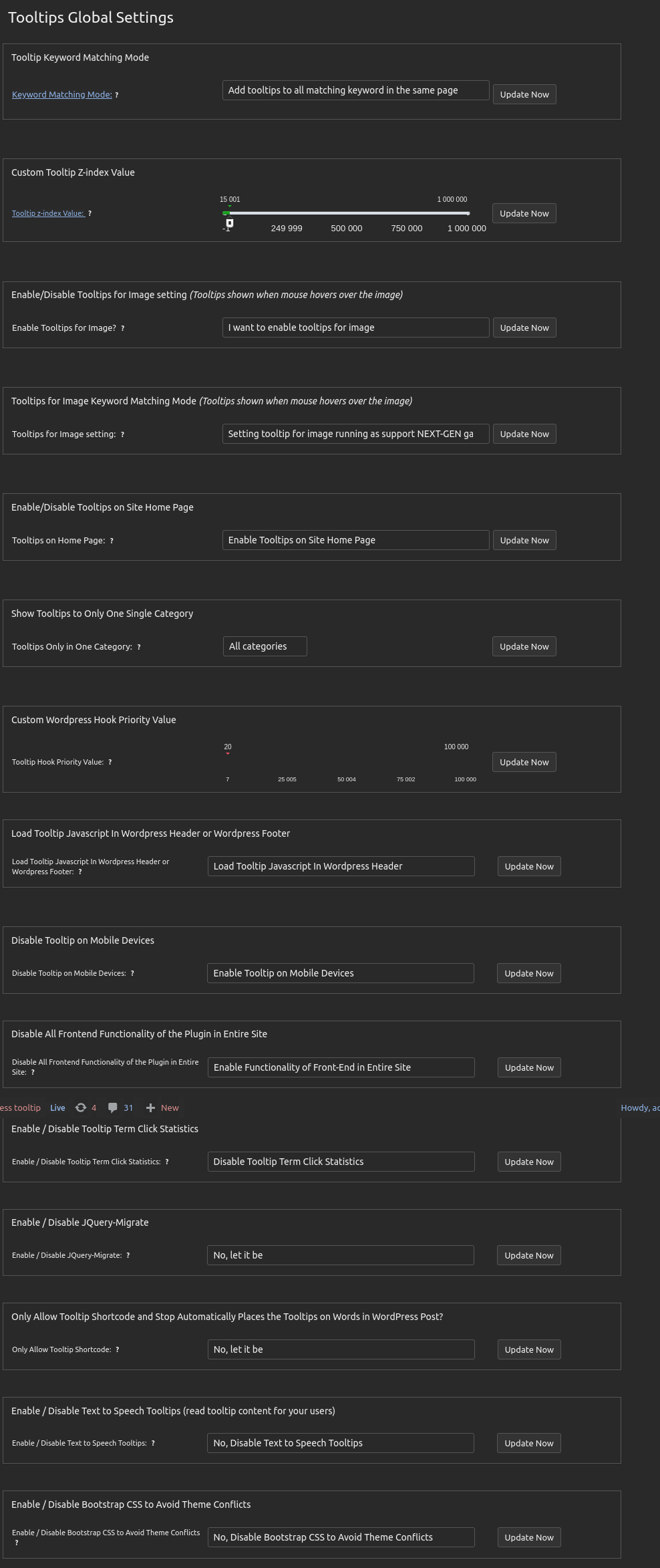
5: at the bottom of the global settings panel, you will find new option:

“Enable / Disable Awesome CSS to Avoid Theme Conflicts”

please select “No, Disable Awesome CSS to Avoid Theme Conflicts”, then click the blue “update now” button

Tooltips Global Settings in WordPress Tooltips 35.5.8

Also, please check the option ” Enable / Disable Bootstrap CSS to Avoid Theme Conflicts”, and disable it too

By this way, we can resolve the conflicts between your system and our plugin 🙂

Once again, we sincerely apologize for the delayed response. Following the developer’s illness and subsequent server hardware failure, we have only recently completed the installation of new hardware and server reconstruction. The development platform has also just been set up (it is currently 5:16 AM, and we still have no time to rest). The developer has indicated that gifts will be sent tomorrow as a gesture of apology. 🙂

Would you please upgrade to the new version?
Now we can work faster and we are happy to resolve any issue for you as soon as possible 🙂

Thanks, have a blessed day with your family 🙂

Best Regards,

WordPress Tooltips Support

And:

Hi,

I hope you’re enjoying quality time with your family when you receive this letter 🙂

We previously informed you that the new version of WordPress Tooltips Pro Plus 35.5.8 has been uploaded to resolve conflicts between the theme and the tooltip plugin 🙂

We sincerely apologize for the inconvenience caused by this delay. Thanks a lot of the bug report, which is greatly appreciated by our WordPress tooltip plugin developer. As a token of our gratitude, our wordpress tooltip developer offered you a license for the WordPress FAQ Pro Plugin(https://tooltips.org/product/wordpress-faq-pro-plugin-with-wordpress-tooltips/):

The WordPress FAQ Pro plugin is a powerful tool designed to make creating and managing FAQs on your WordPress website easy and efficient. It offers a wide range of features, including pre-designed FAQ templates, customizable FAQ styles via a user-friendly interface, AI-generated high-quality content for FAQs and WordPress posts, support for WooCommerce Product FAQs, responsive design for optimal display on different devices, multiple FAQ templates to choose from, FAQs grouped by category, and the ability to specify the number of FAQ items for each FAQ page, among many other features.

Sorry for the delay of the reply and thank you very much for your patience. Our developer added a license of AI Smart Content Links plugin (https://tooltips.org/product/smart-content-links/), which will enhance your website’s content and uplift the user experience with the powerful Smart Content Links plugin. By seamlessly integrating links to relevant content within your WordPress blog posts, you can effortlessly provide valuable context, information, and resources to your readers. These intelligent links are engineered to grant quick access to related resources and information, enabling your audience to delve deeper into the topic at hand while maintaining uninterrupted flow and focus on your core message.

Leveraging the cutting-edge AI-driven Natural Language Processing (NLP), Smart Content Links empowers you to bolster your SEO efforts efficiently. With its intuitive backend interface, simply input a keyword, and the plugin will leverage AI algorithms to rank and match posts, ensuring optimal alignment between content and keywords.

We are working diligently to enhance the functionality of ll out plugins. If you have any suggestions, we are eager to implement new features for you as quickly as possible and promptly resolve any issues. 🙂

Thanks, have a blessed day with your family 🙂

Best Regards,

WordPress Tooltips Support


Tagged with: ,

Nouveau modèle de liste de glossaire avec un nouveau shortcode de liste de glossaire dans le plugin Tooltips de WordPress – WordPress Tooltips Pro Plus 35.4.8 publié

Chers utilisateurs du complément wordpress tooltips : nous espérons que vous allez bien et que vous passez de bons moments avec vos proches ! Nous sommes ravis d’annoncer le lancement de la version 35.4.8 de WordPress Tooltips Pro Plus. Dans cette nouvelle version, nous vous présentons un glossaire totalement nouveau, spécialement conçu pour les étudiants à la recherche d’informations !

Un Changement Inspirant

Au cours des dernières semaines, nous avons recueilli des retours d’expérience de la part des utilisateurs du complément WordPress Tooltips. Beaucoup d’entre vous ont soulevé la nécessité d’un nouveau contenu pour le glossaire lors de la préparation de matériel éducatif (LMS) pour vos étudiants sur WordPress. Vous avez mentionné comment l’inclusion de vidéos et d’images améliore la compréhension des divers concepts.

Les délais de livraison approchent rapidement, et les étudiants commencent à rédiger leurs examens finaux. Il est donc crucial que le glossaire soit disponible dès le début de leurs travaux. Un glossaire existant et bien organisé améliore la lisibilité de vos documents et garantit qu’ils puissent comprendre facilement des concepts techniques ou compliqués.

Ces plateformes éducatives cherchent à s’assurer que le glossaire soit intégré de manière à pouvoir être affiché immédiatement après le contenu de l’examen final. Lorsque des termes spécifiques sont fréquemment utilisés, leur inclusion aide à améliorer la lisibilité du travail.

Termes et Glossaire dans WordPress

Les termes sont des listes de mots liés à un domaine d’étude spécifique et leurs définitions. Ils aident les utilisateurs à comprendre les termes techniques ou le jargon spécifique à un domaine particulier. Les termes apparaissent souvent dans des livres, des articles, des pages Web et divers formats multimédias, offrant clarté et augmentant la compréhension du public. Avoir un glossaire est crucial dans de nombreux domaines pour réduire l’écart entre les experts et les novices. Dans la documentation technique ou scientifique, ajouter un glossaire permet aux lecteurs d’explorer des idées complexes sans être confrontés à des termes inconnus. Les entreprises, les institutions éducatives et les organisations créent leurs propres glossaires pour une communication efficace. Dans le monde numérique, les termes dans WordPress jouent un rôle similaire pour les pages Web construites sur la plateforme WordPress, permettant aux visiteurs de consulter les définitions de termes connexes dans le contexte du contenu de la page. Les termes dans WordPress améliorent l’expérience utilisateur en aidant les visiteurs à comprendre la terminologie et les expressions courantes utilisées sur les pages.

Créer un Glossaire avec WordPress Tooltips

Avec WordPress Tooltips, créer un glossaire est extrêmement facile ! Il vous suffit d’insérer le shortcode [ glossary ] dans votre publication WordPress et un magnifique glossaire sera généré en quelques minutes. Voici à quoi cela ressemblera :

The ideals which have lighted my way, and time after time have given me new courage to face life cheerfully, have been Kindness, Beauty, and Truth. The trite subjects of human efforts, possessions, outward success, luxury have always seemed to me contemptible.
Do something wonderful, people may imitate it.
To follow, without halt, one aim: There is the secret of success.
This is wordpress audio tooltip demo, audio is loading, please wait a moment. Your browser does not support the audio element.
Robert Louis Stevenson
Since wordpress tooltips pro 5.9.2 (the current version is 17.1.4), we start to support bullet screen effect, what is bullet screen? In some countries, for example Korean, China... and so on, a few site start to allows show text messages fly across the screen like bullets, we call it bullet screen, a example site which Read More
Bullet Screen lets you add scrolling comments, quotes, or tips to any WordPress post, offering users a unique and engaging experience
Strawberry & Cream Torte $9 only! On sale! Limited Time Offer! SHOP NOW

Principales Caractéristiques du Glossaire dans WordPress

  • Terme : l’enregistrement de l’expression
  • Définition : le contenu de la définition (facultatif, peut être affiché, exporté ou juste du texte)
  • Catégorie : (facultatif) catégorie à laquelle le terme appartient. Un nombre illimité de catégories peut être établi, par exemple : Technologie, Animaux, Dictionnaire, etc.
  • Lien pour Plus d’Informations : lien menant à la page du terme
  • Notes : (facultatif) possibilité d’ajouter une note au terme et à la définition (tooltip), permettant aux lecteurs d’obtenir toutes les informations nécessaires sans quitter la page du glossaire.

Vous pouvez également ajouter facilement des notes en utilisant le complément de notes de WordPress. Ce complément ajoute automatiquement vos notes aux publications de WordPress.

Qu’est-ce que les Notes de Bas de Page ?

Les notes de bas de page sont des commentaires qui apparaissent en bas de la page et fournissent des informations supplémentaires, des commentaires ou des liens en rapport avec un texte spécifique. Leur utilisation est courante dans l’écriture académique, dans les livres et dans la recherche, aidant à identifier des sources ou à fournir des détails ou des éclaircissements sans interrompre le texte principal.

Caractéristiques Principales :

  • Emplacement : Elles se trouvent généralement en bas de la page, où un tableau ou une liste (comme vos notes) se trouve à côté du texte principal.
  • Formatage : Souvent utilisées des numéros ou des symboles pour représenter les notes de bas de page dans le texte.
  • Contenu : Elles peuvent inclure des liens, des extensions ou des commentaires supplémentaires sur les textes.
  • Numérotation : Elles sont généralement numérotées de manière séquentielle tout au long du document.

Exemple :

Texte principal : “Cette théorie est largement discutée¹.”

Note de bas de page :

¹ Smith, John. Théorie de l’Évolution. New York : Éditeur Académique, 2020.

Les notes de bas de page sont essentielles pour aider les lecteurs à comprendre clairement le sujet, permettant aux auteurs de présenter des informations sans interrompre le texte principal.

Tooltips.org offre tous les compléments nécessaires qui vous permettent de créer des travaux de recherche incroyables. De nombreux administrateurs de sites WordPress LMS ont transformé leurs sites en centres de connaissances, remplis d’expériences incroyables, de musées interactifs ou de puissants centres de marketing, le tout avec quelques clics. Rejoignez des milliers d’utilisateurs satisfaits !

Quoi de Neuf dans le Glossaire dans la Version 35.4.8 du Complément WordPress Tooltips pour les Recherches ?

Comme vous pouvez le constater, une colonne apparaît désormais à gauche de la page du glossaire de WordPress Tooltips qui montre le terme, et à droite une colonne qui montre la définition. Sur la base des retours d’expérience des utilisateurs du complément WordPress Tooltips, nous avons redessiné le glossaire pour que le terme soit visible sur la ligne du titre et que le contenu de la définition se trouve en dessous. Ce format s’adapte parfaitement aux pratiques académiques traditionnelles et offre aux participants un environnement familier.

Les programmeurs du complément WordPress Tooltips ont lancé la version 35.4.8 qui inclut une nouvelle version abrégée appelée [ glossary_list ]. Le nouveau glossaire sera affiché de la manière suivante :


Demo of Glossary List Shortcode -- WordPress Tooltips 35.4.8

Liste de Glossaire – WordPress Tooltips 35.4.8

Voici comment fonctionne le nouveau modèle de modèle dans notre démonstration en ligne.

Merci de partager vos idées merveilleuses concernant le complément WordPress Tooltips ! Si vous avez des questions, n’hésitez pas à nous contacter. Nous serions ravis d’entendre vos commentaires et de réaliser votre vision !

Résumé :

Un glossaire est une liste claire de termes avec leurs définitions correspondantes, qui aide les utilisateurs à comprendre des termes techniques, du jargon professionnel ou des expressions spécifiques. Cela peut être une ressource utile qui aide les utilisateurs à surmonter les obstacles qu’ils rencontrent. Les termes apparaissent fréquemment dans des livres, des articles, des sites Web et divers formats multimédias, offrant clarté et compréhension.

Dans l’écriture académique, ajouter un glossaire permet aux lecteurs d’explorer des pensées complexes sans être confrontés à des termes inconnus. Les entreprises et institutions éducatives développent souvent leurs propres glossaires pour une communication efficace. Dans le monde numérique, les termes dans WordPress offrent des directives pour les ressources connexes sur votre blog.

Le complément WordPress Tooltips permet d’offrir cette option, où les utilisateurs peuvent créer d’incroyables glossaires en quelques clics.


Configuration du Glossaire dans la Version 33.1.8 du Complément WordPress Tooltips

Merci. Passez une bonne journée avec votre famille

L’équipe de Support Produit de WordPress Tooltips

Tagged with: , , , , , , , ,

Novo modelo de lista de glossário com novo shortcode de lista de glossário no plugin Tooltips do WordPress – Lançado o WordPress Tooltips Pro Plus 35.4.8

Estimados usuários do complemento wordpress tooltips: esperamos que estejam bem e aproveitando bons momentos com seus entes queridos! Temos o prazer de anunciar o lançamento da versão 35.4.8 do WordPress Tooltips Pro Plus. Nesta nova versão, apresentamos um glossário completamente novo, projetado especialmente para estudantes que buscam informações!

Uma Mudança Inspiradora

Nas últimas semanas, coletamos feedback dos usuários do complemento WordPress Tooltips. Muitos de vocês destacaram a necessidade de novo conteúdo para o glossário ao preparar materiais educacionais (LMS) para seus alunos no WordPress. Vocês mencionaram como a inclusão de vídeos e imagens melhora a compreensão de vários conceitos.

Os prazos de entrega estão se aproximando rapidamente, e os estudantes começam a redigir seus exames finais, portanto, é crucial que o glossário esteja disponível desde o início de seus documentos. Um glossário existente e bem organizado melhora a legibilidade de seus trabalhos e garante que possam compreender facilmente conceitos técnicos ou complicados.

Essas plataformas educacionais se esforçam para garantir que o glossário esteja integrado de forma que possa ser exibido imediatamente após o conteúdo do exame final. Quando termos específicos são usados com frequência, sua inclusão ajuda a melhorar a legibilidade do trabalho.

Termos e Glossário no WordPress

Os termos são listas de palavras relacionadas a um campo de estudo específico e suas definições. Eles ajudam os usuários a entender termos técnicos ou gírias específicas e frases em um campo particular. Os termos aparecem com frequência em livros, artigos, páginas da web e diversos formatos multimídia, proporcionando clareza e aumentando a compreensão do público. Ter um glossário é crucial em muitas áreas para reduzir a diferença entre especialistas e leigos. Na documentação técnica ou científica, adicionar um glossário permite que os leitores mergulhem em ideias complexas sem enfrentar termos desconhecidos. Empresas, instituições educacionais e organizações criam seus próprios glossários para comunicação eficaz. No mundo digital, os termos no WordPress desempenham uma função semelhante para as páginas da web construídas na plataforma WordPress, permitindo que os visitantes consultem definições de termos relacionados no contexto do conteúdo da página. Os termos no WordPress melhoram a experiência do usuário, ajudando os visitantes a compreender terminologia e expressões comuns utilizadas nas páginas.

Criando um Glossário com WordPress Tooltips

Com o WordPress Tooltips, criar um glossário é extremamente fácil! Basta inserir o shortcode [ glossary ] na sua postagem do WordPress e um belo glossário será gerado em questão de minutos. Veja como ficará:

The ideals which have lighted my way, and time after time have given me new courage to face life cheerfully, have been Kindness, Beauty, and Truth. The trite subjects of human efforts, possessions, outward success, luxury have always seemed to me contemptible.
Do something wonderful, people may imitate it.
To follow, without halt, one aim: There is the secret of success.
This is wordpress audio tooltip demo, audio is loading, please wait a moment. Your browser does not support the audio element.
Robert Louis Stevenson
Since wordpress tooltips pro 5.9.2 (the current version is 17.1.4), we start to support bullet screen effect, what is bullet screen? In some countries, for example Korean, China... and so on, a few site start to allows show text messages fly across the screen like bullets, we call it bullet screen, a example site which Read More
Bullet Screen lets you add scrolling comments, quotes, or tips to any WordPress post, offering users a unique and engaging experience
Strawberry & Cream Torte $9 only! On sale! Limited Time Offer! SHOP NOW

Principais Recursos do Glossário no WordPress

  • Termo: o registro da expressão
  • Definição: o conteúdo da definição (opcional, pode ser exibido, exportado ou apenas como texto)
  • Categoria: (opcional) categoria à qual pertence o termo. Um número ilimitado de categorias pode ser estabelecido, como: Tecnologia, Animais, Dicionário, etc.
  • Link para Mais Informações: link que leva à página do termo
  • Notas: (opcional) pode adicionar uma nota ao termo e definição (tooltip), permitindo que os leitores obtenham todas as informações necessárias sem sair da página do glossário.

Você também pode adicionar notas facilmente usando o complemento de notas do WordPress. Este complemento adiciona automaticamente suas notas às postagens do WordPress.

O que são Notas de Rodapé?

As notas de rodapé são comentários que aparecem na parte inferior da página e fornecem informações adicionais, comentários ou links relacionados a um texto específico. Seu uso é comum na escrita acadêmica, em livros e em pesquisas, ajudando a identificar fontes ou fornecer detalhes ou esclarecimentos sem interromper o texto principal.

Principais Recursos:

  • Localização: Geralmente encontram-se na parte inferior da página, onde uma tabela ou lista (como suas notas) se encontra ao lado do texto principal.
  • Formatação: Geralmente são usados números ou símbolos para representar as notas de rodapé no texto.
  • Conteúdo: Podem incluir links, extensões ou comentários adicionais sobre os textos.
  • Numeração: Geralmente são numeradas sequencialmente ao longo do documento.

Exemplo:

Texto principal: “Essa teoria é amplamente discutida¹.”

Nota de rodapé:

¹ Smith, John. Teoria da Evolução. Nova York: Editora Acadêmica, 2020.

As notas de rodapé são essenciais para ajudar os leitores a compreender claramente o tema, permitindo que os autores apresentem informações sem interromper o texto principal.

Tooltips.org oferece todos os complementos necessários que permitem criar trabalhos de pesquisa incríveis. Muitos administradores de sites WordPress LMS transformaram seus sites em centros de conhecimento, repletos de experiências incríveis, museus interativos ou poderosos centros de marketing, tudo isso com apenas alguns cliques. Junte-se a milhares de usuários satisfeitos!

O que há de novo no glossário na versão 35.4.8 do complemento WordPress Tooltips para pesquisas?

Como pode ser observado, agora aparece uma coluna à esquerda da página do glossário do WordPress Tooltips que mostra o termo, e à direita uma coluna que mostra a definição. Com base no feedback recebido dos usuários do complemento WordPress Tooltips, redesenhamos o glossário para que o termo seja visível na linha do título e o conteúdo da definição fique abaixo. Este formato se adapta perfeitamente às práticas acadêmicas tradicionais e fornece aos participantes um ambiente familiar.

Os programadores do complemento WordPress Tooltips lançaram a versão 35.4.8 que inclui uma nova versão abreviada chamada [ glossary_list ]. O novo glossário será exibido da seguinte maneira:


Demo of Glossary List Shortcode -- WordPress Tooltips 35.4.8

Lista de Glossário – WordPress Tooltips 35.4.8

Veja como funciona o novo modelo de template na nossa demonstração online.

Obrigado por compartilhar suas ideias maravilhosas sobre o complemento WordPress Tooltips! Se você tiver alguma dúvida, não hesite em nos contatar. Adoraríamos ouvir seus comentários e fazer suas ideias se tornarem realidade!

Resumo:

Um glossário é uma lista clara de termos com suas definições correspondentes, que ajuda os usuários a compreender termos técnicos, gíria profissional ou expressões específicas. Pode ser uma fonte útil que ajuda os usuários a superar obstáculos que encontram. Os termos aparecem frequentemente em livros, artigos, sites e diversos formatos multimídia, proporcionando clareza e compreensão.

Na escrita acadêmica, adicionar um glossário permite que os leitores mergulhem em pensamentos complexos sem precisar enfrentar termos desconhecidos. Empresas e instituições educacionais frequentemente desenvolvem seus próprios glossários para uma comunicação eficaz. No mundo digital, os termos no WordPress oferecem diretrizes para recursos relacionados no seu blog.

O complemento WordPress Tooltips permite oferecer essa opção, onde os usuários podem criar glossários incríveis com apenas alguns cliques.


Configuração do Glossário na versão 33.1.8 do complemento WordPress Tooltips

Obrigado. Tenham um bom dia com sua família

A equipe de Suporte ao Produto do WordPress Tooltips

Tagged with: , , , , , , , ,

Nueva plantilla de lista de glosario con nuevo shortcode de lista de glosario en el complemento Tooltips de WordPress – Lanzado WordPress Tooltips Pro Plus 35.4.8

Estimados usuarios del complemento wordpress tooltips : ¡Esperamos que estén bien y disfrutando de buenos momentos con sus seres queridos! Nos complace anunciar el lanzamiento de la versión 35.4.8 de WordPress Tooltips Pro Plus. ¡En esta nueva versión, presentamos un glosario completamente nuevo, diseñado especialmente para estudiantes que buscan información!

Un Cambio Inspirador

En las últimas semanas, hemos recopilado comentarios de los usuarios del complemento WordPress Tooltips. Muchos de ustedes han destacado la necesidad de nuevo contenido para el glosario mientras preparan materiales educativos (LMS) para sus estudiantes en WordPress. Ustedes mencionaron cómo la inclusión de videos e imágenes mejora la comprensión de varios conceptos.

Los plazos de entrega se acercan rápidamente, y los estudiantes comienzan a redactar sus exámenes finales, por lo que es crucial que el glosario esté disponible desde el inicio de sus documentos. Un glosario existente y bien organizado mejora la legibilidad de sus trabajos y asegura que puedan comprender fácilmente conceptos técnicos o complicados.

Estas plataformas educativas se esfuerzan por asegurar que el glosario esté integrado de manera que pueda mostrarse inmediatamente después del contenido del examen final. Cuando se utilizan con frecuencia términos específicos, su inclusión ayuda a mejorar la legibilidad del trabajo.

Términos y Glosario en WordPress

Los términos son listas de palabras relacionadas con un campo de estudio específico y sus definiciones. Ayudan a los usuarios a comprender términos técnicos o jerga específica y frases en un campo particular. Los términos aparecen con frecuencia en libros, artículos, páginas web y diversos formatos multimedia, proporcionando claridad y aumentando la comprensión del público. Tener un glosario es crucial en muchas áreas para reducir la brecha entre expertos y legos. En la documentación técnica o científica, agregar un glosario permite a los lectores sumergirse en ideas complejas sin tener que lidiar con términos desconocidos. Las empresas, instituciones educativas y organizaciones crean sus propios glosarios para una comunicación efectiva. En el mundo digital, los términos en WordPress cumplen una función similar para las páginas web construidas en la plataforma WordPress, permitiendo a los visitantes consultar definiciones de términos relacionados en el contexto del contenido de la página. Los términos en WordPress mejoran la experiencia del usuario al ayudar a los visitantes a comprender terminología y expresiones comunes utilizadas en las páginas.

Creando un Glosario con WordPress Tooltips

Con WordPress Tooltips, ¡crear un glosario es extremadamente fácil! Simplemente inserte el shortcode [ glossary ] en su publicación de WordPress y se generará un hermoso glosario en cuestión de minutos. Así es como se verá:

The ideals which have lighted my way, and time after time have given me new courage to face life cheerfully, have been Kindness, Beauty, and Truth. The trite subjects of human efforts, possessions, outward success, luxury have always seemed to me contemptible.
Do something wonderful, people may imitate it.
To follow, without halt, one aim: There is the secret of success.
This is wordpress audio tooltip demo, audio is loading, please wait a moment. Your browser does not support the audio element.
Robert Louis Stevenson
Since wordpress tooltips pro 5.9.2 (the current version is 17.1.4), we start to support bullet screen effect, what is bullet screen? In some countries, for example Korean, China... and so on, a few site start to allows show text messages fly across the screen like bullets, we call it bullet screen, a example site which Read More
Bullet Screen lets you add scrolling comments, quotes, or tips to any WordPress post, offering users a unique and engaging experience
Strawberry & Cream Torte $9 only! On sale! Limited Time Offer! SHOP NOW

Características Principales del Glosario en WordPress

  • Término: el registro de la expresión
  • Definición: el contenido de la definición (opcional, puede mostrarse, exportarse o solo como texto)
  • Categoría: (opcional) categoría a la que pertenece el término. Se pueden establecer un número ilimitado de categorías, tales como: Tecnología, Animales, Diccionario, etc.
  • Enlace para más Información: enlace que conduce a la página del término
  • Notas: (opcional) puede añadir una nota al término y definición (tooltip), lo que permite a los lectores obtener toda la información necesaria sin salir de la página del glosario.

También puede agregar notas fácilmente utilizando el complemento de notas de WordPress. Este complemento agrega automáticamente sus notas a las publicaciones en WordPress.

¿Qué son las Notas a Pie de Página?

Las notas a pie de página son comentarios que aparecen en la parte inferior de la página y proporcionan información adicional, comentarios o enlaces relacionados con un texto específico. Su uso es común en la escritura académica, en libros y en investigaciones, ayudando a identificar fuentes o proporcionar detalles o aclaraciones sin interrumpir el texto principal.

Características Principales:

  • Ubicación: Generalmente se encuentra en la parte inferior de la página, donde una tabla o lista (como tus notas) se encuentra al lado del texto principal.
  • Formateo: Generalmente se utilizan números o símbolos para representar las notas a pie de página en el texto.
  • Contenido: Pueden incluir enlaces, extensiones o comentarios adicionales sobre los textos.
  • Numeración: Generalmente se numeran secuencialmente a lo largo del documento.

Ejemplo:

Texto principal: “Esta teoría se discute ampliamente¹.”

Nota a pie de página:

¹ Smith, John. Teoría de la Evolución. Nueva York: Editorial Académica, 2020.

Las notas a pie de página son esenciales para ayudar a los lectores a comprender claramente el tema, permitiendo a los autores presentar información sin interrumpir el texto principal.

Tooltips.org ofrece todos los complementos necesarios que permiten crear trabajos de investigación increíbles. Muchos administradores de sitios WordPress LMS han transformado sus sitios web en centros de conocimiento, llenos de experiencias asombrosas, museos interactivos o poderosos centros de marketing, todo esto con solo unos pocos clics. ¡Únete a miles de usuarios satisfechos!

¿Qué hay de nuevo en el glosario de la versión 35.4.8 del complemento WordPress Tooltips para investigaciones?

Como se puede observar, ahora aparece una columna a la izquierda de la página del glosario de WordPress Tooltips que muestra el término, y a la derecha una columna que muestra la definición. Basado en los comentarios obtenidos de los usuarios del complemento WordPress Tooltips, hemos rediseñado el glosario para que el término sea visible en la fila del título y el contenido de la definición quede debajo. Este formato se adapta perfectamente a las prácticas académicas tradicionales y proporciona a los participantes un entorno familiar.

Los programadores del complemento WordPress Tooltips han lanzado la versión 35.4.8 que incluye una nueva versión abreviada llamada [ glossary_list ]. El nuevo glosario se mostrará de la siguiente manera:


Demo of Glossary List Shortcode -- WordPress Tooltips 35.4.8

Lista de Glosario – WordPress Tooltips 35.4.8

Así es como funciona el nuevo modelo de plantilla en nuestra demostración en línea.

¡Gracias por compartir sus maravillosas ideas sobre el complemento WordPress Tooltips! Si tienen alguna pregunta, no duden en comunicarse con nosotros. ¡Nos encantaría escuchar sus comentarios y hacer realidad sus ideas!

Resumen:

Un glosario es una lista clara de términos con sus definiciones correspondientes, que ayuda a los usuarios a comprender términos técnicos, jerga profesisonal o expresiones específicas. Puede ser una fuente útil que ayuda a los usuarios a superar obstáculos con los que se encuentran. Los términos aparecen a menudo en libros, artículos, sitios web y diversos formatos multimedia, proporcionando claridad y comprensión.

En la escritura académica, agregar un glosario permite a los lectores sumergirse en pensamientos complejos sin tener que enfrentarse a términos desconocidos. Las empresas y las instituciones educativas a menudo desarrollan sus propios glosarios para una comunicación efectiva. En el mundo digital, los términos en WordPress ofrecen pautas hacia recursos relacionados en tu blog.

El complemento WordPress Tooltips permite ofrecer esta opción, donde los usuarios pueden crear glosarios increíbles con solo unos pocos clics.


Configuración del Glosario en la versión 33.1.8 del complemento WordPress Tooltips

Gracias. Que tengan un buen día con su familia

El equipo de Soporte al Producto de WordPress Tooltips

Tagged with: , , , , , , , ,
Top


