How to Clear Customized Color of Letters in WordPress Glossary Navigation Bar? WordPress Tooltips Pro Plus 16.1.2 Released

Dear users of  WordPress Tooltip plugin , hope this message find you are doing well and have happy days with your family 🙂   We get a ticket from a user of wordpress tooltips pro plus plugin, he hope “Clear Customized Color of Letters in WordPress Glossary Navigation Bar”, our wordpress tooltip developer  have developed wordpress tooltips pro plus  16.1.2 to realize this feature for wordpress tooltip editor 🙂

How to Clear Customized Color of Letters in WordPress Glossary Navigation Bar?

1: Download the latest version of wordpress tooltips pro plus version >= 16.1.2

2: After downloaded the wordpress tooltips pro plus zip file, please login your wordpress site as wordpress admin

3: In plugins panel,delete the old version of wordpress tooltips pro plugin and then click “add new” button at the top of plugin panel to upload the zip file of the wordpress tooltip glossary plugin , then activate the wordpress tooltips pro plus plugin

4: In wordpress dashboard, click “Tooltips” menu item, and then click “Glossary Settings” sub menu item

5:Move to the the bottom of the “Glossary Settings” panel, you will find the new option “Color of Letters in Glossary Navigation Bar Which Have Terms”, please just click the color picker, it looks like this:
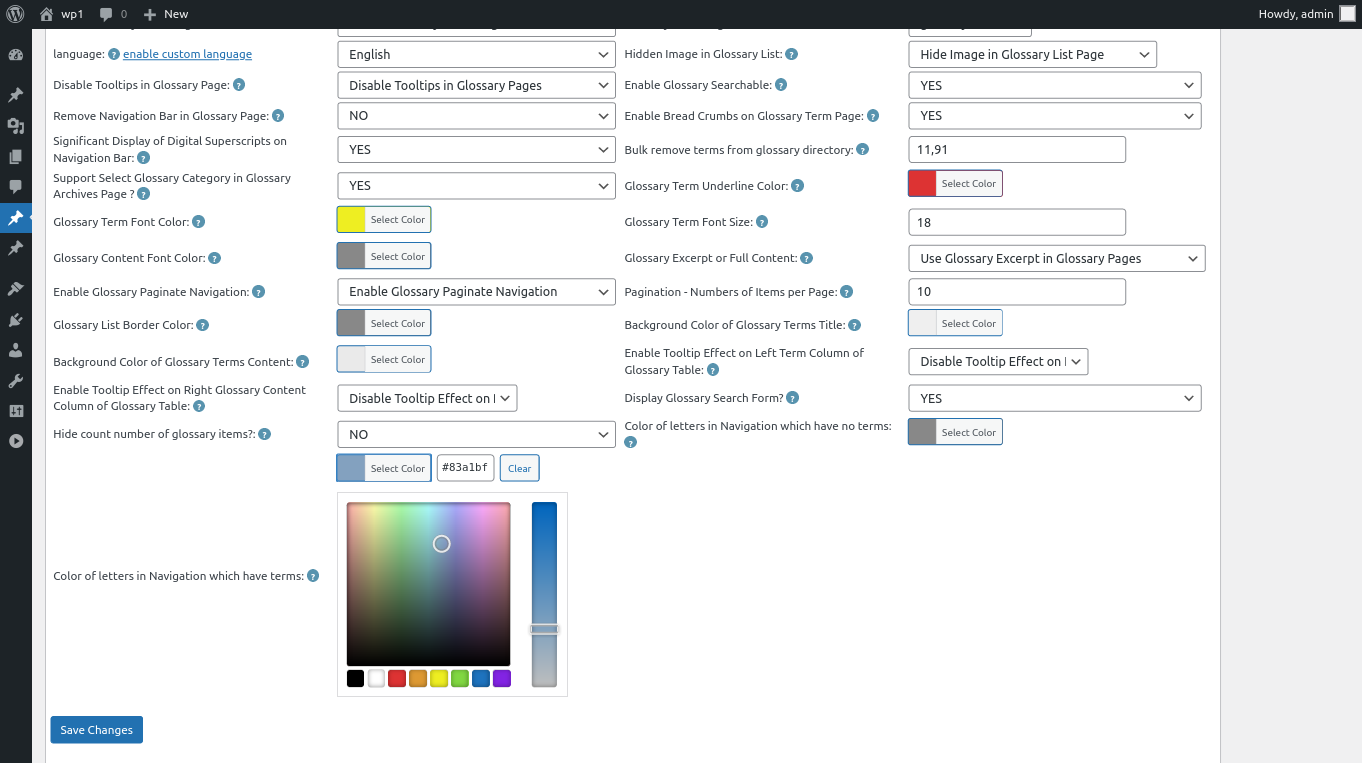
changing color of letters in Navigation which have terms

6: In the color picker, you will find the button “Clear”, once click the “Clear” button, you can remove the customized color of letters in glossary navigation bar, it looks like this:
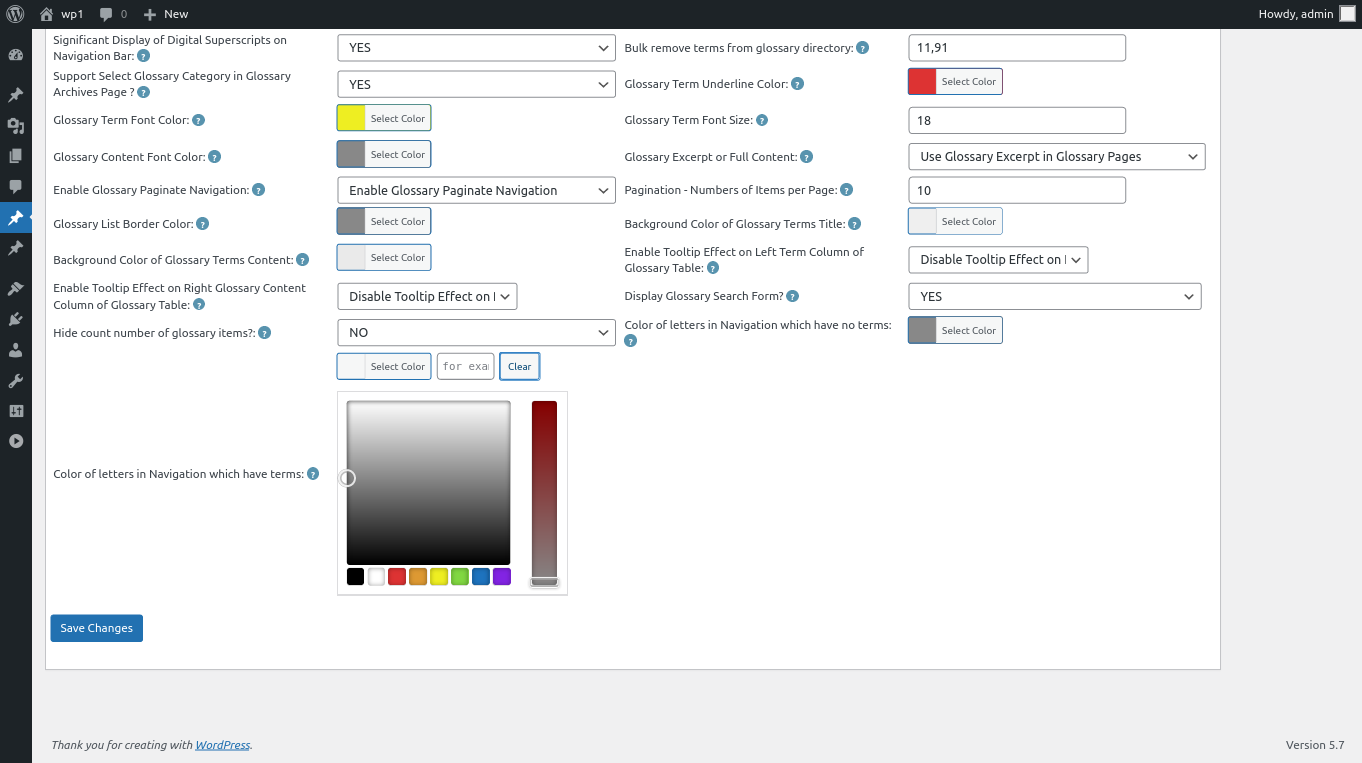
clear color of letters in wordpress glossary navigation bar

clear color of letters in wordpress glossary navigation bar

7: After clear the color of glossary letters, please remember to click “Save Changes” button at the bottom of the glossary settings panel, then in front end the “Color of Letters in Glossary Navigation Bar Which Have Terms” will be changed as you modified in here :):

Thanks for the great feature request, if you have any more question about wordpress tooltip plugin, please don’t hesitate to contact us, we are happy to help you solve it 🙂


Thanks, have a blessed weekend with your family 🙂

WordPress Tooltip Support

Tagged with: , , , ,

How to add tooltips effect for fields in easy pricing tables plugin

Hi,

We get a wordpress tooltip user’s ticket, in which he said that on our wordpress tooltip plugin demo page, he found the demo of tooltips for easy pricing tables plugin page not works well, he found the tooltip shortcode is not works good in fields of easy pricing tables, he request us to check does wordpress tooltips pro support easy pricing tables plugin or not.

Our developer did a check of easy pricing tables plugin, we found it is because the easy pricing tables plugin has upgraded their plugin codes, and their pricing tables do not support add shortcode effect in fields of pricing table, they just support insert shortcode in button text, if wordpress users insert shortcode in other kinds of fields in easy pricing tables, in front end they just displayed messed javascript codes.  But wordpress tooltips pro new version support add tooltips effects on fields of easy pricing tables automatically, so we do not need use wordpress tooltip shortcode in easy pricing tables any more 🙂

This is the screenshot of our wordpress tooltips for easy pricing table:

You can check our demo of wordpress tooltips for easy pricing table directly, just mouse hover each fields, you will find wordpress tooltips can add text, images… and so on for each fields in easy pricing table, so admins can save the space and add more description for each fields in pricing table 🙂


This is the screenshot of our easy pricing table, you can see we are using two methods of wordpress tooltips for easy pricing tables

You can find we are using two methods of wordpress tooltip plugin for easy pricing tables, the first method is just enter tooltip terms in any field in the easy pricing tables, another method is use wordpress tooltip shortcode in button text filed 🙂

Thanks for the note, if you have any more question or feature request for wordpress tooltips plugin, please don’t hesitate to contact us 🙂

Thanks, have a blessed day with your family 🙂

WordPress tooltips support team


Tagged with: , , , ,

WordPress Tooltips Pro Plugin 15.5.0, Support Elementor Tooltip Keyword Matching Mode for Elementor Better

Hi, good evening, dear  WordPress Tooltip Plugin users,  I hope this message find you are doing well and having happy weekend with your family 🙂

We get an amazing wordpress tooltip user’s feedback, he said he found in the wordpress tooltips global settings panel,  after setup the option “Keyword Matching Mode” as “Add tooltips to the first matching keyword in the same page”, in his site there are still found a few same tooltip terms have the tooltip effects:

The issue is related to this: How to Only Add WordPress Tooltip to the First Matching Keyword in the Same WordPress Post? but in my case for instance on my page, look at the word “tooltip term”. It’s repeated all the way down to the bottom, yet in global settings, I have “first matching keyword” selected under keyword matching mode.

This appears to be site-wide. It appears that the “Add tooltips to the first matching keyword in the same page” option isn’t working.

Thank you

We did a check on his site, we found the amazing user is using the amazing elementor page builder, and his elementor pages is based on elementor widgets, actually in his pages, full of  elementor widgets, our old design is support wordpress tooltip matching keyword for each wordpress content, wordpress menu… and so on, in general, in a wordpress page, there are only one wordpress content area, that’s why all things works well in recent years and we never get any report of wordpress tooltip matching keyword, it is the first time we found all pages is building via widgets, our wordpress tooltip developer re-developed our wordpress tooltip plugin, now no matter which kind of option be selected, for example “Add tooltips to all matching keyword in the same page” option, “Add tooltips to the first matching keyword in the same page”  option, “Add tooltips to the first N matching keyword in the same page” option, all tings works well, no matter you are using elementor widgets or wordpress content template to build your wordpress pages, all things works well too 🙂

That’s why we released the new version of wordpress tooltips pro plugin 15.5.0, thanks for the great feedback, that enhanced function of elementor tooltip and helped all wordpress tooltips users a lot! 🙂

Thanks, have a blessed day with your family 🙂

Best Regards,

WordPress Tooltips Plugin Support Team

Tagged with: , ,

WordPress Tooltips Glossary Update at 2020-08-20

Hi Dear WordPress Tooltip Glossary Users,
Hope this message find you are doing well and have happy days with your family! 🙂
Today we have updated our wordpress tooltip glossary plugin site, change at 2020 08 20:
1: WordPress released their newest wordpress version 5.5, our developer of wordpress tooltip plugin have checked all of our wordpress plugins to ensure all things works well with wordpress 5.5, wordpress tooltip supports have tested all plugin and we ensure all things works well with wordpress 5.5 🙂
2: Our wordpress tooltip site have upgraded to wordpress 5.5, and we have upgraded all plugins and themes to works with wordpress 5.5 🙂
3: We have released wordpress tooltips plugin new version 13.5.4, with wordpress tooltip glossary plugin 13.5.4,  we support more easier for advanced wordpress expert developer custom their wordpress tooltip css codes online 🙂
You can find full document of wordpress tooltips glossary plugin 13.5.4 at here 🙂
4: We have re-wrote our wordpress tooltip glossary plugin feature lists page, to add new change logs of wordpress tooltip plugin, you can find newest wordpress tooltip features page at here 🙂
4: We have added SVG tooltips demo in the menu item, wordpress tooltip users can check our SVG Icons Tooltip Demo to learn how to use SVG icons to build pretty tooltips quickly 🙂
We are developing a new wordpress tooltip plugin,if you have any question or suggestion of wordpress tooltip plugin, please don’t hesitate to tell us 🙂
Thanks, have a blessed day with your family 🙂
Best Regards,
WordPress Tooltip Glossary Plugin Support Team
Tagged with: , , , , , ,

Update: We have updated woocommerce product tabs plugin documents

Hey dear woocommerce product tabs plugin users,

We have released new version of woocommerce product tabs plugin and we have re-write our features of woocommerce product tabs plugin page, and we updated the woocommerce product tabs plugin product page too, we have uploaded the latest woocommerce product tabs plugin,  please check our newest document and download new version for your woocommerce site.

Also we have released wordpress members directory plugin 1.2.0, in new version we added navigation bar for select users more quicker, please check and update it too 🙂

Our wordpress tooltip plugin support both of wordpress members directory plugin and woocommerce product tabs plugin

Thanks, have a blessed day with your family 🙂

WordPress Tooltip Support

Tagged with: , ,

WordPress Tooltips Pro Plugin 7.8.0 Released,each wordpress tooltip term have unique pretty style now, you can build a colorful and varied and graceful tooltips site

Hi Dears,

We just released wordpress tooltips plugin 7.8.0, in this version, based on a few amazing users’ requests, we added a few amazing tooltips feature:

* Each wordpress tooltip will have their own unique tooltips style:
By default, all tooltips have same style which generated by your global customized tooltips style in “Tooltips Style Settings” panel, but you can have unique customized tooltips style for each tooltips, in tooltips editor, when you add new tooltips or edit existed tooltips, at the bottom of the tooltips editor, you will find a new metabox which allow users custom your unique for this tooltips, for example, “Tooltip Box Background”,”Tooltip Box Width”, “Tooltip Font Color”,”Tooltip Text Align”, “Tooltip Box Padding:”, “Tooltip Class Name”, “Tooltip Border Radius”, “Border Width”, “Tooltip Border Color”, “Tooltips Border Bottom”, “Tooltip Underline Color”, “Tooltips Shadow”, “Tooltip Font Size”, “Tooltips Line Height”, “Tooltip Term Color”, “Tooltips Popup Animation”, “Title Background Color”, “Tooltip Title Font Size”, “Title Font Color”, “Close Button Background”,
“Close Button Radius”, “Close Button Font Color”… and so on, by this way, each tooltips will have different style and you can build a colorful and varied and graceful tooltips site.

* New option to setting Tooltip z-index Value, in tooltips global settings panel, you will find a new range slider to setting z-index Value:
Some plugins or themes have a very high z-index value, it caused the tooltip hidden behind their flyout, you can increase tooltips z-index to solve this kind of problem.

* New optionto setting tooltip Hook Priority Value,in tooltips global settings panel, you will find a new range slider to setting tooltip Hook Priority Value:
If you want tooltips can support functionality of other wordpress plugins better, and show content which generated by other plugins in tooltips popup window, you need let other plugins(which followed WP the_content API) run first. You can try to change tooltip hook priority in here, heigher value means lower tooltip hook priority and that means let more WP plugins run first, if there are any plugin conflicts, you can just try to change tooltip hook priority lower or higher, then check result in the front end.

* Avoid conflict with another tooltip plugin

* Fixed conflcits with Gravity Forms

* Improved [tooltips] shortcode

* Improved [tooltip_by_id] shortcode

* Fixed the how to use shortcode tips in shortcodes

* Improved tooltips js code, robustness

* Fixed tooltip javascript conflic with other 3rd plugin

* Improved tooltips for menu to support more themes

* Based on users’ request, can add tooltips effect on tooltips term in glossary too

* Speed up page load, move all tooltips javascript function to the footer

* Generate tooltips css file, not only add inlice css codes in the browser page, to improve page load speed

* Fixed toolTipPostID bug when load style,

* Improved advance tooltips shortcode.

* New wordpress tooltips language package

I had to say, this is a hard work, we tested many method to realize these features, and full of conflicts and troubles, finally, we are happy we really realized it! 🙂

Thanks, have a blessings weekend with your family 🙂
Best Regards,
Tomas

Tagged with: , , , , ,

Added more details for wordpress tooltip video tutorial — “WordPress Tooltip Keyword Matching Mode” and “WordPress tooltips for image setting”

Hi Dears,

Based on users requested, we just added more details with text and images for our wordpress tooltip video tutorial, please check new update of “WordPress Tooltips Video Tutorial 7: WordPress Tooltip Keyword Matching Mode” and “WordPress Tooltips Video Tutorial 9: WordPress tooltips for image setting“, we are still add more text and screenshot for video tutorial of our wordpress tooltip plugin, you will see more document soon 🙂

Tagged with: , , , ,

WordPress tooltips plugin 6.5.0, core codes upgraded

Hi Dears,

I have finished a important version of wordpress tooltips, in the wordpress tooltis 6.5.0, I have upgraded core codes of javascripts and css, we have prepared to make more amazing tooltips effects in next versions, Also I have fixed a autocomplete conflicts and Enhanced addon security. 🙂

We have received a few more tooltip feature request, we are finishing new version and you will see it soon 🙂

Thanks dear friends, have a blessings day with your family 🙂

Best Regards,
Tomas

Tagged with: , , , , , ,

WordPress tooltips 6.4.2, support сyrillic language (Russian) and disable specific tooltips for woocommerce

Hi Dears,

Based on users requests, I have developed a new wordpress tooltip plugin 6.4.2, updates in this version:
# Support сyrillic language (Russian)
# support disable specific tooltips for woocommerce
# avoid conflict with a few themes default jquery autocomplete

I am develop a new version based on users amazing request and you will see it soon, any feature request is welcome 🙂

Thanks, have a blessings weekend with your family 🙂

Best Regards,
Tomas

Tagged with: , , , , , , , , , , ,

WordPress Tooltips Pro Plugin 5.7.6 Released, Improved glossary style and highlight tooltip text when hover the tooltip term

Hi Dear Tooltips Users,

I have released a new tooltips version — wordpress tooltips pro 5.7.6. 🙂

Based on users requested, I added a feature — when mouse hover a tooltips terms, our wordpress tooltips plugin will highlight the text of this tooltips terms.

Also for make wordpress glossary looks more professional, we tweak many elements / style of glossary, for examle, margin, padding, backgound, border radius… and so on for glossary and tooltips lists.

A new wordpress tooltip plugin is on the road already, I believe you will like the new version soon. 🙂

Thanks, have a blessings day with your family. 🙂

Best Regards,
Tomas

Tagged with: , , ,
Top


