Dear users of WordPress Tooltip plugin, hope this message find you are doing well and have happy weekend with your family 🙂 We just released wordpress tooltips free plugin 7.9.9, since this version we start to support new wordpress block themes, what is wordpress block theme? A wordpress block theme is a wordpress theme with templates entirely composed of blocks, wordpress make a new wordpress editor — Gutenberg, Gutenberg is a block editor, which replaced the classic editor. WordPress Gutenberg editor allow wordpress users build wordpress posts via blocks. Since wordpress 5.9. wordpress start features of support block-based theme 🙂
A problem is a few new wordpress block theme do not use the_except API in their themes, so wordpress tooltips can not add tooltips effects on tooltip terms in except, our wordpress tooltip developer researched the problem, and we start to support wordpress block themes now 🙂
Also We get a new user of wordpress tooltip free plugin, in which he said after installed wordpress tooltips plugin, he cannot find the tooltip popup window in his site, we did a check for him, we found it is because his site have an option caused old version of jquery plugin cannot works well, after enabled jquery-migrate option in wordpress tooltip plugin, all things works well now 🙂
Our wordpress tooltip developer said it is not good to let user check problems in his theme options, a better method is, for new user of wordpress tooltips plugin, we will enable jquery-migrate for user automatically, users can disable jquery-migrate in backend again. 🙂
Also we are check our all jquery codes to solve this kind of problem, it still need more time, because we are focus on a few more user’s suggestion to wordpress tooltip plugin, in last in recent days, we have released 15 wordpress tooltip plugin, and 3 wordpress footnote with tooltip plugin , from new functions for wordpress glosary to Gutenberg tooltip to PDF viewer tooltip addon…etc, we are developing soundcloud tooltip and a few more wordpress tooltip functions, once finish these feature request, we will check back all of our jquery js files to make it works well with the newest jquery, so users will not have this kind of problem again 🙂
Thanks for so kindly report to wordpress tooltip plugin to, if you have any feature request or question to wordpress tooltip plugin, please don’t hesitate to contact us 🙂
Hi, hope this message find you are doing well and having happy weekend with your family 🙂 In recent days, we released 15 wordpress tooltip plugin, and 3 wordpress footnote with tooltip plugin and build new demos for wordpress footnote plugin, and we improved UI in wordpress tooltip site to build a more friendly site for wordpress tooltip uers 🙂
Change Log of WordPress Tooltips Plugin Versions in Recent Days:
10: In the version WordPress Tooltip Pro 15.9.8 and Tooltips Pro Plus 16.2.4, we build better Case Sensitive function for wordpress tooltip users
11: In WordPress tooltip glossary Plugin Pro Plus16.2.8, we support add Glossary Category under Glossary term, based on user’s suggestion
12: Since WordPress Tooltips Pro Plus Plugin 16.3.4 version, we support Gutenberg Tooltip, wordpress tooltip users can insert Image Tooltip Shortcode inline in Gutenberg now
13: In WordPress Tooltips Plus Plugin 16.3.8 , we fixed UI problem in WordPress Tooltips Knowledge Base
We have changed the menu items of wordpress tooltip site, because an amazing user told us, we should just focus do better works for wordpress tooltip section, do not need add other free plugins in our wordpress tooltip site and menu, because they have not many users yet. We think about this, finally we think his suggestion is right, we try our best to build a better wordpress tooltip plugin for users, and other free wordpress tooltip plugins have no many users install them, so we do not need list it in the top menu bar and we do not need list it in our wordpress tooltips plugin shop, we just do the right thing for our users, yes this is right, we removed these wordpress free plugins from our site 🙂
And another user told us, when he read our document of wordpress tooltip tips, he found in the sidebar, there are a widget named another recent posts, he told us, this is not good, we should just named it as tooltip recent news — this is the correctly content which we added in wordpress tooltip sidebar, yes, we changed the name of wordpress tooltip news widget.
And a user said when he mouse hover our wordpress menu tooltip demo at top menu bar, he found the link is the same of the wordpress tooltip demo, he said this is waste the link and it is not good for users, so we change the link of wordpress menu tooltip demo.
A wordpress tooltip user told us he leave the comment in our wordpress tooltip feature and faq posts, but did not got response, so he submit ticket to us, we checked comments, yes, there are many comments to wordpress tooltip plugin, we replied them one by one and allowed these comments 🙂
Thanks for so many kindly feedback of wordpress tooltip plugin and wordpress tooltip site, that’s good suggestions of how to service for wordpress tooltip users better, thank you so much 🙂
We are developing new wordpress tooltip plugin for users, actually we get many suggestion, sometimes, we lost our whole night to finish these great suggestion for users, we are try our best to finish them asap we can 🙂
Hi Dear WordPress tooltip plugin users, hope this message find you are doing well and have happy days with your family 🙂 Our wordpress tooltip developer have released wordpress tooltips pro plus plugin 16.3.8, because we found the style of knowledge base in wordpress tooltips pro plugin messed up, in this new version we have fixed it 🙂
If you have any question or feature request about wordpress tooltips plugin, please contact us, we are very happy to help you realize it 🙂
Dear WordPress tooltip plugin users, hope this message find you are doing well and have happy days with your family 🙂 Our wordpress tooltip developer have released wordpress tooltips pro plus plugin 16.3.4, to support enter wordpress image tooltip shortcode inline in Gutenberg 🙂
We got a ticket from a wordpress tooltip user:
Hello, I’m trying to implement an image tooltip in the Gutenberg editor with this inline shortcode, [tooltips keyword="Walnut" content="<img src='https://www.mydomain.com/wp-content/uploads/2021/06/Photo-1024x700.jpg'>"]] and it looks like this “Walnut” and no image pops up and it says:
Proper Shortcode Usage is: [[tooltips keyword='wordpress' content = 'hello, wp']] or [[tooltips content = 'hello, wp']]wordpress[[/tooltips]
All with single quotation marks ?
Your example here https://tooltips.org/how-to-use-wordpress-tooltip-shortcode-tooltips-to-add-tooltips-manually/ says this: [tooltips keyword="lovely girls" content="<img src='https://mydomain.com/wp-content/uploads/2017/02/screenshot.png'>"] That’s not the same…is the keyword with single or double quotation mark?
On your site you don’t mention if you have must use Classic Editor (old) or if you can use Gutenberg Block editor (Paragraph/HTML) or the Classis editor block from Gutenberg which only has text possibility? It supposed to work inline in all these editors right?
It seems the Gutenberg editor doesn’t accept the single quotation marks before and after the image because they transform automatically in “ Is this the reason it doesn’t work?
Than there’s the overall question about the single and double quotation marks, I’ve tried every combination with “your” marks see below above the line and “mine” below the line. They vary also (is this important?), how do I replicate yours besides copying them? I’ve tried them all btw. ‘ “ “ ‘ Is the Tooltips plugin actually compatible with Gutenberg editor or must I have to use the old editor?
I’d rather want to use this shortcode method for such a simple code than the tooltip editor with use of [Tooltip For Forms Demo - Message Field ] (this works btw) because it’s more flexible with the term you want to use and quicker if it works right away. 🙂 And if you delete a tooltip in the editor your text/term in the post is gone also.
Could you explain under which conditions this might be going to work? Is there a workaround?
Our wordpress tooltip plugin developer checked this question, yes, Gutenberg will change something in your content, for example, add the tag <p> automatically, replace ‘ with “ automatically….etc. If you are using a tooltip text shortcode , there are no any problem, but if you are using a wordpress image tooltip shortcode, because Gutenberg will change ‘ to “ automatically, if you did not entered image tooltip with correct format( the format is: In the shortcode, after the tag content, please use ‘, and after the tag img src, use “, please check description of the correct format at below), image tooltip shortcode will not works well, that’s why we develop a new version — wordpress tooltips pro plus 16.3.4 to solve this kind of problem 🙂
How to Insert Image Tooltip Shortcode Inline in Gutenberg?
User have no way to stop Gutenberg replace the ‘ to “, even you update the format manually, once Gutenburg saved the post, Gutenberg will replace the ‘ to “ again — automatically, so editor must use the correct format like this:
The rule is: In the shortcode, after the tag content, please use ‘, and after the tag img src, use “
When you enter the wordpress image tooltip shortcode inline Gutenberg, Gutenberg will display the image directly in Gutenberg editor, we make the screenshot of our current post, it looks like this:
When you publish the post, all things will works well in front end automatically 🙂
5: Please note, At the right hand of Gutenberg, we have a metabox “Tooltip Settings for this page”, please remember checked the option “Enable Advance Tooltips Shortcode” 🙂
Does image tooltip shortcode works in Guternberg code editor?
Yes, just insert the tooltip shortcode with the correct format, all things works well in Guternberg code editor too.
The rule of the format of Gutenberg is: In the shortcode, after the tag content, please use ‘, and after the tag img src, use “
We make the screenshot of Gutenberg code editor for users too, it looks like this:
As you can see, we insert a tooltip popup window picture in the image tooltip shortcode, in front end, when mouse hover the tooltip term Walnut, the tooltip window looks like this:
If you have any more question or feature request to wordpress tooltip plugin, please don’t hesitate to contact us, we are very happy realize it for you 🙂
Hi, Dear users of WordPress tooltip plugin , hope this message find you are doing well and have happy days with your family 🙂 We are happy to report you, we just released wordpress tooltips pro plus plugin 16.2.8, based on a wordpress tooltip plugin user’s ticket 🙂
We got a ticket from a wordpress tooltip user:
Subject:
> Glossary: Name of categorie above title
>
> Message:
> Hi, thank you for such an incredible plugin 🙂
>
> I would like to be able to display the category/ categories of a
> glossary item in the overview page.
Our wordpress tooltip plugin author developed a new wordpress tooltips glossary pro plus plugin to do it 🙂
How to Add Tooltip Glossary Category under Glossary Term?
2: Install and activate the wordpress tooltip glossary plugin in your site
3: Click tooltips menu item
4: Click Glossary settings sub menu item
5: You will open Glossary settings panel, at the bottom of Glossary settings panel, you will see the new option “Display Glossary Category Name in Glossary List?” Just click to enable it or disable it
6: If you enable the option, at the bottom of the glossary terms in glossary page, you will see the category name under the glossary terms
Hey, Dear WordPress tooltip plugin users, hope this message find you are doing well and have happy days with your family 🙂 We have released wordpress tooltips pro plugin 15.9.8 and wordpress tooltips pro plus 16.2.4, for clear some question from a coder, to make case sensitive tooltip better. 🙂
We got a support ticket from a wordpress tooltip user:
Hi,
>
> I have noticed something that happens quite often
>
> Lets sat you have two tooltips
>
> 1. interest
> 2. interest rate
>
> If a sentence has the word interest rate in it, it will show TWO
> overlapping tooltips, which is not ideal.
>
> It would be great to havea rule that says, in cadse of overlap,
> display the longer tooltip only.
>
> Thanks
Our support replied
Hi,
>
> Thanks for the message 🙂
>
> We are very happy to help you 🙂
>
> I think this version should not existed in tooltips pro version or
> tooltips pro plus version? I guess the problem existed in free
> version
> I am assign our developer to check it, if the issue existed, we will
> fix it and we will reply you again 🙂
>
> Thanks, have a blessed day with your family 🙂
>
> Best Regards,
> Support Team
The client replied:
Hi there.
>
> I definitely have the premium version.
> You can see it in action here.
>
> https://www.mybudget.com.au/blog/property-talk/what-does-the-recent-interest-rate-rise-in-australian-mean-for-your-budget/
>
> The term is interest rate.
>
I am assign our developer to check it, we will reply you again 🙂
Thanks, have a blessed day with your family 🙂
Best Regards,
Support Team
And the client replied again:
Hi,
>
> I believe the blog has been updated, so only one shows now, as the other word has been excluded, but it was there until not long ago.
>
> Thanks for reply.
Our developer checked the user’s question carefully, the problem existed in wordpress free plugin version, we re-developed wordpress tooltip free plugin to fix it, and in wordpress tooltips pro plugin and in wordpress tooltip pro plus plugin, all things works well, so we replied:
Hi,
Hope you are doing well and having happy weekend with your family 🙂
Thanks for the great URL, our developer have checked it 🙂
Yes, it works well, no problem be found on your page, so our developer tried to follow your description to insert the same terms in our site, and after checked many times, we cannot replay this kind error, all things works well, and we asked a few other users, they did not have this kind of problem too 🙂
If the problem be found again, would you please tell us again, we are very happy to solve it for you 🙂
Thanks, have a blessed sunday with your family 🙂
Best Regards,
Support Team
The client replied again:
> > Hi There,
> > >
> > > Thanks for your reply.
> > > The issue is definitely still there, perhaps your other customers have Case sensitive enabled?
It is strange, we did a test of case sensitive tooltip, with some thing like interest, Interest, interest rate, Interest rate…etc, and enable / disabled case sensitive option with all kinds of sentence, everytime it works well, finally, our developer checked our code carefully, we ensure all things works well, but in our case sensitive module, there are a code line which using “/s” option in preg_replace function, we know in coder’s mind it should be “/is”, but because before this code line, we have other code lines to deal with case sensitive, so we do not need to add “/is” in here, but our developer said keep a good style in code line to help other coders read our code better — is welcome by other coders, so we re-developed our wordpress tooltips pro and wordpress tooltips pro plus to make the coders more clear to clean the question 🙂
Actually, you do not need to upgrade to this version, what you need is upgrade to wordpress tooltips pro plus 16.2.4, in which we support tooltip PDF viewer in a few days before, and we are developing soundcloud tooltip addon in new wordpress tooltips pro plus version, so you can add some pretty music in a small tooltips pop-up box to let your reader release their soul for a while 🙂
Thanks for the great question, if you have any more question or feature request, please do not hesitate to contact us, we are always happy to improve our wordpress tooltip plugin for you 🙂
Dear users of WordPress Tooltip plugin , hope this message find you are doing well and have happy days with your family 🙂 We just released wordpress tooltip free 7.9.5, avoid to display 2 tooltips popup-box when user hover one tooltip term, based on an wordpress tooltip’s feedback 🙂
We got a bug report from the wordpress tooltip user:
Hi,
Lets sat you have two tooltips
1. interest
2. interest rate
If a sentence has the word interest rate in it, it will show TWO overlapping tooltips, which is not ideal.
It would be great to havea rule that says, in cadse of overlap, display the longer tooltip only.
Thanks
Our wordpress tooltip plugin developer create two tooltip terms and did a test, we found yes, there are problem, so our developer fixed the problem in the new version wordpress tooltips 7.9.5 🙂
Please upgrade your wordpress tooltip free version asap you can 🙂
WordPress Tooltip driven by users’ suggestion, if you have any feature require to question, please don’t hesitate to contact us, we always offer big discount for feature request or suggestion which we can realize. For example, we have finished wordpress tooltip PDF viewer addon for wordpress tooltips pro plus, based on user’s feature request, so the wordpress article will keep clean but with many powerful tooltip to load these PDF, video, audio…etc, our task it, when the users hover over an item, the colorful tooltip popup box will display with the animation effect. Tooltip editor can add video, audio, image, and even other content which generated by 3rd wordpress plugins like QR code, Amazon AD, Google Map in tooltip popup box via wordpress standard editor, it is very easy to use, we will offer 50% discount for the great user to upgrade to pro plus version 🙂
The PDF format an open standard, standardized as ISO 32000, developed by Adobe in 1992{{initiated by Adobe co-founder John Warnock in 1991}}. PDF can include text, image, audio, video, link, button, form fields…etc.
What is WordPress Tooltip
WordPress tooltip plugin is a tooltip plugin for wordpress, which be designed to help you create colorful, varied and graceful tooltip styles to present the content to your users, with lively and elegant animation effects, and save your valuable screen space.When the users hover over an item, the colorful tooltip popup box will display with the animation effect. You can add video, audio, image, and even other content which generated by 3rd wordpress plugins like QR code, Amazon AD, Google Map in tooltip popup box via wordpress standard editor, it is very easy to use.
What is WordPress Tooltips PDF Viewer Addon
In Windows / Linux / MacOS, there are a few free PDF Reader software. But on websites, for example, WordPress CMS, there are not many solutions, based on an amazing wordpress tooltip user’s feature request, to develop a wordpress tooltip pdf viewer addon:The amazing user asked a question:
Hi,How can I open a pdf document within a
tooltip ?
This is the first time we heard this kind of question, we requested a few more details, the user replied:
Our wordpress tooltip develope did a few research, and then we decide to develop a wordpress tooltip pdf viewer addon for the user:
Thanks for the message, in the current time, PDF reader
is not a function in our wordpress tooltip plugin. 🙂Although we never said we support PDF viewer, but our
developer have did a few research, and we will try to develop a new
addon for the tooltips pro plus 🙂Thanks, have a blessed day with your family 🙂Best Regards,
Support Team
Yes, it is worth to develop a new worpress tooltip pdf viewer addon, because we found in the current time, a few wordpress users embed pdf iframe in wordpress pages, a problem is, in general, pdf document is large, so it will used a lot of space in the screen, a better method is put pdf document in the tooltip popup box, so the wordpress article will keep clean but with many powerful tooltip to load these PDF, video, audio…etc, the amazing user is super smart! 🙂
How to Easily and Quickly Display the PDF in Tooltip Pop-up Box on the WordPress Page
WordPress Tooltips Addon Settings Panel in Version 16.1.8
as you can see, at the bottom of the wordpress tooltip addon panel, there are Enable / Disable Tooltips PDF Viewer option, please just enable it6 Now it is time to write the first pdf tooltip term, please click tooltips menu item and click add new sub-menu item to create a new tooltip term7 In the tooltip editor, you will find in the right hand of tooltip editor, there are metabox “insert PDF viewer to tooltip”, it looks like this:
insert PDF viewer to tooltip
In the “insert PDF viewer to tooltip” metabix, please enter the URL of the PDF in the PDF URL fieldThen please custom the PDF viewer height and viewer width in tooltip pop-up box, for example, height:400px, width:800px8 Now custom the tooltip pop-up box for this tooltip PDF viewer, at the bottom of this tooltip editor, you will find the metabox “Enable Customize Style”, please select the option yesThen in the tooltip box custom setting panel, please custom the tooltip pop-up box, for example, in the tooltip width option, enter :800It looks like this:
custom tooltip pop-up window
After enter the tooltip title and tooltip content, please click publish to save the tooltip term9 Now create a wordpress post, insert the tooltip term in the wordpress post and mouse hover the tooltip term, now you can read PDF content in the pop-up window, it looks like this:
read PDF content in wordpress tooltip pop-up box
As you can see, when you mouse hover the tooltip term, PDF content be loaded in the tooltip pop-up window, in the PDF tooltip box, you can use browser PDF function to read PDF easily, for example, you can scroll down, scroll up, you can click search to find words in the PDF, you can click next page / last page buttons to read PDF content, you can click toggle sidebar to read PDF content faster, you can download the PDF, you can print the PDF, or rotate clockwise, hand tool, zoom, go to last page, vertical scrolling, horizontal scrolling…etc. 🙂Please note, if you want to move into the tooltip pop-up box to scroll down the PDF document, you need go to tooltip style menu item and set “Tooltip hides when” option as “Stay Open a While”
Conclusion:
Based on a smart user’s feature request, wordpress tooltip developer developed a new addon for wordpress tooltips pro plus plugin — wordpress tooltip PDF viewer addon, with wordpress tooltip PDF viewer, wordpress author do not need to use a lot of rare space on the screen to embed PDF with iframe manually, wordpress editor can insert PDF in wordpress tooltip popup box just with a few clicks, and keep the wordpress pages clean and pretty 🙂
Dear users of WordPress Tooltip plugin , hope this message find you are doing well and have happy days with your family 🙂 We get a ticket from a user of wordpress tooltips pro plus plugin, he hope “Clear Customized Color of Letters in WordPress Glossary Navigation Bar”, our wordpress tooltip developer have developed wordpress tooltips pro plus 16.1.2 to realize this feature for wordpress tooltip editor 🙂
How to Clear Customized Color of Letters in WordPress Glossary Navigation Bar?
1: Download the latest version of wordpress tooltips pro plus version >= 16.1.2
2: After downloaded the wordpress tooltips pro plus zip file, please login your wordpress site as wordpress admin
3: In plugins panel,delete the old version of wordpress tooltips pro plugin and then click “add new” button at the top of plugin panel to upload the zip file of the wordpress tooltip glossary plugin , then activate the wordpress tooltips pro plus plugin
4: In wordpress dashboard, click “Tooltips” menu item, and then click “Glossary Settings” sub menu item
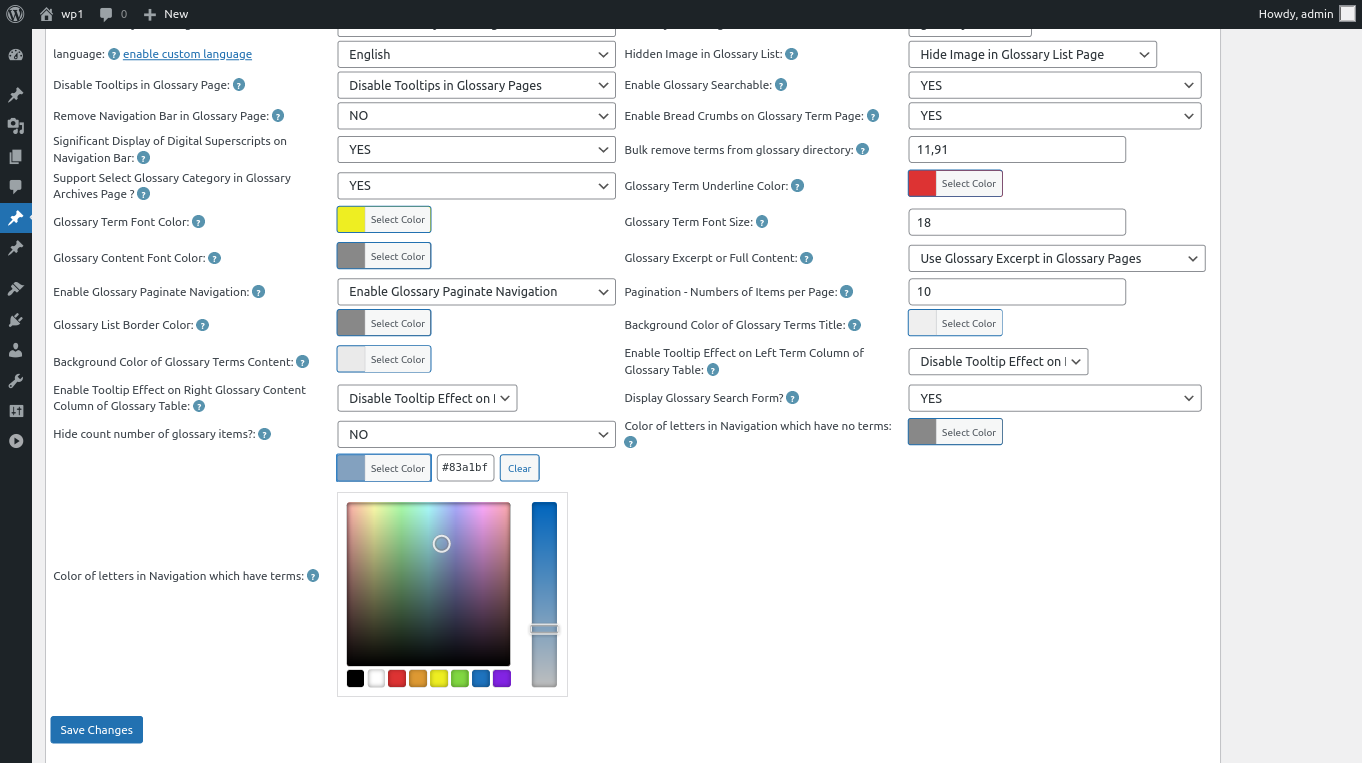
5:Move to the the bottom of the “Glossary Settings” panel, you will find the new option “Color of Letters in Glossary Navigation Bar Which Have Terms”, please just click the color picker, it looks like this:
changing color of letters in Navigation which have terms
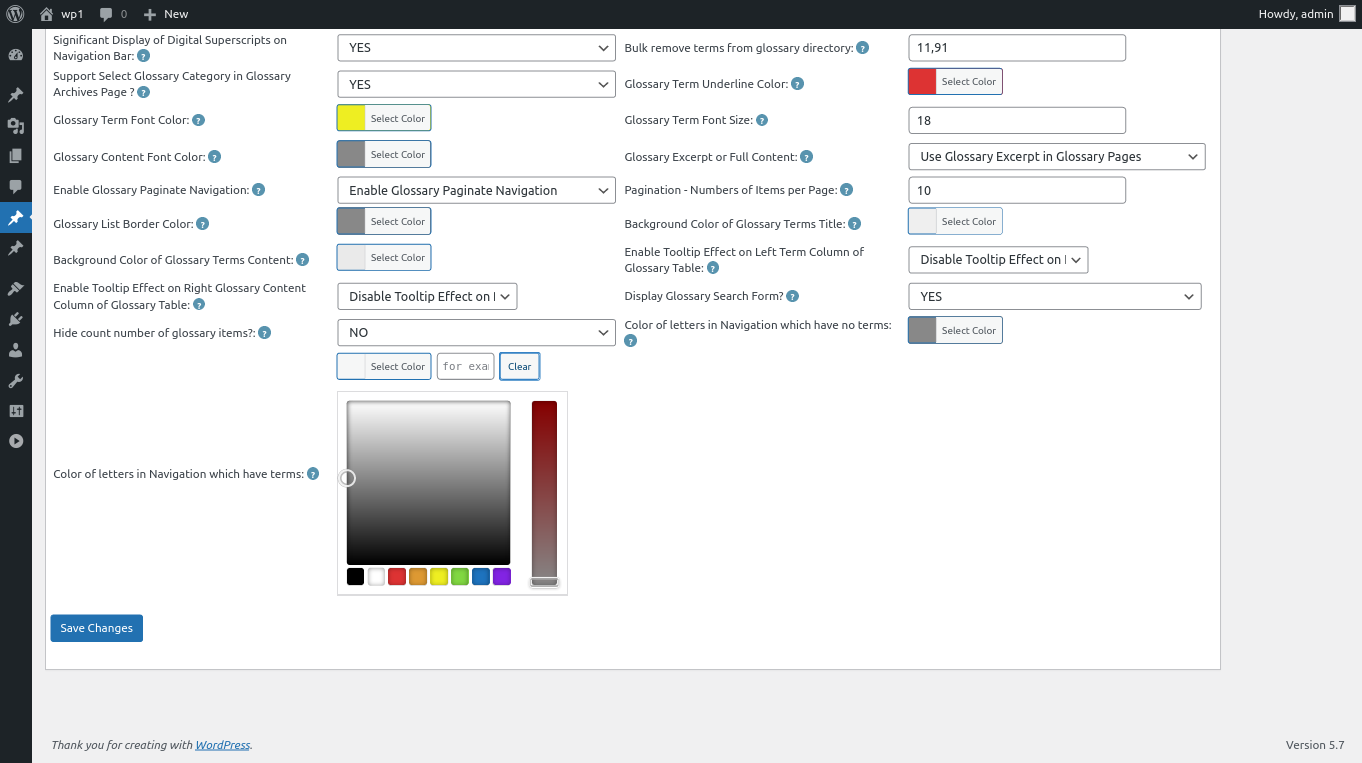
6: In the color picker, you will find the button “Clear”, once click the “Clear” button, you can remove the customized color of letters in glossary navigation bar, it looks like this:
clear color of letters in wordpress glossary navigation bar
7: After clear the color of glossary letters, please remember to click “Save Changes” button at the bottom of the glossary settings panel, then in front end the “Color of Letters in Glossary Navigation Bar Which Have Terms” will be changed as you modified in here :):
Thanks for the great feature request, if you have any more question about wordpress tooltip plugin, please don’t hesitate to contact us, we are happy to help you solve it 🙂
Hi Dear WordPress Tooltip plugin users, hope this message find you are doing well and have happy weekend with your family 🙂 We have released wordpress tooltips pro plus 16.0.8, to allow wordpress glossary admin to change color of letters which have terms in glossary Nav bar, based on an amazing users’ feature request 🙂
How to Change Color of Letters in Glossary Navigation Bar Which Have Terms?
7: Activate the wordpress tooltips pro plus plugin
8: In wordpress dashboard, click “Tooltips” menu item
9: Click “Glossary Settings” sub menu item
10: At the bottom of the “Glossary Settings” panel, you will find the new option “Color of Letters in Glossary Navigation Bar Which Have Terms”, it looks like this:
glossary custom panel in wordpress glossary 16.0.8
11: In the option “Color of Letters in Glossary Navigation Bar Which Have Terms”, you can click the color picker to change the color,it looks like this:
changing color of letters in Navigation which have terms
then just click “Save Changes” button, in front end the “Color of Letters in Glossary Navigation Bar Which Have Terms” will be changed as you modified in here :):
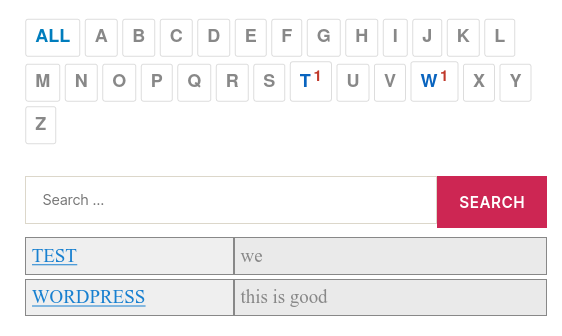
12: For example, the result in front end of the step #11 will looks like this:
customized color of glossary terms which have items
Thanks for the feature request, if you have any more requirement, please don’t hesitate to contact us, we are happy to do it for you 🙂
* 16 Years. Industry Benchmark. Defines the Tooltip Standard
* 688 Versions Released
* 1,000+ multilingual docs and videos, legacy support excellence
* 20,000+ websites trust us
* Ticket Support, Detailed Video Tutorials and Document
* Preset beautiful color schemes & stylesheet, Customize wordpress tooltip plugin style via a few mouse clicks, Multi language, positioning, trigger method, Multi browsers / Mobile devices supported, supports tooltips for many popular wordpress plugins
* Join Our Diverse Community of Users: Our plugin is loved by teachers, writers, manga artists, analysts, engineers, financial experts, and professionals from universities, banks, finance, aerospace, the internet, and beyond!