Tag: wordpress tooltip

How to bulk remove user from member directory in wordpress tooltip plugin? Supported by tooltip pro plus 21.9.8 and tooltips pro 16.8.6

Hi dear WordPress tooltip users, hope this message find you are doing well and have happy weekend with your family

A user has submitted a support ticket for wordpress tooltip plugin. He told us he using our member directory addon to create the directory of members, he added wordpress tooltip effect on each user’s username in the member directory, to show their selfie video,  which greatly helps all members quickly understand each other, enhances member relationships, and strengthens the overall group’s activity and trust, and all users like it the tooltip function for member directory. But a few users told him, they do not like their personal information and emails being displayed on the internal member list. They say they want to maintain their privacy and not be disturbed in their daily lives. 🙂

He checked settings in wordpress tooltip member directory addon, he found he can enable / disable specific user roles in member directory, but he had to change user role for each user manually, as an administrator, constantly trying to change user roles simply because some users do not like their personal information and emails being displayed on the internal member list is a tedious and unenjoyable task. He hopes for a simpler solution. 🙂

Okay, it is the first time we heard this kind of requirement, our wordpress tooltip developer tried to find a easily management method to help wordpress admin to exclude specific users from member directory, finally , we found it:

How to exclude specific user from wordpress member directrory?

1: login wordpress tooltip site download wordpress tooltips pro plus 21.9.8 or tooltips pro 16.8.6.

2: upload ans activate wordpress tooltip plugin in your wordpress site

3: click tooltips menu in wordpress admin area and click directory settings panel, it looks like this:

directory settings panel in wordpress tooltips pro plus 19.2.8

directory settings panel in wordpress tooltips pro plus 19.2.8

This is directory panel in wordpress tooltip pro plus version 19.2.8, some features is not existed in tooltips pro version and more features is not included in wordpress tooltip free plugin, but member directory addon have same functions.

In the new version wordpress tooltips pro 20.9.8. you will find there are a new option “Bulk remove user from member directory by user id in wordpress tooltip”, it looks like this:
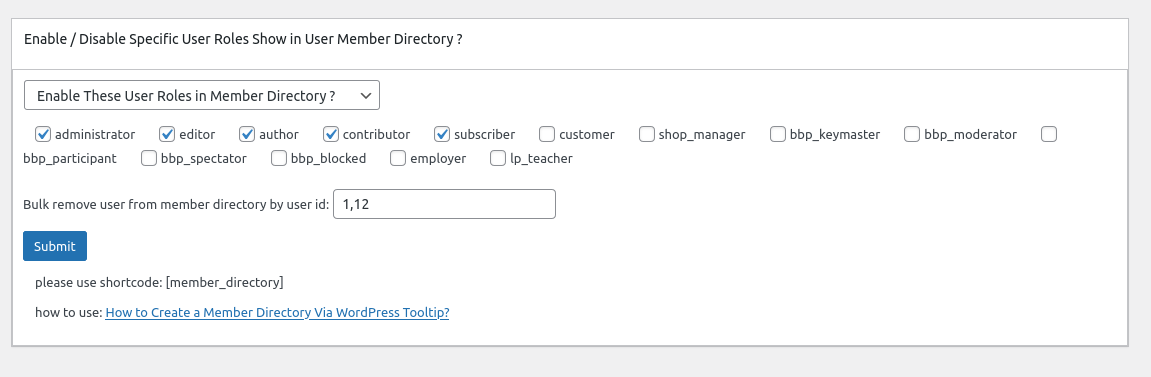
In here you can bulk enter user ids to exclude specific users from wordpress member directory in one time.

4: In front end, users which added in the “Bulk remove user from member directory by user id in wordpress tooltip” option, will be removed from wordpress member directory 🙂

Thanks for the great feedback,we give the user a license of “WordPress live link preview plugin with tooltip” plugin as a THANKS, Live link preview is a light and fast and powerful plugin to display live link preview for your wordpress users.

when users mouse hover a link on your wordpress post, WordPress live link preview plugin will display the live preview screenshot of the site in a wordperss tooltip popup window, users will see where you are sending them.

If you have any more feature request or question for wordpress tooltip plugin, please don’t hesitate to contact us, we are happy to improve wordpress tooltip for you always, and we will give you a few license of our amazing wordpress plugins too 🙂


Tagged with: ,

WordPress Tooltips pro plus 21.7.8 and WordPress Tooltips pro 16.8.2 and WordPress Tooltip free 8.6.9 Released

Hi dear WordPress tooltip users, hope this message find you are doing well and have happy weekend with your family 🙂  We have released WordPress Tooltips pro plus 21.7.8 and WordPress Tooltips pro 16.8.2 and WordPress Tooltip free 8.6.9 , based on a wordpress tooltip free user’s feedback 🙂

The wordpress tooltip user told us after import tooltips from csv file, the tooltips in the frontend interface are somewhat confusing, our wordpress tooltip developer checked his site and lost the whole night to developed a new version to fix the problem for the amazing user 🙂

When you have a time, please upgrade to the latest wordpress tooltips plugin version  🙂

What’s next? We are developing a new version of ACF tooltip addon, in which we can support more new complex fields from ACF pro , in last version, we have support display tooltips effect on most ACF fields of ACF free and ACF Pro in front end, we will add some ACF tooltip function  of ACF free version to wordpress tooltips free, and we are enhance our woocommerce product directory function for wordpress tooltips pro plus, we will move some of woocommerce directory functions to wordpress tooltips free version too. 🙂

Thanks, have a blessed day with your family

Best Regards,

WordPress tooltip plugin support

Tagged with: , ,

How to Enable / Disable Smart Content Link Bar Throughout the Whole WordPress Site? Supported by WordPress Smart Content Link with Tooltip 1.8.0

Hi, Dear WordPress Tooltip users, hope this message find you are doing well and having happy days with your family. We just released wordpress smart content link with tooltips plugin 1.8.0, based on an wordpress tooltip user’s feedback. 🙂

The wordpress tooltip user told us, he do not want smart content link bar displayed throughout the whole wordpress site always, he hope have an option to disable smart content link bar in back end, okay, our wordpress tooltip developer added a new global settings in wordpress smart content link with tooltip plugin, and we added a new option “Enable Smart Content Link Bar Throughout the Whole Site” in the wordpress smart content link with tooltip  global settings panel to solve the problem for the user 🙂

How to Enable / Disable Smart Content Link Bar Throughout the Whole WordPress Site?

1: Login wordpress tooltip plugin site to download the smart content links version which >= 1.8.0

2: upload and install the wordpress smart content links with tooltips version 1.8.0

3: in wordpress dashboard, click smart content link menu item and then click global settings  sub menu item, it looks like this:

Enable Smart Content Link Bar Throughout the Whole Site

Enable Smart Content Link Bar Throughout the Whole Site

4: as you can see, in WordPress Smart Content Links with tooltips global Settings panel, there are new option  “Enable Smart Content Link Bar Throughout the Whole Site”,  you can enable / disable Smart Content Link Bar throughout the wordpress site in here 🙂

What’s next?

We are adding a shortocode for WordPress Smart Content Links with tooltips, so you can add WordPress Smart Content Links Bar in anywhere of your wordpress site 🙂

Thanks for the great feedback, if you have any more feature request or question, please don’t hesitate to contact us

Thanks, have a blessed weekend with your family

Best Regards,

WordPress Tooltip plugin Support

Tagged with: , ,

WordPress Tooltips Free 8.6.3 Released

Hi dear WordPress tooltip users, hope this message find you are doing well and have happy days with your family

We just released wordpress tooltips free 8.6.3, in this version, we improved our core javascript function of  tooltips , to keep a clean UI in front-end 🙂

In last version of wordpress tooltips free plugin 8.5.9,  a wordpress tooltip user told us he did not find the changes in the new version, we told him we added a contact form 7 tooltip addon  , for help wordpress tooltip users get the correctly information of new version, we will add change log of last two version of wordpress tooltips free plugin — because our wordpress tooltips plugin developed before at years before, out change log is too long to displayed in wordpress readme.txt, so full change log can be found at here.

We are developing next version of wordpress tooltips free plugin 8.6.9, in which we will add ACF tooltip function for wordpress tooltip free user, full function can be found at here — acf tooltip in tooltips pro and pro +

Thanks, have a happy day with your family 🙂

Best Regards,

WordPress tooltip plugin support

Tagged with: , ,

What is the way to show in the title of every product a woocommerce tooltip with the description of the product

Hi dear WordPress tooltip users, hope this message find you are doing well and have happy days with your family An amazing woocommerce tooltip user created a topic on our woocommerce tooltip support forum, he asked us: “Hi guys, I’m using Tooltip Pro+ and I’m wondering what is the way to show in the title of every product a Tooltip with the description of the product?”  We’d  like write a detailed document for the woocommerce tooltip user 🙂

What’s the benefit to add woocmmerce tooltip on woocommerce product title?

Woocommerce can add woocommerce tooltip on product title in the shop page or product page to enhance the user experience and provide more information about the product, for example, woocommerce shop owner can provide some quick information about the product, such as its main features, benefits, or any other information that a buyer might be interested in knowing before making a purchase, woocommerce  shop owner can insert tooltips videos / audios / images / coupon codes / payment QR code…etc in the tooltip popup box,  this way, the buyer can have access to important information at a glance without having to click on each product individually to view the details  🙂

How to  to add woocmmerce tooltip on woocommerce product title?

Tooltips are small pop-up window that appear when the mouse cursor hovers an element. In this case, the woocommerce admin can add a tooltip to the product title in the shop page, which will show additional information about the product when the user hovers over it with their mouse, it is very easy to add tooltip on woocommerce title quickly:

1: Login  woocommerce tooltip plugin site to download wordpress tooltip pro plus plugin

2: login your wordpress  dashboard, upload woocommerce tooltip plugin via your wordpress plugins panel,then activate woocommerce tooltip plugin

3: Click “Tooltips” menu item, then click “Addons” sub menu item to open “Tooltips Addon settings” panel

4: In “Tooltips Addon settings” panel, you will find 18 wordpress tooltip addons, please enable “Tooltips for WooCommerce Product” addon and click “Update Now”  button,  it looks like this:

5: Click tooltips menu again
6: Click “woo tooltips” sub menu item, it looks like this:

tooltip sub menu items

tooltip sub menu items

7: Then you will open “Advanced WooCommerce Tooltips Addon Settings” panel, it looks like this:

advanced woocommerce tooltips addon settings

advanced woocommerce tooltips addon settings

8: Please enable “Tooltips for WooCommerce Product Title.

Then in the front end, woocommerce tooltip plugin will detect are there tooltip term in woocommerce product title and add  tooltip effect on woocommerce product title automatically 🙂

Hope this have a little help 🙂

Thanks, have a blessed day with your family 🙂

Best Regards,

WordPress tooltip plugin support

Tagged with: , , ,

How to use woocommerce tooltip to add a Tooltip to a WooCommerce product attribute?

Hi dear WordPress tooltip users, hope this message find you are doing well and have happy days with your family 🙂 We get a ticket from a wordpress tooltip user, he asked us a question “How to use woocommerce tooltip to add a Tooltip to a WooCommerce product attribute?”, by wordpress tooltip,  woocommerce shop owner can add tooltip on woocommerce product attribute easily, we believe there are more woocommerce tooltip user have similar question, we are happy to write a detailed document to help the user to understand how woocommerce tooltip can add a tooltip to woocommerce attribute. 🙂

What’s the benefit to add wordpress tooltip on woocommerce product attribute?

adding a tooltip to a woocommerce product attribute can provide additional information to customers about the attribute. For example, if the attribute is “material”, a tooltip could provide more information about the specific type of material used for the product via add video tooltip or audio tooltip on the materail attribute. This can help customers make more informed purchasing decisions and improve their overall shopping experience. Additionaly, tooltips can also help reduce the amount of customer support inquires related to product attributes, as customers can quickly find the information they need on the product page 🙂

How to add wordpress tooltip on woocommerce product attribute?

it is very easy to add tooltip on woocommerce attribute quickly:

1: Login  woocommerce tooltip plugin site to download wordpress tooltip pro plus plugin

2: login your wordpress  dashboard, upload woocommerce tooltip plugin via your wordpress plugins panel,then activate woocommerce tooltip plugin

3: Click “Tooltips” menu item, then click “Addons” sub menu item to open “Tooltips Addon settings” panel

4: In “Tooltips Addon settings” panel, you will find 18 wordpress tooltip addons, please enable “Tooltips for WooCommerce Product” addon and click “Update Now”  button,  it looks like this:


woocommerce tooltip addon

5: Click tooltips menu again
6: Click “woo tooltips” sub menu item, it looks like this:

tooltip sub menu items

tooltip sub menu items

7: Then you will open “Advanced WooCommerce Tooltips Addon Settings” panel, it looks like this:

advanced woocommerce tooltips addon settings

advanced woocommerce tooltips addon settings

8: Please enable “Tooltips for WooCommerce Product Attribute”, also please enable all other 7 woocommerce tooltip options.

Then in the front end, you will find woocommerce tooltips works well on woocommerce product attribute labels, it looks like this:

tooltips for woocommerce product additional information

Please note, you need add some tooltips first, if you are new users of woocommece tooltip, please check our wordpress tooltip video tutorials to learn how to create a tooltip term easily, and you can customize style for each toolip term to make a colorful woocommerce tooltip to cache the user’s attention, for example:

woocommerce attribute tooltip

Also woocommerce tooltip will add tooltip effect on woocommerce desprition and short descriptuion too, and you can use shortcode to add advanced woocomemrce tooltip content in woocommerce product description too

And you can add a woocommerce glossary for your product to help customer understand the benefit / performance of your product too.

By the way, you can display woocommerce product title, image, price with “add to cart” button, “view cart button” in wordpress tooltip in any wordpress post via Woocommerce product cart anywhere , something looks like it in tooltip popup:


 This will increase the visibility and sales of those products in any where in your woocommerce site
If you have any question or suggestion of woocommerce tooltip plugin, please don’t hesitate to conact us
Thanks, have a blessed day with your family
Best Regards,
WordPress Tooltip Plugin Support Team
Tagged with: , , , ,

WordPress Tooltips Pro + 21.4.8 and wordpress tooltips pro 16.6.6 released

Hi, Dear users of WordPress Tooltip , hope this message find you are doing well and having happy days with your family.   We just released new version of WordPress Tooltips Pro + 21.4.8 and wordpress tooltips pro 16.6.6, to follow wordpress security standard to use sanitize_text_filed function to enhance the security in the wordpress tooltip post types setting panel 🙂

In wordpress tooltip post types setting panel, worpress tooltip plugin editor can choose to restrict tooltip from displaying only in the specified custom post type, we developed this function is based on an amazing wordpress tooltip user’s suggestion, he said he like use wordpress tooltips to provide additional information or context about a particular element on wordpress post, such as buttons or images in wordpress posts, however, he do not want tooltip effect displayed in his lessons custom post type, in this case, tooltip can be a distraction to student, by select specified wordpress standard post type and custom post type, you can avoid this kind of annoyance. 🙂

At the same time, wordpress tooltip plus plugin support add tooltips effect on anything in your wordpress pages — if they have a CSS class or CSS ID, we call this tooltips for anything

Also wordpress tooltip pro plus plugin support reuse wordpress standard post type or wordpress custom type post as tooltip content and title, this will help wordpress blogger  make tooltips for reader fast 🙂

Thanks for great suggestions to wordpress tooltips plugin, if you have any question or feature request, please don’t hesitate to contact us 🙂


Thanks, have a blessed day with your family

Best Regards,

WordPress tooltip plugin support

Tagged with: , ,

WordPress Tooltips Pro Plus 21.1.8 and WordPress Tooltips 16.6.2 Released

Hi, Dear  WordPress Tooltip plugin users, hope this message find you are doing well and having happy weekend with your family.  we just released wordpress tooltips pro plus 21.1.8 and wordpress tooltips plugin 16.6.2, based on a few wordpress tooltips plugin user’s suggestion.

Changed in WordPress Tooltips Pro Plus 21.1.8 and WordPress Tooltips 16.6.2:

1: Improved core javascript function of tooltips

2: Improved glossary shortcode to stop glossary shortcode functions running specific shortcodes

If you have any feature request or requirement of wordpress tooltip plugins, please don’t hesitate to tell us 🙂

Thanks, have a blessed weekend with your family 🙂

Best Regards,

WordPress Tooltips Plugin Support

Tagged with:

WordPress Tooltips Pro Plus Plugin 21.0.8 Released, Improved tooltip close methods

Hi, Dear  WordPress Tooltip plugin users, hope this message find you are doing well and having happy weekend with your family.  We got a ticker from a wordpress tooltip user,in last time, he requested a new feature request to allow wordpress tooltips pro + plugin to add a new close tooltip box method: “click anywhere out of tooltips”, our wordpress tooltip developer developed a new version of tooltip pro plus version to realize the function for him. 🙂

Then he said he installed a slider and he found the new version works on all sections of his wordpress tooltip site, but in the slider section, the option “click anywhere out of tooltips” not works, he requested us to support this 3rd plugin for him too 🙂

Our wordpress tooltip developer checked the problem for him, we found the problem is caused by the code of his slider,when click the section out of the slider, all things works well, and if we right click in the section of the slider, all things works well, but his slider disabled mousedown event, although this is not caused by our wordpress tooltip plugin, and customize tooltip plugin for another 3rd plugin is out of our support scope, and  it is easy to write a description in his tooltip, but our wordpress tooltip developer tried our best to offer a solution for the user, after checked his code, we found the code of his slider is encrypted, our developer tried many times to find a solution to support his wordpress slider, finally we found a method to let wordpress tooltip “click anywhere out of tooltips” method support his 3rd slider plugin, that’s why we released wordpress tooltips pro plus plugin 21.0.8 🙂

What we doing now?

One day before, we released wordpress tooltip pro + to support insert tooltip shortcode into ALT filed of images in image gallery, we are try to support ALT of normal image, and we will release a new wordpress tooltip plugin soon 🙂

Thanks for the great feature request,have a blessed weekend with your family 🙂

Best Regards,

WordPress tooltips support

Tagged with: ,

How to add tooltips effect for contact form 7 plugin? Supported by wordpress tooltips free plugin 8.5.9

Hi, Dear  WordPress Tooltip plugin users, hope this message find you are doing well and having happy weekend with your family.  We got a ticker from an amazing wordpress tooltip free user, he said when he read wordpress tooltip document, he found our wordpress tooltips pro + version support tooltips for contact form 7 and tooltips for ACF plugin, he said he using contact form 7 and ACF too, he hope we can move tooltips for contact form 7 and tooltips for ACF to free user,he said there are a lot of users needing this function 🙂

Sure, our wordpress tooltip developer released wordpress tooltips free plugin 8.5.9 to support add tooltip effects on contact form 7 for the user  🙂

How to create tooltips for contact form 7 in wordpress tooltips free plugin?

1: Login wordpress dashboard and click tooltips menu item, and then click addons sub menu item

2: In tooltips addons sub menu item, please enable tooltips for contact form 7, it looks like this:

Tooltips for Contact Form 7 addon

Tooltips for Contact Form 7 addon

3: In  tooltips menu item, click add new to create a new tooltip, and then just enter the filed name of contact form 7 as tooltips title, then add your description in the tooltip content like this:

enter Contact Form field in tooltip editor

enter Contact Form field in tooltip editor

4: Then in the front-end, you will find wordpress tooltips plugin have added tooltips effect on contact form 7 labels:

contact form 7 with tooltip

contact form 7 with tooltip

5: Please check  our contact form 7 tooltip demo,  and tooltip contact form demo which support tooltip for contact form content field

By the way, we have released wordpress tooltips pro plus 20.9.8  to support display images and multimedia content via image ALT field, based on another amazing tooltip user’s suggestion, wordpress photo gallery users can insert wordpress tooltip shortcodes in their ALT field, and when users mouse hover their images in image glossary, users will see pretty text / images / videos / audios / maps / QRcodes ….etc on a pop-up tooltip window, this will help wordpress photo gallery user extend their image functionality to let their images have sound and video and animation capabilities…etc. Please, we just tested in a few kinds of image and image gallery, we do not promise this function will works well for all photo gallery program.

We give the user 2 wordpress plugins as a THANKS, If you have any feature  requirement, please don’t hesitate to contact us, we always give THANKS for the great suggestions 🙂

Thanks, have a happy day with your family 🙂

Best Regards,

WordPress tooltip support

Tagged with: , ,
Top


