Tag: wordpress tooltip

Wie kann man auf die WordPress Tooltips Pro Plus Version upgraden und den Tooltip-Javascript-Code statisch machen?

Hallo, liebe Benutzer des WordPress Tooltip Plugins, ich hoffe, diese Nachricht erreicht euch in bester Verfassung und ihr habt ein wundervolles Wochenende mit eurer Familie 🙂 Ein Benutzer des WordPress Tooltips Pro Plugins möchte die Geschwindigkeit seiner WordPress Seiten verbessern, indem er den JavaScript-Code der Tooltips in eine statische JavaScript-Datei speichert und lädt. Diese Funktion ist exklusiv für die WordPress Tooltips Pro Plus Version verfügbar. Um dieser Nachfrage gerecht zu werden, plant unser Support-Team die Erstellung eines umfassenden Tutorials, das den Upgrade-Prozess und die Aktivierung dieser Funktion abdeckt. Es ist wahrscheinlich, dass andere Benutzer ähnliche Anforderungen haben, daher die Absicht, eine detaillierte Anleitung zur Aktivierung dieser Funktion bereitzustellen.

1: Wenn Sie Benutzer des WordPress Tooltips Pro Plus Plugins sind, melden Sie sich bitte auf tooltips.org an und klicken Sie auf “WordPress Tooltip Download“, um die neueste Version des WordPress Tooltip Pro Plus Plugins herunterzuladen.

2: Melden Sie sich auf Ihrer WordPress-Website als Administrator an und klicken Sie auf das Menü “Plugins”. Deaktivieren Sie die aktuelle Version des WordPress-Tooltips-Plugins und löschen Sie es anschließend im WordPress-Plugins-Bereich.

3: Laden Sie dann das WordPress Tooltip Plugin (Zip-Datei) im Plugins-Bereich hoch und aktivieren Sie die WordPress Tooltips Pro Plus-Version. Wenn Sie ein neuer Benutzer des WordPress Tooltip Plugins sind, sehen Sie sich unser Video zur Installation des WordPress Tooltip an: WordPress Tooltips Video-Tutorial 3: Wie man das WordPress Tooltips Pro Plugin hochlädt und aktiviert.

4: Gehen Sie im WordPress-Dashboard zum Bereich “Tooltips”. Klicken Sie dort auf den Menüpunkt “Optionale Einstellungen”.

5: Dann wird das optionale Einstellungsfenster geöffnet, es sieht so aus:

6: Bitte navigieren Sie zur Option “Speichern des JavaScript-Codes der Tooltips in einer statischen JavaScript-Datei und Laden der statischen JS-Datei zur Beschleunigung der Seiten”. Wählen Sie “Ja, verwenden Sie die statische JS-Datei” und klicken Sie dann auf die blaue Schaltfläche “Jetzt aktualisieren”.
7: Wenn Sie das WordPress Tooltips Pro Plus Plugin zum ersten Mal verwenden, navigieren Sie bitte zum Tooltips-Menüpunkt und klicken Sie dann auf den Untermenüpunkt “Tooltips zurücksetzen”. Es wird das “Tooltips zurücksetzen” Panel geöffnet, das wie folgt aussieht:
Reset Tooltips in wordpress tooltips pro plus 27.5.8
8: In der “Tooltips zurücksetzen” -Ansicht navigieren Sie bitte zum “Tooltips-Javascript-Datei regenerieren” -Panel und klicken Sie auf die blaue Schaltfläche “Javascript regenerieren”.
Dann werden Sie feststellen, dass alle Inline-Javascript-Codes der WordPress-Tooltips-Begriffe aus dem Quellcode der WordPress-Seiten entfernt wurden und all diese Javascript-Codes in eine statische Javascript-Datei zusammengeführt wurden.
Vielen Dank, haben Sie einen gesegneten Tag mit Ihrer Familie
Mit freundlichen Grüßen,
WordPress Tooltips Plugin Support
Tagged with: ,

How to upgrade to wordpress tooltips pro plus version and staticize tooltip javascript code?

Hi, Dear   WordPress Tooltip plugin users, hope this message find you are doing well and having wonderful weekend with your family:) An user of the WordPress Tooltips Pro plugin wishes to enhance the speed of their WordPress pages by saving the JavaScript code of the tooltips into a static JavaScript file and loading it. This feature is exclusive to the WordPress Tooltips Pro Plus version. To cater to this demand, our support plans on creating a comprehensive tutorial that covers the upgrade process and the activation of this feature. It is likely that other users have similar requirements, hence the intention to provide detailed guidance on enabling this functionality:

1: If you are user of wordpress tooltips pro plus plugin, please login tooltips.org and click wordpress tooltip download  to download latest version of wordpress tooltip pro plus plugin

2: login your wordpress site as admin and click “plugins” menu, deactivate the current version of wordpress tooltips plugin, then delete it in wordpress plugins panel.

3: Then upload the wordpress tooltip plugin (zip file) in plugins panel and activate the wordpress tooltips pro plus version,  if you are new user of wordpress tooltip plugin, please check our  video of how to install wordpress tooltip at:  WordPress Tooltips Video Tutorial 3: How to upload and activate wordpress tooltips pro plugin

4: In WordPress dashboard, navigate to the  From there, click on the “Tooltips” menu item, followed by the “optional settings” sub-menu item.

5: Then you will open optional settings panel, it looks like this:

Tooltips Optional Settings in wordpress tooltips pro plus 27.5.8

Tooltips Optional Settings in wordpress tooltips pro plus 27.5.8

6: Please navigation to the “saving the JavaScript code of the tooltips into a static JavaScript file and load the static js file to speed up pages” option, and choose “Yes, use static js file” and then click the blue “Update Now” button

7: If you are using wordpress tooltips pro plus plugin for the first time, please navigate to tooltips menu item, and then click the “reset tooltips” sub menu item, you will open “reset tooltips” panel, it looks like this:

Reset Tooltips in wordpress tooltips pro plus 27.5.8

Reset Tooltips in wordpress tooltips pro plus 27.5.8

8: In “reset tooltips” panel, please navigate to “regenerate tooltips javascript file” panel and click “Regenerate Javascript” blue button

Then in the front end, you will find all inline javascript codes of wordpress tooltips terms has been removed from source code of wordpress pages, all these javascript codes has been merged into one static javascript file 🙂

Thanks, have a blesse day with your family 🙂

Best Regards,

WordPress Tooltips Plugin Support

Tagged with: , ,

Optimized wordpress page loading speed, move Javascript code just before the closing tag, wordpress tooltips pro plus 27.9.8 and wordpress tooltips pro 19.5.6 released

Hello beloved users of the WordPress Tooltip plugin, I sincerely hope this message brings you warmth and finds you basking in the joys of a beautiful day surrounded by your loved ones. Today, we have received a truly remarkable ticket from one of our esteemed users. They shared with us the incredible feat of creating a staggering 3000 tooltips on their WordPress site, now he want to improve the loading speed of their pages, he said:

We recently purchased the Tooltip Pro plugin for WordPress and are facing several issues that are severely impacting our website’s performance.

Firstly, we’ve noticed that the plugin is making an incredible number of queries with each page load. As you can see from this screenshot, the number of queries is substantial, causing significant slowdowns on our site.

Our wordpress tooltip support replied:

Hope this message find you are doing well and enjoying happy days with your family 🙂

We have checked the great screenshot, thank you, we are checking our code now, we will reply you again. 🙂

If you can give us a URL related the problem, it would be great 🙂

Thanks, have a blessed weekend with your family 🙂

Best Regards,
Wordpress Tooltip Support

Then support of wordpress tooltips plugin checked the screenshot and replied:

Hope this message find you are doing well and having happy days with your family 🙂

Thanks for the great test file, our developer built a development platform to re-play the problem, we believe what you mean is — there are a lot of js code like: removetooltipsmatchingarray.push(‘tooltip_post_id_7568’) in front-end? Our developer is developing a new version to merge all these js codes into one static js file to speed up page load speed 🙂

If we miss-understanding yet, sorry, please just tell us more details, and we are happy to solve it for you 🙂

Once new version finished, we will reply you again 🙂

Thanks, have a blessed day with your family 🙂

Best Regards,
Wordpress Tooltips Plugin Support

And then our wordpress tooltips plugin developer developed a new version to solve this problem for the wordpress tooltip user:

Hope you are doing well and having wonderful weekend with your family 🙂

Thanks for the message, yes, we have finished the new version to solve the problem and we have tested it many times, we will released it in Monday and we will report you again 🙂

Sir, thanks for the great feedback, our developer said he will give you a license of another pro plugin as a THANKS. 🙂

Also we feel sorry for the delay of the work, we need be carefully because we have some trouble in this section, it is not only the coding problem, but also need care about some requirement which submitted by other user(this function was developed based on their needs), and finally we get the best way to solve the conflicts in requirement, our developer said he will give you the a license of 3rd pro plugin to you as a SORRY 🙂

We will report you in the Monday 🙂

Thanks, have a blessed weekend with your family 🙂

Best Regards,
Wordpress Tooltips Plugin Support

And one day later we reported:

Thanks for the message 🙂

1: We have released wordpress tooltips pro plus 27.1.8 and wordpress tooltips pro 19.3.6 to solve the problem, and we just finished the detailed step by step document for you

2: Thanks for the great feedback from the amazing wordpress tooltip user, as a token of our appreciation, we give the license of WordPress FAQ Pro with Tooltip for the amazing user, WordPress FAQ plugin is an effective and efficient jQuery FAQ solution that assists WordPress bloggers in easily creating, managing, and editing FAQs. This plugin allows users to select default appealing FAQ templates, customize FAQ styles in the back-end with just a few clicks, and effortlessly create and display accordion-style FAQs, categorize FAQs, and more. Additionally, it supports WooCommerce Product FAQ, Responsive FAQ, multiple FAQ templates, FAQs grouped by category, and the option to specify the number of FAQ items for each category. Support use OpenAI ChatGPT to generate high-quality content for WordPress F.A.Q and wordpress post automatically. With WordPress FAQ plugin, managing FAQs becomes a seamless experience…. and more

We apologize for the delay in releasing this version, we give the license of another wordpress pro plugin — WordPress Life Quotes with Tooltip, WordPress Life Quotes Plugin is a lovely plugin to display random life quote on the bottom of wordpress post, life quote can serve as a source of inspiration and motivation for readers, including a random life quote in a wordperss post can help to break up the text and make the content more visually interesting and engaging and creating a connection with readers.

Hope this have a little help, if you have any more question, please tell us, we are very happy to improve wordpress tooltip plugin for you 🙂

Thanks, have a blessed day with your family 🙂

Best Regards,
Wordpress Tooltips Plugin Support

And then the wordpress tooltips user replied again:

Good evening,
Thank you for your prompt response.

Despite having followed the procedure correctly, our problem is still present.
I am attaching 2 screenshots of the inspection of a page on our website. As you can see, each page loads many scripts of this kind, seemingly related to the Tooltips plugin, which greatly slows down the site.
I am also attaching a screenshot of the optional settings.
Do you have any idea where this problem might be coming from?

Thank you in advance,

Our wordpress tooltips plugin developer checked the screenshot carefully and we found the problem has been solved,but there are another new request in the screenshots, we developed a new version of wordpress tooltips plugin for the user:

Happy New Year! 🙂

Hope you have successful business in the new year 🙂

1: In your great screenshot, there are no problem of “There is still a lot of JS code like: removetooltipsmatchingarray.push(‘tooltip_post_id_7568’) in the front-end. “? So we guess maybe this is fixed by last version already?

2: What we found in your screenshot is:

jquery(‘.remove_tooltip effect .tooltipsall’).each …, we checked all of our codes carefully, we believe this code line should not expected to be repeated more than six times, but we think since you have raised this questions, we assume that you are in need of a solution for it, so our developer developed a new version to solve this problem by this way:
we customized the function of tooltips for breadcrumbs to move the codes to the bottom of the HTML codes of wordpress post via the wp_footer action hook — now we move this javascript codes just before the closing </body> tag, so we let other js / css codes running first, this tooltip js code runs at the end of the page, so this problem be solved in the tooltips pro 19.5.6 and tooltips pro plus 27.9.8 🙂

Would you upgrade to latest version to do a check of this problem? Any more question is welcome 🙂

Hope this have a little help 🙂

Thanks, have a blessed weekend with your family 🙂

Best Regards,
Support

Please upgrade to the tooltips pro 19.5.6 and tooltips pro plus 27.9.8 to speed up page speed  🙂

Thanks, have a blessed day with your family 🙂

Best Regards,

WordPress tooltips plugin support

Tagged with: ,

WordPress Footnote with Tooltip Plugin 1.6.8 Released

Dear users of the WordPress Tooltip plugin, I hope this message finds you well and enjoying a wonderful day with your family. I wanted to take a moment to reach out and share some important information about the WordPress footnote with tooltips plugin. Before we embark on this new journey together, I want to express my gratitude and well wishes to you. 🙂

Yesterday, a user told us he recently purchased the WordPress FAQ with Tooltips Pro plugin and expressed their satisfaction with its powerful features. However, they noticed that the version they purchased was 4.5.6, while the current version on the website stands at 4.8.6. The user acknowledges the frequent release of updates by the plugin provider and expresses their eagerness to benefit from the latest enhancements in a timely manner.
The user has a request for the plugin provider: they would like to have a push notification feature to receive updates for the plugin. They believe that this feature would greatly assist them in staying informed about the latest versions and promptly leveraging new functionalities. 🙂

Our wordpress tooltips plugin developer finish the new version for him asap, and then our developer said we need add this new version notification function to WordPress Footnote with Tooltip plugin too, because we start received more and more feature request about footnote, so we developed wordpress footnote 1.6.8 for users 🙂

Our WordPress Footnote plugin automatically adds footnotes to your WordPress posts. With our plugin, footnotes are replaced with numbers and linked to the references list automatically. Additionally, the references list is generated by our WordPress Footnote plugin as well. We also offer the option to add tooltips to the footnotes, providing users with a faster and more comprehensive understanding of the footnote items.

WordPress Footnote

Introducing the WordPress Footnote plugin, a user-friendly solution for adding footnotes to your WordPress posts. With just a simple syntax, such as “{{Hi, I am a footnote}},” you can seamlessly incorporate footnotes into your content.
Our plugin takes care of the rest, automatically replacing your footnotes with numbered references that are linked to a generated references list. When hovering over the footnote numbers ([1], [2]), a convenient popup box displays the corresponding footnote content such as “Hi, I am a footnote.” By clicking on the footnote numbers, users are smoothly directed to the references list at the bottom of the page.
Navigating back to related footnotes is made effortless as well. Clicking on the references numbers in the list will lead users back to the corresponding footnotes within the post content. Plus, our plugin handles the management of footnote numbering for you, eliminating the need for manual editing or deletion of numbers ([1], [2], and so on).
With the WordPress Footnote plugin, you can streamline your workflow and ensure a visually pleasing presentation effortlessly. Our intuitive editor provides a seamless experience for adding, editing, and managing your footnotes.

WordPress Footnote Editor

With the WordPress Footnote plugin, which offers a range of customizable settings to enhance your user experience. In the Footnote Global Settings Panel, you have the ability to enable or disable the “Display Footnote Content in Popup Box When Hovering the Footnote Link” feature. Additionally, you can choose from various footnote box styles, customize your footnote tag settings, and enable or disable the references label before the references list. Moreover, you can even customize the label name according to your preferred language.
With these settings, you can tailor the plugin to suit your specific needs. Our goal is to make it easy for you to focus on your content while our powerful footnote plugin takes care of all the technical aspects.
Experience the convenience and flexibility of the WordPress Footnote plugin. Take control of your footnotes and enjoy hassle-free usage with our intuitive and user-friendly WordPress Footnote Setting Panel.

WordPress Footnote Global Settings Panel

WordPress Footnote Global Settings Panel


Tagged with: , , ,

Improved ChatGPT AI tooltips, wordpress tooltips pro plus

Hi, Dear users of WordPress Tooltip plugin, hope this message find you are doing well and having wonderful holiday with your family:)  We got a ticket from a wordpress tooltips pro plus user:

Hi there, I just purchased the wordpress tooltips pro plus plugin, I created some image tooltips and I’m very happy with the functionality, it’s fun.

I have a question, when I try to use the AI tooltips, the content generated is not what I want, how can I solve this problem?

We did a test on our website and we found that everything worked fine, then we did more communication with this user and we found out that the reason was that he didn’t enter the prompt field of AI Tooltips correctly, after entering the prompt field of AI Tooltips correctly, this user said that everything worked perfectly fine 🙂

We think may be more users have similar question, we developed wordpress tooltips pro plus plugin 27.8.8 to add tips in “Generate tooltips via openAI ChatGPT”  panel, so users will not miss-understand again 🙂

What is OpenAI

OpenAI is a research laboratory focused on artificial intelligence and machine learning. Founded in December 2015, the lab is backed by entrepreneurs Elon Musk, Peter Thiel, and several other tech luminaries. OpenAI’s mission is to “advance digital intelligence in the way that is most likely to benefit humanity as a whole, unconstrained by a need to generate financial return.”

What are tooltips?

Tooltips are small popup box with more information like video /  audio / image / google maps / QR code / wiki / text… and so, tooltips box will pop up when users hover over an element in your pages, the element can be a word in your post, a search form input box, an image in your page, a widget on your sidebar.. and so on, wordpress tooltip plugin supports add tooltip effect on any element on the wordpress posts, or display on wordperss menu, comment, contact form, woocmmerce product, bbpress forum, buddypress activity…etc, with pretty effects and many more little amazing components and addons, for example, Bullets Screen

What it WordPress Tooltip Plugin:

WordPress tooltip pro is a tooltips plugin for wordpress, which be designed to help you create colorful, varied and graceful tooltip styles to present the content to your users, with lively and elegant animation effects, and save your valuable screen space.

When the users hover over an item, the colorful tooltip popup box will display with the animation effect. You can add video, audio, image, and even other content which generated by 3rd wordpress plugins like QR code, Amazon AD, Google Map in tooltip popup box via wordpress standard editor, it is very easy to use.

How to generate high-quality content via OpanAI ChatGPT by wordpress tooltips plugin?

Login your wordpress site as admin, click tooltips menu item, then click AI tooltips sub menu item, you will open generate tooltips via OpenAI panel.

Please enter tooltip title in the “Title” input box, and then enter prompt in “Prompt” input box, in our test, we’d like ask AI to generate with this kind of format: “Please write a long article about ‘what is tooltip’”, if you just enter “what is tooltip”, then oepnai chatgpt will just give you a short message, if you tell AI give you a “long article”, then OpanAI chatgpt will generate a high-level detailed content for you automatically. Please don’t forget to enter max tokens, you will see detailed instruction about max tokens in the later part of the article

After enter all the requirements, please click the blue “Generate Tooltips Automatically” button, then AI will generate AIGC(AI Generated Content) content for you automatically, just need about a few seconds.

You can find detailed document and demo about AI tooltips at here , Also you can find detailed document and demo about image tooltips at here 🙂

Thanks, have a blessed day with your family 🙂

Best Regards,

WordPress tooltips plugin support

Tagged with: , , ,

Advancing Towards the Second Step of Displaying Tooltips in the Administrator Control Panel, wordpress tooltips pro plus 27.6.8

Hello, cherished users of the WordPress Tooltip plugin! We hope this message finds you in high spirits, enjoying wonderful days with your loved ones. A few days ago, We reported that we received a heartwarming request from a WordPress tooltips user who expressed a strong desire for our plugin to support the display of tooltips in the admin control panel of the WordPress backend.

They told us, their team is a news website that recently onboarded several volunteers who are not familiar with the backend operations of WordPress or how to use their WordPress news plugin. Training these temporary workers has become quite challenging. They are now requesting the ability to display tooltips in the ADMIN control panel of WordPress. This would enable the webmaster to provide instructions, introduce features, and offer operational tips to administrators and editors. The tooltips would greatly assist new users and those unfamiliar with the system in better understanding and utilizing their WORDPRESS website. They are currently using the remarkable WordPress Tooltips plugin, which has already proven to be highly beneficial. This plugin provides fantastic pop-up text or image hints on the frontend, much to the delight of their readers. However, they are now hoping that the WordPress Tooltips plugin can also be extended to the backend of WordPress. They envision that when administrators hover over or click on specific elements in the backend control panel, relevant information would be displayed, facilitating quick location and comprehension of various functional modules and their corresponding settings options. They kindly request us assistance in fulfilling this feature request.

Then our wordpress tooltips plugin developer checked the user’s ticket, and then checked codes of our wordpress tooltip plugin, we found we need re-develop many modules to support display tooltips in wordpress admin panel to other plugins and themes, so we decided to move forward one step by one step, a few days before we released wordpress tooltips pro plus 26.9.8 and we reported:  We are now moving towards the direction of displaying tooltips in the ADMIN control panel

Today we are happy to report to wordpress tooltip users, we have released wordpress tooltips pro plus plugin 27.6.8 to follow wordpress standard to re-develop our wordpress tooltip plugin in wordperss tooltip language addon.

What is wordperss tooltip language addon?

We are delighted to inform you that our WordPress tooltip language addon provides full support for customizing the frontend output of WordPress tooltips and glossary in your preferred language. With this addon, you have the freedom to personalize the wordpress tooltip and wordpress glossary output according to your exact preferences. Furthermore, you can effortlessly switch the language of the frontend output to your native language, ensuring a seamless and immersive experience for your users. We understand the importance of language customization and aim to create a warm and inclusive environment for all users, regardless of their language background. It looks like this:

custom wordpress tooltip glossary bread crumbs language

In the new version, we followed  security to enhance all functions and $_POST in the language addon 🙂

Thanks for the great suggestion, if you have any more feature request or question, please don’t hesitate to contact us

Thanks, have a blessed day with your family

Best Regards,

WordPress tooltips plugin support

Tagged with: , , ,

Support customize width / margin / padding of smart content link bar and margin of each link in smart content link shortcode, WordPress AI smart content link with tooltips 3.3.0 released

Hello, Esteemed users of the WordPress Tooltip plugin! I trust this message finds you in the best of spirits and enjoying a delightful holiday with your loved ones 🙂

In recent days, we have developed a new wordpress smart content link with tooltip shortcode that support display smart content  links bar in anywhere of your wordpress site, based on an amazing wordperss tooltip user’s feature request:

I would love to be able to customize multiple Smart Content Links. Specifically, I would like to showcase sequels to the current story and provide specific product links for each story. For instance, in one of my comics, there is an episode featuring flying shoes. My idea is to include an AFFILIATE link for shoes below that particular comic episode. Alongside this customization, I would greatly appreciate the ability to insert this specific Smart Content Link Bar anywhere on the page.

Then our wordpress tooltip plugin developer developed smart content link 3.2.2 to realize this great feature request .

The user installed  the new version of wordpress smart content link with tooltip plugin, he said this is what he want, and he give us a little more suggestion:

Currently, I am able to insert a customized smart content link bar anywhere on my WordPress page. It’s a wonderful addition, but I’ve noticed that all the link bars share the same background color. I was wondering if it would be possible to customize each link bar with a different background color. This way, it will enhance user attention and make the website more visually appealing.

In addition to the background color customization, if it’s feasible, I would love to have the flexibility to assign a different color to each individual link.

Our wordpress tooltip developer enhance the function of our smart content link shortcode to allow users change the background and link color in the shortcode, then yesterday we got a new feature request from the user:

Dear team,
I would like to express my utmost appreciation for the prompt release of the new version. I am genuinely pleased with the results as I have successfully installed it and witnessed its excellent performance. With this new update, I can now utilize shortcodes to insert multiple smart content link bars into my posts, each having distinct background colors. This feature is instrumental in captivating my users’ attention, encouraging them to explore comic sequels, previous episodes, and comics related to the subject matter. Such convenience fosters an enjoyable experience for my readers, enabling them to delve into a wider selection of comics.
Moreover, the ability to customize different layered colors for each link is truly remarkable. This customization empowers me to add more prominent colors that entice users to purchase my eBook product. I am immensely grateful for your invaluable support.
I do have a humble request. Can you please consider adding parameters to the shortcode that would allow me to personalize the width, margin, and padding of the smart content link bar? This enhancement would ensure a comfortable opening experience for users and better alignment with my WordPress theme.
Additionally, I’m wondering if it is feasible to customize the margin of the links within the smart content link bar itself.
Thank you once again for your remarkable assistance and responsiveness.
Warm regards,

Our wordpress tooltip developer checked this great ticket, and we developed wordpress smart content links with tooltips  3.3.0 to realize the feature for the user, now you can use the shortcode like this way:

[[scl_unique width=”80%” bg_color=”#c6d6f6″ margin=”20px” padding=”10px” link_margin=”10px” link_padding=”10px” links=”<a href=’https://bb.com’ style=’color: #e4f5d2 !important; visited: #d4c502 !important;’>document</a>,<a href=’https://yy.com’>gift card</a>,<a href=’https://cc.com’>coupon code</a>”]]

Please note, by default, the height of smart content link bar will be set as “auto”, if you did not add “width” in the shortcode,  the width of smart content link bar will be set as ‘100%’, if you did not add “bg_color” in the shortcode, by default the background  color will be set as #eeeeee 🙂

Thanks for the great so many suggestion, our wordpress tooltip developer give the amazing user another pro paid wordpress plugin developed by wordpress tooltip: WordPress Catalogs with Tooltip Plugin,  because we heard the author is selling the eBook product in his woocommerce site, wordpress catalogs plugin is a wordpress catalog maker plugin to help you build catalogs for your wordpress posts, woocommerce product… and so on. With wordpress catalogs plugin, you can list your services, goods, documents, important posts, knowledge base.. or other items in the list with image, links, price… and so on very easy with pretty effects.

Also we reported to the comic book author that our wordpress tooltips pro plugin support woocommerce tooltip too, and some users told us that our woocomemrce tooltips plugin can help them increase comic book sales!

Thanks, have a blessed day with your family

Best Regards,

WordPress tooltips plugin support

Tagged with: , , ,

Support customize colors in smart content link shortcode, WordPress AI smart content link with tooltips 3.2.4 released

Hi, Dear users of WordPress Tooltip plugin, hope this message find you are doing well and having wonderful weekend with your family:) Some days ago, we reported that we developed a new version of the Smart Content Link with tooltips plugin to support use a new shortcode [[scl_unique]] to create unlimited smart content link bar and insert different links in each dedicated smart content link bar, it works like this way:

[[scl_unique links=”<a href=’https://tooltips.org’>wordpress tooltips</a>,<a href=’https://tooltips.org/contact-us/’>contact us</a>”]]

Based on an amazing smart content link with tooltip user’s suggestion.

After released the version of wordpress AI smart content link with tooltip plugin 3.2.2, the user created another ticket:

Hi there,
I hope this message finds you well. First of all, I want to express my sincere gratitude for your efforts in developing the new version 3.2.2 of the Smart Content Links plugin. It has been a great addition to my website.
I wanted to share some feedback on the customization feature. With the latest update, I’m now able to customize multiple Smart Content Links, which is fantastic. I have utilized this feature by adding a Shoes partner link at the bottom of the Flying Shoes episode of the comic.
However, I have a further request that I hope you can assist me with. Currently, I am able to insert a customized smart content link bar anywhere on my WordPress page. It’s a wonderful addition, but I’ve noticed that all the link bars share the same background color. I was wondering if it would be possible to customize each link bar with a different background color. This way, it will enhance user attention and make the website more visually appealing.
In addition to the background color customization, if it’s feasible, I would love to have the flexibility to assign a different color to each individual link. This would provide even more versatility in presenting the content and making it more engaging for users.
Thank you again for your hard work and dedication to improving the plugin. I appreciate your consideration of my request and I’m excited to see how the Smart Content Links plugin evolves.
Warm regards,

Okay, our wordpress tooltip plugin developer checked this ticket carefully, and he said it’s great that the veteran user has come up with another very good feature request, then we released his great idea in one day, now you can create dedicated wordpress smart content link bar via shortcode and insert the shortcode in anywhere of your wordpress site, and you can insert many different links, and you can customize background for each smart content link bar by this way:

[scl_unique bg_color=”#c6d6f6″  links=”<a href=’https://bb.com’ style=’color: #e4f5d2 !important; visited: #d4c502 !important;’>document</a>,<a href=’https://yy.com’>gift card</a>,<a href=’https://cc.com’>coupon code</a>”]

As you can see, in the links, you can use CSS to add color for each links in style field.

That’s why we released WordPress AI smart content link with tooltips 3.2.4, please upgrade it asap you can 🙂

Also AI smart content link support use AI NLP(Natural Language Processing) to help you build best internal links — it is important to improve your SEO quickly, you can enter a keyword in back-end, Smart content links will ranking posts based on the best match with keywords using AI calculations. And Smart content link plugin support works well with wordpress tooltip pro plugin to add amazing extra content like videos , preview images, text , description , AD, affiliates , song…etc for each links in smart content link 🙂


Thanks, have a blessed day with your family

Best Regards,

WordPress tooltips plugin support


Tagged with: , , , ,

Improved the UI design of all tooltip settings panel of the WordPress tooltip plugin, WordPress tooltip plugin pro plus 27.5.8 released

Hi Merry Christmas!

Dear users of  WordPress Tooltip plugin,  hope this message find you are doing well and having wonderful holiday with your family:) We just released wordpress tooltips pro plus 27.5.8 in which we improved the UI design of all tooltip settings panel of the WordPress tooltip plugin 🙂

Just like we reported in Improved the UI design of the tooltip global settings panel of the WordPress tooltip plugin some days ago, an UI designer told us:

I noticed a minor issue in the Tooltips Global Settings panel of the WordPress Tooltips plugin. The titles and content in each panel are not aligned to the left. There seems to be a 5px difference in the padding-left. Would it be possible to address this issue?

We fixed the problem asap once we get the feedback, then our wordpress developer checked all settings panels in wordpress tooltips pro plus plugin, and we have improved the UI design or all settings panel in the new version wordpress tooltips pro plus 27.5.8 🙂

The settings panel affected by this new version includes:

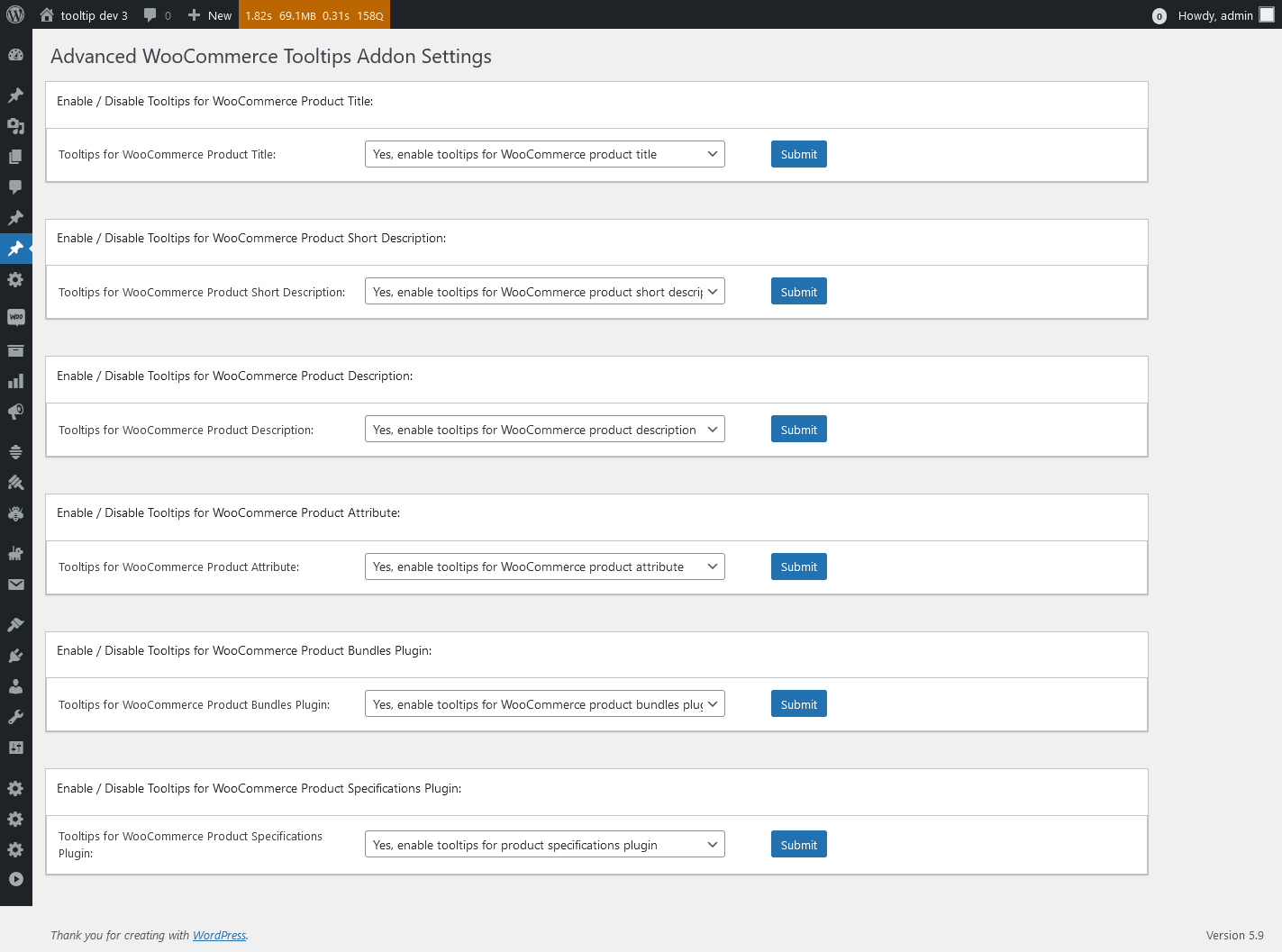
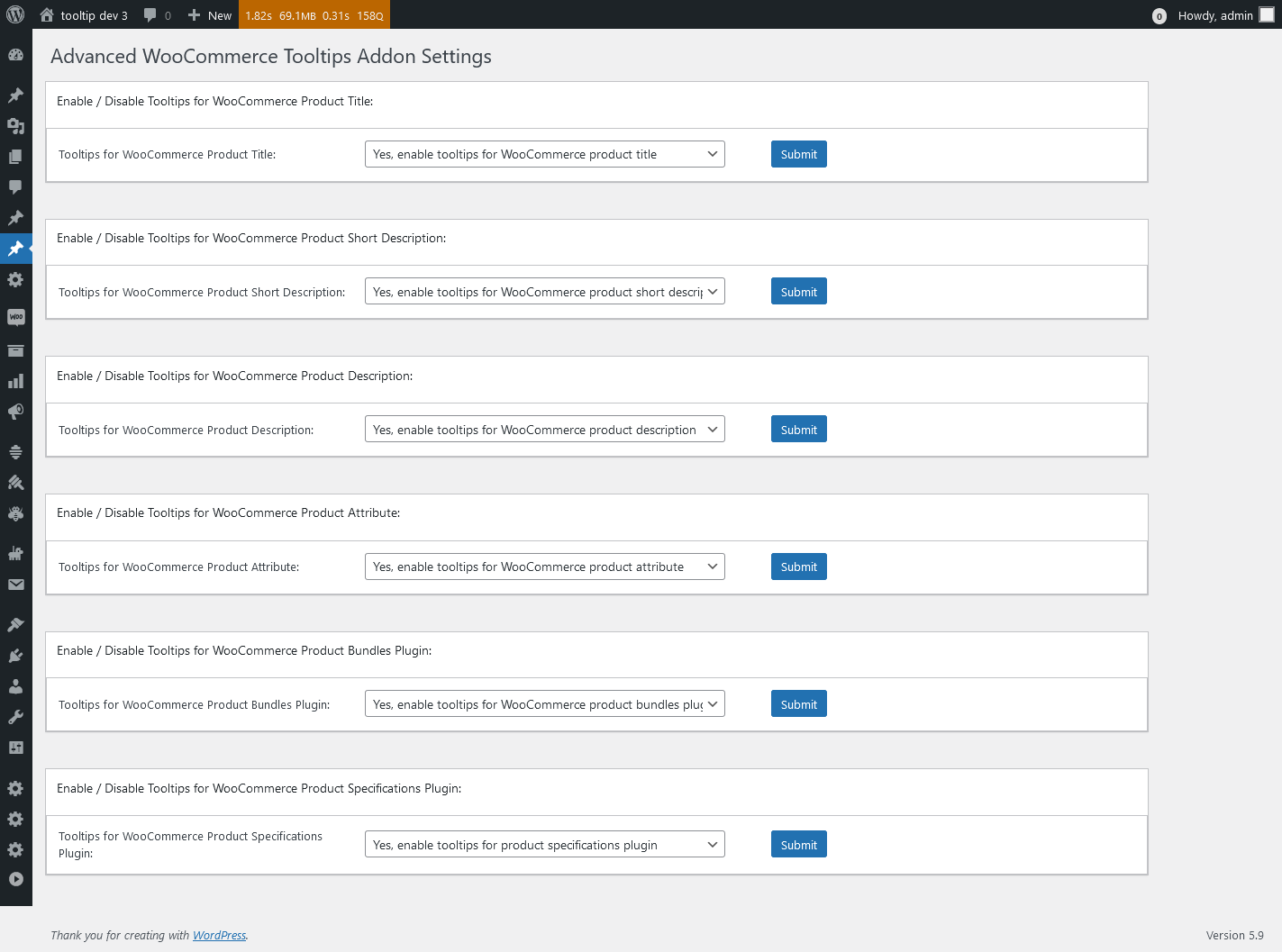
1: Advanced WooCommerce Tooltips Addon Settings, it looks like this:

Advanced WooCommerce Tooltips Addon Settings in wordpress tooltips pro plus 27.5.8

Advanced WooCommerce Tooltips Addon Settings in wordpress tooltips pro plus 27.5.8

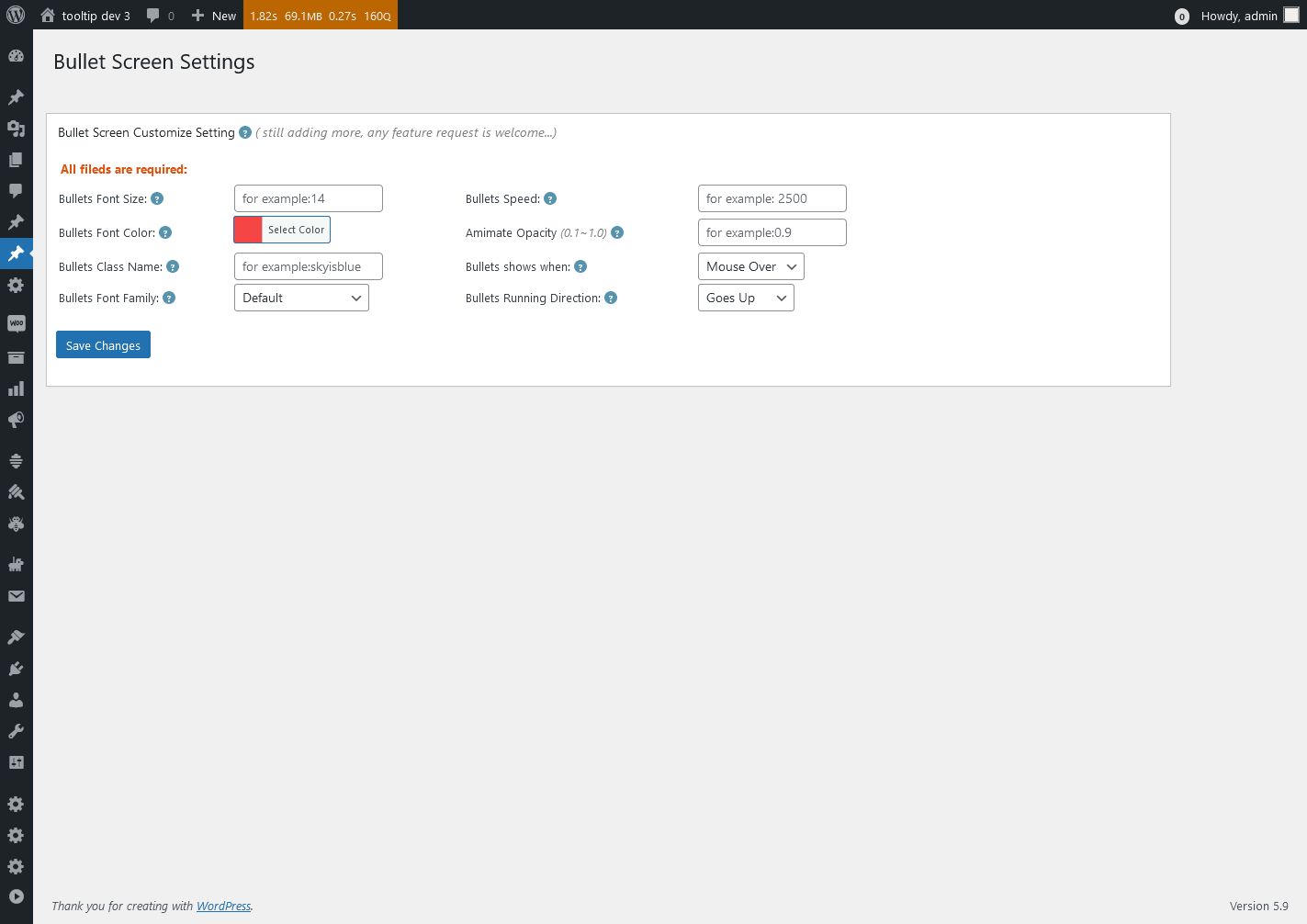
2: WordPress Bullet Screen Settings, it looks like this:

Bullet Screen Settings in wordpress tooltips pro plus 27.5.8

Bullet Screen Settings in wordpress tooltips pro plus 27.5.8

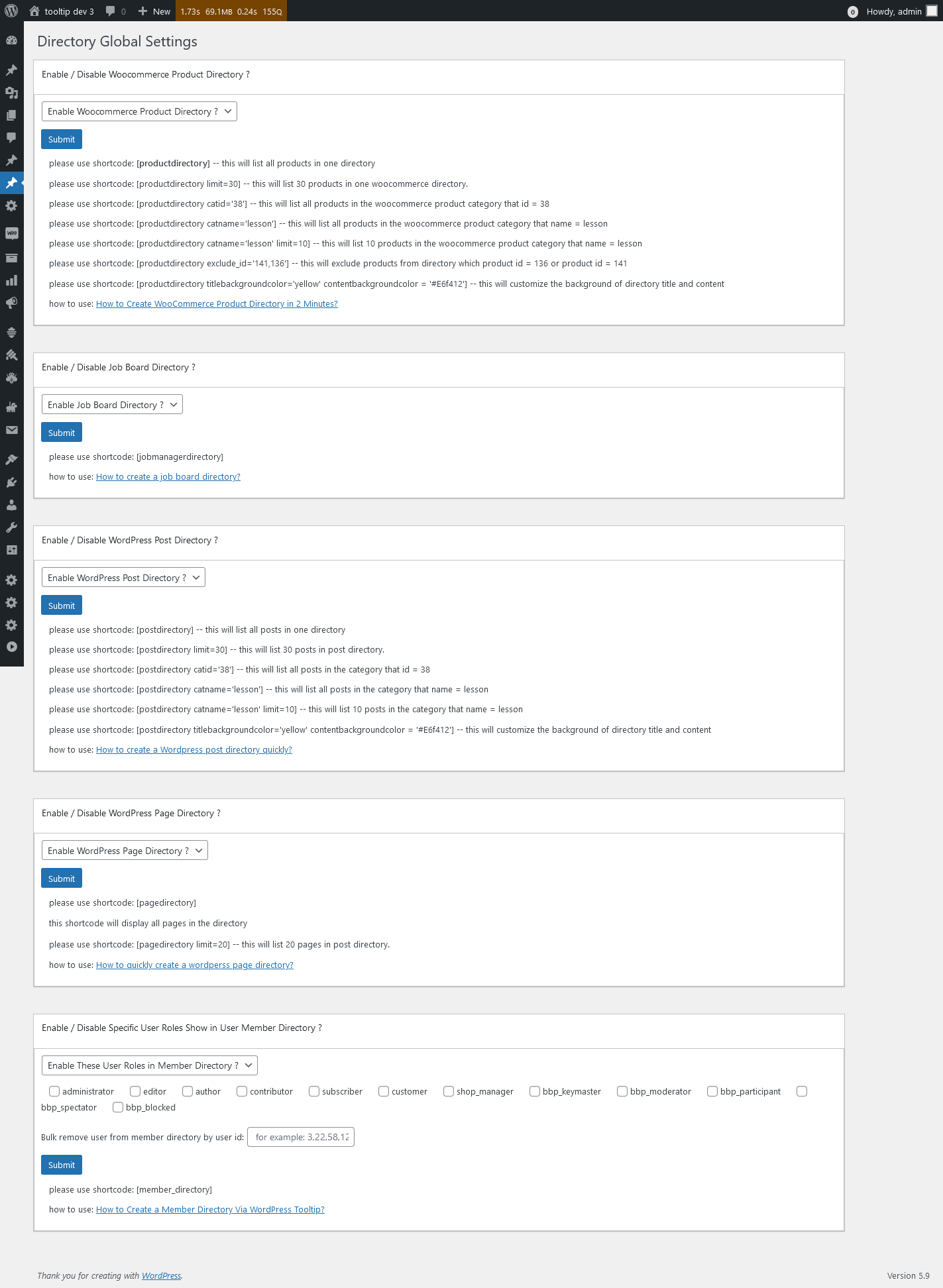
3: WordPress Directory Global Settings, it looks like this:

Directory Global Settings in wordpress tooltips pro plus 27.5.8

Directory Global Settings in wordpress tooltips pro plus 27.5.8

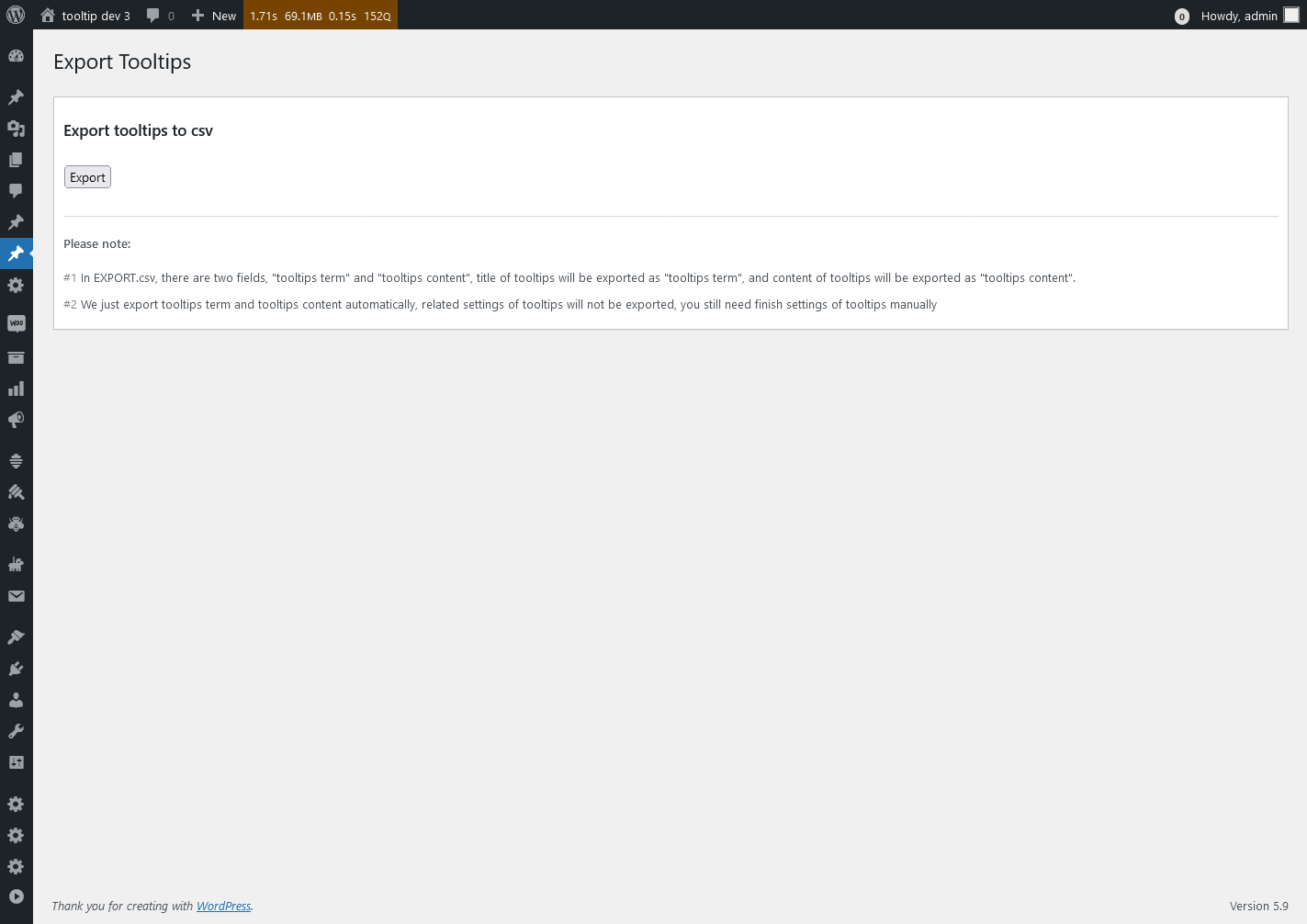
4: Export Tooltips panel, it looks like this:

Export Tooltips in wordpress tooltips pro plus 27.5.8

Export Tooltips in wordpress tooltips pro plus 27.5.8

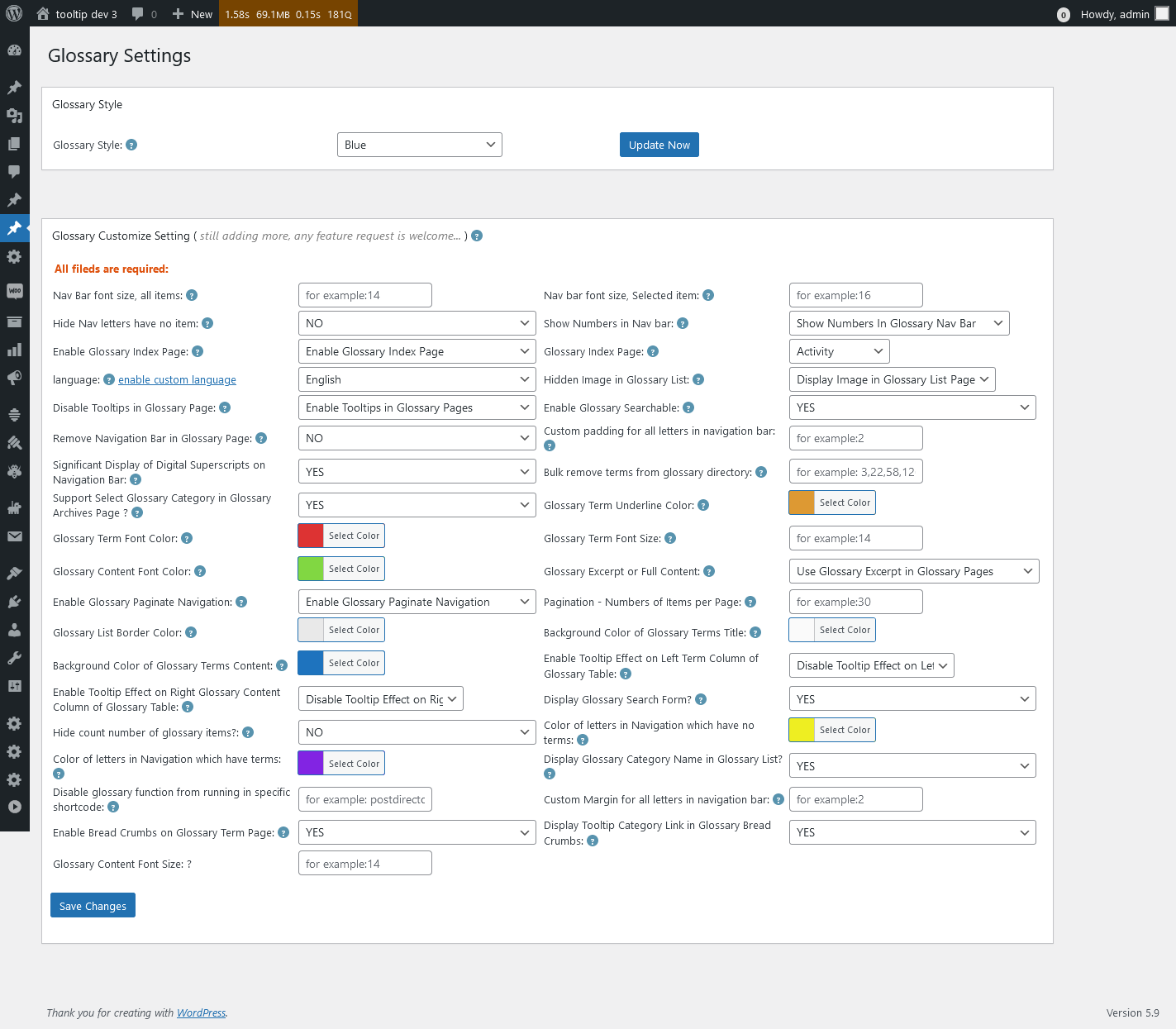
5: WordPress Glossary Settings panel, it looks like this:

Glossary Settings in wordpress tooltips pro plus 27.5.8

Glossary Settings in wordpress tooltips pro plus 27.5.8

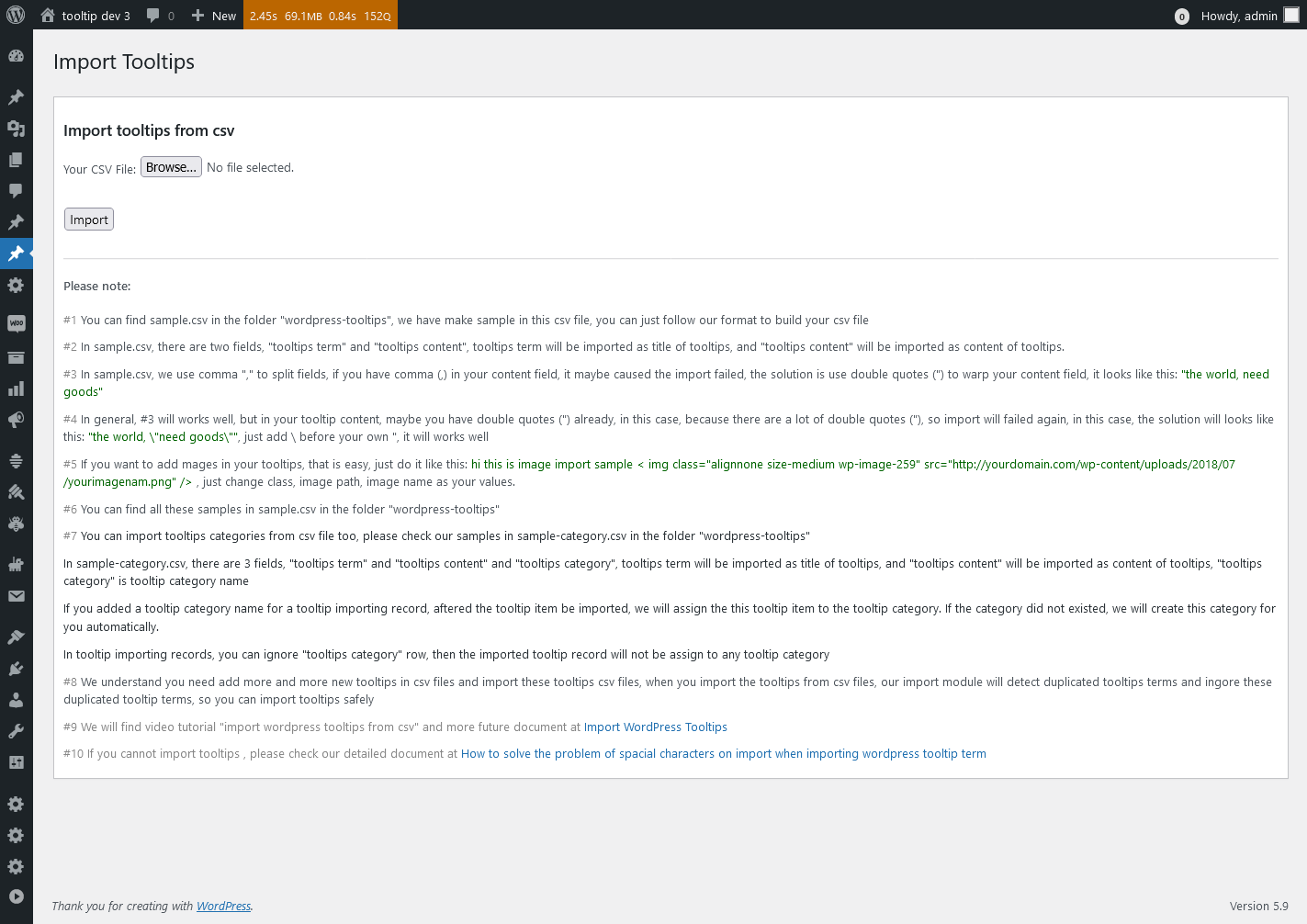
6: Import Tooltips panel , it looks like this:

Import Tooltips panel in wordpress tooltips pro plus 27.5.8

Import Tooltips panel in wordpress tooltips pro plus 27.5.8

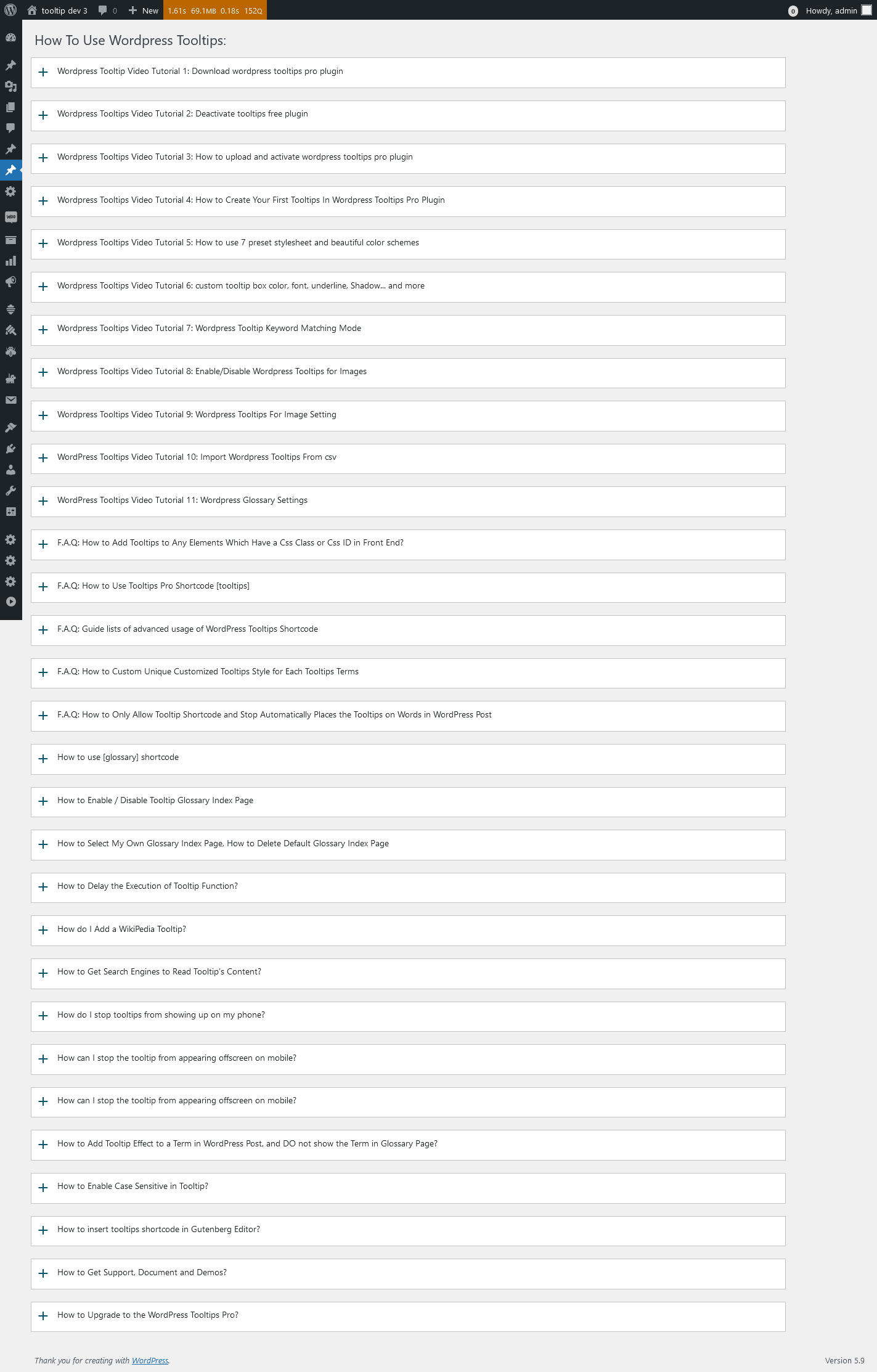
7: wordpress knowledge panel, it looks like this:

knowledge panel in wordpress tooltips pro plus 27.5.8

knowledge panel in wordpress tooltips pro plus 27.5.8

8: Reset WordPress Tooltips panel, it looks like this:

Reset Tooltips in wordpress tooltips pro plus 27.5.8

Reset Tooltips in wordpress tooltips pro plus 27.5.8

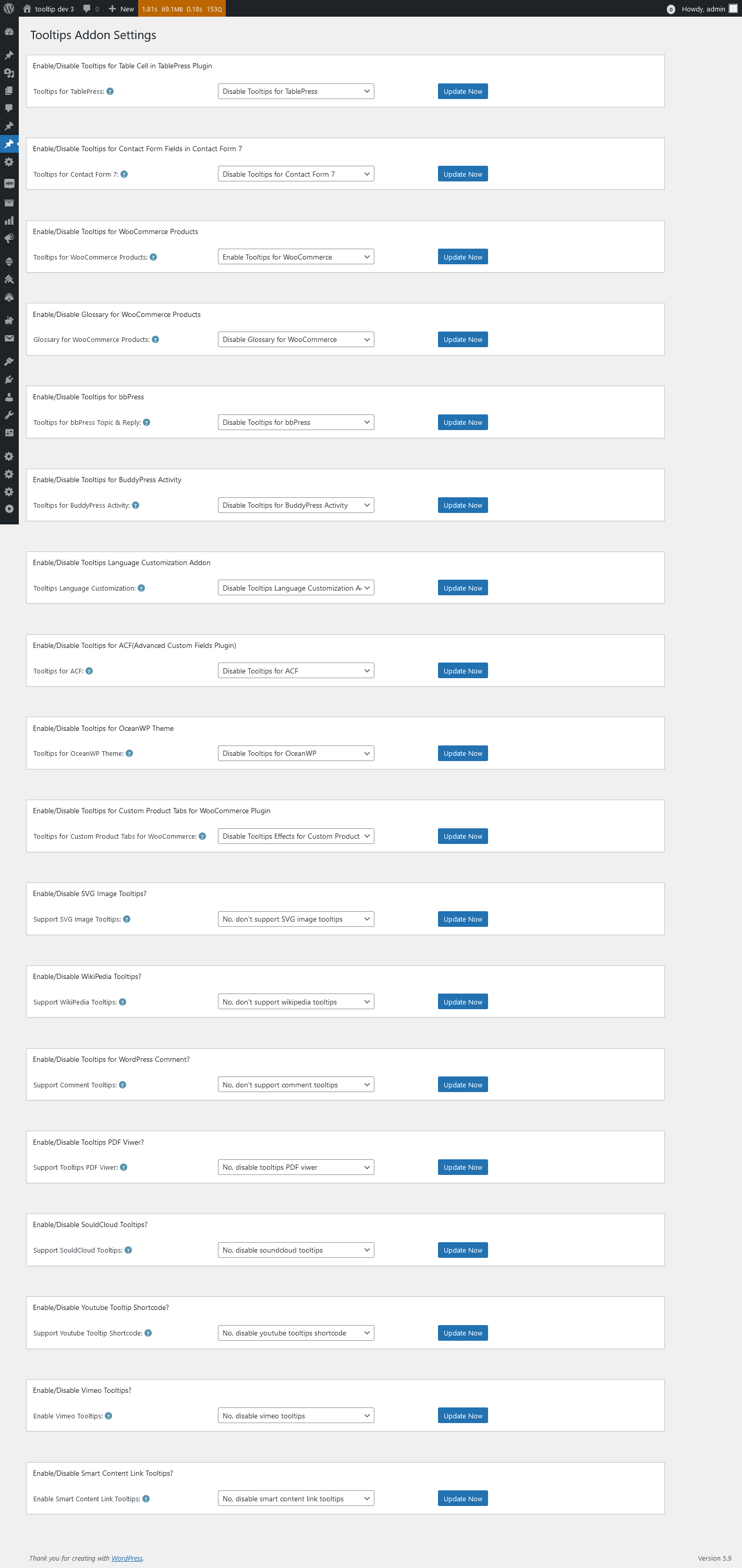
9: WordPress Tooltips Addon Settings panel, it looks like this:

Tooltips Addon Settings in wordpress tooltips pro plus 27.5.8

Tooltips Addon Settings in wordpress tooltips pro plus 27.5.8

10 WordPress Tooltips Global Settings panel, it looks like this:

Tooltips Global Settings in wordpress tooltips pro plus 27.5.8

Tooltips Global Settings in wordpress tooltips pro plus 27.5.8

11: WordPress tooltips plugin menu, it looks like this:

tooltips menu in wordpress tooltips pro plus 27.5.8

tooltips menu in wordpress tooltips pro plus 27.5.8

12 WordPress Tooltips Optional Settings panel, it looks like this:

Tooltips Optional Settings in wordpress tooltips pro plus 27.5.8

Tooltips Optional Settings in wordpress tooltips pro plus 27.5.8

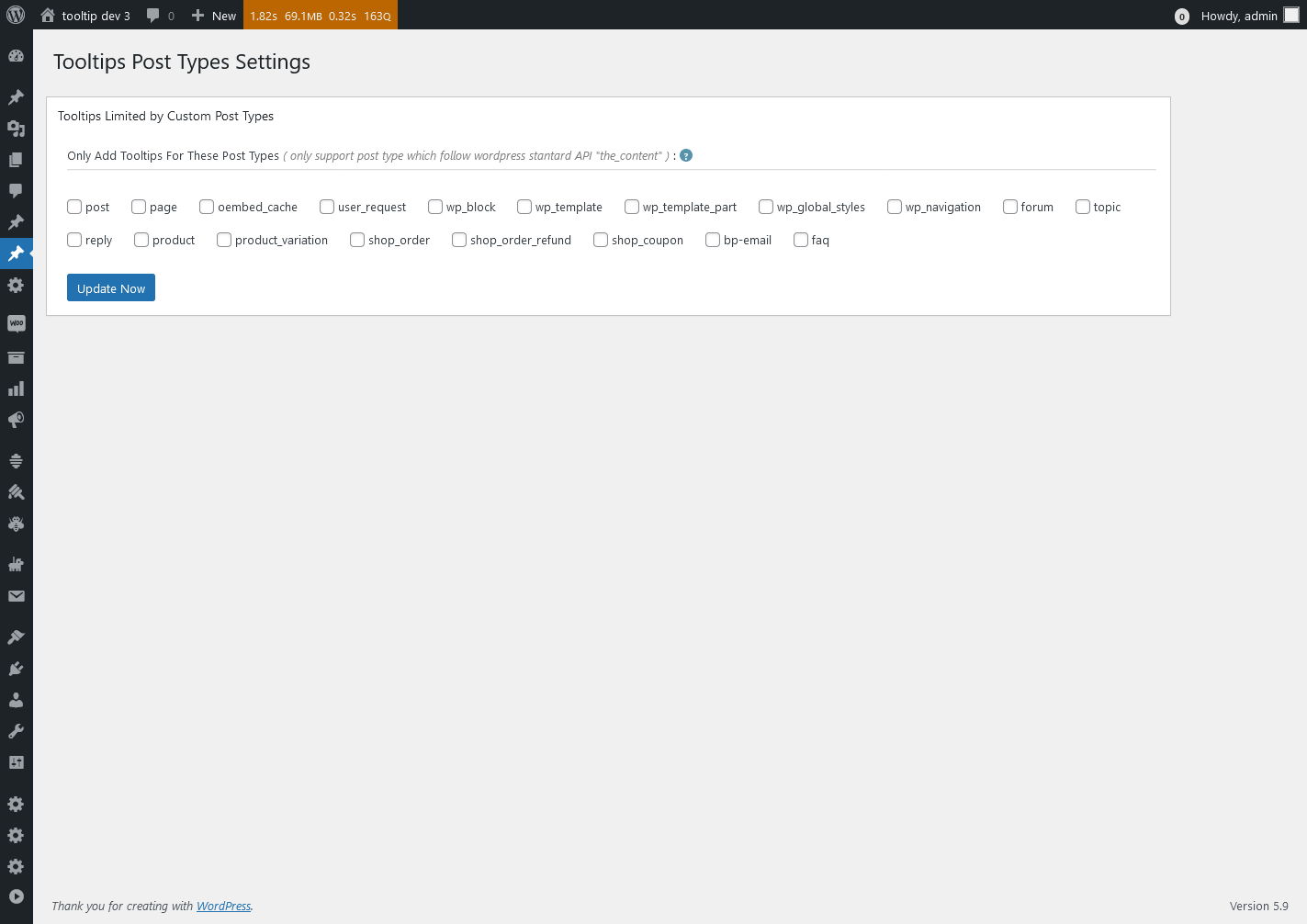
13 WordPress Tooltips Post Types Settings panel, lt looks like this:

Tooltips Post Types Settings in wordpress tooltips pro plus 27.5.8

Tooltips Post Types Settings in wordpress tooltips pro plus 27.5.8

14 WordPress Tooltips Style Settings panel, it looks like this:

Advanced WooCommerce Tooltips Addon Settings in wordpress tooltips pro plus 27.5.8

Advanced WooCommerce Tooltips Addon Settings in wordpress tooltips pro plus 27.5.8

Thanks for the great suggestion, this has helped us not only to improve our UI design, but also to make the interface more comfortable for all wordpress tooltip users. We give the user a license of AI Smart Content Links plugin, which will enhance your website’s content and uplift the user experience with the powerful Smart Content Links plugin. By seamlessly integrating links to relevant content within your WordPress blog posts, you can effortlessly provide valuable context, information, and resources to your readers. These intelligent links are engineered to grant quick access to related resources and information, enabling your audience to delve deeper into the topic at hand while maintaining uninterrupted flow and focus on your core message.
Leveraging the cutting-edge AI-driven Natural Language Processing (NLP), Smart Content Links empowers you to bolster your SEO efforts efficiently. With its intuitive backend interface, simply input a keyword, and the plugin will leverage AI algorithms to rank and match posts, ensuring optimal alignment between content and keywords. 🙂


Thanks, have a blessed day with your family

Best Regards,

WordPress tooltips plugin support


Tagged with: , ,

New shortcode to support display related links bar in anywhere, wordpress AI smart content link with tooltips 3.2.2 released

Hi, Dear   WordPress Tooltip plugin users, hope this message find you are doing well and having wonderful weekend with your family:) An amazing users of wordpress AI smart content link with tooltip plugin wrote to us:

Dear developer,
I hope this message finds you well! First and foremost, I want to express my utmost gratitude for developing the amazing AI Smart Content Link plugin. Let me start by saying that I am absolutely thrilled with its functionality and the positive impact it has had on my comic website.
By using the Smart Content Link feature to display related articles about the background stories of my comics, I have witnessed a significant boost in user engagement. The users have been able to browse and visit other related content, which has truly stimulated their interest. The results have been remarkable! According to Google’s web analytics tool, the number of pageviews for tied-breaking stories has increased from 3 to 7. Additionally, the average time users spent on the site has doubled. Not only that, but the AI Smart Content Link has also led to a substantial increase in my ad revenue. It’s truly outstanding!
I genuinely love your plugin and the value it brings to my website. However, I do have a suggestion that I believe could further enhance its versatility. I would love to be able to customize multiple Smart Content Links. Specifically, I would like to showcase sequels to the current story and provide specific product links for each story. For instance, in one of my comics, there is an episode featuring flying shoes. My idea is to include an AFFILIATE link for shoes below that particular comic episode. Alongside this customization, I would greatly appreciate the ability to insert this specific Smart Content Link Bar anywhere on the page. This flexibility would allow me to maximize the plugin’s benefits.
Once again, I want to congratulate you on developing such a successful plugin. The inclusion of relevant links on the page has effectively guided my users to explore more associated stories, resulting in a substantial increase in pageviews. Thank you once more for your outstanding work, and I sincerely hope that you continue to achieve great success!
Warmest regards,

Our wordpress tooltip plugin developer checked this ticket, we have developed a shortcode [[scl]] in smart content link plugin,  it will display all global smart content links in one smart content link bar, however, this amazing user want to to customize many smart content link bar with different links, so we can not re-use [[scl]] shortcode, we had to develop a new shortcode to realize this great feature request 🙂

In the new version wordpress smart content link with tooltip plugin 3.2.2, you can use a new shortcode [[scl_unique]] to make unlimited smart content link bar and insert different links in each smart content link bar, it works like this way:

[[scl_unique  links=”<a href=’https://tooltips.org’>wordpress tooltips</a>,<a href=’https://tooltips.org/contact-us/’>contact us</a>”]]

You can insert unlimited links in the smart content link bar, just separate different links with comma 🙂

Also you can install wordpress tooltips pro plugin to enhance the function of smart content links, when users house mover a links, they can get video, audio , text , images, content of affiliate, product related with the link….more related links…etc 🙂

Thanks, have a blessed day with your family

Best Regards,

WordPress tooltips plugin support


Tagged with: , , ,
Top