Tag: wordpress tooltip plugin

WordPress Tooltips Plugin 13.2.2 Released

Hi Dear WordPress Tooltip Glossary Users,
Hope this message find you are doing well and have happy days with your family! 🙂
We are happy to report you, we just released the new wordpress tooltip plugin version 13.2.2 🙂
Our developer finished the a new round of code audit, we decide re-write our wordpress tooltip plugin step by step, we developed the wordpress tooltip plugin at 11 years before, since 2009, we added many new modules of wordpress tooltip, based on wordpress tooltip user’s suggestion, also we added many amazing features for wordpress tooltip plugin, based on user’s feature request. But our backbone of the codes of wordpress tooltip plugin did not changed. We are plan add more amazing tooltip features and modules to our wordpress tooltip plugin, after analyzed our codes, we think it is better to re-structure codes of wordpress tooltip plugin, to make codes of wordpress tooltip plugin more clean, more efficient. easier and faster to add new modules… and so on. 🙂
With wordpress tooltips plugin version 13.2.2, we cleaned unnecessary comments and debug codes, products affected by this update:
Please upgrade to the latest wordpress tooltip plugin asap, if you have any question or suggestion of wordpress tooltip plugin, please don’t hesitate to tell us 🙂
We also developed many wordpress plugins for wordpress tooltip users, free and pro, please choose these wordpress plugins according to your needs
Thanks, have a blessed day with your family 🙂
Best Regards,
WordPress Tooltip Glossary Plugin Support Team
Tagged with: ,

WordPress Tooltip Glossary Plugin 13.2.0 Released

Hi Dear WordPress Tooltip Glossary Users,
Hope this message find you are doing well and have happy weekend with your family! 🙂
We are happy to report you, we have released wordpress tooltip glossary plugin 13.2.0, in wordpress tooltip plugin 13.2.0,  our developer finished a new code audit, we improved tooltip shortcode robustness, after many tests, we found a php warning in log when running a social network plugin, if will not break the site or plugin, in front end, no any errors will be find by users, but we still tweak our codes to avoid this php warning in log when using a wordpress social network plugin 🙂
Please download wordpress tooltip glossary 13.2.0 asap, if you have any question or suggestion of wordpress tooltip plugin, please don’t hesitate to tell us 🙂
Thanks, have a blessed day with your family 🙂
Best Regards,
WordPress Tooltip Glossary Plugin Support Team
Tagged with: , , ,

WordPress Tooltip Glossary Plugin 13.1.8 Released, New Advanced WooCommerce Tooltips Addon

Hi Dear WordPress Tooltip Glossary Users,

Hope this message find you are doing well and have a happy weekend with your family! 🙂

I am happy to report you, based on user’s request, we have released WordPress Tooltip Glossary Plugin 13.1.8, in this version, we added a new Advanced WooCommerce Tooltip Addon.

An amazing user created a ticket, in which he requested to have ability to control enable / disable woocommerce tooltip in different woocommerce section, so there are not too much woocommerce tooltips in his woocommerce product pages, woocommerce shop pages… and so on, this is great, his suggestion is right, users should have ability to decide woocommerce tooltip show or disappear in different woocommerce components, we re-developed our woocommerce tooltip addon to allow users enable / disable woocommerce tooltip in woocommerce pages, it looks like this:

advanced woocommerce tooltips settings panel

advanced woocommerce tooltips settings panel

You can see, via advanced woocommerce tooltip settings panel, you can:

enable / disable Tooltips for WooCommerce Product Title

enable / disable  Tooltips for WooCommerce Product Short Description

enable / disable  Tooltips for WooCommerce Product Attribute

enable / disable  Tooltips for WooCommerce Product Bundles Plugin

enable / disable  Tooltips for WooCommerce Product Specifications Plugin

You can find our demo at woocommerce tooltip demo

Also we get a few more feature request of woocommerce tooltip,  we are adding new amazing woocommerce tooltip features in advanced woocommerce tooltip addon, you will see it soon 🙂

Please note, Advanced WooCommerce Tooltip Addon is a default tooltip addon which included in wordpress tooltips multiple-site license version. It is not included in wordpress tooltip single license version or wordpress tooltip free plugin version, however, you can purchase advanced woocommerce tooltips addon dedicated for your tooltip single license with $4. If you are wordpress tooltips multiple-site license buyer, please don’t purchase woocommerce toooltip addon duplicatly 🙂


If you have any question or suggestion of woocommerce tooltip plugin, please don’t hesitate to tell us 🙂

Thanks, have a blessed weekend with your family 🙂

Best Regards,
Wordpress Tooltip Glossary Plugin Support Team

Tagged with: , ,

WordPress Tooltip Site Upgraded, Migrate Hosting, Re-design the Whole Site

Hi Dear WordPress Tooltip Glossary Users,

Hope this message find you are doing well and have happy days with your family! 🙂

We are happy to report you, in last 2 weeks, we have migrate our sites to another hosting, with more amazing functions, also we have re-design the whole site to make it more clean, fast, and user-friendly, our prev design of wordpress tooltip site is a little “heavy”, “official”, if you check our current version of wordpress tooltip site, you will find it is a little more light, “soft”, “geek”, faster, and user-friendly 🙂

In last days, we are work hard to move our sites to new hostings, from files, mysql, mails… and so on, with days and nights, maybe you find you cannot connect wordpress tooltip with a short time, or maybe you found some sections on wordpress tooltip site not works well, or may be your mail ticket lost, we are sorry for this, we are sorry for this, we have finished the migrate work and all things restart working now, if any problem you found, please connect us, we are very happy to help you 🙂

Now we have finished the upgrade process progress of migrate WordPress Tooltip site, new site works well, with more powerful functions, based on our plan, we will start to build more services for users based on new server, for example, CDN, new support system, more free and pro plugins, and a few pro themes, demo sites…. and so on. 🙂

If you have any question or suggestion of wordpress tooltip site, please don’t hesitate to tell us 🙂

Thanks, have a blessed day with your family 🙂

Best Regards,
Wordpress Tooltip Glossary Plugin Support Team

Tagged with: ,

WordPress Tooltips Glossary Plugin 13.0.8 Released, Optimized CSS and Javascript Files

load tooltip javascript in wordpress footer
Dear Users of WordPress Tooltip Glossary Plugin,
Hope this message find you are doing well and having  happy weekend with your family! 🙂
We are happy to report you, we have released wordpress tooltip plugin 13.0.8, in this wordpress tooltip version, we optimizied css and javascript files, to speed up your wordpress tooltip site, changes included in jquery.directory.min.js,jquery.qtip.min.js, directory.min.css, also if you want to speed up your wordpress tooltip glossary loading speed, you can enable “Load Tooltip Javascript In WordPress Header or WordPress Footer” option in ” Tooltips Global Settings” panel, via click wordpress admin -> tooltips menu -> global settings sub menu, it looks like this:
load tooltip javascript in wordpress footer

load tooltip javascript in wordpress footer

If you have any question or suggestion of wordpress tooltip plugin, please don’t hesitate to tell us 🙂
Thanks, have a blessed day with your family 🙂
Best Regards,
WordPress Tooltip Glossary Plugin Support Team
Tagged with: , , , , ,

WordPress Tooltip Glossary Plugin 13.0.4 Released, Support SVG Tooltip Better

Hey Dear Users of WordPress Tooltip Glossary Plugin,
Hope this message find you are doing well and having happy days with your family! 🙂
We have released wordpress tooltip glossary plugin, in this wordpress tooltip version, may be you know, in wordpress tooltip glossary plugin 12.9.8, wordpress tooltip plugin start support SVG tooltip, today, an svg tooltip user told us, he find a warning log in his apache log,  based on user’s report, we have fixed a problem of wordpress SVG tooltip,  and released WordPress Tooltip Glossary Plugin 13.0.4 to fix it 🙂
If you are wordpress tooltip multisite license user, please download and install wordpress tootip glossary plugin 13.0.4 asap you can, if you are wordpress tooltip single license user, you can ignore this version. We are develop a new version of  wordpress tootip glossary plugin, you will see it soon. If you have any question or suggestion of wordpress tooltip plugin, please don’t hesitate to tell us 🙂
Thanks, have a blessed day with your family 🙂
Best Regards,
WordPress Tooltip Glossary  Support Team


Tagged with: , , , ,

WordPress Tooltip Glossary Plugin 13.0.2 Released, Improved Glossary Search Functionality

Hi Dear WordPress Tooltip Glossary Users,
Hope this message find you are doing well and having happy days with your family! 🙂
We are happy to report you, based on an amazing wordpress tooltip user’s report, we have re-developed our wordpress tooltip glossary plugin, to improve wordpress glossary search functionality.  We have released WordPress tooltip glossary plugin 13.0.2, please upgrade to the newest of wordpress tooltip glossary plugin as soon as possible you can 🙂
We get Tons of feature request for wordpress tooltip glossary plugin, we are working hard to develop and test a new wordpress tooltip glossary plugin, you will see it soon,  If you have any question or suggestion of wordpress tooltip plugin, please don’t hesitate to tell us 🙂
Thanks, have a blessed day with your family 🙂
Best Regards,
WordPress Tooltip Glossary Plugin Support Team

 

Tagged with: , , , ,

WordPress Tooltips Glossary Plugin 12.9.8 Released, Developed License Management Module and MultiSite License Support SVG Icon Tooltips

Hi Dear WordPress Tooltip Glossary Plugin Users,
Hope this message find you are doing well and having happy days with your family! 🙂
Update at 2020-08-08, please check the detailed step by step WordPress SVG Tooltip Document: How to Use WordPress SVG Tooltip.
I am happy to report you, we just released wordpress tooltip glossary plugin 12.9.8, changes in this version:
1: We developed a license management module for wordpress tooltip plugin, this is just a start, we will continue add more features in the wordpress tooltip license module 🙂
2:  For MultiSite License Users, wordpress multisite license plugin star to support SVG icon tooltips, an amazing user told us, it is 2020s started in the world, we should support tooltips for SVG icons, SVG icons defined vector-based icons in XML format, it is super easy to edit all things for the SVG icons, for example,  color, animate… and so on, SVG Icons, is  a block of code, so the sizes of SVG icons is very small, he do not want to use PNG or JPEG icons on his site, he start use SVG and it improved his site and his life 🙂
Okay, the problem is wordpress do not support SVG, wordpress do not allow to upload SVG icons at all, we used a few days to learn the new tech in SVG area, now with wordpress tooltip multisite license plugin, you can upload SVG icons in wordpress and add tooltips for SVG Icons, a simple example of SVG tooltips can be find in below:


We will write a detailed document for WordPress SVG tooltip, you will see it soon 🙂
If you have any question or suggestion of wordpress tooltip plugin, please don’t hesitate to tell us 🙂
Thanks, have a blessed day with your family 🙂
Best Regards,
WordPress Tooltip Glossary Plugin Support Team
Tagged with: , , , , ,

How to Use the WordPress Shortcode to Display a Glossary Category Separately in DIVI Theme?

Dear Users of WordPress Tooltip Glossary Plugin,
Good evening! 🙂
I get a wordpress  tooltip ticket, in which a lovely user asked me a question:
can you tell me where we can find the shortcodes to display a glossary category separately? my site is optimized with DIVI.
Yes, wordpress tooltip pro plugin support display glossary terms from a specific glossary category, I guess may be other wordpress tooltip users have the same question, I’d like reply in here publicly, you will find, it is very easy  🙂

1: Login as wordpress admin  in wordpress wp-admin

2: Click “Posts” menu item

3: Edit your wordpress post with divi editor

4: When you want to insert a glossary shortcode to just display specified glossary terms from a glossary category, just use glossary shortcode like this:

[glossary catid='5'] to only show glossary terms from the tooltips categoriy 5 in glossary page, by the tooltip category id ‘5’ 🙂

5: Want to show glossary terms from more glossary categories? Easy, use wordpress glossary shortcode like this:

[glossary catid='5,10,12'] to show glossary temrs of specified glossary categories in wordpress tooltip category, by category id ‘5’, ’10’, ’12’

6: It is hard to remember glossary category id? Yes, of course, with wordpress tooltip glossary plugin, you can use category name, which is easy to be remembered, you can do it like this:

use [glossary catname='classmate,family,school'] to display glossary terms of specified categories ‘classmate’ ,’ family’ , ‘school’ in glossary page, by category name ‘classmate’ , ‘family’, ‘school’

7: That’s all, check front end, everything will works well

easy? Yes, many users told me wordpress tooltip plugin is a time saver 🙂

If you have any question or suggestion of wordpress tooltip plugin, please don’t hesitate to tell us, we are happy to build a better wordpress plugin for you 🙂
Thanks, have a blessed day with your family 🙂
Best Regards,
WordPress Tooltip Glossary Plugin Support Team


Tagged with: , , ,

How to Have the Possibility to Delay the popup of The WordPress Tooltip Window?

Good Morning WordPress Tooltip Glossary Users,
I received a wordpress tooltip user’s ticket, in which he asked me a question:
I like my tooltips to appear on mouse-over, but I would like to have the possibility to delay the popup of the tooltip window, to avoid immediate windows popping up as the user browse through the website.
With wordpress tooltip glossary plugin, it is very easy to delay the wordpress tooltip popup window, based on your settings, I think other users will have the same question, I’d like reply in here publicly 🙂

1: Login as wordpress admin in your wordpress admin area

2: Click “Tooltips” menu item

3: Click “Tooltips Style” sub menu item

4: You will open “Tooltips Style Settings” panel

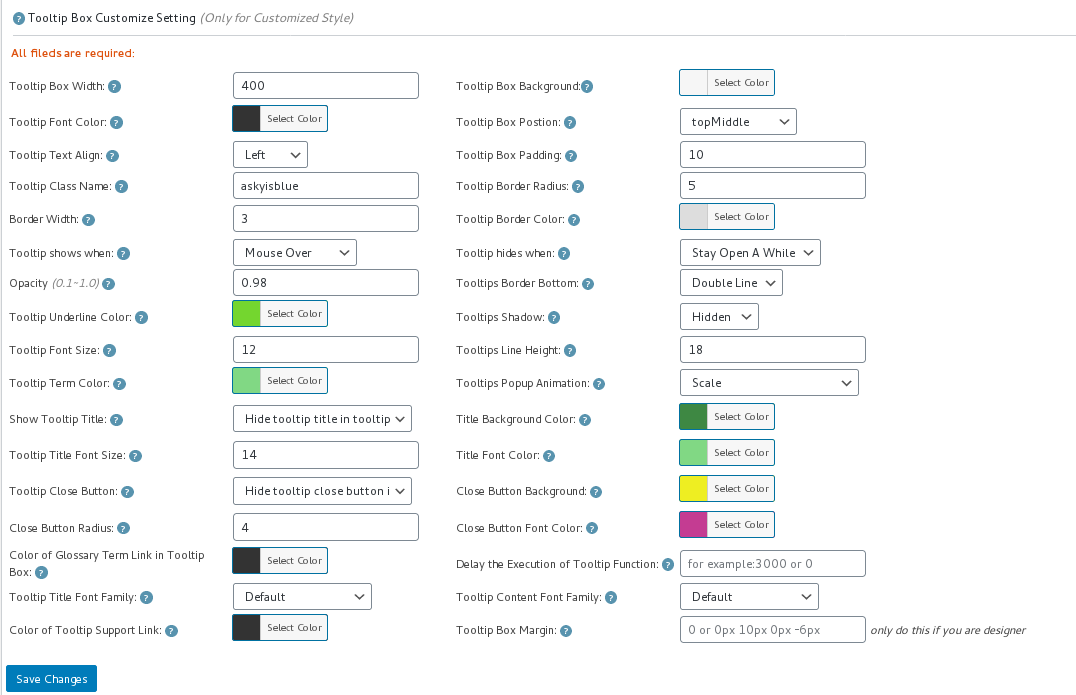
5: In “Tooltips Style Settings” panel, you will find “Tooltip Box Customize Settings”options panel

6: In “Tooltip Box Customize Settings”options panel, you will find “Delay the Execution of Tooltip Function” option, it looks like this:

tooltip style panel version 12.3.6

tooltip style panel version 12.3.6

7: Please input millisecond in the “Delay the Execution of Tooltip Function” field, then click “save changes” button, all tooltips popup window in all wordpress posts will be delayed the specific millisecond you entered in here 🙂

8: If you do not hope all wordpress tooltips popup window in all wordpress posts be delayed, if you just hope delay wordpress tooltip popup window in a specific wordpress post, you can do it too

9: Please Click “Posts” menu item

10: Edit or add a new wordpress post

11: In the wordpress post editor, you will find “Delay the execution of tooltip function” metabox at right hand of wordpress editor,it looks like this:

delay the executon of wordpress tooltip function

delay the executon of wordpress tooltip function

12: Please enter the number of millisecond to delay in here, the execution of tooltip will delay specific milliseconds to wait javascript frameworks(ajax, vue…) generate and load dynamically generated content first, and then load our jQuery codes to add tooltip effects in those dynamically generated content, please note, the priority in wordpress post editor is higher then the global settings in tooltip style setting panel 🙂
WordPress Tooltip Plugin is powerful and very easy to use, right? How about give us a 5.0 ratings on wordpress.org? 🙂

If you have any question or suggestion of wordpress tooltip plugin, please don’t hesitate to tell us, we are always happy to realize wordpress tooltip feature for you, that’s why we released more than 100 wordpress tooltip versions in last 10 years 🙂
Thanks, have a blessed day with your family 🙂
Best Regards,
WordPress Tooltip Glossary Plugin Support
Tagged with: , , ,
Top