Tag: wordpress tooltip plugin

Support Display or Hide Glossary Search Bar in Glossary Page, WordPress Tooltip Glossary Plugin 14.3.2

WordPress tooltip glossary plugin 14.3.2 released

Hi dear wordpress tooltip plugin users, hope this message find you are doing well and have happy days with your family, we are happy to report you, we just released wordpress glossary Plugin 14.3.2, in the wordpress glossary plugin 14.3.2, we added a new option in wordpress glossary settings panel to support display or hide glossary search bar in glossary page, via one click in wordpress glossary settings panel 🙂

What’s new in the wordpress tooltip glossary plugin 14.3.2?

We get an amazing user’s ticket, in which he told us he hope have an option in wordpress glossary settings panel to hide glossary search bar:
Hello and good day!
In my glossary page, I have two comments:
1.is possible hide the Search bar? Can this be a option in Glossary Settings ?
We replied:
Thanks for the suggestion, we will add an new option to display or hide search bar in glossary page 🙂
Actually, when users use our [glossary] shortcode to build a wordpress glossary page, he can display and hide glossary search bar with this method:
[glossary searchform='no']
or
[glossary searchform='yes']
By default, if you just use glossary shortcode [glossary], it means glossary page will display glossary search form 🙂
Our developer checked the ticket and he think many users like a option which can set up glossary search form just via one link in back end in one time, then users do not need enter searchform = no or searchform = yes every time, this is a great idea, that’s why we developed wordpress tooltip plugin 14.3.2 🙂
If you upgrade to the wordpress glossary plugin 14.3.2, in back end, if you click tooltips menu item, and click glossary settings sub menu item, you will open the glossary settings panel, it looks like this:
wordpress glossary custom setitngs panel in wordpress tooltip glossary version 14.3.2

wordpress glossary custom setitngs panel in wordpress tooltip glossary version 14.3.2

At the bottom, you will find the new option “Display Glossary Search Form?”, if you click “YES”, then the glossary search form will displayed at the top of the glossary table, if you click “NO”, then the glossary search form will be hide in the wordpress glossary page 🙂
Please note, wordpress glossary users can use [glossary searchform='no'] or [glossary searchform='yes'] to display or hide glossary search form too, and the priority of the short code is higher than the option value set in the backend, because we want to keep more options available for page builder users 🙂
Thanks for the great suggestion, if you have any question or suggestion of wordpress tooltip plugin, please don’t hesitate to tell us 🙂
Thanks, have a blessed day with your family 🙂
Best Regards,
WordPress Tooltip Glossary Plugin Support Team


Tagged with: , , , ,

WordPress Tooltips Free 7.3.9, Opt to Display Glossary Excerpt or Glossary Full Content

Hi Dear WordPress Tooltip Plugin Users,
Hope this message find you are doing well and have happy weekend with your family!We are happy to report you, we just released wordPress tooltips plugin free version 7.3.9 🙂

What’s new in wordpress tooltips plugin 7.3.9?

1: Support wordpress latest version 5.7
2: With wordpress tooltip plugin 7.3.9, you can opt to display glossary excerpt or glossary full content in glossary index pages
We get a ticket from wordpress tooltip free user, he said when he check our glossary demo, he found in toolttip pro version, users can opt to show excerpt of glossary content — this option keeps the glossary pages neat, clean, generous and beautiful, he told us he want have the same effect on wordpress tooltip glossary free version too 🙂
Our developer have added this module from wordpress tooltips pro version to wordpress tooltip free version 🙂

How to Set up WordPress Glossary Option to Display Glossary Excerpt in Glossary Index Page?

1: Login your wordpress admin on your site

2: Upgrade to the wordpress tooltip 7.3.9

3:In WordPress admin area, click “Tooltips” menu

4: Click “Glossary Settings” sub menu item in wordpress admin area,  you will the open “Glossary Settings” panel

5: You will find “Glossary Excerpt or Full Content” option box,  we have a screenshot from tooltips pro 13.8 (current pro version is 14.2.6 and free is 7.3.9) , but many options in free version can be found in this screenshot too:

glossary settings panel in wordpress tooltip glossary 13.8.4

glossary settings panel in wordpress tooltip glossary 13.8.4

6: In the “Glossary Excerpt or Full Content” option box, you can select use excerpt in glossary pages or “use full glossary content in glossary pages”

7: Please remember to click “Save Changes” blue button

8: Then please check glossary index page in front end, you will find the content of glossary terms column has been changed as you settings in back end

Thanks for using our wordpress glossary plugin! If you have any question or request of wordpress glossary plugin, please don’t hesitate to contact us 🙂
Thanks, have a blessed day with your family 🙂
Best Regards,
WordPress Tooltip Plugin Support Team
Tagged with: ,

Works on tooltips.org at February 2021

Hi Dear WordPress Tooltip Glossary Users,
Hope this message find you are doing well and have happy weekend with your family! 🙂
1: In February 2021, we developed 8 versions of wordpress tooltips & glossary pro  plugin and 6 versions of wordpress tooltips free plugin
2: We developed 2 versions of wordpress faq plugin, support WordPress FAQ, WooCommerce Product FAQ, Responsive FAQ, Multiple FAQ Templates, FAQs grouped by category, specified number of FAQ items for each FAQ, faq on woocommerce tabs… and more 🙂
3: We developed 1 version of woocommerce tabs plugin,with woocommerce tabs plugin, You can insert videos, audios, screenshots, reviews, pricing tables… and so on in woocommerce product tabs, to increase sales of your amazing products, also you can enter any shortcodes in woocommerce product tabs to expand functions of woocommerce product tabs via other 3rd wordpress plugins, to build an awesome and funny and user-friendly and powerful woocommerce product page 🙂
4: We developed a new wordpress free plugin: restriction , wordpress restriction plugin is a wordpress restricted content plugin that allow wordpress admin to restrict access to important privacy content in wordpress posts, which developed for wordpress tooltip users, free download and free support 🙂
5: We added 24 documents for tooltips.org 🙂
We are develop a new version of wordpress tooltip, you will see it soon, if you have any new idea of https://wordpress.orgwordpress plugin, please don’t hesitate to tell us, we are happy to realize it for you.  🙂
Thanks, have a blessed weekend with your family 🙂
Best Regards,
WordPress tooltip glossary plugin support team
Tagged with: ,

How Can I Customize Tooltip Style For Tooltip ShortCode?

How to Customize Tooltip Style For Tooltip ShortCode?

Hope this message find you are doing well and have happy days with your family! 🙂 We get a wordpress tooltip plugin user’s support ticket, in which he asked us the question “I want the bold white text at the top of the tooltip to be the tooltip Title, so that I can style it. > This is what I am using at the moment: [tooltips keyword="WP tooltip" content="wordpress tooltip plugin"]“
This is a good question, actually, we have a easier method to help wordpress tooltip user to customize tooltip style for tooltip shortcode, include customize tooltip title font color, title font size, tooltip title background color… and so on in your tooltip shortcode, via wordpress tooltip shortcode [tooltip_by_id] , just a few steps 🙂

What is WordPress Tooltip Plugin?

WordPress tooltip pro is a tooltips plugin for wordpress, which be designed to help you create colorful, varied and graceful tooltip styles to present the content to your users, with lively and elegant animation effects, and save your valuable screen space

How Can I Customize WordPress Tooltip Style For Tooltip ShortCode?

1: If you didn’t installed wordpress tooltip, please login your account at wordpress glossary tooltip plugin site, if you have installed wordpress tooltip plugin, please jump to step #10 directly 🙂

2: Download wordpress glossary tooltip plugin at “My account” page

3: Login wordpress admin area

4: Click “Plugins” menu item

5: Deactivated old tooltips version

6: Delete the old wordpress tooltip plugin

7: In “Plugins” menu item, click add new at the top of the plugins panel

8: Upload the tooltips plugin zip file which you downloaded from wordpress glossary plugin site

9: Activate latest version of wordpress tooltip glossary plugin

10: Click “Tooltips” menu item

11: Click “Tooltip Style” sub menu item, you will open “Tooltip Style” panel, it looks like this:

wordpress tooltip style settings panel 14.1.6

wordpress tooltip style settings panel 14.1.6

In the screenshot, you can find tooltip title font color, title font size, tooltip title background color… etc. Basically, you can customize every single property of the wordpress tooltip 🙂

12: If you want to customize a unique, beautiful tooltip template for each wordpress tooltip term, that’s easy too

12.1 Click “Add New” sub menu item under the Tooltip menu item

12.2 You will find you can custom unique style for each tootip, via “custom unique style for this tooltip” metabox which at the bottom of the tooltip editor,it looks like this:

unique pretty style for each tooltip term

unique pretty style for each tooltip term

13: After customized tooltip style for the tooltip term, then use the shortcod tooltip_by_id to display it in front end.

By this way, you can customize unique style for each  tooltip shortcode, not only wordpress tooltip title, but also wordpress Tooltip Box Width, Tooltip Font Color, Tooltip Background, Tooltip Padding, Tooltip Position, Tooltip Radius, Tooltip Border, Tooltips Popup Animation … etc 🙂

For example:

[tooltip_by_id shortcode [tooltip_by_id tooltip_id='3107']

The result looks like this:

Tooltip For Forms Demo - Message Field
If you have any question or suggestion of wordpress tooltip plugin, please don’t hesitate to tell us 🙂
Thanks, have a blessed day with your family 🙂
Best Regards,
WordPress Tooltip Glossary Plugin Support Team
Tagged with: , , ,

Works of Tooltips.org in Recent Days

Hi Dear WordPress Tooltip Glossary Users,
Hope this message find you are doing well and have happy weekend with your family. I am happy to report you, in last days, we have released 5 https://wordpress.org/wordpress plugin versions for wordpress tooltips users 🙂
1:  We released WordPress Tooltips plugin 14.1.8  to support Tooltips click statistics, it looks like this:
2:  We get an user’s ticket, in which he said he hope want to use  wordpress glossary in woocommerce product tabs,  to help his customer understand details of his toolbox, with images and videos for each toolbox plan. For realize his feature request, we developed WordPress Tooltip Glossary 14.2.0 to support show WooCommerce glossary in woocommerce product tabs, it looks like this:
3:  WooCommerce Tabs Plugin 1.0.5 Released
New option to support disable woocommerce tabs temporarily, and woocommerce shop manager still can edit the content of woocommerce tabs in back end,  WooCommerce Tabs Plugin is a free wordpress plugin developed for wordpress tooltip plugin users, you can download it free at WooCommerce Tabs Plugin
4: WordPress F.A.Q Plugin 3.6.5 released,
A wordpress faq plugin user told us, he just want to display a few wordpress faq items in faq page, for example, just display 10 faq items, or just display 20 faq terms in faq page, now you can use [faq catid=1 limit='30'] to customize how many faq terms will show in faq page 🙂
WordPress F.A.Q Plugin is a free wordpress plugin developed for wordpress tooltip plugin users, you can download it free at wordpress faq plugin
5: WordPress FAQ Plugin 3.6.7, Support WooCommerce FAQ
New option  in wordpress FAQ global settings panel — “Enable Woocommerce F.A.Q Tab”, to enable woocommerce faq in woocomemrce product tab or not, it looks like this:
Thank you very much for amazing feedback, if you have any question or suggestion of wordpress tooltip plugin, please don’t hesitate to tell us 🙂
Thanks, have a blessed day with your family 🙂
Best Regards,
WordPress Tooltip Glossary Plugin Support Team
Tagged with: , , ,

WordPress Tooltips Pro 14.1.8 Released, Support Tooltips Click Statistics

Hi Dear WordPress Tooltip Glossary Users,
Hope this message find you are doing well and have happy days with your family! Based on wordpress tooltip user’s feedback, we have released WordPress tooltips Pro plugin 14.1.8 🙂

What’s new in wordpress tooltips pro plugin 14.1.8?

We get a wordpress tooltip user’s message,he said he is doing SEO A/B testing for his website, he wants to show some tooltip terms on different pages, but with different content and style of tooltip, he wants to know which tooltip terms are most liked by users and which tooltip terms have how many views, so that he can adjust the style of tooltip window according to user’s preferences, and adjust the content of the tooltip popup window in the way that the user likes. 🙂
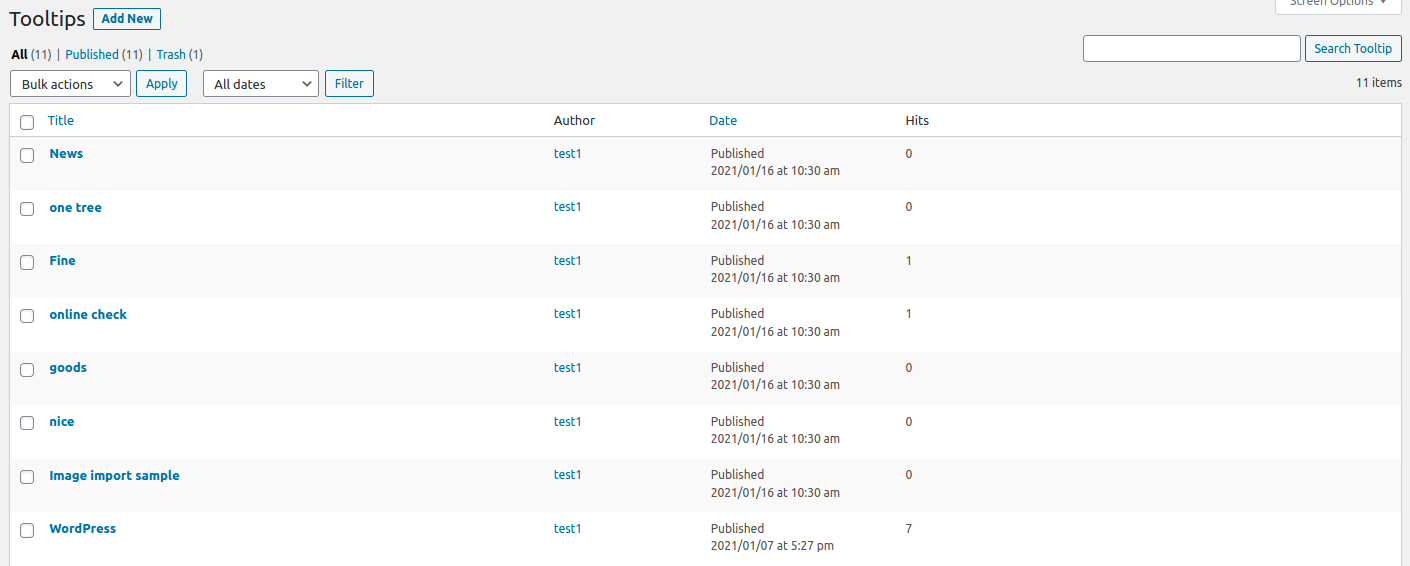
This is a good idea, we used to have count module for tooltip term to count the actual number of displays, but because we found some conflicts after we upgraded the javascript package, we disabled it, this time after receiving this user’s feature request, our developers spent some effort to research and resolve these conflicts, and finally we re-enabled the wordpress tooltip’s display statistics feature :)If you upgraded to wordpress tooltips plugin 14.1.8, when you view tooltip terms in back end, you will find it looks like this:
You can see, in “all tooltips” panel, there are a column “Hits”, if users mouse hover a tooltip term or click a tooltip term (based on your method of how to display tooltip option in “tooltip style” panel),  we will send the number of user click requests to the database in the backend using javascript ajax function, and show the hits in the back end 🙂
Please upgrade to wordpress tooltip pro plugin 14.1.8 and enjoy the wordpress tooltip hits statistics function 🙂
We are developing the new functions for wordpress tooltip plugin, if you have any question or suggestion of wordpress tooltip plugin, please don’t hesitate to tell us 🙂
Thanks, have a blessed day with your family 🙂
Best Regards,
WordPress Tooltip Glossary Plugin Support Team
Tagged with: , ,

This week’s wordpress tooltip job summary on January 24, 2021

Hi Users of Dear WordPress Tooltip Glossary Plugin,
Hope this message find you are doing well and have happy weekend with your family! 🙂 This is a job summary of our works on wordpress tooltips site 🙂
1: WordPress Tooltips Pro Plugin 14.1.6 Released, Support Custom Tooltip Terms Font Style, the new wordpress tooltip plugin style panel looks like this:
wordpress tooltip style settings panel 14.1.6

wordpress tooltip style settings panel 14.1.6

2: WordPress Tooltip Free Plugin 7.3.5 Released
3: Re-wrote our wordpress tooltip document  “How to add WordPress Tooltips in the menu?“, because the video is a bit of slow, we have uploaded the video to wordpress tooltip on youtube.
4: We have updated our features of wordpress tooltip plugin, to add new version updates.
If you have any question or suggestion of wordpress tooltip plugin, please don’t hesitate to tell us, also we have many free wordpress plugin, please just install these wordpress free plugins free of charge. 🙂
Thanks, have a blessed day with your family 🙂
Best Regards,
WordPress Tooltip Glossary Plugin Support Team
Tagged with: ,

WordPress Tooltip Free Plugin 7.3.5 Released

Hi Dear WordPress Tooltip Free Plugin Users,
Hope this message find you are doing well and have happy weekend with your family! 🙂
We get a message from an user of wordpress tooltips free plugin, in which he said our support ticket link did not work, we checked our codes of wordpress tooltips free plugin, and finally we find there are a ticket link is not working now, it is because after upgraded to the latest wordpress, the old ticket support plugin cannot works well, so we used new mail ticket link –> contact us, also we will develop a support ticket plugin by our self.
In the WordPress Tooltip plugin 7.3.5, we have fixed this problem, please upgrade to the new version, and if you have any question or suggestion of wordpress tooltip plugin, please don’t hesitate  to tell us via our support ticket link 🙂
And we have developed a few free wordpress plugin for users too, you can download these wordpress plugins free of charge, for example:
Thanks, have a blessed day with your family 🙂
Best Regards,
WordPress Tooltip Glossary Plugin Support Team
Tagged with: ,

WordPress Tooltips 14.1.6, Support Custom Tooltip Terms Font Style

Hi Dear WordPress Tooltip Glossary Users,
Hope this message find you are doing well and have happy days with your family. We just released wordpress tooltips plugin 14.1.6, based on an user’s suggestion, to allow users customize tooltip terms font style 🙂

What’s new in WordPress Tooltips Plugin 14.1.6?

We got a feedback from a user who said he is a loyal user of our wordpress tooltip plugin for many years and he likes our wordpress tooltip plugin very much because after using our wordpress tooltip plugin, his website can host more but the pages of the site are cleaner, which is the way he likes to express himself 🙂

He has a small request to allow setting the font style of wordpress tooltip terms in the front end, as his personal habit is to let tooltip terms have an italic font style, so as to distinguish it from the simple web content. After using the italic style, when users read the wordpress post, they will subconsciously realize that the italic words are more special, and they will tend to use the mouse to explore more content behind the italic words.

This way, the wonderful content hidden behind the tooltip term, including pictures, videos, and animal sounds of the species, will have more opportunities to be displayed, and the user will have the feeling of being there. 🙂

This is a great suggestion! That’s why we re-developed our wordpress tooltip plugin and released WordPress Tooltips 14.1.6.
In WordPress Tooltips Plugin 14.1.6, we support Custom Tooltip Terms Font Style, when you open tooltip style menu, at the bottom of the customize tooltip style panel, you will find the new option “Custom Tooltip Terms Font Style”, it looks like this:
wordpress tooltip style settings panel 14.1.6

wordpress tooltip style settings panel 14.1.6

When you click select box of the option “Tooltip Term Font Style“, you will find you can select “normal”, “italic”, or “oblique” 🙂

Thanks for the great feature of wordpress tooltip plugin, if you have any question or suggestion of wordpress tooltip plugin, please don’t hesitate to tell us, we are always happy to build the best wordpress tooltip plugin for tooltip users.  🙂
Thanks, have a blessed day with your family 🙂
Best Regards,
WordPress Tooltip Glossary Plugin Support Team
Tagged with: , ,

Works on Tooltips.org in Recent Days at January 2020

Hi Dear WordPress Tooltip Glossary Users,
Hope this message find you are doing well and have happy days with your family! 🙂
In January of 2020, we did a lot of work for tooltips.org:
1: We have released 5 versions of wordpress tooltips plugin
In these versions, we added a few tooltips features based on users feedback, include wordpress tooltip free version and tooltip pro versions, and we followed wordpress security standard to enhanced code security 🙂
2: We write a few documents for help wordpress tooltip users use tooltip plugin easier:
And we re-write a few documents, for example:
Also we changed our features description page of wordpress  tooltips plugin, include new features of recent wordpress tooltip plugin updates.
And we re-sort our menus of wordpress tooltip site, a few users told us, when he check our document of wordpress tooltip plugin menu, he found a few other wordpress free plugin in this menu item, for example, wordpress faq plugin, and other free wordpress plugins, he suggest we remove these sub menus, and just keep menus related with tooltip document, so users can check all wordpress tooltip documents more easier, we followed his suggestion and we have moved all sub menu items which not related with tooltip document to other menu, and we will add more menu items to help tooltip users 🙂
We have finished a new version of wordpress tooltips plugin, based on another tooltip user’s suggestion,  we are work hard to test it, and you will see it soon,If you have any question or suggestion of wordpress tooltip plugin, please don’t hesitate to tell us 🙂
Thanks, have a blessed day with your family 🙂
Best Regards,
WordPress Tooltip Glossary Plugin Support Team

Tagged with: ,
Top

