Tag: wordpress tooltip plugin

Optimized wordpress page loading speed, move Javascript code just before the closing tag, wordpress tooltips pro plus 27.9.8 and wordpress tooltips pro 19.5.6 released

Hello beloved users of the WordPress Tooltip plugin, I sincerely hope this message brings you warmth and finds you basking in the joys of a beautiful day surrounded by your loved ones. Today, we have received a truly remarkable ticket from one of our esteemed users. They shared with us the incredible feat of creating a staggering 3000 tooltips on their WordPress site, now he want to improve the loading speed of their pages, he said:

We recently purchased the Tooltip Pro plugin for WordPress and are facing several issues that are severely impacting our website’s performance.

Firstly, we’ve noticed that the plugin is making an incredible number of queries with each page load. As you can see from this screenshot, the number of queries is substantial, causing significant slowdowns on our site.

Our wordpress tooltip support replied:

Hope this message find you are doing well and enjoying happy days with your family 🙂

We have checked the great screenshot, thank you, we are checking our code now, we will reply you again. 🙂

If you can give us a URL related the problem, it would be great 🙂

Thanks, have a blessed weekend with your family 🙂

Best Regards,
Wordpress Tooltip Support

Then support of wordpress tooltips plugin checked the screenshot and replied:

Hope this message find you are doing well and having happy days with your family 🙂

Thanks for the great test file, our developer built a development platform to re-play the problem, we believe what you mean is — there are a lot of js code like: removetooltipsmatchingarray.push(‘tooltip_post_id_7568’) in front-end? Our developer is developing a new version to merge all these js codes into one static js file to speed up page load speed 🙂

If we miss-understanding yet, sorry, please just tell us more details, and we are happy to solve it for you 🙂

Once new version finished, we will reply you again 🙂

Thanks, have a blessed day with your family 🙂

Best Regards,
Wordpress Tooltips Plugin Support

And then our wordpress tooltips plugin developer developed a new version to solve this problem for the wordpress tooltip user:

Hope you are doing well and having wonderful weekend with your family 🙂

Thanks for the message, yes, we have finished the new version to solve the problem and we have tested it many times, we will released it in Monday and we will report you again 🙂

Sir, thanks for the great feedback, our developer said he will give you a license of another pro plugin as a THANKS. 🙂

Also we feel sorry for the delay of the work, we need be carefully because we have some trouble in this section, it is not only the coding problem, but also need care about some requirement which submitted by other user(this function was developed based on their needs), and finally we get the best way to solve the conflicts in requirement, our developer said he will give you the a license of 3rd pro plugin to you as a SORRY 🙂

We will report you in the Monday 🙂

Thanks, have a blessed weekend with your family 🙂

Best Regards,
Wordpress Tooltips Plugin Support

And one day later we reported:

Thanks for the message 🙂

1: We have released wordpress tooltips pro plus 27.1.8 and wordpress tooltips pro 19.3.6 to solve the problem, and we just finished the detailed step by step document for you

2: Thanks for the great feedback from the amazing wordpress tooltip user, as a token of our appreciation, we give the license of WordPress FAQ Pro with Tooltip for the amazing user, WordPress FAQ plugin is an effective and efficient jQuery FAQ solution that assists WordPress bloggers in easily creating, managing, and editing FAQs. This plugin allows users to select default appealing FAQ templates, customize FAQ styles in the back-end with just a few clicks, and effortlessly create and display accordion-style FAQs, categorize FAQs, and more. Additionally, it supports WooCommerce Product FAQ, Responsive FAQ, multiple FAQ templates, FAQs grouped by category, and the option to specify the number of FAQ items for each category. Support use OpenAI ChatGPT to generate high-quality content for WordPress F.A.Q and wordpress post automatically. With WordPress FAQ plugin, managing FAQs becomes a seamless experience…. and more

We apologize for the delay in releasing this version, we give the license of another wordpress pro plugin — WordPress Life Quotes with Tooltip, WordPress Life Quotes Plugin is a lovely plugin to display random life quote on the bottom of wordpress post, life quote can serve as a source of inspiration and motivation for readers, including a random life quote in a wordperss post can help to break up the text and make the content more visually interesting and engaging and creating a connection with readers.

Hope this have a little help, if you have any more question, please tell us, we are very happy to improve wordpress tooltip plugin for you 🙂

Thanks, have a blessed day with your family 🙂

Best Regards,
Wordpress Tooltips Plugin Support

And then the wordpress tooltips user replied again:

Good evening,
Thank you for your prompt response.

Despite having followed the procedure correctly, our problem is still present.
I am attaching 2 screenshots of the inspection of a page on our website. As you can see, each page loads many scripts of this kind, seemingly related to the Tooltips plugin, which greatly slows down the site.
I am also attaching a screenshot of the optional settings.
Do you have any idea where this problem might be coming from?

Thank you in advance,

Our wordpress tooltips plugin developer checked the screenshot carefully and we found the problem has been solved,but there are another new request in the screenshots, we developed a new version of wordpress tooltips plugin for the user:

Happy New Year! 🙂

Hope you have successful business in the new year 🙂

1: In your great screenshot, there are no problem of “There is still a lot of JS code like: removetooltipsmatchingarray.push(‘tooltip_post_id_7568’) in the front-end. “? So we guess maybe this is fixed by last version already?

2: What we found in your screenshot is:

jquery(‘.remove_tooltip effect .tooltipsall’).each …, we checked all of our codes carefully, we believe this code line should not expected to be repeated more than six times, but we think since you have raised this questions, we assume that you are in need of a solution for it, so our developer developed a new version to solve this problem by this way:
we customized the function of tooltips for breadcrumbs to move the codes to the bottom of the HTML codes of wordpress post via the wp_footer action hook — now we move this javascript codes just before the closing </body> tag, so we let other js / css codes running first, this tooltip js code runs at the end of the page, so this problem be solved in the tooltips pro 19.5.6 and tooltips pro plus 27.9.8 🙂

Would you upgrade to latest version to do a check of this problem? Any more question is welcome 🙂

Hope this have a little help 🙂

Thanks, have a blessed weekend with your family 🙂

Best Regards,
Support

Please upgrade to the tooltips pro 19.5.6 and tooltips pro plus 27.9.8 to speed up page speed  🙂

Thanks, have a blessed day with your family 🙂

Best Regards,

WordPress tooltips plugin support

Tagged with: ,

Improved ChatGPT AI tooltips, wordpress tooltips pro plus

Hi, Dear users of WordPress Tooltip plugin, hope this message find you are doing well and having wonderful holiday with your family:)  We got a ticket from a wordpress tooltips pro plus user:

Hi there, I just purchased the wordpress tooltips pro plus plugin, I created some image tooltips and I’m very happy with the functionality, it’s fun.

I have a question, when I try to use the AI tooltips, the content generated is not what I want, how can I solve this problem?

We did a test on our website and we found that everything worked fine, then we did more communication with this user and we found out that the reason was that he didn’t enter the prompt field of AI Tooltips correctly, after entering the prompt field of AI Tooltips correctly, this user said that everything worked perfectly fine 🙂

We think may be more users have similar question, we developed wordpress tooltips pro plus plugin 27.8.8 to add tips in “Generate tooltips via openAI ChatGPT”  panel, so users will not miss-understand again 🙂

What is OpenAI

OpenAI is a research laboratory focused on artificial intelligence and machine learning. Founded in December 2015, the lab is backed by entrepreneurs Elon Musk, Peter Thiel, and several other tech luminaries. OpenAI’s mission is to “advance digital intelligence in the way that is most likely to benefit humanity as a whole, unconstrained by a need to generate financial return.”

What are tooltips?

Tooltips are small popup box with more information like video /  audio / image / google maps / QR code / wiki / text… and so, tooltips box will pop up when users hover over an element in your pages, the element can be a word in your post, a search form input box, an image in your page, a widget on your sidebar.. and so on, wordpress tooltip plugin supports add tooltip effect on any element on the wordpress posts, or display on wordperss menu, comment, contact form, woocmmerce product, bbpress forum, buddypress activity…etc, with pretty effects and many more little amazing components and addons, for example, Bullets Screen

What it WordPress Tooltip Plugin:

WordPress tooltip pro is a tooltips plugin for wordpress, which be designed to help you create colorful, varied and graceful tooltip styles to present the content to your users, with lively and elegant animation effects, and save your valuable screen space.

When the users hover over an item, the colorful tooltip popup box will display with the animation effect. You can add video, audio, image, and even other content which generated by 3rd wordpress plugins like QR code, Amazon AD, Google Map in tooltip popup box via wordpress standard editor, it is very easy to use.

How to generate high-quality content via OpanAI ChatGPT by wordpress tooltips plugin?

Login your wordpress site as admin, click tooltips menu item, then click AI tooltips sub menu item, you will open generate tooltips via OpenAI panel.

Please enter tooltip title in the “Title” input box, and then enter prompt in “Prompt” input box, in our test, we’d like ask AI to generate with this kind of format: “Please write a long article about ‘what is tooltip’”, if you just enter “what is tooltip”, then oepnai chatgpt will just give you a short message, if you tell AI give you a “long article”, then OpanAI chatgpt will generate a high-level detailed content for you automatically. Please don’t forget to enter max tokens, you will see detailed instruction about max tokens in the later part of the article

After enter all the requirements, please click the blue “Generate Tooltips Automatically” button, then AI will generate AIGC(AI Generated Content) content for you automatically, just need about a few seconds.

You can find detailed document and demo about AI tooltips at here , Also you can find detailed document and demo about image tooltips at here 🙂

Thanks, have a blessed day with your family 🙂

Best Regards,

WordPress tooltips plugin support
Tagged with: , , ,

Advancing Towards the Second Step of Displaying Tooltips in the Administrator Control Panel, wordpress tooltips pro plus 27.6.8

Hello, cherished users of the WordPress Tooltip plugin! We hope this message finds you in high spirits, enjoying wonderful days with your loved ones. A few days ago, We reported that we received a heartwarming request from a WordPress tooltips user who expressed a strong desire for our plugin to support the display of tooltips in the admin control panel of the WordPress backend.

They told us, their team is a news website that recently onboarded several volunteers who are not familiar with the backend operations of WordPress or how to use their WordPress news plugin. Training these temporary workers has become quite challenging. They are now requesting the ability to display tooltips in the ADMIN control panel of WordPress. This would enable the webmaster to provide instructions, introduce features, and offer operational tips to administrators and editors. The tooltips would greatly assist new users and those unfamiliar with the system in better understanding and utilizing their WORDPRESS website. They are currently using the remarkable WordPress Tooltips plugin, which has already proven to be highly beneficial. This plugin provides fantastic pop-up text or image hints on the frontend, much to the delight of their readers. However, they are now hoping that the WordPress Tooltips plugin can also be extended to the backend of WordPress. They envision that when administrators hover over or click on specific elements in the backend control panel, relevant information would be displayed, facilitating quick location and comprehension of various functional modules and their corresponding settings options. They kindly request us assistance in fulfilling this feature request.

Then our wordpress tooltips plugin developer checked the user’s ticket, and then checked codes of our wordpress tooltip plugin, we found we need re-develop many modules to support display tooltips in wordpress admin panel to other plugins and themes, so we decided to move forward one step by one step, a few days before we released wordpress tooltips pro plus 26.9.8 and we reported:  We are now moving towards the direction of displaying tooltips in the ADMIN control panel

Today we are happy to report to wordpress tooltip users, we have released wordpress tooltips pro plus plugin 27.6.8 to follow wordpress standard to re-develop our wordpress tooltip plugin in wordperss tooltip language addon.

What is wordperss tooltip language addon?

We are delighted to inform you that our WordPress tooltip language addon provides full support for customizing the frontend output of WordPress tooltips and glossary in your preferred language. With this addon, you have the freedom to personalize the wordpress tooltip and wordpress glossary output according to your exact preferences. Furthermore, you can effortlessly switch the language of the frontend output to your native language, ensuring a seamless and immersive experience for your users. We understand the importance of language customization and aim to create a warm and inclusive environment for all users, regardless of their language background. It looks like this:

custom wordpress tooltip glossary bread crumbs language

In the new version, we followed  security to enhance all functions and $_POST in the language addon 🙂

Thanks for the great suggestion, if you have any more feature request or question, please don’t hesitate to contact us

Thanks, have a blessed day with your family

Best Regards,

WordPress tooltips plugin support
Tagged with: , , ,

Improved the UI design of all tooltip settings panel of the WordPress tooltip plugin, WordPress tooltip plugin pro plus 27.5.8 released

Hi Merry Christmas!

Dear users of  WordPress Tooltip plugin,  hope this message find you are doing well and having wonderful holiday with your family:) We just released wordpress tooltips pro plus 27.5.8 in which we improved the UI design of all tooltip settings panel of the WordPress tooltip plugin 🙂

Just like we reported in Improved the UI design of the tooltip global settings panel of the WordPress tooltip plugin some days ago, an UI designer told us:

I noticed a minor issue in the Tooltips Global Settings panel of the WordPress Tooltips plugin. The titles and content in each panel are not aligned to the left. There seems to be a 5px difference in the padding-left. Would it be possible to address this issue?

We fixed the problem asap once we get the feedback, then our wordpress developer checked all settings panels in wordpress tooltips pro plus plugin, and we have improved the UI design or all settings panel in the new version wordpress tooltips pro plus 27.5.8 🙂

The settings panel affected by this new version includes:

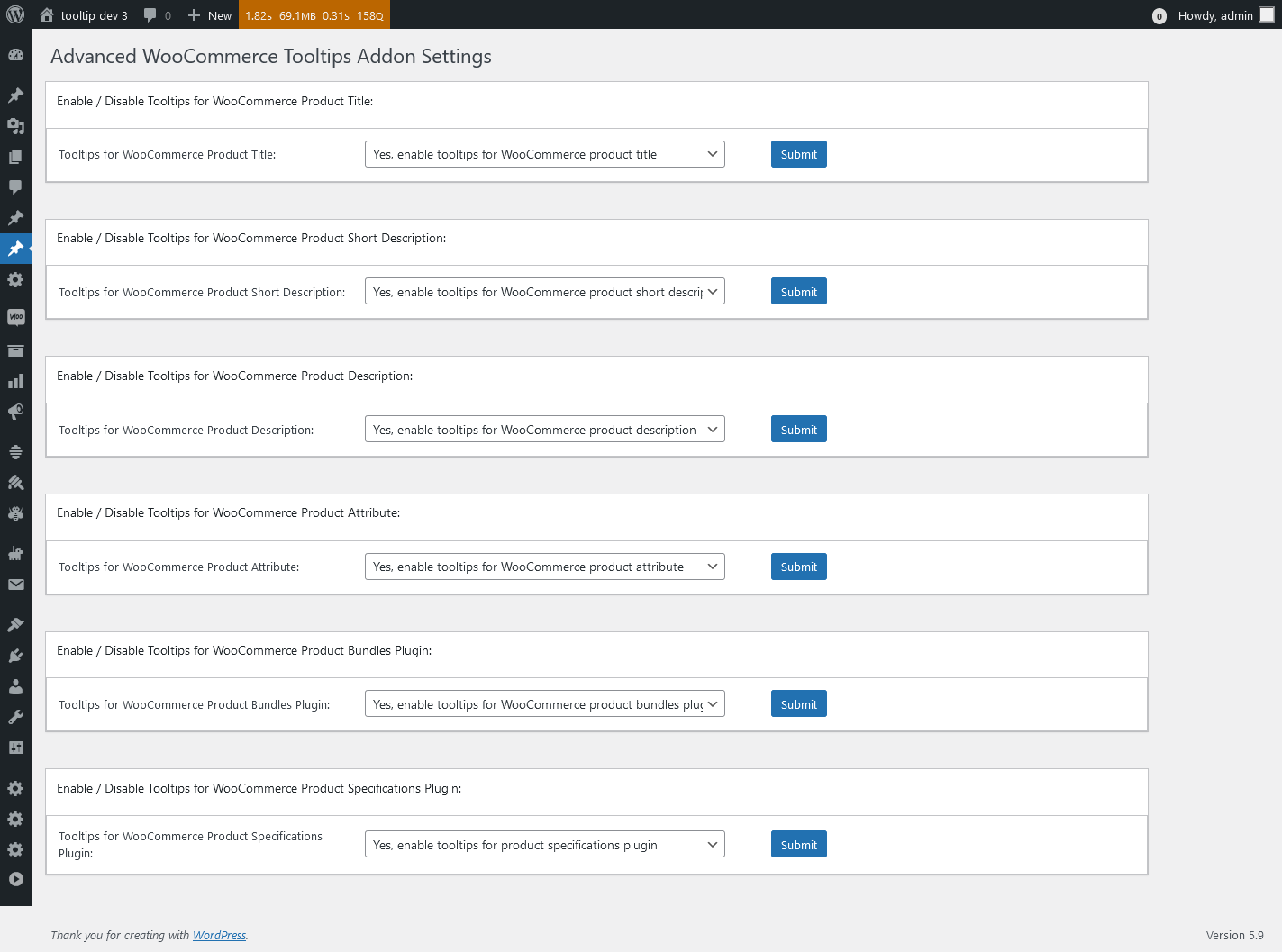
1: Advanced WooCommerce Tooltips Addon Settings, it looks like this:

Advanced WooCommerce Tooltips Addon Settings in wordpress tooltips pro plus 27.5.8

Advanced WooCommerce Tooltips Addon Settings in wordpress tooltips pro plus 27.5.8

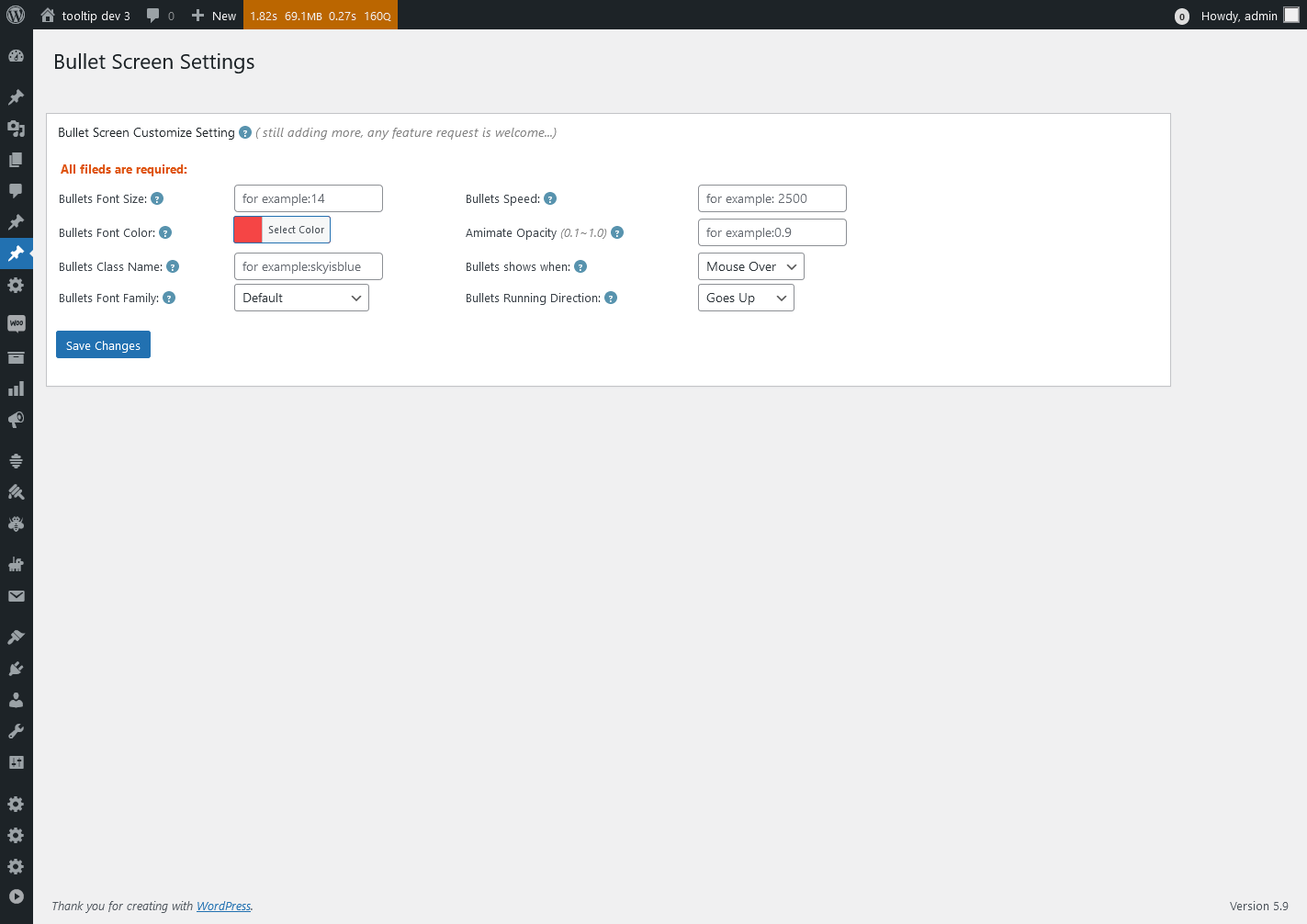
2: WordPress Bullet Screen Settings, it looks like this:

Bullet Screen Settings in wordpress tooltips pro plus 27.5.8

Bullet Screen Settings in wordpress tooltips pro plus 27.5.8

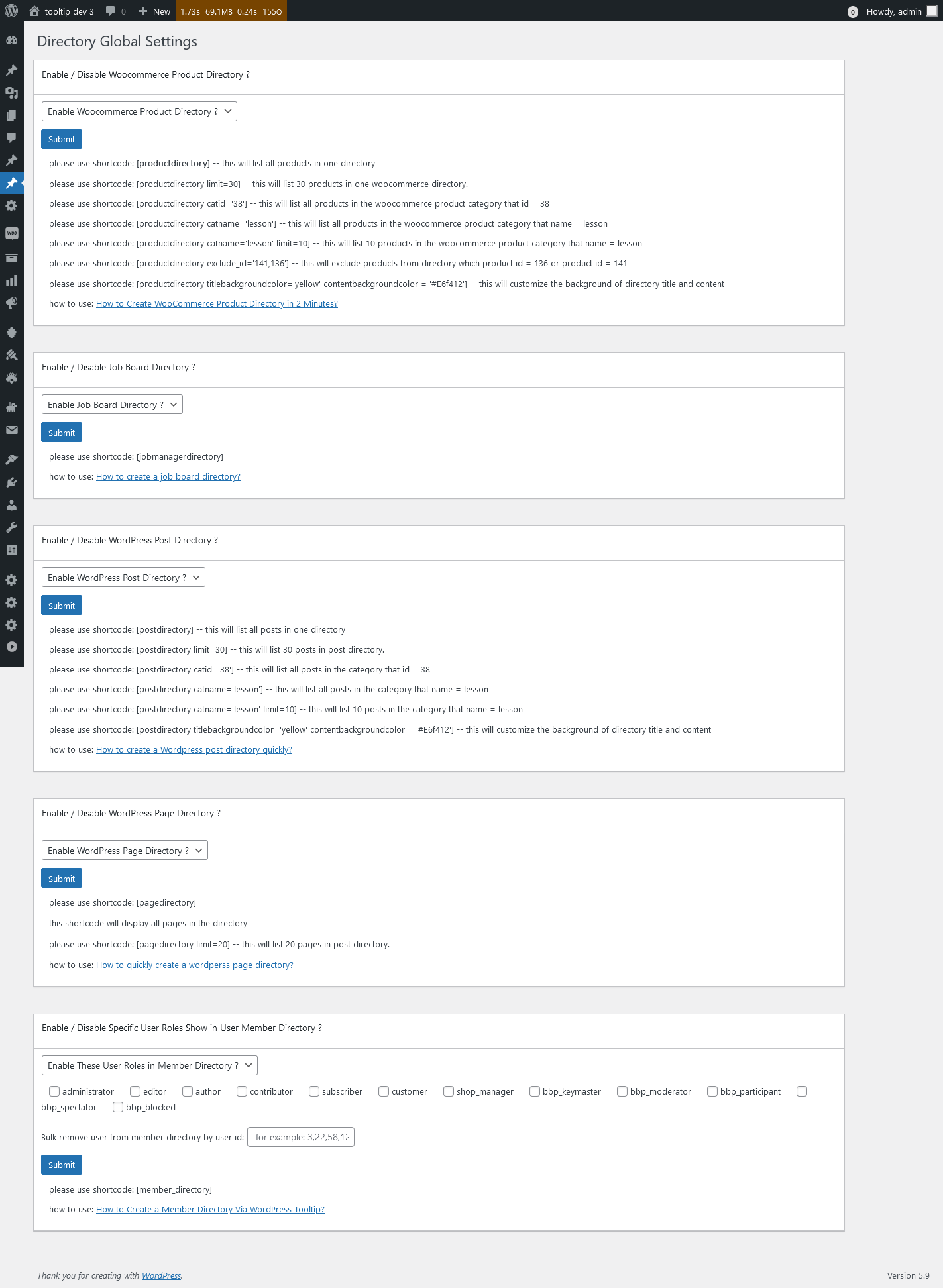
3: WordPress Directory Global Settings, it looks like this:

Directory Global Settings in wordpress tooltips pro plus 27.5.8

Directory Global Settings in wordpress tooltips pro plus 27.5.8

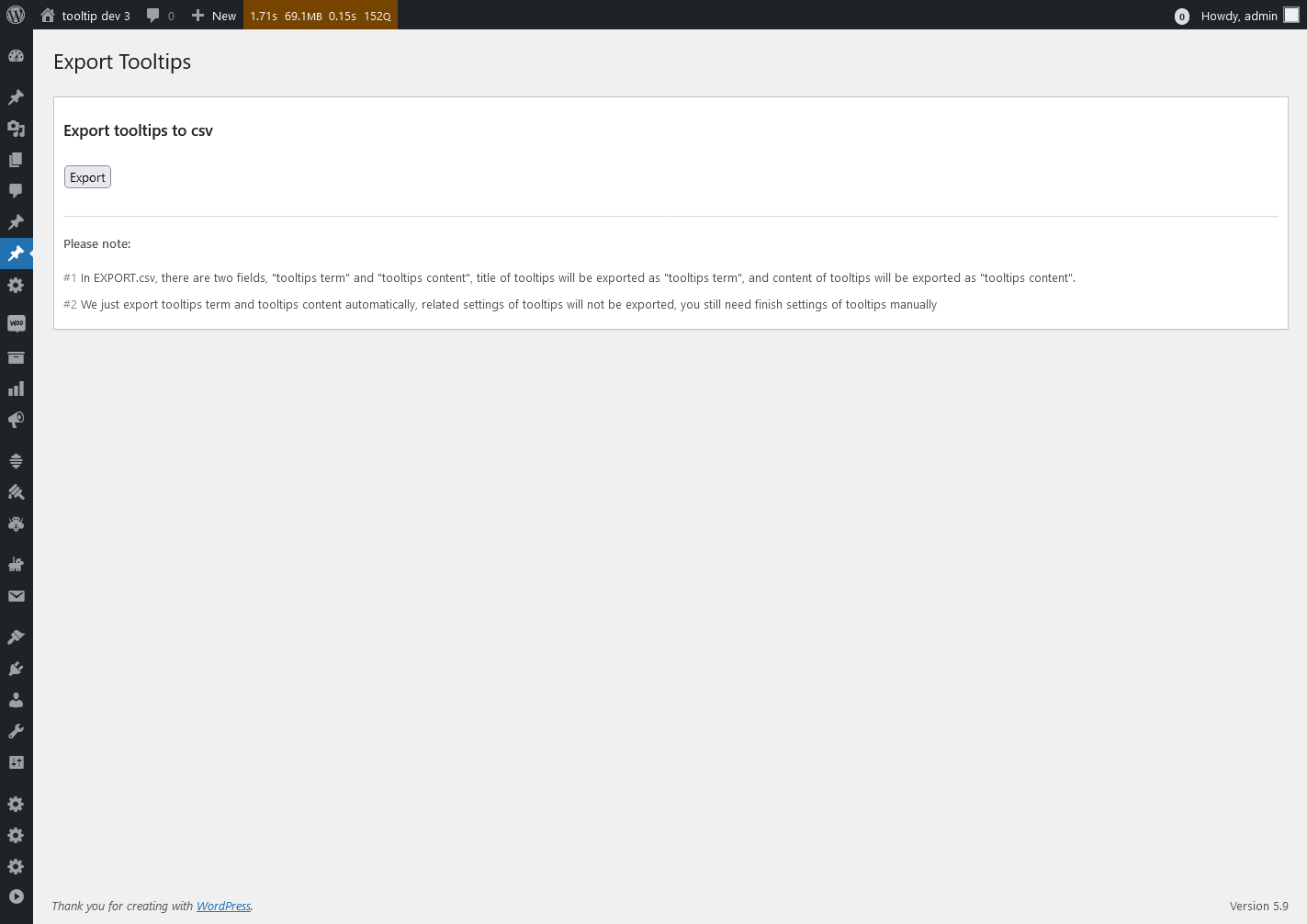
4: Export Tooltips panel, it looks like this:

Export Tooltips in wordpress tooltips pro plus 27.5.8

Export Tooltips in wordpress tooltips pro plus 27.5.8

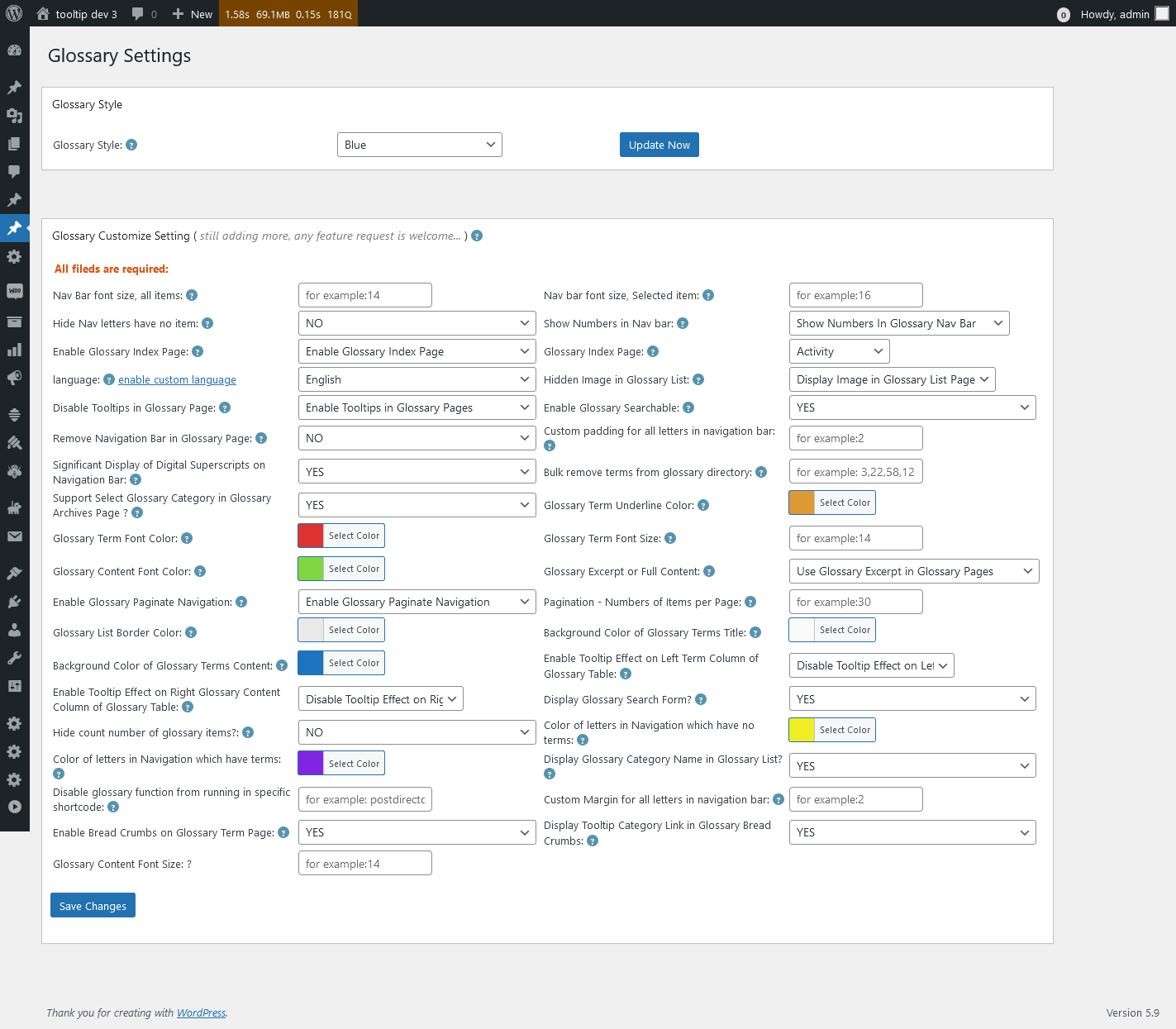
5: WordPress Glossary Settings panel, it looks like this:

Glossary Settings in wordpress tooltips pro plus 27.5.8

Glossary Settings in wordpress tooltips pro plus 27.5.8

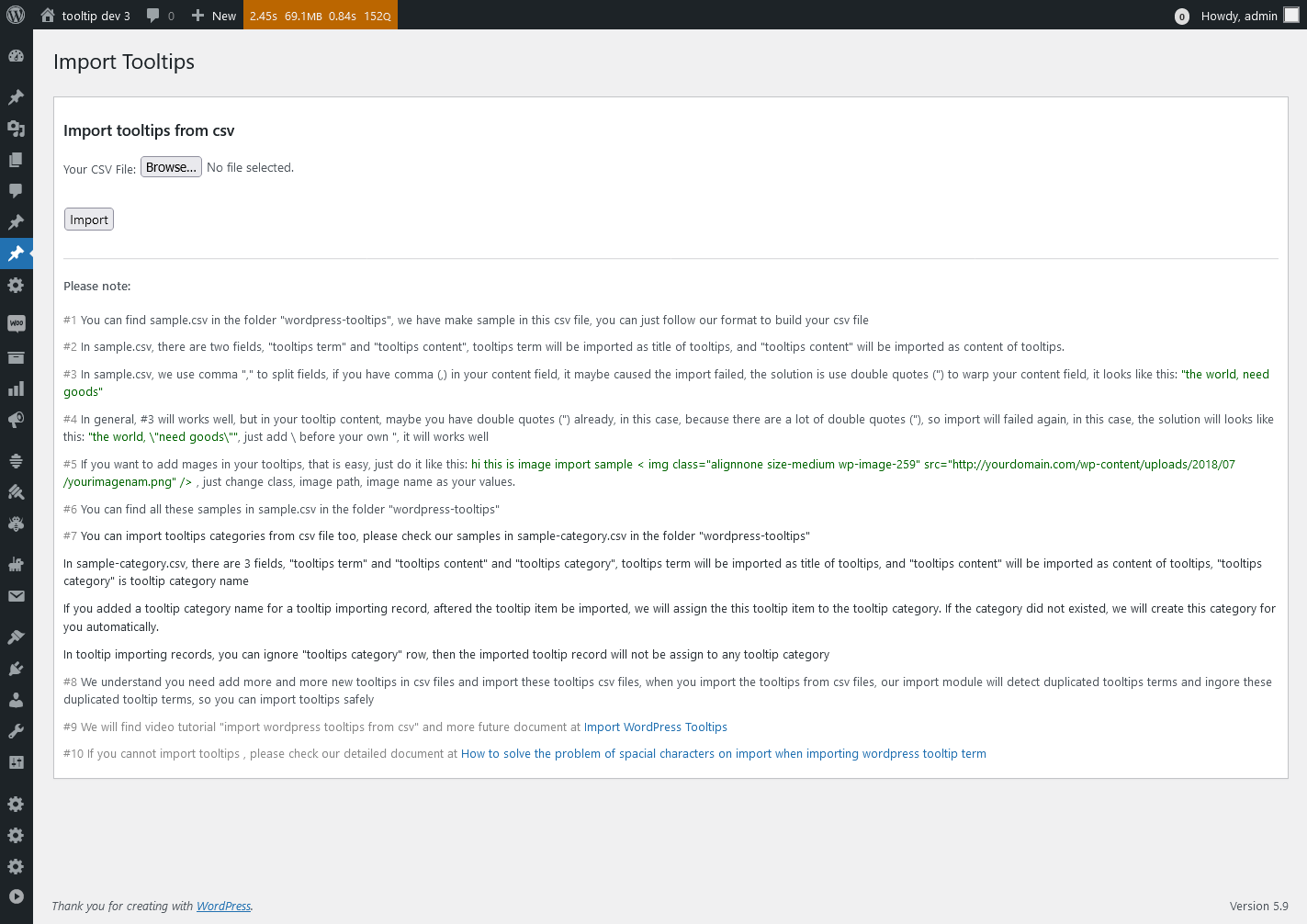
6: Import Tooltips panel , it looks like this:

Import Tooltips panel in wordpress tooltips pro plus 27.5.8

Import Tooltips panel in wordpress tooltips pro plus 27.5.8

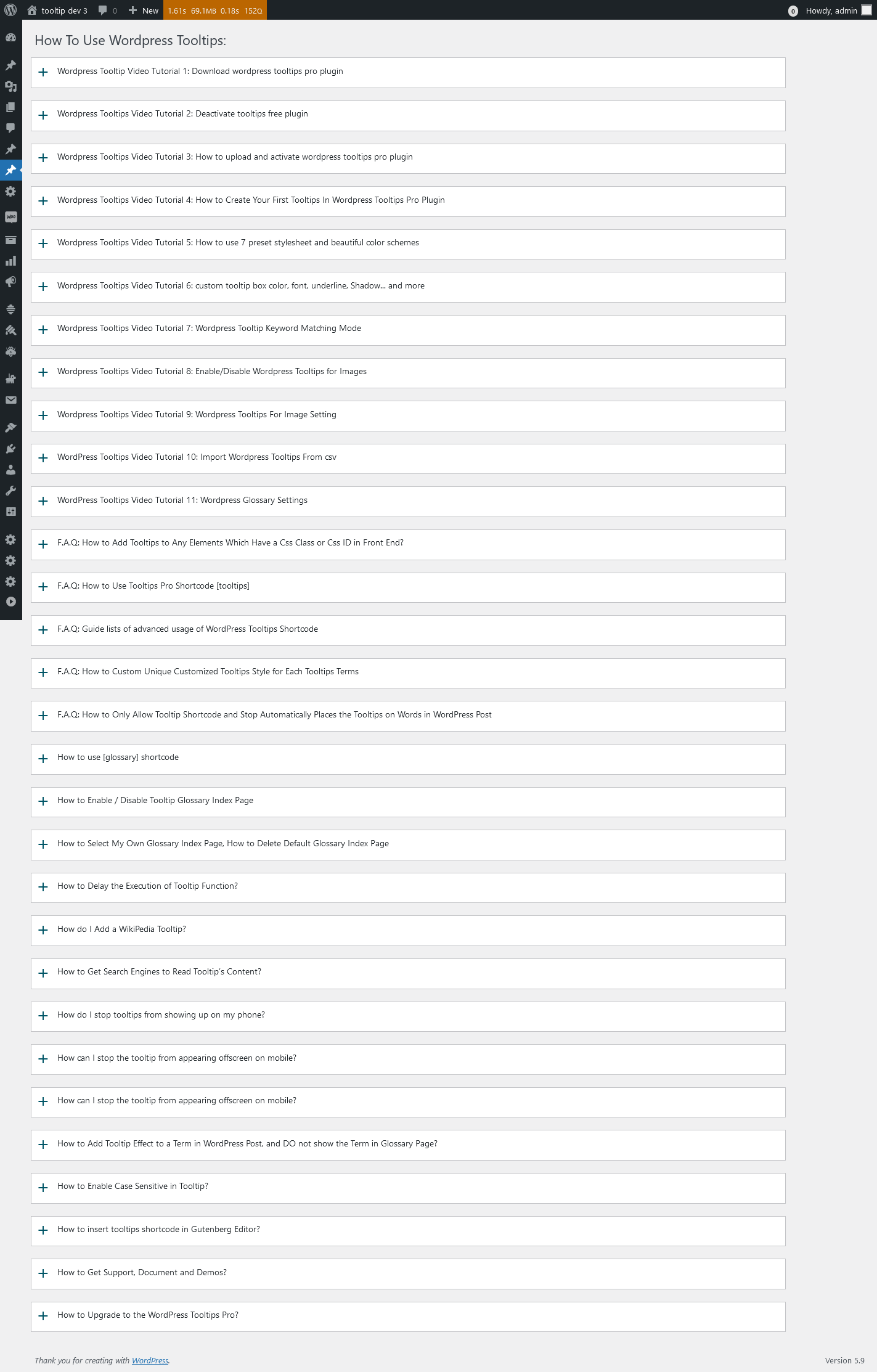
7: wordpress knowledge panel, it looks like this:

knowledge panel in wordpress tooltips pro plus 27.5.8

knowledge panel in wordpress tooltips pro plus 27.5.8

8: Reset WordPress Tooltips panel, it looks like this:

Reset Tooltips in wordpress tooltips pro plus 27.5.8

Reset Tooltips in wordpress tooltips pro plus 27.5.8

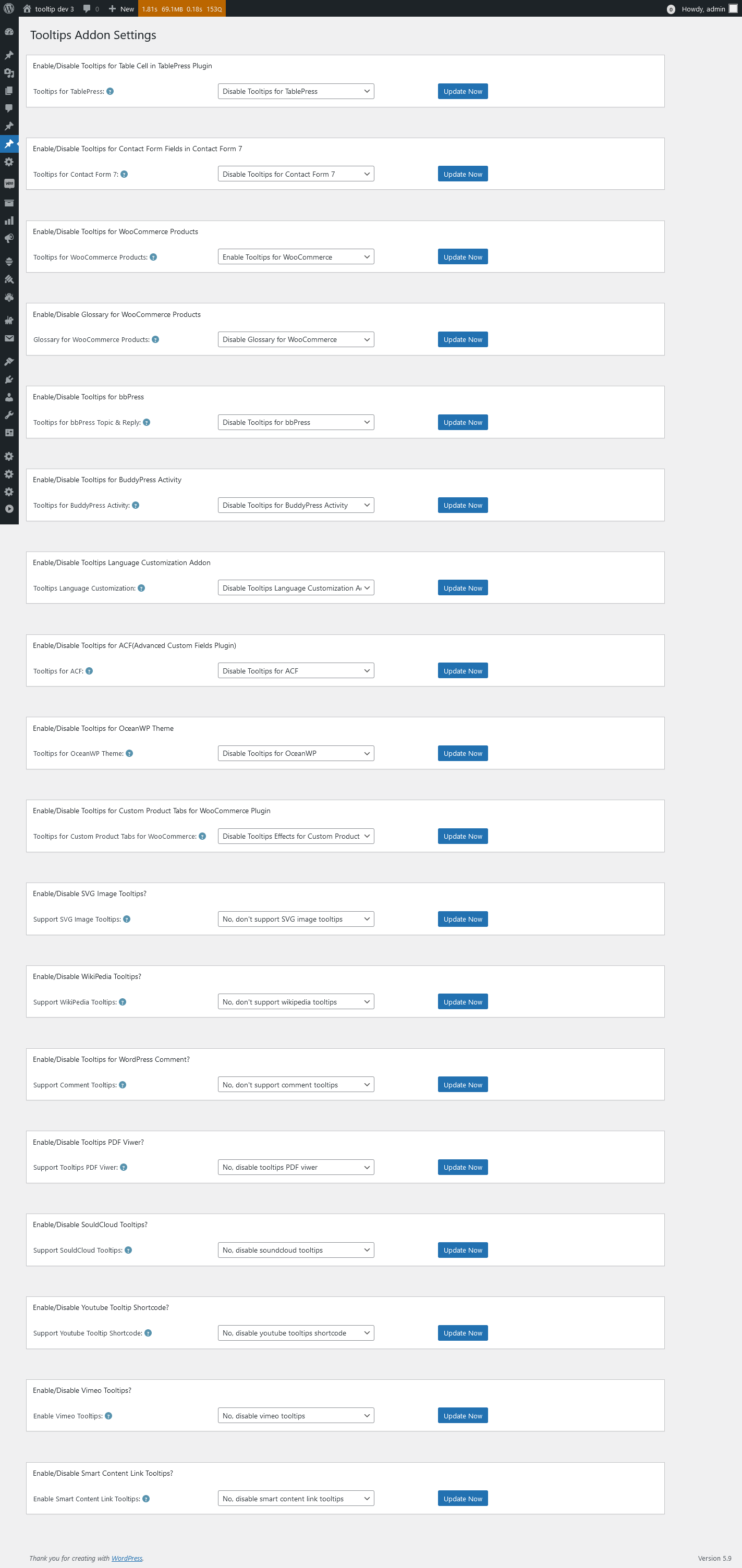
9: WordPress Tooltips Addon Settings panel, it looks like this:

Tooltips Addon Settings in wordpress tooltips pro plus 27.5.8

Tooltips Addon Settings in wordpress tooltips pro plus 27.5.8

10 WordPress Tooltips Global Settings panel, it looks like this:

Tooltips Global Settings in wordpress tooltips pro plus 27.5.8

Tooltips Global Settings in wordpress tooltips pro plus 27.5.8

11: WordPress tooltips plugin menu, it looks like this:

tooltips menu in wordpress tooltips pro plus 27.5.8

tooltips menu in wordpress tooltips pro plus 27.5.8

12 WordPress Tooltips Optional Settings panel, it looks like this:

Tooltips Optional Settings in wordpress tooltips pro plus 27.5.8

Tooltips Optional Settings in wordpress tooltips pro plus 27.5.8

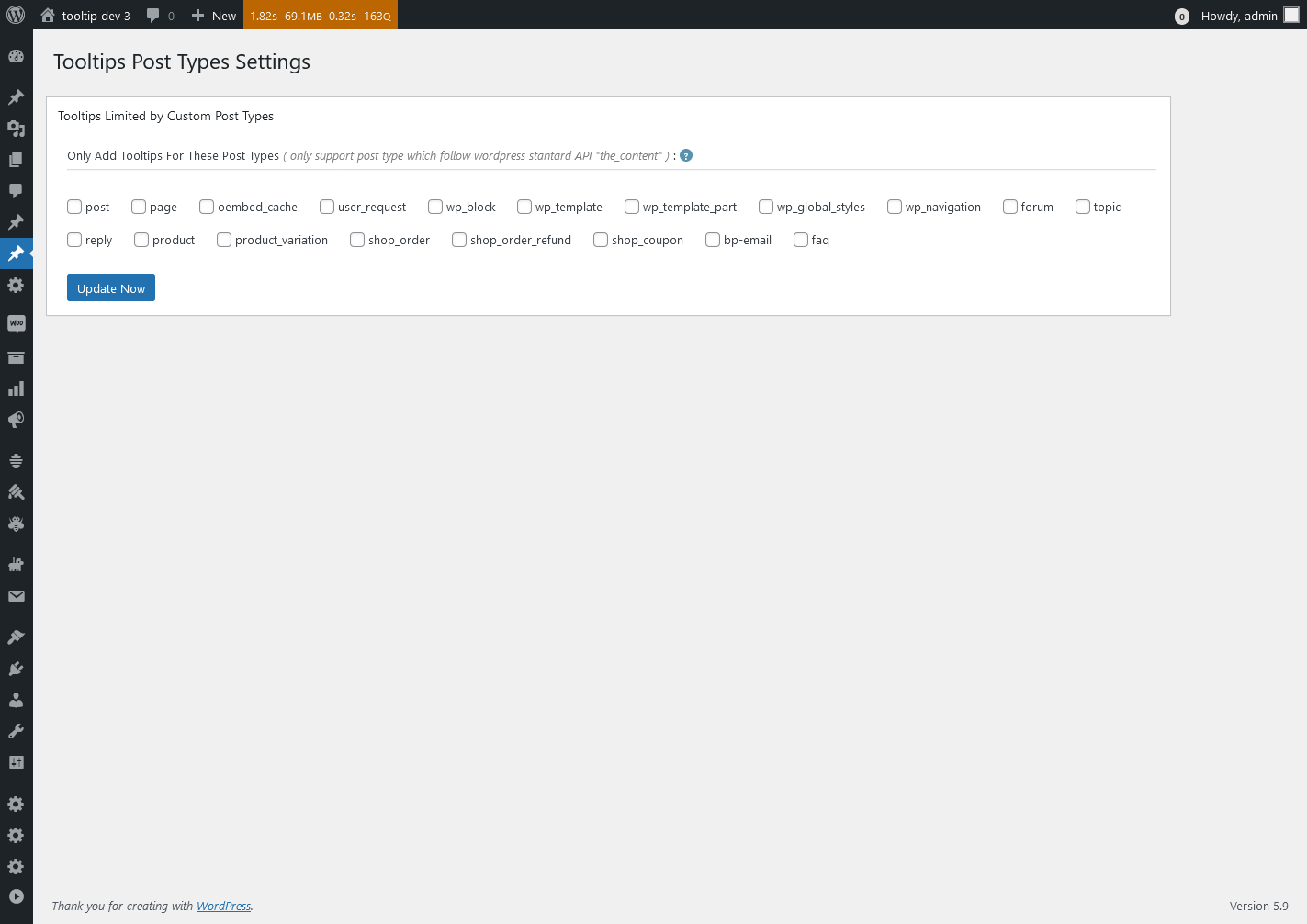
13 WordPress Tooltips Post Types Settings panel, lt looks like this:

Tooltips Post Types Settings in wordpress tooltips pro plus 27.5.8

Tooltips Post Types Settings in wordpress tooltips pro plus 27.5.8

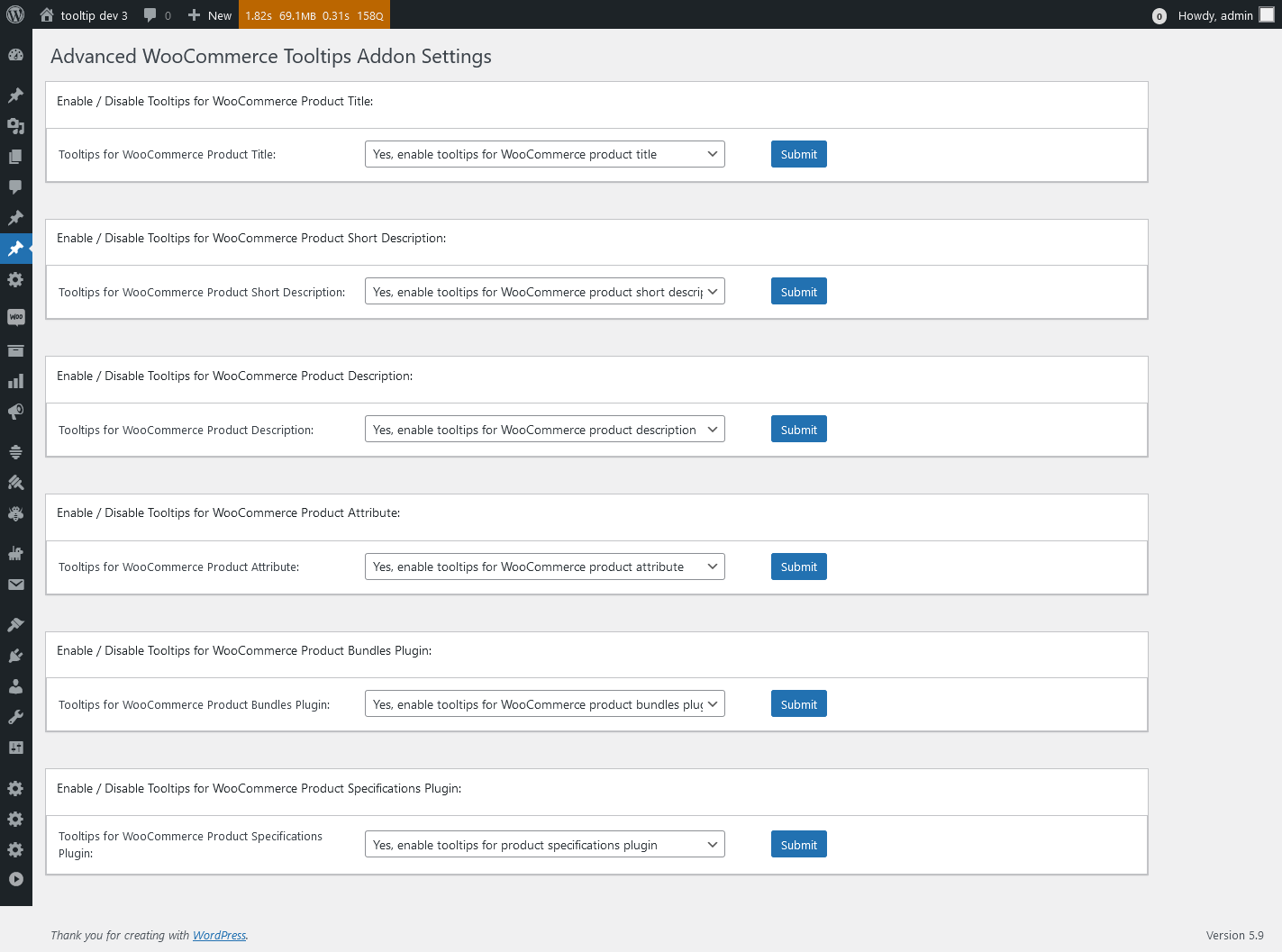
14 WordPress Tooltips Style Settings panel, it looks like this:

Advanced WooCommerce Tooltips Addon Settings in wordpress tooltips pro plus 27.5.8

Advanced WooCommerce Tooltips Addon Settings in wordpress tooltips pro plus 27.5.8

Thanks for the great suggestion, this has helped us not only to improve our UI design, but also to make the interface more comfortable for all wordpress tooltip users. We give the user a license of AI Smart Content Links plugin, which will enhance your website’s content and uplift the user experience with the powerful Smart Content Links plugin. By seamlessly integrating links to relevant content within your WordPress blog posts, you can effortlessly provide valuable context, information, and resources to your readers. These intelligent links are engineered to grant quick access to related resources and information, enabling your audience to delve deeper into the topic at hand while maintaining uninterrupted flow and focus on your core message.
Leveraging the cutting-edge AI-driven Natural Language Processing (NLP), Smart Content Links empowers you to bolster your SEO efforts efficiently. With its intuitive backend interface, simply input a keyword, and the plugin will leverage AI algorithms to rank and match posts, ensuring optimal alignment between content and keywords. 🙂


Thanks, have a blessed day with your family

Best Regards,

WordPress tooltips plugin support


Tagged with: , ,

New shortcode to support display related links bar in anywhere, wordpress AI smart content link with tooltips 3.2.2 released

Hi, Dear   WordPress Tooltip plugin users, hope this message find you are doing well and having wonderful weekend with your family:) An amazing users of wordpress AI smart content link with tooltip plugin wrote to us:

Dear developer,
I hope this message finds you well! First and foremost, I want to express my utmost gratitude for developing the amazing AI Smart Content Link plugin. Let me start by saying that I am absolutely thrilled with its functionality and the positive impact it has had on my comic website.
By using the Smart Content Link feature to display related articles about the background stories of my comics, I have witnessed a significant boost in user engagement. The users have been able to browse and visit other related content, which has truly stimulated their interest. The results have been remarkable! According to Google’s web analytics tool, the number of pageviews for tied-breaking stories has increased from 3 to 7. Additionally, the average time users spent on the site has doubled. Not only that, but the AI Smart Content Link has also led to a substantial increase in my ad revenue. It’s truly outstanding!
I genuinely love your plugin and the value it brings to my website. However, I do have a suggestion that I believe could further enhance its versatility. I would love to be able to customize multiple Smart Content Links. Specifically, I would like to showcase sequels to the current story and provide specific product links for each story. For instance, in one of my comics, there is an episode featuring flying shoes. My idea is to include an AFFILIATE link for shoes below that particular comic episode. Alongside this customization, I would greatly appreciate the ability to insert this specific Smart Content Link Bar anywhere on the page. This flexibility would allow me to maximize the plugin’s benefits.
Once again, I want to congratulate you on developing such a successful plugin. The inclusion of relevant links on the page has effectively guided my users to explore more associated stories, resulting in a substantial increase in pageviews. Thank you once more for your outstanding work, and I sincerely hope that you continue to achieve great success!
Warmest regards,

Our wordpress tooltip plugin developer checked this ticket, we have developed a shortcode [[scl]] in smart content link plugin,  it will display all global smart content links in one smart content link bar, however, this amazing user want to to customize many smart content link bar with different links, so we can not re-use [[scl]] shortcode, we had to develop a new shortcode to realize this great feature request 🙂

In the new version wordpress smart content link with tooltip plugin 3.2.2, you can use a new shortcode [[scl_unique]] to make unlimited smart content link bar and insert different links in each smart content link bar, it works like this way:

[[scl_unique  links=”<a href=’https://tooltips.org’>wordpress tooltips</a>,<a href=’https://tooltips.org/contact-us/’>contact us</a>”]]

You can insert unlimited links in the smart content link bar, just separate different links with comma 🙂

Also you can install wordpress tooltips pro plugin to enhance the function of smart content links, when users house mover a links, they can get video, audio , text , images, content of affiliate, product related with the link….more related links…etc 🙂

Thanks, have a blessed day with your family

Best Regards,

WordPress tooltips plugin support


Tagged with: , , ,

Improved the UI design of the tooltip global settings panel of the WordPress tooltip plugin, WordPress tooltip plugin pro plus 27.4.8 released

Hi, Dear   WordPress Tooltip plugin users, hope this message find you are doing well and having wonderful days with your family:) We got a feedback from an UI designer:

Hello,
I hope this message finds you well. First of all, let me express my appreciation for your WordPress Tooltips Pro Plus plugin. I am a loyal user and I truly enjoy its powerful and outstanding features. I use WordPress Tooltips to showcase my design portfolio, including design illustrations, videos, and the final website effects.

Recently, I upgraded to a newer version of the WordPress Tooltips plugin and as a UI designer, it is in my nature to provide feedback. My job involves understanding user requirements, coming up with creative ideas, and creating design solutions, including interface design, color palettes, and layout arrangements. Based on prototypes and design plans, I work on detailed interface designs, including design illustrations, icons, buttons, as well as page layout, color schemes, and visual effects.

I noticed a minor issue in the Tooltips Global Settings panel of the WordPress Tooltips plugin. The titles and content in each panel are not aligned to the left. There seems to be a 5px difference in the padding-left. Would it be possible to address this issue?

Thank you for your attention and I look forward to your response. Your dedication to providing users with an exceptional experience is truly commendable.
Best regards,


Our wordpress tooltip developer checked this ticket and we tried our best to fixed it asap we can ( in one hour ), please upgrade to wordpress tooltips pro plus 27.4.8 to check the new UI of global settings panel, we are checking other panel and we will fix this UI problem asap we can  🙂

We appreciate your suggestion and our developers sent you a license for the WordPress live link preview plugin with tooltip plugin because you mentioned “I use WordPress Tooltips to showcase my design portfolio, including design illustrations, videos, and the final website effects. I use WordPress Tooltips to showcase my design portfolio, including design illustrations, videos, and the final website effects.”, our developers thought it might be a good way to impress your clients if you could show them how your website looks in real time 🙂   Live link preview is a light and fast and powerful plugin to display live link preview for your wordpress users.  when users mouse hover a link on your wordpress post, WordPress live link preview plugin will display the live preview screenshot of the site in a wordperss tooltip popup window, users will see where you are sending them.

If you have any more question or feature request, please don’t hesitate to contact us, we are very happy to improve wordpress tooltips plugin for you, and we always offer gift as THANKS for your suggestion

Thanks, have a blessed day with your family

Best Regards,

WordPress tooltips plugin support

Tagged with: , , ,

Cómo solucionar el problema de caracteres especiales al importar un término de información sobre herramientas de WordPress tooltips

Hola estimados usuarios del complemento WordPress Tooltip, espero que este mensaje les encuentre bien y que estén pasando días maravillosos con su familia 🙂 Un increíble usuario de wordpress tooltip creó un ticket, él dijo:

Hola, estoy tratando de usar su complemento para un sitio web de tutores de idiomas. Una cosa que me gustaría hacer es importar múltiples tooltips para usar en el sitio. Sin embargo, no puedo hacer esto con ciertos caracteres como é. Un ejemplo de esto es cuando quiero agregar el tooltip, no creo tener -_ no créo tener. Estoy utilizando el formato CSV que se sugiere y he probado diferentes iteraciones utilizando comillas, etc., sin éxito. Cualquier ayuda sería muy apreciada.

Nuestro equipo de soporte de WordPress Tooltip Plugin respondió:

Hola,
Espero que estén bien y que estén teniendo un maravilloso fin de semana con su familia 🙂
Gracias por el mensaje 🙂
Estamos muy felices de ayudarte 🙂
Lo siento, esta es la primera vez que escuchamos este tipo de problema. Debido a que tenemos muchas versiones de complemento con funciones diferentes, ¿podrías decirnos por favor?:
1. la versión del complemento que estás utilizando
2. la URL relacionada con el problema
3. un poco más de detalles sobre el contenido del archivo, si puedes compartir el archivo CSV con nosotros, intentaremos probarlo en nuestro sitio para resolverlo para ti 🙂
Gracias, que tengas un bendecido día con tu familia 🙂
Atentamente,
Equipo de soporte del complemento WordPress Tooltip

El usuario del complemento de WordPress Tooltip respondió:

Por supuesto,
versión 9.3.1
Sin URL, ya que no puedo importar, y aquí adjunto el ejemplo de CSV que estoy usando.
Saludos cordiales

Nuestro desarrollador de herramientas de información sobre herramientas de WordPress descargó el archivo CSV de información sobre herramientas y realizó una prueba en nuestro sitio de herramientas de información sobre herramientas. Sí, descubrimos que no podemos importar registros desde el archivo CSV a las herramientas de información sobre herramientas de WordPress. Luego revisamos cuidadosamente los códigos en nuestro módulo de importación de herramientas de información sobre herramientas de WordPress, pero no encontramos ningún error en las funciones. Finalmente, después de muchas pruebas, descubrimos que el archivo CSV del usuario no está codificado en UTF-8, sino en ANSI. Nuestro desarrollador de complementos de herramientas de información sobre herramientas de WordPress dijo que, al trabajar con archivos CSV, es importante asegurarse de que la codificación del archivo coincida con la codificación utilizada en el código. De lo contrario, es posible que encuentres texto ilegible o tengas problemas para reconocer ciertos caracteres. Si tu código está utilizando la codificación UTF-9, debes asegurarte de que el archivo CSV cargado también esté codificado en UTF-8. Puedes verificar la codificación del archivo antes de cargarlo.

¿Cómo convertir tu archivo a un archivo codificado en UTF-8?

Para convertir un archivo codificado en ANSI a un archivo codificado en UTF-8 en Windows, puedes usar el Bloc de notas o cualquier otro editor de texto. Por ejemplo, para un archivo codificado en ANSI, sigue estos pasos:

  1. Abre el Bloc de notas.
  2. Abre el archivo codificado en ANSI en el Bloc de notas.
  3. Ve al menú archivo y selecciona “Guardar como”.
  4. En el menú desplegable “Guardar como tipo”, elige “Todos los archivos”.
  5. Dale al archivo un nuevo nombre y añade la extensión “.csv”, por ejemplo, tt.csv.
  6. En el menú desplegable “Codificación”, selecciona “UTF-8”.
  7. Haz clic en el botón “Guardar”.

El bloc de notas guardará el archivo utilizando la codificación UTF-8. Ten en cuenta que si el archivo contiene caracteres no ASCII, se convertirán en secuencias de múltiples bytes en lugar de bytes individuales.
También puedes utilizar otras herramientas como Notepad++, Visual Studio Code, etc., para convertir un archivo codificado en ANSI a UTF-8. Estas herramientas brindan opciones más avanzadas y un mejor manejo de diferentes tipos de archivo y conjuntos de caracteres.
Para ayudar a más usuarios a evitar cometer este error, nuestro desarrollador de tooltips de WordPress agregó este consejo en el panel de “importar tooltips” en WordPress tooltips pro plus 27.3.8, WordPress tooltips pro 19.4.6, WordPress tooltips free 9.3.9

Agradecemos enormemente el fantástico feedback que recibimos del increíble usuario de WordPress tooltips. Como muestra de nuestra gratitud, nos complace ofrecer al increíble usuario una licencia para WordPress FAQ Pro con Tooltip. El plugin WordPress FAQ es una solución verdaderamente efectiva y eficiente para bloggers de WordPress, que les permite crear, gestionar y editar preguntas frecuentes sin esfuerzo. Con este plugin, los usuarios pueden elegir fácilmente atractivas plantillas predeterminadas de preguntas frecuentes, personalizar los estilos de las preguntas frecuentes en unos pocos clics y crear hermosas preguntas frecuentes tipo acordeón. También permite la categorización de las preguntas frecuentes y ofrece soporte para WooCommerce Product FAQ, Responsive FAQ, múltiples plantillas de preguntas frecuentes y preguntas frecuentes agrupadas por categoría. Además, tienes la flexibilidad de especificar el número de elementos de preguntas frecuentes para cada categoría. Al utilizar el plugin WordPress FAQ, la gestión de preguntas frecuentes se convierte en una experiencia sin esfuerzo y fluida. ¡Y hay aún más por descubrir! Estamos muy agradecidos por tu informe y estamos encantados de compartir esta experiencia mejorada contigo.
Si tienes alguna otra pregunta o solicitud de funciones, no dudes en contactarnos. Estaremos encantados de mejorar las funciones del plugin de tooltips de WordPress para ti.
Gracias, que tengas un día bendecido junto a tu familia.
Atentamente,
Soporte del plugin de tooltips de WordPress

Tagged with: , ,

Comment résoudre le problème des caractères spatiaux lors de l’importation de wordpress tooltip term ?

Bonjour chers utilisateurs du plugin WordPress Tooltip, j’espère que ce message vous trouvera en bonne santé et que vous passerez de merveilleuses journées avec votre famille 🙂 Un utilisateur de wordpress tooltip a créé un ticket, il a dit : “J’essaie d’utiliser votre plugin pour un site de cours de langue :

J’essaie d’utiliser votre plugin pour un site web de cours de langue. Une chose que j’aimerais faire est d’importer plusieurs infobulles pour les utiliser dans le site, mais je ne peux pas le faire avec certains caractères tels que é… Je ne peux cependant pas le faire avec certains caractères comme é .
Un exemple de ceci est lorsque je veux ajouter l’infobulle , je ne pense pas que j’ai -_ no créo tener. J’utilise le format CSV suggéré et j’ai essayé différentes itérations d’utilisation de citations, etc. sans succès.

Notre plugin wordpress tooltip support a répondu :

Bonjour,

J’espère que vous allez bien et que vous passez un merveilleux week-end en famille .

Merci pour votre message Nous sommes très heureux de pouvoir vous aider.

Nous sommes très heureux de pouvoir vous aider .

Désolé, c’est la première fois que nous entendons ce genre de problème. Parce que nous avons plusieurs versions de plugin avec des fonctions différentes, Pourriez-vous nous dire :
1 la version du plugin que vous utilisez
2 l’URL liée au problème
3 un peu plus de détails sur le contenu du fichier, si vous pouvez partager le fichier csv avec nous, nous essaierons de le tester sur notre site pour le résoudre pour vous Merci, bonne journée à tous.

Merci, passez une bonne journée en famille .

Meilleures salutations,
Wordpress tooltip plugin support

L’utilisateur de wordpress tooltip a répondu :

Bien entendu
version 9.3.1
Pas d’Url car je ne peux pas importer et voici l’exemple de CSV que j’utilise en pièce jointe.
Je vous prie d’agréer, Madame, Monsieur, l’expression de mes salutations distinguées.

Notre développeur d’infobulles wordpress a téléchargé le fichier csv d’infobulles, et a fait un test sur notre site d’infobulles, oui, nous avons trouvé que nous ne pouvions pas importer les enregistrements du fichier csv dans les infobulles wordpress. Ensuite, nous avons lu attentivement les codes dans notre module d’importation wordpress tooltip, mais nous n’avons trouvé aucun bug dans les fonctions, finalement, après de nombreux tests, nous avons trouvé que le fichier csv de l’utilisateur n’est pas encodé en UTF-8, mais en ANSI, notre développeur de plugin wordpress tooltip a dit, lorsque vous travaillez avec des fichiers csv, il est important de s’assurer que l’encodage du fichier correspond à l’encodage utilisé dans le code. Dans le cas contraire, vous risquez d’obtenir un texte tronqué ou d’avoir des difficultés à reconnaître certains caractères. Si votre code utilise l’encodage UTF-9, vous devez vous assurer que le fichier CSV téléchargé est également encodé en UTF-8. Vous pouvez vérifier l’encodage du fichier avant de le télécharger .

Comment convertir votre fichier en un fichier codé en UTF-8 ?

Pour convertir un fichier codé ANSI en fichier codé UTF-8 sous Windows, vous pouvez utiliser le Bloc-notes ou tout autre éditeur de texte. Par exemple, pour un fichier codé ANSI, voici les étapes à suivre :

1 Ouvrez Notepad.

2 Ouvrez le fichier codé ANSI dans Notepad.

3 aller dans le menu fichier et sélectionner enregistrer sous

4 dans le menu déroulant “enregistrer sous”, choisir “tous les fichiers”.

5 donnez un nouveau nom au fichier et ajoutez l’extension “.csv”, par exemple, tt.csv

6 dans le menu déroulant “Encodage”, sélectionnez “UTF-8”

7 cliquez sur le bouton “enregistrer

Le Bloc-notes enregistre le fichier en utilisant le codage UTF-8. Notez que si le fichier contient des caractères non ASCII, ils seront convertis en séquences de plusieurs octets au lieu d’octets uniques.

Vous pouvez également utiliser d’autres outils tels que notepad++, visual studio code, etc, pour convertir un fichier codé ANSI en UTF-8. Ces outils offrent des options plus avancées et une meilleure gestion des différents types de fichiers et jeux de caractères.

Pour aider plus d’utilisateurs à éviter de faire cette erreur, notre développeur d’infobulles WordPress a ajouté cette astuce dans le panneau “importer des infobulles” dans WordPress tooltips pro plus 27.3.8, WordPress tooltips pro 19.4.6, WordPress tooltips free 9.3.9 .

Nous apprécions grandement les commentaires fantastiques que nous avons reçus de l’incroyable utilisateur de WordPress Tooltip. En guise de remerciement, nous sommes ravis de lui offrir une licence pour WordPress FAQ Pro with Tooltip. Le plugin WordPress FAQ est une solution efficace pour les blogueurs WordPress, leur permettant de créer, gérer et éditer des FAQ sans effort. Avec ce plugin, les utilisateurs peuvent facilement choisir des modèles de FAQ par défaut visuellement attrayants, personnaliser les styles de FAQ en quelques clics, et créer de magnifiques FAQ en accordéon. Il permet également de catégoriser les FAQ et prend en charge les FAQ de produits WooCommerce, les FAQ réactives, les modèles de FAQ multiples et les FAQ regroupées par catégorie. En outre, vous avez la possibilité de spécifier le nombre d’éléments de FAQ pour chaque catégorie. Le support utilise OpenAI ChatGPT pour générer un contenu de haute qualité pour WordPress F.A.Q et wordpress post automatiquement. En utilisant le plugin WordPress FAQ, la gestion des FAQ devient une expérience facile et transparente. Et il y a encore plus à découvrir ! Nous vous remercions pour votre rapport et sommes ravis de partager avec vous cette expérience améliorée .

If you have any more question of feature request,  please don’t hesitate to contact us, we are very happy to improve functions of wordpress tooltip plugin for you

Thanks, have a blessed day with your family

Best Regards,

WordPress tooltips plugin support

Tagged with: , ,

Wie löst man das Problem der Leerzeichen beim Import von WordPress Tooltip Begriffen?

Hi liebe Benutzer des WordPress Tooltip Plugins, ich hoffe, diese Nachricht erreicht euch in bester Verfassung und dass ihr wundervolle Tage mit eurer Familie verbringt 🙂 Ein fantastischer WordPress Tooltip-Benutzer hat ein Ticket erstellt und sagt folgendes:

Hey,

ich versuche dein Plugin für eine Website von Sprachlehrern zu verwenden.  Eine Sache, die ich gerne tun würde, ist, mehrere Tooltips für die Verwendung auf der Website zu importieren. Allerdings kann ich dies nicht mit bestimmten Zeichen wie é tun. Ein Beispiel dafür ist, wenn ich den Tooltip hinzufügen möchte, ich glaube, ich habe -_ no créo tener. Ich verwende das empfohlene CSV-Format und habe verschiedene Varianten mit Anführungszeichen usw. ausprobiert, aber ohne Erfolg. Ich wäre sehr dankbar für jegliche Unterstützung.

Unser Support für das WordPress Tooltip Plugin antwortete wie folgt:

Hallo, Ich hoffe, es geht dir gut und du verbringst ein wundervolles Wochenende mit deiner Familie 🙂

Vielen Dank für die Nachricht 🙂

Wir helfen dir gerne weiter 🙂

Es tut uns leid, dass wir dieses Problem zum ersten Mal hören. Da wir viele verschiedene Plugin-Versionen mit unterschiedlichen Funktionen haben, könntest du uns bitte Folgendes mitteilen:

  1. Die von dir verwendete Plugin-Version
  2. Die URL, die mit dem Problem zusammenhängt
  3. Ein paar weitere Details zum Inhalt der Datei. Wenn du die CSV-Datei mit uns teilen kannst, werden wir versuchen, sie auf unserer Website zu testen und das Problem für dich zu lösen 🙂 Danke und einen gesegneten Tag mit deiner Familie 🙂 Mit freundlichen Grüßen, Support für das WordPress Tooltip-Plugin” Der WordPress Tooltip-Benutzer antwortete: Natürlich, Version 9.3.1 Keine URL, da ich nicht importieren kann. Hier ist die beigefügte Beispiel-CSV, die ich verwende. Mit freundlichen Grüßen

Unsere wordpress tooltip Entwickler heruntergeladen die tooltip csv-Datei, und hat einen Test auf unserer tooltip Website, ja, wir fanden wir können nicht importieren Datensätze aus der csv-Datei in wordpress tooltips. Dann lesen wir Codes in unserem WordPress-Tooltip-Import-Modul, sorgfältig, aber wir können keinen Fehler in Funktionen zu finden, schließlich, nach vielen Tests, fanden wir den Benutzer csv-Datei ist nicht UTF-8-Kodierung, es ist ANSI-Kodierung, unsere WordPress-Tooltip-Plugin-Entwickler sagte, bei der Arbeit mit csv-Dateien, ist es wichtig, um sicherzustellen, dass die Datei-Codierung entspricht der Kodierung im Code verwendet. Andernfalls kann es passieren, dass der Text verstümmelt ist oder bestimmte Zeichen nicht erkannt werden. Wenn Ihr Code die Kodierung UTF-9 verwendet, müssen Sie sicherstellen, dass die hochgeladene CSV-Datei auch in UTF-8 kodiert ist. Sie können die Kodierung der Datei vor dem Hochladen überprüfen.

Wie konvertiert man eine Datei in eine UTF-8 kodierte Datei?

Um eine ANSI-kodierte Datei in eine UTF-8-kodierte Datei unter Windows zu konvertieren, können Sie Notepad oder einen anderen Texteditor verwenden. Für eine ANSI-kodierte Datei zum Beispiel sind folgende Schritte erforderlich:

1 Öffnen Sie Notepad.

2 Öffnen Sie die ANSI-kodierte Datei in Notepad

3 Gehen Sie zum Menü Datei und wählen Sie Speichern unter

4 Wählen Sie in der Dropdown-Liste “Speichern unter” die Option “Alle Dateien”.

5 geben Sie der Datei einen neuen Namen und fügen Sie die Erweiterung “.csv” hinzu, z. B. tt.csv

6 Wählen Sie in der Dropdown-Liste “Kodierung” die Option “UTF-8”.

7 Klicken Sie auf die Schaltfläche “Speichern”.

Notepad speichert die Datei in der Kodierung UTF-8.Wenn die Datei Nicht-ASCII-Zeichen enthält, werden diese in Multi-Byte-Sequenzen anstelle von einzelnen Bytes konvertiert.Sie können auch andere Tools wie Notepad++, Visual Studio Code usw. verwenden, um eine ANSI-kodierte Datei in eine UTF-8-Datei zu konvertieren. Diese Tools bieten mehr erweiterte Optionen und eine bessere Handhabung verschiedener Dateitypen und Zeichensätze.Um mehr Benutzern zu helfen, diesen Fehler zu vermeiden, hat unser WordPress Tooltip-Entwickler diesen Tipp in das Panel “Tooltips importieren” in WordPress Tooltips pro plus 27.3.8, WordPress Tooltips pro 19.4.6, WordPress Tooltips free 9.3.9 aufgenommen.

Wir schätzen das fantastische Feedback, das wir von dem erstaunlichen WordPress Tooltip-Benutzer erhalten haben, sehr.Als Zeichen unserer Dankbarkeit freuen wir uns, dem erstaunlichen Benutzer eine Lizenz für WordPress FAQ Pro mit Tooltip anzubieten. Das WordPress FAQ-Plugin ist eine wirklich effektive und effiziente Lösung für WordPress-Blogger, mit der sie mühelos FAQs erstellen, verwalten und bearbeiten können.Mit diesem Plugin können Benutzer optisch ansprechende Standard-FAQ-Vorlagen auswählen, FAQ-Stile mit ein paar einfachen Klicks anpassen und schöne FAQs im Akkordeon-Stil erstellen. Es ermöglicht auch die Kategorisierung von FAQs und bietet Unterstützung für WooCommerce Product FAQ, Responsive FAQ, mehrere FAQ-Vorlagen und nach Kategorien gruppierte FAQs. Zusätzlich haben Sie die Möglichkeit, die Anzahl der FAQ-Elemente für jede Kategorie festzulegen. Unterstützung von OpenAI ChatGPT zur automatischen Generierung hochwertiger Inhalte für WordPress-FAQ und WordPress-Posts. Durch die Verwendung des WordPress FAQ-Plugins wird die Verwaltung von FAQs zu einer mühelosen und nahtlosen Erfahrung. Und es gibt noch mehr zu entdecken! Wir sind so dankbar für Ihren Bericht und freuen uns, diese verbesserte Erfahrung mit Ihnen zu teilen .

Wenn Sie weitere Fragen oder Funktionswünsche haben, zögern Sie bitte nicht, uns zu kontaktieren, wir sind sehr glücklich, die Funktionen des WordPress Tooltip Plugins für Sie zu verbessern

Danke, haben Sie einen gesegneten Tag mit Ihrer Familie

Mit freundlichen Grüßen,

WordPress Tooltips Plugin Unterstützung


Tagged with: , ,

How to solve the problem of spacial characters on import when importing wordpress tooltip term? WordPress tooltips pro plus 27.3.8, tooltips pro 19.4.6, tooltips free 9.3.9 released

Hi Dear users of  WordPress Tooltip plugin, hope this message find you are doing well and having wonderful days with your family:) An amazing wordpress tooltip user created a ticket, he said:

Hey im trying to use your plugin for a language tutors website.One thing I would like to do is import multiple tooltips for use in the site, However I cant do this with certain characters such as é . An
example of this is when I want to add the tooltip , I dont think I have -_ no créo tener. I am using the CSV format that is suggested and I have tried different iterations of using quotations etc to no success, any support would be greatly appreciated

Our wordpress tooltip plugin support replied:

Hi,

Hope you are doing well and having wonderful weekend with your family 🙂

Thanks for the message 🙂

We are very happy to help you 🙂

Sorry this is the first time we heard this kind of problem. Because we have many plugin versions with different functions, Would you please tell us:
1 the plugin version you are using
2 the URL related with the problem
3 a little more details about the content of the file, if you can share the csv file with us, we will try to test in our site to solve it for you 🙂

Thanks, have a blessed day with your family 🙂

Best Regards,
Wordpress tooltip plugin support

The wordpress tooltip user replied:

Of course
version 9.3.1
No Url as I can’t import  and here is the example CSV I am using attached.
Best regards

Our wordpress tooltip developer downloaded the tooltip csv file, and did a test on our tooltip site, yes, we found we can not import records from the csv file into wordpress tooltips.  Then we read codes in our wordpress tooltip import module, carefully, but we can not find any bug in functions, finally, after many tests, we found the user’s csv file is not UTF-8 encoding, it is ANSI encoding, our wordpress tooltip plugin developer said, when working with csv files, it is important to ensure that the file encoding matches the encoding used in the code. Otherwise, you may encounter garbled text or have trouble recognize certain characters. If your code is using UTF-9 encoding, you need to make sure that the uploaded CSV file is also encoded in UTF-8. You can check the encoding of the file before uploading it. 🙂

How to convert your file to a UTF-8 encoded file?

To convert an ANSI-encoded file to a UTF-8 encoded file in Windows, you can use Notepad or any other text editor. For example, for ANSI-encoded file, here are steps :

1 Open notepad.

2 open the ANSI-encoded file in notepad

3 go to the file menu and select save as

4 in the save as type dropdown, choose “all files”

5 give the file a new name and add the “.csv” extension, for example, tt.csv

6 in the “Encoding” dropdown, select “UTF-8”

7 click the “save” button

Notepad will save the file using UTF-8 encoding. Note that if the file contains non-ASCII characters, they will be converted to multi-byte sequences instead of single bytes.

You can also use other tools like notepad++, visual studio code,etc, to convert ANSI-encoded file to a UTF-8. These tools provide more advanced options and better handing of different file type and character sets.

To help more users avoid making this make this mistake, our wordpress tooltip developer added this tip into  “import tooltips” panel in WordPress tooltips pro plus 27.3.8, WordPress tooltips pro 19.4.6, WordPress tooltips free 9.3.9 🙂

We greatly appreciate the fantastic feedback we received from the amazing WordPress tooltip user. As a token of our gratitude, we are delighted to offer the amazing user a license for WordPress FAQ Pro with Tooltip. The WordPress FAQ plugin is a truly effective and efficient solution for WordPress bloggers, enabling them to effortlessly create, manage, and edit FAQs. With this plugin, users can easily choose visually appealing default FAQ templates, customize FAQ styles in a few simple clicks, and create beautiful accordion-style FAQs. It also allows for the categorization of FAQs and offers support for WooCommerce Product FAQ, Responsive FAQ, multiple FAQ templates, and FAQs grouped by category. Additionally, you have the flexibility to specify the number of FAQ items for each category. Support use OpenAI ChatGPT to generate high-quality content for WordPress F.A.Q and wordpress post automatically. By utilizing the WordPress FAQ plugin, the management of FAQs becomes an effortless and seamless experience. And there’s even more to discover! We are so grateful for your report and are thrilled to share this enhanced experience with you. 🙂

If you have any more question of feature request,  please don’t hesitate to contact us, we are very happy to improve functions of wordpress tooltip plugin for you 🙂

Thanks, have a blessed day with your family 🙂

Best Regards,

WordPress tooltips plugin support
 

Tagged with: , ,
Top