Tag: Wordpress Tooltip Glossary plugin

WordPress Tooltip Glossary Plugin 10.2.4 Released, Option to Enable / Disable Breadcrumb in Glossary Term Pages

Hello Dear WordPress Tooltip Glossary Plugin Users,

Last weekend we reported that wordpress tooltip plugin 9.8.8 Released, Beautify Css Effect for Bread Crumbs of Tooltip Glossary Item, and based on users feedback, WordPress Tooltip Plugin 9.9.2, Tooltip Language Addon Support Custom the Label “Glossary Category” to Your Own Language, today we are happy to report you, based on another amazing users feedback:

WordPress Tooltip Glossary Plugin Support Option to Enable / Disable Breadcrumb in Glossary Term Pages

Option to enable / disable bread crumbs in glossary term pages: In backend, you will find option “Enable Bread Crumbs on Glossary Term Page” in in Glossary Settings panel,, if you select yes, in front end of glossary term pages, we will show bread crumbs on glossary term pages, if you select no, then in front end, we will disable bread crumbs on glossary term pages. It looks like this:

enable disable breadcrumb on glossary-term page

enable disable breadcrumb on glossary-term page

Also we fixed an image tooltip bug, when use alt as image tooltip.

We received Tons feedback, thanks for amazing feature requests, we are very happy to them for wordppress tooltip glossary plugin users,   we are happy to build a better and better wordpress tooltip glossary plugin for you! 🙂

If you have any feature requests or question, please don’t hesitate to tell us! 🙂

Thanks, have a blessed weekend with your family 🙂
Best Regards,
Tooltips Support Team
Tagged with: , , ,

WordPress Tooltip Plugin 9.9.6, Tooltip Language Addon Support Custom Language for WordPress Tooltip Glossary Bread Crumbs to Your Own Language

Dear WordPress Tooltip Glossary Plugin Users,

Hope this message find you are doing well and have happy weekend with your family 🙂

We are happy to report you, based on an amazing users feature request, we have released wordpress tooltip glossary plugin 9.9.6, in this version, you can custom the words of wordpress tooltip glossary bread crumbs to your own language, In back end, in the wordpress tooltip glossary language addon, you can custom the breadcrumbs label “Glossary” on glossary term pages with your own language like this:

custom wordpress tooltip glossary bread crumbs language

custom wordpress tooltip glossary bread crumbs language

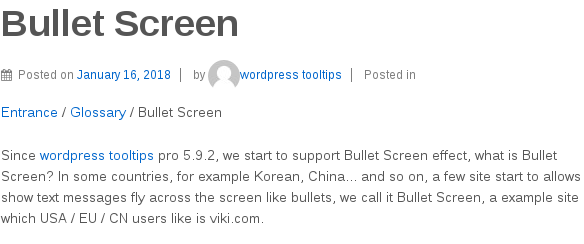
In front end, the changes will be find at your tooltip glossary term page, for example: bullet screen tooltip glossary term:

wordpress tooltip glossary custom bread crumbs language

wordpress tooltip glossary custom bread crumbs language

You can find the bread crumbs word “Home / Glossary / Bullet Screen” has been changed to “Entrance / Glossary / Bullet Screen”

Thanks give us so many amazing feature requests, we will realize all of them, we are happy to make a pretty wordpress tooltip glossary plugin for users  🙂

Thanks, have a blessed day weekend with your family 🙂

Best Regards,

WordPress Tooltip Support Team

Tagged with: , ,

How to Select My Own Glossary Index Page, How to Delete Default Glossary Index Page

Hi Dear WordPress Tooltip Glossary Users,

Hope this message find you are doing well and have happy days with your family 🙂

Based on users requests, we are adding knowledge base to help users use wordpress tooltips glossary plugin more easier, today we added a new item in wordpress tooltip knowledge base:

“How to Select My Own Glossary Index Page, How to Delete Default Glossary Index Page”.

Based on users feature requests, for increase SEO rank of wordpress tooltip site, we will create glossary page for your site,  each glossary item have their own link, and all these links will listed in wordpress glossary page automatically.

In general, at the first time when you enabled glossary index page in “Enable Glossary Index Page” option, we will generate a new wordpress page “glossary” at ‘ ‘Glossary Index Page for you automatically, however, you can select any wordpress page as glossary index page from select box in “Glossary Index Page” option via “Glossary Settings” plugins menu, the “Glossary Settings” panel looks like this:

glossary settings panel

glossary settings panel

Also if you want to delete glossary index page, you can just find it and delete the page “glossary” manually at wordpress admin area -> all pages, and select another page as your glossary page.

Also we have another method to list all glossary item: use [glossary] shortcode, you can find [glossary] shortcode demo at Glossary Demo. Or click this to check full of wordpress tooltips plugin features.

Any more feature request is welcome 🙂

Thanks, have a blessed day with your family 🙂

Best Regards,

Tooltips Support Team

Tagged with: , , , , , ,

WordPress Tooltips Pro Plugin 9.0.2 Released

Hey Dear WordPress Tooltips Plugin Users,

Hope this message find you are doing well and have happy weekend with your family 🙂

I am happy to report you that we just released a new version of wordpress tooltips pro version, in wordpress tooltip 9.0.2, we support Auto-Upgrade from tooltips free better, when you upgrade from wordpress tooltip free plugin versions, you do not need to deactivate and delete wordpress tooltip free plugin, you can just upload wordpress tooltip pro plugin and activate it directly, our wordpress tooltip pro plugin will detect do you installed wordpress tooltip free plugin or not, if yes, when you try to activate wordpress tooltip pro plugin, wordpress tooltip pro plugin will deactivate wordpress tooltip free plugin automatically and upgrade from wordpress tooltip free plugin automatically, it is safe and nothing need to do 🙂

We are developing a new version based on user’s feature request, you will see it soon 🙂

Thanks, have a blessed weekend with your family 🙂

Best Regards,
Wordpress Tooltip Plugin Support Team

Tagged with: , ,

WordPress Tooltip Plugin 9.0.0 Released, New Option To Enable / Disable Glossary Navigation Bar in Glossary Page

Hi Dear WordPress Tooltip Plugin Users,

Hope this message find your are doing well and have happy days with your family 🙂

I am happy to report you that we just released a new version of wordpress tooltip plugin, in wordpress tooltip plugin 9.0.0, you can:

What Is Changes: Enable / Disable Glossary Navigation Bar In Glossary Page OR Tooltip List Page

An user opened a ticket, he told us he like a simple and clean style on glossary page, he want to have a chance to custom glossary page to enable or disable glossary navigation bar in glossary page, wordpress tooltip list page, based on his feature request, we developed a new version wordpress tooltip 9.0.0 to realize this feature request.

How “Enable / Disable Glossary Navigation Bar In Glossary Page OR Tooltip List Page” Works?

After upgraded to wordpress tooltip plugin 9.0.0. If you logged in wordpress admin area, and click tooltips menu, then click “Glossary Settings” Panel, You will find In “Glossary Settings” panel, we added new option “Remove Navigation Bar in Glossary Page”:

If you select “YES” in the option “Remove Navigation Bar in Glossary Page”, we will remove navigation bar which at the top of the glossary page

If you select “NO” in the option “Remove Navigation Bar in Glossary Page”, we will add navigation bar at the top of the glossary page

It looks like this:

Remove Navigation Bar in Glossary Page

Remove Navigation Bar in Glossary Page

Please note, by default, when you create wordpress tooltip glossary page, the glossary navigation bar will shown on the the top of glossary page.

Affected section by “Enable / Disable Glossary Navigation Bar In Glossary Page OR Tooltip List Page” Option

Default glossary page which created by wordpress tooltips plugin
Glossary page which created manually by glossary shortcode
Wordpress tooltip list page which created manually by wordpress tooltip list shortcode

We are developing a new wordpress tooltip version based on another amazing users feature request, if you have any suggestion or question for wordpress tooltips plugin, please don’t hesitate to contact us 🙂

Want to know all features of wordpress tooltip glossary plugin? check features of wordpress tooltips plugin.

Just $9, Go here to get an amazing wordpress tooltip plugin 🙂

Thanks, have a blessed day with your family 🙂

Best Regards,

WordPress Tooltips Glossary Plugin Support Team

Tagged with: , , , , , , ,

WordPress Tooltip Glossary Plugin Version 8.9.0, Upgraded Glossary Shortcode to Support Enable / Disable Glossary Search Form in Glossary Shortcode

Hi Dear WordPress Tooltip GLossary Plugin Users,

Two days before, we released wordpress tooltip glossary plugin 8.8.8 and we reported that our wordpress tooltip plugin support glossary search form now, also we reported that:

Based on a few users requests, we are enhance functions of wordpress glossary, for example, a few users told us they do not need a glossary nav bar… and so on, so we are try to add more wordpress glossary control option in backend, so wordpress tooltip plugin users can decide which component will shown in wordpress glossary list page, include glossary nav-bar, glossary search form… and so on.

Today we are happy to report you that we finished a new wordpress glossary plugin version 8.9.0, new update in wordpress tooltip 8.9.0:

WordPress Glossary Plugin Shortcode Support Enable / Disable Glossary Search Form on the Top of Glossary List

Our wordpress glossary plugin have a shortcode [glossary], just insert this wordpress golssary shortcode into any wordpress post or page, you will make a glossary page quickly, you can check glossary at our wordpress glossary plugin demo,  also since wordpress glossary plugin 8.8.8,[glossary] shortcode support a glossary search form at the top of wordpress glossary table, glossary users can search glossary keyword in glossary search form, and wordpress glossary will show search result in glossary result list for the user.

Now, based on users feature request, our [glossary] shortcode support enable / disable glossary search form on the top of glossary list.

How WordPress Glossary Plugin Shortcode Search Form Parameter Works?

By default if you using [glossary] shortcode in any wordpress pages or wordpress posts, wordpress tooltip glossary plugin will show a search form at the top of the glossary list, however, you can disable glossary search form by:

[glossary catid='3' searchform='no']

Or

[glossary searchform='no']

Or

[glossary catname='love' searchform='no']

and so on, then in wordpress glossary list, we will not show search form at the top of the glossary list.

Of course, by default, [glossary] shortcode will show glossary search form at the top of glossary list,  we added this parameter is just based on the consideration of maybe some users don’t want to have search form in glossary page, so we added this glossary search form parameter as an option to help you custom your glossary page.

In general, search form will show on wordpress glossary page by default, you do not need add search form option in glossary parameters,  but if you want, you can use:
[glossary catid='3' searchform='yes']

yet, this will add search form at the top of glossary list, although this parameter is not needed. 🙂

What We are Doing for WordPress Glossary Plugin Now?

We receiving a few users feature request, some of them hope remove glossary navigation bar, we are try to add an option in wordpress glossary seting page in back end to allow users disable glossary navigation bar in backend, I hope you will see this new version soon, we will continue to improve our wordpress glossary plugin features based on lots of users suggestion 🙂

Thanks, have a blessed day with your family 🙂

Best Regards,

WordPress Tooltip Glossary Plugin Support Team


Tagged with: , , , , ,

WordPress Tooltips 8.8.8 Released, Support Glossary Search Form

Hi Dear WordPress Tooltip Users,

Based on users feature suggestion, we just finished a new wordpress tooltip version 8.8.8, in this version:

WordPress Tooltip Plugin Support WordPress Glossary Search Form

An user told us in his glossary list page, he want a wordpress glossary search form, so his customers can search and get interested products glossary quickly, it is a great suggestion, we are very happy to realize this amazing feature, we re-developed our wordpress tooltips plugin, and now if you check glossary list page, you will find at the top of glossary terms, there are a glossary search form. 🙂

How does WordPress Glossary Search Form Working?

As you know wordpress tooltip plugin have a shortcode [glossary], once you insert this wordpress glossary shortcode in any wordpress posts or wordpress page, we will show users a glossary list table, you can find it at wordpress glossary demo.

Now if you upgraded to wordpress tooltip 8.8.8, we added glossary search form at the top of wordpress glossary lists, users can search glossary term in glossary search  form, once he clicked “search” button,  in glossary table, we will only show related glossary terms search result to the user.

Glossary Search Form Support WordPress Glossary Advanced Shortcode

For example, if you use [glossary catname='love'], we will just search and show glossary terms in the wordpress tooltip category “love”.

Or If you use [glossary catid='1'],we will just search and show glossary terms in the wordpress tooltip category which category id = 1

When show glossary search result to users, glossary item counter number in glossary nav bar will be changed realtime based on related glossary search resul

What are we doing for new wordpress tooltip glossary functionality?

Based on a few users requests, we are enhance functions of wordpress glossary, for example, a few users told us they do not need a glossary nav bar… and so on, so we are try to add more wordpress glossary control option in backend, so wordpress tooltip plugin users can decide which component will shown in wordpress glossary list page, include glossary nav-bar, glossary search form… and so on.

Also we hope we enhance our [glossary] shortcode, to allow users decide which glossary component will show in front end.

Thanks for Great Suggestion to WordPress Tooltip Glossary plugin

Dear wordpress tooltip glossary users, thank you very much for give us so many great suggestions in last years, it make wordpress tooltip glossary plugin better and better, you will see the new version of wordpress glossary plugin soon 🙂

Thanks, have a blessed weekend with your family 🙂

Best Regards,

WordPress Tooltip Support Team


Tagged with: , , , , , , ,
Top