I like my tooltips to appear on mouse-over, but I would like to have the possibility to delay the popup of the tooltip window, to avoid immediate windows popping up as the user browse through the website.
1: Login as wordpress admin in your wordpress admin area
2: Click “Tooltips” menu item
3: Click “Tooltips Style” sub menu item
4: You will open “Tooltips Style Settings” panel
5: In “Tooltips Style Settings” panel, you will find “Tooltip Box Customize Settings”options panel
6: In “Tooltip Box Customize Settings”options panel, you will find “Delay the Execution of Tooltip Function” option, it looks like this:
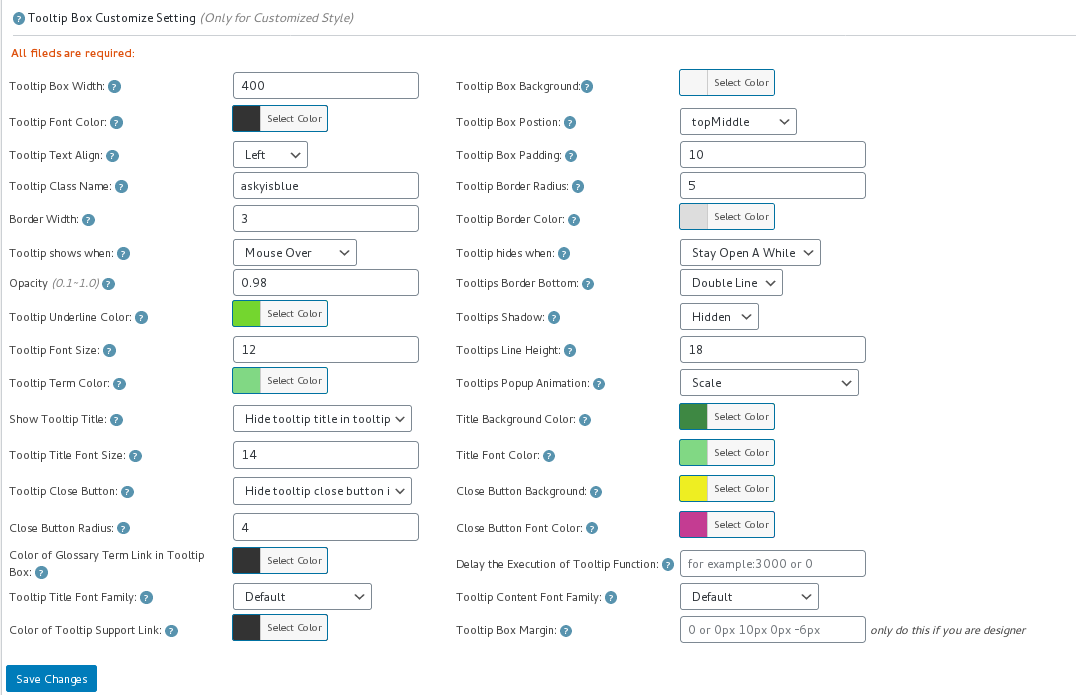
tooltip style panel version 12.3.6
7: Please input millisecond in the “Delay the Execution of Tooltip Function” field, then click “save changes” button, all tooltips popup window in all wordpress posts will be delayed the specific millisecond you entered in here 🙂
8: If you do not hope all wordpress tooltips popup window in all wordpress posts be delayed, if you just hope delay wordpress tooltip popup window in a specific wordpress post, you can do it too
9: Please Click “Posts” menu item
10: Edit or add a new wordpress post
11: In the wordpress post editor, you will find “Delay the execution of tooltip function” metabox at right hand of wordpress editor,it looks like this:

delay the executon of wordpress tooltip function
12: Please enter the number of millisecond to delay in here, the execution of tooltip will delay specific milliseconds to wait javascript frameworks(ajax, vue…) generate and load dynamically generated content first, and then load our jQuery codes to add tooltip effects in those dynamically generated content, please note, the priority in wordpress post editor is higher then the global settings in tooltip style setting panel 🙂
WordPress Tooltip Plugin is powerful and very easy to use, right? How about give us a 5.0 ratings on wordpress.org? 🙂