Tag: wordpress glossary

How to Translate ‘Read More’ on WordPress Glossary — wordpress tooltips pro plus 33.6.8

Translating ‘Read More’ in WordPress Glossary Page — Supported by wordpress tooltips pro plus 33.6

Hi, dear wordpress tooltip users, I hope this message find you are doing well and having happy days with your family 🙂 We received a ticket from an amazing wordpress tooltip users, in which he said he want to change the “Read More” in wordpress glossary page:

Subject:
Customize Glossary Page

Message:
Hello,

I would like to ask if it is possible to change the appearance of the glossary page, like the length of the excerpt, or to write a specific excerpt for each term. Also I would like to add a custom button like a
arrow instead of a read more tag.

Our wordpress tooltip plugin support replied:

Hi ,

Hope you are doing well and having happy days with your family 🙂

Thanks for feature requests 🙂

Currently, in glossary settings panel, we have an option “Glossary excerpt or full content”, after read your ticket, our developer said we will follow your request to add new options to realize your feature request, once finish the function, we will write a detailed document for you and we will report you the document URL again 🙂

Thanks, have a nice day with your family 🙂
Best Regards,
Wordpress Tooltips Plugin Support Team

Our wordpress tooltip plugin developer released a new version WordPress Tooltips Pro Plus 32.3.8 to support customizable glossary excerpt length in wordpress glossary page:

Hi,

Hope you are doing well and having happy days with your family 🙂

We are happy to report you, we have uploaded WordPress Tooltips Pro Plus 32.3.8, this version support for customizable glossary excerpt length, we have wrote a detailed document for you at:

Support for Customizable Glossary Excerpt Length, WordPress Tooltips Pro Plus 32.3.8 Released

Thanks, have a blessed day with your family 🙂

Best Regards,
Wordpress Tooltips Plugin Support Team

At the same time,  we implement many more glossary functions based on wordpress tooltip user’s feedback, we reported to the user:

Hi ,

Hope you are doing well and having happy days with your family 🙂

We have developed a few new versions for glossary, in glossary settings panel, you can :
1: opt to open glossary in new window
2: opt to open read-more in new window
3: opt to manually set glossary slug

Thanks, I hope you and your family have a wonderful day 🙂

Best Regards,
Wordpress Tooltips Plugin Support Team

The wordpress tooltip user replied:

Hello,

thank I had good times with my family on vacation. Sorry for the late reply and thank you for new features!

Regarding the appearence, I don`t really mind. The only think is,  could you tell me how to translate “Read More” into “Weiterlesen”?

I changed it in the “Custom Language of Tooltip and Glossary” and I lso selected “Custom My Language” but it doesn’t change.

Best regards and blessed time with your family!

Our wordpress tooltip plugin developer replied:

Hi ,

Thank you very much for your suggestions. Every time I read your replies, I feel very pleased 🙂

Your suggestion is truly valuable, sorry for the issues, I will fix them as soon as possible. I will report back to you once it’s down 🙂

Thanks, I hope you and your family have a wonderful day 🙂

Best Regards,

and

‘Read More’ Translation on WordPress Glossary Page

Hi,

I have developed wordpress tooltips pro plus 33.6.8 to resolve the problem for you 🙂

Would you please:

1: upgrade to wordpress tooltips pro plus 33.6.8

2: login your wordpress site

3: click tooltips menu in wordpress dashboard

4: click addon sub menu item

5: in addons panel, please enable tooltips language customization and refresh the page

6: in the tooltips menu , you will find new sub-menu item “Languages”, please click it

7: at the bottom of “Languages” panel, you will find custom “read more” in tooltips excerpt option, please just enter any words you want in here, and all things will works well for you.

The “Languages” panel looks like this:

Custom Language of Tooltip and Glossary

Thanks for the feature request, I have add a license of wordpress faq pro plugin in your account, you can find how to use it at:

WordPress FAQ Pro Plugin With WordPress Tooltips (version 4.6.6)

Would you please do a check and give me a feedback? 🙂

Thanks, have a blessed day with your family 🙂

Best Regards,

Then wordpress tooltips user replied:

Hello,

thank you very much for your support! It works

Have a great day with you family!

Thanks

The glossary looks like this:

The ideals which have lighted my way, and time after time have given me new courage to face life cheerfully, have been Kindness, Beauty, and Truth. The trite subjects of human efforts, possessions, outward success, luxury have always seemed to me contemptible.
Do something wonderful, people may imitate it.
To follow, without halt, one aim: There is the secret of success.
Reflect on your present blessings, of which every man has many; not on your past misfortunes, of which all men have some.
True happiness means forging a strong spirit that is undefeated, no matter how trying our circumstances.
Love is the flower you've got to let grow.
We shall never know all the good that a simple smile can do.
In order to succeed, we must first believe that we can.
The best way to pay for a lovely moment is to enjoy it.
There is no duty we so underrate as the duty of being happy. By being happy we sow anonymous benefits upon the world.

Thanks for the great feature request for wordpress tooltip plugin, if you have any more question or suggestion, please don’t hesitate to contact us, we are very happy to realize it for you 🙂

Thanks, have a blessed day with your family 🙂

WordPress tooltips plugin support


Tagged with: , , ,

Créer un glossaire à partir de n’importe quelle table WordPress pour des données tierces — WordPress Tooltips Plugin

Créer facilement un glossaire pour les données de plugins tiers dans le plugin de tooltips WordPress

Bonjour, chers utilisateurs du plugin de WordPress tooltips! J’espère que ce message vous trouve en bonne santé et que vous passez une merveilleuse journée en famille. Récemment, nous avons reçu un ticket de support d’un utilisateur précieux qui voulait insérer un shortcode d’un plugin de liste tiers dans la fenêtre pop-up des tooltips, mais a rencontré certaines difficultés. Après enquête, nous avons constaté que le plugin utilise une méthode unique pour charger le contenu depuis l’arrière-plan. Plutôt que d’utiliser des types de publications personnalisés WordPress, l’auteur a créé plusieurs tables dédiées, ce qui complique l’intégration avec d’autres plugins. Après un effort considérable, nous sommes ravis d’annoncer que nous avons résolu ce problème pour nos utilisateurs de WordPress Tooltips. Vous pouvez maintenant récupérer facilement le contenu des plugins tiers à l’aide de leurs tables. Ensuite, nous avons sorti WordPress Tooltips Pro Plus 33.4.8, permettant aux utilisateurs de tooltips de générer des annuaires à partir de n’importe quelle table WordPress pour des données externes. Ensuite, notre développeur de plugins de tooltips WordPress a déclaré que cette fonctionnalité aiderait les utilisateurs de glossaires à créer un glossaire WordPress pour les données de plugins tiers également. Permettre à un utilisateur de tooltips WordPress de créer un glossaire à partir de n’importe quelle table externe (en dehors de WordPress) peut offrir plusieurs avantages significatifs pour les utilisateurs de glossaires :

– Sources de données élargies : Les utilisateurs peuvent extraire des termes et des définitions de diverses bases de données ou ressources externes, ce qui permet de créer un glossaire plus riche et plus complet qui va au-delà des limites du contenu WordPress.

– Intégration de contenu diversifié : En s’appuyant sur des tables externes, les utilisateurs peuvent intégrer du contenu provenant d’autres plateformes ou systèmes, garantissant que le glossaire reste pertinent et inclut une terminologie utilisée dans divers contextes ou secteurs.

– Meilleure contextualisation : Les données externes peuvent offrir des contextes plus larges pour les termes, fournissant aux utilisateurs des définitions supplémentaires, des exemples ou des cas d’utilisation qui ne se limitent pas à leur site WordPress, améliorant ainsi la compréhension.

– Mises à jour dynamiques : Si la source de données externe est régulièrement mise à jour, le glossaire peut automatiquement refléter ces changements, garantissant que les utilisateurs ont toujours accès aux informations les plus récentes sans intervention manuelle.

– Personnalisation et individualisation : Les utilisateurs peuvent adapter le glossaire à leurs besoins spécifiques en sélectionnant les tables externes à inclure, permettant une expérience plus personnalisée en fonction des intérêts ou exigences de leur audience.

– Efficacité en temps et en ressources : La création manuelle des entrées de glossaire peut être fastidieuse. La génération automatique d’entrées à partir de sources externes peut faire gagner du temps et réduire la charge de travail des utilisateurs, leur permettant de se concentrer sur d’autres tâches importantes.

– Interopérabilité : Le soutien à la création d’entrées de glossaire à partir de tables externes peut améliorer l’interopérabilité des données à travers diverses plateformes, facilitant la consolidation des informations pour les utilisateurs qui utilisent plusieurs systèmes.

– Amélioration de l’expérience utilisateur : Offrir un glossaire plus vaste et bien conçu peut améliorer l’expérience utilisateur globale sur le site, rendant plus facile pour les visiteurs de trouver rapidement des informations pertinentes.

– Avantages en matière de SEO : Un glossaire plus complet peut entraîner une amélioration des performances SEO en incluant des termes et des expressions qui sont plus largement recherchés dans les données externes, ce qui peut potentiellement générer plus de trafic organique vers le site.

En permettant la création de glossaires à partir de tables externes, les utilisateurs obtiennent un outil puissant qui améliore la fonctionnalité, l’interactivité et la richesse du contenu de leur site Web.
… et bien plus encore. Nous avons donc développé la version 33.5.8 de WordPress Tooltips Pro Plus pour aider les utilisateurs de tooltips WordPress à créer un glossaire à partir de n’importe quelle table externe

Comment créer un glossaire pour des données provenant de n’importe quelle table WordPress ?

1. Veuillez cliquer sur le menu « télécharger wordpress tooltip » pour télécharger le plugin WordPress Tooltip Pro Plus, version >= 33.5.8.

2. Générez un post WordPress et utilisez le shortcode [ glossary_via_tables ] pour créer directement un glossaire à partir d’une table tierce. Il devrait apparaître comme suit :

[ glossary_via_tables table=’stock’ fields=’stock_name,stock_price’ ]

Dans ce cas, la table en question est ‘stock’, qui est présente dans votre base de données. Vous pouvez choisir les champs spécifiques que vous souhaitez afficher dans l’annuaire. Par exemple, je ne nécessite que les champs ‘quote_title’ et ‘quote_content.’ Le plugin WordPress Tooltips extraira automatiquement les données de la table ‘stock’ pour générer le glossaire.

Ce que nous faisons maintenant :
1. Nous développons une nouvelle version du plugin de tooltips WordPress pour permettre aux utilisateurs de glossaires d’ajouter une légende en haut du glossaire.

2. Dans la nouvelle version, les utilisateurs pourront insérer un nombre illimité de champs de table dans le shortcode.

3. Nous redesignons l’interface utilisateur avec un nouveau style attrayant et plus de fonctionnalités.
Un glossaire ressemble à ceci :

The ideals which have lighted my way, and time after time have given me new courage to face life cheerfully, have been Kindness, Beauty, and Truth. The trite subjects of human efforts, possessions, outward success, luxury have always seemed to me contemptible.
Do something wonderful, people may imitate it.
To follow, without halt, one aim: There is the secret of success.
Reflect on your present blessings, of which every man has many; not on your past misfortunes, of which all men have some.
True happiness means forging a strong spirit that is undefeated, no matter how trying our circumstances.
Love is the flower you've got to let grow.
We shall never know all the good that a simple smile can do.
In order to succeed, we must first believe that we can.
The best way to pay for a lovely moment is to enjoy it.
There is no duty we so underrate as the duty of being happy. By being happy we sow anonymous benefits upon the world.


Tagged with: , , , ,

Glossar aus beliebiger WordPress-Tabelle für Drittanbieter-Daten erstellen — WordPress Tooltips Plugin

Einfache Erstellung eines Glossars für Daten von Drittanbieter-Plugins im WordPress-Tooltips-Plugin

Hallo, liebe Benutzer des WordPress Tooltip Plugins! Ich hoffe, diese Nachricht trifft euch wohl und ihr verbringt einen wunderbaren Tag mit eurer Familie. Kürzlich erhielten wir ein Support-Ticket von einem geschätzten Benutzer, der einen Shortcode für ein Drittanbieter-Listing-Plugin in das Tooltip-Pop-up-Fenster einfügen wollte, aber auf einige Schwierigkeiten stieß. Bei der Untersuchung stellten wir fest, dass das Plugin eine einzigartige Methode verwendet, um Inhalte vom Backend zu laden. Anstatt WordPress benutzerdefinierte Beitragstypen zu nutzen, hat der Autor mehrere spezielle Tabellen erstellt, was die Integration mit anderen Plugins kompliziert. Nach erheblichem Aufwand freuen wir uns, ankündigen zu können, dass wir dieses Problem für unsere WordPress Tooltips-Benutzer gelöst haben. Ihr könnt jetzt direkt Inhalte aus Drittanbieter-Plugins mit ihren Tabellen abrufen und das ganz einfach. Dann haben wir WordPress Tooltips Pro Plus 33.4.8 veröffentlicht, das es Tooltip-Benutzern ermöglicht, Verzeichnisse aus beliebigen WordPress-Tabellen für externe Daten zu generieren. Dann sagte unser Entwickler des WordPress Tooltips Plugins, dass diese Anforderung den Benutzern des Glossars helfen wird, ein WordPress-Glossar für Daten von Drittanbieter-Plugins zu erstellen. Es ermöglicht einem WordPress Tooltip-Benutzer, ein Glossar aus jeder externen Tabelle (außerhalb von WordPress) zu erstellen, was mehrere erhebliche Vorteile für Glossarbenutzer bieten kann:

– Erweiterte Datenquellen: Benutzer können Begriffe und Definitionen aus verschiedenen externen Datenbanken oder Ressourcen abrufen, was zu einem reichhaltigeren und umfassenderen Glossar führt, das über die Grenzen des WordPress-Inhalts hinausgeht.
– Vielfältige Inhaltsintegration: Durch die Nutzung externer Tabellen können Benutzer Inhalte aus anderen Plattformen oder Systemen integrieren und sicherstellen, dass das Glossar relevant bleibt und Terminologie aus mehreren Kontexten oder Branchen umfasst.
– Bessere Kontextualisierung: Externe Daten können breitere Kontexte für Begriffe bieten, indem sie Benutzern zusätzliche Definitionen, Beispiele oder Anwendungsfälle liefern, die nicht auf ihrer WordPress-Seite beschränkt sind, was das Verständnis verbessert.
– Dynamische Aktualisierungen: Wenn die externe Datenquelle regelmäßig aktualisiert wird, kann das Glossar diese Änderungen automatisch widerspiegeln, sodass Benutzer immer Zugang zu den aktuellsten Informationen haben, ohne manuell eingreifen zu müssen.
– Anpassung und Personalisierung: Benutzer können das Glossar an ihre spezifischen Bedürfnisse anpassen, indem sie auswählen, welche externen Tabellen sie einbeziehen möchten, was eine individuellere Erfahrung basierend auf den Interessen oder Anforderungen ihres Publikums ermöglicht.
– Zeit- und Ressourcenschutz: Die manuelle Erstellung von Glossareinträgen kann mühsam sein. Die automatische Generierung von Einträgen aus externen Quellen kann Zeit sparen und die Arbeitslast der Benutzer reduzieren, sodass sie sich auf andere wichtige Aufgaben konzentrieren können.
– Interoperabilität: Die Unterstützung der Erstellung von Glossareinträgen aus externen Tabellen kann eine bessere Dateninteroperabilität über verschiedene Plattformen hinweg ermöglichen und es einfacher machen, Informationen für Benutzer zu konsolidieren, die mehrere Systeme nutzen.
– Verbessertes Benutzererlebnis: Ein umfangreicheres und abgerundetes Glossar kann das allgemeine Benutzererlebnis auf der Website verbessern und es Besuchern erleichtern, relevante Informationen schnell zu finden.
– SEO-Vorteile: Ein umfassenderes Glossar kann zu verbesserten SEO-Leistungen führen, indem es Begriffe und Phrasen umfasst, die in externen Daten häufiger gesucht werden, was potenziell mehr organischen Traffic auf die Website bringt.
Durch die Möglichkeit, Glossare aus externen Tabellen zu erstellen, erhalten Benutzer ein leistungsstarkes Werkzeug, das die Funktionalität, Interaktivität und den Reichtum ihrer Website-Inhalte verbessert.
… und vieles mehr, also haben wir Version 33.5.8 des WordPress Tooltips Pro Plus für WordPress Tooltip-Benutzer entwickelt, um diesen bei der Erstellung eines Glossars aus beliebigen externen Tabellen zu helfen

Wie erstellt man ein Glossar für Daten aus beliebigen WordPress-Tabellen?
1: Bitte klickt auf das Menüelement “WordPress Tooltip herunterladen”, um das WordPress Tooltip Pro Plus-Plugin in der Version >= 33.5.8 herunterzuladen.

2. Generiert einen WordPress-Beitrag und nutzt den Shortcode [ glossary_via_tables ], um direkt ein Glossar aus einer Drittanbieter-Tabelle zu erstellen. Es sollte wie folgt erscheinen:

[ glossary_via_tables table=’stock’ fields=’stock_name,stock_price’ ]

In diesem Fall handelt es sich bei der betreffenden Tabelle um ‘stock’, die in deiner Datenbank vorhanden ist. Du kannst die spezifischen Felder auswählen, die im Verzeichnis angezeigt werden sollen

The ideals which have lighted my way, and time after time have given me new courage to face life cheerfully, have been Kindness, Beauty, and Truth. The trite subjects of human efforts, possessions, outward success, luxury have always seemed to me contemptible.
Do something wonderful, people may imitate it.
To follow, without halt, one aim: There is the secret of success.
Reflect on your present blessings, of which every man has many; not on your past misfortunes, of which all men have some.
True happiness means forging a strong spirit that is undefeated, no matter how trying our circumstances.
Love is the flower you've got to let grow.
We shall never know all the good that a simple smile can do.
In order to succeed, we must first believe that we can.
The best way to pay for a lovely moment is to enjoy it.
There is no duty we so underrate as the duty of being happy. By being happy we sow anonymous benefits upon the world.
Tagged with: , , ,

Create Glossary from Any WordPress Table for Third-Party Data, Supported by wordpress tooltips pro plus 33.5.8

Easily Create Glossary for Third-Party Plugin Data in WordPress Tooltips Plugin

Hello, dear WordPress Tooltip Plugin users! I hope this message finds you well and enjoying a wonderful day with your family. Recently, we received a support ticket from a valued user who wanted to insert a third-party listing plugin shortcode into the tooltip popup window but faced some difficulties. Upon investigating, we found that the plugin uses a unique method to load content from the backend. Rather than utilizing WordPress custom post types, the author created multiple dedicated tables, which complicates integration with other plugins. After putting in considerable effort, we are excited to announce that we’ve addressed this issue for our WordPress Tooltips users.  You can now directly retrieve content from third-party plugins using their tables with ease.Then we released WordPress Tooltips Pro Plus 33.4.8 , enabling tooltip users to generate directories from any WordPress table for external data. Then our wordpress tooltips plugin developer said this requirement will help glossary users to create wordpress glossary for third-party plugin data too. Allowing a WordPress tooltip user to create a glossary from any external table (outside of WordPress) can provide several significant benefits to glossary users:

Expanded Data Sources: Users can pull in terms and definitions from various external databases or resources, allowing for a richer and more comprehensive glossary that goes beyond the limitations of WordPress content.

Diverse Content Integration: By leveraging external tables, users can integrate content from other platforms or systems, ensuring that the glossary remains relevant and includes terminology used across multiple contexts or industries.

Better Contextualization: External data can offer broader contexts for terms, providing users with additional definitions, examples, or usage cases that are not confined to their WordPress site, thus enhancing understanding.

Dynamic Updates: If the external data source is regularly updated, the glossary can automatically reflect these changes, ensuring that users always have access to the most current information without manual intervention.

Customization and Personalization: Users can tailor the glossary to their specific needs by selecting which external tables to include, allowing for a more personalized experience based on their audience’s interests or requirements.

Time and Resource Efficiency: Manually creating glossary entries can be tedious. Automatically generating entries from external sources can save time and reduce the workload for users, allowing them to focus on other important tasks.

Interoperability: Supporting the creation of glossary entries from external tables can enable better data interoperability across various platforms, making it easier to consolidate information for users who utilize multiple systems.

Enhanced User Experience: Providing a more extensive and well-rounded glossary can improve the overall user experience on the site, making it easier for visitors to find relevant information quickly.

SEO Benefits: A more comprehensive glossary can lead to improved SEO performance by including terms and phrases that are more widely searched for in external data, potentially driving more organic traffic to the site.
By allowing glossary creation from external tables, users gain a powerful tool that enhances their website’s functionality, interactivity, and content richness.

… much more , so we developed version 33.5.8 of WordPress Tooltips Pro Plus for wordpress tooltip users to help WordPress tooltip users to create a glossary from any external table 🙂

How to Create Glossary for Data from Any WordPress Table?

1: Please click “download wordpress tooltip”  menu item to download wordpress tooltip pro plus plugin which version >= 33.5.8

2. Generate a WordPress post and utilize the shortcode [ glossary_via_tables ] to directly build a glossary from a third table. It should appear as follows:

[ glossary_via_tables table=’stock’ fields=’stock_name,stock_price’ ]

In this case, the table in question is ‘stock,’ which is present in your database. You can choose the specific fields you want to show in the directory. For example, I only require the fields ‘quote_title’ and ‘quote_content.’ The WordPress Tooltips plugin will automatically pull data from the ‘stock’ table to generate the glossary.

What we doing now:

1: we are developing a new version of wordpress tooltips plugin to allow glossary users add a caption at the top of the glossary

2: in the new version, users can insert unlimited table fields in the shortcode

3: we are re-design the UI  with a new pretty style with more functionality

A glossary looks like this:

The ideals which have lighted my way, and time after time have given me new courage to face life cheerfully, have been Kindness, Beauty, and Truth. The trite subjects of human efforts, possessions, outward success, luxury have always seemed to me contemptible.
Do something wonderful, people may imitate it.
To follow, without halt, one aim: There is the secret of success.
Reflect on your present blessings, of which every man has many; not on your past misfortunes, of which all men have some.
True happiness means forging a strong spirit that is undefeated, no matter how trying our circumstances.
Love is the flower you've got to let grow.
We shall never know all the good that a simple smile can do.
In order to succeed, we must first believe that we can.
The best way to pay for a lovely moment is to enjoy it.
There is no duty we so underrate as the duty of being happy. By being happy we sow anonymous benefits upon the world.

If you have any more feature request, please don’t hesitate to contact us, we are very happy to realize your requirement  🙂

Tagged with: , , ,

How to Hide Letters Without Items in Glossary — WordPress Tooltips Free 10.2.3”

Why and How to Hide Letters Without Items in Your WordPress Glossary

— New Features in WordPress Tooltips Free 10.2.3

Hi, Dear  WordPress Tooltip users, I hope this message find you are doing well and enjoying happy days with your family.  🙂  We received an amazing wordpress tooltips users’ ticket, in which he asked:

Subject:

tooltips with superscripts

Message:
Is it possible (currently, or with an enhancement) for a tooltip to be displayed for a word that has a superscript number at the end of it?

Our wordpress tooltips plugin support replied:

Hi,

Thanks for the question 🙂

I guess what you’re looking for might be:
In glossary page (https://tooltips.org/glossary-demo/) , only display glossary items that has a superscript number at the end of it? 🙂

If so in tooltips pro version we have an option: “Hide Nav letters have no item” , just enable it and we will only display glossary items that has a superscript number at the end of it 🙂

Currently we have no this feature in free version, but our developer is developing a new version to add this function from pro version to free version for you, you will see it soon 🙂

Sorry if I misunderstood, please tell me more details or provide a screenshot or page? 🙂

Thanks, have a blessed day with your family 🙂

Best Regards,
WordPress Tooltips Plugin Support

We then released the WordPress Tooltips Free plugin 10.2.3 for tooltip users to resolve the issue! 🙂

A Step-by-Step Guide to Hiding Letters Without Items in WordPress Glossary

1: Please login your wordpess as administrator

2: Click on the “Tooltips” menu item

3: Click on the “Glossary Settings” sub-menu item

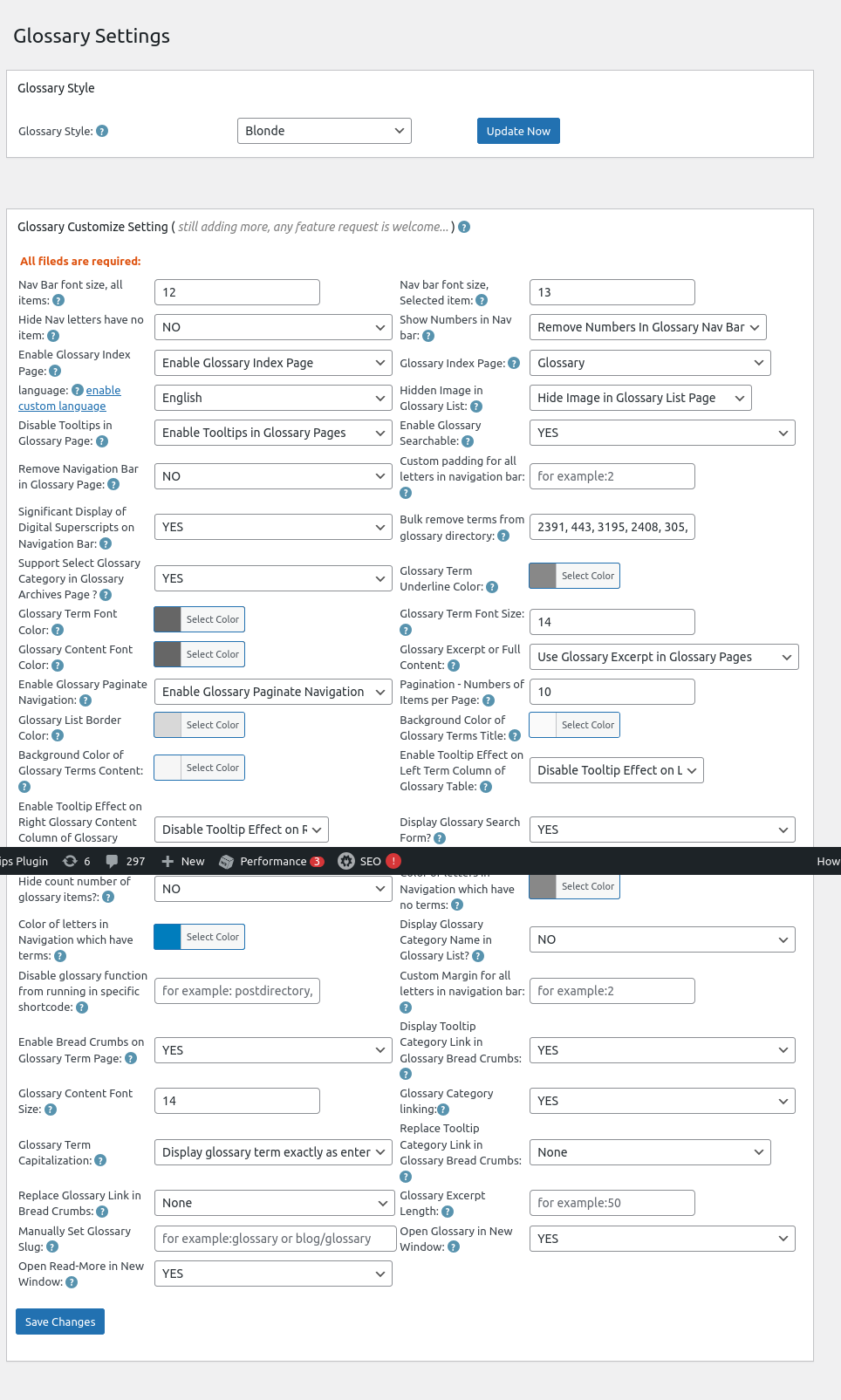
4: Now, you will open “Glossary Settings” panel, I make a screenshot of wordpress tooltips 33.6.8 which using on tooltips.org, but there are a few options is the same with wordpress tooltips free, for instance,  “Hide Nav letters have no item”

Glossary Settings in wordpress tooltips 33.6.8

Glossary Settings in wordpress tooltips 33.6.8

5: If you select “Yes” in the option Glossary Settings in wordpress tooltips 33.6.8, then in front-end, we will hide letters without items in wordpress glossary page

If you select “No” in the option Glossary Settings in wordpress tooltips 33.6.8, then in front-end, we will display all letters in wordpress glossary page, include letters which have no items

what is wordpress glossary?

A WordPress glossary is a compilation of terms and definitions related to WordPress, which helps users (especially beginners) understand the various concepts, features, and terminology associated with the platform. It serves as a reference guide to facilitate better comprehension of WordPress functionalities, themes, plugins, and best practices. It looks like this:

The ideals which have lighted my way, and time after time have given me new courage to face life cheerfully, have been Kindness, Beauty, and Truth. The trite subjects of human efforts, possessions, outward success, luxury have always seemed to me contemptible.
Do something wonderful, people may imitate it.
To follow, without halt, one aim: There is the secret of success.
Reflect on your present blessings, of which every man has many; not on your past misfortunes, of which all men have some.
True happiness means forging a strong spirit that is undefeated, no matter how trying our circumstances.
Love is the flower you've got to let grow.
We shall never know all the good that a simple smile can do.
In order to succeed, we must first believe that we can.
The best way to pay for a lovely moment is to enjoy it.
There is no duty we so underrate as the duty of being happy. By being happy we sow anonymous benefits upon the world.

Conclusion:

WordPress tooltip glossary plugin  allows tooltips users to hide letters (sections of the glossary) that do not contain any glossary items. Glossary users can find this option within the settings of the plugin, labeled “Hide Nav letters have no item”. By utilizing this feature, the glossary can be presented in a more streamlined manner, which may be visually appealing to some users.

Enhanced User Experience: By removing empty sections, the glossary becomes less cluttered, making it easier for readers to find relevant terms without distractions.

Improved Navigation: A cleaner layout can help users navigate the glossary more efficiently, as they won’t encounter irrelevant letters.

Customization: This option gives site administrators more flexibility in designing their glossary according to the needs and preferences of their reader base.

Overall, this feature aims to create a more user-friendly and aesthetically pleasing glossary, which can lead to higher engagement and satisfaction among users.

You can find change log of wordpress tooltips free plugin at:

Change Log for the WordPress Tooltips Free Plugin

Tagged with: , , ,

Corrected the issue with the glossary permalink structure in wordpress tooltips pro plus 33.2.8

Hi, Dear   WordPress Tooltip plugin users, I hope this message finds you well and that you’re enjoying a happy day with your family. We received feedback from an amazing wordpress tooltip user who mentioned that  the glossary permalink structure is not incorrect.

We did a check of our code, we believe we made a logical error in our attempt to support multiple permalink results, we are working hard to support multiple permalink results for the user and we found there are some difficult points. We have corrected this mistake in the new version of wordpress tooltips pro plus version 33.2.8.

Thanks for the great feedback and feature requests, if you have any more question, please let us know, and we will implement it for you immediately. 🙂

Thanks, have a wonderful day with your loved ones 🙂

Best Regards,

WordPress tooltips plugin support

Tagged with: , , , , ,

Choose to link tooltip terms to their corresponding tooltip pages, with the option to open them in a new window or the same window automatically, WordPress tooltips pro plus 33.1.8 released

New Feature: Choose How to Link WordPress Tooltip Terms — New or Same Window

Hey there, awesome users of the WordPress Tooltip plugin! I trust you are having a happy day with your family   Recently we received a ticket in which the amazing user reported a bug of open the wordpress tooltip term in new window, and user said:

How can I remove target=”_blank” from the toolip links?

I couldn’t find it in the configuration?

Regards,

Our WordPress tooltip plugin developer reviewed the ticket and conducted extensive tests. Ultimately, we discovered that the issue only occurs when users enable the ‘Link Tooltip Term to Tooltip Page Automatically’ option in the tooltips settings panel.

We have released wordpress tooltips pro plus 33.1.8 to fix the bug for the amazing tooltip user 🙂

How to Choose Your Tooltip Linking Option: New or Same Window

1: Log into your WordPress account with administrator privileges. Once you’re in the dashboard, look for the ‘Tooltips’ option in the menu.

2: Next, click on the ‘Optional Settings’ submenu to access the ‘Optional Settings’ panel. In this panel, find the option labeled ‘Link Tooltip Term to Tooltip Page Automatically.’

3: You’ll notice a new checkbox labeled ‘Open Tooltip Page in New Window.’ Simply check this box, and on the front end, the ‘target=’_blank” attribute will be removed from the link, allowing you to open the tooltip page in the same browser window. It looks like this:

wordpress tooltips Open tooltip page in new window

Additionally, if you prefer not to link tooltip terms to the tooltip page automatically, you can adjust the ‘Link Tooltip Term to Tooltip Page Automatically’ option to ‘No, do not link tooltip term to tooltip page.’ Also, set the ‘Open Tooltip Link in New Page Automatically When User Mouses Over the Tooltip with a Link’ option to ‘No, do not open link with tooltip term automatically.’

Thank you for your wonderful feedback! If you have any additional questions or feature requests, please feel free to reach out. We’re always eager to improve the WordPress tooltip plugin for you! 🙂

We also updated the updates document at:

Change Log for the WordPress Tooltips Pro Plus Plugin

Features of wordpress tooltips plugin

WordPress tooltips pro plus version

Thanks, have a blessed day with your family 🙂

Best Regards,

WordPress Tooltips Plugin Support

Tagged with: , , ,

تقديم خيار ‘اقرأ المزيد’ لفتح الروابط في نافذة جديدة في إرشادات ووردبريس

إضافة خاصية “اقرأ المزيد” لفتح الروابط في نافذة جديدة في إضافة ووردبريس Tooltips Pro Plus 32.8.8

مرحبًا، أعزائي مستخدمي إضافة ووردبريس WordPress Tooltips، أTrust أن هذه الرسالة تجدكم في روح معنوية جيدة وتستمتعون بلحظات ممتعة مع عائلتكم. قبل عدة أيام، تلقينا تذكرة من مستخدم رائع لإضافة ووردبريس Tooltips. ذكر أنه أنشأ صفحة غلوساري واختار “استخدام مقتطف الغلوساري في صفحات الغلوساري” تحت خيار “مقتطف الغلوساري من المحتوى الكامل” في لوحة الإعدادات. ومع ذلك، عند النقر على “اقرأ المزيد” في المقتطف على الواجهة الأمامية، تفتح رابط الغلوساري في نفس النافذة. طلب إمكانية فتح رابط الغلوساري في نافذة جديدة بدلاً من ذلك.

راجع مطور إضافة ووردبريس Tooltips هذه التذكرة، وأصدرنا إصدارًا جديدًا، ووردبريس Tooltips Pro Plus 32.8.8، لتنفيذ طلب الخاصية “فتح روابط ‘اقرأ المزيد’ في نافذة جديدة” لمستخدمنا الرائع.

كيفية فتح روابط “اقرأ المزيد” في نافذة جديدة في إضافة ووردبريس Tooltips؟

1: انقر على عنصر قائمة “تحميل” في الشريط العلوي لموقع ووردبريس Tooltips، وقم بتنزيل إضافة ووردبريس Tooltips Pro Plus التي تحمل الإصدار >= 32.8.8.

2: سجل دخولك إلى موقع ووردبريس كمسؤول.

3: في لوحة معلومات ووردبريس، انقر على عنصر قائمة “Tooltips”، الذي يبدو مثل هذا:

tooltips menu in wordpress tooltips pro plus 27.5.8

قائمة tooltips في ووردبريس Tooltips Pro Plus 27.5.8

4: الآن، انقر على عنصر القائمة الفرعية “إعدادات الغلوساري” في عنصر قائمة “tooltips”.

5: بعد ذلك، في لوحة إعدادات الغلوساري، ستجد الخيار الجديد “فتح اقرأ المزيد في نافذة جديدة”، الذي يبدو مثل هذا:


فتح اقرأ المزيد في نافذة جديدة في لوحة إعدادات الغلوساري لإضافة ووردبريس Tooltips

6: في خيار “فتح اقرأ المزيد في نافذة جديدة”، يرجى اختيار “نعم”. هذا سيضمن أنه عند النقر على رابط “اقرأ المزيد” لمقتطف الغلوساري في صفحة الغلوساري، سيفتح رابط “اقرأ المزيد” نافذة جديدة. إذا اخترت “لا”، فسيتم فتحه في نفس النافذة.
آمل أن يكون هذا مفيدًا قليلاً

يبدو أن غلوسارينا هكذا:


The ideals which have lighted my way, and time after time have given me new courage to face life cheerfully, have been Kindness, Beauty, and Truth. The trite subjects of human efforts, possessions, outward success, luxury have always seemed to me contemptible.
Do something wonderful, people may imitate it.
To follow, without halt, one aim: There is the secret of success.
Reflect on your present blessings, of which every man has many; not on your past misfortunes, of which all men have some.
True happiness means forging a strong spirit that is undefeated, no matter how trying our circumstances.
Love is the flower you've got to let grow.
We shall never know all the good that a simple smile can do.
In order to succeed, we must first believe that we can.
The best way to pay for a lovely moment is to enjoy it.
There is no duty we so underrate as the duty of being happy. By being happy we sow anonymous benefits upon the world.

Tagged with: , , ,

Introducerea opțiunii ‘Citește mai mult’ pentru a deschide linkurile într-o fereastră nouă în WordPress Tooltip

Plugin WordPress Tooltips Pro Plus 32.8.8, Nowa Funkcja — Otwórz Linki ‘Czytaj Więcej’ w Nowym Oknie w Tooltipach WordPress

Cześć, drodzy użytkownicy pluginu WordPress Tooltips, mam nadzieję, że ta wiadomość zastaje Was w dobrym nastroju i że spędzacie radosne chwile z rodziną. Kilka dni temu otrzymaliśmy zgłoszenie od jednego niesamowitego użytkownika pluginu WordPress Tooltips. Wspomniał on, że stworzył stronę glosariusza i wybrał „Użyj Wyciągu Glosariusza na Stronach Glosariusza” w opcji „Wyciąg Glosariusza z Prawdziwej Treści” w panelu ustawień. Jednak po kliknięciu „Czytaj Więcej” w wyciągu na froncie, link do glosarza otwiera się w tym samym oknie. Poprosił o możliwość otwierania linku do glosarza w nowym oknie.

Nasz deweloper pluginu WordPress Tooltips przeanalizował to zgłoszenie i wydaliśmy nową wersję, WordPress Tooltips Pro Plus 32.8.8, aby zrealizować prośbę o funkcjonalność „Otwórz Linki ‘Czytaj Więcej’ w Nowym Oknie” dla naszego niesamowitego użytkownika.

Jak otworzyć linki ‘Czytaj Więcej’ w nowym oknie w Pluginie WordPress Tooltips?

1: Kliknij element menu “pobierz” na górnym pasku strony WordPress Tooltips i pobierz plugin WordPress Tooltips Pro Plus w wersji >= 32.8.8.

2: Zaloguj się do swojego serwisu WordPress jako administrator.

3: W panelu WordPress, kliknij na element menu “Tooltips”, który wygląda tak:

tooltips menu in wordpress tooltips pro plus 27.5.8


menu tooltipów w WordPress Tooltips Pro Plus 27.5.8
4: Teraz kliknij na element menu „Ustawienia Glosarza” w menu „tooltips”.

5: Następnie, w panelu ustawień glosarza, znajdziesz nową opcję „Otwórz Czytaj Więcej w Nowym Oknie”, która wygląda tak:


Otwórz Czytaj Więcej w Nowym Oknie w panelu ustawień glosarza WordPress Tooltips

6: W opcji „Otwórz Czytaj Więcej w Nowym Oknie” wybierz „TAK”. To zapewni, że po kliknięciu na link „czytaj więcej” w wyciągu glosarza na stronie glosarza, link „czytaj więcej” otworzy się w nowym oknie. Jeśli wybierzesz „NIE”, otworzy się w tym samym oknie.

Mam nadzieję, że to będzie pomocne
Nasz glosariusz wygląda tak:

The ideals which have lighted my way, and time after time have given me new courage to face life cheerfully, have been Kindness, Beauty, and Truth. The trite subjects of human efforts, possessions, outward success, luxury have always seemed to me contemptible.
Do something wonderful, people may imitate it.
To follow, without halt, one aim: There is the secret of success.
Reflect on your present blessings, of which every man has many; not on your past misfortunes, of which all men have some.
True happiness means forging a strong spirit that is undefeated, no matter how trying our circumstances.
Love is the flower you've got to let grow.
We shall never know all the good that a simple smile can do.
In order to succeed, we must first believe that we can.
The best way to pay for a lovely moment is to enjoy it.
There is no duty we so underrate as the duty of being happy. By being happy we sow anonymous benefits upon the world.
Tagged with: , , ,

Introducerea opțiunii ‘Citește mai mult’ pentru a deschide linkurile într-o fereastră nouă în WordPress Tooltip

Plugin WordPress Tooltips Pro Plus 32.8.8, Nouă Funcție — Deschiderea Linkurilor ‘Citește mai mult’ într-o Fereastră Nouă în Tooltip-urile WordPress

Bună, dragi utilizatori ai pluginului WordPress Tooltips, sper că acest mesaj vă găsește într-o stare bună și că vă bucurați de momente plăcute cu familia. Acum câteva zile, am primit o cerere de la un utilizator minunat al pluginului WordPress Tooltips. Acesta a menționat că a creat o pagină de glosar și a selectat ‘Utilizează Extrasele Glosarului în Paginile Glosarului’ sub opțiunea ‘Extrasul Glosarului din Conținutul Complet’ în panoul de setări. Cu toate acestea, când face clic pe ‘Citește mai mult’ în extras pe frontend, linkul glosarului se deschide în aceeași fereastră. El a cerut posibilitatea de a deschide linkul glosarului într-o fereastră nouă.

Dezvoltatorul nostru al pluginului WordPress Tooltips a revizuit această cerere, iar noi am lansat o nouă versiune, WordPress Tooltips Pro Plus 32.8.8, pentru a implementa cerința de funcționalitate ‘Deschiderea Linkurilor ‘Citește mai mult’ într-o Fereastră Nouă’ pentru utilizatorul nostru minunat.

Cum să deschideți linkurile ‘Citește mai mult’ într-o fereastră nouă în Pluginul WordPress Tooltips?

1: Faceți clic pe elementul de meniu “descarcă” din bara de sus a site-ului WordPress Tooltips, descărcați pluginul WordPress Tooltips Pro Plus versiunea >= 32.8.8.

2: Conectați-vă la site-ul dvs. WordPress ca administrator.

3: În tabloul de bord WordPress, faceți clic pe elementul de meniu “Tooltips”, care arată astfel:

tooltips menu in wordpress tooltips pro plus 27.5.8

meniu tooltips în wordpress tooltips pro plus 27.5.8

4: Acum, faceți clic pe elementul de submeniu “Setări Glosar” în elementul de meniu “tooltips”.

5: Apoi, în panoul de setări al glosarului, veți găsi noua opțiune “Deschide Citește mai mult într-o Fereastră Nouă”, care arată astfel:

Deschide Citește mai mult într-o Fereastră Nouă în panoul de setări al glosarului WordPress Tooltips

6: În opțiunea “Deschide Citește mai mult într-o Fereastră Nouă”, selectați “DA”. Aceasta va asigura că atunci când faceți clic pe linkul citit mai mult al extrasului de glosar în pagina de glosar, linkul citit mai mult se va deschide într-o fereastră nouă. Dacă selectați “NU”, acesta se va deschide în aceeași fereastră.

Sper că acest lucru să fie de ajutor
Glosarul nostru arată astfel:

The ideals which have lighted my way, and time after time have given me new courage to face life cheerfully, have been Kindness, Beauty, and Truth. The trite subjects of human efforts, possessions, outward success, luxury have always seemed to me contemptible.
Do something wonderful, people may imitate it.
To follow, without halt, one aim: There is the secret of success.
Reflect on your present blessings, of which every man has many; not on your past misfortunes, of which all men have some.
True happiness means forging a strong spirit that is undefeated, no matter how trying our circumstances.
Love is the flower you've got to let grow.
We shall never know all the good that a simple smile can do.
In order to succeed, we must first believe that we can.
The best way to pay for a lovely moment is to enjoy it.
There is no duty we so underrate as the duty of being happy. By being happy we sow anonymous benefits upon the world.
Tagged with: , , ,
Top


