
Hi Dear WordPress Tooltip plugin users, hope this message find you are doing well and have happy weekend with your family 🙂 Just like we reported in last wordpress tooltips version, we got an amazing request from an amazing wordpress tooltip user, in which he hope we can solve a js conflict with wordpress ninja form. That why we release the wordpress tooltips pro plus 15.9.6, not only support add tooltips effects on the content which generated by ninja form dynamically, but also support a few more 3rd plugins which generate their content dynamically, this is improve wordpress tooltips plugin fucntcion to support more wordpress plugins. 🙂 After solved the problem in wordpress tooltips pro plus 15.9.6, we get a great feature request from this amazing tooltip user, in which he said:
It’s working well, thank you.
Quick question: with the glossary, is there a way we can change the colour of letters that don’t have terms, rather than hide them?
Thank you
A few hours later, our developer replied:
Hi,,
I have developed wordpress tooltips pro plus 16.0.0 to support your feature request:”with the glossary, is there a way we can change the colour of letters that don’t have terms, rather than hide them?” 🙂
If you want to upgrade to tooltips pro plus, I’d like offer a 25% discount for your great feature request, please just let me know 🙂
Thanks, have a blessed day with your family 🙂
Best Wishes,
Tomas
Yes, the user offered many great suggestions for wordpress tooltips plugin, this helped all users of wordpress tooltip, we always offer discount for really great suggestions to amazing wordpress tooltip users 🙂
How to Change the Colour of Letters that don’t Have Terms, Rather Than Hide Them? Supported by WordPress Tooltips Pro Plus 16.0.0
1: Please upgrade to wordpress tooltips pro plugin 16.0.0, if you did not upgrade to the latest wordpress tooltips pro plus please, please login wordpress tooltip site, then click “download” menu item at home page of wordpress tooltip to download the wordpress tooltips pro plugin 16.0.0, this is a zip file
2: After downloaded wordpress-tooltips pro plus 16.0.0 plugin, please login your wordpress site as admin, then in your wordpress site dashboard, please click “Plugins” menu item and then deactivated the old tooltips plugin version
3: Then please click the “Delete” link to delete the old version of wordpress tooltip and in “Plugins” menu item, click “add new” link which at the top of the plugins panel, in here you can upload the tooltips plugin zip file that you downloaded from wordpress glossary plugin site
4:After activated wordpress glossary plugin 16.0.0, please Click “Tooltips” menu item in wordpress dashboard, now please click “Glossary Settings” sub menu item, you will open “Glossary Settings” panel in wordpress glossary pluigin 16.0.0, it looks like this:
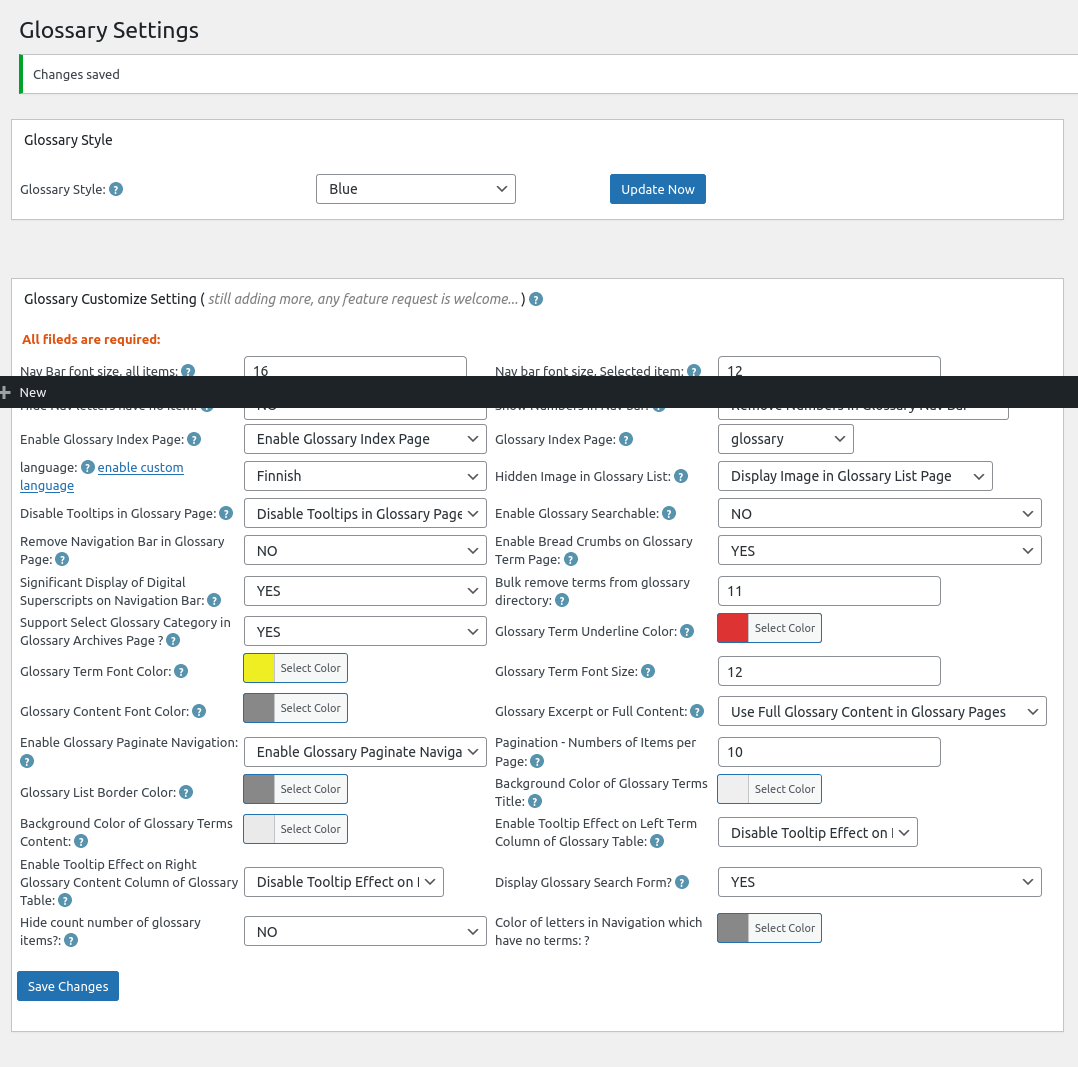
Glossary Settings panel in wordpress tooltips glossary plugin 16.0.0
Please note, because my screenshot tooltip have some problem, in the screenshot of glossary settings panel, you will find there are a black bar on the screenshot, in the real glossary settings panel, you will not see this black bar 🙂
5: At the bottom of the glossary settings panel, you will see “there are a new option: color of letters in navigation which have no items”, please just click the color picker to select the color for the color of letters in navigation which have no items and click “save changes” button 🙂
also the admin tooltip did not displayed because we make this screenshot after function verified, in the real version of wordpress tooltips pro plus, the “?” is a real admin tooltip in which you can get guide of how to use the option 🙂
6:Before: In front end, before you changed the settings of the option “color of letters in navigation which have no items”, color of letters in navigation which have no items looks like this:
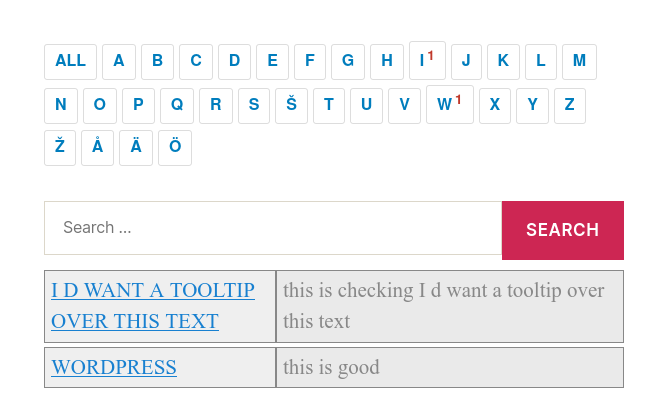
wordpress glossary default blue template
You can see in here I selected blue template for my wordpress glossary page, we have 5 pretty wordpress glossary template: blue , blonde, dark, green , red, once you clicked to select a glossary theme, the color and style has been set up by default good-designed wordpress glossary template, in general, what you need just one-click, no other works need to do 🙂
After: after changed “color of letters in navigation which have no items”, it looks like this:
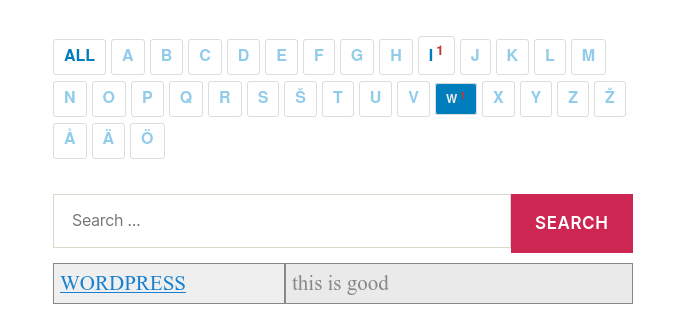
wordpress glossary customized color of letter color in blue template
You can see I selected another blue color for “color of letters in navigation which have no items”, so user will focus on the letters which have items 🙂
You can chose another pretty color for your “color of letters in navigation which have no items”, I believe you will do better work for me, I just focus on develop work, this is just a sample 🙂
Conclusion:
An amazing wordpress tooltips user gave us a few great suggestions, for example, he suggested us to add an option to re-set “color of letters in navigation which have no items”, our wordpress tooltip developer think this is a great suggestion to improve user experience, so we realized the great feature request asap we can in a few hours. Based on user’s suggestion in last 12 years, wordpress glossary plugin has been build as a powerful wordpress glossary tool for users. If you have any amazing suggestion, please don’t hesitate to contact us, we are happy to realize it, we’d like offer discount for you if your idea is helpful for wordpress tooltip users 🙂




