Tag: wordpress glossary plugin

Cum să traducem ‘Citește mai mult’ pe pagina de glosar în pluginul Tooltips pentru WordPress? — WordPress Tooltips Plugin

Překlad ‘Přečíst více’ na stránce glosáře WordPressu — Podporováno WordPress Tooltips Pro Plus 33.6

Ahoj, milí uživatelé WordPress Tooltips, doufám, že se máte dobře a máte šťastné dny se svou rodinou 🙂 Obdrželi jsme ticket od úžasného uživatele WordPress Tooltips, ve kterém uvedl, že chce změnit “Přečíst více” na stránce glosáře WordPressu:
Předmět:
Přizpůsobení stránky glosáře
Zpráva:
Dobrý den,
rád bych se zeptal, zda je možné změnit vzhled stránky glosáře, například délku úryvku, nebo napsat konkrétní úryvek pro každý termín. Také bych chtěl přidat vlastní tlačítko, jako je šipka místo značky “přečíst více”.
Naše podpora pluginu WordPress Tooltips odpověděla:
Ahoj,
doufám, že se máš dobře a máš šťastné dny se svou rodinou 🙂
Děkujeme za návrhy na funkce 🙂
Aktuálně máme na panelu nastavení glosáře možnost “Úryvek glosáře nebo celý obsah”. Po přečtení tvého ticketu náš vývojář řekl, že vyhovíme tvé žádosti a přidáme nové možnosti pro splnění tvého požadavku. Jakmile funkci dokončíme, napíšeme pro tebe podrobný dokument a znovu ti zašleme URL dokumentu 🙂
Děkujeme, měj hezký den se svou rodinou 🙂
S pozdravem,
Tým podpory pluginu WordPress Tooltips
Náš vývojář pluginu WordPress Tooltips vydal novou verzi WordPress Tooltips Pro Plus 32.3.8, která podporuje přizpůsobitelnou délku úryvků glosáře na stránce glosáře WordPressu:
Ahoj,
doufám, že se máš dobře a máš šťastné dny se svou rodinou 🙂
S potěšením tě informujeme, že jsme nahráli WordPress Tooltips Pro Plus 32.3.8. Tato verze podporuje přizpůsobitelnou délku úryvků glosáře. Napsali jsme pro tebe podrobný dokument zde:

Support for Customizable Glossary Excerpt Length, WordPress Tooltips Pro Plus 32.3.8 Released


Děkujeme, měj požehnaný den se svou rodinou 🙂
S pozdravem,
Tým podpory pluginu WordPress Tooltips
Ve stejnou dobu implementujeme mnoho dalších funkcí glosáře na základě zpětné vazby uživatelů WordPress Tooltips, informovali jsme uživatele:
Ahoj,
doufám, že se máš dobře a máš šťastné dny se svou rodinou 🙂
Vyvinuli jsme několik nových verzí pro glosář. Na panelu nastavení glosáře můžeš:
1: zvolit otevření glosáře ve novém okně
2: zvolit otevření “přečíst více” ve novém okně
3: zvolit ruční nastavení slug glosáře
Děkujeme, doufám, že ty a tvoje rodina máte nádherný den 🙂
S pozdravem,
Tým podpory pluginu WordPress Tooltips
Uživatel pluginu WordPress Tooltips odpověděl:
Dobrý den,
děkuji, strávil jsem skvělé chvíle se svojí rodinou na dovolené. Omlouvám se za pozdní odpověď a děkuji za nové funkce!
Co se týče vzhledu, opravdu mi na tom nezáleží. Jediná věc je, mohl byste mi říct, jak přeložit “Přečíst více” na “Weiterlesen”?
Změnil jsem to v “Vlastním jazyce tooltipu a glosáře” a také jsem vybral “Můj vlastní jazyk”, ale nezměnilo se to.
S pozdravem a požehnané chvíle se svojí rodinou!
Náš vývojář pluginu WordPress Tooltips odpověděl:
Ahoj,
moc děkuji za tvoje návrhy. Každýkrát, když čtu tvoje odpovědi, cítím se velmi potěšen 🙂
Tvůj návrh je opravdu cenný, omlouvám se za problémy, co nejdříve je opravím. Dám ti vědět, jakmile to bude hotové 🙂
Děkuji, doufám, že ty a tvoje rodina máte nádherný den 🙂
S pozdravem,
a
Překlad ‘Přečíst více’ na stránce glosáře WordPress
Ahoj,
vyvinul jsem WordPress Tooltips Pro Plus 33.6.8, abych vyřešil problém pro tebe 🙂
Mohl bys prosím:
1: aktualizovat na WordPress Tooltips Pro Plus 33.6.8
2: přihlásit se na svůj WordPress web
3: kliknout na menu tooltips v administračním rozhraní WordPressu
4: kliknout na položku v podmenu addon
5: na panelu addon povol prosím přizpůsobení jazyka tooltipu a obnov stránku
6: v menu tooltips, najdeš novou podnabídku “Jazyky”, prosím klikni na to
7: na dně panelu “Jazyky” najdeš možnost vlastní “přečíst více” v úryvku tooltipu, prosím zadej jakákoli slova, která chceš, a vše bude fungovat dobře pro tebe.
Panel “Jazyky” vypadá takto:


Vlastní jazyk tooltipu a glosáře
Děkuji za návrh funkce, přidal jsem licenci na plugin WordPress FAQ Pro do tvého účtu. Můžeš zjistit, jak ho používat zde:

WordPress FAQ Pro Plugin With WordPress Tooltips (version 4.6.6)


Mohl bys prosím prověřit a dát mi zpětnou vazbu? 🙂
Děkuji, měj požehnaný den se svou rodinou 🙂
S pozdravem,
Poté uživatel pluginu WordPress Tooltips odpověděl:
Dobrý den,
moc děkuji za vaši podporu! Funguje to.
Mějte skvělý den se svou rodinou!
Děkuji.
Glosář vypadá takto:

The ideals which have lighted my way, and time after time have given me new courage to face life cheerfully, have been Kindness, Beauty, and Truth. The trite subjects of human efforts, possessions, outward success, luxury have always seemed to me contemptible.
Do something wonderful, people may imitate it.
To follow, without halt, one aim: There is the secret of success.
Reflect on your present blessings, of which every man has many; not on your past misfortunes, of which all men have some.
True happiness means forging a strong spirit that is undefeated, no matter how trying our circumstances.
Love is the flower you've got to let grow.
We shall never know all the good that a simple smile can do.
In order to succeed, we must first believe that we can.
The best way to pay for a lovely moment is to enjoy it.
There is no duty we so underrate as the duty of being happy. By being happy we sow anonymous benefits upon the world.

Děkujeme za skvělý návrh funkce pro plugin WordPress Tooltips, pokud máš nějaké další dotazy nebo návrhy, neváhej se s námi spojit, velmi rádi je pro tebe zrealizujeme 🙂
Děkujeme, mějte požehnaný den se svou rodinou 🙂
Tým podpory pluginu WordPress Tooltips
Tagged with: , , ,

Jak přeložit ‘Přečíst více’ na stránce s glosářem v pluginu WordPress Tooltips?

Překlad ‘Přečíst více’ na stránce s glosářem WordPress – Podporováno pluginem WordPress Tooltips Pro Plus 33.6

Dobrý den, milí uživatelé WordPress Tooltips, doufám, že se máte dobře a trávíte šťastné dny se svou rodinou 🙂 Obdrželi jsme ticket od úžasného uživatele WordPress Tooltips, který uvedl, že chce změnit ‘Přečíst více’ na stránce s glosářem WordPress:
Předmět:
Přizpůsobení stránky s glosářem
Zpráva:
Dobrý den,
rád bych se zeptal, zda je možné změnit vzhled stránky s glosářem, například délku výňatku, nebo napsat konkrétní výňatek pro každý termín. Také bych chtěl přidat vlastní tlačítko, jako je šipka, místo tagu ‘přečíst více’.
Náš tým podpory pluginu WordPress Tooltips odpověděl:
Dobrý den,
doufám, že se máte dobře a trávíte šťastné dny se svou rodinou 🙂
Děkujeme za vaše požadavky na funkce 🙂
Aktuálně, v panelu nastavení glosáře, máme možnost ‘Výňatek glosáře nebo celý obsah’, po přečtení vašeho ticketu, náš vývojář řekl, že vyhovíme vaší žádosti a přidáme nové možnosti pro realizaci vašich požadavků, jakmile funkci dokončíme, napíšeme pro vás podrobný dokument a znovu vám zašleme URL dokumentu 🙂
Děkujeme, mějte hezký den se svou rodinou 🙂
S pozdravem,
Tým podpory pluginu WordPress Tooltips
Náš vývojář pluginu WordPress Tooltips uvolnil novou verzi WordPress Tooltips Pro Plus 32.3.8, aby podpořil přizpůsobitelnou délku výňatku glosáře na stránce s glosářem WordPress:
Dobrý den,
doufám, že se máte dobře a trávíte šťastné dny se svou rodinou 🙂
S potěšením vám oznamujeme, že jsme nahráli WordPress Tooltips Pro Plus 32.3.8, tato verze podporuje přizpůsobitelnou délku výňatku glosáře, pro vás jsme napsali podrobný dokument, který naleznete na:

Support for Customizable Glossary Excerpt Length, WordPress Tooltips Pro Plus 32.3.8 Released


Děkujeme, mějte požehnaný den se svou rodinou 🙂
S pozdravem,
Tým podpory pluginu WordPress Tooltips
Současně implementujeme mnoho dalších funkcí glosáře na základě zpětné vazby uživatelů WordPress Tooltips, informovali jsme uživatele:
Dobrý den,
doufám, že se máte dobře a trávíte šťastné dny se svou rodinou 🙂
Vyvinuli jsme několik nových verzí pro glosář, v panelu nastavení glosáře můžete:
1: zvolit otevření glosáře v novém okně
2: zvolit otevření ‘přečíst více’ v novém okně
3: zvolit manuální nastavení slug glosáře
Děkujeme, doufám, že vy a vaše rodina máte skvělý den 🙂
S pozdravem,
Tým podpory pluginu WordPress Tooltips
Uživatel WordPress Tooltips odpověděl:
Dobrý den,
děkuji, měl jsem skvělé chvíle s rodinou na dovolené. Omlouvám se za pozdní odpověď a děkuji za nové funkce!
Co se týče vzhledu, opravdu mi na tom nezáleží. Jediná věc je, můžete mi říct, jak přeložit ‘Přečíst více’ na ‘Weiterlesen’?
Změnil jsem to v ‘Vlastním jazyce tooltipu a glosáře’ a také jsem vybral ‘Můj vlastní jazyk’, ale nezměnilo se to.
S pozdravem a požehnaným časem s rodinou!
Náš vývojář pluginu WordPress Tooltips odpověděl:
Dobrý den,
moc vám děkuji za vaše návrhy. Každýkrát, když čtu vaše odpovědi, cítím se velmi potěšen 🙂
Váš návrh je opravdu cenný, omlouvám se za problémy, co nejdříve je opravím. Dám vám vědět, jakmile to bude hotové 🙂
Děkuji, doufám, že vy a vaše rodina máte nádherný den 🙂
S pozdravem,
a
Překlad ‘Přečíst více’ na stránce s glosářem WordPress
Dobrý den,
vyvinul jsem WordPress Tooltips Pro Plus 33.6.8, abych vyřešil problém pro vás 🙂
Můžete prosím:
1: aktualizovat na WordPress Tooltips Pro Plus 33.6.8
2: přihlásit se na svůj WordPress web
3: kliknout na menu tooltips v administračním panelu WordPress
4: kliknout na položku podmenu addon
5: v panelu addon, prosím povolte přizpůsobení jazyka tooltips a obnovte stránku
6: v menu tooltips najdete novou podmenu položku ‘Jazyky’, prosím klikněte na ni
7: na konci panelu ‘Jazyky’ najdete vlastní ‘přečíst více’ v možnosti výňatku tooltips, prosím zadejte zde jakákoliv slova, která chcete, a všechno bude fungovat dobře pro vás.
Panel ‘Jazyky’ vypadá takto:


Vlastní jazyk tooltipu a glosáře
Děkuji za požadavek na funkci, přidal jsem licenci pluginu WordPress FAQ Pro do vašeho účtu, jak jej používat, naleznete na:

WordPress FAQ Pro Plugin With WordPress Tooltips (version 4.6.6)


Můžete prosím zkontrolovat a dát mi zpětnou vazbu? 🙂
Děkuji, mějte požehnaný den se svou rodinou 🙂
S pozdravem,
Poté uživatel WordPress Tooltips odpověděl:
Dobrý den,
moc vám děkuji za podporu! Funguje to.
Mějte skvělý den se svou rodinou!
Děkuji.
Glosář vypadá takto:

The ideals which have lighted my way, and time after time have given me new courage to face life cheerfully, have been Kindness, Beauty, and Truth. The trite subjects of human efforts, possessions, outward success, luxury have always seemed to me contemptible.
Do something wonderful, people may imitate it.
To follow, without halt, one aim: There is the secret of success.
Reflect on your present blessings, of which every man has many; not on your past misfortunes, of which all men have some.
True happiness means forging a strong spirit that is undefeated, no matter how trying our circumstances.
Love is the flower you've got to let grow.
We shall never know all the good that a simple smile can do.
In order to succeed, we must first believe that we can.
The best way to pay for a lovely moment is to enjoy it.
There is no duty we so underrate as the duty of being happy. By being happy we sow anonymous benefits upon the world.

Děkujeme za skvělý požadavek na funkci pro plugin WordPress Tooltips, pokud máte další otázky nebo návrhy, neváhejte nás kontaktovat, velmi rádi to pro vás realizujeme 🙂
Děkujeme, mějte požehnaný den se svou rodinou 🙂
Podpora pluginu WordPress Tooltips

Tagged with: , , ,

¿Cómo traducir ‘Leer más’ en la página del glosario en el plugin de WordPress tooltips?

Traduciendo ‘Leer más’ en la Página de Glosario de WordPress — Soportado por WordPress Tooltips Pro Plus 33.6.8

Hola, queridos usuarios de WordPress Tooltip, espero que este mensaje les encuentre bien y que estén teniendo días felices con su familia 🙂 Recibimos un ticket de un increíble usuario de WordPress Tooltip, en el que decía que quería cambiar “Leer más” en la página de glosario de WordPress: Asunto:
Personalizar página de glosario Mensaje:
Hola, Me gustaría preguntar si es posible cambiar la apariencia de la página de glosario, como la longitud del extracto, o escribir un extracto específico para cada término. También me gustaría agregar un botón personalizado como una flecha en lugar de una etiqueta de “Leer más”. Nuestro equipo de soporte del plugin de WordPress Tooltips respondió: Hola, Espero que estés bien y disfrutando de días felices con tu familia 🙂 Gracias por tus solicitudes de funciones 🙂 Actualmente, en el panel de configuración del glosario, tenemos una opción “Extracto de glosario o contenido completo”. Después de leer tu ticket, nuestro desarrollador dijo que seguiremos tu solicitud para agregar nuevas opciones que realicen tu solicitud de función, una vez que finalicemos la función, redactaremos un documento detallado para ti y te informaremos la URL del documento nuevamente 🙂 Gracias, que tengas un buen día con tu familia 🙂
Atentamente,
Equipo de Soporte del Plugin de WordPress Tooltips Nuestro desarrollador del plugin de WordPress Tooltips lanzó una nueva versión WordPress Tooltips Pro Plus 32.3.8 para soportar la longitud de extracto personalizable en la página de glosario de WordPress: Hola, Espero que estés bien y disfrutando de días felices con tu familia 🙂 Estamos felices de informarte que hemos subido WordPress Tooltips Pro Plus 32.3.8, esta versión soporta la longitud de extracto personalizable, hemos escrito un documento detallado para ti en:
https://tooltips.org/support-for-customizable-glossary-excerpt-length-wordpress-tooltips-pro-plus-32-3-8-released/ Gracias, que tengas un día bendecido con tu familia 🙂 Atentamente,
Equipo de Soporte del Plugin de WordPress Tooltips Al mismo tiempo, implementamos muchas más funciones de glosario basadas en los comentarios de los usuarios de WordPress Tooltip, informamos al usuario: Hola, Espero que estés bien y disfrutando de días felices con tu familia 🙂 Hemos desarrollado unas nuevas versiones para el glosario, en el panel de configuración del glosario, puedes:

  1. optar por abrir el glosario en una nueva ventana
  2. optar por abrir “Leer más” en una nueva ventana
  3. optar por establecer manualmente el slug del glosario
    Gracias, espero que tú y tu familia tengan un día maravilloso 🙂 Atentamente,
    Equipo de Soporte del Plugin de WordPress Tooltips El usuario de WordPress Tooltip respondió: Hola, Gracias, tuve buenos momentos con mi familia en vacaciones. ¡Perdón por la respuesta tardía y gracias por las nuevas funciones! Respecto a la apariencia, realmente no me importa. Lo único es, ¿podrías decirme cómo traducir “Leer más” a “Weiterlesen”? Lo cambié en el “Idioma personalizado de Tooltip y Glosario” y también seleccioné “Mi idioma personalizado”, pero no cambia. ¡Saludos cordiales y que tengas un tiempo bendecido con tu familia! Nuestro desarrollador del plugin de WordPress Tooltips respondió: Hola, Muchas gracias por tus sugerencias. Cada vez que leo tus respuestas, me siento muy complacido 🙂 Tu sugerencia es realmente valiosa, lamento los problemas, los arreglaré lo antes posible. Te reportaré una vez que esté solucionado 🙂 Gracias, espero que tú y tu familia tengan un día maravilloso 🙂 Atentamente, Y Traducción de ‘Leer Más’ en la Página del Glosario de WordPress Hola, He desarrollado WordPress Tooltips Pro Plus 33.6.8 para resolver el problema para ti 🙂 ¿Podrías por favor:
  4. actualizar a WordPress Tooltips Pro Plus 33.6.8
  5. iniciar sesión en tu sitio de WordPress
  6. hacer clic en el menú de tooltips en el panel de WordPress
  7. hacer clic en el submenú de complementos, en el panel de complementos, por favor habilitar la personalización del idioma de tooltips y refrescar la página, en el menú de tooltips, encontrarás un nuevo elemento de submenú “Idiomas”, por favor haz clic en él
  8. en la parte inferior del panel “Idiomas”, encontrarás la opción “leer más” personalizada en el extracto de tooltips, simplemente ingresa cualquier palabra que desees aquí, y todo funcionará bien para ti. El panel “Idiomas” se ve así: Idioma Personalizado de Tooltip y Glosario Gracias por la solicitud de función, he agregado una licencia del plugin de FAQ de WordPress en tu cuenta, puedes encontrar cómo usarlo en:
    https://tooltips.org/product/wordpress-faq-pro-plugin-with-wordpress-tooltips/ ¿Podrías hacer una verificación y darme tu opinión? 🙂 Gracias, que tengas un día bendecido con tu familia 🙂 Atentamente, Luego el usuario de WordPress Tooltips respondió: Hola, ¡Muchas gracias por tu apoyo! ¡Funciona! ¡Que tengas un gran día con tu familia! Gracias El glosario se ve así: [glosario catid=’2006′] Gracias por la gran solicitud de características para el plugin de WordPress Tooltip, si tienes alguna otra pregunta o sugerencia, no dudes en contactarnos, ¡estamos muy felices de realizarlo para ti 🙂 Gracias, que tengas un día bendecido con tu familia 🙂 Equipo de Soporte del Plugin de WordPress Tooltips
Tagged with: , , ,

Comment traduire ‘Lire la suite’ sur la page de glossaire dans le plugin Tooltips de WordPress ?

Traduction de ‘Lire la suite’ sur la page du glossaire WordPress – Prise en charge par WordPress Tooltips Pro Plus 33.6 Salut, chers utilisateurs de WordPress Tooltips, j’espère que vous allez bien et que vous passez des journées heureuses avec votre famille 🙂 Nous avons reçu une demande d’un utilisateur incroyable de WordPress Tooltips, dans laquelle il a dit qu’il voulait changer “Lire la suite” sur la page du glossaire WordPress : Objet : Personnaliser la page du glossaire Message :

Bonjour,

J’aimerais savoir s’il est possible de changer l’apparence de la page du glossaire, comme la longueur de l’extrait, ou d’écrire un extrait spécifique pour chaque terme.

De plus, j’aimerais ajouter un bouton personnalisé, comme une flèche, au lieu d’un tag “Lire la suite”.

Notre support du plugin WordPress Tooltips a répondu :

Salut,

J’espère que vous allez bien et que vous passez des journées heureuses avec votre famille 🙂

Merci pour vos demandes de fonctionnalités 🙂

Actuellement, dans le panneau des paramètres du glossaire, nous avons une option “Extrait du glossaire ou contenu complet”.

Après avoir lu votre demande, notre développeur a dit qu’il suivrait votre demande pour ajouter de nouvelles options afin de réaliser votre demande de fonctionnalité.

Une fois la fonction terminée, nous rédigerons un document détaillé pour vous et nous vous ferons part à nouveau de l’URL du document 🙂

Merci, passez une bonne journée avec votre famille 🙂
Cordialement,

L’équipe de support du plugin WordPress Tooltips Notre développeur de plugin WordPress Tooltips a publié une nouvelle version, WordPress Tooltips Pro Plus 32.3.8, pour prendre en charge la longueur personnalisable des extraits du glossaire sur la page du glossaire WordPress :

Salut, J’espère que vous allez bien et que vous passez des journées heureuses avec votre famille 🙂

Nous sommes heureux de vous informer que nous avons téléchargé WordPress Tooltips Pro Plus 32.3.8, cette version prend en charge la longueur personnalisable des extraits du glossaire. Nous avons rédigé un document détaillé pour vous à l’adresse :
https://tooltips.org/support-for-customizable-glossary-excerpt-length-wordpress-tooltips-pro-plus-32-3-8-released/ Merci, passez une journée bénie avec votre famille 🙂

Cordialement,
L’équipe de support du plugin WordPress Tooltips En même temps, nous avons mis en œuvre de nombreuses autres fonctions de glossaire basées sur les retours des utilisateurs de WordPress Tooltips, nous avons informé l’utilisateur :

Salut,

J’espère que vous allez bien et que vous passez des journées heureuses avec votre famille 🙂

Nous avons développé quelques nouvelles versions pour le glossaire. Dans le panneau des paramètres du glossaire, vous pouvez :

1 : choisir d’ouvrir le glossaire dans une nouvelle fenêtre

2 : choisir d’ouvrir “Lire la suite” dans une nouvelle fenêtre

3 : choisir de définir manuellement le slug du glossaire

Merci, j’espère que vous et votre famille passez une merveilleuse journée 🙂

Cordialement,
L’équipe de support du plugin WordPress Tooltips

L’utilisateur de WordPress Tooltips a répondu :

Bonjour,

Merci, j’ai passé de bons moments avec ma famille en vacances. Désolé pour la réponse tardive et merci pour les nouvelles fonctionnalités !

Concernant l’apparence, cela ne me dérange vraiment pas.

La seule chose est, pourriez-vous me dire comment traduire “Lire la suite” en “Weiterlesen” ?

Je l’ai changé dans “Langue personnalisée du Tooltip et du Glossaire” et j’ai également sélectionné “Langue personnalisée”, mais cela ne change pas.

Cordialement et passez un moment béni avec votre famille !

Notre développeur de plugin WordPress Tooltips a répondu :

Salut,

Merci beaucoup pour vos suggestions.

Chaque fois que je lis vos réponses, je me sens très content 🙂

Votre suggestion est vraiment précieuse, désolé pour les problèmes, je vais les résoudre dès que possible. Je vous informerai dès que ce sera fait 🙂

Merci, j’espère que vous et votre famille passez une merveilleuse journée 🙂

Cordialement, et Traduction de ‘Lire la suite’ sur la page du glossaire WordPress Salut, J’ai développé WordPress Tooltips Pro Plus 33.6.8 pour résoudre le problème pour vous 🙂

Pourriez-vous s’il vous plaît :

1 : mettre à niveau vers WordPress Tooltips Pro Plus 33.6.8

2 : vous connecter à votre site WordPress

3 : cliquer sur le menu Tooltips dans le tableau de bord WordPress

4 : cliquer sur l’élément de sous-menu addon

5 : dans le panneau d’addons, veuillez activer la personnalisation de la langue des tooltips et recharger la page

6 : dans le menu tooltips, vous trouverez un nouvel élément de sous-menu “Langues”, veuillez cliquer dessus

7 : en bas du panneau “Langues”, vous trouverez “Lire la suite” personnalisé dans l’option extrait des tooltips, veuillez simplement entrer les mots que vous souhaitez ici, et tout fonctionnera bien pour vous. Le panneau “Langues” ressemble à ceci :

Langue personnalisée du Tooltip et du Glossaire Merci pour la demande de fonctionnalité, j’ai ajouté une licence du plugin WordPress FAQ Pro à votre compte. Vous pouvez trouver comment l’utiliser à l’adresse :
https://tooltips.org/product/wordpress-faq-pro-plugin-with-wordpress-tooltips/

Pourriez-vous vérifier et me donner un retour ? 🙂

Merci, passez une journée bénie avec votre famille 🙂

Cordialement, Ensuite, l’utilisateur de WordPress Tooltips a répondu :

Bonjour, Merci beaucoup pour votre soutien ! Cela fonctionne. Passez une excellente journée avec votre famille ! Merci Le glossaire ressemble à ceci :

The ideals which have lighted my way, and time after time have given me new courage to face life cheerfully, have been Kindness, Beauty, and Truth. The trite subjects of human efforts, possessions, outward success, luxury have always seemed to me contemptible.
Do something wonderful, people may imitate it.
To follow, without halt, one aim: There is the secret of success.
Reflect on your present blessings, of which every man has many; not on your past misfortunes, of which all men have some.
True happiness means forging a strong spirit that is undefeated, no matter how trying our circumstances.
Love is the flower you've got to let grow.
We shall never know all the good that a simple smile can do.
In order to succeed, we must first believe that we can.
The best way to pay for a lovely moment is to enjoy it.
There is no duty we so underrate as the duty of being happy. By being happy we sow anonymous benefits upon the world.

Merci pour la grande demande de fonctionnalités pour le plugin WordPress Tooltips.

Si vous avez d’autres questions ou suggestions, n’hésitez pas à nous contacter, nous serions très heureux de le réaliser pour vous 🙂

Merci, passez une journée bénie avec votre famille 🙂

Équipe de support du plugin WordPress Tooltips

Tagged with: , , ,

How to Translate ‘Read More’ on WordPress Glossary — wordpress tooltips pro plus 33.6.8

Translating ‘Read More’ in WordPress Glossary Page — Supported by wordpress tooltips pro plus 33.6

Hi, dear wordpress tooltip users, I hope this message find you are doing well and having happy days with your family 🙂 We received a ticket from an amazing wordpress tooltip users, in which he said he want to change the “Read More” in wordpress glossary page:

Subject:
Customize Glossary Page

Message:
Hello,

I would like to ask if it is possible to change the appearance of the glossary page, like the length of the excerpt, or to write a specific excerpt for each term. Also I would like to add a custom button like a
arrow instead of a read more tag.

Our wordpress tooltip plugin support replied:

Hi ,

Hope you are doing well and having happy days with your family 🙂

Thanks for feature requests 🙂

Currently, in glossary settings panel, we have an option “Glossary excerpt or full content”, after read your ticket, our developer said we will follow your request to add new options to realize your feature request, once finish the function, we will write a detailed document for you and we will report you the document URL again 🙂

Thanks, have a nice day with your family 🙂
Best Regards,
Wordpress Tooltips Plugin Support Team

Our wordpress tooltip plugin developer released a new version WordPress Tooltips Pro Plus 32.3.8 to support customizable glossary excerpt length in wordpress glossary page:

Hi,

Hope you are doing well and having happy days with your family 🙂

We are happy to report you, we have uploaded WordPress Tooltips Pro Plus 32.3.8, this version support for customizable glossary excerpt length, we have wrote a detailed document for you at:

Support for Customizable Glossary Excerpt Length, WordPress Tooltips Pro Plus 32.3.8 Released

Thanks, have a blessed day with your family 🙂

Best Regards,
Wordpress Tooltips Plugin Support Team

At the same time,  we implement many more glossary functions based on wordpress tooltip user’s feedback, we reported to the user:

Hi ,

Hope you are doing well and having happy days with your family 🙂

We have developed a few new versions for glossary, in glossary settings panel, you can :
1: opt to open glossary in new window
2: opt to open read-more in new window
3: opt to manually set glossary slug

Thanks, I hope you and your family have a wonderful day 🙂

Best Regards,
Wordpress Tooltips Plugin Support Team

The wordpress tooltip user replied:

Hello,

thank I had good times with my family on vacation. Sorry for the late reply and thank you for new features!

Regarding the appearence, I don`t really mind. The only think is,  could you tell me how to translate “Read More” into “Weiterlesen”?

I changed it in the “Custom Language of Tooltip and Glossary” and I lso selected “Custom My Language” but it doesn’t change.

Best regards and blessed time with your family!

Our wordpress tooltip plugin developer replied:

Hi ,

Thank you very much for your suggestions. Every time I read your replies, I feel very pleased 🙂

Your suggestion is truly valuable, sorry for the issues, I will fix them as soon as possible. I will report back to you once it’s down 🙂

Thanks, I hope you and your family have a wonderful day 🙂

Best Regards,

and

‘Read More’ Translation on WordPress Glossary Page

Hi,

I have developed wordpress tooltips pro plus 33.6.8 to resolve the problem for you 🙂

Would you please:

1: upgrade to wordpress tooltips pro plus 33.6.8

2: login your wordpress site

3: click tooltips menu in wordpress dashboard

4: click addon sub menu item

5: in addons panel, please enable tooltips language customization and refresh the page

6: in the tooltips menu , you will find new sub-menu item “Languages”, please click it

7: at the bottom of “Languages” panel, you will find custom “read more” in tooltips excerpt option, please just enter any words you want in here, and all things will works well for you.

The “Languages” panel looks like this:

Custom Language of Tooltip and Glossary

Thanks for the feature request, I have add a license of wordpress faq pro plugin in your account, you can find how to use it at:

WordPress FAQ Pro Plugin With WordPress Tooltips (version 4.6.6)

Would you please do a check and give me a feedback? 🙂

Thanks, have a blessed day with your family 🙂

Best Regards,

Then wordpress tooltips user replied:

Hello,

thank you very much for your support! It works

Have a great day with you family!

Thanks

The glossary looks like this:

The ideals which have lighted my way, and time after time have given me new courage to face life cheerfully, have been Kindness, Beauty, and Truth. The trite subjects of human efforts, possessions, outward success, luxury have always seemed to me contemptible.
Do something wonderful, people may imitate it.
To follow, without halt, one aim: There is the secret of success.
Reflect on your present blessings, of which every man has many; not on your past misfortunes, of which all men have some.
True happiness means forging a strong spirit that is undefeated, no matter how trying our circumstances.
Love is the flower you've got to let grow.
We shall never know all the good that a simple smile can do.
In order to succeed, we must first believe that we can.
The best way to pay for a lovely moment is to enjoy it.
There is no duty we so underrate as the duty of being happy. By being happy we sow anonymous benefits upon the world.

Thanks for the great feature request for wordpress tooltip plugin, if you have any more question or suggestion, please don’t hesitate to contact us, we are very happy to realize it for you 🙂

Thanks, have a blessed day with your family 🙂

WordPress tooltips plugin support


Tagged with: , , ,

Create Glossary from Any WordPress Table for Third-Party Data, Supported by wordpress tooltips pro plus 33.5.8

Easily Create Glossary for Third-Party Plugin Data in WordPress Tooltips Plugin

Hello, dear WordPress Tooltip Plugin users! I hope this message finds you well and enjoying a wonderful day with your family. Recently, we received a support ticket from a valued user who wanted to insert a third-party listing plugin shortcode into the tooltip popup window but faced some difficulties. Upon investigating, we found that the plugin uses a unique method to load content from the backend. Rather than utilizing WordPress custom post types, the author created multiple dedicated tables, which complicates integration with other plugins. After putting in considerable effort, we are excited to announce that we’ve addressed this issue for our WordPress Tooltips users.  You can now directly retrieve content from third-party plugins using their tables with ease.Then we released WordPress Tooltips Pro Plus 33.4.8 , enabling tooltip users to generate directories from any WordPress table for external data. Then our wordpress tooltips plugin developer said this requirement will help glossary users to create wordpress glossary for third-party plugin data too. Allowing a WordPress tooltip user to create a glossary from any external table (outside of WordPress) can provide several significant benefits to glossary users:

Expanded Data Sources: Users can pull in terms and definitions from various external databases or resources, allowing for a richer and more comprehensive glossary that goes beyond the limitations of WordPress content.

Diverse Content Integration: By leveraging external tables, users can integrate content from other platforms or systems, ensuring that the glossary remains relevant and includes terminology used across multiple contexts or industries.

Better Contextualization: External data can offer broader contexts for terms, providing users with additional definitions, examples, or usage cases that are not confined to their WordPress site, thus enhancing understanding.

Dynamic Updates: If the external data source is regularly updated, the glossary can automatically reflect these changes, ensuring that users always have access to the most current information without manual intervention.

Customization and Personalization: Users can tailor the glossary to their specific needs by selecting which external tables to include, allowing for a more personalized experience based on their audience’s interests or requirements.

Time and Resource Efficiency: Manually creating glossary entries can be tedious. Automatically generating entries from external sources can save time and reduce the workload for users, allowing them to focus on other important tasks.

Interoperability: Supporting the creation of glossary entries from external tables can enable better data interoperability across various platforms, making it easier to consolidate information for users who utilize multiple systems.

Enhanced User Experience: Providing a more extensive and well-rounded glossary can improve the overall user experience on the site, making it easier for visitors to find relevant information quickly.

SEO Benefits: A more comprehensive glossary can lead to improved SEO performance by including terms and phrases that are more widely searched for in external data, potentially driving more organic traffic to the site.
By allowing glossary creation from external tables, users gain a powerful tool that enhances their website’s functionality, interactivity, and content richness.

… much more , so we developed version 33.5.8 of WordPress Tooltips Pro Plus for wordpress tooltip users to help WordPress tooltip users to create a glossary from any external table 🙂

How to Create Glossary for Data from Any WordPress Table?

1: Please click “download wordpress tooltip”  menu item to download wordpress tooltip pro plus plugin which version >= 33.5.8

2. Generate a WordPress post and utilize the shortcode [ glossary_via_tables ] to directly build a glossary from a third table. It should appear as follows:

[ glossary_via_tables table=’stock’ fields=’stock_name,stock_price’ ]

In this case, the table in question is ‘stock,’ which is present in your database. You can choose the specific fields you want to show in the directory. For example, I only require the fields ‘quote_title’ and ‘quote_content.’ The WordPress Tooltips plugin will automatically pull data from the ‘stock’ table to generate the glossary.

What we doing now:

1: we are developing a new version of wordpress tooltips plugin to allow glossary users add a caption at the top of the glossary

2: in the new version, users can insert unlimited table fields in the shortcode

3: we are re-design the UI  with a new pretty style with more functionality

A glossary looks like this:

The ideals which have lighted my way, and time after time have given me new courage to face life cheerfully, have been Kindness, Beauty, and Truth. The trite subjects of human efforts, possessions, outward success, luxury have always seemed to me contemptible.
Do something wonderful, people may imitate it.
To follow, without halt, one aim: There is the secret of success.
Reflect on your present blessings, of which every man has many; not on your past misfortunes, of which all men have some.
True happiness means forging a strong spirit that is undefeated, no matter how trying our circumstances.
Love is the flower you've got to let grow.
We shall never know all the good that a simple smile can do.
In order to succeed, we must first believe that we can.
The best way to pay for a lovely moment is to enjoy it.
There is no duty we so underrate as the duty of being happy. By being happy we sow anonymous benefits upon the world.

If you have any more feature request, please don’t hesitate to contact us, we are very happy to realize your requirement  🙂

Tagged with: , , ,

How to Hide Letters Without Items in Glossary — WordPress Tooltips Free 10.2.3”

Why and How to Hide Letters Without Items in Your WordPress Glossary

— New Features in WordPress Tooltips Free 10.2.3

Hi, Dear  WordPress Tooltip users, I hope this message find you are doing well and enjoying happy days with your family.  🙂  We received an amazing wordpress tooltips users’ ticket, in which he asked:

Subject:

tooltips with superscripts

Message:
Is it possible (currently, or with an enhancement) for a tooltip to be displayed for a word that has a superscript number at the end of it?

Our wordpress tooltips plugin support replied:

Hi,

Thanks for the question 🙂

I guess what you’re looking for might be:
In glossary page (https://tooltips.org/glossary-demo/) , only display glossary items that has a superscript number at the end of it? 🙂

If so in tooltips pro version we have an option: “Hide Nav letters have no item” , just enable it and we will only display glossary items that has a superscript number at the end of it 🙂

Currently we have no this feature in free version, but our developer is developing a new version to add this function from pro version to free version for you, you will see it soon 🙂

Sorry if I misunderstood, please tell me more details or provide a screenshot or page? 🙂

Thanks, have a blessed day with your family 🙂

Best Regards,
WordPress Tooltips Plugin Support

We then released the WordPress Tooltips Free plugin 10.2.3 for tooltip users to resolve the issue! 🙂

A Step-by-Step Guide to Hiding Letters Without Items in WordPress Glossary

1: Please login your wordpess as administrator

2: Click on the “Tooltips” menu item

3: Click on the “Glossary Settings” sub-menu item

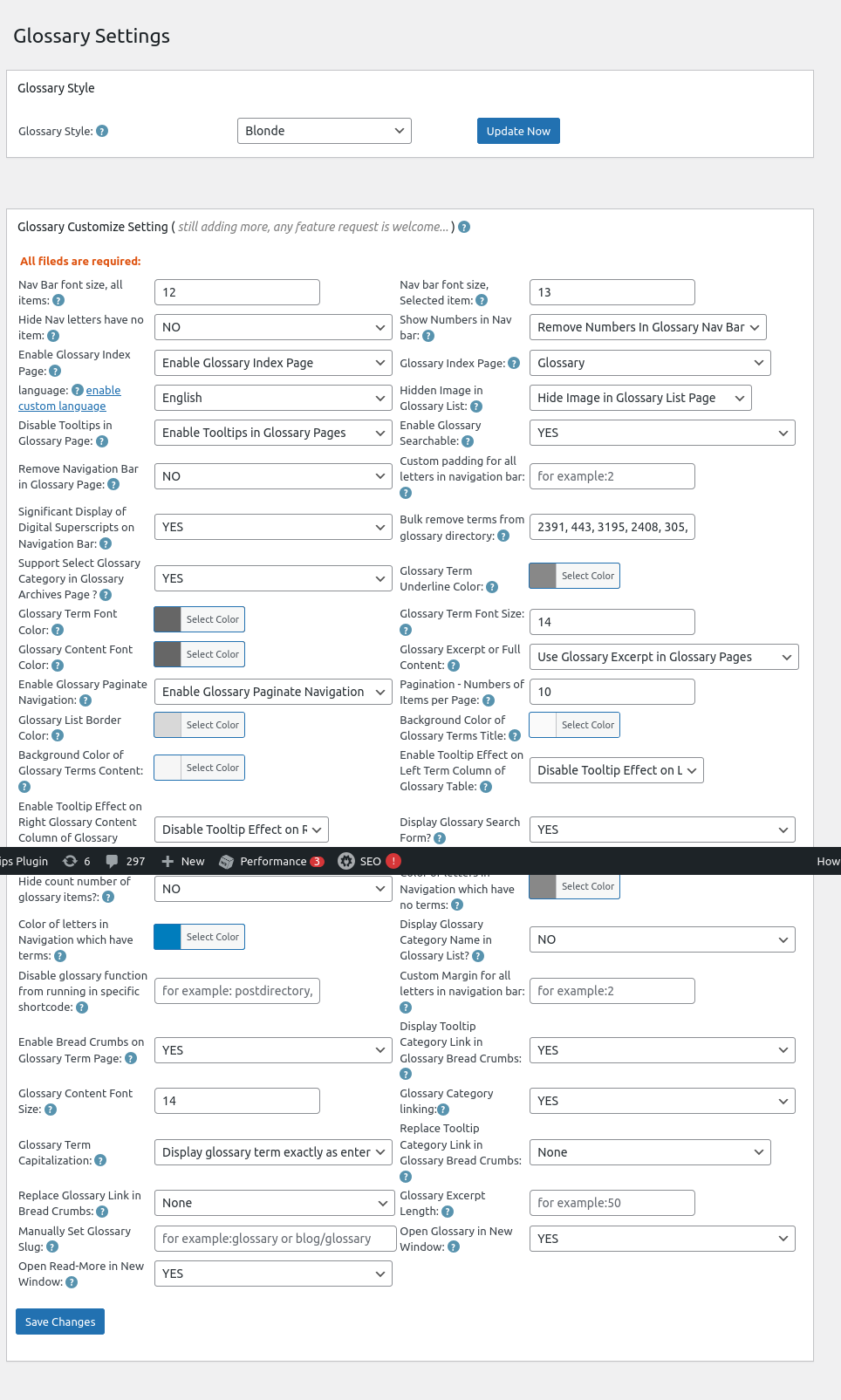
4: Now, you will open “Glossary Settings” panel, I make a screenshot of wordpress tooltips 33.6.8 which using on tooltips.org, but there are a few options is the same with wordpress tooltips free, for instance,  “Hide Nav letters have no item”

Glossary Settings in wordpress tooltips 33.6.8

Glossary Settings in wordpress tooltips 33.6.8

5: If you select “Yes” in the option Glossary Settings in wordpress tooltips 33.6.8, then in front-end, we will hide letters without items in wordpress glossary page

If you select “No” in the option Glossary Settings in wordpress tooltips 33.6.8, then in front-end, we will display all letters in wordpress glossary page, include letters which have no items

what is wordpress glossary?

A WordPress glossary is a compilation of terms and definitions related to WordPress, which helps users (especially beginners) understand the various concepts, features, and terminology associated with the platform. It serves as a reference guide to facilitate better comprehension of WordPress functionalities, themes, plugins, and best practices. It looks like this:

The ideals which have lighted my way, and time after time have given me new courage to face life cheerfully, have been Kindness, Beauty, and Truth. The trite subjects of human efforts, possessions, outward success, luxury have always seemed to me contemptible.
Do something wonderful, people may imitate it.
To follow, without halt, one aim: There is the secret of success.
Reflect on your present blessings, of which every man has many; not on your past misfortunes, of which all men have some.
True happiness means forging a strong spirit that is undefeated, no matter how trying our circumstances.
Love is the flower you've got to let grow.
We shall never know all the good that a simple smile can do.
In order to succeed, we must first believe that we can.
The best way to pay for a lovely moment is to enjoy it.
There is no duty we so underrate as the duty of being happy. By being happy we sow anonymous benefits upon the world.

Conclusion:

WordPress tooltip glossary plugin  allows tooltips users to hide letters (sections of the glossary) that do not contain any glossary items. Glossary users can find this option within the settings of the plugin, labeled “Hide Nav letters have no item”. By utilizing this feature, the glossary can be presented in a more streamlined manner, which may be visually appealing to some users.

Enhanced User Experience: By removing empty sections, the glossary becomes less cluttered, making it easier for readers to find relevant terms without distractions.

Improved Navigation: A cleaner layout can help users navigate the glossary more efficiently, as they won’t encounter irrelevant letters.

Customization: This option gives site administrators more flexibility in designing their glossary according to the needs and preferences of their reader base.

Overall, this feature aims to create a more user-friendly and aesthetically pleasing glossary, which can lead to higher engagement and satisfaction among users.

You can find change log of wordpress tooltips free plugin at:

Change Log for the WordPress Tooltips Free Plugin

Tagged with: , , ,

Corrected the issue with the glossary permalink structure in wordpress tooltips pro plus 33.2.8

Hi, Dear   WordPress Tooltip plugin users, I hope this message finds you well and that you’re enjoying a happy day with your family. We received feedback from an amazing wordpress tooltip user who mentioned that  the glossary permalink structure is not incorrect.

We did a check of our code, we believe we made a logical error in our attempt to support multiple permalink results, we are working hard to support multiple permalink results for the user and we found there are some difficult points. We have corrected this mistake in the new version of wordpress tooltips pro plus version 33.2.8.

Thanks for the great feedback and feature requests, if you have any more question, please let us know, and we will implement it for you immediately. 🙂

Thanks, have a wonderful day with your loved ones 🙂

Best Regards,

WordPress tooltips plugin support

Tagged with: , , , , ,

Choose to link tooltip terms to their corresponding tooltip pages, with the option to open them in a new window or the same window automatically, WordPress tooltips pro plus 33.1.8 released

New Feature: Choose How to Link WordPress Tooltip Terms — New or Same Window

Hey there, awesome users of the WordPress Tooltip plugin! I trust you are having a happy day with your family   Recently we received a ticket in which the amazing user reported a bug of open the wordpress tooltip term in new window, and user said:

How can I remove target=”_blank” from the toolip links?

I couldn’t find it in the configuration?

Regards,

Our WordPress tooltip plugin developer reviewed the ticket and conducted extensive tests. Ultimately, we discovered that the issue only occurs when users enable the ‘Link Tooltip Term to Tooltip Page Automatically’ option in the tooltips settings panel.

We have released wordpress tooltips pro plus 33.1.8 to fix the bug for the amazing tooltip user 🙂

How to Choose Your Tooltip Linking Option: New or Same Window

1: Log into your WordPress account with administrator privileges. Once you’re in the dashboard, look for the ‘Tooltips’ option in the menu.

2: Next, click on the ‘Optional Settings’ submenu to access the ‘Optional Settings’ panel. In this panel, find the option labeled ‘Link Tooltip Term to Tooltip Page Automatically.’

3: You’ll notice a new checkbox labeled ‘Open Tooltip Page in New Window.’ Simply check this box, and on the front end, the ‘target=’_blank” attribute will be removed from the link, allowing you to open the tooltip page in the same browser window. It looks like this:

wordpress tooltips Open tooltip page in new window

Additionally, if you prefer not to link tooltip terms to the tooltip page automatically, you can adjust the ‘Link Tooltip Term to Tooltip Page Automatically’ option to ‘No, do not link tooltip term to tooltip page.’ Also, set the ‘Open Tooltip Link in New Page Automatically When User Mouses Over the Tooltip with a Link’ option to ‘No, do not open link with tooltip term automatically.’

Thank you for your wonderful feedback! If you have any additional questions or feature requests, please feel free to reach out. We’re always eager to improve the WordPress tooltip plugin for you! 🙂

We also updated the updates document at:

Change Log for the WordPress Tooltips Pro Plus Plugin

Features of wordpress tooltips plugin

WordPress tooltips pro plus version

Thanks, have a blessed day with your family 🙂

Best Regards,

WordPress Tooltips Plugin Support

Tagged with: , , ,

تقديم خيار ‘اقرأ المزيد’ لفتح الروابط في نافذة جديدة في إرشادات ووردبريس

إضافة خاصية “اقرأ المزيد” لفتح الروابط في نافذة جديدة في إضافة ووردبريس Tooltips Pro Plus 32.8.8

مرحبًا، أعزائي مستخدمي إضافة ووردبريس WordPress Tooltips، أTrust أن هذه الرسالة تجدكم في روح معنوية جيدة وتستمتعون بلحظات ممتعة مع عائلتكم. قبل عدة أيام، تلقينا تذكرة من مستخدم رائع لإضافة ووردبريس Tooltips. ذكر أنه أنشأ صفحة غلوساري واختار “استخدام مقتطف الغلوساري في صفحات الغلوساري” تحت خيار “مقتطف الغلوساري من المحتوى الكامل” في لوحة الإعدادات. ومع ذلك، عند النقر على “اقرأ المزيد” في المقتطف على الواجهة الأمامية، تفتح رابط الغلوساري في نفس النافذة. طلب إمكانية فتح رابط الغلوساري في نافذة جديدة بدلاً من ذلك.

راجع مطور إضافة ووردبريس Tooltips هذه التذكرة، وأصدرنا إصدارًا جديدًا، ووردبريس Tooltips Pro Plus 32.8.8، لتنفيذ طلب الخاصية “فتح روابط ‘اقرأ المزيد’ في نافذة جديدة” لمستخدمنا الرائع.

كيفية فتح روابط “اقرأ المزيد” في نافذة جديدة في إضافة ووردبريس Tooltips؟

1: انقر على عنصر قائمة “تحميل” في الشريط العلوي لموقع ووردبريس Tooltips، وقم بتنزيل إضافة ووردبريس Tooltips Pro Plus التي تحمل الإصدار >= 32.8.8.

2: سجل دخولك إلى موقع ووردبريس كمسؤول.

3: في لوحة معلومات ووردبريس، انقر على عنصر قائمة “Tooltips”، الذي يبدو مثل هذا:

tooltips menu in wordpress tooltips pro plus 27.5.8

قائمة tooltips في ووردبريس Tooltips Pro Plus 27.5.8

4: الآن، انقر على عنصر القائمة الفرعية “إعدادات الغلوساري” في عنصر قائمة “tooltips”.

5: بعد ذلك، في لوحة إعدادات الغلوساري، ستجد الخيار الجديد “فتح اقرأ المزيد في نافذة جديدة”، الذي يبدو مثل هذا:


فتح اقرأ المزيد في نافذة جديدة في لوحة إعدادات الغلوساري لإضافة ووردبريس Tooltips

6: في خيار “فتح اقرأ المزيد في نافذة جديدة”، يرجى اختيار “نعم”. هذا سيضمن أنه عند النقر على رابط “اقرأ المزيد” لمقتطف الغلوساري في صفحة الغلوساري، سيفتح رابط “اقرأ المزيد” نافذة جديدة. إذا اخترت “لا”، فسيتم فتحه في نفس النافذة.
آمل أن يكون هذا مفيدًا قليلاً

يبدو أن غلوسارينا هكذا:


The ideals which have lighted my way, and time after time have given me new courage to face life cheerfully, have been Kindness, Beauty, and Truth. The trite subjects of human efforts, possessions, outward success, luxury have always seemed to me contemptible.
Do something wonderful, people may imitate it.
To follow, without halt, one aim: There is the secret of success.
Reflect on your present blessings, of which every man has many; not on your past misfortunes, of which all men have some.
True happiness means forging a strong spirit that is undefeated, no matter how trying our circumstances.
Love is the flower you've got to let grow.
We shall never know all the good that a simple smile can do.
In order to succeed, we must first believe that we can.
The best way to pay for a lovely moment is to enjoy it.
There is no duty we so underrate as the duty of being happy. By being happy we sow anonymous benefits upon the world.

Tagged with: , , ,
Top


