Tag: wordpress glossary plugin

WordPress Tooltip Glossary Plugin 13.5.8 Released, Glossary Users can Better Customize the Colors for Glossary of Terms

Hi Dear WordPress Tooltip Glossary Users,
Hope this message find you are doing well and have happy weekend with your family! 🙂
As a user of wordpress glossary plugin, you probably know that our glossary creator not only comes with many beautiful glossary templates, our wordpress glossary plugin also helps you to easily customize the glossary layout, just a few clicks of the mouse, you can easily create colorful glossary effects! 🙂
We We got a request from a user of the wordpress glossary plugin who told us that he is an author, he’s writing a glossary book , he would like to be able to customize the font color of glossary even after turning off the “Enable Glossary Index Page” option. 🙂
We did some tests as he described, and eventually we understood what he wanted from Glossary Plugin. In our WordPress Glossary Plugin, in glossary settings panel, you will find “Enable Glossary Index Page” option, if you enabled the “Enable Glossary Index Page” option, we will build glossary list for glossary users automatically, and in the glossary page, you will find we added glossary link for glossary key terms automatically too. When you enabled the “Enable Glossary Index Page” option, you can custom the font color of glossary terms in the glossary index . In the current time, if you disabled “Glossary Index Page“, our glossary maker do not support custom the font color of glossary term in the glossary table, that’s why we developed a new wordpress glossary plugin to help glossary users customize the colors for glossary of terms easier, even when glossary editor disabled glossary index page. 🙂
Now in the glossary settings panel, it looks like this:
glossary settings panel in wordpress tooltip glossary plugin 12.8.2

glossary settings panel in wordpress tooltip glossary plugin 13.5.8

In the above glossary diagram, you can see that we have an option “Glossary Term Font Color”, this option will always works no matter you enable glossary index page or disable glossary index page, please check our glossary examples page 🙂
Please upgrade to wordpress tootlip plugin 13.5.8 asap. In last 11 years, we’ve been enhancing the wordpress tooltip glossary for a decade now, this is our 303rd version of wordpress tooltip glossary plugin,  we have many wordpress glossary users all over the world and glossary supports multiple languages!,  we are happy to develop the best wordpress glossary plugin for you, if you have any question or suggestion of wordpress tooltip plugin, please don’t hesitate to tell us 🙂
Thanks, have a blessed weekend with your family 🙂
Best Regards,
WordPress Tooltip Glossary Plugin Support Team
Tagged with: , , ,

WordPress Tooltip Glossary Plugin 13.5.6 is Released – the 302nd Version of the WordPress Tooltip Plugin!

Hi Dear WordPress Tooltip Glossary Users,

Hope this message find you are doing well and have happy days with your family! 🙂

We are happy to report you, we just released the 302nd Version of the WordPress Tooltip Glossary Plugin — WordPress Tooltip Glossary Plugin 13.5.6 🙂

Why We Develop the 13.5.6 of WordPress Tooltip Plugin?

It is because we get a wordpress tooltip plugin user’s ticket, in which he told us, in the last few days, one of his blog posts suddenly wouldn’t load fully and could only partially be realistic, he request we help to solve this problem, because he said when he deactivated wordpress tooltip plugin, the problem disappeared 🙂

This is a really strange thing, we did a lot of testing on our own wordpress tooltip server but could not reproduce this error! Because wordpress tooltip is a large wordpress plugin, there are many many many options to set up, we had to did a lot lot lot of hard combo testing to re-play the problem, finally, working with the user, we found that in a rarely used combination of settings, there are some rare scenarios when there are some rare cases of user input, the problem happened, we lost our sleep to fix this problem asap we can, and we did a lot of testing to make sure the problem was completely solved, then we released our 302nd Version of the WordPress Tooltip Plugin — WordPress Tooltip Glossary Plugin 13.5.6 🙂

Thanks for the great report and help, please download the wordpress tooltip 13.5.6 asap you can, if you find any problem or feature request of  wordpress tooltip plugin, please don’t hesitate to tell us, we are always to build the best wordpress tooltip plugin for you 🙂

Thanks, have a blessed day with your family 🙂

Best Regards,
Wordpress Tooltip Glossary Plugin Support Team
Tagged with: , , ,

WordPress Tooltips Glossary Update at 2020-08-20

Hi Dear WordPress Tooltip Glossary Users,
Hope this message find you are doing well and have happy days with your family! 🙂
Today we have updated our wordpress tooltip glossary plugin site, change at 2020 08 20:
1: WordPress released their newest wordpress version 5.5, our developer of wordpress tooltip plugin have checked all of our wordpress plugins to ensure all things works well with wordpress 5.5, wordpress tooltip supports have tested all plugin and we ensure all things works well with wordpress 5.5 🙂
2: Our wordpress tooltip site have upgraded to wordpress 5.5, and we have upgraded all plugins and themes to works with wordpress 5.5 🙂
3: We have released wordpress tooltips plugin new version 13.5.4, with wordpress tooltip glossary plugin 13.5.4,  we support more easier for advanced wordpress expert developer custom their wordpress tooltip css codes online 🙂
You can find full document of wordpress tooltips glossary plugin 13.5.4 at here 🙂
4: We have re-wrote our wordpress tooltip glossary plugin feature lists page, to add new change logs of wordpress tooltip plugin, you can find newest wordpress tooltip features page at here 🙂
4: We have added SVG tooltips demo in the menu item, wordpress tooltip users can check our SVG Icons Tooltip Demo to learn how to use SVG icons to build pretty tooltips quickly 🙂
We are developing a new wordpress tooltip plugin,if you have any question or suggestion of wordpress tooltip plugin, please don’t hesitate to tell us 🙂
Thanks, have a blessed day with your family 🙂
Best Regards,
WordPress Tooltip Glossary Plugin Support Team
Tagged with: , , , , , ,

WordPress Tooltips Glossary Plugin 13.5.4 Released, Improved Function of WordPress Tooltips Coder

Hi Dear WordPress Tooltip Glossary Users,
Hope this message find you are doing well and have happy days with your family! 🙂

What is WordPress Tooltips Coder?

WordPress Tooltips Coder is a useful tool for help wordpress webmaster to customized css codes of wordpress tooltip glossary  With wordpress tooltip glossary plugin, we have made pretty glossary templates,  and users do not need have css knowledge, users can use our tooltips style custom pretty tooltips template just via a few clicks in  1 minute! 🙂

But sometimes, as wordpress expert developer, they want to make some advanced effects with their wordpress blog, in old wordpress tooltip versions, we have a tooltips.css in the root folder of the wordpress tooltips plugin, in which we have tooltis css sample codes and developer can custom their own advanced css codes in the tooltips.css, but we got a wordpress tooltips expert coder’s ticket in which he told us, he make some pretty tooltip affects by himself, but every time after upgraded to the newest version of wordpress tooltip glossary plugin, he had to replace the tooltips.css with his own customized css codes again, he hope have ability to make customized css online and store it in mysql database, so he do not need always copy his pretty tooltips template manually 🙂

Based on the wordpress tooltip coder’s suggestion, we developed a wordpress tooltips coder menu, wordpress expert developers can add their own customized css code in here, it looks like this:


tooltip glossary custom coder

tooltip glossary custom coder

Why We Release WordPress Tooltips Glossary Plugin 13.5.4?

We got an amazing user’s ticket, in which he told us:
Hi,
I am trying to use the Tooltips Coder to add a before modifier to the tooltip title as I need all the tooltips to have Glossary written at
the top. However when I add my code .qtip .qtip-titlebar .qtip-title:before { content: ‘GLOSSARY’ } it is escaping the single quotes – meaning it is invalid when it is rendered on the page. Is there anyway to allow this?

Many Thanks

Our developer checked into the problem and analyzed our codes, we found it is because our wordpress tooltips plugin followed wordpress security standard to use sanitize functions to check all use submitted content to  protect wordpress and mysql, that why his ‘GLOSSARY’ looks like \’GLOSSARY\’, we have re-developed wordpress tooltips to solve this problem 🙂
Please upgrade your wordpress tooltips version to wordpress tooltips glossary 13.5.4 asap you can  🙂
Thanks for the great report, if you have any question or suggestion of wordpress tooltip plugin, please don’t hesitate to tell us, we are always happy to offer a best wordpress tooltip plugin for users 🙂
Thanks, have a blessed day with your family 🙂
Best Regards,
WordPress Tooltip Glossary Plugin Support Team

Tagged with: , , , ,

WordPress Tooltip Glossary Plugin 13.2.0 Released

Hi Dear WordPress Tooltip Glossary Users,
Hope this message find you are doing well and have happy weekend with your family! 🙂
We are happy to report you, we have released wordpress tooltip glossary plugin 13.2.0, in wordpress tooltip plugin 13.2.0,  our developer finished a new code audit, we improved tooltip shortcode robustness, after many tests, we found a php warning in log when running a social network plugin, if will not break the site or plugin, in front end, no any errors will be find by users, but we still tweak our codes to avoid this php warning in log when using a wordpress social network plugin 🙂
Please download wordpress tooltip glossary 13.2.0 asap, if you have any question or suggestion of wordpress tooltip plugin, please don’t hesitate to tell us 🙂
Thanks, have a blessed day with your family 🙂
Best Regards,
WordPress Tooltip Glossary Plugin Support Team

Tagged with: , , ,

WordPress Tooltips Glossary Plugin 13.0.8 Released, Optimized CSS and Javascript Files

load tooltip javascript in wordpress footer
Dear Users of WordPress Tooltip Glossary Plugin,
Hope this message find you are doing well and having  happy weekend with your family! 🙂
We are happy to report you, we have released wordpress tooltip plugin 13.0.8, in this wordpress tooltip version, we optimizied css and javascript files, to speed up your wordpress tooltip site, changes included in jquery.directory.min.js,jquery.qtip.min.js, directory.min.css, also if you want to speed up your wordpress tooltip glossary loading speed, you can enable “Load Tooltip Javascript In WordPress Header or WordPress Footer” option in ” Tooltips Global Settings” panel, via click wordpress admin -> tooltips menu -> global settings sub menu, it looks like this:
load tooltip javascript in wordpress footer

load tooltip javascript in wordpress footer

If you have any question or suggestion of wordpress tooltip plugin, please don’t hesitate to tell us 🙂
Thanks, have a blessed day with your family 🙂
Best Regards,
WordPress Tooltip Glossary Plugin Support Team
Tagged with: , , , , ,

WordPress Tooltip Glossary Plugin 13.0.4 Released, Support SVG Tooltip Better

Hey Dear Users of WordPress Tooltip Glossary Plugin,
Hope this message find you are doing well and having happy days with your family! 🙂
We have released wordpress tooltip glossary plugin, in this wordpress tooltip version, may be you know, in wordpress tooltip glossary plugin 12.9.8, wordpress tooltip plugin start support SVG tooltip, today, an svg tooltip user told us, he find a warning log in his apache log,  based on user’s report, we have fixed a problem of wordpress SVG tooltip,  and released WordPress Tooltip Glossary Plugin 13.0.4 to fix it 🙂
If you are wordpress tooltip multisite license user, please download and install wordpress tootip glossary plugin 13.0.4 asap you can, if you are wordpress tooltip single license user, you can ignore this version. We are develop a new version of  wordpress tootip glossary plugin, you will see it soon. If you have any question or suggestion of wordpress tooltip plugin, please don’t hesitate to tell us 🙂
Thanks, have a blessed day with your family 🙂
Best Regards,
WordPress Tooltip Glossary  Support Team


Tagged with: , , , ,

WordPress Tooltip Glossary Plugin 13.0.2 Released, Improved Glossary Search Functionality

Hi Dear WordPress Tooltip Glossary Users,
Hope this message find you are doing well and having happy days with your family! 🙂
We are happy to report you, based on an amazing wordpress tooltip user’s report, we have re-developed our wordpress tooltip glossary plugin, to improve wordpress glossary search functionality.  We have released WordPress tooltip glossary plugin 13.0.2, please upgrade to the newest of wordpress tooltip glossary plugin as soon as possible you can 🙂
We get Tons of feature request for wordpress tooltip glossary plugin, we are working hard to develop and test a new wordpress tooltip glossary plugin, you will see it soon,  If you have any question or suggestion of wordpress tooltip plugin, please don’t hesitate to tell us 🙂
Thanks, have a blessed day with your family 🙂
Best Regards,
WordPress Tooltip Glossary Plugin Support Team


Tagged with: , , , ,

WordPress Tooltips Glossary Plugin 12.9.8 Released, Developed License Management Module and MultiSite License Support SVG Icon Tooltips

Hi Dear WordPress Tooltip Glossary Plugin Users,
Hope this message find you are doing well and having happy days with your family! 🙂
Update at 2020-08-08, please check the detailed step by step WordPress SVG Tooltip Document: How to Use WordPress SVG Tooltip.
I am happy to report you, we just released wordpress tooltip glossary plugin 12.9.8, changes in this version:
1: We developed a license management module for wordpress tooltip plugin, this is just a start, we will continue add more features in the wordpress tooltip license module 🙂
2:  For MultiSite License Users, wordpress multisite license plugin star to support SVG icon tooltips, an amazing user told us, it is 2020s started in the world, we should support tooltips for SVG icons, SVG icons defined vector-based icons in XML format, it is super easy to edit all things for the SVG icons, for example,  color, animate… and so on, SVG Icons, is  a block of code, so the sizes of SVG icons is very small, he do not want to use PNG or JPEG icons on his site, he start use SVG and it improved his site and his life 🙂
Okay, the problem is wordpress do not support SVG, wordpress do not allow to upload SVG icons at all, we used a few days to learn the new tech in SVG area, now with wordpress tooltip multisite license plugin, you can upload SVG icons in wordpress and add tooltips for SVG Icons, a simple example of SVG tooltips can be find in below:


We will write a detailed document for WordPress SVG tooltip, you will see it soon 🙂
If you have any question or suggestion of wordpress tooltip plugin, please don’t hesitate to tell us 🙂
Thanks, have a blessed day with your family 🙂
Best Regards,
WordPress Tooltip Glossary Plugin Support Team
Tagged with: , , , , ,

How to Have the Possibility to Delay the popup of The WordPress Tooltip Window?

Good Morning WordPress Tooltip Glossary Users,
I received a wordpress tooltip user’s ticket, in which he asked me a question:
I like my tooltips to appear on mouse-over, but I would like to have the possibility to delay the popup of the tooltip window, to avoid immediate windows popping up as the user browse through the website.
With wordpress tooltip glossary plugin, it is very easy to delay the wordpress tooltip popup window, based on your settings, I think other users will have the same question, I’d like reply in here publicly 🙂

1: Login as wordpress admin in your wordpress admin area

2: Click “Tooltips” menu item

3: Click “Tooltips Style” sub menu item

4: You will open “Tooltips Style Settings” panel

5: In “Tooltips Style Settings” panel, you will find “Tooltip Box Customize Settings”options panel

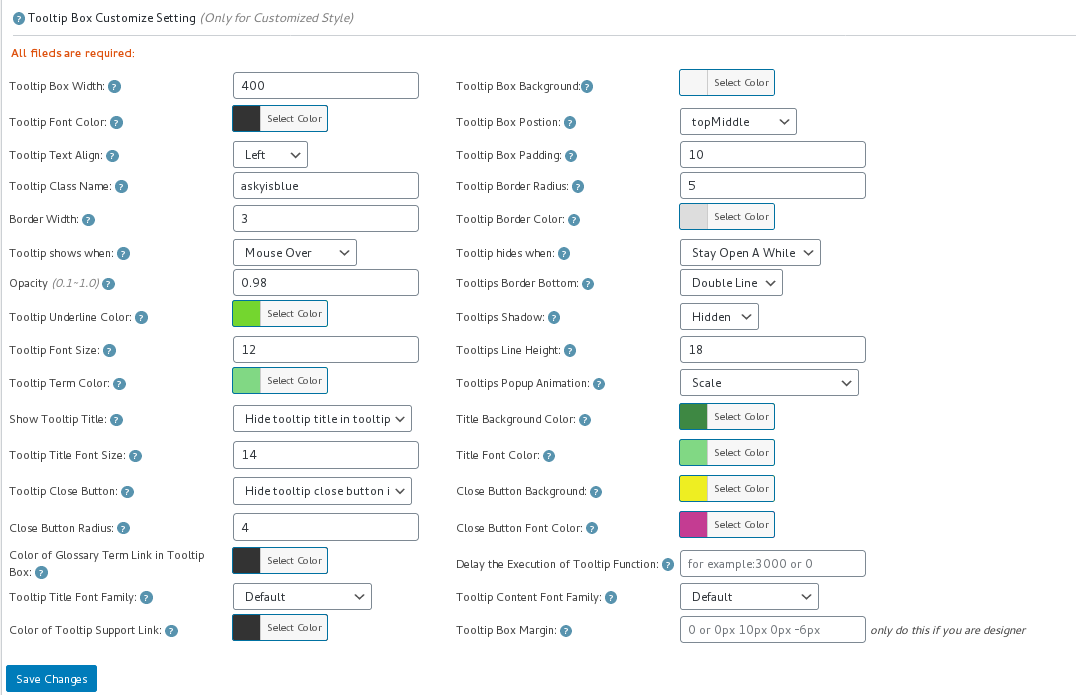
6: In “Tooltip Box Customize Settings”options panel, you will find “Delay the Execution of Tooltip Function” option, it looks like this:

tooltip style panel version 12.3.6

tooltip style panel version 12.3.6

7: Please input millisecond in the “Delay the Execution of Tooltip Function” field, then click “save changes” button, all tooltips popup window in all wordpress posts will be delayed the specific millisecond you entered in here 🙂

8: If you do not hope all wordpress tooltips popup window in all wordpress posts be delayed, if you just hope delay wordpress tooltip popup window in a specific wordpress post, you can do it too

9: Please Click “Posts” menu item

10: Edit or add a new wordpress post

11: In the wordpress post editor, you will find “Delay the execution of tooltip function” metabox at right hand of wordpress editor,it looks like this:

delay the executon of wordpress tooltip function

delay the executon of wordpress tooltip function

12: Please enter the number of millisecond to delay in here, the execution of tooltip will delay specific milliseconds to wait javascript frameworks(ajax, vue…) generate and load dynamically generated content first, and then load our jQuery codes to add tooltip effects in those dynamically generated content, please note, the priority in wordpress post editor is higher then the global settings in tooltip style setting panel 🙂
WordPress Tooltip Plugin is powerful and very easy to use, right? How about give us a 5.0 ratings on wordpress.org? 🙂

If you have any question or suggestion of wordpress tooltip plugin, please don’t hesitate to tell us, we are always happy to realize wordpress tooltip feature for you, that’s why we released more than 100 wordpress tooltip versions in last 10 years 🙂
Thanks, have a blessed day with your family 🙂
Best Regards,
WordPress Tooltip Glossary Plugin Support
Tagged with: , , ,
Top


