Tag: woocommerce glossary

WordPress Tooltip Plugin 14.3.6 — WooCommerce Tooltip Menu Notify Bar

Hi dear users of WordPress tooltip glossary plugin , hope this message find you are doing well and have happy weekend with your family, we are happy to report you, we just released WordPress Tooltips Plugin 14.3.6 to help users use woocommerce tooltip addon better 🙂

What’s new in WordPress Tooltip Plugin 14.3.6?

We got a user’s ticket, he requested a few tooltip features for the woocommerce products, we have realized it for him a few days before, then he told us he purchased wordpress tooltips multi-site license plugin, for use advanced woocommerce tooltip addon for his client’s site, but he do not know how to use the woocommerce tooltip addon, we analyzed his ticket, we found the problem is he do not know how to use to woocommerce tooltip menu to enable / disable “Tooltips for WooCommerce Product Title” / “Tooltips for WooCommerce Product Short Description” / “Tooltips for WooCommerce Product Description” / “Tooltips for WooCommerce Product Attribute”  / “Tooltips for WooCommerce Product Bundles Plugin” / “Tooltips for WooCommerce Product Specifications Plugin”, we write a detailed document for him yesterday, and our developer think a better method to help users use woocommerce tooltip and woocommerce glossary addon easier — is write a woocommerce tooltip menu notify admin bar for users, so after users activated woocommerce tooltip and woocommerce glossary  addon, they will know where to find the woocommerce tooltip menu and woocommerce glossary menu to  set up their woocommerce tooltip and woocommerce glossary for woocommerce products 🙂

Also we made a screenshot for woocommerce tooltip menu and woocommerce glossary menu in here, for help users understand it better:

wordpress tooltip menus 14.3.6

wordpress tooltip menus 14.3.6

In the screenshot, you can find “Woo Tooltips” sub menu item and “Woo Glossary” sub menu item, once click “Woo Tooltips” sub menu item or “Woo Glossary” sub menu item, you can set up woocommerce tooltips and woocommerce glossary via a few clicks 🙂

If you have more have any suggestion or feature request for wordpress tooltip plugin, please don’t hesitate to tell us, we a re very happy to build the best wordpress plugin for you 🙂

Thanks, have a blessed weekend with your family 🙂

Best Regards,

WordPress Tooltip Plugin Support

Tagged with: , , ,

WordPress Tooltips Pro Plugin 14.2.6 Released, Improved WooCommerce Glossary and Glossary Shortcode

Hi Dear  WordPress Tooltips Plugin Users,

Hope this message find you are doing well and have happy days with your family! 🙂 We are happy to report you, we have released wordpress tooltip glossary plugin 14.2.6 🙂

Changes in WordPress Tooltip Glossary Plugin:

1: Woocommerce Glossary new option “Number of Glossary Items display in WooCommerce Product Tabs”

We got a ticket from a woocommerce glossary user who said that the new addon “woocommerce glossary” is a very good feature that helps him show more details of the product with an elegant way in the limited space of the product page, which helps to increase the sales of the woocommerce product.

And he especially like the feature that woocommerce glossary support only show specific woocomemrce glossary category, but his problem is that he wrote many woocommerce glossary items, so he want to have an option to allow woocommerce store manager to decide how many woocommerce glossary items to show in woocommerce glossary tab

This is the great feature reqeust, we have re-developed the our woocommerce glossary addon to allow woocommerce store manager to custom the number of woocommerce glossary items in the woocommerce glossary settings panel, it looks like this:

woocommerce glossary addon

woocommerce glossary addon

By default, when woocommerce store manager add enabled woocommerce glossary tab in his woocommerce product pages, we will show all woocommerce glossary items in the woocommerce glossary tab, an example looks like this:

woocommerce glossary tab with full items

woocommerce glossary tab with full items

But if woocommerce shop manager entered the woocommerce glossary number in the option “Number of Glossary Items display in WooCommerce Product Tabs”, wordpress tooltip pluginwill display only the specified number of woocommerce glossary items in woocommerce glossary tab, it looks like this:

woocommerce glossary limited items

woocommerce glossary limited items

2: WordPress glossary shortcode support displaying only a specific number of glossary items in glossary page

Our wordpress glossary developer think that the new feature is not only for woocommerce stores, but in fact all glossary should support this feature – just show the specified number of glossary on the glossary page, so we re-developed our glossary shortcode to support this function, since wordpress glossary 14.2.6, you can use the [glossary] like this:

[glossary limit=10]

If you want to display all glossary items in the glossary page, just remove the “limit” and use [glossary] directly 🙂

3 Fixed a bug of wordpress tooltip shortcode tooltip_by_id in wordpress tooltip plugin

An amazing user found, under some specific settings, some special characters will appear, we have find the reason and fixed this problem in wordpress tooltip plugin, thanks for the great bug report 🙂

If you have any question or suggestion of wordpress tooltip plugin, please don’t hesitate to tell us 🙂

Thanks, have a blessed day with your family 🙂

Best Regards,
WordPress Tooltip Glossary Plugin Support Team

Tagged with: , , ,

WordPress Tooltip Glossary 14.2.0, Support WooCommerce Glossary

Hi Dear WordPress Tooltip Glossary Users,
Hope this message find you are doing well and have happy weekend with your family! We are happy to report you,We just released WordPress Tooltip Glossary Plugin 14.2.0, to support WooCommerce Glossary 🙂

What’s new in wordpress tooltip glossary pro plugin 14.2.0?

We get a wordpress tooltip glossary pro plugin user’s feedback, he told us he purchased our wordpress tooltips glossary pro plugin, it works great and help him build a powerful woocommerce shop with woocommerce tooltips, he feel happy that woocommerce tooltip can add tooltip effect on woocommerce product title, description, short description, and even product title in woocommerce shop page, or woocommrece plugin products page attribute tabs, all things works great, and he want more 🙂
He hope have a chance to add wordpress glossary in woocommerce product tabs, because he need add more product attributes and descriptions in one single tabs, to help woocommerce customer understand details about his toolbox, with images and videos for each element in toolbox, to help users understand the product and choose plans more easier, and he will save time to answer user’s question in online chat box, what he need is just send woocommerce glossary tab to users which chat with his support 🙂
No problem, this is the first time, we heard this kind of requirement to use glossary in woocommerce product tabs, our developer worked hard in many  days to support this woocommerce glossary functions and we are happy to report you, with wordpress glossary plugin multiple site license version 14.2.0, wordpress glossary plugin start to support woocommerce glossary in woocommerce product tabs 🙂

How to use woocommerce glossary?

It is very easy to use woocommerce glossary in woocommerce product tabs:
1: Login wordpress admin area
2: Click tooltips menu item
3: Click addons sub menu item
4: In tooltip glossary addons panel, it looks like this:
enable woocommerce glossary addon

enable woocommerce glossary addon

Please check “glossary for woocommerce products” option, and select “enable glossary for woocommerce ” option in the select box, and click “update now” button 🙂
5: Then under the tooltips menu item, you will find a new sub menu item “woo glossary”
6: Please click the woo glossary sub menu item
7: you will open woocommerce glossary settings panel, it looks like this:
woocommerce glossary settings panel

woocommerce glossary settings panel

8: In the option “glossary category in woocommerce product tabs:, you will find you can opt to display all glossary items in woocommerce product glossary tab, or do not display any glossary items in woocommerce product glossary tab, or show specified glossary items from a glossary category — when you add / edit a glossary in tooltips editor, you can select the category for that tooltip term .
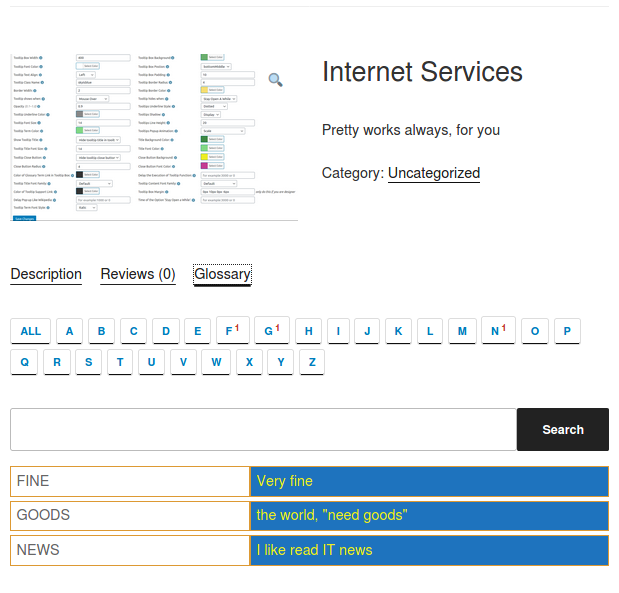
9: Once you clicked submit button, in front end, you will find in the woocommerce product tab, there are glossary tab, if you click glossary tab, you will find the glossary show in the content area in the woocommerce product tab, it looks like this:
woocommerce glossary front end

woocommerce glossary front end

10: In glossary style sub menu item, you can custom font color, background color, font family …. and so on
Thanks a lot of the amazing feature request of the woocommerce glossary, if you have any question or suggestion of wordpress tooltip plugin, please don’t hesitate to tell us 🙂
Thanks, have a blessed day with your family 🙂
Best Regards,
WordPress Tooltip Glossary Plugin Support Team
Tagged with: , , ,
Top