
How can I stop the tooltip from appearing offscreen on mobile?
1: If you don’t have our wordpress tooltip plugin installed on your wordpress, please login your buyer account at wordpress tooltip site, if you have installed wordpress tooltip plugin on your site, please jump to step #10 directly 🙂
2: Download wordpress tooltip plugin via “My account” page
3: Login admin area of your wordpress site
4: Click “Plugins” menu item
5: If you installed wordpress tooltip free plugin or other version of our wordpress tooltip plugin, please deactivated old tooltips version
6: Delete the old wordpress tooltip plugin
7: In “Plugins” menu item, click add new at the top of the plugins panel
8: Upload the tooltips plugin zip file which you downloaded from wordpress glossary plugin site
9: Activate latest version of wordpress tooltip plugin
10: Click “Tooltips” menu item
11: Click “Tooltips Style” sub menu item, you will open “Tooltip Style Settings” panel, it looks like this:
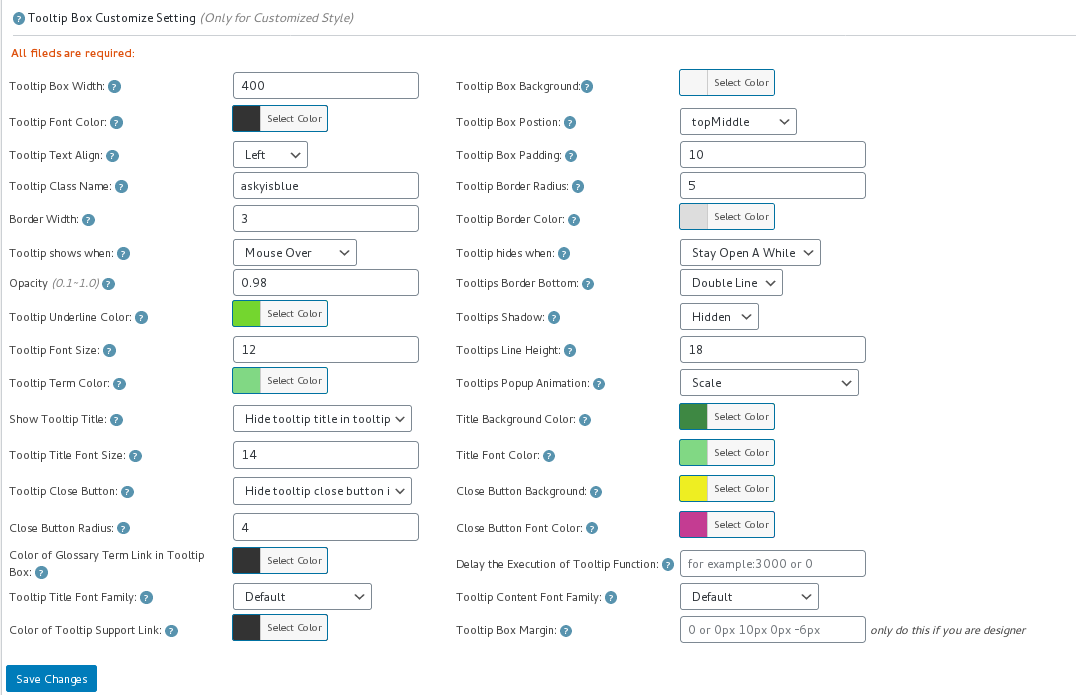
tooltip style panel version 12.3.6
12: In the screenshot of tooltip style settings panel, you will find the option: “Tooltip Box Postion” at the top of the “Tooltip box Customize Setting” panel, Please set the “Tooltip Box Postion” option to “topMiddle” or “bottomMiddle”.
13 Click “Save Changes” blue button at the bottom of the “Tooltip box Customize Setting” panel
14 In front end, when you open your page on mobiles, you will find the tooltip popup box does not go beyond the boundaries of the mobile screen.




