
Hi Dear WordPress Tooltip Glossary Users,
Hope this message find you are doing well and have happy days with your family! Based on wordpress tooltip user’s feedback, we have released WordPress tooltips Pro plugin 14.1.8 🙂
What’s new in wordpress tooltips pro plugin 14.1.8?
We get a wordpress tooltip user’s message,he said he is doing SEO A/B testing for his website, he wants to show some tooltip terms on different pages, but with different content and style of tooltip, he wants to know which tooltip terms are most liked by users and which tooltip terms have how many views, so that he can adjust the style of tooltip window according to user’s preferences, and adjust the content of the tooltip popup window in the way that the user likes. 🙂
This is a good idea, we used to have count module for tooltip term to count the actual number of displays, but because we found some conflicts after we upgraded the javascript package, we disabled it, this time after receiving this user’s feature request, our developers spent some effort to research and resolve these conflicts, and finally we re-enabled the wordpress tooltip’s display statistics feature :)If you upgraded to wordpress tooltips plugin 14.1.8, when you view tooltip terms in back end, you will find it looks like this:
This is a good idea, we used to have count module for tooltip term to count the actual number of displays, but because we found some conflicts after we upgraded the javascript package, we disabled it, this time after receiving this user’s feature request, our developers spent some effort to research and resolve these conflicts, and finally we re-enabled the wordpress tooltip’s display statistics feature :)If you upgraded to wordpress tooltips plugin 14.1.8, when you view tooltip terms in back end, you will find it looks like this:
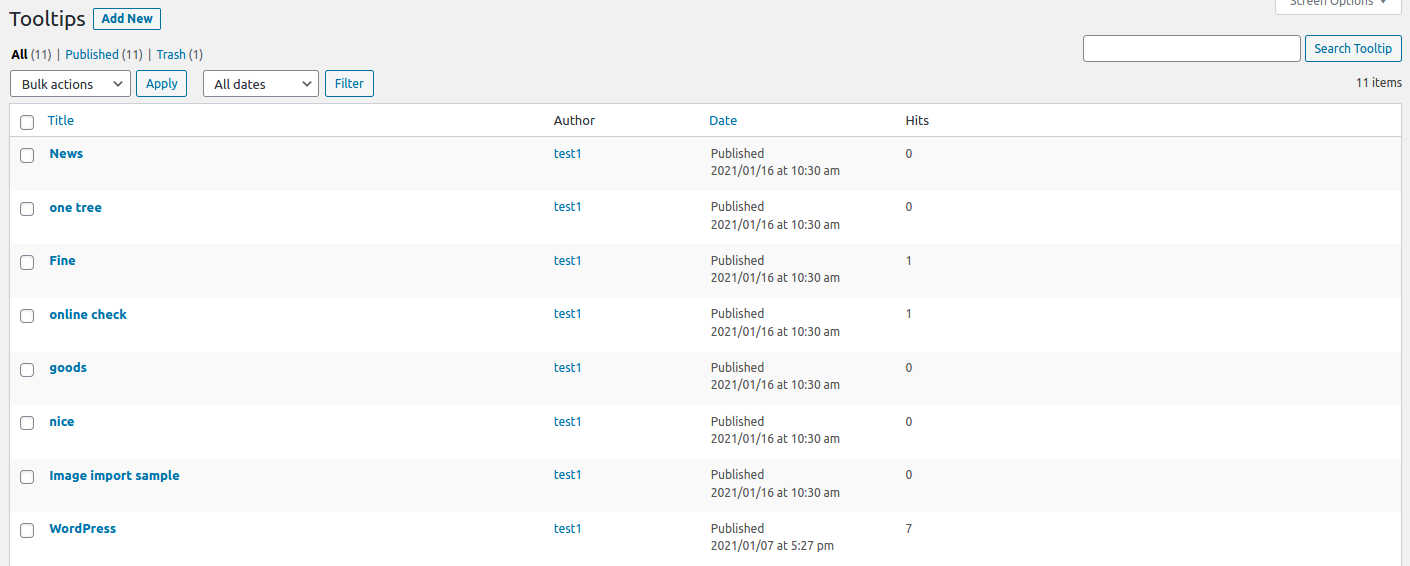
You can see, in “all tooltips” panel, there are a column “Hits”, if users mouse hover a tooltip term or click a tooltip term (based on your method of how to display tooltip option in “tooltip style” panel), we will send the number of user click requests to the database in the backend using javascript ajax function, and show the hits in the back end 🙂
Please upgrade to wordpress tooltip pro plugin 14.1.8 and enjoy the wordpress tooltip hits statistics function 🙂
We are developing the new functions for wordpress tooltip plugin, if you have any question or suggestion of wordpress tooltip plugin, please don’t hesitate to tell us 🙂
Thanks, have a blessed day with your family 🙂
Best Regards,
WordPress Tooltip Glossary Plugin Support Team




