
Hey, Dear users of WordPress Tooltip plugin , hope this message find you are doing well and having happy weekend with your family 🙂 We get a wordpress user’s ticket, in which he told us he want to use wordpress page “glossary” as “glossary index page”, in the ticket he told us:
> > Hi there,
> > >
> > > I’m having trouble with my glossary page. Rather than the styled
> > > glossary that I see in your demos, I’m getting an ‘archive’ page
> > > which looks really messy. What am I doing wrong?
> > > Thank you!
Our wordpress tooltip support replied
> Hi,
> >
> > Thanks for the message 🙂
> >
> > We are very happy to help you 🙂
> >
> > Because we have many plugin versions with different functions, Would you please tell us:
> > 1 the plugin version you are using
> > 2 the URL related with the problem
> > 3 a little more details to tell us how to find the problem in the
> > URL
> >
> > Thanks, have a blessed day with your family 🙂
> >
> > Best Regards,
> > Support Team
The wordpress tooltip user replied us with more details:
Hi there,
>
> Thanks for getting back to me.
>
> Plugin version: Tooltips Pro 16.0.06
> URL: hidden in here
> Problem:
>
> When I created a glossary index page through the Glossary Settings section, it set it as a ‘tooltips archive’ page which I can’t customise in any way. It’s just a list of terms and excerpts like a blog page, with no clickable alphabet at the top.
>
> Here’s what I would like it to look like:
> url hidden in here
> This is a page I’ve created myself using the shortcode. But instead I get this:
> url hidden in here
>
> I wouldn’t mind if I could just use the style page (/glossary) but all of the terms come with breadcrumbs that link back to that archive page (currently called Glossary3).
>
> Am I doing something wrong?
>
> Many thanks,
Thanks for this detailed description of the question, we understood it, yes, we can solve it by a few simple steps in wordpress tooltips plugin and wordpress site, I think may be more wordpress tooltip users have similar requirement, I’d like write a detailed step by step document with screenshot to help all users to do this easily 🙂
How to use the wordpress post name “glossary” as glossary index page in wordpress tooltip plugin?
I believe the what the wordpress tooltip user want is let wordpress page “glossary” https://www.tooltips.org/glossary/ — by default, it is a wordpress glossary category archive page, it looks like this:

wordpress tooltip glossary archive page
looks like this — https://tooltips.org/glossary-demo/ — a wordpress glossary page with full functionality, it looks like this:
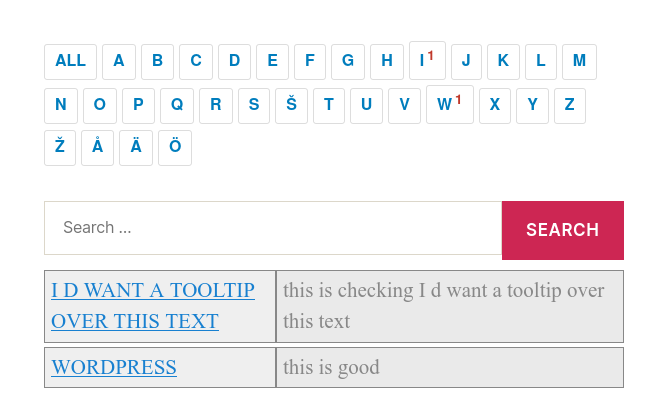
wordpress glossary default blue template
if so, yes you can do it by this way:
1: login wordpress as admin
2: click tooltips menu item
3: click “glossary settings” sub menu item
4: you will open “glossary settings” page, it looks like this:

glossary custom panel in wordpress glossary 16.0.8
5: as you can see, in the “glossary customize settings” panel, you will find the option “glossary index page” is set as “glossary” — the “glossary” page is a wordpress page which created automatically by wordpress tooltips plugin, as wordpress tooltip glossary archive page to list all glossary items and link back to each glossary item — for improve SEO rank of your wordpress glossary site in google, you can change it by this way:
5.1: please create a New page in wordpress editor, for example, create a new wordpress post using the title “glossaryindexpage” or any other title you want in wordpress post editor, you do not need enter any content in wordpress editor, wordpress glossary plugin will generate all content in this glossary archive page automatically, so what you need to do is just give the wordpress post a title and then publish this page directory. 🙂
5.2 back to “glossary customize settings” panel, in your browser for example firefox, refresh this page to let the new wordpress post show in the the option “glossary index page”
5.3 then in “glossary customize settings” panel, click the select box in the option “glossary index page”, you will find the new page “glossaryindexpage” that created in the step #5.1, has been added into the select box, just select “glossaryindexpage” as your “glossary index page” and click the blue “save changes” button
5.4 okay, now the “glossary” page is free, you can edit page “glossary” in wordpress editor, what you need to do is just insert glossary shortcode in the content — [glossary], and publish it
5.5 in front end when you open the page https://www.tooltips.org/glossary again, you will find it works like:
5.6 then in the new page glossaryindexpage, it will works like your old “glossary” page — a wordpress glossary archive, now it will display a list of terms and excerpts 🙂
I guess may be this is what you want? 🙂
Conclusion:
With wordpress tooltip glossary plugin, you will owned glossary archive page automatically which is a real wordpress page that created by wordpress tooltip plugin automatically, and you can release the wordpress page “glossary” to add other functions in the “glossary” page, for example, insert wordpress tooltip shortcodes, for example — insert [glossary] shortcode to let it works like a full wordpress glossary functionality page which looks like this: wordpress glossary
Best Regards,
Support




