
Hi Dear WordPress Tooltip Plugin Users,
I get a user’s question, in which he asked us:
I just bought the Tooltips PRO plugin. I’m trying to show an audio tooltip when the mouse hover an image , The problem is that the tooltip disappears when I move the mouse towards the audio, so it doesn’t allow you to hear it. Any way to solve this problem?
I guess maybe a few users have the same question, I will reply in here publicly, it is very easy to solve the problem, would you please:
#1 Go to wordpress admin area
#2 Click tooltips menu
#3 Click tooltips style sub menu item
#4 You will open “Tooltips Style Settings” Panel, in “tooltip box cuustomize setting” option panel, you will find “tooltips hides when” option box, please select “stay open a while”
#5 Click “save changes” button.
It looks like this:
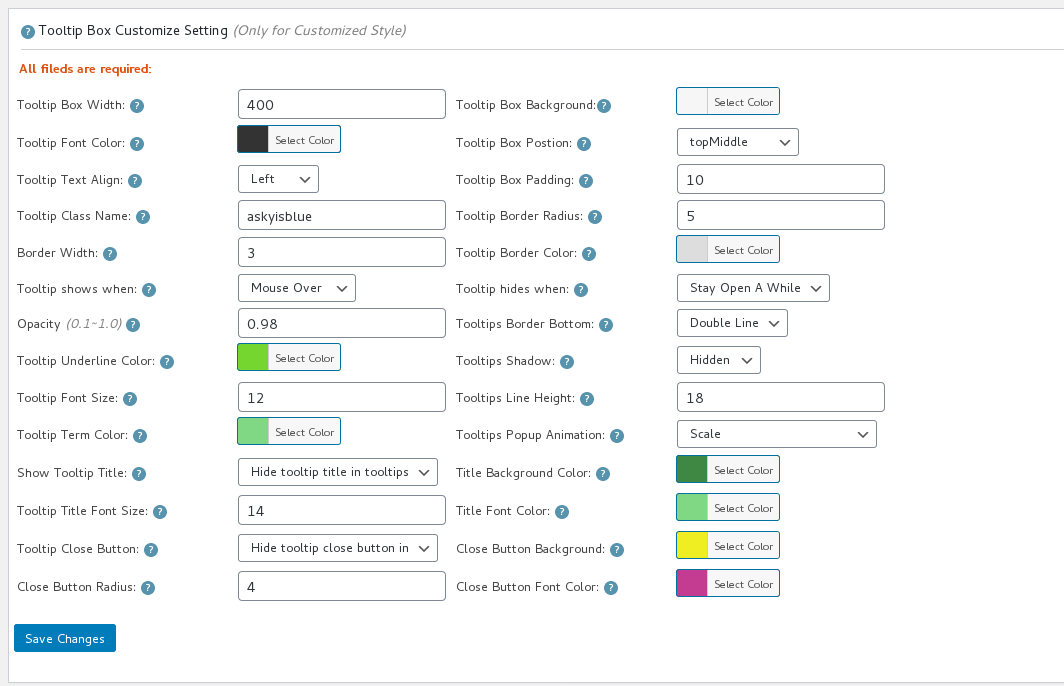
tooltip box customize setting
By this way, when the mouse leaves the tooltip terms, you can click links in the tooltip, or click button to play audio or video in tooltip box 🙂
Hope this have a little help 🙂
Any more question or feature request is welcome 🙂




