
Hi, Dear users of wordpress tooltip , hope this message find you are doing well and having happy weekend with your family 🙂 In last article we reported that we are working hard to develop a new amazing function for wordpress tooltip users: AI Tooltips — wordpress tooltip users can use OpenAI chatgpt to generate content for wordpress tooltip automatically. After many days research and tacking key problems from morning to night and some days of all night work, we are happy to report you, we developed a new wordpress tooltip pro plus plugin 19.4.8 to support use artificial intelligence to generate content for tooltip automatically, what you need to do is just enter tooltip title and a few prompts, you will get a high level content for your tooltip in one minute, in our test, wordpress tooltips plugin generated a few wordpress tooltips with 5000 words in 3 minutes via artificial intelligence automatically, we cannot wait to dedicate this product to you! 🙂
How to use artificial intelligence to automatically generate tooltip content?
1: Please login tooltips.org and click download wordpress tooltip to download wordpress tooltip pro + plugin (version >=19.4.8)
2: Install latest version of wordpress tooltips pro plus plugin in your wordpress site, new user please check our video of how to install wordpress tooltip at: WordPress Tooltips Video Tutorial 3: How to upload and activate wordpress tooltips pro plugin
3: After activated wordpress tooltip pro + plugin, click “Tooltips” menu item, click “Optional Settings” sub menu item, then enter your openai api key in “OpenAI keys” input text, it looks like this:

openai key in Optional Settings for AI tooltips
example openai key looks like:
apikey: sk-p999HAfj6Xm1bO00SXgJc7kFxvFPtQ1KBBWrqSXT
This is not a real openai key, please check our section “using openai costs money” in next section in this document.
If you don’t know what is OpenAI , please just read our detailed instructions on how to register and obtain openai key later in this article — by the way, all instructions is generated by artificial intelligence.
4: After end your openai key, please click “AI Tooltips” sub menu item, it looks like this:

Generate Tooltips via OpenAI settings panel for AI Tooltips
5: Please enter tooltip title in the “Title” input box, and then enter prompt in “Prompt” input box, in our test, we’d like ask AI to generate with this kind of format: “Please write a long article about ‘what is tooltip'”, if you just enter “what is tooltip”, then oepnai chatgpt will just give you a short message, if you tell AI give you a “long article”, then OpanAI chatgpt will generate a high-level detailed content for you automatically. Please don’t forget to enter max tokens, you will see detailed instruction about max tokens in the later part of the article 🙂
6: After enter all the requirements, please click the blue “Generate Tooltips Automatically” button, then AI will generate AIGC(AI Generated Content) content for you automatically, just need about a few seconds. 🙂
In wordpress tooltip plugin, we will save the AIGC content as draft, and we will give you a notification bar with the link to edit this AIGC content, you can edit the edit link to check the content and publish it — in next version we will develop a new option to let wordpress tooltip admin to decide publish AIGC content directly or save it as draft first…etc 🙂
The notification bar looks like this:

generated AI Tooltips via OpenAI
7: You can edit the AIGC content in wordpress tooltps editor, our developer asked Artificial Intelligence tell us “What is tooltip”, and wordpress tooltips plugin saved the AIGC content as tooltip draft and displayed a editor link of the AIGC tooltip post, after click the edit link, wordpress tooltip editor can check the content and publish the tooltip, it looks like this:

the content of the long article that generated by AI automatically
At front-end, wordpress tooltip plugin will display the AIGC content in wordpress tooltip popup box, it looks like this:

AI generated tooltip in front-end
AI generated a high-level article, right? 🙂
8: Also in All tooltips panel, you can find AIGC post listed in here as draft, you can use quick edit to publish it directly:
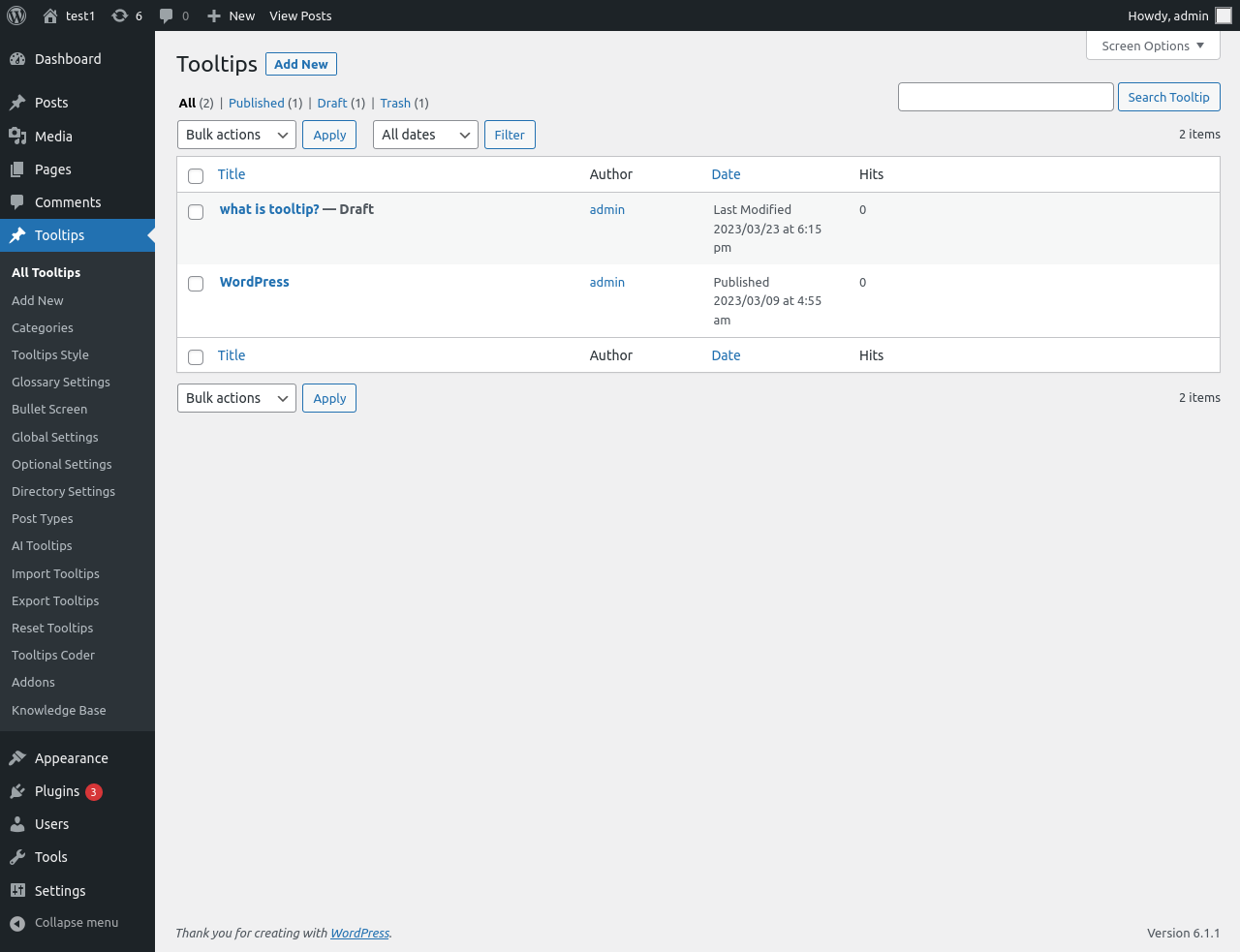
auto-generated AI tooltips just need publish it
8: Via wordpress tooltip AI tooltip function, you can easily add various interesting content to enhance the taste of the article and feed back your readers with a feast of thoughts, for example, let’s add a light seasoning to relax the reader, let’s ask the openai chat bot to generate a joke for the word “writing”, OpenAI chatbot create a short joke in 1 second like this:
Q: What did one page of writing say to the other page?
A: Nothing, they were just separated by a sheet of paper.
Then wordpress tooltips plugin saved the joke and guide the wordpress tooltip editor to the tooltip editor, after review the content that generated by AI, you can decide publish it or not, it looks like this:
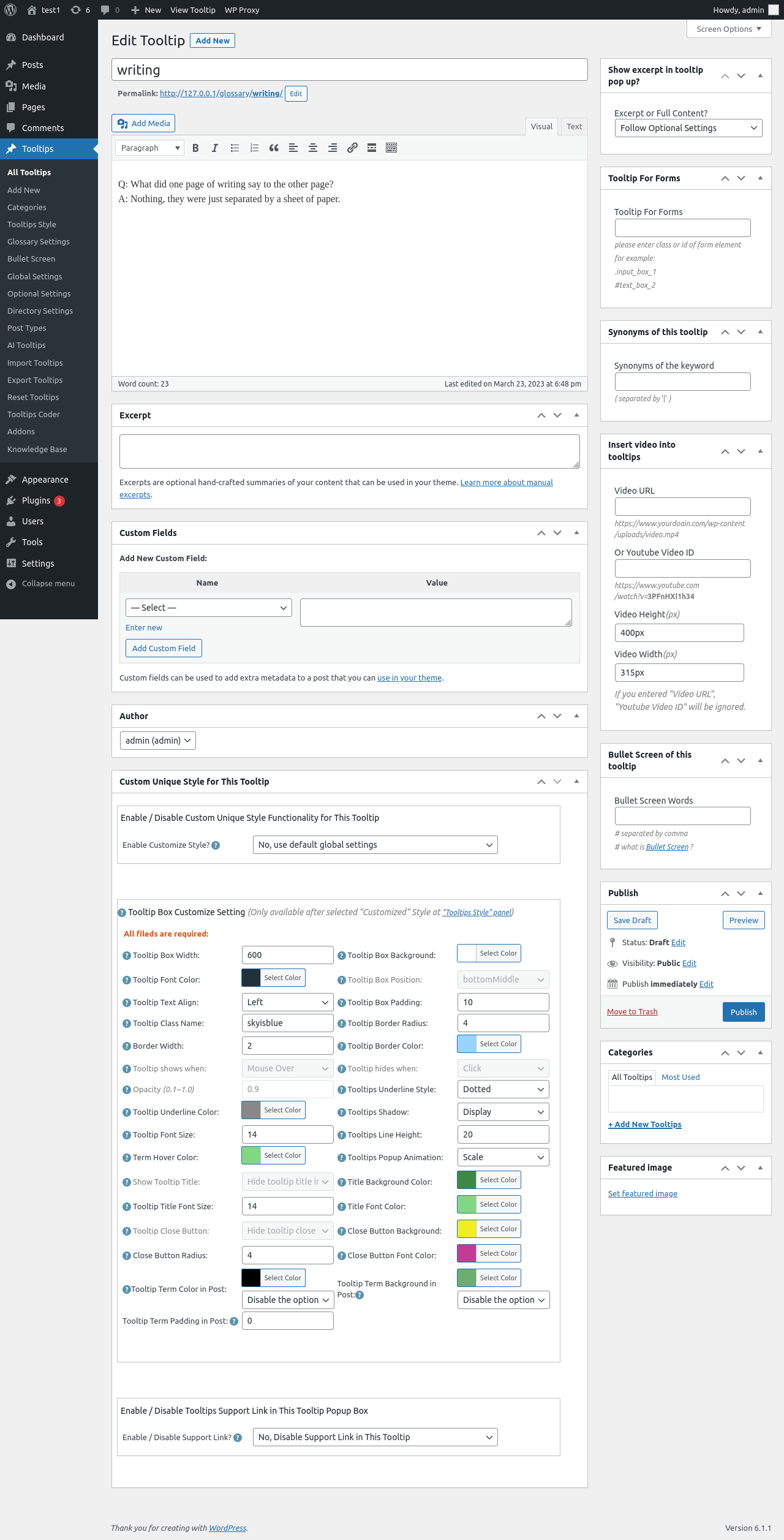
a joke about writing that generated by AI
In front end, wordpress tooltip plugin will display AIGC content in wordpress tooltip popup window like this:
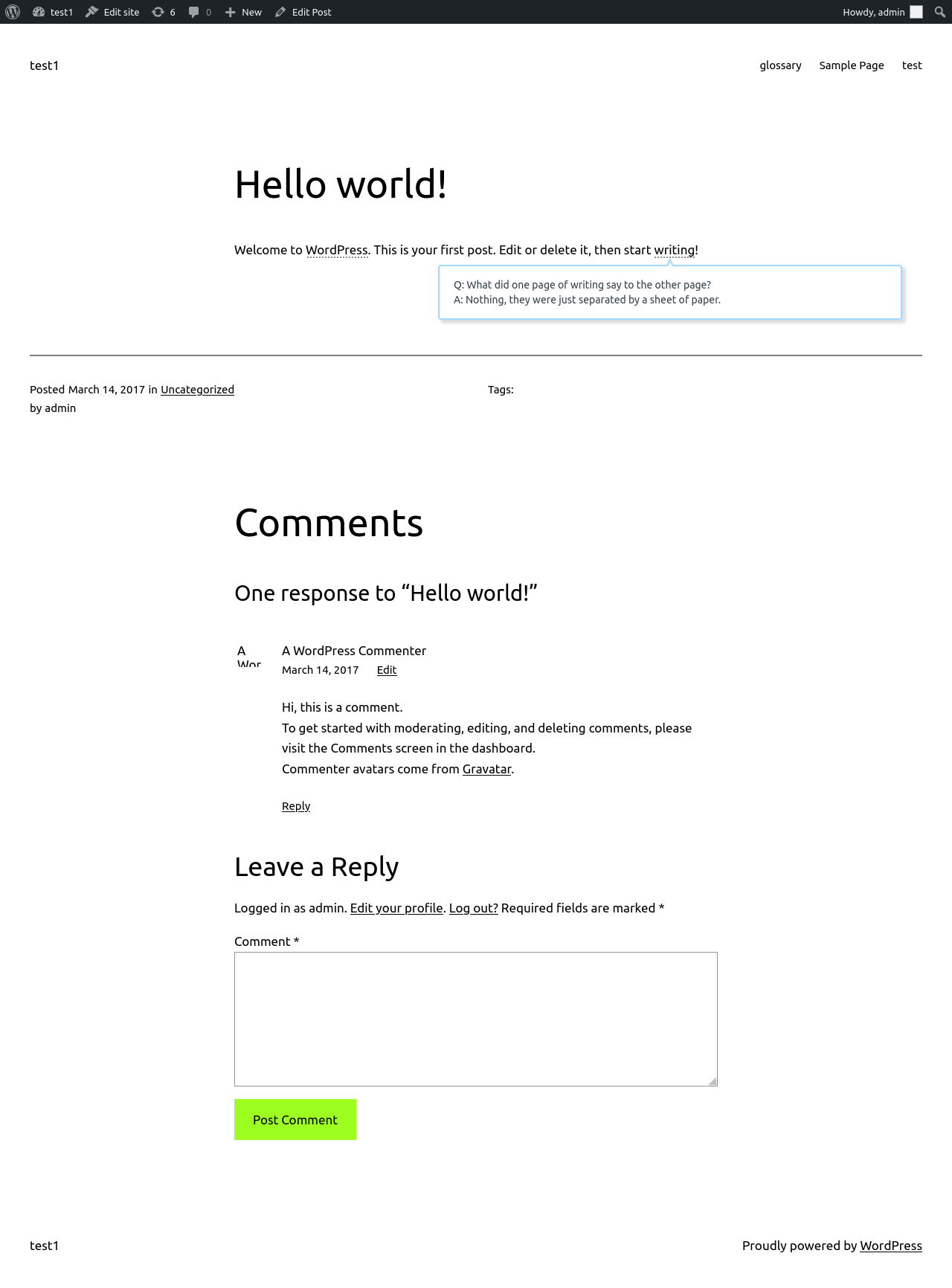
the joke that generated by AI in front-end
Wow, this makes writing extremely easy and you can provide readers with a lot of interesting additional information, which will add a lot of color to your masterpiece 🙂
In next version, we will allow wordpress tooltip users opt to save the AIGC content as wordpress post, you will get many many great high-level content for your site automatically 🙂
We spent three minutes getting AI to write all the remaining articles for us, all these content is generated by artificial intelligence:
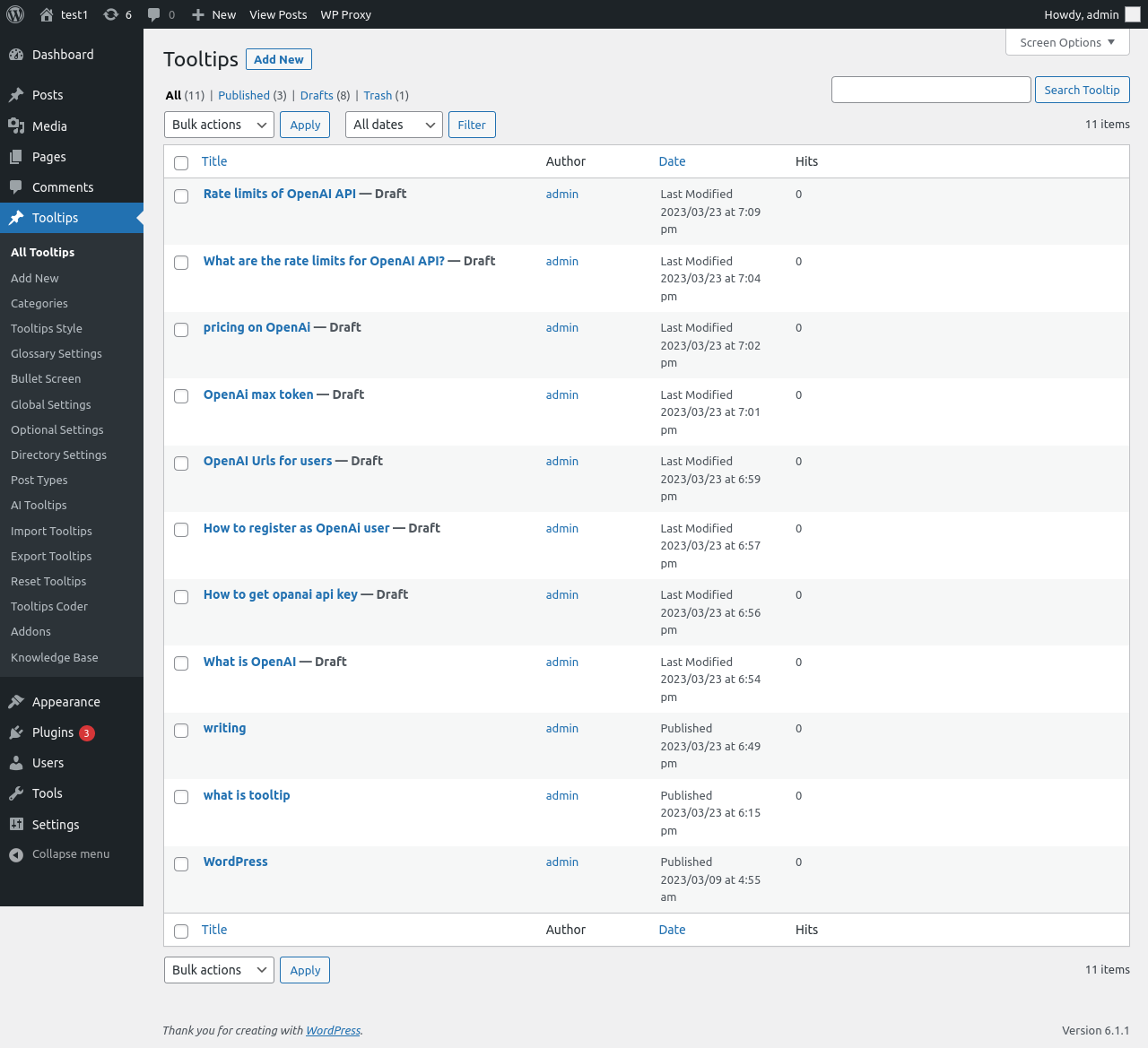
All these article generated by AI automatically — more than 5000 words in 3 minutes
All the rest is generated by artificial intelligence.
How to register as OpenAi user
Registering as an OpenAI User
OpenAI is an artificial intelligence research laboratory consisting of the greatest minds in the field of machine learning and artificial intelligence. It was founded in 2015 with the goal of advancing artificial intelligence in order to benefit humanity. OpenAI has become one of the most successful research labs in this field, and has made great advances in many fields, such as robotics and natural language processing.
If you are interested in learning more about OpenAI and contributing to its research, you need to register as an OpenAI user. This article will discuss the general steps necessary when registering as an OpenAI user.
Step 1: Create an OpenAI Account
If you are a new user, the first step towards registering as an OpenAI user is to create an account on the OpenAI website. To do this, you will need to provide a valid email address and some personal information. After registering your account, you will receive an account activation email.
Step 2: Verify Your OpenAI Account
Once you have registered your OpenAI account, the next step is to verify your account. This is done by clicking the link in your account activation email. You will be asked to enter a username and password. Once you have successfully verified your account, you will be able to access the OpenAI resources.
Step 3: Join a Research Group
Once your OpenAI account has been verified, you need to join a research group. The OpenAI team is divided into three groups – the Collaboration Team, the OpenAI Executives, and the OpenAI Fellows. Each of these groups has their own section of the main website and their own research projects. Once you have selected the research group you wish to take part in, you can fill out the application form and submit your application.
Step 4: Participate in Research Projects
Once you have been accepted into a research group, you will be able to participate in their research projects. Depending on the project and the research group, this can involve working on coding projects, helping to collect data, or providing feedback on the research. You can also attend meetings or seminars related to the research projects.
Step 5: Access OpenAI Resources
As an OpenAI user, you will have access to the OpenAI resources, such as the OpenAI Universe, OpenAI Gym, and the OpenAI Platform. You will also be able to use the OpenAI Library, which is a collection of open source software for research on artificial intelligence.
Step 6: Participate in Research Outreach
As an OpenAI user, you have the opportunity to participate in research outreach to the community. This includes giving back to the open source community and providing feedback on current research projects. It is a great way to stay connected with the research and to learn more about the current development of artificial intelligence.
Step 7: Submit Research Proposals
OpenAI encourages users to submit research proposals. This is a great way to contribute to the research conducted by the OpenAI team. If your proposal is accepted, you may be awarded an OpenAI Fellowship, and gain access to resources and funding to further develop your research.
Conclusion
Registering as an OpenAI user is a great way to become involved in the world of artificial intelligence research. From joining a research group and participating in projects, to accessing OpenAI resources and even submitting research proposals, there are many ways to contribute and be part of the OpenAI community. All you need to do is create an OpenAI account and begin your journey.
How to register as openai user and generated openai key
Step 1: Visit the OpenAI homepage and click the “Sign Up” button at the upper right corner of the page.
URL: https://beta.openai.com/
Step 2: Create an OpenAI account. You can create an account by providing your address, phone number, and creating a password.
Step 3: Log in to your OpenAI account.
URL: https://beta.openai.com/sign-in/
Step 4: After you log in, click the “API Keys” button in the left navigation bar.
URL: https://beta.openai.com/account/keys/
Step 5: In the API Keys page, you can generate new API keys. Click the ” Generate API key” button to generate a new API key.
Step 6: Once the API key has been generated, you can copy the API key and use it with OpenAI API services.
That’s it! You now have registered as an user of OpenAI and generated the OpenAI API Key.
OpenAi max token?
OpenAi Max Token is a crypto token created by Elon Musk’s AI research firm, OpenAI. It is a Decentralized Autonomous Organization (DAO) token designed to serve as a utility token to power OpenAI’s products and services. The token will allow users to access OpenAI’s products and services, such as its AI systems, analytics, and more. It is an ERC-20 compliant token, based on the Ethereum blockchain, so users can store, transfer, and trade it just like any other cryptocurrency. OpenAi Max Tokens are intended to incentivize developers to use OpenAI’s services, helping to build a stronger and more robust platform. As such, the token provides users with access to a wide range of AI tools and services, such as machine learning and natural language processing. Additionally, the token will help fund the development of new features and products for OpenAI, allowing for better and more powerful AI technology.
What is tooltip?
Tooltips are useful, small pieces of information that are displayed whenever a user places their cursor over an item or element on a website. They are sometimes referred to as “mouseovers” or “pointers”, and they provide helpful information related to the item or element in question. For instance, when a user places their cursor over a button, a tooltip may appear which describes the function of that button, or when a user hovers over text, a tooltip might provide a definition for a phrase or word that appears in the text.
Tooltips can be used to communicate information related to any element of a webpage, from form fields and links, to icons and images. The aim of a tooltip is to reduce the need for extra clicks by further explaining the function of a given item at a glance. As well as providing potentially useful contextual information for users, tooltips can also be used to cleverly guide people’s interactions with a page, helping to create a more natural, user-friendly experience.
So, how are tooltips usually created? For smaller projects and websites, it’s often possible to create or modify basic HTML or CSS code to create custom tooltips. In more complex sites, though, automated Javascript plugins are often needed to quickly, easily, and reliably generate tooltips on individual pages.
Despite their usefulness, it’s important to remember that tooltips should not be relied upon too heavily. It’s important to provide clear, self-explanatory menus and links, rather than relying on tooltips to supply all of the necessary information. This way, users will be able to quickly and smoothly navigate the site, no matter where their cursor happens to be.
In conclusion, tooltips are invaluable pieces of information that can greatly improve the user experience of a website, providing helpful contextual information at a glance. However, it’s also important to ensure that sites are optimised for usability in other ways too, as tooltips cannot and should not be counted on to provide all the necessary information.
What is OpenAI
OpenAI is a research laboratory focused on artificial intelligence and machine learning. Founded in December 2015, the lab is backed by entrepreneurs Elon Musk, Peter Thiel, and several other tech luminaries. OpenAI’s mission is to “advance digital intelligence in the way that is most likely to benefit humanity as a whole, unconstrained by a need to generate financial return.”
The OpenAI team consists of scientists, engineers, and economists working to develop advanced artificial technology. OpenAI works with a wide range of research initiatives, such as robotics, computer vision, and natural language processing (NLP). Through its research, OpenAI hopes to explore the world of intelligent machines, identify the application and ethical concerns of AI technologies, and help businesses use secure and reliable AI systems in their operations.
OpenAI pursues its research objectives mainly through deep learning, a specialized AI application where computers learn to identify patterns in large datasets. Deep learning models are trained with massive amounts of data to pick out patterns, enabling computers to understand patterns in images, videos, and audio recordings. OpenAI uses its own deep learning models to explore various AI topics and applications such as autonomous driving, computer vision, and natural language processing.
In addition to exploring AI topics, OpenAI pursues its research goals through partnerships and collaborations with universities, corporations, and industry leaders. OpenAI also works with entities such as Google and Microsoft to develop AI frameworks and libraries for other companies to use.
OpenAI also pursues its research goals through open source projects and competitions. By releasing projects and libraries open source, OpenAI allows developers and companies to learn and apply artificial intelligence concepts to their own projects and products. OpenAI also runs the AI Dungeon, which offers AI-based game competitions that allow developers to compete against each other’s AI-powered approaches.
In addition to research and development, OpenAI also specializes in policy and ethics research. Through its policy research, OpenAI strives to explore the impact of AI technologies on society, identify legal and ethical policies to ensure the safe and responsible use of AI, and work to ensure that AI technologies do not become a source of inequality and exploitation.
OpenAI’s primary goal is to make the world a better place through artificial intelligence and machine learning. With its commitment to research and development, partnerships, open source efforts, and policy initiatives, OpenAI is working to make this goal a reality.
How to get opanai api key
If you are a developer looking to make use of OpenAI’s powerful suite of AI tools, then you will first need to get your OpenAI API key. An OpenAI API key grants you access to OpenAI’s open-source platform to build, train, and deploy AI models. But before you can access the OpenAI platform, you must first understand both the benefits that an OpenAI API key offers you, as well as the process of obtaining one. In this article, we will discuss everything you need to know to get an OpenAI API key.
What Does an OpenAI API Key Offer You?
An OpenAI API key offers you unprecedented access to OpenAI’s powerful suite of AI tools for training, deploying, and managing models. By obtaining an OpenAI API key, you become part of the OpenAI community and can access their expansive suite of open source AI tools. These tools can be used to build and train AI models, as well as to explore the latest advances in AI research. Accessing OpenAI’s AI platform can significantly simplify and speed up the process of developing and deploying AI solutions.
In addition to these base features, the OpenAI platform provides advanced tools for training and deploying AI models, such as hyperparameter optimization, integration with advanced computing resources, and more. With an OpenAI API key, these tools are at your fingertips, allowing you to more easily develop innovative AI solutions.
How to Get an OpenAI API Key
First and foremost, customers wanting to obtain an OpenAI API key need to understand the eligibility requirements for the key. Many of OpenAI’s AI tools are open to all developers, however, the advanced computing resources and the ability to develop and deploy models require some sort of payment. Accordingly, OpenAI has put in place a strict criteria for eligibility in order to obtain an OpenAI API key.
In order to be eligible to obtain an OpenAI API key, you will need to apply and fill in the Online Application Form. You will need to provide details such as your name, contact information and company or developer website (if applicable). Once submitted, the OpenAI team will review your Application and if approved, you will receive an OpenAI API key via email.
In addition to the application, OpenAI requires you to sign up for one of their AI plans and make a payment to be eligible for an OpenAI API key. The OpenAI Team offers four tiers for their AI plans ranging from the Pro plan for developers working on small projects up to the Enterprise Plan for commercial companies building advanced AI solutions. Depending on your project, you can select the most suitable AI plan for your work and make the payment using a credit card. After the payment is made, you will receive an OpenAI API key via email, allowing you to access the OpenAI platform.
Conclusion
OpenAI is an open-source platform for developing and deploying AI models. Obtaining an OpenAI API key grants you access to the OpenAI platform and all the powerful AI tools they have to offer. In order to get an OpenAI API key, you need to fill out the application and make the payment for one of the OpenAI AI plans. Once completed, the OpenAI Team will review your application and if approved, you will receive an OpenAI API key via email. With an OpenAI API key in hand, developers can build, train, and deploy AI models more easily.
Okay, we can generated many many content automatically via AI, but there are a problem, Using OpenAI costs money
Pricing on OpenAI?
Pricing on OpenAI is a complex subject, due to the wide range of services it provides. OpenAI is an artificial intelligence research and development company committed to creating beneficial smart agents that learn and act as needed in partnership with humans. It focuses on machine learning, natural language processing, computer vision, robotic systems, and more.
OpenAI provides clients with access to their pre-trained AI models, APIs, and tools for the development of new products and services. Pricing for these services varies based on the complexity of the job and access granted to the user. As a general rule, larger projects with greater complexity will require higher rates.
For instance, access to OpenAI’s pre-trained models can cost as little as $0.01 per API call (for the Economy tier) or as much as $25 per API call (for the Professional tier). OpenAI also offers an Enterprise tier that can cost as much as $100,000 or more depending on the complexity of the project.
In addition to the cost of using OpenAI’s pre-trained models, some projects may require the use of additional tools, such as Natural Language (NL) processing, natural language understanding (NLU) , computer vision (CV), and robotic systems. The cost of these additional services will vary based on the complexity of the task and the type of services needed. For example, using OpenAI’s deep learning framework (GPT-2) to build an NLU system can cost in the tens of thousands of dollars.
Finally, OpenAI also offers custom services for users who want to build a totally unique AI system from scratch. This service involves a consultation with an Open AI professional consultant to develop your specific project and an unspecified monthly fee, usually ranging from $10,000 to $50,000 per month.
OpenAI’s services are very versatile and can help you in many different ways. However, when deciding to use OpenAI’s services, it is important to understand the different pricing tiers and services available. This will ensure that you are not paying too much for what you need and can optimize your expenses.
Okay, stop, don’t worry about what the AI said…, the following is written by a real person, which is waht we wordpress tooltip support wrote: Actually we write many articles, we did not consume a lot of money
Another important problem is:
What are the rate limits for OpenAI API?
In wordpress tooltips AI tooltips panel, we requested artificial intelligence to write a instruction like this:
“write a long article to tell users about “Rate limits of OPANAI API”, include types, 1 TMP equals how much token, and users level “Free trial users” , “Pay-as-you-go users (first 48 hours)”… etc,”
The OpenAI ChatGPT replied:
Rate limits of OpenAI API
When using the OpenAI API, your application is subject to certain rate limits – the number of requests your application can make in a set amount of time. Understanding these limits is important to ensure that your application is using OpenAI resources responsibly and efficiently.
Types of Rate Limits
OpenAI offers two types of rate limits: a global limit, which applies to all of OpenAI’s resources, and a per-resource limit, which varies depending on the resource type.
Global Limit
The global limit, also referred to as the TMP limit, is the total number of request tokens you may use in a given time window, which is two hours. The number of tokens consumed for requests depends on the resource, but each TMP is generally equivalent to 1000 requests. Therefore, the number of requests will vary depending on the resource type.
Per-Resource Limit
In addition to the global rate limit, OpenAI also has a per-resource rate limit, which is specific to each resource type. These limits are based on the number of requests you can make in a given time window, which is two hours. The maximum number of requests allowed per two hour period also varies by resource.
User Levels
OpenAI offers two levels of users: Free Trial users and Pay-as-you-go users. Free trial users are limited to a total of 500 request tokens in a two hour window and 100 requests per resource type. Pay-as-you-go users, during the first 48 hours of usage, are limited to a total of 1000 request tokens in a two hour window and 200 requests per resource type. After the first 48 hours, Pay-as-you-go users will be subject to the rate limits of their chosen pricing plan.
It’s important to keep track of your usage and make sure that your application falls within these rate limits. OpenAI enforces rate limits to ensure that all users receive the best possible experience and performance. If an application exceeds the rate limit, OpenAI may temporarily block it from making additional requests until the usage falls within the rate limit again.
This is good, we checked OpenAI official page, this section is copy from the page https://platform.openai.com/docs/guides/rate-limits/overview:
Rate limits are a way for OpenAI to manage the number of requests made to its API (Application Programming Interface). OpenAI limits the number of calls per hour and per day to ensure a stable experience for all users.
OpenAI’s rate limits depend on the type of API being used. For the OpenAI GPT-3 API, the rate limit is 1 call per second and 1000 calls per day. This rate limit applies to all GPT-3 API requests from all sources and is managed using a rolling time window.
The OpenAI CLI (Command Line Interface) has a slightly different rate limit. The CLI rate limit is 4 concurrent calls per second, with a maximum of 2,000 concurrent calls per day.
When rate limiting is triggered, the OpenAI API will return a 429 error code. This code indicates that the request has been rate limited and any further requests will be dropped until the request rate has dropped below the limit.
In order to handle large numbers of requests, it is recommended that users request resources in batches instead of making individual requests. This will ensure that your rate requests do not exceed the rate limit and ensure a consistent experience.
Rate limiting is an important feature of any API, and OpenAI’s rate limits are designed to ensure quality of service for all users. It is important to keep in mind when making requests to OpenAI’s API and ensure that you are not exceeding the rate limits set in place. Doing so will ensure your requests are processed efficiently and help make the OpenAI API experience smoother for all users.
Conclusion:
Via wordpress tooltip pro plus plugin, you can easily add various interesting content to enhance the taste of the article and feed back your readers with a feast of thoughts, for example, let’s add a light seasoning to relax the reader. You can generate high-level content from openai chat bot automatically, what you need just enter a title and enter a prompt. WordPress tooltip developer is working hard to add new AIGC functions for wordpress tooltip users, you can generate wordpress post, woocommerce product…etc automatically, via wordpress tooltips plugin, artificial intelligence writer will automatically generate all kinds content for your wordpress site. 🙂




