
Hi, Dear WordPress Tooltip plugin users, I hope this message finds you are doing well and having happy days with your family Our wordpress tooltip plugin developer released a new wordpress tooltip pro plus plugin version 35.5.8, based on a wordpress tooltip user’s feedback:
Hello Tooltips Support,
…
I purchased the Pro Plus version (v35.3.8).
When I first activated the Pro plugin on my live site, the layout broke completely — header, menu, footer and mobile view collapsed.
Could you please investigate this?
Thank you in advance,
Our WordPress Tooltips support checked the user’s site and we replied:
Hi,
I hope this message finds that you are doing well and having happy days with your family 🙂
Thanks for the message 🙂
We are very happy to help you 🙂
About: “When I first activated the Pro plugin on my live site, the layout completely broke — the header, menu, footer, and mobile view all collapsed.”
Sorry for the inconvenience. We checked your lovely site , and it seems that the page is working well. Could you please provide us with a little more detail about the issue?
We suspect that the problem may be caused by one of the following:
1:It appears you are using a caching plugin. Sometimes, caching plugins can interfere with JavaScript code.
2:There might be a conflict between some of your plugins or themes and our plugin.
Would you please:
a: make sure your site will in zero-risk always by install a backup plugin like “all in one wp migration” or “duplicator” — it just need 3 minutes
b: deactivate plugins one by one, change the theme to default wordpress theme
c: Tell us which plugin or theme is causing the conflictWe will check it and resolve it for you 🙂
Thanks, have a blessed day with your family 🙂
Best Regards,
WordPress TooltipsSupport Team
The wordpress tooltip user checked their site and replied again:
Hi Support Team,
Thank you for your reply. Let me clarify the two separate issues I am facing, and where you can check them:
Problem: the Pro plugin uses the same CSS class names as the Salient theme, which causes serious layout conflicts:
The header, footer, and mobile view collapse.
The Salient editor interface also breaks.
Please see the attached screenshots.Could you please:
Fix the CSS conflict in the Pro version (e.g. by using unique class name prefixes, or allowing us to customize the CSS prefix).
This way I can safely use the Pro plugin on my live site.Thank you for your understanding,
Our wordpress tooltips developer checked the issue and developed a new version to resolve the issue for the wordpress tooltip user:
Hi,
I hope this message finds that you are doing well and having happy days with your family 🙂
We apologize for the inconvenience. We have completed a new version (35.5.8) to address this issue and uploaded it to tooltips.org, would you please:
1: login your wordpress site as admin
2: deactivate and delete the tooltips pro plus
3: in wordpress dashboard, click the “plugins” menu item to upload the newest version and activate it
4: click the “tooltips” menu item in wordpress dashboard, then click global settings sub menu
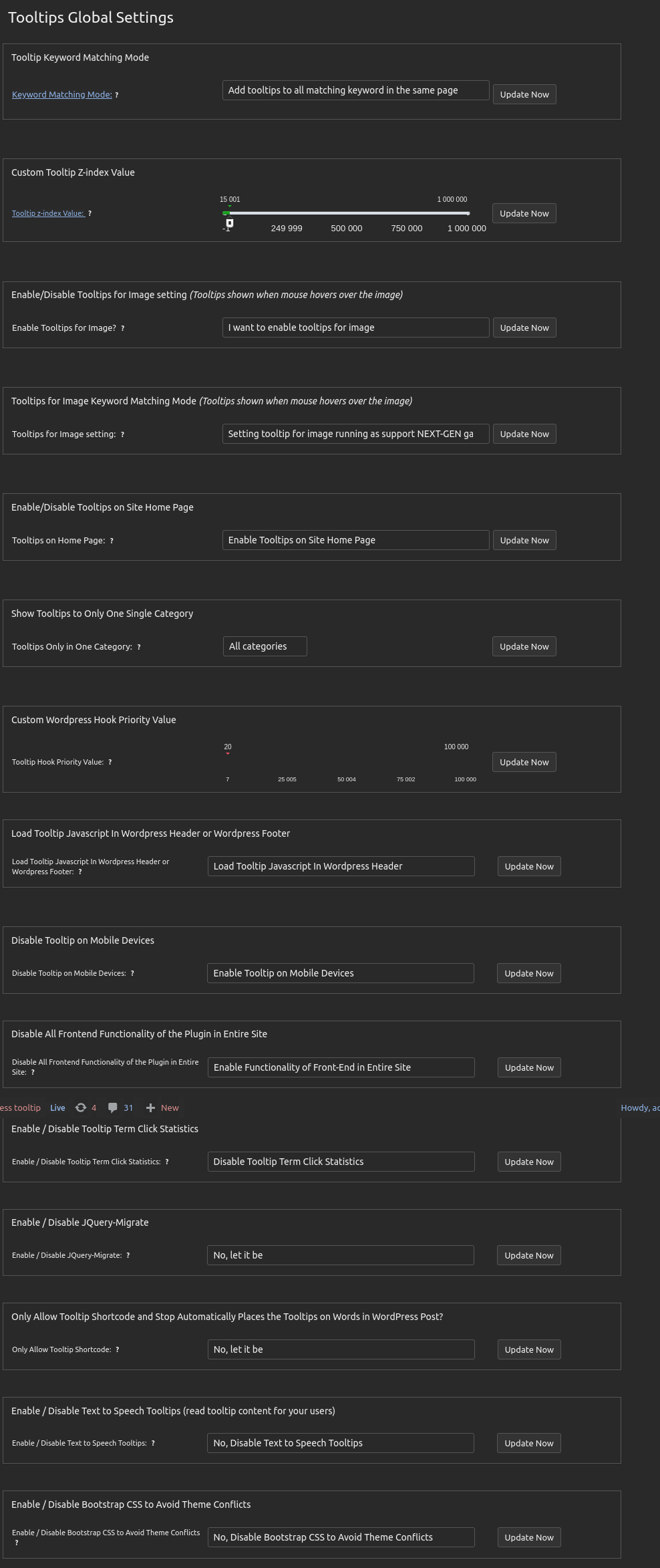
5: at the bottom of the global settings panel, you will find new option:
“Enable / Disable Awesome CSS to Avoid Theme Conflicts”
please select “No, Disable Awesome CSS to Avoid Theme Conflicts”, then click the blue “update now” button
Tooltips Global Settings in WordPress Tooltips 35.5.8
Also, please check the option ” Enable / Disable Bootstrap CSS to Avoid Theme Conflicts”, and disable it too
By this way, we can resolve the conflicts between your system and our plugin 🙂
Once again, we sincerely apologize for the delayed response. Following the developer’s illness and subsequent server hardware failure, we have only recently completed the installation of new hardware and server reconstruction. The development platform has also just been set up (it is currently 5:16 AM, and we still have no time to rest). The developer has indicated that gifts will be sent tomorrow as a gesture of apology. 🙂
Would you please upgrade to the new version?
Now we can work faster and we are happy to resolve any issue for you as soon as possible 🙂Thanks, have a blessed day with your family 🙂
Best Regards,
WordPress Tooltips Support
And:
Hi,
I hope you’re enjoying quality time with your family when you receive this letter 🙂
We previously informed you that the new version of WordPress Tooltips Pro Plus 35.5.8 has been uploaded to resolve conflicts between the theme and the tooltip plugin 🙂
We sincerely apologize for the inconvenience caused by this delay. Thanks a lot of the bug report, which is greatly appreciated by our WordPress tooltip plugin developer. As a token of our gratitude, our wordpress tooltip developer offered you a license for the WordPress FAQ Pro Plugin(https://tooltips.org/product/wordpress-faq-pro-plugin-with-wordpress-tooltips/):
The WordPress FAQ Pro plugin is a powerful tool designed to make creating and managing FAQs on your WordPress website easy and efficient. It offers a wide range of features, including pre-designed FAQ templates, customizable FAQ styles via a user-friendly interface, AI-generated high-quality content for FAQs and WordPress posts, support for WooCommerce Product FAQs, responsive design for optimal display on different devices, multiple FAQ templates to choose from, FAQs grouped by category, and the ability to specify the number of FAQ items for each FAQ page, among many other features.
Sorry for the delay of the reply and thank you very much for your patience. Our developer added a license of AI Smart Content Links plugin (https://tooltips.org/product/smart-content-links/), which will enhance your website’s content and uplift the user experience with the powerful Smart Content Links plugin. By seamlessly integrating links to relevant content within your WordPress blog posts, you can effortlessly provide valuable context, information, and resources to your readers. These intelligent links are engineered to grant quick access to related resources and information, enabling your audience to delve deeper into the topic at hand while maintaining uninterrupted flow and focus on your core message.
Leveraging the cutting-edge AI-driven Natural Language Processing (NLP), Smart Content Links empowers you to bolster your SEO efforts efficiently. With its intuitive backend interface, simply input a keyword, and the plugin will leverage AI algorithms to rank and match posts, ensuring optimal alignment between content and keywords.
We are working diligently to enhance the functionality of ll out plugins. If you have any suggestions, we are eager to implement new features for you as quickly as possible and promptly resolve any issues. 🙂
Thanks, have a blessed day with your family 🙂
Best Regards,
WordPress Tooltips Support





Leave a Reply