
Hi, Dear WordPress Tooltip plugin user, hope this message find you are doing well and having happy days with your family 🙂 An amazing wordpress tooltip user asked us a few questions, we’d like write a few detailed documents for the wordpress tooltip user — with screenshots and detailed step by step document, for help the user use the wordpress tooltip easier. 🙂 Today the question and answer is:
In the meantime I created a lot of tooltips but they are all from the same type and look. Thus I’m asking you how to achieve the following.
4) How to set the display time before the popup vanishes ?
Okay, in wordpress tooltips pro plugin we have the function to allow wordpress tooltip editor to decide how long the wordpress tooltip popup window should stay for a while in screen of a wordpress post, and when wordpress users mouse leave the wordpress tooltip term, the tooltip popup window will not closed instantly, tooltip plugin will still display wordpress tooltip popup window for a few seconds — you can customized the time in tooltip style panel. Okay, let’s star to settings tooltip popup display time now 🙂
How to set the display time before the popup vanishes in wordpress tooltips plugin?
1: Download ans install the latest wordpress tooltip pro or wordpress tooltip plus plugin
2: delete the old version of wordpress tooltip plugin and upload the new wordpress tooltip plugin into your wordpress site via plugins panel , activate the new tooltip plugin
3:in wordpress dashboard, you will find the new tooltips menu item, it looks like this:

wordpress tooltip menus 14.3.6
4: as you can see, in the tooltips menu, there are tooltips style sub menu item, just click “tooltips style” sub menu item
5: you will open “Tooltips Style Settings” panel, in the tooltips box customize settings panel, you will find the option: “tooltips hides when”, please select “Stop Open A While”, it looks like this:
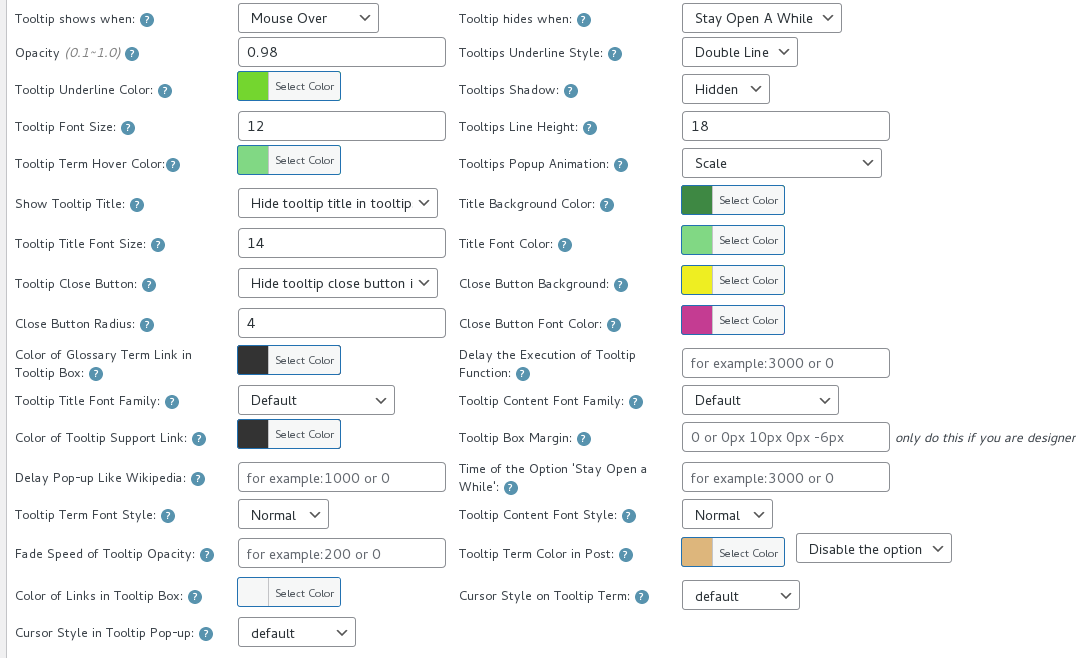
Time of the Option Stay Open a While
6: then move to the bottom of tooltip box customize setting panel, you will find the option “Time of the Option ‘Stop Open A While'”, please just enter milliseconds that you hope this tooltip popup displayed in the screen of your wordpress post, for example, you want 3 seconds, then please enter 3000 milliseconds 🙂
7: in front end, when user mouse hover the wordpress tooltip term, he will find the tooltip content window pop-up, when the user mouse leave the tooltip term or tooltip popup, the tooltip popup will not be closed instantly, the tooltip window will still display 3 seconds before vanishes 🙂
Conclusion:
WordPress tooltip plugin is drive by wordpress tooltip users, we have customized many amazing tooltip functions for wordpress tooltip users, based on tooltip user’s feedback and suggestions, for example, you can select wordpress tooltip popup when mouse over, or mouse click, and you can decide tooltip hide when mouse over or double click…etc, and you can custom the display time before the wordpress tooltip popup vanishes …etc, if you have any more feature request to wordpress tooltip plugin, please don’t hesitate to tell us, we will realize it for you 🙂





Leave a Reply