
Hi, dear WordPress Tooltip users, I hope you are doing well and having happy weekend with your family 🙂 An amazing wordpress tooltip user wrote to us : “Hello, I’d like to remove the tooltip (“home” text) which appears hovering on site logo (every page). I use tooltips for some images on my site so I’d need to remove the tooltip ONLY on the site logo image. Thanks in advance for your help.”
Our wordpress tooltip plugin support team replied:
Hi,
Thanks for the message 🙂
We are very happy to help you 🙂
Sorry for the problem, , would you please try:
1: In wordpress tooltip global settings panel, navigate to “enable tooltips for image” option, then select “I want to disable tooltips for image”
If you want to enable tooltips function for image yet, then you can try:
2: In wordpress tooltip global settings panel, locate to “tooltips for mage setting“ option, select “use rel attribute in img tag as content of tooltips for image”
We have detailed step by step document with screenshot at:
How to Avoid WordPress Tooltip Displayed on the Site Logo and Other Images?How to Avoid WordPress Tooltip Displayed on the Site Logo and Other Images?
Hope this have a little help 🙂
Thanks, have a blessed day with your family 🙂
Best Regard,
WordPress tooltip plugin support
The wordpress tooltip user replied:
Subject:
remove tooltip from site logo ONLYMessage:
Hello,
I’d like to remove the tooltip (“home” text) which appears hovering on site logo (every page).
I use tooltips for some images on my site so I’d need to remove the tooltip ONLY on the site logo image.
Thanks in advance for your help.
Then our wordpress tooltip developer checked this ticket, and we decided to develop a new version to prevent tooltips from appearing on specified images, because we believe more users have similar requirement and we replied:
Hi,
Thanks for the reply 🙂
In this case, we have another solution, We will write a detailed document for you and we will reply you again 🙂
Thanks, have a blessed day with your family 🙂
Best Regards,
Wordpress tooltip plugin support
That’s why re developed a new version of wordpress tooltips plugin: WordPress tooltips pro plus 31.3.8 🙂
How to prevent tooltips from appearing on specified image?
1:If you are a customer of the WordPress Tooltip Pro Plus plugin, please click on the “download wordpress tooltip” link to get the latest version of the plugin. Make sure the version number is equal to or greater than 31.3.8. If you are a new user, you will need to purchase a license for the WordPress Tooltip Pro Plus plugin.
2: Log in to your WordPress site as wordpress admin and click the “Plugins” menu in the wordpress dashboard.
3: Deactivate and delete the existing version of the WordPress Tooltip pro plus plugin from the wordpress plugin panel.
5: Click the “Add New” button to upload the WordPress Tooltip pro plus plugin version >= 31.3.8 , and activate the plugin.
6: If you are new user of wordpress tooltip plugin, please check our video of how to install wordpress tooltip at: WordPress Tooltips Video Tutorial 3: How to upload and activate wordpress tooltips pro plugin
7: In the WordPress dashboard, go to the “Tooltips” menu. Then, click on the “Optional Settings” sub-menu item. The WordPress Tooltip menu appears as follows:

tooltips menu in wordpress tooltips pro plus 27.5.8
9: Within the WordPress optional settings panel, you will find we have added a new “Prevent tooltips from appearing on specified image” option. It looks like this:
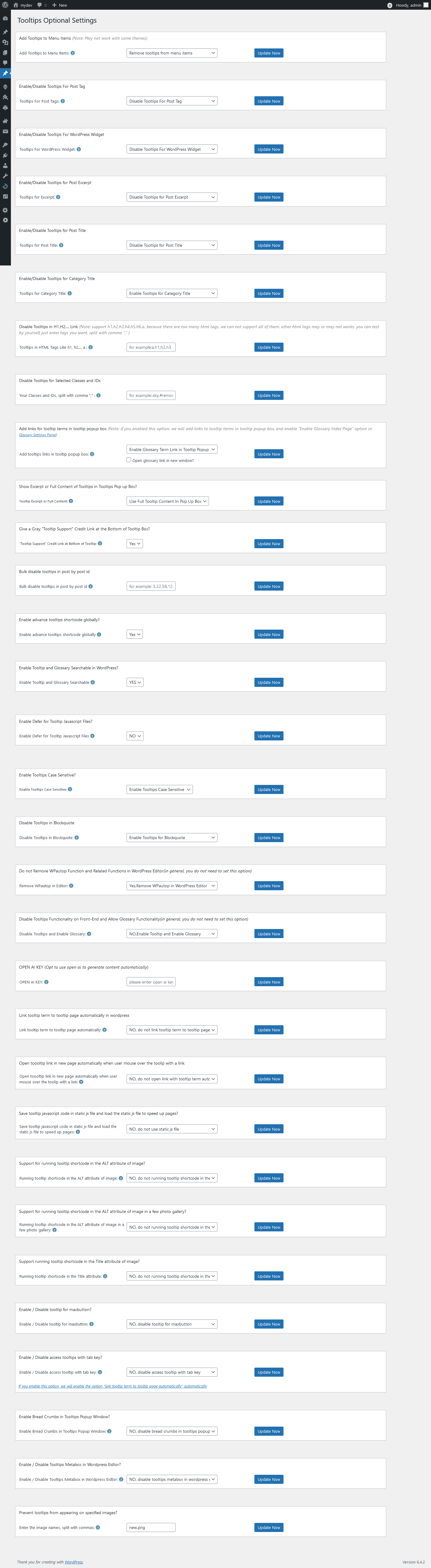
Prevent tooltips from appearing on specified images
As you can see in the ‘Prevent tooltips from appearing on specified images’ option, you can enter the image names. If you have multiple images, separate the names with commas.
In what situations should this setting be used?
Please note that this setting will only take effect when you set the value of ‘tooltips for image keyword matching mode’ to ‘Use ALT attribute in img tag as content of tooltips for image,’ which is the setting requested by the user.”
Hope this have a little help
Thanks for the great feature request, and sorry for the delayed response, our wordpress tooltip plugin developer have added a license in your account as a Sorry, WordPress FAQ plugin is a powerful & fast jQuery FAQ solution to help wordpress blodder create / manage / edit FAQs easily, select default pretty FAQ template and custom FAQ style in back-end via a few clicks. With wordpress faq plugin, it is very easy to create and show accordion FAQs, display FAQs grouped by category…etc, easy to use, select pretty FAQ templates from pre-designed template, custom FAQ style in back-end via a few clicks, Support use OpenAI ChatGPT to generate high-quality content for WordPress F.A.Q and wordpress post automatically, support WooCommerce Product FAQ, Responsive FAQ, Multiple FAQ Templates, FAQs grouped by category, specified number of FAQ items for each FAQ… and more and more, you can find more details at:
WordPress FAQ Pro Plugin With WordPress Tooltips (version 4.6.6)
Thanks, have a blessed day with your loved ones
Best Regards,
Wordpress Tooltips Plugin Support Team





Leave a Reply