
Hi, good afternoon, dear users of WordPress Tooltip Plugin , we get a ticket from a wordpress tooltip plugin user which using wp-optimize plugin to optimize her wordpress site, and she reported that there are a conflict:
Hi Guys, I was wondering if you know a minify execption for your plugin? When i enable my cache and minify tool tips stops working. it shows the line but no words pop up. As soon as i disabled the minify bit, it then appears again.
Thanks!and
When my Cache Minify is switch off I get the correct view with the text bubble above the commercial button on mouse hover. Then when minify is turn on. I get error image. Where nothing pops up. I was hoping you would have a code extension of sorts, as minify speeds up my website a lot.
We asked more details about the version of WordPress tooltips plugin and did a check on her screenshot of cache plugin, and we suggestion is do not use javascript async model, she replied:
If I turn off the defer all Javascript, then the labels work again. If your developer able to supply the Java code for: Any JavaScript files that match the paths below will be loaded asynchronously.I think if we get this code right and the exeption is made then I can re enable the Javascript defer.
Thank you so much for your help, I really appreciate the promptness and wiliness of your efforts on this
Yesterday, our wordpress tooltips developer developed a new version to solve the problem for she — based on the suggestion of add defer attribute for all of our javascript files, and we have a document Javascript Codes of Tooltips and Glossary Support Defer for she 🙂
Then we requested she tell us the cache plugin name so we can do some tests to check more, she replied: “it is called WP-Optimise”
After installed WP-Optimise, we found it is really a easy-to-use cache plugin, it is great, just like the plugin author said:
Boost your site’s speed and performance through caching. Clean the database, compress images and cache your site for higher speed & SEO.
WP-Optimize Cache is a revolutionary, all-in-one WordPress performance plugin that caches your site, cleans your database, compresses your images.
Our cache feature is built around the world’s fastest caching engine. This simple, popular and highly effective tool has everything you need to keep your website fast and thoroughly optimized!
It does it in three clever ways:
* It allows you to clean and optimise your database.
* It gives you the option to compress your images.
* It allows you to cache your pages, for super fast load times (read more caching information below).It also enables you to minify and asynchronise CSS and JavaScript (aka. “defer CSS JavaScript”).
Extensive tests show the cache feature alone can make WordPress sites at least as fast as any other caching or speed plugin available and often faster. But when you combine the cache with the database optimization, image compression features and minify, the speed difference with alternative solutions is significant.
The built-in minify feature adds another layer of optimization, reducing the size and number of requests to your server.
We tested all options in this wordpress cache plugin, for find any conflicts, finally, we found we like the cache plugin 🙂
Actually, the real problem is the jquery file be loaded as defer, so all in-line javascript codes which need jquery will not works, many wordpress plugins using in-line javascript codes and use jquery UI, this kind of plugin will have problems.
A simple method to solve the problem is:
1: login wordpress as wp admin
2: click WP-Optimize menu item in wordpress dashboard
3: click minify sub menu item
4: click javascript tab, then you will find “exclude javascript from processing” panel, just enter wordpress official jquery file path in here, and all problems will be solved, we make a screenshot for wordpress users:
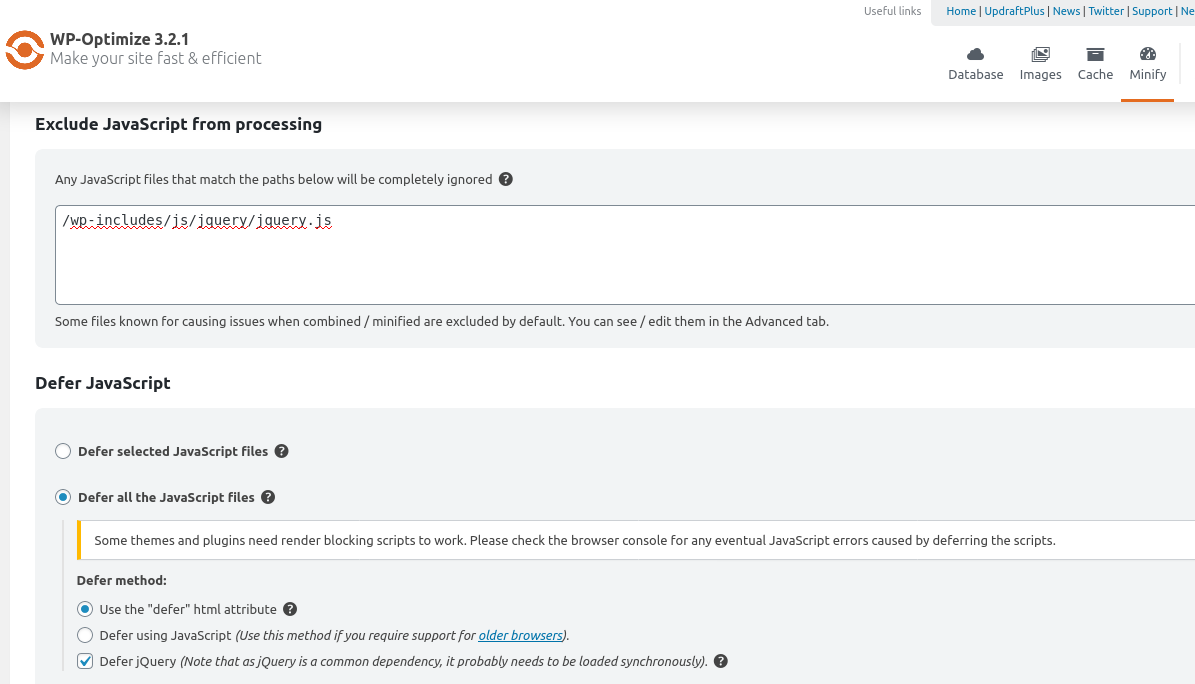
WP-Optimize works with wordpress tooltips
Then all things well works well, and wordpress tooltips plugin will works well with WP-Optimize, all other wordpress plugin using jquery inline javascript codes will works well too 🙂
Thanks for the great feedback, if you have any question of feature request for wordpress tooltips plugin, please don’t hesitate to contact us:)
Thanks, have a blessed day with your family 🙂
WordPress tooltips support team





Leave a Reply