
We get a ticket from an amazing wordpress tooltip users which using Fast Secure Contact Form plugin, he said he read our document How to Create WordPress Tooltip for Contact Form 7? He want to add wordpress tooltips effect for each input text field in the Fast Secure Contact Form, so users will know which kind of message with which kind of format will be accepted by his support. He do not know how to add tooltips popup box in his contact form input text field, he hope us write a document of How to Add WordPress tooltip plugin on Fast Secure Contact Form for him. 🙂
We are happy to help more wordpress tooltips uers who using other amazing wordpress form plugins, our wordpress tooltips support nearly all wordpress form plugins, for example: Contact Form 7, WPForm, GF form, Fast Secure Contact Form… and so on 🙂
How to Add WordPress Tooltips on Fast Secure Contact Form?
With wordpress tooltip plugin, it is very easy to add tooltips effect for each input box field in fast secure contact form:
1: Because this function just be included in wordpress tooltips pro and wordpress tooltips pro plus plugin, so if you do not have wordpress tooltips pro plugin yet, please login your account in wordpress tooltip plugin site.
2: After logged in your account, please click “download” menu item to download wordpress tooltip plugin zip file.
3: After downloaded wordpress tooltips pro zip file, please login your wordpress site admin area as wordpress admin
4: Then in wordpress dashboard, please “Plugins” menu, you will open wordpress official plugin management panel.
5: If you installed wordpress tooltips free plugin or old version of wordpress tooltip pro plugin, please delete the old version of wordpress tooltip plugin
Then in “Plugins” management panel, please click “add new” link at the top of the plugins panel, in here you can upload the wordpress tooltips plugin zip file
6: After installed wordpress tooltip plugin, please remember to activate the new wordpress tooltip plugin
7: Now in fast secure contact form, please create a contact form, it is simple and fast:
7.1 In wordpress dashboard, click settings menu item
7.2 Then click FS Contact Form sub menu item
7.3 You will open “Fast Secure Contact Form Settings” panel
7.4 In here you can create a new contact form, we make a screenshot for you:

…., and then create fields in fields tab in fast secure contact form, after entered all fields, just click publish to save your contact form 🙂
7.5 After publish the contact form, in front end, it looks like this:
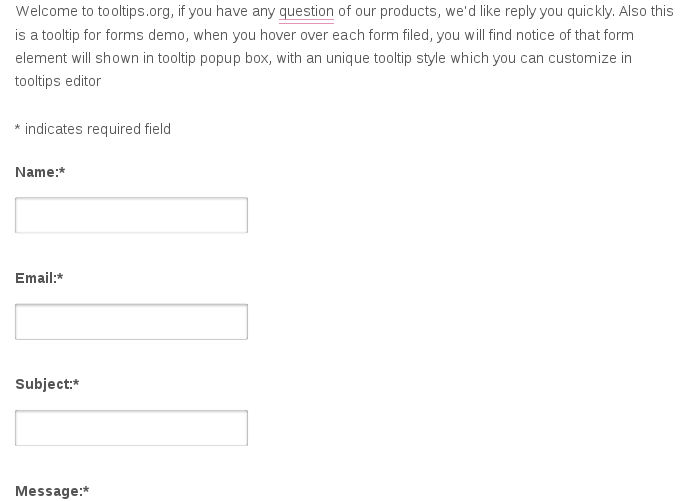
Okay, now what you need to do is — when user mouse hover the input text field in contact form, a wordpress tooltips window will pop-up, and display tooltips content in the tooltip window, how can we do this? 🙂
It is very simple.
7.6: In your browser, for example firefox, just click F12, and then check the css class or css id for the input text box, for example, in my site, the input text box which under the label “name”, have a id “#fscf_name1”, just remember this, we will use it to add tooltips effect on this input text field at next steps soon.
8: In wordpress dashboard, click tooltips menu item
9: Then click “Add new” sub menu item
10: Add wordpress tooltip content in wordpress tooltips editor, it looks like this:

add new wordpress tooltips for input field in contact form
11: Then in the right hand of the tooltip editor, you will find metabox “Tooltip For Forms “, in here just enter the css id of the input text filed “#fscf_name1”, it looks like this:

That’s all, very simple? Yes!
In the front end, when mouse hover the input text box “Name”, you will find tooltip popup window. You can find demo for this document at: Tooltip for anything.
Conclusion:
With wordpress tooltip plugin, wordpress admin can add tooltip effect in any contact form, just a few clicks and input the css class or css id of any component in the contact form, you can show awesome tooltips effect for any component in any wordpress contact form 🙂





Leave a Reply