Author: team

WordPress 404s Plugin 2.5.5 Released

Hey WordPress 404 plugin Users,

Hope this message find you are doing well and have happy days with your family! 🙂

We just released WordPress 404s Plugin 2.5.5 to add some new feature based on user’s suggestion 🙂

We get an amazing suggestion from the wordpress 404s plugin user, in which the amazing user told us, he enjoy the feature of redirect 404 page not found to wordpress home page, that’s good, but he hope have an option to choose redirect 404 with 301 moved permanently status code or 302 code, manually, because 301 is more SEO friendly in search engines 🙂

This is great suggestion, we have re-developed our wordpress 404s plugin to support it, now if you login your wordpress admin area, check in wordpress 404s settings panel, you will find we have added a new “Redirect 404 with 301 moved permanently status code or 302 code” option box, you can opt to use 301 moved permanently status code to redirect 404 page not found to wordpress home page or use 302 code to do it.

The wordpress 404s settings panel looks like this:

404s Global Settings panel in version 2.8.3

404s Global Settings panel in version 2.8.3

Also we have added more description of 404 plugin in read me. 🙂

Thanks for the amazing suggestion! If you have any more question or suggestion of wordpress 404 plugin, please don’t hesitate to tell us, we are always happy to offer a more and more useful 404 tool for you!
Thanks, have a blessed day with your family 🙂
Best Regards,
WordPress Tooltip Glossary Plugin Support Team
Tagged with: , , , ,

How to Enable / Disable WordPress Tooltips in WordPress Glossary Page?

Hi Dear WordPress Tooltip Glossary Users,
Hope this message find you are doing well and having happy weekend with your family! 🙂
We get a wordpress tooltip ticket, in which the tooltip user asked us a question:

How to Enable / Disable WordPress Tooltips in WordPress Glossary Page?

1: Login as wordpress admin

2: Click “Tooltips” menu item

3: Click “Glossary Settings” sub menu item, you will open WordPress tooltip “Glossary Settings” panel

4: In “Glossary Settings” panel, You will find the option: “Disable Tooltips in Glossary Page”, it looks like this:

Disable Tooltips in Glossary Page

Disable Tooltips in Glossary Page

5: Just set up “Disable Tooltips in Glossary Page” option to enable or disable wordpress Tooltips effect in wordpress glossary page

6: Click “Save Changes” blue button at the bottom of the wordpress “Glossary Settings” panel

6: In front end, if you open glossary pages, for example “Bullet Screen“,  you will changes in “Disable Tooltips in Glossary Page” option works 🙂

If you have any question or suggestion of wordpress tooltip plugin, please don’t hesitate to tell us 🙂
Thanks, have a blessed day with your family 🙂
Best Regards,
WordPress Tooltip Glossary Plugin Support Team


Update: We have updated WordPress Glossary Plugin Demo

Hi Dear WordPress Glossary Plugin Client,

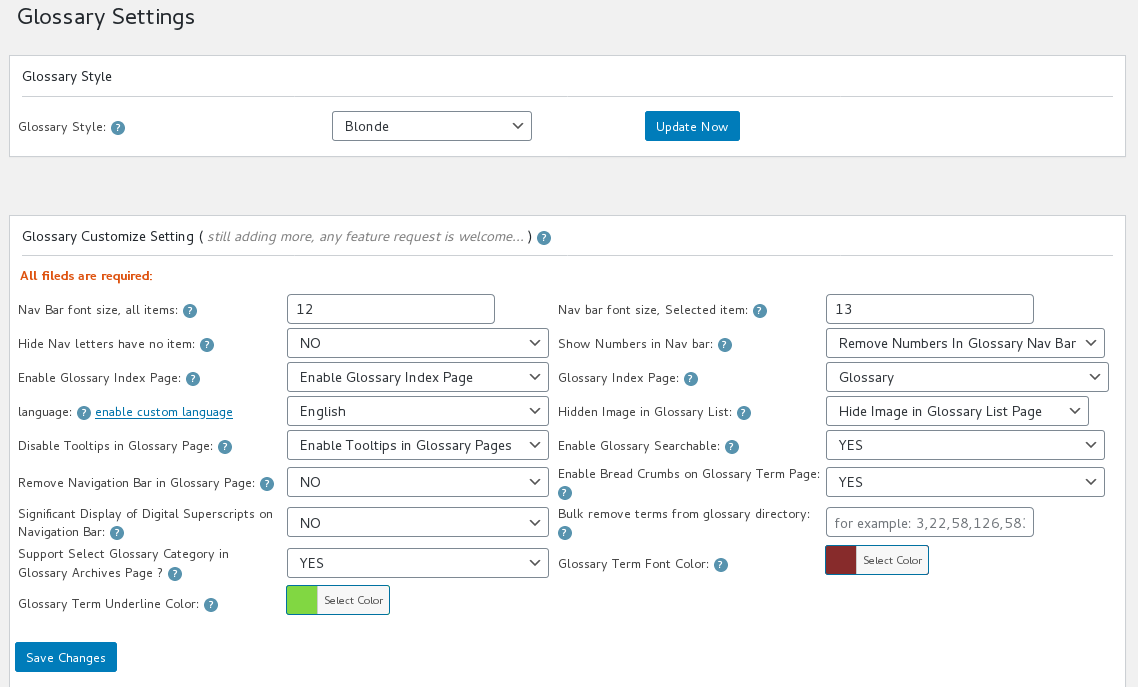
We just updated Glossary Demo page, in this wordpress glossary demo page, we have added new links of glossary functions description, and we have use glossary option “Bulk remove terms from glossary directory” to show how to bulk disable glossary items in glossary directory, it looks like this:

wordpress glossary setting panel demo for build remove items from glossary directory

wordpress glossary setting panel demo for build remove items from glossary directory

You can see in “bulk remove terms from glossary directory” option, we have added a few glossary IDs, these glossary item will not show in WordPress Glossary Demo page, also we tweaked a little glossary colors in the wordpress glossary demo page. Also in here you can see,  if you do not want to change glossary term font size, when you click “Save Changes” button,  you can just enter 0 in the “glossary term font size” option box 🙂

As you can see, we are upgrade our wordpress glossary functionality quickly now, we upgrade our wordpress glossary plugin nearly one version per day, we have Tons of feature request about wordpress glossary section, we will finish them asap we can, in recent days, we are focus on improve wordpress glossary plugin functions for users,  if you need more glossary functions or any question, please  contat us 🙂

Thanks, have a blessed day with your family 🙂
Best Regards,
WordPress Tooltip Glossary Plugin Support Team
Tagged with: , , ,

WordPress Tooltip Glossary Plugin 12.0.8, Support Custom Glossary Term Font Color

Hi Dear WordPress Glossary Tooltip Plugin Users,

Hope this message find you are doing well and have happy days with your family! 🙂 We have released WordPress Glossary Tooltip Plugin 12.0.8, based on wordpress glossary plugin user’s suggestion: “although wordpress glossary tooltip plugin have 5 pretty preset wordpress glossary template, but it is better to allow users custom glossary font color”, our WordPress Glossary Tooltip Plugin support custom glossary term font color now. 🙂

How to Custom Glossary Term Font Color in WordPress Glossary Tooltip Plugin?

1: Login your wordpress glossary plugin account

2: Download wordpress glossary tooltip plugin via “My account”

3: Login wordpress admin

4: Click “Plugins” menu item in wordpress admin

5: Deactivated old version of wordpress tooltips plugin

6: Delete the old wordpress tooltip plugin

7: In “Plugins” menu item, click add new at the top of the plugins panel

8: Upload the tooltips plugin zip file which you downloaded from wordpress glossary tooltip plugin site

9: Activate latest version of wordpress glossary tooltip plugin

10: Click “Tooltips” menu item

11: Click “Glossary Settings” sub menu item, you will open “Glossary Settings” panel

12: You will find the new option: “Glossary Term Font Color” at the bottom of the “Glossary Term Font Color” panel, please just select the color for your wordpress glossary term via wordpress color picker, it looks like this:

glossary settings panel version 12.0.8

glossary settings panel version 12.0.8

13 Click “Save Changes” blue button

14 In front end, if you open glossary index page, you will find the glossary terms font color has been changed

If you have any question or suggestion of wordpress tooltip plugin, please don’t hesitate to tell us 🙂
Thanks, have a blessed day with your family 🙂
Best Regards,
WordPress Glossary Tooltip  Plugin Team
Tagged with: ,

WordPress Tooltip Glossary Plugin 10.6.2 Released, Support Enclosing Shortcodes

Hi Dear WordPress Tooltip Glossary Plugin Users,

Hope this message find you are doing well and have happy weekend with your family 🙂

We are happy to report you that we released wordpress tooltip glossary plugin 10.6.2, changes in this version:

WordPress Tooltip Glossary Plugin Support Self-Closing Shortcode and Enclosing Shortcode

Just like we reported before, in general, tooltips pro will add tooltips effects automatically in post’s content/title/tag/excerpt/gallery/menu… and so on, based on wordpress standard APIs, this will save your time to manage tooltips, for example, when you want to change tooltips content, you will not need to search all posts to find out which page have a specified tooltips and change it one by one manually,  you can just edit your tooltips in wordpress standard tooltips WYSWYG editor, then tooltips content will be updated automatically.

However, you can still add tooltips manually, you can add wordpress tooltip sitewide via shortcode “tooltips”, you can find a demo at here . WordPress Tooltip plugin have many shortcodes to help you implement a variety of tooltip functions, for example, you can use “tooltips” shortcode to use image as a tooltip for another image, for example, “tooltips” shortcode support self-closing,  and since wordpress tooltip 10.6.2, it support enclosing shortcodes too, so you can add tooltips for icons and so on, our shortcodes have poweful functions, please check “lists of how to use wordpress tooltip shortcode“, you will find it is very east to create video tooltip, audio tooltip, image tooltip…manually.

How to build a Icon Tooltip?

Very easy! Please mouse hover this icon tooltip -> 🙂

Please check codes:

[tooltips keyword='good' content = 'you are very welcome!']:)[/tooltips]

Just use your icon replace the “:)”

We are adding new module for help you select pretty icons more easier 🙂

Thanks, have a blessed day with your family 🙂

WordPress Tooltip Glossary Plugin Support Team

Tagged with: , ,

WordPress Tooltips Plugin 9.1.0 Released

Hi Dear WordPress Tooltips Users,

An user asked us a question:

how to get wordpress tooltip plugin document more easier

Today we are happy to report you, we have added a few new Knowledge Base articles in wordpress tooltip plugin Knowledge Base menu:

How to Get Support, Document and Demos

How to Enable / Disable Tooltip Glossary Index Page

How to Select My Own Glossary Index Page, How to Delete Default Glossary Index Page

How to Upgrade to the WordPress Tooltips Pro

We are adding more wordpress tooltip knowledge base articles into knowledge base panel, you will see it soon, also you can find all wordpress tooltip plugin knowledge base articles at wordpress tooltip plugin documents, and you can find all wordpress tooltip features at features of wordpress tooltip plugin.

Thanks, any more question, please do not hesitate to contact us, we’re always ready to assist you the best we can. 🙂

Have a blessed day with your family 🙂

Best Regards,

WordPress Tooltips Support Team

Tagged with: , , ,

WordPress tooltips 6.3.8, support contact form 7 tooltips, woocommerce tooltips, bbpress tooltips, buddypress tooltips, table tooltips, glossary category filter… and more

Hi Dears,

Based on amazing users amazing requests, I have released a new version wordpress tooltips plugin, in wordpress tool tips 6.3.8, we added new wordpress tooltips feaures:

# In glossary index page, at the top of glossary items, user can select different glossary category from glossary category dropdown box, when user select a category, glossary index page will only show glossary in
slected category
# Restruct plugin to support develop addons for tooltips pro plugin
# New tooltips addon panel, in which you can enable / disable many tooltips addons
# New wordpress tooltips addon to support show tooltips for table cells in tablpress plugin
You can enable / disable tooltips for table cell in tablepress at Tooltips Optional Settings Panel
# New wordpress tooltips addon to support show tooltips for contact form 7
# New wordpress tooltips addon to support show tooltips for woocommerce
# New bbpress tooltips addon to support show tooltips in bbpress topic & reply
# New buddypress tooltips addon to support show tooltips in buddypress activity
# Improved tooltips for menu addon, support more themes and support more post types
# In Glossary Settings panel, added option to enable / disable tooltips effect on glossary pages
# In wordpress editor, added post meta box to allow users disable all tooltips in the page
# In wordpress editor, added post meta box to allow users disable specific tooltips in the page — with autocomplete effect
# fix a plugin conflicts with tooltip
# In Tooltips Post Types Settings setting panel, can remove all post types now.
# Improved performance of new version notify

We have received a few new amazing feature requests and we are doing it now, we will release a new version soon. 🙂

Thanks, have a blessings day with your family 🙂

Best Regards,
Tomas

Tagged with: , , , , , , , ,

WordPress Tooltips Pro 6.0.8, added tooltips popup animation effects

Hi Dears,

I just released wordpress tooltips pro 6.0.8, in this version:
# In style customize setting pabel, Users can change toolstips term color via color picker
# Added tooltips popup animation effects, for example: wiggle, scale, 360 degree rotation,rotateY vertical Y-axis, and I am add more effects
# Fixed setting problem in a few browser
# Change duplicated function name with free version
# Fixed a few words in setting panel
# Changed update notify server for get update information faster

Thanks for great feature requests, any more amazing feature is very welcome 🙂

Thanks, have a blessings day with your family 🙂

Best Regards,
Tomas

Tagged with: , , , , , , , , ,

WordPress Tooltips 5.8.0, wordpress tooltip popup with wiggle effect and wordpress tooltip term with transition effect…

Hi Dears,

Based on users requested, I have released a new wordpress tooltips version 5.8.0, in wordpress tooltips 5.8.0:
# When mouse hover tooltips terms, wordpress tooltip content will popup with wiggle effect
# When mouse hover the tooltips term, we will show highlight color with a transition effect, the font color will highlight “slowly” — in one second

A new tooltips version is on the road already, any feature request is welcome! 🙂

Thanks, have a blessings day with your family. 🙂

Best Regards,
Tomas

Tagged with: , , , ,

WordPress Tooltips Pro Plugin 5.7.6 Released, Improved glossary style and highlight tooltip text when hover the tooltip term

Hi Dear Tooltips Users,

I have released a new tooltips version — wordpress tooltips pro 5.7.6. 🙂

Based on users requested, I added a feature — when mouse hover a tooltips terms, our wordpress tooltips plugin will highlight the text of this tooltips terms.

Also for make wordpress glossary looks more professional, we tweak many elements / style of glossary, for examle, margin, padding, backgound, border radius… and so on for glossary and tooltips lists.

A new wordpress tooltip plugin is on the road already, I believe you will like the new version soon. 🙂

Thanks, have a blessings day with your family. 🙂

Best Regards,
Tomas

Tagged with: , , ,
Top