Improved AJAX wordpress tooltip hit stats, supported by wordpress tooltips pro plus 20.3.8

Hi, Dear  users of  WordPress Tooltip plugin , hope this message find you are doing well and having happy holidat with your family. 🙂

We get a wordpress tooltip user’s feedback, in which he told us he found a php warning in latest version of PHP. We did many test on our server, we did not found any php warning, it is strange, our wordpress developer said our wordpress tooltip ajax hit stats function is very very old, it is time to update it with newest tech, so our wordpress tooltips developer re-developed the wordpress tooltip ajax hit stats by follow wordpress latest standard, and then the user told us the problem do not existed again — it is a little strange too, because what we changed is about javascript side, anyway, the user happy, so we are happy too 🙂

Please upgrade to wordpress tooltips pro plus 20.3.8 asap you can  🙂

If you have any question of suggestion about wordpress tooltip plugin, please don’t hesitate to tell us 🙂

Thanks, have a blessed day with your family 🙂

Best Regards,

WordPress tooltip plugin support

Tagged with: , ,

How to prevent Glossary interface to appear within a shortcode? Supported by wordpress tooltips pro plus 20.2.8

Why we develop wordpress tooltips pro + 20.2.8?

Hi, Dear   WordPress Tooltip plugin users, hope this message find you are doing well and having happy weekend with your family We just released wordpress tooltips pro plus 20.2.8, to address feedback from a user about the scope of glossary usage, this user said:

“I have a page list plugin, which will show all the PAGE in a list, then I found my glossary  appearing in the page list, because glossary is too big, so it looks special in the page list, not very beautiful, please disable glossary in shortcode “

This is the first time we heard this kind of requirement about glossary, we did not anticipate that wordpress glosasry would appear inside the interface of the third-party plugin. Our glossary plugin developer tried a few methods to solve this kind of problem for the user, finally, we got it. This is why we released wordpress tooltips pro plus 20.2.8 🙂

How to prevent glossary interface displayed in a shortcode  of 3rd plugin?

1: Login wordpress tooltip site  — tooltips.org to download latest version of wordpress tooltips pro plus plugin

2: Install and activate wrdpress tooltips pro plus plugin, please check our  video — how to install wordpress tooltip at:  WordPress Tooltips Video Tutorial 3: How to upload and activate wordpress tooltips pro plugin

3: In your wordpress dashboard,   click “Tooltips” menu item, then click “Glossary Settings” sub menu item, at the bottom of the wordpress glossary  settings panel, you will find a new option “Disable glossary function from running in specific shortcode”, it looks like this:

Disable glossary function from running in specific shortcode in wordpress tooltip back-end

Disable glossary function from running in specific shortcode in wordpress tooltip back-end

In the “Disable glossary function from running in specific shortcode” input box, please just enter the all shortcode name that you do not hope include glossary interface, split by commas.

4 Click “Save changes” blue button to submit changes, that’s all 🙂

In front-end of wordpress, you will not find the glossary interface now 🙂

Thanks for the feature request, we give the great user a plugin “WordPress FAQ Pro Plugin With WordPress Tooltips” as a thanks 🙂

If you have any question of suggestion about wordpress tooltip plugin, please don’t hesitate to tell us 🙂

Thanks, have a blessed day with your family 🙂

Best Regards,

WordPress tooltip plugin support

Tagged with: , , ,

WordPress live link preview plugin with tooltip

What is WordPress live link preview plugin?

Live link preview is a light and fast and powerful plugin to display live link preview for your wordpress users.

when users mouse hover a link on your wordpress post, WordPress live link preview plugin will display the live preview screenshot of the site in a wordperss tooltip popup window, users will see where you are sending them.

Live link preview plugin will use an API to generate the screenshot of pages, the first 1000 views is free of charge, then you can display 10,000 screenshots just pay $2 / month.

WordPress admin can enter API key in the back-end of Live link preview plugin

WordPress admin can customize the width of live link preview popup window in back-end

Live Link Preview settings panel

Live Link Preview settings panel

In front end, it looks like this:

live link preview front-end width 800

live link preview front-end width 800

The benefit of use wordpress live link preview with wordperss tooltip plugin

Improved user experience: By providing live link previews, users can quickly and easily preview the content of linked pages without having to leave the current page. This can help to improve the user experience and keep users engaged with the site.

Increased engagement: Live link previews can also increase engagement on a website by making it more convenient for users to explore linked content. With a simple mouse over, users can get a glimpse of what the linked content is about, which can encourage them to click through and read more.

Enhanced credibility: If a website frequently links to external content, live link previews can help to establish the credibility of the site by providing users with a quick and easy way to verify that the content is legitimate and safe.

Time-saving: Live link previews can also save users time by allowing them to quickly preview linked pages without navigating away from the current page. This can be particularly useful for websites with a lot of linked content or for users who want to quickly skim through a large number of links.

Overall, the function of a live link preview can enhance the user experience, increase engagement and save time, and can be a valuable addition to any WordPress website.

good, what is the benefit of install live link preview plugin on wordpress sites?
I’m sorry for the confusion. The information I provided earlier was not relevant to your question.

To answer your updated question, the benefit of installing a live link preview plugin on a WordPress site is that it can improve the user experience by allowing them to preview linked content without having to navigate away from the current page. This can save time and increase engagement by encouraging users to explore more of the site’s content. Additionally, live link preview can add a layer of credibility to a website by allowing users to quickly verify that linked content is legitimate and safe. Overall, installing a live link preview plugin can be a valuable addition to any WordPress site that wants to enhance the user experience and provide more convenient access to linked content.

We are adding more features for the Live link preview plugin,you will see it soon 🙂

Tagged with: ,

WordPress Anti-spam Register Form Plugin

Wordperss Anti-Spam Register Form plugin is a wordpress plugin to stop a few kinds of spam bot auto-register spam-users on your wordpress site.

My wordpress has many spam registrations. The problem is I can not received mail from my users because my site sent too many welcome mail to these spammer.

I had to stop these spam bot, I decide to write a WordPress plugin to prevent spam registration by the following way:
1:  In front-end, adding a dynamic input field to the register form with a label “real humans should not fill in this field”.
2: The name of the dynamic input field is different every time the register form is displayed.
3:  In back-end, when WordPress processes user registration,  if this dynamic input field is filled in, an error will be returned, stating that “you have filled in a field that humans should not have filled in.”

Otherwise, the registration will be successful.

Also the benefit of installing an anti-spam register form in a WordPress site is that it can help to prevent fake or spam user registrations. This can have several positive impacts on the site, including:

Improved security: By reducing the number of fake user accounts, an anti-spam register form can help to improve the overall security of a WordPress site. Fake user accounts can be used to gain unauthorized access to the site or cause other forms of damage, so preventing them from being created in the first place is an important step in protecting the site.

Reduced server load: Fake user accounts can put a strain on a WordPress site’s server, which can make the site slower and more difficult to use. By using an anti-spam register form to prevent these accounts from being created, site owners can reduce the burden on their server and improve the site’s performance.

Better user experience: For legitimate users of a WordPress site, dealing with fake user accounts can be frustrating and time-consuming. By preventing these accounts from being created in the first place, site owners can improve the experience of their real users and make it easier for them to use the site as intended.

Overall, installing an anti-spam register form in a WordPress site can help to improve security, reduce server load, and enhance the user experience, making it a valuable addition for any site owner who wants to protect their users and improve the performance of their site.

We are continue to add more functions to stop spam-bot to register spam users in wordpress site, you will see the new version soon 🙂

Tagged with: , , ,

WordPress Life Quotes Plugin With WordPress Tooltip

WordPress Life Quotes Plugin is a lovely plugin to display random life quote on the bottom of wordpress post, life quote can serve as a source of inspiration and motivation for readers, including a random  life quote in a wordperss post can help to break up the text and make the content more visually interesting and engaging and creating a connection with readers.

After activate the WordPress Life Quotes Plugin, after wordpress post content, readers will find a lovely  random life quote, everytime when user read your wordpress post, they will find different lovely life quote 🙂

Displaying a life quote on wordpress site can have several benefits for your wordpress sites, including:

Inspirational and motivation: Life quotes can serve as a source of inspiration and motivation for your readers, helping them to stay positive and motivated in their own lives 🙂

Attention-grabbing: include a life quote in a wordpress post can help to break up the text and make the content more visually interesting and engaging 🙂

Shareable: A well-chosen life quote can be easily shared on social media platforms like facebook and twitter, when user like the life quote, may be they will share it on social networking, this will help to increase the visibility of a wordpress site and drive traffic to wordpress site. 🙂

Personal touch: including a life quote can add a personal touch to a wordpress blog, reflecting the interests and values of the wordpress site owner and creating a connection with blog readers 🙂

Overall, displaying a life quote on your wordpress site can be a simple but effective way to enhance the user experience and drive engagement.

Out wordpress tooltip site have installed and activated our life quotes plugin, enjoy 🙂

Tagged with: , , , ,

WordPress Dark Mode Plugin with WordPress Tooltip

Dark mode plugin is a light wordpress plugin to enable dark mode on wordpress front-end for your readers, after activated wordpress dark mode plugin, wordpress users will find a floating switch button in the bottom-right of the wordpress pages, you can one click to turn on / turn off dark mode at any time.

Enable dark mode on wordpress site will improve user experience and accessibility for your wordpress site:

Reduced eye strain: Dark mode can help to reduce eye fatigue caused by staring at bright screens for long periods of time, which can be particularly beneficial for users who spend a lot of time browsing a website.

Improved visibility: Using dark text on a light background can create a stark contrast that can be difficult to read for some users, particularly those with visual impairments. Dark mode can help to improve the visibility of text and other content by using lighter text on a dark background.

Better readability: By reducing the amount of blue light emitted by a screen, dark mode can help to improve readability, particularly in low-light environments.

Aesthetics: Some users simply prefer the look of dark mode over the traditional light mode. By providing a dark mode option, sites can cater to these users and improve their overall experience.

Improved user experience: By offering a dark mode option, a website can cater to users who prefer a darker color scheme. This can improve the overall user experience and keep users engaged with the site for longer periods of time.

Enhanced accessibility: Dark mode can make it easier for users with visual impairments or sensitivity to bright light to use a website. It can also help to reduce eye strain and fatigue, making it more comfortable to read content for extended periods of time.

Energy efficiency: When using a device with an OLED or AMOLED display, dark mode can help to extend battery life by reducing the amount of power needed to display black pixels.

Overall, enabling dark mode on a WordPress site can help to improve user experience, accessibility, aesthetics, and energy efficiency.


Tagged with: , ,

WordPress Tooltip Free 8.4.5 Released

Hi Dear  wordpress tooltip plugin users, hope this message find you are doing well and having happy weekend with your family 🙂

We got a ticket from a wordpress tooltip free plugin user, he said he renamed the folder of wordpress tooltip plugin, and then he found in the wordpress tooltip settings panel,  the logo of worddpress tooltip lost, he think this is not a problem but he think it is better to tell us 🙂

We did a check of our code, yes, our code using hard-code to display tooltip logo on wordperss tooltip settings panel, sorry for this, we developed the plugin about 12 years before…., we have fixed this problem asap we can, now if you changed the fold name of wordpress tooltip plugin, the tooltip logo will still displayed in the settings panel 🙂

Thank you so much for tell us the bug, you make the wordpress tooltip plugin better for all tooltip users, we sent a license of our wordpress smart content link plugin to the amazing user as a gift, we will add more and more function in this little plugin, for example, find the best post in your wordpress site which related with a keyword by a great AI algorithms…etc, it will works automatically, a tooltip user told us  internal link is important for SEO, that’s why we developed such functions for user,   also in wordpress tooltip plugin, we are adding more and more functions for tooltip user, in tooltip pro plus, we have added opanAI chatgpt function to generate tooltip and wordperss post automatically for tooltip users, also we are try to add an Image AI to add pretty image automatically for wordpress tooltip users too 🙂

In last 12 years, WordPress tooltips plugin is driven by tooltip users, we got Tons of feedback and we’d like try our best to realize these feature request, we always sent a little gift to the amazing wordpress tooltip user 🙂

Thanks for the great suggestion you make the wordperss tooltips  better for tooltip users, if you have any more question or feature request, please don’t hesitate to tell us 🙂

Tagged with:

How to reuse wordpress standard post / page or 3rd custom type post as wordpress title and tooltip content? Supported by wordpress tooltips pro + 20.1.8

Hi Dear users of wordpress tooltip plugin, hope this message find you are doing well and having happy weekend with your family 🙂 We got a ticket from a wordpress tooltip user, he told us he using mediawiki to build a WIKI site for EDU, and he have sync mediawiki content with wordpress custom type post “lesson”, he said he want to reuse these lesson as tooltip terms, but his WIKI have about 9,000 terms, if he add all content of mediawiki terms into wordpress tooltip, it is a super hard work, he found we have a wiki tooltip function,  so he come to here to tell us he hope wordpress tooltip can integrate mediawiki to make a mediawiki tooltip for him  🙂

Yes we developed a wiki tooltip function a few years before, you can easy to reuse wikipedia terms to build your tooltip on wordpress quickly, there are a few document about how to build wiki tooltip:

WikiPedia Tooltip

How do I Add a WikiPedia Tooltip?

How do I Add German WikiPedia Tooltip? Supported by WordPress Tooltip Multi-site Version 14.8.4

French Wikipedia Tooltip and Spanish Wikipedia Tooltip, WordPress Tooltip Plugin 14.9.0

The amazing wordpress tooltip user give us a great feature request, we do not know this kind of requirement, after analyze our codes and wordpress codes, we believe we can solve the problem for him with a easier method, we developed  a new shortcode [[any_tt anyid=’1′]] for wordpress tooltip users, what you need to do is just use the new tooltip shortcode “any_tt” in wordpress, and enter any post id of your custom type post or wordpress standard post as anyid=’your post id’, then wordpress tooltips pro plus will use the title of your 3rd custom type post as tooltip title and use content of your 3rd custom type post as tooltip content automatically 🙂

We believe the new tooltip shortcode will help many wordpress webmaster

[any_tt anyid=’1′]

The benefit of use reuse other kinds of post, cutom type post as tooltip title and tooltip content

Reusing other kinds of post or custom type post as tooltip title and content in a WordPress tooltip plugin can provide several benefits for the webmaster. Here are some possible motivations:

Content consistency: If the webmaster has already created posts or custom post types with relevant content, reusing that content in tooltips can help ensure a consistent message across the site. This can help maintain a cohesive user experience and avoid confusion.

Time savings: Reusing existing content rather than creating new content specifically for tooltips can save time and effort for the webmaster. By repurposing existing content, they can reduce the amount of time spent on creating new content.

Improved SEO: By using existing posts or custom post types as tooltip content, the webmaster can increase the amount of internal linking on their site. Internal linking is an important aspect of SEO, as it helps search engines crawl and index the site’s content more effectively.

Better user experience: Providing additional information or context through tooltips can enhance the user experience on the site. By reusing existing content as tooltip content, the webmaster can provide users with a more informative and engaging experience without requiring them to navigate away from the current page.

Overall, reusing existing content as tooltip title and content can save time, improve consistency, and enhance the user experience on the site.

Thanks for the great suggestion you make the wordperss tooltips  better for tooltip users, if you have any more question or feature request, please don’t hesitate to tell us 🙂

In last 12 years, WordPress tooltips plugin is driven by tooltip users, we got Tons of feedback and we’d like try our best to realize these feature request, we sent a little gift to the amazing wordpress tooltip user 🙂


Thanks, have a blessed day with your family 🙂


Best Regards,

WordPress tooltip plugin support

Tagged with: , , , , , ,

WordPress Easy SSL plugin

What is SSL?

SSL is a security protocol that encrypts data sent between a user’s web browser and the server hosting the wordpress. When SSL is enabled, all traffic between the user and the server is encrypted, making it more difficult for third parties to intercept or access sensitive information such as login credentials or credit card details.

Why wordpress webmaster might enable force SSL on their WordPress site

Security: SSL encryption makes it more difficult for hackers to intercept sensitive information exchanged between a user’s browser and the website’s server. This is particularly important for sites that handle sensitive information, such as e-commerce sites or sites that require users to enter personal information.

SEO: In 2014, Google announced that it would use HTTPS (Hypertext Transfer Protocol Secure, which relies on SSL encryption) as a ranking signal in its search algorithm. Enabling SSL on a WordPress site can help improve its search engine ranking and visibility.

User confidence: When users see the green padlock icon in their browser’s address bar indicating that a site is using SSL encryption, they are more likely to trust the site and feel confident that their information is secure.

Enabling force SSL on a WordPress site involves configuring the site to always use HTTPS URLs instead of HTTP URLs. This can be done by modifying the site’s .htaccess file or by using a plugin such as Really Simple SSL. Once SSL is enabled, visitors to the site will automatically be directed to the HTTPS version of the site, which provides a more secure browsing experience.

Some wordpress product like buddypress will look HTTP page and HTTPS  page as different sites, other  plugins based on user roles will not works well if your site did not enabled SSL and have HTTP pages, easy SSL plugin will force SSL for your HTTP pages to HTTPS pages, this will help you avoid this kind of problem 🙂

Overall, enabling force SSL on a WordPress site is a good security practice that can help protect user data and improve search engine rankings.

How to use Easy SSL plugin?

Easy SSL plugin will redirect non-SSL HTTP pages to HTTPS pages automatically. With Easy  SSL expiration plugin, the wordpress webmaster will receive reminders of upcoming SSL certificate expirations well in advance. This allows them to plan and take the necessary steps to renew or replace the certificate before it expires, reducing the risk of downtime and security issues.

Easy SSL expiration plugin simplifies the process of monitoring SSL certificate expiration dates by automatically checking the certificates and notifying the webmaster of any upcoming expirations. This saves time and effort compared to manually monitoring certificate expiration dates.

Easy SSL expiration monitor will check SSL status of your wordpress site one time one day,  you can find SSL expiration status in wordpres dashboard widget and Easy SSL plugin will send you a reminder before the SSL expired.

It is very easy to use easy SSL plugin:

1: Download easy SSL plugin from wordpress tooltip site and upload the easy SSL plugin to your wordpress

2:Activate it, the plugin will works automatically, Easy SSL plugin will redirect all non-SSL HTTP pages to HTTPS pages automatically.

3: 30 days before your wordpress SSL is about to expire , our plugin will send you mail notification “SSL certificate will expire in 30 days.” You will get the one notification every day, until the SSL expiration days > 30 days.

You can enable / disable it at “Easy SSL settings panel” in easy SSL settings panel. The SSL settings panel looks like this:

easy SSL expiration monitoring settings

easy SSL expiration monitoring settings

If you disabled You can  SSL expiration monitoring in Easy SSL settings panel, easy SSL plugin will not check your SSL expiration status and will not send SSL expiration notification to you again

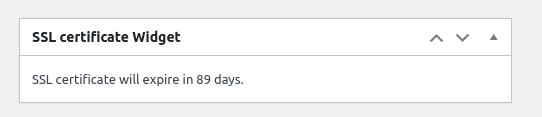
4:You can enable SSL expiration widget in wordpress dashboard widget, it looks like this:

easy SSL certificate widget in wordpress dashboard

easy SSL certificate widget in wordpress dashboard

What’s the benefits to use Easy SSL plugin for the bPress webmaser?

Site Availability: If the SSL certificate on wordpress expires, users may be unable to access the site or see warning messages in the browser, resulting in lost traffic and revenue for the site owner. With an SSL expiration plugin, the webmaster can take action to renew the certificate before it expires, ensuring the continued availability of the site.

Security Compliance: Many industry standards and regulations require valid SSL certificates, so an SSL expiration plugin can help ensure compliance with these requirements. By receiving notifications of upcoming SSL certificate expirations, the webmaster can proactively renew the certificate, helping to maintain the site’s security and compliance.

Overall, easy SSL expiration plugin can save time, simplify maintenance, and help ensure the security and compliance of your wordpress site.

Our wordpress tooltip plugin author is still adding new feature for Easy SSL plugin, if you have any feature request or question, please don’t hesitate to tell us 🙂


Tagged with: , , , , ,

WordPress Tooltips Pro Plus 20.0.8 Released

Hi dear wordpress tooltip plugin user, hope this message find you are doing well and having happy weekend with your family 🙂 We have released wordpress tooltips pro + 20.0.8 🙂

Based on a talk with an amazing wordpress tooltips user, we added a new option in optional panel to realized a function like this:

In a wordpress post, if a wordpress tooltip keyword have a link, when user mouse over this wordpress tooltip term, we will pop-up a tooltip window, and wordpress tooltip admin can opt to open the link of the tooltip keyword in a new window too, you can enable / disable this function in optional settings panel like this:

1: upgrade to wordpress tooltips pro plus 20.0.8

2: install it on your wordpress site

3: in wordpress dashboard, click the tooltips menu item and then click the optional settings sub-menu item

4: you will open the optional settings panel, and you will find a new option “Open toooltip link in new page automatically when user mouse over the toolip with a link”.

If you enabled this option, when user mouse hover a tooltip keyword which have a link, the link will be opened in new page automatically

please note, the new window may be blocked by web browsers, users will find a notification bar at the top of the page and users need to set up it in one time to allow your site open the new window automatically, I guess may be this can help some users which have import lesson or document for users? Anyway, by default, the option is disabled, you can enable / disable it in the option “Open toooltip link in new page automatically when user mouse over the toolip with a link” 🙂

Thanks for the great suggestion, that helped many tooltip users to have a better function to make the dream into the truth,  have a blessed weekend with your family 🙂


Best Regards,

WordPress tooltip plugin support

Tagged with: ,
Top