WordPress Member Directory with Tooltip 2.0.7 Released

Hi dear WordPress tooltip users, hope this message find you are doing well and have happy day with your family, We have improved functions for wordpress member directory 🙂

What is member directory?

A member directory is a list of individuals or organizations who are members of a particular group, association, or community. It typically includes contact information such as names, addresses, phone numbers, and email addresses. Member directories are often used by organizations to facilitate communication and networking among their members. They can be in the form of a printed document, an online database, or a mobile app.

What is WordPress Member Directory plugin?

The WordPress Member Directory plugin is a tool that allows you to create a directory of members on your WordPress website. It enables you to display a list of members, their profiles, and contact information. This plugin is useful for websites that have a membership system, such as social networks, online communities, and business directories. With this plugin, you can easily manage and display your members’ information, making it easier for visitors to find and connect with them.:)

What’ new in wordpress member directory 2.0.7?

1: In wordpress member directory 2.0.7, you can build remove / hide specific users in wordpress member directory, based on an amamzing wordpress tooltip user’s feedback. The user has submitted a support ticket for wordpress tooltip plugin to told us he using our wordpress tooltip member directory addon to create the directory of members, he added wordpress tooltip effect on each user’s username in the member directory, to show their selfie video,  which greatly helps all members quickly understand each other, enhances member relationships, and strengthens the overall group’s activity and trust, and all users like it the tooltip function for member directory. But a few users told him, they do not like their personal information and emails being displayed on the internal member list. They say they want to maintain their privacy and not be disturbed in their daily lives.

Then in wordpress tooltip member directory addon, we added new option and function to solve this kind of problem for member directory editor, then we move these new changes to our wordpress member directory plugin too 🙂

How to exclude specific user from wordpress member directrory?

1: download wordpress member directory plugin and upload it to your wordpress via plugins panel

2: click member directory menu , then in member directory settings panel, you will find there are a new option “Bulk remove user from member directory by user id in wordpress tooltip”, it looks like this:
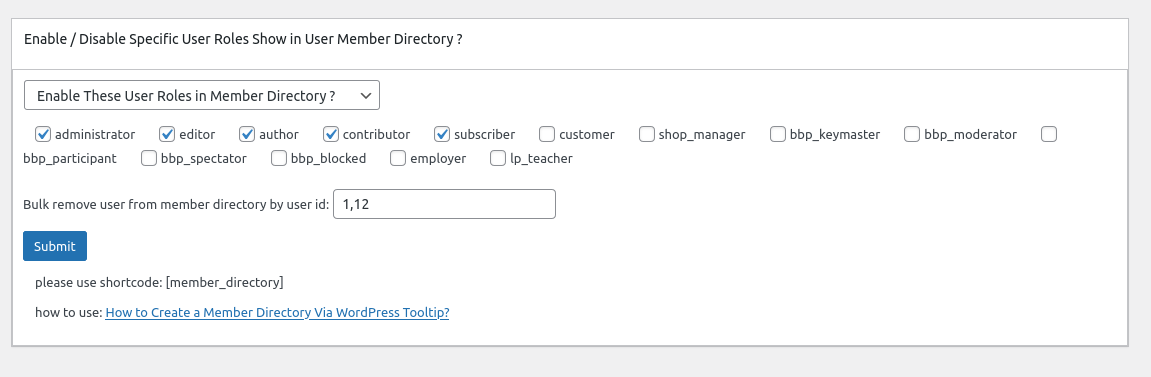
In here you can bulk enter user ids to exclude specific users from wordpress member directory in one time.

3: In front end, users which added in the “Bulk remove user from member directory by user id in wordpress tooltip” option, will be removed from wordpress member directory

If you have any more feature request about member directory, please don’t hesitate to tell us, we are happy to help you realize it  🙂

Thanks, have a blessed day with your family 🙂

Best Regards,

Best Regards,

WordPress tooltip plugin support

Tagged with: ,

How to bulk remove user from member directory in wordpress tooltip plugin? Supported by tooltip pro plus 21.9.8 and tooltips pro 16.8.6

Hi dear WordPress tooltip users, hope this message find you are doing well and have happy weekend with your family

A user has submitted a support ticket for wordpress tooltip plugin. He told us he using our member directory addon to create the directory of members, he added wordpress tooltip effect on each user’s username in the member directory, to show their selfie video,  which greatly helps all members quickly understand each other, enhances member relationships, and strengthens the overall group’s activity and trust, and all users like it the tooltip function for member directory. But a few users told him, they do not like their personal information and emails being displayed on the internal member list. They say they want to maintain their privacy and not be disturbed in their daily lives. 🙂

He checked settings in wordpress tooltip member directory addon, he found he can enable / disable specific user roles in member directory, but he had to change user role for each user manually, as an administrator, constantly trying to change user roles simply because some users do not like their personal information and emails being displayed on the internal member list is a tedious and unenjoyable task. He hopes for a simpler solution. 🙂

Okay, it is the first time we heard this kind of requirement, our wordpress tooltip developer tried to find a easily management method to help wordpress admin to exclude specific users from member directory, finally , we found it:

How to exclude specific user from wordpress member directrory?

1: login wordpress tooltip site download wordpress tooltips pro plus 21.9.8 or tooltips pro 16.8.6.

2: upload ans activate wordpress tooltip plugin in your wordpress site

3: click tooltips menu in wordpress admin area and click directory settings panel, it looks like this:

directory settings panel in wordpress tooltips pro plus 19.2.8

directory settings panel in wordpress tooltips pro plus 19.2.8

This is directory panel in wordpress tooltip pro plus version 19.2.8, some features is not existed in tooltips pro version and more features is not included in wordpress tooltip free plugin, but member directory addon have same functions.

In the new version wordpress tooltips pro 20.9.8. you will find there are a new option “Bulk remove user from member directory by user id in wordpress tooltip”, it looks like this:

In here you can bulk enter user ids to exclude specific users from wordpress member directory in one time.

4: In front end, users which added in the “Bulk remove user from member directory by user id in wordpress tooltip” option, will be removed from wordpress member directory 🙂

Thanks for the great feedback,we give the user a license of “WordPress live link preview plugin with tooltip” plugin as a THANKS, Live link preview is a light and fast and powerful plugin to display live link preview for your wordpress users.

when users mouse hover a link on your wordpress post, WordPress live link preview plugin will display the live preview screenshot of the site in a wordperss tooltip popup window, users will see where you are sending them.

If you have any more feature request or question for wordpress tooltip plugin, please don’t hesitate to contact us, we are happy to improve wordpress tooltip for you always, and we will give you a few license of our amazing wordpress plugins too 🙂


Tagged with: ,

How to use scl shortcode to display Smart Content Links in anywhere of your wordpress site? Supported by Smart Content Links with Tooltip version 1.9

Hi dear WordPress tooltip users, hope this message find you are doing well and have happy weekend with your family   We have released WordPress Smart Content Links with Tooltip version 1.9 , based on a wordpress tooltip user’s feedback

New shortcode [[scl]] to display smart content link  bar in specific wordpress posts, ‘scl’ means smart content link 🙂

The Smart Content Links with Tooltip plugin user told us, he love smart content link plugin, but in his wordpress site, he found the smart content link bar displaying throughout the whole wordpress site, although he found he can opt to display smart content link bar in specific wordpress post type,  but he still do not want smart content link bar display in all wordpress posts, he  want an option to enable / disable smart content link bar in back end, and just offer a shortcode of smart content link plugin to allow he display smart content links in specific wordpress posts, in last version our wordpress tooltip developer added a new global settings in wordpress smart content link with tooltip plugin, and we added a new option “Enable Smart Content Link Bar Throughout the Whole Site” in the wordpress smart content link with tooltip  global settings panel to solve the problem for the user. And in this version — smart content link plugin 1.9 you can use shortcode [[scl]] to display smart content link  bar in specific wordpress posts 🙂

Thanks for the great suggestion to wordpress tooltip plugins, we give a license of wordpress footnote with tooltip plugin for him as a THANK 🙂

If you have any more  feature request to wordpress tooltip plugins, please don’t hesitate to contact us 🙂

Thanks, have a blessed day with your family

Best Regards,

WordPress tooltip plugin support

Tagged with: , ,

WordPress Tooltips pro plus 21.7.8 and WordPress Tooltips pro 16.8.2 and WordPress Tooltip free 8.6.9 Released

Hi dear WordPress tooltip users, hope this message find you are doing well and have happy weekend with your family 🙂  We have released WordPress Tooltips pro plus 21.7.8 and WordPress Tooltips pro 16.8.2 and WordPress Tooltip free 8.6.9 , based on a wordpress tooltip free user’s feedback 🙂

The wordpress tooltip user told us after import tooltips from csv file, the tooltips in the frontend interface are somewhat confusing, our wordpress tooltip developer checked his site and lost the whole night to developed a new version to fix the problem for the amazing user 🙂

When you have a time, please upgrade to the latest wordpress tooltips plugin version  🙂

What’s next? We are developing a new version of ACF tooltip addon, in which we can support more new complex fields from ACF pro , in last version, we have support display tooltips effect on most ACF fields of ACF free and ACF Pro in front end, we will add some ACF tooltip function  of ACF free version to wordpress tooltips free, and we are enhance our woocommerce product directory function for wordpress tooltips pro plus, we will move some of woocommerce directory functions to wordpress tooltips free version too. 🙂

Thanks, have a blessed day with your family

Best Regards,

WordPress tooltip plugin support

Tagged with: , ,

How to Enable / Disable Smart Content Link Bar Throughout the Whole WordPress Site? Supported by WordPress Smart Content Link with Tooltip 1.8.0

Hi, Dear WordPress Tooltip users, hope this message find you are doing well and having happy days with your family. We just released wordpress smart content link with tooltips plugin 1.8.0, based on an wordpress tooltip user’s feedback. 🙂

The wordpress tooltip user told us, he do not want smart content link bar displayed throughout the whole wordpress site always, he hope have an option to disable smart content link bar in back end, okay, our wordpress tooltip developer added a new global settings in wordpress smart content link with tooltip plugin, and we added a new option “Enable Smart Content Link Bar Throughout the Whole Site” in the wordpress smart content link with tooltip  global settings panel to solve the problem for the user 🙂

How to Enable / Disable Smart Content Link Bar Throughout the Whole WordPress Site?

1: Login wordpress tooltip plugin site to download the smart content links version which >= 1.8.0

2: upload and install the wordpress smart content links with tooltips version 1.8.0

3: in wordpress dashboard, click smart content link menu item and then click global settings  sub menu item, it looks like this:

Enable Smart Content Link Bar Throughout the Whole Site

Enable Smart Content Link Bar Throughout the Whole Site

4: as you can see, in WordPress Smart Content Links with tooltips global Settings panel, there are new option  “Enable Smart Content Link Bar Throughout the Whole Site”,  you can enable / disable Smart Content Link Bar throughout the wordpress site in here 🙂

What’s next?

We are adding a shortocode for WordPress Smart Content Links with tooltips, so you can add WordPress Smart Content Links Bar in anywhere of your wordpress site 🙂

Thanks for the great feedback, if you have any more feature request or question, please don’t hesitate to contact us

Thanks, have a blessed weekend with your family

Best Regards,

WordPress Tooltip plugin Support

Tagged with: , ,

WordPress Tooltips Free 8.6.3 Released

Hi dear WordPress tooltip users, hope this message find you are doing well and have happy days with your family

We just released wordpress tooltips free 8.6.3, in this version, we improved our core javascript function of  tooltips , to keep a clean UI in front-end 🙂

In last version of wordpress tooltips free plugin 8.5.9,  a wordpress tooltip user told us he did not find the changes in the new version, we told him we added a contact form 7 tooltip addon  , for help wordpress tooltip users get the correctly information of new version, we will add change log of last two version of wordpress tooltips free plugin — because our wordpress tooltips plugin developed before at years before, out change log is too long to displayed in wordpress readme.txt, so full change log can be found at here.

We are developing next version of wordpress tooltips free plugin 8.6.9, in which we will add ACF tooltip function for wordpress tooltip free user, full function can be found at here — acf tooltip in tooltips pro and pro +

Thanks, have a happy day with your family 🙂

Best Regards,

WordPress tooltip plugin support

Tagged with: , ,

WordPress Tooltips pro plus 21.6.8 — wordpress tooltips pro 16.7.6 — wordpress ACF group 1.1.0 Released

Hi dear WordPress tooltip users, hope this message find you are doing well and have happy days with your family 🙂 An amazing wordpress acf tooltip user created a ticket and he told us after enable wp_debug, he found php warning, we released wordpress tooltips pro plugin 21.6.8 and wordpress tooltips pro plugin 16.7.6 to fix this php warning error 🙂

Thanks for the great bug report, we give the great wordpress tooltip plugin user a THANKS — we added license of smart content link with tooltip plugin in his account — which allows wordpress editor to easily add contextual content links within the body of your article. These smart links are designed to provide readers with quick access to related resources and information, making it easier for them to learn more about the topic at hand. Try it out today and see how smart links can enhance your content!

Also we have released wordpress advanced custom field (ACF) group plugin 1.1.0, in this version we improved UI of ACF fields in front-end in wordpress post, WordPress ACF GROUP plugin by wordpress tooltips is a ACF (Advanced custom fields) plugin to print the values and labels of all fields from a ACF group 🙂

Thanks for the great feedback, if you have any more question or feature request, please don’t hesitate to contact us 🙂

We are very happy to help you 🙂


Thanks, have a blessed day with your family

Best Regards,

WordPress tooltip plugin support

Tagged with: , , , ,

What is the way to show in the title of every product a woocommerce tooltip with the description of the product

Hi dear WordPress tooltip users, hope this message find you are doing well and have happy days with your family An amazing woocommerce tooltip user created a topic on our woocommerce tooltip support forum, he asked us: “Hi guys, I’m using Tooltip Pro+ and I’m wondering what is the way to show in the title of every product a Tooltip with the description of the product?”  We’d  like write a detailed document for the woocommerce tooltip user 🙂

What’s the benefit to add woocmmerce tooltip on woocommerce product title?

Woocommerce can add woocommerce tooltip on product title in the shop page or product page to enhance the user experience and provide more information about the product, for example, woocommerce shop owner can provide some quick information about the product, such as its main features, benefits, or any other information that a buyer might be interested in knowing before making a purchase, woocommerce  shop owner can insert tooltips videos / audios / images / coupon codes / payment QR code…etc in the tooltip popup box,  this way, the buyer can have access to important information at a glance without having to click on each product individually to view the details  🙂

How to  to add woocmmerce tooltip on woocommerce product title?

Tooltips are small pop-up window that appear when the mouse cursor hovers an element. In this case, the woocommerce admin can add a tooltip to the product title in the shop page, which will show additional information about the product when the user hovers over it with their mouse, it is very easy to add tooltip on woocommerce title quickly:

1: Login  woocommerce tooltip plugin site to download wordpress tooltip pro plus plugin

2: login your wordpress  dashboard, upload woocommerce tooltip plugin via your wordpress plugins panel,then activate woocommerce tooltip plugin

3: Click “Tooltips” menu item, then click “Addons” sub menu item to open “Tooltips Addon settings” panel

4: In “Tooltips Addon settings” panel, you will find 18 wordpress tooltip addons, please enable “Tooltips for WooCommerce Product” addon and click “Update Now”  button,  it looks like this:

5: Click tooltips menu again
6: Click “woo tooltips” sub menu item, it looks like this:

tooltip sub menu items

tooltip sub menu items

7: Then you will open “Advanced WooCommerce Tooltips Addon Settings” panel, it looks like this:

advanced woocommerce tooltips addon settings

advanced woocommerce tooltips addon settings

8: Please enable “Tooltips for WooCommerce Product Title.

Then in the front end, woocommerce tooltip plugin will detect are there tooltip term in woocommerce product title and add  tooltip effect on woocommerce product title automatically 🙂

Hope this have a little help 🙂

Thanks, have a blessed day with your family 🙂

Best Regards,

WordPress tooltip plugin support

Tagged with: , , ,

ACF Group Plugin by WordPress Tooltips

WordPress ACF GROUP plugin by wordpress tooltips is a ACF plugin to print the values and labels of all fields from a ACF group/

What is Advanced custom files(ACF) plugin?

ACF(Advanced custom files) is a wordpress plugin that provides a user-friendly interface for creating and managing custom fields.It allows worpdress developers and wordpress admin to easily add custom fields to their wordpress posts and pages withoug the need for complex code.

Then ACF plugin is designed to enhance the functionality of wordpress by adding additional fields that are not includes by default. These custom fields can be sued to collect specific information about a post or page, such as product features, customer reviews, event dates and times, and more.

using the ACF plugni, custom fields can be added to various type of content, including posts, pages, custom post types, and even taxonomy terms. The plugin provides a variety of field types, including text, image, select , date picker and more, making it easy to customize the fields based on the specific needs of the wordpress site.

ACF plugin has become a popular tool among wordpress users due to its ease of use and flexibility. It allows developer and wordpress admin to create rich, customized content without the need of advanced coding skills 🙂

Why develop ACF Group plugin?

We developed an ACF Tooltip addon for our wordpress tooltip pro plugin, when wordpress users insert ACF fields into frontend of wordpress post, wordpress tooltip ACF Tooltip addon will add tooltip effect on ACF fields automatically.

A problem is, what we want to do is, load all ACF fields in a ACF group and display their labels and values in frontend of wordpress post, and add wordpress tooltip effect for ACF fields which have a wordpress tooltip keyword, but after searched a lot of official site and plugins, we cannot find this kind of plugin or code, so we decide to develop this ACF group plugin for ourself and for all ACF users and wordpress tooltip users 🙂

How to use ACF Group Plugin?

1: Login wordpress tooltip plugin site to download acf group plugin

2: login your wordpress dashboard, upload acf group plugin via your wordpress plugins panel,then activate acf group plugin

3: in front-end, in wordpress editor, enter the shortcode
[[acf_group group=’group1′]]
“group1” is the acf group title

Then in the front end, ACF GROUP plugin will print group title and then list the values and labels of all fields from the ACF group group1

What’s wordpress tooltips plugin?

Tooltips are small popup box with more information like video / audio / image / google maps / QR code / wiki / text… and so, tooltips box will pop up when users hover over an element in your pages, the element can be a word in your post, a search form input box, an image in your page, a widget on your sidebar.. and so on, wordpress tooltip plugin supports add tooltip effect on any element on the wordpress posts, or display on wordperss menu, comment, contact form, woocmmerce product, bbpress forum, buddypress activity…etc, with pretty effects and many more little amazing components and addons, for example, Bullets Screen
What it WordPress Tooltip Plugin:

WordPress tooltip pro is a tooltips plugin for wordpress, which be designed to help you create colorful, varied and graceful tooltip styles to present the content to your users, with lively and elegant animation effects, and save your valuable screen space.

When the users hover over an item, the colorful tooltip popup box will display with the animation effect. You can add video, audio, image, and even other content which generated by 3rd wordpress plugins like QR code, Amazon AD, Google Map in tooltip popup box via wordpress standard editor, it is very easy to use.

In wordpres tooltip plugin, we included a ACF tooltip addon to add tooltip effect on ACF fields in front-end automatically 🙂

What’s benefit to use ACF Group plugin?

Displaying all fields in an ACF field group in the frontend of a WordPress post can also provide several other benefits for the WordPress admin:

Enhanced User Engagement: By providing visitors with more detailed information about a post, they may be more likely to engage with it and potentially share it with others. This can help to increase traffic to the website and improve engagement metrics.

Customized User Experience: ACF fields can be used to provide a more customized experience for visitors based on their interests and preferences. For example, if a field group is used to collect data about a visitor’s location or interests, the WordPress admin can use this information to display more relevant content to the visitor.

Streamlined Content Creation: By using ACF fields to collect and display information in a standardized way, the WordPress admin can streamline the content creation process and ensure that each post contains all relevant information in a consistent format.

Improved SEO: Including additional information about a post in the form of ACF fields can help to improve search engine optimization (SEO). By including relevant keywords and detailed information in the fields, the post may rank higher in search engine results pages.

We are adding more and more ACF features in this ACF group plugin 🙂

Tagged with: , , , ,

How to use woocommerce tooltip to add a Tooltip to a WooCommerce product attribute?

Hi dear WordPress tooltip users, hope this message find you are doing well and have happy days with your family 🙂 We get a ticket from a wordpress tooltip user, he asked us a question “How to use woocommerce tooltip to add a Tooltip to a WooCommerce product attribute?”, by wordpress tooltip,  woocommerce shop owner can add tooltip on woocommerce product attribute easily, we believe there are more woocommerce tooltip user have similar question, we are happy to write a detailed document to help the user to understand how woocommerce tooltip can add a tooltip to woocommerce attribute. 🙂

What’s the benefit to add wordpress tooltip on woocommerce product attribute?

adding a tooltip to a woocommerce product attribute can provide additional information to customers about the attribute. For example, if the attribute is “material”, a tooltip could provide more information about the specific type of material used for the product via add video tooltip or audio tooltip on the materail attribute. This can help customers make more informed purchasing decisions and improve their overall shopping experience. Additionaly, tooltips can also help reduce the amount of customer support inquires related to product attributes, as customers can quickly find the information they need on the product page 🙂

How to add wordpress tooltip on woocommerce product attribute?

it is very easy to add tooltip on woocommerce attribute quickly:

1: Login  woocommerce tooltip plugin site to download wordpress tooltip pro plus plugin

2: login your wordpress  dashboard, upload woocommerce tooltip plugin via your wordpress plugins panel,then activate woocommerce tooltip plugin

3: Click “Tooltips” menu item, then click “Addons” sub menu item to open “Tooltips Addon settings” panel

4: In “Tooltips Addon settings” panel, you will find 18 wordpress tooltip addons, please enable “Tooltips for WooCommerce Product” addon and click “Update Now”  button,  it looks like this:


woocommerce tooltip addon

5: Click tooltips menu again
6: Click “woo tooltips” sub menu item, it looks like this:

tooltip sub menu items

tooltip sub menu items

7: Then you will open “Advanced WooCommerce Tooltips Addon Settings” panel, it looks like this:

advanced woocommerce tooltips addon settings

advanced woocommerce tooltips addon settings

8: Please enable “Tooltips for WooCommerce Product Attribute”, also please enable all other 7 woocommerce tooltip options.

Then in the front end, you will find woocommerce tooltips works well on woocommerce product attribute labels, it looks like this:

tooltips for woocommerce product additional information

Please note, you need add some tooltips first, if you are new users of woocommece tooltip, please check our wordpress tooltip video tutorials to learn how to create a tooltip term easily, and you can customize style for each toolip term to make a colorful woocommerce tooltip to cache the user’s attention, for example:

woocommerce attribute tooltip

Also woocommerce tooltip will add tooltip effect on woocommerce desprition and short descriptuion too, and you can use shortcode to add advanced woocomemrce tooltip content in woocommerce product description too

And you can add a woocommerce glossary for your product to help customer understand the benefit / performance of your product too.

By the way, you can display woocommerce product title, image, price with “add to cart” button, “view cart button” in wordpress tooltip in any wordpress post via Woocommerce product cart anywhere , something looks like it in tooltip popup:


 This will increase the visibility and sales of those products in any where in your woocommerce site
If you have any question or suggestion of woocommerce tooltip plugin, please don’t hesitate to conact us
Thanks, have a blessed day with your family
Best Regards,
WordPress Tooltip Plugin Support Team
Tagged with: , , , ,
Top


