Beautified Bullet Screen Settings panel, improved code security of Bullet Screen module, wordpress tooltips pro plus 29.9.8 released

Hey, esteemed users of WordPress Tooltip! I hope this message finds you well and enjoying joyful moments with your loved ones!  Yesterday, we got a feedback from a WordPress Tooltip plugin, he praised the functionality of our Bullet Screen, noting that it was the only WordPress Bullet Screen plugin he could find 🙂

What is Bullets-Screen?

Bullets Screen is a feature that displays a barrage effect of user comments, real-time messages, or other text content on a website in a scrolling or floating manner. The benefits of supporting Bullets Screen functionality for a website include:

  1. Increased User Engagement: Bullets allow wordpress content to be displayed on the page intuitively and in real-time, encouraging user interaction.
  2. Attention-Grabbing: The dynamic nature of the bullet screen effect can attract user attention, increasing focus on website content.
  3. Social Aspect: Bullets create a social environment where users feel engaged and involved, enhancing interaction and communication among users.
  4. Entertainment Value: Bullets add an element of fun and entertainment, making the user experience more engaging and diverse. Overall, the Bullets Screen feature can add a dynamic interactive way for websites to enhance user experience and engagement.

Starting from the release of wordpress tooltips pro 5.9.2 back in 2018 (the latest version being 29.9.8 in 2024), we initiated the development of the bullet screen effect for our wordpress tooltip users. The feedback from many users has been overwhelmingly positive, expressing their appreciation for this new feature. 🙂

Today, we developed a new version of wordpress tooltips pro plus 29.9.8, in this version, we improved UI of Bullet Screen Settings panel, the new Bullets Screen Settings panel looks like this:
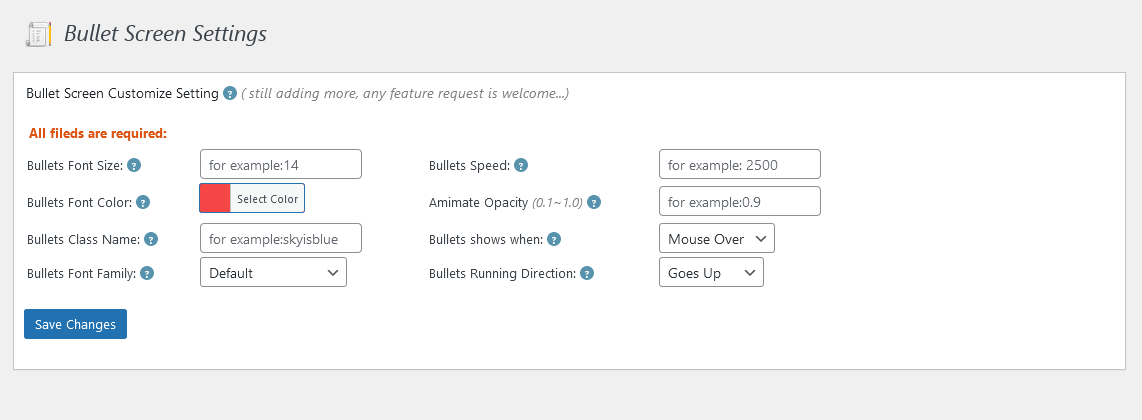
Bullet Screen Settings in wordpress tooltips pro plus 29.8.8

From the screenshot, you can see that the Bullets Screen Settings panel now looks much more lively. 🙂

Also we have improved code security of WordPress Bullets Screen module 🙂

If you have any more question of feature request, please don’t hesitate to contact us 🙂

Best Regards,

WordPress Tooltips Plugin Support

Tagged with: , ,

Support for more member directory functions, wordpress tooltips free plugin 9.6.1 released

Hi, greetings to all the devoted users of the WordPress Tooltip plugin! I hope this message finds each and every one of you in high spirits, enjoying your happy days to the fullest with your dear family.     A few days before, we released wordpress tooltips free plugin 9.5.9 to support filtering users by including only those whose IDs are included in the “include” parameter list. Today, we added a new function of members directory in wordpress tooltips plugin, to support for more member directory functions from amazing user: A WordPress user is using wordpress tooltips plugin with the member directory feature. They requested the addition of a parameter to exclude certain WordPress user IDs from being displayed in the member directory. We support this feature in this version in tooltips 9.6.1.

This is a great feature request, possible reasons for the requested functionality,  A members directory admin may have different reasons for wanting to exclude specific user IDs from the member directory. Here are some possible explanations:

  1. Privacy Protection: Some users might not want their profiles to be visible in the member directory due to security or privacy concerns.
  2. Internal Management: In certain cases, specific users may belong to internal teams or special organizations and prefer not to be listed in the member directory. This can help limit the directory to display only certain roles or specific users.
  3. Special Membership Privileges: Occasionally, certain users may have unique privileges or roles and would like to distinguish themselves by not being listed among regular users in the member directory. In summary, the requested functionality provides users with more flexibility and control to exclude specific user IDs from the member directory as per their needs. This can be done to ensure privacy protection, internal management, or to provide special membership privileges.

We also updated member directory panel in wordpress tooltips free 9.6.1, we have added examples of the use of the shortcode [ member_directory ]

We have also written a detailed step-by-step guide on how to use this function in member_directoery shortcode, please click ‘How to disable a specified user from appearing in the member directory?‘ to view


What are tooltips?

Tooltips are small popup box with more information like video /  audio / image / google maps / QR code / wiki / text… and so, tooltips box will pop up when users hover over an element in your pages, the element can be a word in your post, a search form input box, an image in your page, a widget on your sidebar.. and so on, wordpress tooltip plugin supports add tooltip effect on any element on the wordpress posts, or display on wordperss menu, comment, contact form, woocmmerce product, bbpress forum, buddypress activity…etc, with pretty effects and many more little amazing components and addons, for example, Bullets Screen 🙂

What it WordPress Tooltip Plugin:

WordPress tooltip pro is a tooltips plugin for wordpress, which be designed to help you create colorful, varied and graceful tooltip styles to present the content to your users, with lively and elegant animation effects, and save your valuable screen space.

When the users hover over an item, the colorful tooltip popup box will display with the animation effect. You can add video, audio, image, and even other content which generated by 3rd wordpress plugins like QR code, Amazon AD, Google Map in tooltip popup box via wordpress standard editor, it is very easy to use.

WordPress Glossary:

Thanks for the great feature requests, if you have any more question, please don’t hesitate to contact us, we are very happy to create pretty wordpress plugin for you always 🙂

Thanks, have a blessed day with your family 🙂

Best Regards,

WordPress tooltips plugin support

Tagged with: , ,

WordPress tooltips pro plus 29.8.8 and wordpress tooltips pro 19.8.8 released

Hi, dear users of WordPress Tooltip! I sincerely hope this message finds you in the best of spirits and basking in the warmth of happiness alongside your cherished companions. 🙂  We are happy to report you we just released WordPress tooltips pro plus plugin version 29.8.8 and wordpress tooltips pro plugin version 19.8.8 , to fix an issue which reported by an amazing wordpress tooltip plugin user 🙂

The wordpress tooltip plugin user said he installed tooltips pro plugin and he added some tooltip terms, then create wordpress pages via Divi Builder, he found an issue: warning: preg_replace unkown modifier ‘F’ in tooltips.php, this user is a great developer, he said he debug the issue and manually modify the plugin code to fix the error, and the great developer shared his code with us 🙂

Our wordpress tooltips plugin developer checked the problem carefully and checked our wordpress tooltips plugin carefully, we fixed the problem in WordPress tooltips pro plus plugin version 29.8.8 and wordpress tooltips pro plugin version 19.8.8, please upgrade to latest version of wordpress tooltips plugin asap you can 🙂

Thanks a lot of the bug report, which is greatly appreciated by our WordPress tooltip plugin developer.  As a token of our gratitude, our wordpress tooltip developer offered the great user a license for the WordPress FAQ Pro Plugin.

The WordPress FAQ Pro plugin is a powerful tool designed to make creating and managing FAQs on your WordPress website easy and efficient. It offers a wide range of features, including pre-designed FAQ templates, customizable FAQ styles via a user-friendly interface, AI-generated high-quality content for FAQs and WordPress posts, support for WooCommerce Product FAQs, responsive design for optimal display on different devices, multiple FAQ templates to choose from, FAQs grouped by category, and the ability to specify the number of FAQ items for each FAQ page, among many other features.

We hope that this license will be of great value to you and your WordPress endeavors. If you have any further questions or require assistance, please do not hesitate to contact us 🙂

Thanks, have a blessed day with your family 🙂

Best Regards,

WordPress tooltips plugin support

Tagged with: ,

Support customize the login link, WordPress Restricted Content Plugin by WordPress Tooltips 1.0.9 Released

Hi, Dear WordPress Tooltip users, hope this message find you are doing well and having happy days with your family We got a feedback from a user of WordPress Restricted Content Plugin, he told us he want to customize the login link:

Title: Custom Login Link Redirection for Restricted Content Access

Description: I am a user of the Restricted Content Plugin in WordPress and I am interested in customizing the default login link provided by the plugin. Instead of the standard login link, I would like to have the ability to redirect users who do not have permission to access restricted content to a custom link, specifically to my WooCommerce shop for membership access.

Benefits: 1. Enhanced user experience: By redirecting users to the WooCommerce shop, the user journey becomes more seamless and tailored to provide a clear path for purchasing membership access.

2. Increased revenue potential: Directing users to purchase a membership access can help in converting visitors into paying members, thus generating more revenue.

3. Monetization of restricted content: Customizing the login link redirection can help in effectively monetizing the restricted content on the website.

Request: I kindly request the implementation of a feature that enables users to customize the login link redirection for restricted content access. This feature would provide users with the flexibility to direct unauthorized users to a specific link, such as the WooCommerce shop for membership purchase. Thank you for considering this feature request.

Our wordpress tooltip plugin developer checked this ticket and re-developed the Restricted Content Plugin to support this feature, now you can custom the link like this way:
[ restriction roles=’customer, editor,admin’ link=’https://tooltips.org/shop/’]hi, we are private content[/restriction ]

By this way, only user roles customer, editor, admin can read your wordpress paid content , when guest and other user view the post, they will find the note : “Sorry this is restricted content, please log in first“, so users can purchase your membership product and then back to read the private paid content 🙂

We also redeveloped our plugin to enhanced code security by use sanitize_url for link 🙂

Our WordPress tooltip plugin developer has reviewed this ticket and redeveloped the Restricted Content Plugin to support this feature. Now you can customize the link in the following manner:
[ restriction roles=’customer, editor, admin’ link=’https://tooltips.org/shop/’ ]hi, we are private content[ /restriction ]

In this way, only user roles customer, editor, and admin can access your WordPress paid content. When guests and other users view the post, they will see the note: “Sorry, this is restricted content. Please log in first.” This allows users to purchase your membership product and then return to read the private paid content. We have also enhanced our plugin by improving code security, using sanitize_url for the link.

Thanks for the great suggestion, please don’t hesitate to contact us, wordpress tooltips plugin team always happy to realize your amazing requirement 🙂


What are tooltips?

Tooltips are small popup box with more information like video /  audio / image / google maps / QR code / wiki / text… and so, tooltips box will pop up when users hover over an element in your pages, the element can be a word in your post, a search form input box, an image in your page, a widget on your sidebar.. and so on, wordpress tooltip plugin supports add tooltip effect on any element on the wordpress posts, or display on wordperss menu, comment, contact form, woocmmerce product, bbpress forum, buddypress activity…etc, with pretty effects and many more little amazing components and addons, for example, Bullets Screen 🙂

What it WordPress Tooltip Plugin:

WordPress tooltip pro is a tooltips plugin for wordpress, which be designed to help you create colorful, varied and graceful tooltip styles to present the content to your users, with lively and elegant animation effects, and save your valuable screen space.

When the users hover over an item, the colorful tooltip popup box will display with the animation effect. You can add video, audio, image, and even other content which generated by 3rd wordpress plugins like QR code, Amazon AD, Google Map in tooltip popup box via wordpress standard editor, it is very easy to use.

WordPress Glossary:

Tagged with: , , ,

WordPress tooltips free 9.5.9 released

Hello, beloved users of WordPress Tooltip! I sincerely hope this message finds you in the best of spirits and basking in the warmth of happiness alongside your cherished companions. May your days be filled with joy and contentment! We are very happy to report you: we just released wordpress tooltips free 9.5.9 🙂

Changes in wordpress tooltips free 9.5.9:

1: In the MEMBER DIRECTORY feature, we  provide support for filtering users by including only those whose IDs are included in the “include” parameter list. Please check more details at How to display only the users in a specified user ID list in the member directory?

2: Fully followed wordpress security standard to re-developed wordperss tooltips plugin

We changed more than 100 functions to use sanitize* functions , esc* functions, wp_kses* functions, wpdb* functions. check_admin_referer functions, wp_nonce* functions… etc to enhance to code security of wordpress tooltips plugin

Please upgrade to the latest version of wordpress tooltips free plugin, if you have any more question or feature request, please don’t hesitate to contact us 🙂

At the same time,  in tooltips pro plus version, we added many more amazing members directory functions, and in last version, we support the ability to use the shortcode of all member directories on a page at the same time

Thanks, have a blessed day with your family 🙂

Best Regards,

WordPress tooltips plugin support

Tagged with: ,

Supports the ability to use the shortcode of all member directories on a page at the same time, wordpress tooltips pro plus 29.6.8 released

Hi To all dear users of WordPress Tooltip, I send my greetings, hoping that this message finds you in high spirits, surrounded by the love of your dear ones. Recently, we received many amazing feature request from a user of the WordPress Tooltip plugin, the great user has been using the member directory by wordpress tooltip to create a specialized list for educators.  🙂

However, they encountered a challenge where they only wanted to display users with the role of “teacher,” while the directory was showing all users. To tackle this issue, our diligent developer has devised a solution in the latest version, WordPress Tooltip Pro Plus 28.8.8.

The user expressed their contentment with the resolution of the problem and also shared another suggestion. They are currently working on a class page and require the ability to list both teachers and administrators using the member directory functionality. They inquired if there was a way to achieve this. As a token of gratitude and to meet their needs, our dedicated developer has released WordPress Tooltip Pro Plus 28.9.8. This new version incorporates a feature that enables the display of specific user information in the member directory based on designated user IDs.

The user spoke highly of the WordPress Tooltip plugin, considering it the best they have ever used and commending our exceptional support. We expressed our appreciation for their feedback and assured them of our commitment to continuously enhance the user experience. In response, the teacher expressed gratitude for the recent version update. They acknowledged the outstanding work of our team in addressing their previous request and admired the WordPress Tooltip plugin. Additionally, they presented another requirement – to create a member directory using the WordPress Tooltip plugin that can exclude certain users, including those who are no longer associated with the organization or administrators. They sought guidance on achieving this functionality and expressed their gratitude in advance for any assistance provided. Our diligent developer carefully reviewed this new feature request, and it is with great joy that we announce the release of WordPress Tooltip Pro Plus 29.0.8. This version empowers administrators to selectively remove specified users from appearing in the member directory.

Just a few days later, the user once again expressed their gratitude and expressed their desire to go even further. They requested the ability to display all users with the role of “teacher” in the member directory while still having the option to exclude specific users. In response to their needs, our WordPress Tooltip plugin developer has re-engineered version 29.1.8 to fulfill their requirements.

Then the user wrote to us again, he told us, the individual expresses immense gratitude for the swift and impeccable assistance received regarding the user list feature. The outcome has been nothing short of extraordinary, earning esteemed recognition from the educational institution. However, a new challenge has arisen, calling for a member directory that encompasses all the noteworthy class presidents. Given the annual influx of new students and subsequently appointed class presidents, an automated system that accommodates dynamic updates without manual intervention is sought after. It is with this in mind that the individual wishes to harness the power of a fuzzy search function within the WordPress Tooltip plugin. The aim is to effortlessly present a comprehensive roster of users whose names are prefixed with “class_president” in the member directory. Thus, in a spirit of both curiosity and anticipation, the individual humbly requests guidance on the implementation of this desired functionality. Our WordPress tooltips plugin developer has worked tirelessly to create WordPress Tooltips Pro Plus 29.5.8, which allows for the display of specific types of users using fuzzy search in the member directory.

Today, this user once again offered a valuable piece of feedback, the individual graciously extends their heartfelt appreciation for the swift assistance received, highlighting the seamless functionality of the new version. However, a minor query has arisen regarding the utilization of the shortcode function for multiple member directories on a single page. Is it conceivable to expand the capabilities and allow for the simultaneous employment of shortcode functionality for multiple member directories in a cohesive manner? With utmost respect, the individual kindly seeks guidance on this matter, driven by both enthusiasm and a genuine desire for optimal efficiency. Our wordpress tooltips developer fixed thie problem in wordpress tooltips pro plus 29.6.8 🙂

If there are any additional features you’d like to request, please feel free to reach out to us. We greatly appreciate your enthusiasm as a user, and we are dedicated to continually enhancing our plugin while ensuring your satisfaction. 🙂


Have a day filled with blessings and cherished moments with your loved ones. 🙂

Warmest regards,
Support for the WordPress tooltips plugin

Tagged with: , , ,

Member Directory by WordPress Tooltips Plugin 2.2.3 released, Showing only the users from a designated user ID list in the member directory

Hi, esteemed users of WordPress Tooltip, I hope this message finds you well and having happy days with your loved ones.  Recently, we received a ticket from a WordPress tooltip plugin user regarding our member directory. After reviewing our member directory documentation, the user discovered that our WordPress Tooltips Pro Plus version offers numerous impressive member directory functions that align with their requirements. Consequently, they kindly requested that we incorporate the “Showing only the users from a designated user ID list in the member directory” function into the free version of our member directory plugin. 🙂

We are very happy to know the member directory user like our functions, we are happy to add more and more function from our wordpress tooltips pro plus plugin into member directory plugin 🙂

We have released Member Directory by WordPress Tooltips Plugin 2.2.3, in which support showing only the users from a designated user ID list in the member directory 🙂

How to Show only the users from a designated user ID list in the member directory

1: Crete a new wordpres post and insert the wordpress tooltip member directory shortcode :

[ member_directory  include=’653,5,864’]

2: Inside the front-end page, you’ll see that the member directory will only display information about users with user IDs 653, 5, and 865.

What is WordPress Member Directory Plugin?

Member Directory, list all members on your site based on user roles, to help your company build a company address book, school portfolio… and so on, help users contact each other more easier


How to Use WordPress Member Directory Plugin

Member directory plugin is very easy to use, just inser wordpress Member directory shortcode [ member_directory ] in any page or post, you will get a member directory with pretty member directory template quickly


Further Reading: How to list specific type of users using fuzzy search in member directory of wordpress tooltip plugin?

Further Reading: How do I display only users with specific user roles from a specified list of user IDs in the Member Directory?

Further Reading: How to only display users with a specific role in the member directory and hide users from the specified user ID list?

Further Reading: How to disable a specified user from appearing in the member directory?

Further Reading: How to display only the users in a specified user ID list in the member directory?

… etc

What are tooltips?

Tooltips are small popup box with more information like video /  audio / image / google maps / QR code / wiki / text… and so, tooltips box will pop up when users hover over an element in your pages, the element can be a word in your post, a search form input box, an image in your page, a widget on your sidebar.. and so on, wordpress tooltip plugin supports add tooltip effect on any element on the wordpress posts, or display on wordperss menu, comment, contact form, woocmmerce product, bbpress forum, buddypress activity…etc, with pretty effects and many more little amazing components and addons, for example, Bullets Screen 🙂

What it WordPress Tooltip Plugin:

WordPress tooltip pro is a tooltips plugin for wordpress, which be designed to help you create colorful, varied and graceful tooltip styles to present the content to your users, with lively and elegant animation effects, and save your valuable screen space.

When the users hover over an item, the colorful tooltip popup box will display with the animation effect. You can add video, audio, image, and even other content which generated by 3rd wordpress plugins like QR code, Amazon AD, Google Map in tooltip popup box via wordpress standard editor, it is very easy to use.

WordPress Glossary:

Thanks for the feature request to our member directory plugin, if you have any more question, please don’t hesitate to contact us, have a blessed day with your family

Best Regards,

WordPress tooltips plugin support

Tagged with: , ,

How to list specific type of users using fuzzy search in member directory of wordpress tooltip plugin? WordPress tooltips pro plus 29.5.8 released

Dear esteemed users of WordPress Tooltip,

I hope this message reaches you in good spirits, surrounded by the warmth of loved ones. Recently, we received invaluable feedback from a user of the WordPress Tooltip plugin regarding its member directory feature.

This user has been utilizing the member directory to create a specialized list for teachers. However, they faced a challenge where they only wanted to display users with the role of “teacher,” while the directory was showing all users. To address this issue, our diligent developer has devised a solution in the latest version, WordPress Tooltip Pro Plus 28.8.8.

The user expressed their satisfaction with the problem being resolved and also shared another suggestion. They are currently working on a class page and require the ability to list both teachers and administrators using the member directory functionality. They inquired if there was a way to accomplish this. As a gesture of appreciation and to fulfill their needs, our dedicated developer has released WordPress Tooltip Pro Plus 28.9.8. This new version incorporates a feature that allows the display of specific user information in the member directory based on designated user IDs.

The user highly praised the WordPress Tooltip plugin as the best they have ever used, highlighting the exceptional support we offer. We expressed our gratitude for their feedback and reassured them of our commitment to continually enhance the user experience. In response, the teacher expressed their appreciation for the recent version update. They acknowledged the team’s outstanding work in addressing their previous request and expressed admiration for the WordPress Tooltip plugin. Additionally, they presented another requirement – to create a member directory using the WordPress Tooltip plugin that can exclude certain users, including those who are no longer associated with the organization or administrators. They sought guidance on achieving this functionality and expressed gratitude in advance for any assistance provided. Our diligent developer carefully reviewed this new feature request, and we are elated to announce the release of WordPress Tooltip Pro Plus 29.0.8. This version empowers administrators to selectively remove specified users from appearing in the member directory.

Just a few days later, the user extended their thanks once again and expressed their desire to take it a step further. They requested the ability to display all users with the role of “teacher” in the member directory while still having the option to exclude specific users. Responding to their needs, our WordPress Tooltip plugin developer has re-engineered version 29.1.8 to fulfill their requirements.

Then the user told us:

Hi, I want to express my gratitude for your prompt assistance with the user list feature. It turned out to be fantastic, and I received accolades from the school. Now, I have encountered a new challenge. I require a member directory that includes all the class presidents. Since we have new students and class presidents every year, I would like to have an automated system that updates the list without manual intervention. The user names assigned to class presidents all start with “class_president”. Consequently, I’m hoping to utilize a fuzzy search function in the WordPress tooltip plugin to display a list of users with the “class_president” prefix in the member directory. Could you please guide me on how to achieve this?

Great! This is an excellent feature request. Our WordPress tooltips plugin developer has worked tirelessly to create WordPress Tooltips Pro Plus 29.5.8, which allows for the display of specific types of users using fuzzy search in the member directory.

How to list specific type of users using fuzzy search in member directory of wordpress tooltip plugin?

1: WordPress Tooltip Pro Plus plugin customers can simply click on the “Download WordPress Tooltip” button to directly download the latest version. New users are kindly requested to purchase a license for WordPress Tooltip Pro Plus.

2: Once you have downloaded and installed WordPress Tooltip Pro+ plugin version 29.5.8 or higher, please proceed with the following steps.

3: For newcomers, we highly recommend watching our comprehensive video tutorial series titled “WordPress Tooltips Video Tutorial.” The third video in this series, titled “How to Upload and Activate WordPress Tooltips Pro Plugin,” provides detailed instructions.

4: Create a new WordPress post and insert the shortcode

[ member_directory search=’*class_president*’ ]

5: After completing the above steps, please check the member directory in the front-end. You will notice that it displays all class president in the member directory 🙂

If you have any more feature request, please don’t hesitate to contact us, we are delighted to have such enthusiastic users, and we remain committed to continuously improving our plugin.

Thanks, have a blessed day with your loved ones 🙂

Best Regards,

WordPress tooltips plugin support

Tagged with: , , ,

WordPress Announcements by wordpress tooltips version 1.9.3 released

Hi, Dear cherished  WordPress Tooltip users,

I hope this message finds you in high spirits, enjoying a wonderful day with your loved ones. 🙂

Based on a wordpress tooltip plugin user’s suggestion, we developed a wordpress announcements plugin for wordperss blogger who have multiple-author-editor, this WordPress plugin allows you to display announcements in the admin area when users log in. If users do not accept the announcements, they will not be able to access any menus or links in the backend. The plugin provides a simple and easy-to-use solution for showing, editing, adding, and deleting announcements in the admin area. When users log in, they will see all the announcements first. If logged-in users do not accept the announcements, they will only be able to view the announcements page and won’t be able to access any other menus or links in the WordPress backend. This plugin can be used to display Terms of Service (TOS) or important notes to users when they log in to the backend. In the Announcements settings panel, you can easily add, edit, and delete any announcements. More amazing features for the plugin are being developed, and feature requests are welcome.

Yesterday, we got a report from a wordpress developer, he said we can improve the code of our plugin to use newest wordpress use roles and capabilities manage menus in back-end of Announcements.

We released WordPress Announcements by wordpress tooltips version 1.9.3 to improve our code 🙂

What are tooltips?

Tooltips are small popup box with more information like video /  audio / image / google maps / QR code / wiki / text… and so, tooltips box will pop up when users hover over an element in your pages, the element can be a word in your post, a search form input box, an image in your page, a widget on your sidebar.. and so on, wordpress tooltip plugin supports add tooltip effect on any element on the wordpress posts, or display on wordperss menu, comment, contact form, woocmmerce product, bbpress forum, buddypress activity…etc, with pretty effects and many more little amazing components and addons, for example, Bullets Screen 🙂

What it WordPress Tooltip Plugin:

WordPress tooltip pro is a tooltips plugin for wordpress, which be designed to help you create colorful, varied and graceful tooltip styles to present the content to your users, with lively and elegant animation effects, and save your valuable screen space.

When the users hover over an item, the colorful tooltip popup box will display with the animation effect. You can add video, audio, image, and even other content which generated by 3rd wordpress plugins like QR code, Amazon AD, Google Map in tooltip popup box via wordpress standard editor, it is very easy to use.

WordPress Glossary:

Tagged with: ,

WordPress Announcements Plugin by WordPress Tooltips

Plugin Name: WordPress Announcements Plugin by WordPress Tooltips:

When users logged in admin area, they will see announcements first, if users did not accept announcements, they can not open any menu in back end.

Description:

Announcements is a simple & easy-to-use solution that help you to show / edit / add / delete announcements in your admin area, if user logged in your admin area, they will see all announcements first,
if logged in users do not accept your announcements, they can not open any menu or links in your wordpress back end, the only page they can view is your announcements in back end. This plugin can help you show TOS or Notes for any users when they logged in your back end

In Announcements setting panel, you will add title, message in Announcement Message Editor, also there are options that allow users view an announcement and do not need to access the agreement, and still can open admin menu or links, all these announcements will be stored
in Announcements menu, if users open announcements menu, they will find any messages / notes you sent to them.

Announcements setting panel, you can add / edit / delete any announcements very easy.

More amazing features are being developed and any feature request is welcome.

== Installation ==

1:Upload the Announcements plugin to your blog
2:Activate it
3: You will find Announcements menu item and Announcements settings menu, just click Announcements settings menu item, you can add / edit / delete new announcements quickly.
4: Once you add a new announcements, when other users logged in admin area, they will find your announcements first, they must accepe your Announcements, else they can not do anything in your admin area
1, 2, 3,4: You’re done!

== Screenshots ==

1. Announcements Setting Panel
2. Announcements that users had to accept when they logged in

== Changelog ==
= Version 1.9.3 =
Use roles and capabilities manage menus in back-end of Announcements

= Version 1.8.9 =
Follow wordpress security standard to use esc_attr to check and filter content which generated by admin in all output
Follow wordpress security standard to use sanitize_text_field to check and filter content which generated by admin in all inpupt

= Version 1.8.7 =
Fixed sync error
Fixed version option

= Version 1.8.5 =
Show Announcement at the front end the site pages, guest users will view these announcement at the top of the site
In back end, admin can add / edit / delete Announcements which will show in front end of the site.

= Version 1.8.1 =
fix missing argument 2 for wpdb::prepare()

= Version 1.7.1 =
fixed the bug of “The plugin generated 22 characters of unexpected output during activation”

= Version 1.7 =
* Spell out that the license is GPLv3
* Finished the first version
* General code clean up

== Upgrade Notice ==
= Version 1.7 =
* Spell out that the license is GPLv3
* Finished the first version
* General code clean up

== Download ==
http://wordpress.org/extend/plugins/announcements/

Tagged with: ,
Top


