How To Download WordPress Tooltips Pro Plugin?

Hi Dears,

Today we received a wordpress tooltip user’s ticket, he said:

on the dashboard of my site I get the message
“Tooltip Pro new version 8.9.6 has been released, please login to download new version, change log can be found at document”
I have version 8.2.0 installed.
Logged in in my account I don’t find a link to download the update.
Please give me a hint where it can be found.

I think maybe a few more users have the same question, I am happy to reply it in here publicly 🙂

It is very easy to download wordpress tooltip pro plugin via a few simple steps:

#1 Step 1 Login wordpress tooltip site via https://tooltip.org/login , it looks like this:

Login wordpress tooltip site tooltips.org

Login wordpress tooltip site tooltips.org

#Step 2, You will be redirected to “My Account” panel (https://tooltips.org/my-account/) automatically, it looks like this:
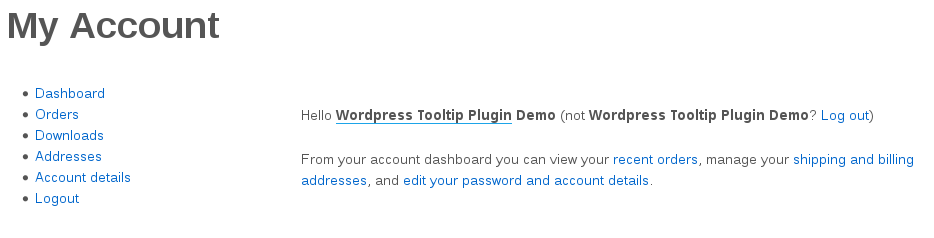
wordpress tooltip my account panel

wordpress tooltip my account panel

At the left hand of “My Account” panel, you will find “Downloads” link

#Step 3 Click “Downloads” link(https://tooltips.org/my-account/downloads/) in “My Account” panel, then you will open download plugin panel, it looks like this:

Download WordPress Tooltips Pro Plugin

Download WordPress Tooltips Pro Plugin

In here, you will find the red button “Tooltips Pro Pluing”, just click “Tooltips Pro Pluing” button to download newest version of wordpress tooltips pro plugin 🙂

Any more question is welcome 🙂

Thanks, have a blessed weekend with your family 🙂

Best Regards,

WordPress Tooltips Support Team


Tagged with:

How to Select My Own Glossary Index Page, How to Delete Default Glossary Index Page

Hi Dear WordPress Tooltip Glossary Users,

Hope this message find you are doing well and have happy days with your family 🙂

Based on users requests, we are adding knowledge base to help users use wordpress tooltips glossary plugin more easier, today we added a new item in wordpress tooltip knowledge base:

“How to Select My Own Glossary Index Page, How to Delete Default Glossary Index Page”.

Based on users feature requests, for increase SEO rank of wordpress tooltip site, we will create glossary page for your site,  each glossary item have their own link, and all these links will listed in wordpress glossary page automatically.

In general, at the first time when you enabled glossary index page in “Enable Glossary Index Page” option, we will generate a new wordpress page “glossary” at ‘ ‘Glossary Index Page for you automatically, however, you can select any wordpress page as glossary index page from select box in “Glossary Index Page” option via “Glossary Settings” plugins menu, the “Glossary Settings” panel looks like this:

glossary settings panel

glossary settings panel

Also if you want to delete glossary index page, you can just find it and delete the page “glossary” manually at wordpress admin area -> all pages, and select another page as your glossary page.

Also we have another method to list all glossary item: use [glossary] shortcode, you can find [glossary] shortcode demo at Glossary Demo. Or click this to check full of wordpress tooltips plugin features.

Any more feature request is welcome 🙂

Thanks, have a blessed day with your family 🙂

Best Regards,

Tooltips Support Team

Tagged with: , , , , , ,

WordPress Tooltips Pro Plugin 9.0.2 Released

Hey Dear WordPress Tooltips Plugin Users,

Hope this message find you are doing well and have happy weekend with your family 🙂

I am happy to report you that we just released a new version of wordpress tooltips pro version, in wordpress tooltip 9.0.2, we support Auto-Upgrade from tooltips free better, when you upgrade from wordpress tooltip free plugin versions, you do not need to deactivate and delete wordpress tooltip free plugin, you can just upload wordpress tooltip pro plugin and activate it directly, our wordpress tooltip pro plugin will detect do you installed wordpress tooltip free plugin or not, if yes, when you try to activate wordpress tooltip pro plugin, wordpress tooltip pro plugin will deactivate wordpress tooltip free plugin automatically and upgrade from wordpress tooltip free plugin automatically, it is safe and nothing need to do 🙂

We are developing a new version based on user’s feature request, you will see it soon 🙂

Thanks, have a blessed weekend with your family 🙂

Best Regards,
Wordpress Tooltip Plugin Support Team

Tagged with: , ,

How to enable woocommerce tooltip on woocommerce product category page?

Dear WordPress Tooltip Users,

Hope this message find you are doing well and have happy days with your family and have success business 🙂

We received a ticket from an amazing user, he asked us why woocommerce tooltip did not show on his woocommerce product category page, I guess this is a representative issue, I’d like reply this question publicly:

How to enable woocommerce tooltip on woocommerce product category page?

In general, for use full of functionality of woocommerce tooltip, please:
1: Login wordpress admin area
2: Click “Tooltips” menu item
3: Click “Addons” sub menu item to open “Tooltips Addon Settings” panel, it looks like this:

woocommerce tooltip addon panel

woocommerce tooltip addon panel

4: In “Enable / Disable Tooltips for WooCommerce Products” panel, please select “Enable Tooltips for WooCommerce” and click “Update Now” button
That’s all

In general, in product category page, woocommerce will list your products in this category, if your product title / product description / product category description have tooltip terms, tooltips pro will add tooltip effect on tooltip terms automatically. If you did not find tooltip effect on woocommerce product category page, the only reason is you did not enabled woocommerce tooltips on tooltip addon panel 🙂

You can check our woocommerce tooltip product category demo

For avoid more users confuse about this, we will develop a new version, once users activated woocommerce, tooltips pro will show a notice to report users enable woocommerce tooltip in tooltip addons panel 🙂

I make a short list of woocommerce tooltip guide articles maybe you will like:

How to Enable Tooltips Effects on WooCommerce Product Page?

WooCommerce Tooltip

WordPress Tooltip 8.8.4 Released, woocommerce tooltip support “Product Specifications for WooCommerce” Plugin

WordPress Tooltip 8.6.8, Support woocommerce tooltips for WooCommerce Product Bundles plugin

WordPress Tooltips Plugin 8.5.6, Support WooCommerce Product Attribute Better

WordPress Tooltip 7.9.6, Enhanced WooCommerce Tooltip Functionality

WordPress Tooltip Plugin 6.7.2, Support Custom WordPress Bullet Screen, Support Bullet in Shortcode, Support Bullet on WooCommerce Products

WordPress tooltips 6.4.2, support сyrillic language (Russian) and disable specific tooltips for woocommerce

WordPress tooltips 6.3.8, support contact form 7 tooltips, woocommerce tooltips, bbpress tooltips, buddypress tooltips, table tooltips, glossary category filter… and more

Hope this have a little help 🙂

Thanks, have a blessed day with your family 🙂

Best Regards,
Tooltips Support Team


Tagged with: , ,

WordPress Tooltip Plugin 9.0.0 Released, New Option To Enable / Disable Glossary Navigation Bar in Glossary Page

Hi Dear WordPress Tooltip Plugin Users,

Hope this message find your are doing well and have happy days with your family 🙂

I am happy to report you that we just released a new version of wordpress tooltip plugin, in wordpress tooltip plugin 9.0.0, you can:

What Is Changes: Enable / Disable Glossary Navigation Bar In Glossary Page OR Tooltip List Page

An user opened a ticket, he told us he like a simple and clean style on glossary page, he want to have a chance to custom glossary page to enable or disable glossary navigation bar in glossary page, wordpress tooltip list page, based on his feature request, we developed a new version wordpress tooltip 9.0.0 to realize this feature request.

How “Enable / Disable Glossary Navigation Bar In Glossary Page OR Tooltip List Page” Works?

After upgraded to wordpress tooltip plugin 9.0.0. If you logged in wordpress admin area, and click tooltips menu, then click “Glossary Settings” Panel, You will find In “Glossary Settings” panel, we added new option “Remove Navigation Bar in Glossary Page”:

If you select “YES” in the option “Remove Navigation Bar in Glossary Page”, we will remove navigation bar which at the top of the glossary page

If you select “NO” in the option “Remove Navigation Bar in Glossary Page”, we will add navigation bar at the top of the glossary page

It looks like this:

Remove Navigation Bar in Glossary Page

Remove Navigation Bar in Glossary Page

Please note, by default, when you create wordpress tooltip glossary page, the glossary navigation bar will shown on the the top of glossary page.

Affected section by “Enable / Disable Glossary Navigation Bar In Glossary Page OR Tooltip List Page” Option

Default glossary page which created by wordpress tooltips plugin
Glossary page which created manually by glossary shortcode
Wordpress tooltip list page which created manually by wordpress tooltip list shortcode

We are developing a new wordpress tooltip version based on another amazing users feature request, if you have any suggestion or question for wordpress tooltips plugin, please don’t hesitate to contact us 🙂

Want to know all features of wordpress tooltip glossary plugin? check features of wordpress tooltips plugin.

Just $9, Go here to get an amazing wordpress tooltip plugin 🙂

Thanks, have a blessed day with your family 🙂

Best Regards,

WordPress Tooltips Glossary Plugin Support Team

Tagged with: , , , , , , ,

How to add CSS to tooltips.css in order to specify a particular ToolTip font (such as Montserrat)

Hi Dear WordPress Tooltips Users,

Hope this message find you are doing well and have happy days with your family 🙂

We received a ticket a few days before which said he want to custom tooltip font in tooltip popup box, I guess maybe other users will have this kind of requirement too, I’d like reply in here publicly for help more users which want to custom wordpress tooltip font:

How to add CSS to tooltips.css in order to specify a particular ToolTip font (such as Montserrat)

You will find tooltips.css in the plugin folder, and you can use this example code in tooltips.css to change font family for tooltip content in wordpress tooltip popup box:

.qtip-content
{
font-family: Arial, Helvetica !important;
}

Also we will add an option to help users change font family in tooltip box 🙂

If you have any more question about wordpress tooltip plugin, please don’t hesitate to contact us 🙂

Thanks, have a blessed day with your family 🙂

Best Regards,
Wordpress Tooltip Plugin Support Team

ps: We have updated our wordpress tooltips feature page to add our more detailed new feature description, you can check wordpress tooltip plugin feature page at here.

Tagged with: ,

How to Use WordPress Tooltip With WooCommerece Products Attributes?

Hi Dear WordPress Tooltip Users,

We received a ticket in which asked us a question about how to use wordpress tooltip to support woocommerce products attributes, I guess maybe many more users will have the same question, I’d like reply this ticket publicly:

How to Use WordPress Tooltip With WooCommerece Products Attributes?

WordPress Tooltip Plugin support WooCommerce product attributes which generated by woocommerce official plugin, it is very easy, you can do it by this way:

#1 Login wordpress admin area
#2 Click tooltips menu item
#3 Click addons sub menu item
#4 In addons settings panel, please enable “woocommerce” addon
#5 In woocommerce product, add some attributes and ensure in content of attributes, you have added some tooltip terms in attributes, it looks like this:

wordpress tooltip for woocommerce attribute

wordpress tooltip for woocommerce attribute

#6 in front end, click product “Additional Information” tab, when you hover the tooltip terms in woocommerce attributes, you will find tooltip popup window with tooltip content(you can add text, image, video, audio… and so on, it looks like this:

woocommerce attribute tooltip

woocommerce attribute tooltip

Hope this have a little help 🙂

Also you can find more woocommerce tooltip articles at:

WooCommerce Tooltip Demo

How to Enable Tooltips Effects on WooCommerce Product Page?

WordPress Tooltip 8.8.4 Released, woocommerce tooltip support “Product Specifications for WooCommerce” Plugin

WordPress Tooltip 8.6.8, Support woocommerce tooltips for WooCommerce Product Bundles plugin

WordPress Tooltips Plugin 8.5.6, Support WooCommerce Product Attribute Better

WordPress Tooltip 7.9.6, Enhanced WooCommerce Tooltip Functionality

WooCommerce Tooltip

WordPress Tooltip Plugin 6.7.2, Support Custom WordPress Bullet Screen, Support Bullet in Shortcode, Support Bullet on WooCommerce Products

We are adding more wordpress tooltip feature to our plugin, if you have any feature request, please don’t hesitate to contact us 🙂

Thanks, have a blessed day with your family 🙂

Best Regards,
Tooltips Support Team


Tagged with: , , ,

How to Have Different Animations for Different Tooltips?

Hi Dear WordPress Tooltip Plugin User,

We received an user’s tooltip plugin support ticket, in which he said

I would like to have different animations for different tooltips but they (2 at the moment) seem to only follow what is specified in “Tooltips Style – Customized – Tooltips Popup Animation = Wiggle” and do not obey what is selected under the settings for each tooltip, What am I missing?

I guess maybe other users have similar question,  I am happy to reply this ticket in here publicly:

How to Have Different Animations for Different WordPress Tooltip Terms?

Yes, different tooltips can have different animations, would you please:
#1 Login wordpress admin area
#2 Click “Tooltips” Menu item then click “All Tooltips” sub menu item, then please click “Edit” under any tooltip term to edit this tooltip term
#3 In tooltip editor, you will find “Enable / Disable Custom Unique Style Functionality for This Tooltip” option, please select “Yes, I will customize a unique style for this tooltip at below”

Please check my screenshot for one wordpress tooltip, you will find I have enabled “Enable Customize Style” option first, then setup tooltips popup animation attribute as “Scale”

different animations for different tooltips

different animations for different tooltips

Another screenshot for another tooltip term, you can find I have  enabled “Enable Customize Style” option too, and  setup tooltips popup animation attribute as “360degree rotatior”

different wordpress tooltips have different animations

different wordpress tooltips have different animations

#4 Then in “Tooltip Box Customize Settings” panel, please select your wordpress tooltips popup animation from “tooltips popup animation” panel

I guess you did not finished step #3 🙂

Thanks, have a blessed day with your family 🙂

Best Regards,
Wordpress Tooltips Support Team


Tagged with: , , ,

How to Upgrade to the Newest WordPress Tooltips Pro

Hi Dear WordPress Tooltip Plugin Users,

In recent days, we received a tooltip ticket which ask us how to upgrade from wordpress tooltip free or old version of wordpress tooltips pro plugin to the latest wordpress tooltip pro version, we are very happy to report it to all users 🙂

It is always safe to update from old version to another new version, our wordpress tooltip pro plugin will detect your version and upgrade it safely, you can do it by this way:

#1 Download the latest wordpress tooltips version, if you do not know how to download tooltips plugin, please check:

How To Download WordPress Tooltips Pro Plugin?

#2 Install wordpress backup plugin “Duplicator”, and do a full backup for your site, it just need about 3 minutes 🙂

#3 Then go to wordpress plugins panel, deactivate tooltips free or old tooltips pro plugin

#4 Click Delete button to delete tooltips free or old tooltips pro plugin

#5 Upload new tooltips pro zip file in plugins panel

#6 Activate latest version of tooltips pro plugin

You can find our detailed video tutorials at:

WordPress Tooltips Video Tutorial 1: Download wordpress tooltips pro plugin

WordPress Tooltips Video Tutorial 2: Deactivate tooltips free plugin

WordPress Tooltips Video Tutorial 3: How to upload and activate wordpress tooltips pro plugin

When you upgrade the tooltips plugin, your settings and options is safe,  upgrade wordpress tooltips will not delete your tooltip configuration or data 🙂

Hope this have a little help 🙂

We are adding a Knowledge base menu item in next version of wordpress tooltip plugin for help users use it more easier. 🙂

Any question? Please don’t hesitate to contact us 🙂

Thanks, have a blessed day with your family 🙂

Best Regards,
Tooltips Support Team

Tagged with: , ,

WordPress Tooltip Plugin 8.9.6, Fixed Video Tooltip Youtube issue

Hi Dears,

We received an amazing users’ report, told us sometimes youtube tooltip have a little problem, we did many tests and finally we found the reason and solved it in this new version, changes in wordpress tooltip 8.9.6

In video tooltips, fixed youtube HTTPS error in video tooltip popup box

The affected sections listed in below:
wordpress tooltips pro
ACF tooltip addon
bbPress tooltip addon
BuddyPress tooltip addon
Contact form 7 tooltip addon
Table tooltip addon
WooCommerce tooltip addon

Thanks give us the rare bug report, if you have any question, please don’t hesitate to contact us, we are very happy to develop a better wordpress tooltip plugin based on your suggestions 🙂

We are developing a new version based on another user’s new feature request, you will see it soon 🙂

Thanks, have a blessed weekend with your family 🙂

Best Regards,

WordPress Tooltip Plugin Support Team

Tagged with: , , ,
Top


