WordPress Tooltip Plugin 9.9.6, Tooltip Language Addon Support Custom Language for WordPress Tooltip Glossary Bread Crumbs to Your Own Language

Dear WordPress Tooltip Glossary Plugin Users,

Hope this message find you are doing well and have happy weekend with your family 🙂

We are happy to report you, based on an amazing users feature request, we have released wordpress tooltip glossary plugin 9.9.6, in this version, you can custom the words of wordpress tooltip glossary bread crumbs to your own language, In back end, in the wordpress tooltip glossary language addon, you can custom the breadcrumbs label “Glossary” on glossary term pages with your own language like this:

custom wordpress tooltip glossary bread crumbs language

custom wordpress tooltip glossary bread crumbs language

In front end, the changes will be find at your tooltip glossary term page, for example: bullet screen tooltip glossary term:
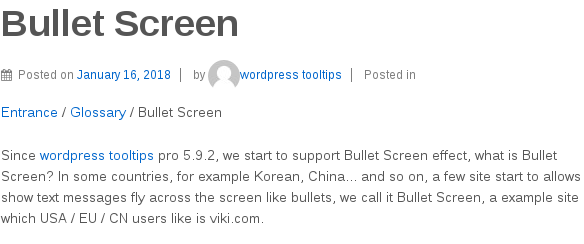
wordpress tooltip glossary custom bread crumbs language

wordpress tooltip glossary custom bread crumbs language

You can find the bread crumbs word “Home / Glossary / Bullet Screen” has been changed to “Entrance / Glossary / Bullet Screen”

Thanks give us so many amazing feature requests, we will realize all of them, we are happy to make a pretty wordpress tooltip glossary plugin for users  🙂

Thanks, have a blessed day weekend with your family 🙂

Best Regards,

WordPress Tooltip Support Team

Tagged with: , ,

WordPress Tooltip Plugin 9.9.2, Tooltip Language Addon Support Custom the Label “Glossary Category” to Your Own Language

Hi Dear WordPress Tooltip Glossary Plugin Users,

We received a users ticket, in which he told us, he like the functionality of wordpress tooltip glossary category filter in tooltip glossary archive index page,  so he can add different industry words based on tooltip glossary categories, and users can change tooltip glossary categories from glossary categories filter to view related glossary terms quickly, the only thing he want to change is, replace the words “Glossary Category” with his industry words 🙂

We think this is a great feature request, we have re-developed our wordpress tooltip glossary language addon to support custom the label “Glossary Category” of glossary category filter  in glossary archive index page, in back end, you will find the new option ‘Glossary to Your Own Language — “Glossary Category” on Glossary Archive Page’ in wordpress tooltip glossary language addon panel, it looks like this:

custom wordpress tooltip glossary category filter

custom wordpress tooltip glossary category filter

You can just change the Glossary Category as any word you want in this option, in front end, it will be changed as what you entered in here:

wordpress tooltip glossary category filter

wordpress tooltip glossary category filter

If you have any wordpress tooltip feature requests or question, please don’t hesitate to contact us, we are very happy to build a better and better wordpress tooltip plugin for you 🙂

Thanks, have a blessed day with your family 🙂

Best Regards,

WordPress Tooltips Glossary Plugin Support Team


Tagged with: , , ,

WordPress Tooltip Plugin 9.8.8 Released, Beautify Css Effect for Bread Crumbs of Tooltip Glossary Item

Hi Dear WordPress Tooltip Plugin Users,

Based on users requests, we have released wordpress tooltip plugin 9.8.8, this version beautify css effect for bread crumbs of tooltip glossary item, the tooltip glossary bread crumbs looks like this:

wordpress tooltip glossary breadcrumbs

wordpress tooltip glossary breadcrumbs

We also fixed a bug on glossary index page. 🙂

We are adding new option for bread crumbs of tooltip glossary, you will see it soon in next wordpress tooltip glossary version 🙂

If you have any question or feature request, please don’t hesitate to contact us 🙂

Thanks, have a blessed weekend with your family 🙂

Best Regards,

WordPress Tooltip Glossary Plugin Support Ttam

Tagged with: , ,

WordPress Tooltips Plugin 9.8.6 Released, Case Sensitive Supprot Synonyms

Hi Dear WordPress Tooltip Glossary Plugin Users,

Hope this message find you are doing well and have happy days with your family 🙂

In wordpress tooltip glossary plugin 9.7.6, we have reported that WordPress Tooltips Plugin 9.7.6, Support Tooltips Case Sensitive

An amazing user told us that is great, however she hope wordpress tooltip glossary synonyms support case sensitive too, today we have realized this feature, now when you enter in tooltip glossary synonyms in tooltips metabox, it is case sensitive now 🙂

Also we fixed a glossary bug too 🙂

Bounce Tips of WordPress Tooltip Glossary Plugin

How Do wordpress tooltip plugin Support Homonym Tooltip?

We are try to beautify css effect for bread crumbs of tooltip glossary item, you will see it in next wordpress tooltip glossary version soon 🙂

If you have any wordpress tooltip glossary feature request, please don’t hesitate to tell us 🙂

Thanks, have a blessed day with your family 🙂

Best Regards,

WordPress Tooltips Support Team


Tagged with: , , ,

WordPress Tooltips Plugin 9.8.2, Support Breadcrumbs in Tooltip Glossary Term Page

Dear WordPress Tooltips Plugin Users,

We are happy to report you, based on a few amazing users’ wordpress glossary feature request, we just released wordpress tooltip plugin 9.8.2, the changes in this wordpress tooltips plugin version:

Support Breadcrumbs in Tooltip Glossary Term Page

A few amazing user told us, our tooltip plugin is time saver, and some users hope in wordpress tooltip glossary term page, her users can have a link back to glossary index page, so users will not lost in her site, this is great feature request! We have added bread crumbs in glossary term page, when users view wordpress tooltip glossary term page, at the top of the glossary term page, they will find  bread crumbs like this: Home / Glossary / glossary term name, users can click to back to glossary page, or click to back to home page,please check demo of glossary breadcrumbs

Also we made a screenshot of breascrumbs of wordpress glossary term page in here:

wordpress tooltip glossary breadcrumbs

wordpress tooltip glossary breadcrumbs

Iit is SEO-Friendly search engines can index your tooltip glossary pages more easier and better, this is really a great feature request, thank you very much for it, if you have any more feature request or any question, please don’t hesitate to tell us, we are happy to offer a better and better wordpress tooltip glossary plugin for you and your users! 🙂

Thanks have blessed weekend with your family 🙂

Best Regards,

WordPress Tooltip Plugin Support Team


Tagged with: , , ,

How Do WordPress Tooltip Plugin Support Homonym Tooltip?

Hi Dear WordPress Tooltips Plugin Users,

We received an ticket which ask us how to support homonym tooltip:

same word, but different meanings?

For example, we have two applications we are documenting and both of them use the word “dashboard” but they mean different things.

Hello – I love the tooltips plugin and it is very useful for our use case.

I guess maybe more users have the same question, I’d like reply it public in here 🙂

If you want to use homonym tooltip, you can just use tooltip shortcode to do it, the wordpress tooltip shortcode [tooltips] is very easy to using:

[tooltips keyword="wordpress tooltips" content="Wordress Tooltips is a rich featured wordpress tooltip plugin. "]

It looks like this: wordpress tooltips

Then you can write another shortcode like this:

wordpress tooltips

Easy? 🙂

Also our [tooltips] shortcode have many advanced method, you can find more guides at:

How to add multimedia tooltip to an image using tooltip shortcode

How to add Video Tooltip using tooltip shortcode

How to add Audio Tooltip using tooltip shortcode

How to diable the other tooltip and only display your specially designated tooltip in a certain post

How to disable wordpress tooltip for a specific page

How to use wordpress tooltip shortcode [tooltips] to add tooltips manually?

WordPress Tooltips Video Tutorial 10: Import WordPress Tooltips From csv

WordPress Audio Tooltips Demo

WordPress Image Tooltips Demo

Also wordpress tooltip plugin support synonyms tooltips too

You can enter all synonyms in tooltips editor in one time, and our tooltips plugin will detect all these synonyms and add same tooltips content for these synonyms automatically, in backend, you can enter all synonyms in tooltips editor in one time, and our tooltips plugin will detect all these synonyms and add same tooltips content for these synonyms tooltip automatically, it looks like this:

synonyms tooltip

synonyms tooltip


You can find “Synonyms of this tooltip” metabox at the right hand of wordpress tooltip editor 🙂

Thanks, any more question is welcome 🙂

Have a blessed day with your family 🙂

Best Regards,

WordPress Tooltip Support Team

Tagged with: , , ,

WordPress Tooltips Plugin 9.7.6, Support Tooltips Case Sensitive

Hi Dear WordPress Tooltip Users,

Based on an amazing user’s feature request, we have released wordpress tooltips plugin 9.7.6, changes in this the version 9.7.6:

WordPress Tooltip Support tooltips Case Sensitive

In back end, in tooltips “Optional Settings” Panel, you will find “Enable Tooltips Case Sensitive” option, in which you can Enable or Disable Tooltips Case Sensitive, it looks like this:

Wordpress Tooltips Case Sensitive

WordPress Tooltips Case Sensitive

It is recommend to enable tooltips case sensitive, by default, this option will be enabled. You can view full features of wordpress tooltips plugin in here

Dear users, we received a lot of amazing wordpress tooltip feature request, we are developing a new version, you will see it soon, if you have any wordpress tooltip plugin question or feature request, please don’t hesitate to tell us 🙂

Thanks. have a blessed day with your family 🙂

Best Regards,

WordPress Tooltip Team


Tagged with: , ,

WordPress Tooltips Plugin 9.7.2, Optimized Code to Speed up Your Page Load Time

Hi Dear WordPress Tooltips Plugin Users,

Based  on an amazing users feature requests, we have released wordpress tooltip plugin 9.7.2, in this version:

Optimized WordPress Tooltip Glossary Bullet Screen Code to Speed up Your Page Load Time

As you know, our wordpress tooltips plugin used many javascript codes to realize the amazing effects of wordpress tooltip, bullet screen, wordpress bullet screen… and so on, by default, we followed wordpress standard API to load these javascript files on the wordpress header, just like most of plugin doing, however, an amazing users tell us, move these javascript to the wordpress fotter is better, it is good suggestion, we realized these amazing suggestion in wordpress tooltip 9.7.2:

# You can chose to load tooltips js codes / directory js codes / in wordpress footer:
In “Tooltips Global Settings” panel, added “Load Tooltip Javascript In WordPress Header or WordPress Footer” option, you can chose to
“Load Tooltip Javascript In WordPress Header” or “Load Tooltip Javascript In WordPress Footer”.

By default, wordpress tooltips will “Load Tooltip Javascript In WordPress Header”, however, if you chose “Load Tooltip Javascript In WordPress Header or WordPress Footer”, it will help your site load more faster.

On our site, after chose to the option “Load Tooltip Javascript In WordPress Footer”, our home page site page test from 4.5s to 2s, it is good 🙂

# Also we re-developed javascript codes to let topltips pro works better with many wordpress cache plugins to speed up your site

Affected wordpress tooltip modules:
Tooltips main module
Tooltips shortcode
WordPress Bullet screen pages
All glossary pages
Woocommerce tooltip addon
ACF Tooltip(Advanced Custom Fields) addon
bbPress Tooltip Addon
Buddypress Tooltip addon
Contact form 7 Tooltip addon
Menu Tooltip addon
Table Tooltip addon

# Fixed the bug of category selector in glossary index page
# Fixed the bug on submit notice bar

Please check full features of wordpress tooltip plugin for all change logs of wordpres tooltip,

We got a lot of amazing wordpress tooltip feature requests, we are working hard from day to night to realize them, you will see it soon 🙂

Thanks, have a blessed day with your family 🙂

Best Regards,

Tooltips Support Team

Tagged with: , , , ,

WordPress Tooltips Plugin 9.4.4, New Meta Box to Show Excerpt or Full Content of Tooltip in Tooltip Pop up Box

Hi Dear WordPress Tooltip Plugin Users,

We released wordpress tooltip plugin 9.4.2 in 2 days before, in which we added a new option to show excerpt of the tooltip or full content of Tooltip in tooltip pop up box, yesterday we received an amazing users’ feature request, she told me she like the feature of only show excerpt of tooltip in tooltip pop up box, but because this is a global settings so this feature will affect all tooltip posts, she hope have an meta box in wordpress tooltip WYSIWYG editor, so can chose a simple & clean tooltip style in tooltip box via tooltip excerpt for specific tooltips, and own the ability to display complete multimedia content for specific tooltips posts, today we released wordpress tooltip plugin 9.4.4 to realize this amazing feature requests:

In worddpress tooltips wysiwyg editor, You can set up “Show excerpt in tooltip pop up” for each tooltip term

It looks like this:

tooltip excerpt or full content meta box

tooltip excerpt or full content meta box

In the right-head of the wordpress tooltip editor, you will find we added a new meta box “Show excerpt in tooltip pop up?”, You can set up “Show excerpt in tooltip pop up” for each tooltip term. The priority of this setup is higher than the “Show Excerpt or Full Content of Tooltips in Tooltips Pop up Box?” option in “Optional Settings” Panel.

By default, wordpress tooltip plugin will show full content for tooltip term in tooltip pop up box.

By this way, you can chose a simple & clean wordpress tooltip style in tooltip box via tooltip excerpt for specific tooltip posts, at the same time, you still own the ability to display complete multimedia content for specific tooltips.

If you have any wordpress tooltip feature requests, please don’t hesitate to contact us 🙂

Thanks, have a blessed weekend with your family 🙂

Best Regards,

WordPress Tooltip Plugin Support Team

Tagged with: , , ,
Top


