WooCommerce Product Tabs Plugin 1.0.2 Released

Hi Dear WooCommerce Product Tabs Plugin Users,

Hope this message find you are doing well and having happy days with your family! 🙂

Thanks for use our woocommerce product tabs plugin, we are happy to report you, we have re-developed a new woocommerce product tabs plugin and just released it a few minutes before, the woocommerce product tabs plugin 1.0.2. we improved woocommerce tabs metabox in woocommerce  product editor. Please upgrade to the latest woocommerce product tabs plugin asap to unlock more features of woocommerce product tabs 🙂

Also our woocommerce product tabs plugin support show wordpress tooltip in woocommerce product tabs. 🙂
If you have any question of woocommerce product tabs plugin, please contact us 🙂
Thanks, have a blessed day with your family 🙂
Best Regards,
WooCommerce Product Tabs Plugin Support Team
Tagged with: ,

WordPress Members Directory Plugin 1.2.0 Released

Hi WordPress Members Directory Plugin Users,

Hope this message find you are doing well and having happy weekend with your family! 🙂
We are happy to report you, we have released WordPress Members Directory Plugin 1.2.0, in this wordpress members directory plugin, we added wordpress members directory navigation bar at the top of the members directory page.  By default, we will list users in the members directory page, and with members directory navigation bar, you can click A to view all users start A, click T to view all users start T… and so on,
Also in the members directory navigation bar, we will show user counts in the digital superscripts of the ‘A’, ‘B’, ‘C’… too, so you can know how many users start with A…Z  🙂
We are still adding new functions for wordpress members directory plugin, if you have any great idea, tell us, we will realize it for you! Any question is welcome too. 🙂
Thanks, have a blessed weekend with your family 🙂
Best Regards,
WordPress Members Directory Plugin Support Team
Tagged with: , , ,

WooCommerce Product Tabs Plugin Features

What is WooCommerce Product Tabs Plugin?

WooCommerce Product Tabs Plugin is a WooCommerce plugin which create product tabs in woocommerce product pages easier.

How WooCommerce Product Tabs Plugin Works?

It is very easy to use wordpress product tabs plugin,

1: Once you installed the WooCommerce Product Tabs Plugin, you will find the menu item “product  tabs” in wordpress admin area.

2: If you click “product  tabs” in wordpress admin area, you will find “All Tabs” sub menu item and “Add New” sub menu item.

3: With “All Tabs”, we listed all product tabs you have created, you can Edit / Quick Edit / Trash / View … product tabs,  just like manage wordpress standard posts in wordpress “posts” panel, actually WooCommerce Product Tabs is wordpress custom post

4: With “Add New” sub menu item, you create new woocommerce product tabs in product tabs WYSWYG editor, just like wordpress standard WYSWYG editor, it looks like this:

add new woocommerce product tab

add new woocommerce product tab

As you can see, it is 100% wordpress standard WYSWYG editor, easy? 🙂

5: When you edit woocommerce products, please click “product tabs” link in product meta box, then select product tabs from product tab list.

6: In front end, selected tabs will show in woocommerce product page automatically 🙂

With woocommerce product tabs plugin, you can create product tabs very easy, you can insert videos, audios, screenshots, reviews, pricing tables… and so on in woocommerce product tabs, to increase sales of your amazing products,  also  you can enter any shortcodes in woocommerce product tabs to expand  functions of woocommerce product tabs via 3rd wordpress plugins, to build an awesome and funny and user-friendly and powerful woocommerce product page 🙂

Also woocommerce product tabs plugin support woocommerce tooltip with wordpress tooltip plugin 🙂

Price? $0, it is a free of charge, we develop this plugin for our wordpress tooltip plugin, and we’d like share it with our wordpress tooltip users 🙂

Change Log of WooCommerce Product Tabs Plugin

= woocommerce product tabs plugin version 1.0.2 =
Improved tabs metabox in product editor

= woocommerce product tabs plugin version 1.0.0 =
first version

Tagged with: , , , ,

WordPress Tooltip Glossary Plugin New Version 12.4.0

Hi Dear Users of WordPress Tooltip Glossary Plugin,
Hope this message find you are doing well and having happy days with your family! 🙂
We are happy to report you, we have released wordpress tooltip glossary plugin 12.4.0, in this version, our developer finished the code audit, changes in wordpress tooltip plugin 12.4.0:
1: Move all glossary settings admin functions to dedicated file for expand functions of wordpress glossary better
2: Use wordpress sanitize security functions to enhance security glossary settings panel
3: Rewrite description of “Glossary Excerpt or Full Content” option
The wordpress glossary settings panel in wordpress tooltipplugin12.4.0 looks like this:

wordpress glossary plugin 12.4.0 glossary settings panel

We are focus to improve glossary functionality to offer a better wordpress glossary plugin for users, there are many changes in glossary section, we are developing a new wordpress tooltip plugin version, you will see it soon 🙂
If you have any question or suggestion of wordpress glossary plugin, please contact us, we are happy to offer a better and better wordpress glossary plugin for users. 🙂
Thanks, have a blessed weekend with your family 🙂
Best Regards,
WordPress Tooltip Glossary Plugin Support Team


Tagged with: , , ,

WordPress Member Directory 1.0.0 Rleased

Hi WordPress Tooltip Users,

We are happy to report you, based on users’ suggestion,  we just developed a new wordpress plugin for users — wordpress member directory plugin, with member directory plugin,we will list members on your site and you can use a shortcode to help users to know each other and contact each other more easier 🙂

We get many suggestion and feature for wordpress member directory plugin, we are try our best to realize these new features asap for users, you will see the new version soon 🙂

If you have any suggestion about wordpress member directory plugin, please don’t hesitate to tell us 🙂

Thanks, have a blessed day with your family 🙂
Best Regards,
WordPress Member Directory Plugin Support Team
Tagged with: , ,

WordPress Tooltip Glossary Plugin 12.3.6 Released

Dear Customer of WordPress Tooltip Plugin,
Hope this message find you are doing well and having happy days with your family! 🙂
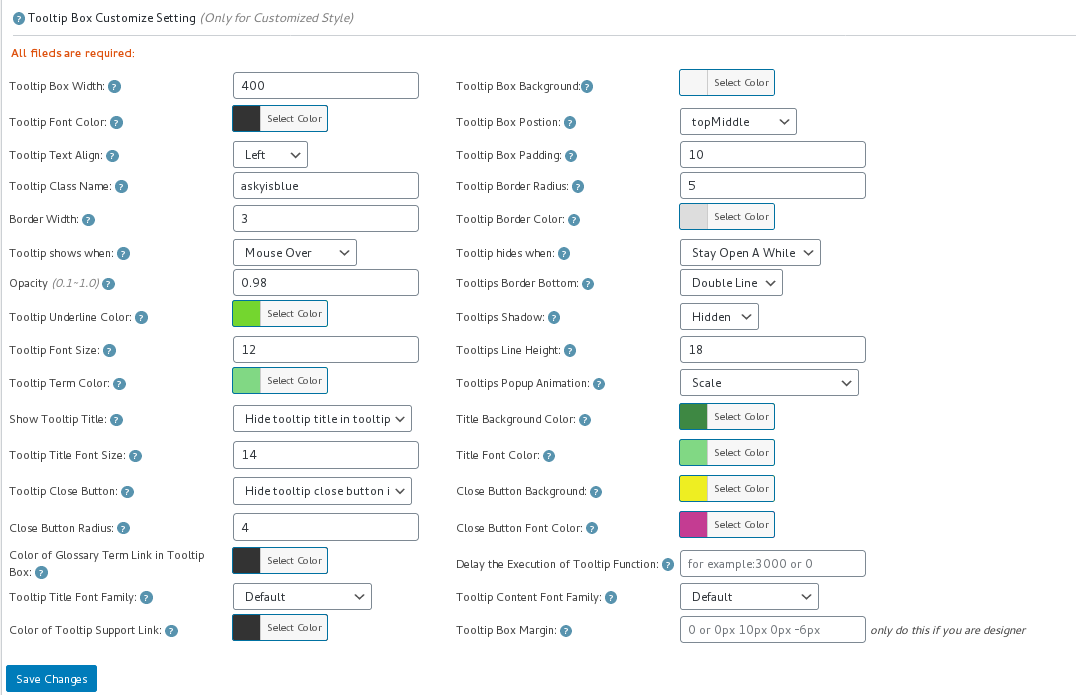
We are happy to report you, we have released a new wordpress tooltip plugin version 12.3.6, in this version, based on an amazing user’s suggestion, we have add a new module to set up wordpress tooltip style default values for new users, that means, if you are first time to install wordpress tooltip plugin, after activated wordpress tooltip plugin, wordpress tooltip pro plugin will set up a default tooltip style template for you automatically, by this way, you do not need to research how to set up tooltip style with all tooltip style fields one by one, what you need to do is just start to use wordpress tooltip instantly, and then you can customize your own tooltip style via a few clicks in wordpress tooltip style panel later, new wordpress tooltip style panel looks like this:
tooltip style panel version 12.3.6

tooltip style panel version 12.3.6

You can see we have setup wordpress tooltip font color, anamation, font size, background color, shadow…. and so on for you automatically, what you need to do is just install and using, easy, right ? 🙂
Thanks for amazing suggestion, we are realize your other suggestions, you will see it soon 🙂  If you have any question or suggestion of wordpress tooltip plugin, please contact us 🙂
Thanks, have a blessed day with your family 🙂
Best Regards,
WordPress Tooltip Support Team
Tagged with: ,

WordPress Tooltip Glossary 12.3.2 Released

Dear Users of WordPress Tooltip Plugin,
Hope this message find you are doing well and have happy weekend with your family! 🙂
I am happy to report you, we just released wordpress tooltip glossary plugin 12.3.2, in this version, we support opt to enable / disable wordpress tooltip in the entire site.

How to Disable / Enable WordPress Tooltip in Entire Site?

1: Login wordpress tooltip plugin

2: Download wordpress tooltip plugin 12.3.2 in WooCommerce “My account” page

3: Login admin area of your wordpress site

4: Click “Plugins” menu item in the back end of your wordpress site

5: Deactivated old version of wordpress tooltip plugin

6: Delete the old version of  wordpress tooltip plugin

7: In “Plugins” menu item, click add new at the top of the wordpress plugins panel page

8: Upload the tooltips plugin 12.3.2 zip file which you downloaded from wordpress glossary plugin site

9: Activate latest version of wordpress tooltip plugin

10: Click “Tooltips” menu item

11: Click “Global Settings” sub menu item, you will open ” Tooltips Global Settings” panel

12: You will find the new option: “Disable Tooltip in Entire Site” at the bottom of the “Tooltips Global Settings” panel, it looks like this:

disable tooltip in entire site option box

disable tooltip in entire site option box

13 By default, wordpress tooltip is enabled in the entire site, but we get an amazing user’s ticket, in which she request we offer a tooltip disable tooltip in the entire site, in wordpress tooltip 12.3.2, you can just select “Disable Tooltip in Entire Site” in the “Disable Tooltip in Entire Site” option box to disable wordpress tooltip in the entire site, and select “Enable Tooltip in Entire Site” in the “Enable Tooltip in Entire Site” option box to enable  wordpress tooltip in the entire site

14 Please remember to click “Update NOw” button

Thanks for the amazing feature request, if you have any question or suggestion of wordpress tooltip plugin, please don’t hesitate to tell us, we are very happy to build a better and better wordpress tooltip plugin for you  🙂
Thanks, have a blessed weekend with your family 🙂
Best Regards,
WordPress Tooltip Glossary Plugin Support Team
Tagged with: , , ,

How to Add Tooltip Effect on WooCommerce Product Attribute?

Hi Dear WooCommerce Tooltip Plugin Users,
Hope this message find you are doing well and having happy weekend with your family! 🙂
We get a user’s ticket, in which he ask us how to add woocommerce tooltip effect on woocommerce product attribute tab, I think might more users have the same woocommerce tooltip question, I’d like reply in here publicly 🙂

How to Add Tooltip Effect on WooCommerce Product Attribute?

1: Login client account at woocommerce tooltip plugin site

2: Download wordpress tooltip plugin in “My account” Tab

3: Login your wordpress site

4: In your wordpress admin, click “Plugins” menu item

5: Deactivated old woocommerce tooltip version

6: Delete your wordpress tooltip plugin

7: In “Plugins” menu item, click “add new” button at the top of the plugins page

8: Upload the woocommerce tooltip plugin zip file to your woocommerce site

9: Activate latest version of wordpress tooltip  plugin in back end

10: Click “Tooltips” menu item

11: Click “Addons” sub menu item to open “Tooltips Addon settings” panel

12: In “Tooltips Addon settings” panel, you will find a lot of addons, please just enable “Tooltips for WooCommerce Products” and click “Update Now”,  it looks like this:

woocommerce tooltip addon

woocommerce tooltip addon

13 Then in your woocommerce product pages, please click Additional information tab, you will find we had add woocommerce tooltips on woocommerce product attributes for your woocommerce products, It looks like this:

woocommerce attribute tooltip


If you have any question or suggestion of woocommerce tooltip plugin, please don’t hesitate to tell us 🙂
Thanks, have a blessed day with your family 🙂
Best Regards,
WordPress Tooltip Plugin Support Team
Tagged with: , , ,

WordPress Tooltips Glossary Plugin 12.3.0 Released

Hi Dear WordPress Tooltips Glossary Plugin Users,

Hope this message find you are doing well and have happy days with your family! 🙂
We get a user’s ticket, in which she said wordpress tooltips plugin free have a conflicts with her navigation bar in OceanWP theme , we installed the OceanWP theme in our site and did a check, but we can not find any problem, all things works well, finally, after did a check for she, we find this is problem existed when enabled a settings in OceanWP wordpress theme, and it is caused by a API conflicts in OceahWP WordPress theme, that’s why  we released wordpress tooltip glossary plugin pro 12.3.0, in this wordpress tooltip version, we have fixed the conflicts of tooltips with navigation bar in oceanWP theme, if you are using wordpress tooltip glossary plugin with oceanWP theme, please don’t forget to upgrade to the latest wordpress tooltip glossary plugin 12.3.0m, thanks 🙂
Thanks for the conflicts report, if you have any question or conflicts report about wordpress tooltip plugin, please don’t hesitate to tell us, we are happy to solve it for you 🙂
Thanks, have a blessed day with your family 🙂
Best Regards,
WordPress Tooltip Glossary Plugin Support Team
Tagged with: , , ,

Update: Improved WordPress Glossary Demo

Hi Dear WordPress Tooltips Glossary Plugins Users,

Hope this message find you are doing well and having happy days with your family! 🙂

We get an amazing user’s ticket, in which he said our wordpress glossary demo page is awesome, he find there are videos tooltip, audios tooltip, image tooltips, text tooltips, qr codes tooltips, that’s great, but as a glossary index page, when users looks so many rich-media in a little space, it seems the page messed up, he asked us does there any method to just show excerpt of wordpress glossary, so everything can looks clean, simple, users can click into the links to read more glossary content 🙂

Yes, of course, we can, we have this ability to make a clean and simple glossary page, just like we described at wordpress glossary plugin 12.2.4 document:

It is very easy to build a clean and simple wordpress glossary page

you can do it by this way:

1: Login your account at wordpress glossary plugin site

2: Download wordpress glossary plugin via “My account”

3: Login your wordpress admin on your site

4: Click “Plugins” menu item in your wordpress admin area

5: Deactivated old tooltips version in plugins panel

6: Delete the old wordpress tooltip plugin in wordpress plugins panel

7: In WordPress “Plugins” menu item, please click “add new” link at the top of the plugins panel

8: Upload the wordpress glossary plugin zip file which you downloaded from wordpress glossary  site

9: Activate latest version of wordpress glossary plugin 12.2.4

10: In WordPress admin area, click “Tooltips” menu

11: Click “Glossary Settings” sub menu item in wordpress admin area,  open “Glossary Settings” panel

12: You will find “Glossary Excerpt or Full Content” option box, just select excerpt option or full content option,  it looks like this:

glossary settings panel in wordpress tooltip glossary plugin 12.2.4

glossary settings panel in wordpress tooltip glossary plugin 12.2.4

13 Please remember to click “Save Changes” blue button

14 Check glossary index page in front end, you will find the content of glossary terms column has been changed as you settings in back end

We have  updated our WordPress Glossary Demo page, please just check the it 🙂

Thanks, have a blessed weekend with your family 🙂
Best Regards,
WordPress Tooltip Glossary Plugin Support Team
Tagged with: , , ,
Top