Hope this message find you are doing well, hope this message find your are have happy new year with your family! 🙂
What’s new changes on tooltips.org?
1: We released a few versions of wordpress tooltips pro plugin and wordpress tooltips free plugin, the latest version of wordpress tooltips pro plugin is the version 14.1.0, this is our 339th versions of wordpress tooltips plugin, in recent wordpress glossary plugin versions, we added a few more options to help users customize color of wordpress glossary list, enable / disable wordpress tooltip effect in glossary terms or glossary content of glossary tables, or allow users to customize display time of wordpress tooltip windows…. and so on 🙂
2: We released a few other wordpress plugins for wordpress users, for example, we released WordPress 404s plugin 3.3.5, it is free wordpress plugin, wordpress tooltip users can download it free of charge, also we upgraded Woocommerce Product Tabs free plugin to 1.0.3,
4: Based on user’s suggestion, we have tweak our tooltips demo menus, we moved video tooltips demo and a few other tooltip demos’ link at the top of wordpress tooltip demo menu, also we have move wordpress faq plugin document and faq plugin document and wordpress private post plugin document to wordpress free plugin menu item, so in wordpress tooltip document menu item, so users will not miss-understand the function of tooltip plugin and users will focus on how to get video and document and faq from the tooltip document menu item/
5: We have upgraded tooltips.org to wordpress 5.6, and our wordpress tooltips plugins (free and pro) works well with wordpress 5.6 🙂
If you have any question or suggestion of wordpress tooltip plugin, please don’t hesitate to tell us 🙂
Hope this message find you are doing well and have happy new year with your family! 🙂
What’s new of this version of wordpress tooltip plugin?
We get an wordpress tooltip user’s feedback, he hope our wordpress glossary works better with his wordpress advanced theme, we checked it site and codes of his wordpress advance theme, and we tweak codes on our wordpress tooltips plugin side, to improve the compatibility of the wordpress tooltip plugin with his wordpress advance theme 🙂
Our wordpress glossary front end looks like this:
wordpress glossary frontend
As you can see, our wordpress glossary supports displaying text, voice, video, maps, qrcode, icons, youtube, tables, animations… etc in glossary.
If you have any question or suggestion of wordpress tooltip plugin, please don’t hesitate to tell us 🙂
Dear WordPress Tooltip Plugin Users, Happy New Year!
Hope this message find you are doing well and have happy holiday with your family! 🙂
We are happy to report you, we have released wordpress tooltips free plugin 7.3.1 🙂
Why we released wordpress tooltips free plugin 7.3.1
In general, our glossary page looks like the screenshot at below, you can see in the header of the wordpress glossary page, we have a glossary navigation bar with all the letters and numbers in your language, which allows the user to filter and select words or phrases that start with a specific letter or number by clicking on those letters or numbers, it look like this:
We get an amazing user’s ticket, in which he told us, he read our feature description of wordpress tooltips pro plugin, he found our wordpress tooltips pro plugin have a function to allow wordpress tooltip users to decide display or hide numbers in glossary navigation bar, he hope we add this function into wordpress tooltips free plugin too, because he just use our wordpress tooltip glossary plugin to build the glossary of industrial terms, he do not need numbers in the navigation bar 🙂
What’s the changes in the wordpress tooltips free plugin 7.3.1
This is why we released the wordpress tooltips free plugin 7.3.1, after upgraded your wordpress tooltip free plugin to the version 7.3.1, please click the “Tooltips” Menu item, then please click the “Glossary Settings” sub menu item, you will open the “Glossary Settings” panel, then you will find in the WordPress glossary settings panel, we added an new option “Show Numbers in Nav Bar”, via the option “Show Numbers in Nav Bar”, you can select the option “Show Numbers in Glossary Nav Bar” or the option “Remove Numbers in Glossary Nav Bar”, to display or hide the numbers in the glossary navigation bar 🙂
Hope this message find you are doing well and have happy holidays with your family! 🙂
We have just developed a new version of the wordpress tooltip glossary plugin, wordpress glossary 14.0.8 🙂
What’s changes in the new version of wordpress tooltip plugin 13.0.8?
In some previous releases, we reported that a user requested to disable tooltip effect in the glossary term left column in the glossary table, and we developed a new version to allow users enable / disable tooltips effect via the option “Enable Tooltip Effect on Left Term Column of Glossary Table” 🙂
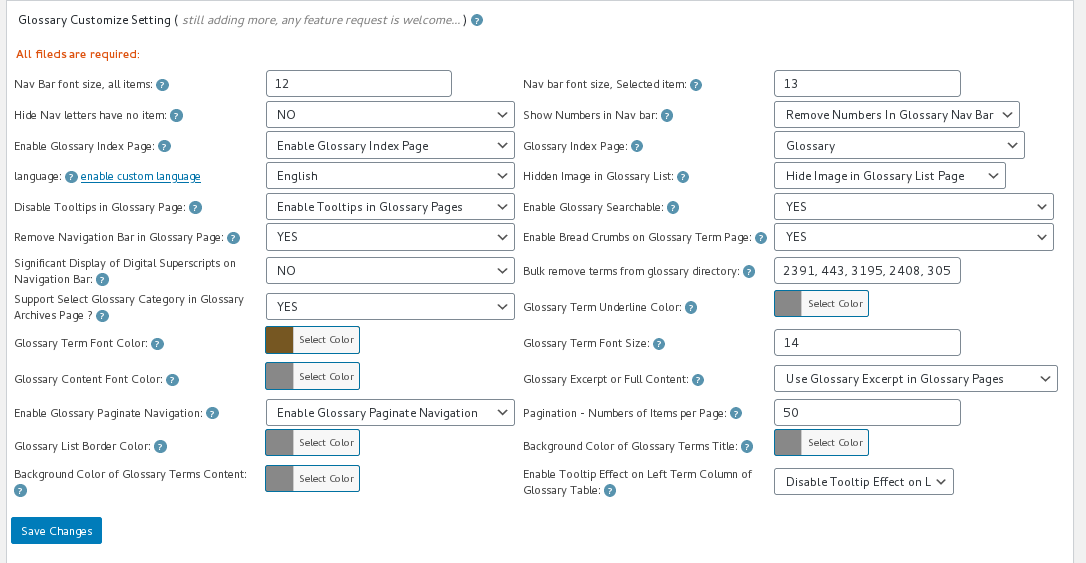
We guess there may be other users who have the need to disable the display of the glossary content column in the glossary table for tooltip? So we developed the wordpress glossary plugin 14.0.8 to allow users enable disable tooltip effect in the glossary content column via the new option “Glossary Content Column of Glossary Table”, it looks like this:
glossary settings panel in wordpress glossary plugin 13.0.8
What you need to do is just select “Disable tooltip effect on glossary content column” or “Enable Disable tooltip effect on glossary content column” and click “Save changes” blue button, then in front end,tooltip effect will be enabled or disabled in glossary list page 🙂
What we are doing for the wordpress tooltip plugin now?
We are develop a new version, we are working hard to make wordpress tooltip glossary plugin to support wordpress new editor: gutenberg, and we are add new tooltips features based on a few other users’ suggestion, if you have any question or suggestion of wordpress tooltip plugin, please don’t hesitate to tell us, we are very happy to offer the best wordpress tooltip glossary plugin for you 🙂
Also we have many free wordpress plugins at our free wordpress plugin shop, free for wordpress tooltip users, please download it and give us feedback, we are happy to improve functions of these free plugin too 🙂
Thanks, have a blessed holiday with your family! 🙂
Hope this message find you are doing well and have happy days with your family! 🙂
We get a ticket from an wordpress tooltip user, he asked a question: “how to hide all tab in tooltips nav bar?”
Please follow our step by step tutorial below, you can easily implement this function:
1: If you have not yet downloaded and installed our latest wordpress tooltip plugin., please login your account at wordpress glossary tooltip plugin site, if you have installed latest wordpress tooltip plugin, please jump to step #10 directly 🙂
2: Download wordpress glossary tooltip plugin via “My account” page
3: Login wordpress admin area in your wordpress site
4: Click “Plugins” menu item
5: Deactivated old version of wordpress tooltips plugin
6: Delete the old version of wordpress tooltip plugin
7: In “Plugins” menu item, please click “add new” link at the top of the plugins panel
9: Activate latest version of wordpress tooltip glossary plugin
10: Click “Tooltips” menu item
11: Click “Glossary Settings” sub menu item, you will open “Glossary Settings” panel
12: You will find the option: “Remove Navigation Bar in Glossary Page” in the “Glossary Customize Setting” panel, please just select the “Yes”,it looks like this:
wordpress glossary settings panel 14.0.6
13: Please remember to click “Save Changes” blue button
14 In front end, if you open glossary index page, you will find tabs have be removed from glossary page 🙂
If you have any question or suggestion of wordpress tooltip plugin, please don’t hesitate to tell us 🙂
Hope this message find you are doing well and have happy days with your family! 🙂
We have released wordpress tooltip glossary 14.0.6, in this version, we improved a glossary feature:
1: Support glossary categories filter better: A few months before, we got a ticket from a user, he said the glossary category selector is not works well on his advanced theme, we did a check and we developed a version to let glossary categories filter support his theme, this week we got another user’s report, for solve this kind of problem, we developed the current wordpress glossary plugin version to detect glossary URLs and now glossary categories filter can works for all these theme automatically 🙂
2: In the feedback submitted by wordpress tooltip users, we found that some wordpress themes do not provide the summary function, in this case, when the user selects the “Support Select Glossary Category in Glossary Archives Page ?” option, in the glossary table, the glossary content column on the right will not show the summary content of the glossary term, because these themes do not support the wordpress post excerpt function, so the wordpress glossary content column will be displayed as an empty column. Based on this kind of problem, we developed the new wordpress glossary version to generate wordpress post excerpt by our wordpress glossary plugin, so no matter the theme support wordpress post excerpt function or not, we will always show glossary content for the glossary terms 🙂
We are developing a new wordpress tooltip plugin based on user’s feedback, if you have any question or suggestion of wordpress tooltip plugin, please don’t hesitate to tell us 🙂
Hope this message find you are doing well and have happy weekend with your family! 🙂
In the feedback submitted by wordpress tooltip users, We found that some users want to add the effect of tooltip for glossary terms in the first column of the glossary table -> that is -> the glossary terms column, so in the earlier version of wordpress tooltip, we added this function for users.
But we got another user’s feedback, in which he told us, in his opinion, the content of glossary term is already shown in the glossary content column on the right, so he thinks that the effect of tooltip should not be added to the glossary term column…
Both are true, I understand that some users use longer glossary terms to build the glossary, so in these longer glossary terms, some technical terms are more difficult to understand, so users want to add the effect of tooltip to the terms in these glossary terms. A few other users use the wordpress glossary plugin to build dictionaries, so the content of these glossary terms is relatively short and do not need to add the effect of tooltip to the terms in the glossary terms of the dictionary
These user needs conflict with each other, I think a better way is to add a new option that allows tooltip users to choose in the background to open or close the effect of glosasry term tooltip, so we developed wordpress tooltip plugin 14.0.4, to solve this problem.
If you upgraded wordpress glossary 14.0.1, in glossary settings panel, you will find we have a new option: “Enable Tooltip Effect on Left Term Column of Glossary Table”, you can enable / disable tooltips effect on glossary term column via one click, it looks like this:
glossary settings panel in wordpress glossary plugin 14.0.4
Please check our wordpress glossary demo page 🙂
Please upgrade to the new wordpress tooltip glossary 14.0.4, if you have any question or suggestion of wordpress tooltip plugin, please don’t hesitate to tell us 🙂
Hope this message find you are doing well and have happy days with your family! 🙂
We just released wordpress tooltip plugin 13.9.8, in this new version of the wordpress tooltips plugin, we have added new tips for using wordpress tooltip in the wordpress tooltip knowledge base panel –> which you can view by clicking on the tooltips menu –> knowledge base sub menu to open the wordpress tooltip knowledge base to view the new items 🙂
AlsoWe found that many tickets are some basic questions, which we have detailed in the tooltip FAQ / Knowledge menu of the plugin, or
in our wordpress tooltip document with detailed videos, and detailed tutorials with illustrations, our tutorials are detailed to step by step, just follow Our tutorials are detailed to step by step, just follow our step by step tutorials, it only takes a little time and you can build beautiful wordpress tooltip effects inside your wordpress post.
To help users discover these wordpress tooltip tutorials more easily, we have added a feature: when users activate the wordpress tooltip plugin for the first time, we will display an admin notice bar at the top, inside this admin notice bar We will display a link to the konwledge menu in the wordpress tooltip plugin, a link to global settings, a link to create the first tooltip quickly and start working automatically, and a link to the tooltip support system, so you can get help easier 🙂
Please note, this help admin notice bar will only displayed when users activate the wordpress tooltip plugin for first time, when you open other pages, this admin notice bar will not show again 🙂
If you have any question or suggestion of wordpress tooltip plugin, please don’t hesitate to tell us 🙂
Hope this message find you are doing well and have happy weekend with your family! 🙂
We are happy to report you, we just relased wordpress tooltips free 7.2.9 🙂
We found that many tickets are some basic questions, which we have detailed in the tooltip FAQ / Knowledge menu of the plugin, or in our wordpress tooltip document with detailed videos, and detailed tutorials with illustrations, our tutorials are detailed to step by step, just follow Our tutorials are detailed to step by step, just follow our step by step tutorials, it only takes a little time and you can build beautiful wordpress tooltip effects inside your wordpress post.
To help users discover these wordpress tooltip tutorials more easily, we have added a feature: when users activate the wordpress tooltip plugin for the first time, we will display an admin notice bar at the top, inside this admin notice bar We will display a link to the konwledge menu in the wordpress tooltip plugin, a link to global settings, a link to create the first tooltip quickly and start working automatically, and a link to the tooltip support system, so you can get help easier 🙂
Please note, this help admin notice bar will only displayed when users activate the wordpress tooltip plugin for first time, when you open other pages, this admin notice bar will not show again 🙂
If you have any question or suggestion of wordpress tooltip plugin, please don’t hesitate to tell us 🙂
Hope this message find you are doing well and have happy days with your family! 🙂
We get a ticket from an amazing user of wordpress tooltip plugin, he said he wanted to add the effect of tooltips to the words in some wordpress posts, but he didn’t want the tooltip terms to show up in the wordpress glossary list.
In the current time, we have two methods can realize this feature, I am happy to reply in here publicly 🙂
How to Add Tooltip Effect to a Term in WordPress Post, and DO not show the Term in Glossary Page?
3: Change your glossary shortcode to just display glossary terms from specified glossary categories, please use glossary shortcode like this:
[glossary catid='1']: only show glossary terms which in the wordpress glossary category id = 1,
Or if you hope show glossary terms from multiple glossary categories, use wordpress glossary shortcode like this:
[glossary catid='5,10,12'] to show glossary terms of specified glossary categories in wordpress tooltip category, by category id ‘5’, ’10’, ’12’
4: It is hard to remember glossary category id? Easy, you can use category name, do it like this:
use [glossary catname='classmate,family,school'] to display glossary terms of specified categories ‘classmate’ ,’ family’ , ‘school’ in glossary page, by category name ‘classmate’ , ‘family’, ‘school’
By this way, you can assign the tooltip terms that you don’t want to display in the glossary to a special tooltip category, and then filter them out with cat id or cat name.
5: In the right hand of the wordpress tooltip editor, you will find the “Synonms of this tooltip” metabox, it looks like this:
synonyms tooltip
6:In the “Synonms of this tooltip” metabox, you can enter all synonyms of this glossary term in one time, for example, for wordpress tooltip glossary term “this”, you can input “This”, “tHis”, “THIS”… and so on in wordpress tooltip “Synonms of this tooltip” metabox, please separated by “|”
In front end,wordpress tooltips glossary plugin will scan your wordpress posts, and add tooltip effect to these synonyms tooltip automatically. But in the wordpress glossary page, these synonyms tooltip will not displayed in glossary directory 🙂
We are working hard to add an important feature for tooltips, which is wanted by many users, but it is a hard work, still need many days hard work, so we decide release another new version, you will see it soon 🙂
If you have any question or suggestion of wordpress tooltip plugin, please don’t hesitate to tell us 🙂
* 16 Years. Industry Benchmark. Defines the Tooltip Standard
* 688 Versions Released
* 1,000+ multilingual docs and videos, legacy support excellence
* 20,000+ websites trust us
* Ticket Support, Detailed Video Tutorials and Document
* Preset beautiful color schemes & stylesheet, Customize wordpress tooltip plugin style via a few mouse clicks, Multi language, positioning, trigger method, Multi browsers / Mobile devices supported, supports tooltips for many popular wordpress plugins
* Join Our Diverse Community of Users: Our plugin is loved by teachers, writers, manga artists, analysts, engineers, financial experts, and professionals from universities, banks, finance, aerospace, the internet, and beyond!