Recent Works in WordPress Tooltips Plugin Site Until 2022-09-16

Hi,  hope this message find you are doing well and having happy weekend with your family 🙂 In recent days, we released 15 wordpress tooltip plugin, and 3 wordpress footnote with tooltip plugin and build new demos for wordpress footnote plugin, and we improved UI in wordpress tooltip site to build a more friendly site for wordpress tooltip uers 🙂

Change Log of WordPress Tooltips Plugin Versions in Recent Days:

1: New wordpress tooltips free plugin solved JS conflicts with wordpress ninja form

2: WordPress Tooltips Free Plugin 7.8.7 follow wordress security standard to use wordress security functions to check and filter data submitted by admin in wordpress tooltip language addon

3: WordPress Tooltips Pro Plus 16.0.0, allow users  to change the color of letters which don’t have glossary term yet

4: WordPress Tooltips Pro Plus Plugin 16.0.4, Enhanced Separator Function for Synonyms Tooltip

5: WordPress Tooltips Free Plugin 7.9.3, use wordpress security function sanitize_textarea_field and esc_attr to check all contents which generated by wordpress tooltip editor and admin

6: Support to change color of letters in Glossary gavigation bar that have terms too , supported in WordPress Tooltips Pro Plus 16.0.8

7: New option to clear customized color of letters in WordPress Glossary Navigation Bar — WordPress Tooltips Pro Plus 16.1.2

8:  New tooltip PDF viewer addon, allow wordpress tooltip editor to display PDF documents in Tooltip window in WordPress posts, Supported by WordPress Tooltips PDF Viewer Addon in WordPress Tooltips Pro Plus 16.1.8

9: In WordPress tooltips free plugin 7.9.5, new function to avoid Show duplicated overlapping tooltips in the same tooltip term

10: In the version WordPress Tooltip Pro 15.9.8 and Tooltips Pro Plus 16.2.4, we build better Case Sensitive function for wordpress tooltip users

11: In WordPress tooltip glossary Plugin Pro Plus16.2.8, we support add  Glossary Category under Glossary term, based on user’s suggestion

12: Since WordPress Tooltips Pro Plus Plugin 16.3.4 version, we support Gutenberg Tooltip, wordpress tooltip users can insert Image Tooltip Shortcode inline in Gutenberg now

13: In WordPress Tooltips Plus Plugin 16.3.8 ,  we fixed UI problem in WordPress Tooltips Knowledge Base

14: Based on a wordpress tooltip user’s feedback, we added a new option “Do not Remove WPautop Function and Related Functions in WordPress Editor” in tooltip optional panel, in WordPress Tooltips Pro Plus Plugin 16.4.4 version


Change Log of WordPress Footnote with Tooltip Plugin:

1: Allow wordpress footnote with tooltip editor to add links in footnote items, supported in WordPress Footnote with Tooltip plugin 1.4.2

2: Fixed a bug of Footnotes label display wordpress footnote label in other wordpress posts, in WordPress Footnote with Tooltip plugin 1.4.8

3: WordPress Footnote with Tooltips Plugin 1.5.8 Released, Support a WordPress Theme Better

4: We build the demo of wordpress footnote with tooltip plugin

Also we re-write our description for wordpress tooltip plugin features document, and we added new change logs to our wordpress tooltips pro plugin plugin.

We have changed the menu items of wordpress tooltip site, because an amazing user told us, we should just focus do better works for wordpress tooltip section, do not need add other free plugins in our wordpress tooltip site and menu, because they have not many users yet. We think about this, finally we think his suggestion is right, we try our best to build a better wordpress tooltip plugin for users, and other free wordpress tooltip plugins have no many users install them, so we do not need list it in the top menu bar and we do not need list it in our wordpress tooltips plugin shop, we just do the right thing for our users, yes this is right, we removed these wordpress free plugins from our site 🙂

And another user told us, when he read our document of wordpress tooltip tips, he found in the sidebar, there are a widget named another recent posts, he told us, this is not good, we should just named it as tooltip recent news — this is the correctly content which we added in wordpress tooltip sidebar, yes, we changed the name of wordpress tooltip news widget.

And a user said when he mouse hover our wordpress menu tooltip demo at top menu bar, he found the link is the same of the wordpress tooltip demo, he said this is waste the link and it is not good for users, so we change the link of wordpress menu tooltip demo.

A wordpress tooltip user told us he leave the comment in our wordpress tooltip feature and faq posts, but did not got response, so he submit ticket to us, we checked comments, yes, there are many comments to wordpress tooltip plugin, we replied them one by one and allowed these comments 🙂

Thanks for so many kindly feedback of wordpress tooltip plugin and wordpress tooltip site, that’s good suggestions of how to service for wordpress tooltip users better, thank you so much 🙂

We are developing new wordpress tooltip plugin for users, actually we get many suggestion, sometimes, we lost our whole night to finish these great suggestion for users, we are try our best to finish them asap we can 🙂


Tagged with: , ,

How to Add Tooltip Glossary Category under Glossary Term? Supported in WordPress Tooltip Glossary Plugin Pro Plus16.2.8 Released

Hi, Dear  users of WordPress tooltip plugin , hope this message find you are doing well and have happy days with your family 🙂  We are happy to report you, we just released wordpress tooltips pro plus plugin 16.2.8, based on a wordpress tooltip plugin user’s ticket 🙂

We got a ticket from a wordpress tooltip user:

Subject:
> Glossary: Name of categorie above title
>
> Message:
> Hi, thank you for such an incredible plugin 🙂
>
> I would like to be able to display the category/ categories of a
> glossary item in the overview page.

Our wordpress tooltip plugin author developed a new wordpress tooltips glossary pro plus plugin to do it 🙂

How to Add Tooltip Glossary Category under Glossary Term?

1: Download latest wordpress tooltips glossary pro plus plugin via download wordpress tooltip glossary plugin

2: Install and activate the wordpress tooltip glossary plugin in your site

3: Click tooltips menu item

4: Click Glossary settings sub menu item

5: You will open Glossary settings panel, at the bottom of Glossary settings panel, you will see the new option “Display Glossary Category Name in Glossary List?” Just click to enable it or disable it

6: If you enable the option, at the bottom of the glossary terms in glossary page, you will see the category name under the glossary terms

Tagged with: , ,

WordPress Footnote with Tooltips Plugin 1.5.8 Released, Support a WordPress Theme Better

Hi, Dear  WordPress tooltip plugin users, hope this message find you are doing well and have happy days with your family 🙂  We just released wordpress footnote with tooltips plugin 1.5.8.

We got a ticket from a user of wordpress footnote with tooltips plugin, in which he told us, in his wordpress site, when users mouse hover a footnote term,  the worpress foonote tooltip pop-up window works well, he can see the footnote content in the tooltip window and when mouse our the footnote term, the footnote tooltip window hided, that’s good.  The only problem is, the background color of wordpress footnote tooltip window is not right 🙂

Our wordpress footnote tooltip developer checked the user’s site, that’s really strange, yes. Finally we tried to installed the same plugins and theme of the user’s site, and we found it is because in his wordpress theme, the theme author added a few !important in background color of their css code, this caused the color of background in wordpress footnote tooltip window be changed as their theme background color… 🙂

Our wordpress footnote tooltip developer re-developed our plugin, and added !important on background color in our css code of wordpress footnote tooltip plugin, all things works well now 🙂

Thanks for the great question, if you have any more question or feature request, please do not hesitate to contact us, we are always happy to improve our wordpress footnoot with tooltip plugin for you 🙂

Thanks, have a blessed day with your family 🙂

Best Regards,

WordPress Tooltips Plugin Support

Tagged with: ,

Better Case Sensitive Support in WordPress Tooltip Pro 15.9.8 and Tooltips Pro Plus 16.2.4

Hey, Dear  WordPress tooltip plugin users, hope this message find you are doing well and have happy days with your family 🙂  We have released wordpress tooltips pro plugin 15.9.8 and wordpress tooltips pro plus 16.2.4, for clear some question from a coder, to make case sensitive tooltip better. 🙂

We got a support ticket from a wordpress tooltip user:

Hi,
>
> I have noticed something that happens quite often
>
> Lets sat you have two tooltips
>
> 1. interest
> 2. interest rate
>
> If a sentence has the word interest rate in it, it will show TWO
> overlapping tooltips, which is not ideal.
>
> It would be great to havea rule that says, in cadse of overlap,
> display the longer tooltip only.
>
> Thanks

Our support replied

Hi,
>
> Thanks for the message 🙂
>
> We are very happy to help you 🙂
>
> I think this version should not existed in tooltips pro version or
> tooltips pro plus version? I guess the problem existed in free
> version
> I am assign our developer to check it, if the issue existed, we will
> fix it and we will reply you again 🙂
>
> Thanks, have a blessed day with your family 🙂
>
> Best Regards,
> Support Team

The client replied:

Hi there.
>
> I definitely have the premium version.
> You can see it in action here.
>
> https://www.mybudget.com.au/blog/property-talk/what-does-the-recent-interest-rate-rise-in-australian-mean-for-your-budget/
>
> The term is interest rate.
>

Our wordpress tooltip support replied:

Hi,

Thanks for the reply 🙂

I am assign our developer to check it, we will reply you again 🙂

Thanks, have a blessed day with your family 🙂

Best Regards,
Support Team

And the client replied again:

Hi,
>
> I believe the blog has been updated, so only one shows now, as the other word has been excluded, but it was there until not long ago.
>
> Thanks for reply.

Our developer checked the user’s question carefully, the problem existed in wordpress free plugin version, we re-developed wordpress tooltip free plugin to fix it,  and in wordpress tooltips pro plugin and in wordpress tooltip pro plus plugin, all things works well, so we replied:

Hi,

Hope you are doing well and having happy weekend with your family 🙂

Thanks for the great URL, our developer have checked it 🙂

Yes, it works well, no problem be found on your page, so our developer tried to follow your description to insert the same terms in our site, and after checked many times, we cannot replay this kind error, all things works well, and we asked a few other users, they did not have this kind of problem too 🙂

If the problem be found again, would you please tell us again, we are very happy to solve it for you 🙂

Thanks, have a blessed sunday with your family 🙂

Best Regards,
Support Team

The client replied again:

> > Hi There,
> > >
> > > Thanks for your reply.
> > > The issue is definitely still there, perhaps your other customers have Case sensitive enabled?

It is strange, we did a test of case sensitive tooltip, with some thing like interest, Interest, interest rate, Interest rate…etc, and enable / disabled case sensitive option with all kinds of sentence, everytime it works well, finally, our developer checked our code carefully, we ensure all things works well, but in our case sensitive module, there are a code line which using “/s” option in preg_replace function, we know in coder’s mind it should be “/is”, but because before this code line, we have other code lines to deal with case sensitive, so we do not need to add “/is” in here, but our developer said keep a good style in code line to help other coders read our code better — is welcome by other coders, so we re-developed our wordpress tooltips pro and wordpress tooltips pro plus to make the coders more clear to clean the question 🙂

Actually, you do not need to upgrade to this version, what you need is upgrade to wordpress tooltips pro plus 16.2.4, in which we support tooltip PDF viewer in a few days before, and we are developing soundcloud tooltip addon in new wordpress tooltips pro plus version, so you can add some pretty music in a small tooltips pop-up box to let your reader release their soul for a while 🙂

Thanks for the great question, if you have any more question or feature request, please do not hesitate to contact us, we are always happy to improve our wordpress tooltip plugin for you 🙂

Thanks, have a blessed day with your family 🙂

Best Regards,

WordPress Tooltips Plugin Support

Tagged with: , ,

Avoid Show 2 Overlapping Tooltips in One Tooltip Term, WordPress Tooltips Free 7.9.5 Released

Dear users of  WordPress Tooltip plugin , hope this message find you are doing well and have happy days with your family 🙂 We just released wordpress tooltip free 7.9.5, avoid to display 2 tooltips popup-box when user hover one tooltip term, based on an wordpress tooltip’s feedback 🙂

We got a bug report from the wordpress tooltip user:

Hi,

Lets sat you have two tooltips
1. interest
2. interest rate

If a sentence has the word interest rate in it, it will show TWO overlapping tooltips, which is not ideal.

It would be great to havea rule that says, in cadse of overlap, display the longer tooltip only.
Thanks

Our wordpress tooltip plugin developer create two tooltip terms and did a test, we found yes, there are problem, so our developer fixed the problem in the new version wordpress tooltips 7.9.5 🙂

Please upgrade your wordpress tooltip free version asap you can 🙂

WordPress Tooltip driven by users’ suggestion, if you have any feature require to question, please don’t hesitate to contact us, we always offer big discount for feature request or suggestion which we can realize. For example, we have finished wordpress tooltip PDF viewer addon for wordpress tooltips pro plus, based on user’s feature request, so the wordpress article will keep clean but with many powerful tooltip to load these PDF, video, audio…etc, our task it, when the users hover over an item, the colorful tooltip popup box will display with the animation effect. Tooltip editor can add video, audio, image, and even other content which generated by 3rd wordpress plugins like QR code, Amazon AD, Google Map in tooltip popup box via wordpress standard editor, it is very easy to use, we will offer 50% discount for the great user to upgrade to pro plus version  🙂

Thanks, have a happy day with your family 🙂

Best Regards,

WordPress tooltip support

Tagged with: ,

WordPress Footnote with Tooltip Plugin 1.4.8 Released

Hi, dear wordpress footnote with tooltips user, hope this message find you are doing well and have happy weekend with your family 🙂

A few days before, we released wordpress footnote with tooltips 1.4.2, to support insert link in footnote items, based on the suggestion of an amazing wordpress footnote with tooltips. Then we get the user’s feedback:

Hello thank you,

Nice that you keep developing this plugin.
I tested 1.4.2 and footnotes can have a link inside now.

  1. But as I mentioned also in my mail, what about the Footnotes label
    that is now displayed on all my posts, even on posts without footnotes, how to change that?
    It isn’t logical to show this label if there are no footnotes to
    show.
  2. I send you a screenshot from an example post which
    creates his own footnotes automatically. It has to do with icons in
    that post I think. Can you have a look?

Sleep well (

Greetings,

Our developer checked the screenshot and re-play the issue in our wordpress footnote with tooltip site, and we found the reason, we have fixed the problem and the issue be solved in wordpress footnote with tooltip 1.4.8 now 🙂

Thanks for the great feedback and feature request, if you have any more question of feature request, please don’t hesitate to contact us, we are very happy to improve functions of wordpress footnote with tooltip plugin 🙂

Thanks, have a blessed weekend with your family 🙂

Best Regards,

WordPress Footnote with Tooltip Support Team

Tagged with:

WordPress Footnote Plugin 1.4.2, Support Add Urls in Footnote Items

H, Dear  users of WordPress tooltip plugin , hope this message find you are doing well and have happy days with your family 🙂 We just released wordpress footnote with tooltip plugin 1.4.2, to support wordpress footnote editor to insert links in footnote items 🙂

An amazing user of wordpress footnote with tooltip plugin wrote to us:

Hello Support Team,

I’m trying to create my first footnote here to see how it works.
{{Shore Fire Media – Introducing SHEROES: New Podcast Series From Talkhouse & Carmel Holt, Amplifying Womxn’s Voices In Song & Conversation}}

It works as promised but when I add a link to this footnote this post disappears between Post Title and Footnote label, see attached
screenshot. Carmel Holt</a> {{Shore Fire Media – <a href=”https://mydomain.com” target=”_blank” rel=”noreferrer noopener”>Introducing SHEROES: New Podcast Series From Talkhouse &amp; Carmel Holt, Amplifying Womxn’s Voices In Song &amp; Conversation</a>}}

Carmel Holt already has a link to a Facebookpage, could that be the problem?

I’m using the block editor for this post.


Our wordpress footnote with tooltip plugin did not support insert link in footnote items, this is the first we get this kind of suggestion, our wordpress footnote developer checked the great feedback, and developed a new version wordpress footnote with tooltip plugin 1.4.2 to allow footnote editor to insert links in footnote items. 🙂

Also we have merged footnote menu items too, we are developing a new version of wordpress footnote with tooltip plugin — to allow footnote insert image, links, videos…etc in footnote editor and display these advanced footnote content as tooltip content, that means when users mouse hover items in references lists, they will see more advanced content with text, image, video… in a tooltip popup window, so users do not need to open too many references pages again and again, they can get all references content in one page on your site  🙂

Thanks for the great feature request of wordpress footnote with tooltip plugin, if you have any more question, please don’t hesitate to contact us 🙂

Thanks, have a blessed day with your family 🙂

Best Regards,

wordpress footnote with tooltip plugin support team


Tagged with: , , , , , ,

How to Clear Customized Color of Letters in WordPress Glossary Navigation Bar? WordPress Tooltips Pro Plus 16.1.2 Released

Dear users of  WordPress Tooltip plugin , hope this message find you are doing well and have happy days with your family 🙂   We get a ticket from a user of wordpress tooltips pro plus plugin, he hope “Clear Customized Color of Letters in WordPress Glossary Navigation Bar”, our wordpress tooltip developer  have developed wordpress tooltips pro plus  16.1.2 to realize this feature for wordpress tooltip editor 🙂

How to Clear Customized Color of Letters in WordPress Glossary Navigation Bar?

1: Download the latest version of wordpress tooltips pro plus version >= 16.1.2

2: After downloaded the wordpress tooltips pro plus zip file, please login your wordpress site as wordpress admin

3: In plugins panel,delete the old version of wordpress tooltips pro plugin and then click “add new” button at the top of plugin panel to upload the zip file of the wordpress tooltip glossary plugin , then activate the wordpress tooltips pro plus plugin

4: In wordpress dashboard, click “Tooltips” menu item, and then click “Glossary Settings” sub menu item

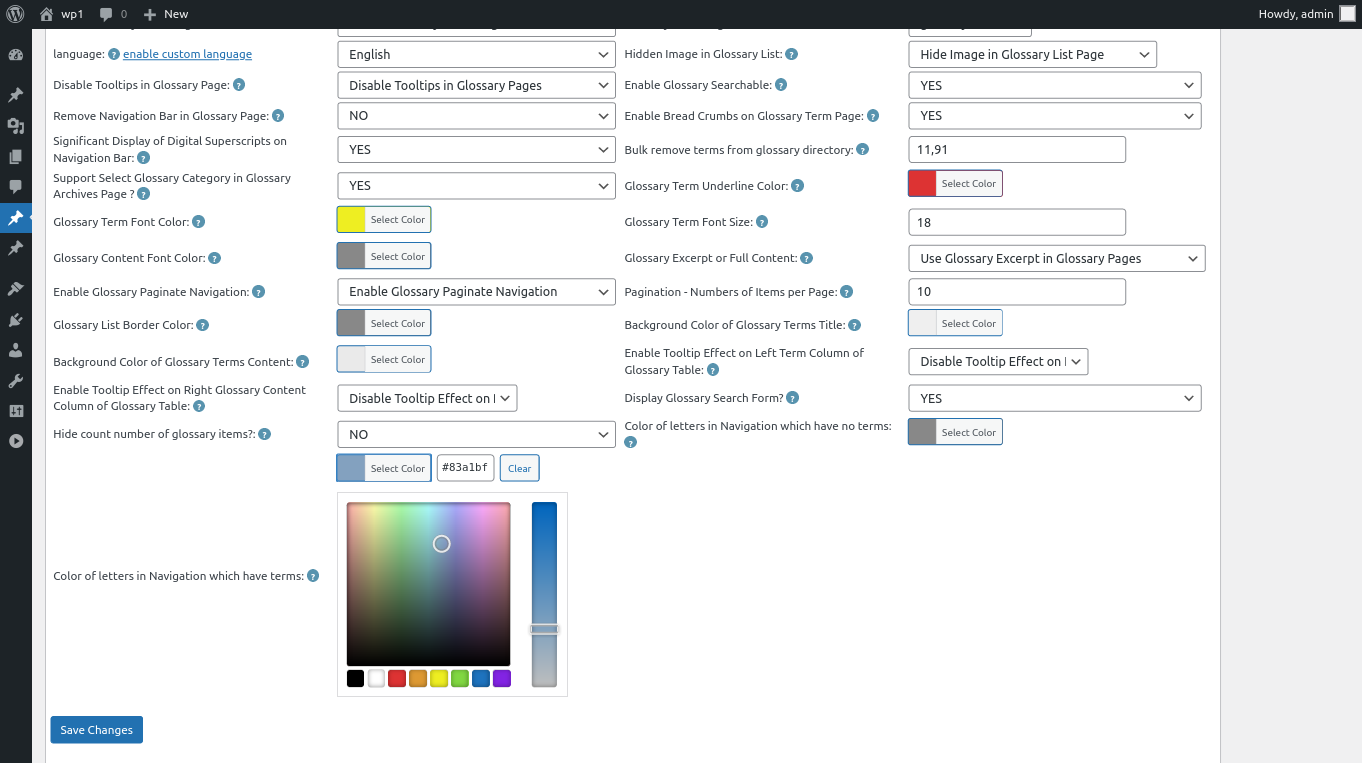
5:Move to the the bottom of the “Glossary Settings” panel, you will find the new option “Color of Letters in Glossary Navigation Bar Which Have Terms”, please just click the color picker, it looks like this:

changing color of letters in Navigation which have terms

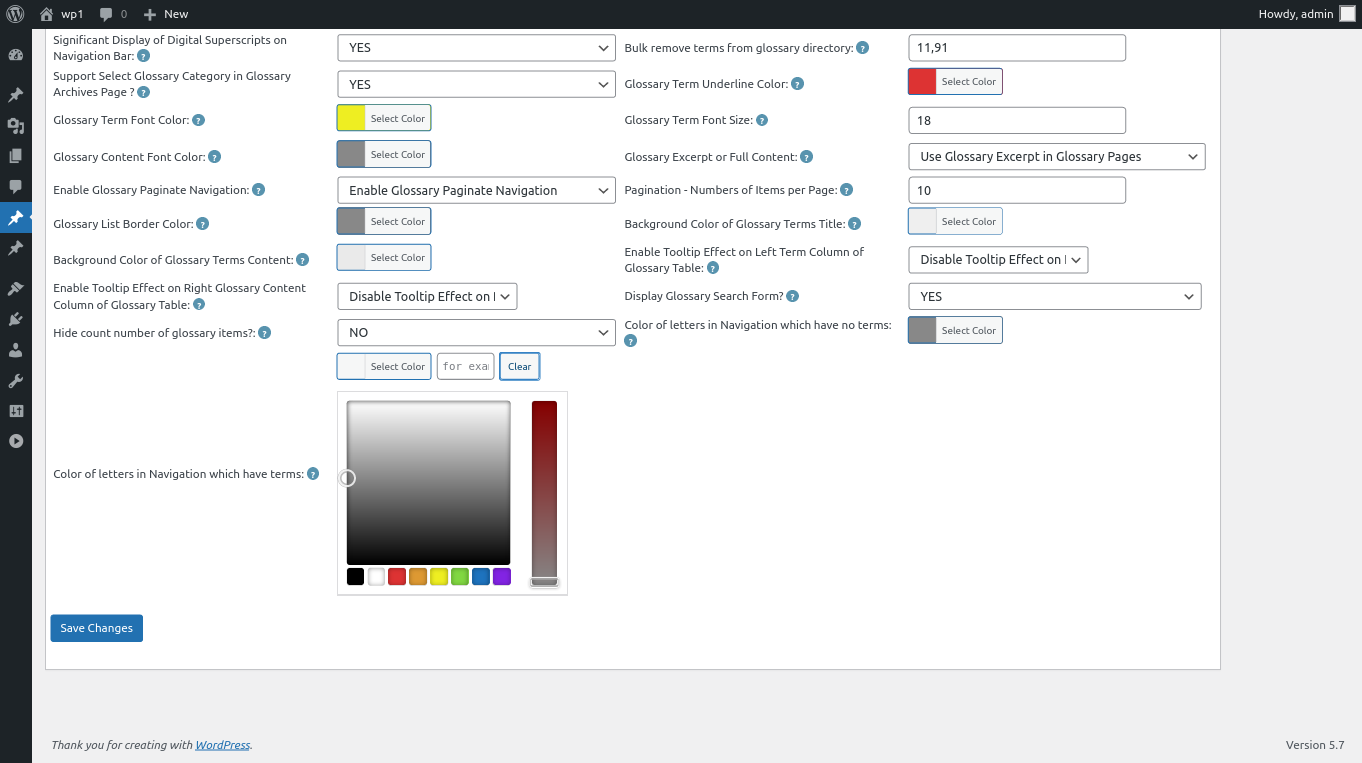
6: In the color picker, you will find the button “Clear”, once click the “Clear” button, you can remove the customized color of letters in glossary navigation bar, it looks like this:

clear color of letters in wordpress glossary navigation bar

clear color of letters in wordpress glossary navigation bar

7: After clear the color of glossary letters, please remember to click “Save Changes” button at the bottom of the glossary settings panel, then in front end the “Color of Letters in Glossary Navigation Bar Which Have Terms” will be changed as you modified in here :):

Thanks for the great feature request, if you have any more question about wordpress tooltip plugin, please don’t hesitate to contact us, we are happy to help you solve it 🙂


Thanks, have a blessed weekend with your family 🙂

WordPress Tooltip Support

Tagged with: , , , ,

WordPress Tooltips Free Plugin 7.9.3 Released

Dear Users of WordPress Tooltip plugin, hope this message find you are doing well and having happy ways with your family, we are happy to report you, we have released wordpress tooltips free plugin 7.9.3 🙂

In wordpress tooltips plugin 7.9.3. we followed wordpress security to use sanitize_textarea_field to filter all input which submitted by admin and editors , and we use  esc_attr to filter all output which generated by tooltips plugin. This version have 61 changes, include functions in wordpress tooltips global settings, import tooltips, all tooltip  addons, glossary settings, wordpress tooltip knowledge base, all metabox in tooltip editor…etc. 🙂

Because this version have big changes and the changes nearly include all functions in wordpress tooltips plugin, so we used a lot of days to test each options, and each input and output, from backend to frontend, until we ensure all things works well. However, if you find any problem, please don’t hesitate to contact us, we will fix any problem 🙂

Thanks, have a happy day with your family 🙂

Best Regards,

WordPress Tooltip Plugin Support

Tagged with: ,

WordPress Tooltips Pro Plus Plugin 16.0.4, Enhanced Separator Function

Hi Dear  WordPress Tooltip plugin users, hope this message find you are doing well and have happy weekend with your family 🙂 We just released wordpress tooltips pro plus  16.0.4 and wordpress tooltips pro version 15.9.4, to enhanced separator function — based on an amazing wordpress tooltip user’s feedback, in the ticket, he said:

Hi Support,

FYI – Had a strange problem with weird characters showing on the
front end (see image links).

It was caused by having an OR symbol in the Synonyms text box without  an accompanying word.

Maybe you could check for this and strip it out?
Kind Regards

Our wordpress tooltip developer checked his screenshot and we replied:

Hi

Hope you are doing well and having happy weekend with your family 🙂

Thanks for the great screenshots 🙂

Our developer have tried copy your words in our site and checked it carefully, sorry we cannot re-play the error on our side, we will  try  our best to help you solve all problems 🙂
2: About “accompanying word” — would you please tell us which one is  the “accompanying word”, we just see the synonyms is  “polypeptides”,  but in your another screenshot, there are no tooltip term  “polypeptides”? It seems these screenshot and message is not  related  with each other? It is a little to understand, sorry, would you please  tell us the whole problem clearly? We are happy to help you solve the  problem…, also we do not know how did you entered this “accompanying  word”? Maybe via another math plugin? There are lack of some important  information in this point 🙂

If I lost any more question, sorry for it, please let me know, we are  happy to help you solve it 🙂

Thanks, have a blessed day with your family 🙂

Best Regards,
Support Team

The user told us the problem is something like this: In wordpress tooltip editor, there are ” Synonyms of the keyword ” metabox, it looks like this:

synonyms tooltip demo

synonyms tooltip demo

In general, we will enter synonyms tooltips like this way: “test1|test2”, but the user just enter something like “test1|”, then he found in his site there are some tooltip terms don’t work properly — and the problem happens randomly 🙂

Our tooltip developer checked our code carefully, we do found if user add synonyms tooltip like “test1|”, our code split “|” to make an array of synonyms tooltip, because after “|”, the synonyms term is empty,  then in our side, we will have an empty element in the array, although we think it seems this should not caused the problems in the screenshot, but we do need enhance the function to avoid the empty element in the array, honestly, we never expected users will enter synonyms tooltips in this way, so we use a new function to filter the empty element in the array, that’s why we decide to released a new wordpress tooltips pro and wordpress tooltips pro plus version 🙂

We replied the user:

Hi,

Thanks for the detailed reply 🙂

At first, we are developing a new version to enhance the functions which splits terms via “|”, because are many modules use the same  functions, so we need a lot of test, once finish the test, we will release it soon 🙂

This change will affect many modules, include woocommerce tooltip, buddypress tooltip, bbpress tooltip…etc, and a few more options for example “Disable Tooltips in HTML Tags Like h1, h2…, a” and “Disable Your Classes and IDs, split with comma “,” “… etc, we have did a lot of hard work on test for ensure new codes will works well 🙂

Thanks for the great suggestion for find the bug, we’d like offer a 10% discount for any product, we will send the coupon code to the amazing tooltip user 🙂

If you have any more feature request or ideas, please don’t hesitate to contact us, we have got a lot of suggestion from amazing users, and we are try out best to realize it for wordpress tooltip users, you will see it soon 🙂

Thanks, have a blessed weekend with your family 🙂

Best Regards,

WordPress Tooltips Plugin Support Team


Tagged with: ,
Top


