
Hi dear WordPress tooltip users, hope this message find you are doing well and have happy day with your family, We have improved functions for wordpress member directory 🙂
What is member directory?
A member directory is a list of individuals or organizations who are members of a particular group, association, or community. It typically includes contact information such as names, addresses, phone numbers, and email addresses. Member directories are often used by organizations to facilitate communication and networking among their members. They can be in the form of a printed document, an online database, or a mobile app.
What is WordPress Member Directory plugin?
The WordPress Member Directory plugin is a tool that allows you to create a directory of members on your WordPress website. It enables you to display a list of members, their profiles, and contact information. This plugin is useful for websites that have a membership system, such as social networks, online communities, and business directories. With this plugin, you can easily manage and display your members’ information, making it easier for visitors to find and connect with them.:)
What’ new in wordpress member directory 2.0.7?
1: In wordpress member directory 2.0.7, you can build remove / hide specific users in wordpress member directory, based on an amamzing wordpress tooltip user’s feedback. The user has submitted a support ticket for wordpress tooltip plugin to told us he using our wordpress tooltip member directory addon to create the directory of members, he added wordpress tooltip effect on each user’s username in the member directory, to show their selfie video, which greatly helps all members quickly understand each other, enhances member relationships, and strengthens the overall group’s activity and trust, and all users like it the tooltip function for member directory. But a few users told him, they do not like their personal information and emails being displayed on the internal member list. They say they want to maintain their privacy and not be disturbed in their daily lives.
Then in wordpress tooltip member directory addon, we added new option and function to solve this kind of problem for member directory editor, then we move these new changes to our wordpress member directory plugin too 🙂
How to exclude specific user from wordpress member directrory?
1: download wordpress member directory plugin and upload it to your wordpress via plugins panel
2: click member directory menu , then in member directory settings panel, you will find there are a new option “Bulk remove user from member directory by user id in wordpress tooltip”, it looks like this:
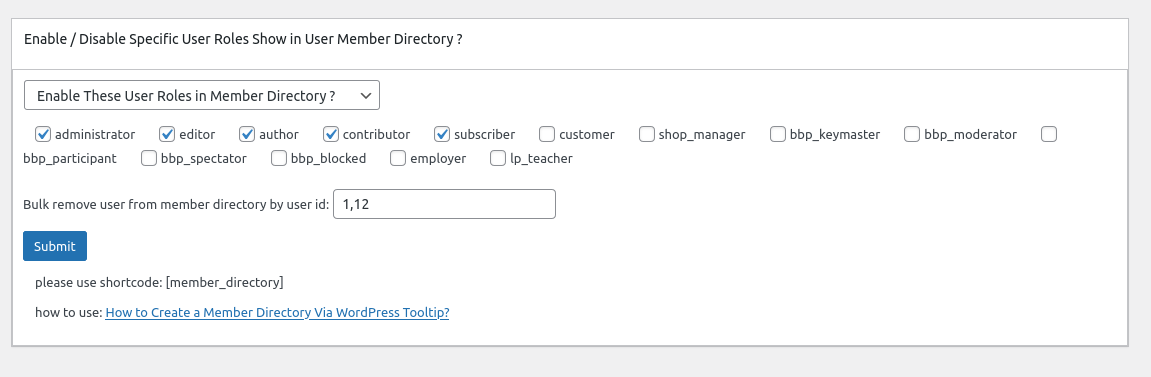
In here you can bulk enter user ids to exclude specific users from wordpress member directory in one time.
3: In front end, users which added in the “Bulk remove user from member directory by user id in wordpress tooltip” option, will be removed from wordpress member directory
If you have any more feature request about member directory, please don’t hesitate to tell us, we are happy to help you realize it 🙂
Thanks, have a blessed day with your family 🙂
Best Regards,
Best Regards,
WordPress tooltip plugin support





Leave a Reply