

Description
What is WordPress FAQ Plugin?
WordPress FAQ plugin is a powerful & fast jQuery FAQ solution to help wordpress blodder create / manage / edit FAQs easily, select default pretty FAQ template and custom FAQ style in back-end via a few clicks. With wordpress faq plugin, it is very easy to create and show accordion FAQs, display FAQs grouped by category…etc
Features in WordPress FAQ Plugin
* Lightweight & load fast & easy to use, just 3 minutes, you can build your own wordpress FAQ lists via wordpress custom post type editor and manage with wordpress custom post type manager

wordpress FAQ posts
* AI FAQ — Support use OpenAI ChatGPT to generate WordPress F.A.Q automatically
You can use OpenAI ChatGPT to general high-level FAQ content automatically, just enter your OpenAI ChatGPT key in wordpress FAQ global settings panel:
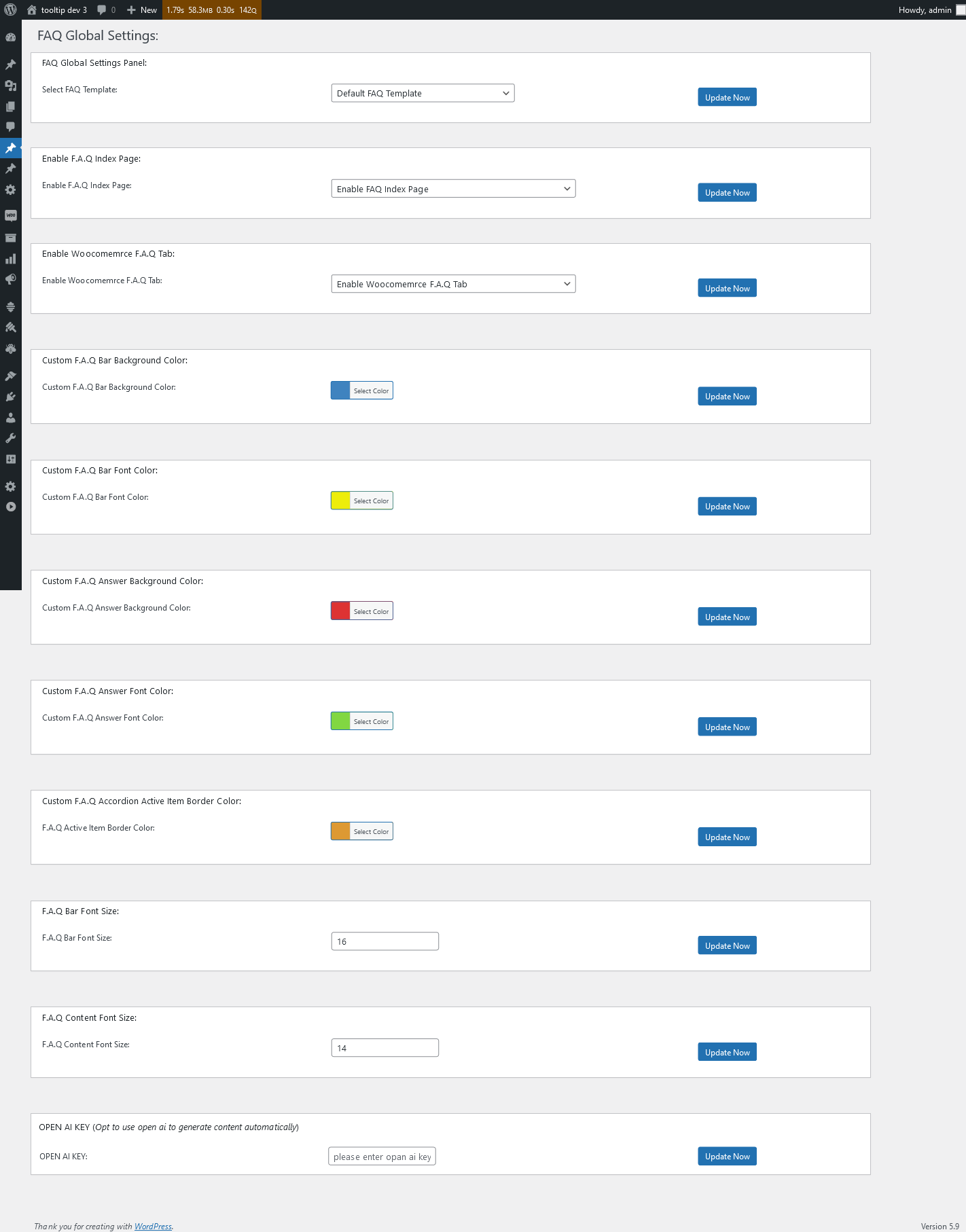
wordpress faq global settings panel in 4.7.6
And then click AI FAQ sub menu item, you will open “Generate FAQ via OpenAI” panel:

Generate FAQ via OpenAI
As you can see, just enter the FAQ title, and wrie prompt, max tokens, select to publish as FAQ post or wordpress post or wordpress page, then click “Generate Content Automatically”, then OpenAI ChatGPT will generate high-quality wordpress FAQ or wordpress post for you automatically.
Please read more step by step document about AI FAQ
* Responsive FAQ design
* Add / Edit / Delete / Manage FAQ in Frequently Asked Questions via WYSIWYG wordpress standard editor

adding new wordpress FAQ plugin
* Using any existed post or even custom post as FAQ: WordPress blogger can use any eixted wordpress posts / pages / custom post type / ….etc as content of a wordperss faq item, it help you build FAQ page every fast and super easy, you do not need to re-write duplicated content in FAQ — that is not good for SEO, we will reuse the post title as FAQ title, and reuse the post content as FAQ content

Using existed post as wordpress FAQ post
* One click to change wordpress FAQ template and wordpress FAQ schema
By default, we have included a few pretty pre-designed faq template for you, what you need just select a pre-designed template via a few clicks:
In back end of WordPress FAQ Plugin:

wordpress faq preset templates
In front end, a sample of wordpress FAQ plugin Blue-Yellow template:

using different templates for wordpress FAQ plugin
* Custom FAQ Color from wordpress color picker:
WordPress FAQ pro plugin support customize background color of FAQ question and FAQ answer, customize font color of FAQ question and FAQ answer, customize font size of FAQ question and FAQ answer, customize FAQ accordion activate item border color…etc, If you want to custom wordpress faq style, you do not need to add CSS manually, what you need to do is just select color from color picker:
* Create FAQ categories and assign FAQ posts to categories

WordPress FAQ Categories
* Support display FAQs grouped by category, you can use You can use shortocde
to show FAQs by categories, in the case you have multiple products, you can build multiple faq lists which grouped by FAQ categories* Support create multiple FAQs for different usage
* Support all morden browser
* Unlimited FAQs
* Unlimited FAQ categories
* In frontend, you can use shortocde [faq] to show all accordion faq in any wordpess post or page
* In frontend, users can toggle between hiding and showing large amount of faq content via a few clicks
and more…
—
Do You Have a Demo Page of WordPress FAQ Plugin?
Yes, we do have demo of wordpress FAQ plugin, please check WordPress Tooltips Plugin FAQ Page
How to Install WordPress Frequently Asked Questions Plugin
1:Upload the Frequently Asked Questions to your blog
2:Activate it
3:You will find FAQ menu item in admin area, you can add new faq posts in wordpress custom post editor.
And you can add/edit/delete faq posts just like wordpress standard posts.
1, 2, 3: You’re done!
Frequently Asked Questions
= Can I Add category for FAQ posts? =
Yes, you can add / edit / delete categories in “FAQ” category menu item
= Responsive? =
Yes, FAQ pages is responsive
Change log of WordPress Frequently Asked Questions Plugin
Added faq link for each faq term, for help your site to get a better SEO rank
It looks like this: https://tooltips.org/faq/
In FAQ editor, you can edit / custom the permalink of FAQ post
= WordPress Frequently Asked Questions Plugin Version 4.8.6 =
New option to custom FAQ item order
= WordPress Frequently Asked Questions Plugin Version 4.7.6 =
new UI of FAQ Global Settings panel, pretty and easy to use
= WordPress Frequently Asked Questions Plugin Version 4.6.6 =
fixed an issue of FAQ question font size
= WordPress Frequently Asked Questions Plugin Version 4.5.6 =
Improved wordpress color picker and avoid conflicts with wordpress tooltips plugin
= WordPress Frequently Asked Questions Plugin Version 4.4.6 =
New Option to Support F.A.Q Content Font Size
= WordPress Frequently Asked Questions Plugin Version 4.3.6 =
New Option to Support F.A.Q Title Font Size
= WordPress Frequently Asked Questions Plugin Version 4.2.6 =
New Option to Support custom F.A.Q Active Item Border Color
= WordPress Frequently Asked Questions Plugin Version 4.1.6 =
In FAQ Global Settings, added new option “Custom F.A.Q Answer Font Color” to allow admin to custom faq answer content font color
= WordPress Frequently Asked Questions Plugin Version 4.0.6 =
Support use OpenAI ChatGPT to generate WordPress F.A.Q automatically
= WordPress Frequently Asked Questions Plugin Version 3.9.6 =
New option “Custom F.A.Q Bar Font Color” to allow admin to custom faq bar title font color
= WordPress Frequently Asked Questions Plugin Version 3.8.6 =
New option to allow admin to custom faq bar background color
= WordPress Frequently Asked Questions Plugin Version 3.7.3 =
added two filter for developer to add specific effects on F.A.Q title or F.A.Q content:
You can use filter_faq_item_title to change content of faq title or something more, for example, add tooltip effects on faq title
apply_filters( ‘filter_faq_item_title’, $ffw_faq_for_wp_how_to_bar_title);
You can use filter_faq_item_content to change content of faq item content or something more, for example, add tooltip effects on faq content
apply_filters( ‘filter_faq_item_content’, $ffw_faq_for_wp_how_to_bar_content);
= WordPress Frequently Asked Questions Plugin Version 3.7.1 =
Opt to add No Index meta for any FAQ post to tell google do not index this FAQ post
You can enable faq archive in the page yourdomain.com/faqs, also you can one click to disable faq archive in faq settings panel
= WordPress Frequently Asked Questions Plugin Version 3.6.7 =
Support woocommerce FAQ
In “FAQ Global Settings” panel, you will find new option “Enable Woocomemrce F.A.Q Tab”
You can display / hide F.A.Q tab in woocommerce product tabs
= WordPress Frequently Asked Questions Plugin Version 3.6.5 =
Support to display only the specified number of FAQ items
Just use wordpress FAQ shortcode parameters like this:
[faq limit='20']
If you want to display all faq items, use shortcode [faq] directly
= WordPress Frequently Asked Questions Plugin Version 3.6.3 =
Support wordpress F.A.Q Index / Archive Page
In wordpress faq global settings page, support opt to enable or disable faq archive page, opt to enable or disable faq permalinks
= WordPress Frequently Asked Questions Plugin Version 3.5.9 =
Added a new Black Blue F.A.Q Template
= WordPress Frequently Asked Questions Plugin Version 3.5.3 =
You can use any existed post or even custom post as FAQ, so you will not need re-write duplicated content in FAQ, we will reuse the post title as FAQ title, and reuse the post content as FAQ content.
For example, if you have a bbpress topic, and you think that is helpful for users, you can just add post id in FAQ editor, and we will use the specified bbpress topic title as FAQ title and use bbPress topic content as FAQ content… and so on
When you edit a FAQ term, in the right hand of the FAQ editor, you will find “Use existed post as FAQ post?” metabox, just enter the existed post id in the input box, then the title and content of this FAQ will be replaced with your specificed post
= WordPress Frequently Asked Questions Plugin Version 3.4.3 =
Added a new Pretty Yellow faq Template, in “FAQ Global Settings” panel, in “Select FAQ Template” option,
you will find the new pretty yellow faq template
= WordPress Frequently Asked Questions Plugin Version 2.4.3 =
Added faq link for each faq term, for help your site to get a better SEO rank
It looks like this: https://tooltips.org/faq/wordpress
In FAQ editor, you can edit / custom the permalink of faq post
= WordPress Frequently Asked Questions Plugin Version 2.1.3 =
Added FAQ demo Url in readme
= WordPress Frequently Asked Questions Plugin Version 2.1.1 =
Support FAQ temeplate
In FAQ admin area, you will find new menu “Global Settings”
In “Global Settings” panel, you will find “Select FAQ Template” option
In “Select FAQ Template” option, you can select different FAQ template
Also we build a demo at: https://tooltips.org/faq/
= WordPress Frequently Asked Questions Plugin Version 1.2.3 =
Load jQuery-UI.js for more functions
= WordPress Frequently Asked Questions Plugin Version 1.1.3 =
Support display FAQs grouped by category
You can use shortocde
In faq categories manage panel, Updated label to “Add New FAQ Categories”
In faq categories manage panel, Updated label to “Parent FAQ Categories”
In faq categories manage panel, change button to “Add New FAQ Categories”
= WordPress Frequently Asked Questions Plugin Version 1.0.3 =
Add icons for faq items
Upgrade jquery UI theme
Add images
= WordPress Frequently Asked Questions Plugin Version 1.0.0 =
* Spell out that the license is GPLv3
* Finished the first version
* General code clean up
