
Hey dear Users of WordPress Tooltip, hope this message find you are doing well and have happy weekend with your family 🙂 We just released wordpress tooltips pro plus plugin version 15.6.8, based on an amazing wordpress tooltip user’s suggestion. The wordpress tooltip user said he love functions of wordpress tooltips pro plus plugin, he is enjoy the function of tooltip style panel. in which wordpress tooltip users can custom a pretty and unique tooltip style quickly, just a few clicks. Now he is using option ” Tooltip Term Color in Post” in tooltip style panel to change the colors of tooltip term in his template, and he enabled wordpress tooltips for wordpress menus. The problem is, in his wordpress custom theme, the font color of top menu item in the theme is — white, and the sub-menu item in the wordpress template is — black, so if he select white as the font color of tooltip term, some tooltip term will be hidden in the sub-menu item, because the font color of sub-menu item is white, if he select black as the font color of tooltip term, then some tooltip terms will be hidden in the top menu item…, we suggested the user chose another color as font color of tooltip term, but he said he tried and it is not pretty, now he would like find a method to disable option ” Tooltip Term Color in Post” in tooltip style panel, he hope use original font color in the wordpress theme as font color of tooltip term 🙂
Okay, just like we reported at our wordpress tooltip plugin document “How to Custom WordPress Tooltip Term Color in WordPress Post? Supported by WordPress Tooltip Plugin 14.8.0“:
A few days before, we get a pre-sale question from a wordpress tooltip free plugin user, he asked:
“1. Does the Pro plugin allow me to change the format of the term on the page? For instance, of the term being underlined, could I instead change the color of the term text in the post?”Yes wordpress tooltip pro plugin do allow wordpress tooltip editor to change the format of wordpress tooltip term in the wordpress pages, you can decide the underline color or underline style of wordpress tooltip term in back end, but in last wordpress tooltip plugin version, we do not support change the color of the wordpress tooltip term in the post directly, we do supported customize the color of the term when user mouse hover the tooltip term , after replied this ticket, our developer decide develop a new wordpress tooltip plugin version to allow wordpress tooltip editor change the color of the wordpress tooltip term in wordpress posts directly, not only change the mouse hover color of the term 🙂
So we developed wordpress tooltips plugin 14.8.0 for the user’s amazing feature request, at that time, we did not know some users have requirement to disable the font color of tooltip terms, after check the new user’s ticket, our developer decide developed a new wordpress tooltip pro plus plugin to solve the problem for wordpress tooltip users, that’s why we released wordpress tooltip pro plus 15.6.8. 🙂
Now if you upgraded to the wordpress tooltip pro plus 15.6.8, in wordpress tooltip style panel, you will find we have added a new select-box behind the option ” Tooltip Term Color in Post”, it looks like this:

enable the option Tooltip Term Color in Post
If you want to enable enable the option Tooltip Term Color in Post, please select “enable the option”,then in the front end of wordpress post, you will find the color of tooltip terms has been changed as you settings in tooltip style, for example:
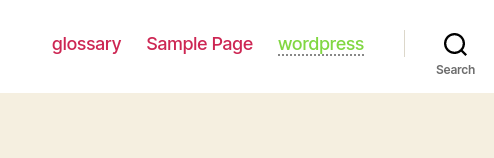
front end after enabled the option Tooltip Term Color in Post
You can see the original font color of wordpress menu item is red, but font color of tooltip terms in the wordpress menu has been changed as green — followed settings in wordpress tooltip style 🙂
If you do not want the font color of tooltip term be changes, and if you want to use the original font color in your wordpress themes, please select “disable the option” — it looks like this:

disable the option Tooltip Term Color in Post
Then in the front end, we will not change the font color of tooltip term, for example:

front end after disabled the option Tooltip Term Color in Post
Thanks for the great suggestion to wordpress tooltip plugin, if you have any question or feature request, please don’t hesitate to tell us, we are very happy to realize it for wordpress tooltip users 🙂
Hope you have a blessed weekend with your family 🙂
WordPress Tooltip Plugin Support Team





Leave a Reply