
Hi Dear WordPress Tooltip Plugin Users,
We get a user’s ticket, in which he asked us how to make tooltip content text align centered, we have developed a new version to realize it, and we are happy write a document for use this tooltip style feature easier 🙂
How Do I Make WordPress Tooltip Content Text Align Centered?
1: Login wordpress admin
2: Click “Tooltips” menu item
3: Click “Tooltips Style” sub menu item to open “Tooltips Style Settings” panel
4: In “Tooltips Style Settings” panel, You will find “Tooltip Box Customize Settings” panel, it looks like this:
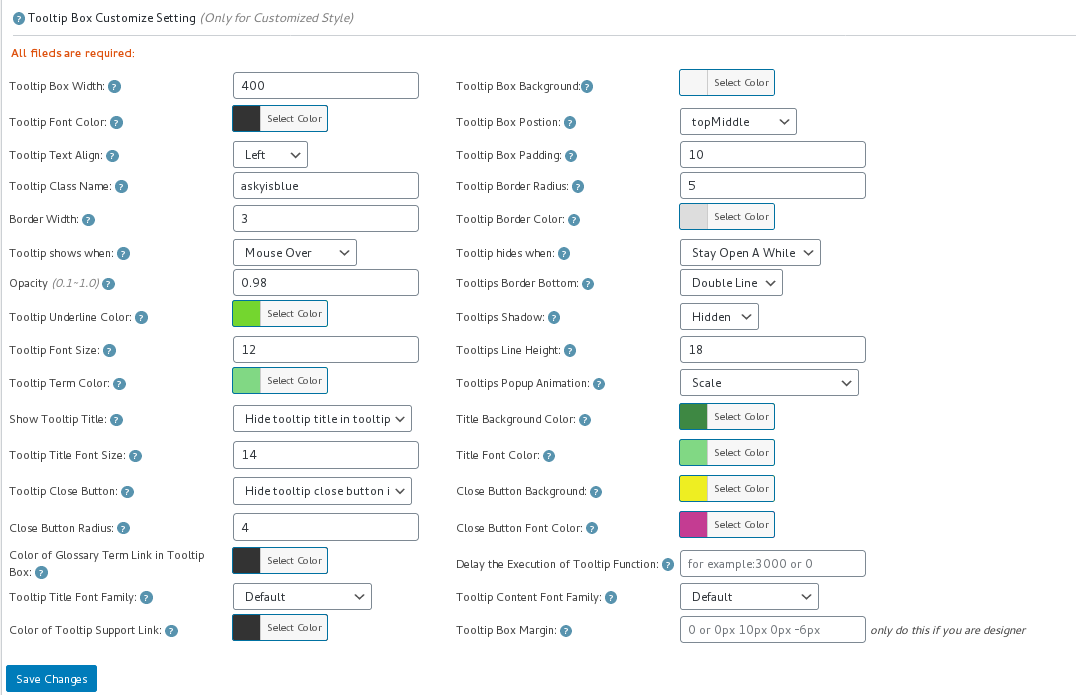
tooltip style panel version 12.3.6
5: In “Tooltip Text Align” option, you will find 3 options “Left”, “Center”, “Right”, please just select “Center”
6: Also you will need finish other settings in “Tooltip Box Customize Settings” panel
7: Click “Save Changes” blue button
8: Check your wordpress tooltip in front end, when mouse hover a tooltip term, you will find in tooltip popup box, tooltip title and tooltip content is text align centered now 🙂
Via WordPress Tooltip plugin, just a few clicks, you can make a pretty style just in a few minutes, wordpress tooltip plugin is a time saver, so good and so easy, right? 🙂
If you have any features request of wordpress tooltip plugin or any question of wordpress tooltip, please contact us 🙂





Leave a Reply