
Hi Dears,
Today we received a wordpress tooltip user’s ticket, he said:
on the dashboard of my site I get the message
“Tooltip Pro new version 8.9.6 has been released, please login to download new version, change log can be found at document”
I have version 8.2.0 installed.
Logged in in my account I don’t find a link to download the update.
Please give me a hint where it can be found.
I think maybe a few more users have the same question, I am happy to reply it in here publicly 🙂
It is very easy to download wordpress tooltip pro plugin via a few simple steps:
#1 Step 1 Login wordpress tooltip site via https://tooltip.org/login , it looks like this:

Login wordpress tooltip site tooltips.org
#Step 2, You will be redirected to “My Account” panel (https://tooltips.org/my-account/) automatically, it looks like this:
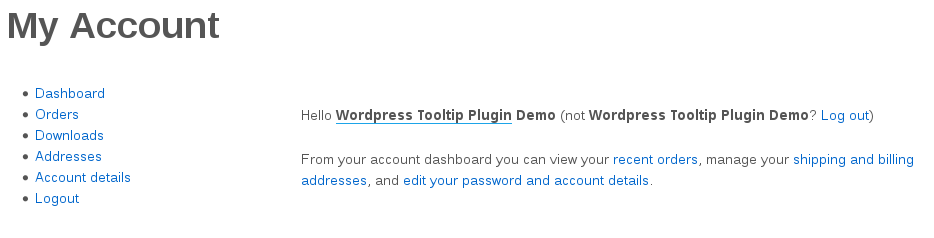
wordpress tooltip my account panel
At the left hand of “My Account” panel, you will find “Downloads” link
#Step 3 Click “Downloads” link(https://tooltips.org/my-account/downloads/) in “My Account” panel, then you will open download plugin panel, it looks like this:

Download WordPress Tooltips Pro Plugin
In here, you will find the red button “Tooltips Pro Pluing”, just click “Tooltips Pro Pluing” button to download newest version of wordpress tooltips pro plugin 🙂
Any more question is welcome 🙂
Thanks, have a blessed weekend with your family 🙂
Best Regards,
WordPress Tooltips Support Team





Leave a Reply